mantis
Health Gecti
- License — License: MIT
- Description — Repository has a description
- Active repo — Last push 0 days ago
- Community trust — 11 GitHub stars
Code Basarisiz
- exec() — Shell command execution in bench/adapters.ts
- process.env — Environment variable access in bench/adapters.ts
Permissions Gecti
- Permissions — No dangerous permissions requested
Bu listing icin henuz AI raporu yok.
A lean browser interface for AI agents.

Lets AI agents browse the web as short, numbered text instead of screenshots.
perzian.dev/mantis · by Perzian
It works with Claude Code, Codex, Cursor or your own agent as an MCP server. Install in two commands.
npx -y -p mantis-browser mantis install
claude mcp add mantis -- npx -y -p mantis-browser mantis-mcp
npx -y -p mantis-browser mantis read https://example.com   # try it without an agent
Windows, Linux servers and other agents: SETUP.
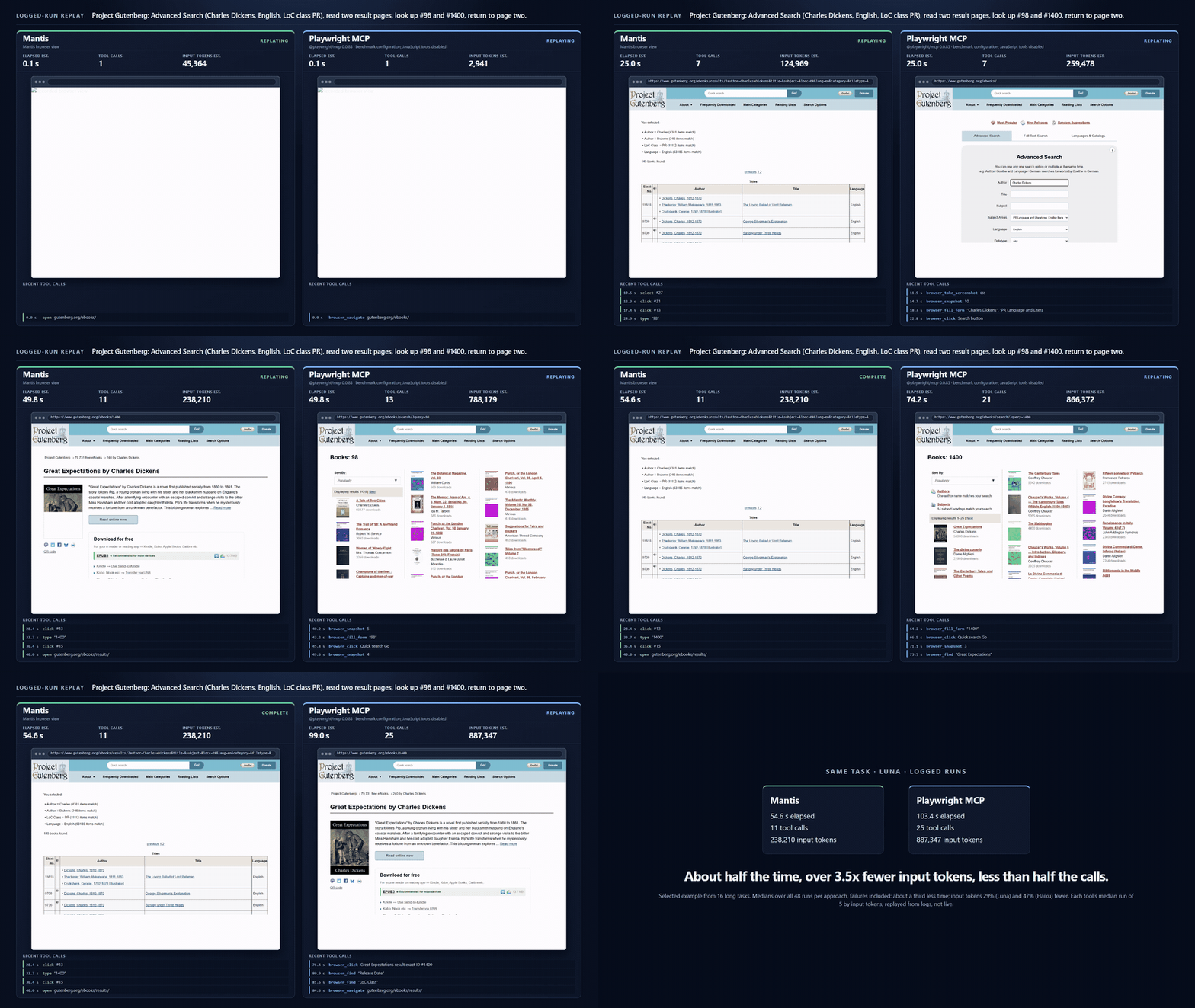
One real task (Luna, each tool’s median run of 5 by input tokens, replayed): about half the time, over 3.5x fewer input tokens, less than half the calls. Across all 5 runs: 3-5x fewer tokens, about half the time, 11-12 calls vs 21-29. This is a selected example from 16 long tasks; medians across all 16 are in Results. Full video.
Security and threat model: SECURITY.md.
How it works
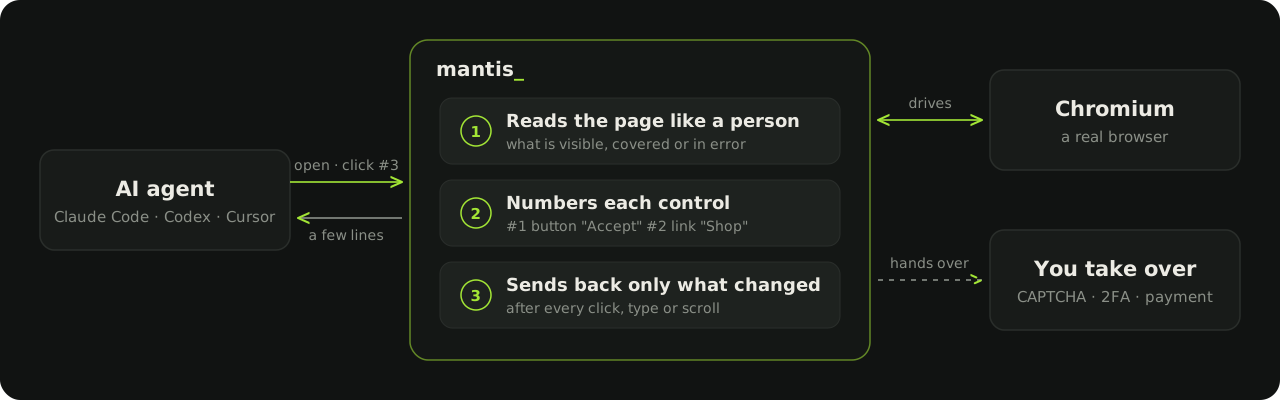
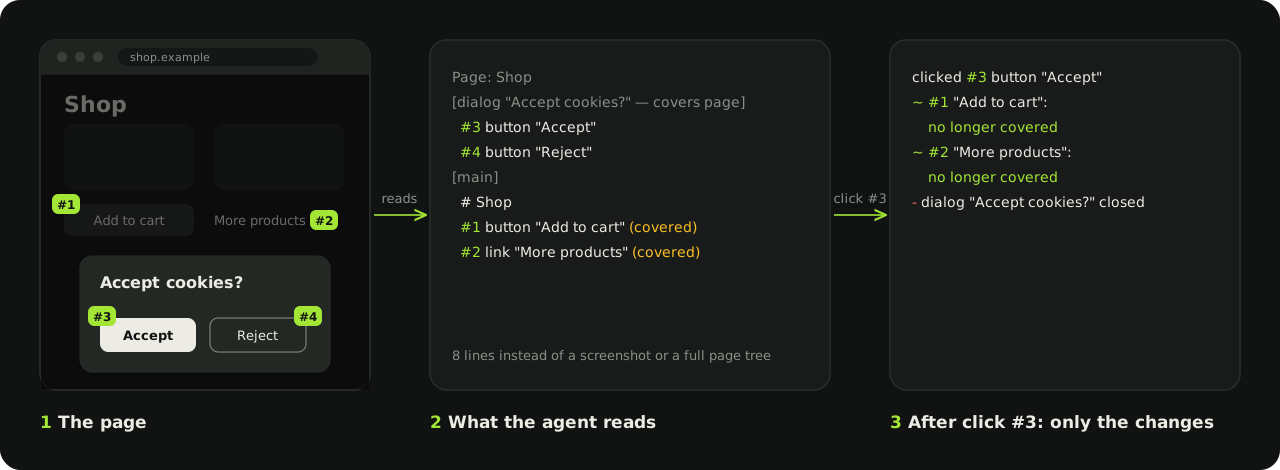
What the agent sees
Results
Mantis vs the accessibility tree (Playwright MCP) on public sites, gpt-6-luna and claude-haiku-5-5. Every cell is a per-run median; time is end-to-end wall time per run:
0.1.13: headline numbers are 0.1.9's; later builds checked on Dickens (Luna, Haiku), the capability-v1 local set and the visual-live-v1 real-site set.
Long tasks (correct: 14 keyed tasks, 42 runs per cell; medians: all 16 tasks, 48 runs per cell; both approaches run in the same session):
| Luna Mantis | Luna tree | Haiku Mantis | Haiku tree | |
|---|---|---|---|---|
| Correct | 35/42 | 34/42 | 40/42 | 40/42 |
| Input tokens (median) | 244k | 345k | 268k | 506k |
| Tool calls (median) | 17 | 24 | 19 | 30 |
| Time (median) | 42s | 66s | 54s | 85s |
Short tasks (30 tasks, 90 runs per cell; tree and screenshot columns are the earlier 20261026 run):
| Luna Mantis | Luna tree | Luna screenshot | Haiku Mantis | Haiku tree | Haiku screenshot | |
|---|---|---|---|---|---|---|
| Correct | 88/90 | 86/90 | 90/90 | 90/90 | 88/90 | 88/90 |
| Input tokens (median) | 64k | 99k | 104k | 38k | 88k | 33k |
| Tool calls (median) | 3 | 4 | 7 | 3 | 5 | 6 |
| Time (median) | 16s | 31s | 35s | 19s | 30s | 23s |
Versus the accessibility tree:
- Long tasks: accuracy within one run, 29-47% fewer input tokens, 29-37% fewer calls, about a third less time.
- Short tasks: accuracy equal or better, 35-57% fewer input tokens.
Versus screenshots:
- Luna: screenshots score 2 runs higher but use more tokens and time.
- Haiku: screenshots use fewer tokens.
Caveats:
- Short-task times compare a newer Mantis build with the earlier tree and screenshot run, so treat that time gap as indicative.
- Scores come from deterministic answer keys on the final page state. Two long iframe/tab tasks can't be keyed and are left out of the long-task counts.
- Method and full caveats: bench/RESULTS.md.
Use your own Chrome
Optional. Mantis can drive your real Chrome (your tabs, your sign-ins) instead of launching a fresh browser:
- Run
npx -y -p mantis-browser mantis chrome. It starts Chrome on127.0.0.1:9222with a dedicated profile. - Add
MANTIS_CDP_URL=http://127.0.0.1:9222to theenvof the Mantis MCP config. - Sign in to your sites once in that profile; sign-ins persist there.
- Mantis then acts on your real tabs, so act carefully. Without the variable nothing changes.
Limitations
- No canvas input: canvas, WebGL, maps and drawing apps are described only as canvas, with no coordinate click or draw tool.
- Login and bot walls need
ask_human, which needs a display. - Benchmarked only on read, navigate and form-fill tasks on public sites, with two models. The screenshot baseline is this project's own tool, and a few tasks were swapped after results (disclosed).
- Page content is untrusted data; see SECURITY.md.
- Small v0.1.x beta.
Learn more
- How it works in detail
- Claude skill: teaches Claude how to read Mantis output
- Install, configuration and tool reference
- Re-running the benchmarks
License
MIT
Yorumlar (0)
Yorum birakmak icin giris yap.
Yorum birakSonuc bulunamadi