toolmaker-agent
Health Pass
- License — License: Apache-2.0
- Description — Repository has a description
- Active repo — Last push 0 days ago
- Community trust — 87 GitHub stars
Code Warn
- Code scan incomplete — No supported source files were scanned during light audit
Permissions Pass
- Permissions — No dangerous permissions requested
No AI report is available for this listing yet.
Toolmaker Agent is an Agentic AI SDLC platform — humans and agents collaborate on the same structured data model.
Toolmaker Agent
We don't care what you build. We care how you build it.
1. What this is
Toolmaker Agent is an Agentic AI SDLC platform — humans and agents collaborate on the same structured data model.
It ships as a single self-contained executable: a Go REST API with a layered architecture, SQLite storage, and a compiled React frontend embedded directly into the binary, for managing Products, Features, Requirements, and UML/4+1-view system-design diagrams — paired with an LLM-driven conversational agent and a MCP server for coding agents like Claude Code/Codex/DeepSeek Harness. Open one port and you get the full workbench — no separate frontend deployment, no external database to provision.
2. Problems Addressed
Code agents and skill-based workflows today mostly produce their output as free-form Markdown files — a spec here, a plan there, an ADR somewhere else — scattered across whatever directory structure a project happens to have, with no schema tying them together and no way to query "every requirement related to X" beyond grep. Toolmaker Agent gives that output somewhere real to land: typed Product/Feature/Requirement/UML records with revisions, parent/child relationships, and semantic search — each addressable by a stable OID, not another markdown file dropped into a docs folder and disconnected from everything else.
This is also why the data model itself follows the standard software engineering development process — Product, Feature, Requirement, and UML/system design map directly onto the classic stages of product definition, feature breakdown, requirements gathering, and architecture design, with the process still extending further from there. Each stage's output is saved as formatted, typed data rather than free-form text — so it can be reliably shared and reused across teammates, and across different agents, instead of becoming a private, one-off artifact nobody else can make sense of once that conversation or that agent's run is over.
3. Key features
Product / Feature / Requirement / UML CRUD, each with optimistic concurrency.
4+1 system-design views rendered as Mermaid diagrams. Any diagram can be exported as a PNG or SVG image. 7 diagram types are supported:
Diagram type Mermaid syntax keyword Syntax docs Use Case Diagram usecase-betaUse Case Diagram Class Diagram classDiagramClass Diagram Architecture Diagram architecture-betaArchitecture Diagram Flowchart flowchartFlowchart Sequence Diagram sequenceDiagramSequence Diagram State Diagram stateDiagram-v2State Diagram ER Diagram erDiagramEntity Relationship Diagram Use Case and Architecture diagrams use Mermaid's
-betasyntax, which isn't finalized yet and may change in a future release.Note:
usecase-betais too new (shipped Sept 2026 with v12.0.0) for LLMs to have seen it — chat/MCP-generated use case diagrams often mix in PlantUML-style syntax errors. Writing/reviewing the script by hand in the UI is recommended.LLM chat agent backed by trpc-agent-go, letting you talk a Product/Feature/Requirement/UML diagram into existence instead of filling out a form:
- A propose-confirm tool-calling flow for every write, so the model never mutates data without a human in the loop.
- Persisted, per-conversation history, automatically summarized once it grows past a threshold.
- Pluggable multi-provider configuration — OpenAI, Anthropic, Gemini, DeepSeek, Ollama, LM Studio, Hunyuan, Moonshot AI.
- SSE-streamed responses.
MCP Server — implemented with the official MCP SDK, exposing 20 tools over Streamable HTTP transport, so a coding agent like Claude Code/Codex/DeepSeek Harness can manage the same data straight from the terminal — no confirmation step.
RAG / semantic search — a global search box in the header (searches every product in the org by default) plus a semantic search tool available from both the chat agent and MCP clients, so you can find entities by meaning ("find requirements similar to X"), not just exact keyword/OID matches. Every Create/Update asynchronously re-embeds the entity's content.
4. Installation and Configuration
Toolmaker Agent ships as six pre-built, self-contained binaries — one per platform/architecture combination — from the public phcp-tech/toolmaker-agent releases page.
4.1. Download
| Platform | Architecture | Asset |
|---|---|---|
| Windows | x64 | toolmaker-agent-windows-amd64.exe |
| Windows | ARM64 | toolmaker-agent-windows-arm64.exe |
| Linux | x64 | toolmaker-agent-linux-amd64 |
| Linux | ARM64 | toolmaker-agent-linux-arm64 |
| macOS | Intel | toolmaker-agent-darwin-amd64 |
| macOS | Apple Silicon | toolmaker-agent-darwin-arm64 |
Grab the one matching your machine from the Releases page.
4.2. Install and run
The binary is fully self-contained (frontend included) — drop it in any directory you like, there's no installer and nothing else to deploy.
- Windows: double-click it, or run it from a terminal.
- Linux/macOS: mark it executable first, then run it:
chmod +x toolmaker-agent-linux-amd64   # match the file you downloaded
./toolmaker-agent-linux-amd64
On first launch it creates its SQLite database automatically (no manual schema step) and starts listening on http://localhost:8080 by default. Its config/database/logs live in a machine-wide directory, separate from wherever you placed the binary — so running multiple copies from different folders, or upgrading to a newer binary, all share the same data:
| Platform | Data directory |
|---|---|
| Windows | %ProgramData%\phcp\toolmaker-agent |
| macOS | /Library/Application Support/phcp/toolmaker-agent |
| Linux | /var/lib/phcp/toolmaker-agent |
4.3. Configure an LLM provider
Open http://localhost:8080 and go to Settings → LLM. Add a provider entry — pick one of the built-in options (OpenAI, Anthropic, Gemini, DeepSeek, Ollama, LM Studio, Hunyuan, Moonshot AI, Qwen, GLM, MiniMax) or Custom (OpenAI-compatible) for anything else that speaks the OpenAI wire protocol — fill in the model name and its credentials, save, and mark it active, this step is required before the chat agent or any tool-calling feature will work.
If you'd rather not depend on any cloud service and run the model entirely on your own machine, pick Ollama or LM Studio — both are local model servers that need no API key; install and start either per its own docs, then point Base URL at your local instance (http://localhost:11434 for Ollama's default, http://localhost:1234/v1 for LM Studio's). That makes chat, tool calling, and MCP all work fully offline, with no data ever leaving your machine.
4.4. (Optional) Configure embeddings for semantic search
If you also want RAG/semantic search, go to Settings → Embedding and configure an embedding provider (also OpenAI-compatible, e.g. Qwen text embedding). This is a separate configuration from the LLM provider above. Skipping this step doesn't block anything else — Product/Feature/Requirement/UML CRUD, chat, and MCP all work fully without it; only semantic search stays unavailable.
4.5. MCP Server
Register the server with an MCP-aware client (For other Code Agents, please configure the MCP Client according to the documentation):
- Claude Code:
claude mcp add --transport http toolmaker-agent http://127.0.0.1:8080/agtapi/v2/mcp - Codex:
codex mcp add toolmaker-agent --url http://127.0.0.1:8080/agtapi/v2/mcp - DeepSeek Harness (DSH): add an entry to
$DSH_HOME/cordis.patch.yml(or a single profile's$DSH_HOME/profiles/<name>/cordis.patch.yml), using the
@deepseek-ai/dsh-mcp-clientplugin:- id: mcp-toolmaker-agent name: '@deepseek-ai/dsh-mcp-client' config: serverName: toolmaker-agent transport: streamable-http url: http://127.0.0.1:8080/agtapi/v2/mcp
4.6. Start using it
- Create a Product.
- Add Features and Requirements under it — manually, via chat, or via MCP.
- Open System Design and add a UML diagram for one of the 4+1 views.
That's the full core workflow this release covers.
4.7. Semantic Search
Three ways to reach the same underlying vector index, each scoped differently:
| Surface | Scope | Notes |
|---|---|---|
| Chat agent tool | The chat's current product only | Real-execution tool, the model can't pick a different product itself |
| MCP tool | One product, via required productOid |
Same handler logic as the chat tool |
| /search API | Every product in the org by default; optional productOid narrows to one |
Backs the header search box; results include productOid since a hit can come from any product |
All three return each hit's kind (product/feature/requirement/uml), OID, name, and a relevance score — use that OID to pull up the full entity afterward, via the matching query call or its detail panel.
5. Three Ways to Manage Your Data
Every entity in Toolmaker Agent — Product, Feature, Requirement, UML diagram — can be created, updated, and deleted through three independent front doors, all backed by the same service layer and the same database. Pick whichever fits the moment: fill out a form, describe what you want in plain language, or let a coding agent do it for you.
5.1. Manual — the web UI
Plain forms and detail panels: click "+ Create", type into a field, hit save. No AI in the loop at all — the baseline CRUD experience every other mode builds on.
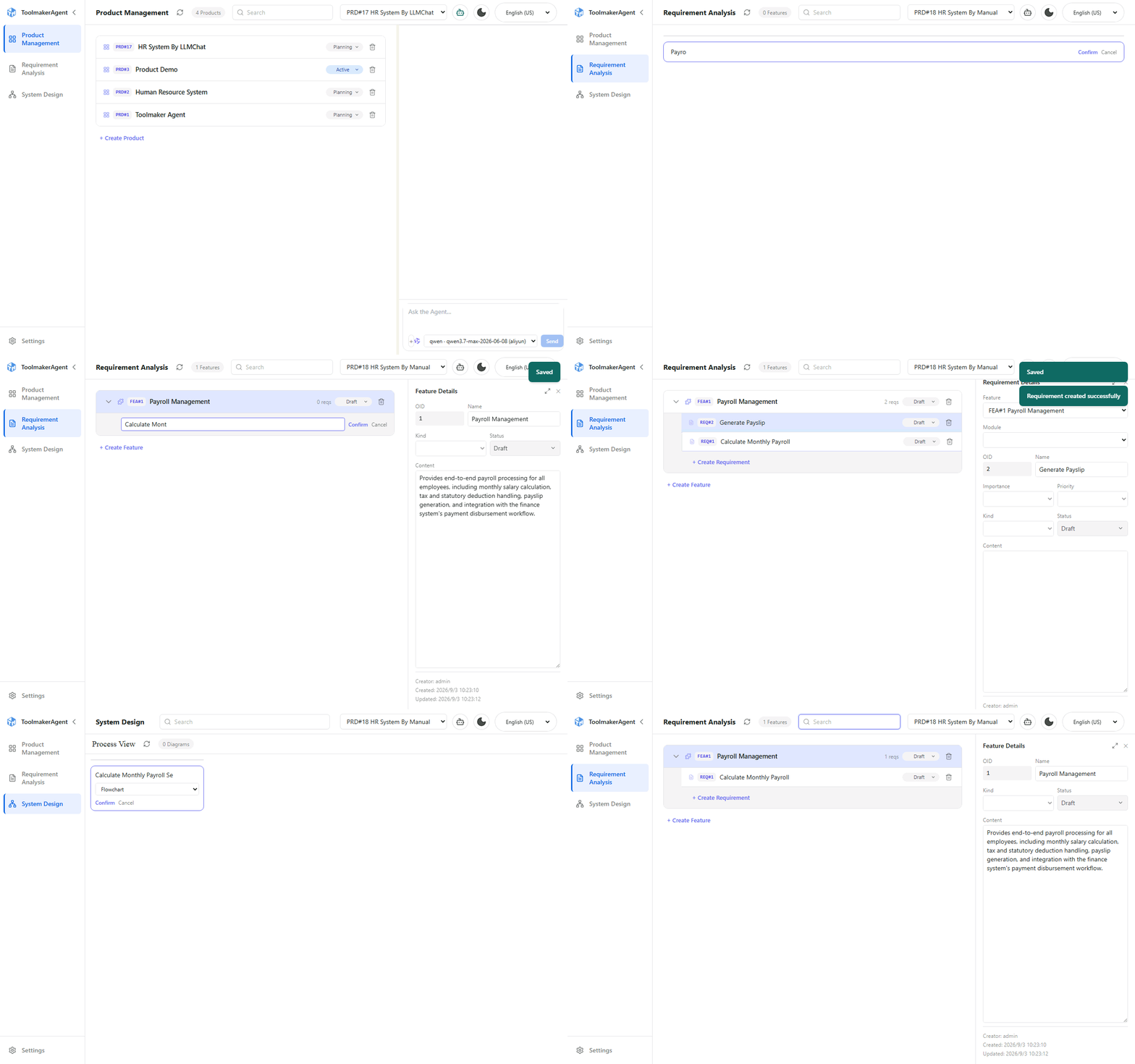
The recording below creates a Product with content, a Feature, two Requirements (deleting one), a realistic UML sequence diagram under the Process view, and finishes with a live semantic-search lookup that jumps straight to a matching Feature.
5.2. LLM Chat — propose, confirm, done
The header chat panel talks to the same entities in natural language. Every write goes through the propose → confirm flow, the model proposes an action, you see exactly what it's about to do, and nothing is written until you click Confirm.
For example, with Human Resource System as the active product, you can refer to a Feature or Requirement by its name, its OID (e.g. FEA#24), or both; the model resolves either into the right record.
"Under feature Leave Management, create a requirement named Manager approval required before a leave request is finalized — once an employee submits a leave request, the assigned manager must approve it before it takes effect."
The model proposes tools with every field it inferred, shows you a confirmation card, and only writes the new Requirement (REQ#87) once you click Confirm. A follow-up in the same conversation, this time by OID:
"Change REQ#84's priority to high."
works the same way, another confirmation card, nothing saved until you confirm.
Chat doesn't have to stay single-shot commands, either. You can talk through an idea at length first — scope, edge cases, trade-offs — and only once the discussion has actually converged, ask the model to turn the whole conversation into a Feature and its Requirements in one go. In that sense, Toolmaker Agent doubles as long-term storage for what you and the model actually decided: the conversation itself is bounded by the model's context window, but its conclusions, once confirmed, persist as structured, queryable records instead of scrolling off into forgotten chat history.
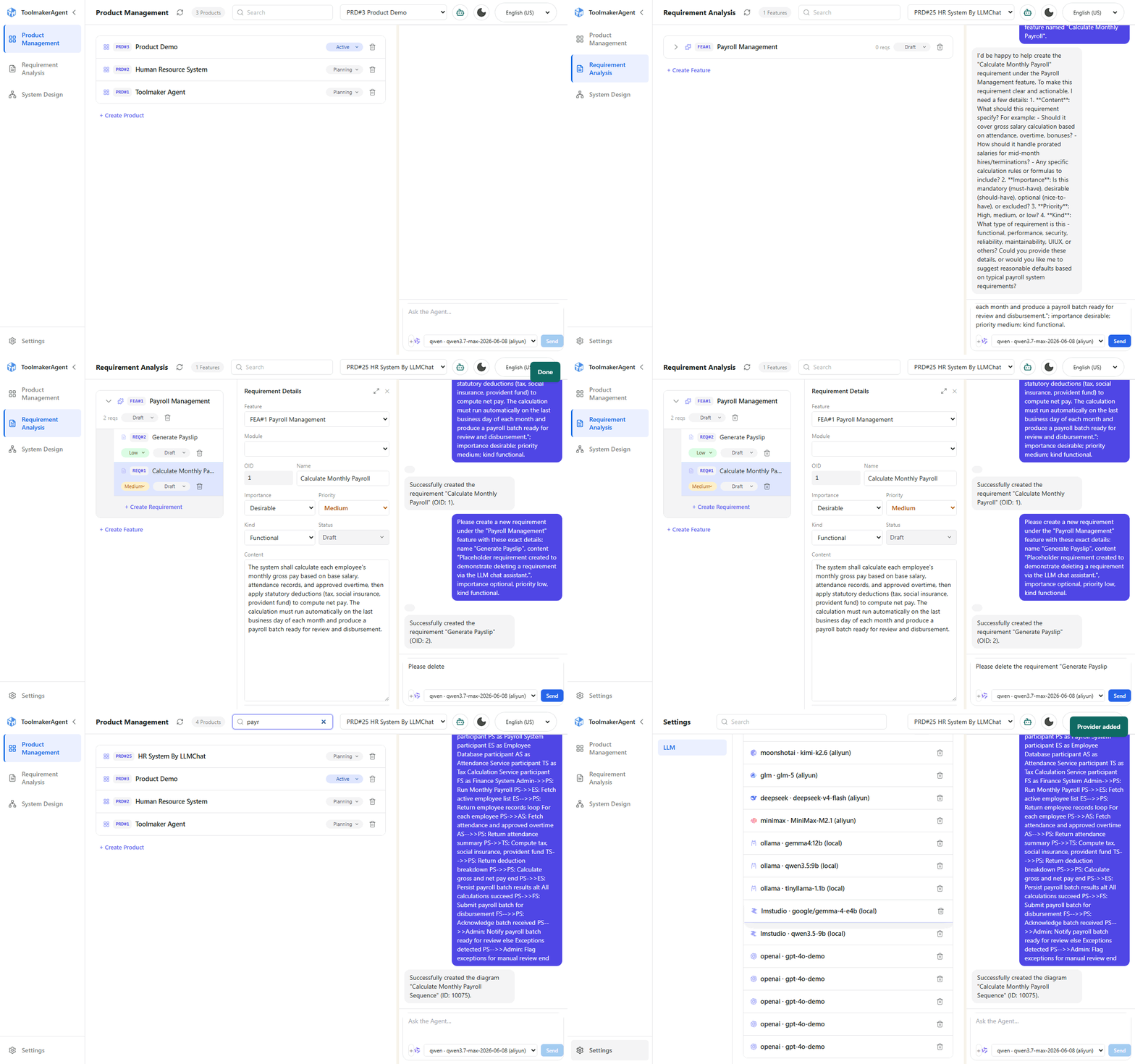
The recording below runs the same scenario as the manual demo, entirely through chat — including the model asking a clarifying question when a required field (a Requirement's content) is missing, and then proposing the write once you answer.
5.3. MCP — a coding agent driving the same data
Register the server with an MCP-aware client such as Claude Code/Codex/DeepSeek Harness and it can create, query, update, and delete the exact same entities directly from the terminal. MCP tools execute immediately — there's no confirmation dialog, since the caller is a developer already driving the agent.
For example, once the MCP server is registered, the same flexibility carries over to the terminal:
"In Human Resource System, under feature#24, create a requirement: Manager approval required before a leave request is finalized."
Claude Code resolves the Feature by name, calls tool with the productOid/featureOid/name/content it inferred from your sentence, and the Requirement exists immediately — no confirmation dialog, since MCP tools execute right away.
The same idea carries over to MCP more broadly: a long planning session with Claude Code — exploring an approach, weighing trade-offs — doesn't have to stay trapped in that one terminal conversation. Once you land on a decision, a tool call turns it into a persistent record any teammate, or another agent, can query later — long after that conversation itself is gone.
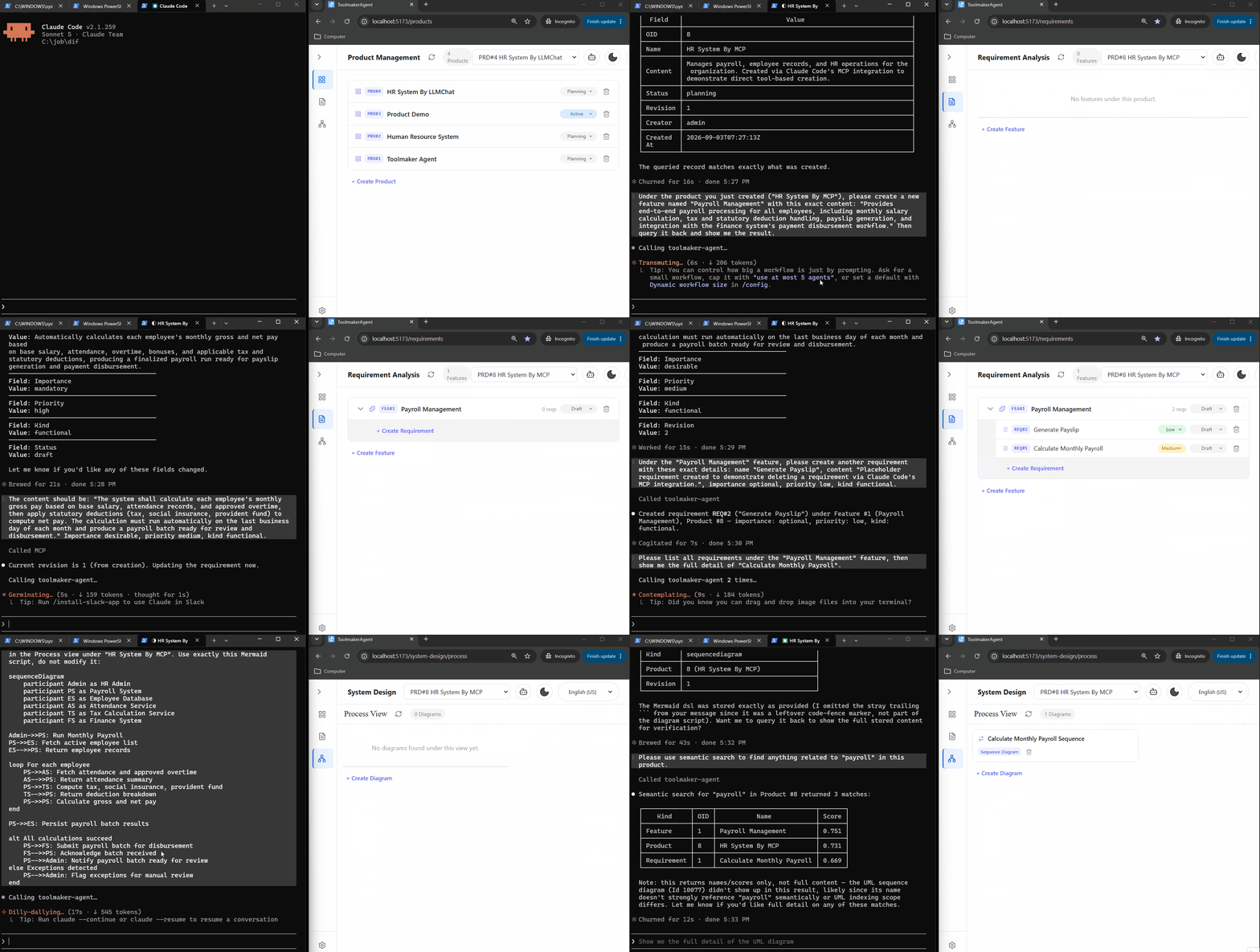
The recording below is a real Claude Code session issuing MCP tool calls end to end: create a Product, a Feature, and a Requirement (again pausing to ask for a missing required field instead of guessing — this time the agent asks you, in the terminal), query them back, delete a Requirement, and create a UML sequence diagram.
6. Tech stack
| Layer | Technology |
|---|---|
| Backend language/runtime | Go 1.26 |
| common-library-golang | https://github.com/phcp-tech/common-library-golang |
| HTTP framework | Gin |
| Database | SQLite via dbsqlx (raw SQL, no ORM); schema applied from config/schema_sqlite.sql |
| Agent/LLM orchestration | trpc-agent-go |
| RAG / vector search | trpc-agent-go's knowledge/embedder (OpenAI-compatible embeddings, incl. DashScope) + knowledge/vectorstore/inmemory |
| MCP | Official modelcontextprotocol/go-sdk, Streamable HTTP transport |
| Auth/policy | Casbin |
| CLI | Cobra |
| Frontend | React 19, TypeScript, Vite |
| Frontend state | TanStack Query v5 |
| Frontend routing | react-router-dom v7 |
| Styling | Tailwind CSS |
| Diagrams | Mermaid (+ Cytoscape, KaTeX for advanced diagram types) |
7. License
Apache License 2.0 — see LICENSE.
Reviews (0)
Sign in to leave a review.
Leave a reviewNo results found