kaletacms
Health Warn
- License — License: GPL-2.0
- Description — Repository has a description
- Active repo — Last push 0 days ago
- Low visibility — Only 5 GitHub stars
Code Warn
- network request — Outbound network request in image/admin.js
- network request — Outbound network request in image/editor.js
Permissions Pass
- Permissions — No dangerous permissions requested
No AI report is available for this listing yet.
Kaleta – an open-source CMS for business websites with a visual page builder, a token design system and Claude over MCP

Kaleta
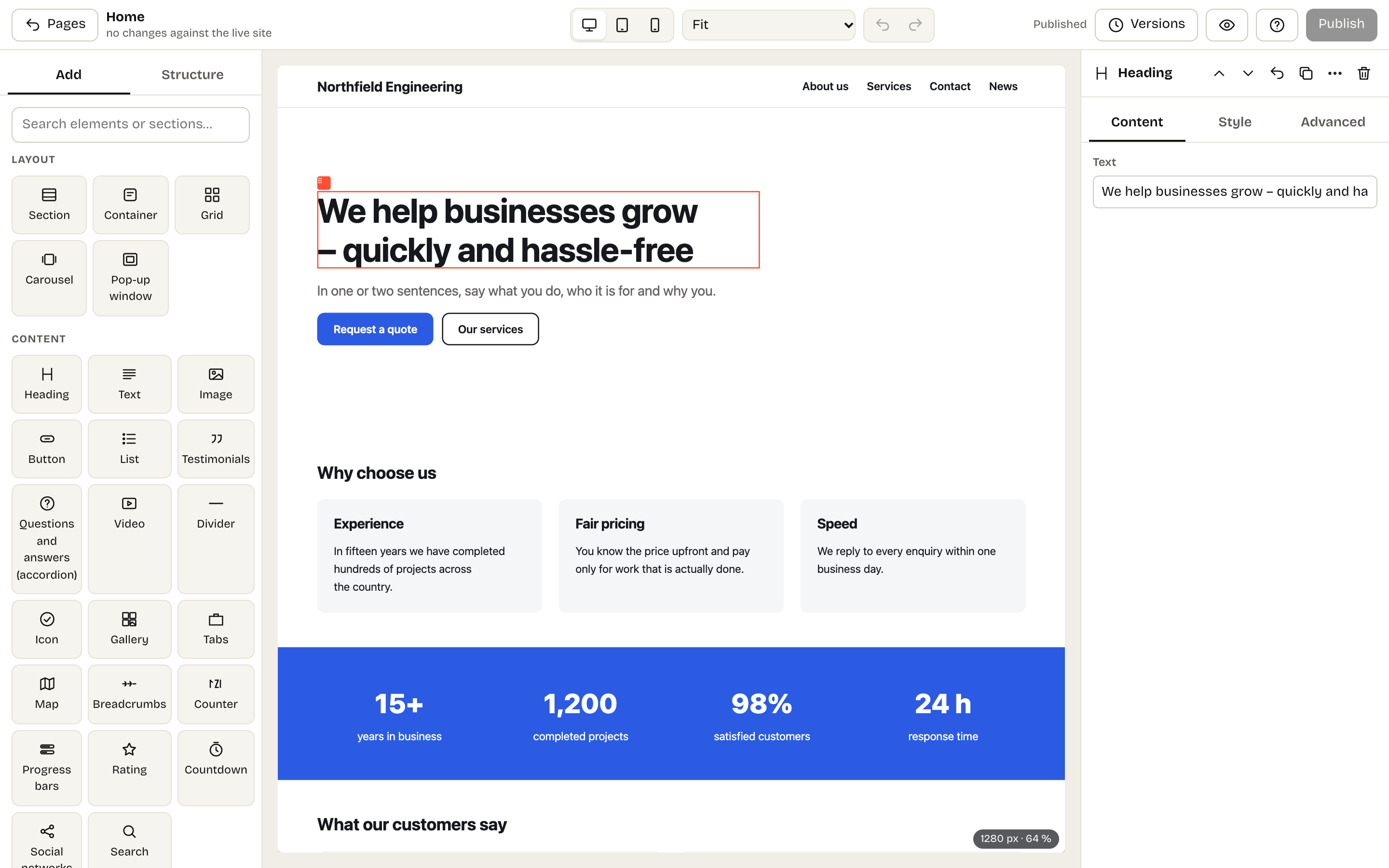
An open-source CMS for business websites – services, testimonials, team, careers, contact and news. A visual page builder
whose output reads like hand-written HTML, an AI assistant, Claude over MCP, and a WordPress importer.
Česky
Project website: kaletacms.com · guide: kaletacms.com/guide · latest version: GitHub Releases · what comes next: roadmap · release policy
Features
- Page builder – the canvas is the real page. Drag elements and ready-made sections into place, style them separately
for desktop, tablet, mobile and hover. Drafts save continuously and go live only when you publish; older versions can be restored. - Library of 40 ready-made sections (heroes, services, pricing, testimonials, team, gallery, contact with a form…) and
three starter sites at installation. Texts follow the page language. - Design system – one-click styles, colours with a readability (WCAG) check, dark mode, fonts, fluid sizes and spacing –
all tokens, so changing a colour restyles the whole site. - Site parts – header, footer and wrappers for the news item, news list and 404 page in the builder, including
variants for selected pages (a landing page without navigation). - Pop-ups – windows, slide-in panels and bars built in the builder, with triggers (time, scrolling, exit intent,
idle time, page count), rules by page, language, period, device and campaign, and cookie-free views and conversions. - Components – reusable blocks with properties; editing a component updates it everywhere.
- Collections – custom content types (testimonials, team, products, branches…) with their own fields, listed in the
builder with{{field}}tags, filters, sorting and pagination, and item pages with a builder template. - Forms and enquiries – an enquiry form without CAPTCHA or cookies, enquiries in the admin, email notifications,
CSV export and automatic deletion of personal data. - Newsletter – double opt-in sign-up; send your latest news in an e-mail styled by the design system (through SMTP),
or pass confirmed subscribers to Brevo, MailerLite, Mailchimp, Ecomail, SmartEmailing or any service via a webhook. - Company details – address, company ID, opening hours and map once in Settings; the site shows them and search
engines get LocalBusiness structured data. - AI – the assistant drafts a new section from a description, rewrites element text, suggests headlines, SEO
descriptions, proofreading and translation (Claude, OpenAI, Google Gemini or Mistral). Claude can also build the site
over MCP: it turns HTML into builder content and edits site parts, collections and the design – always as a draft to approve. - News (blog), sites in around forty languages, SEO and llms.txt, cookie-free analytics, redirects, backups and signed updates,
WordPress import (straight into the builder, too).
Principles
- No technical debt: plain PHP 8.4+, no framework, Composer or build step; no third-party plugins.
- Clean output: one builder element = one HTML tag, CSS only for what the page uses, in cascade layers (
@layer);
JavaScript only where it is really needed. Tests enforce it. - Web 2026: fluid type and spacing, container queries, OKLCH colours (
color-mix), the Popover API, view transitions. - AI as a first-class user: whatever works in the editor works over MCP – same schema, validation and permissions.
- Privacy and accessibility by default: no third-party scripts or fonts, colour contrast checks.
- FTP installation, signed updates.
Installation
- Download
kaleta-X.Y.Z.zipfrom Releases and upload its contents
(including the hidden.htaccessfiles) to hosting with PHP 8.4+ and MySQL 8 / MariaDB 10.6+. - Create an empty database.
- Open
https://your-site.com/install.php, fill in the form and choose a starter site.
Later versions are downloaded and installed by the site itself (Settings → Backups and updates); packages are signed by the publisher.
Nginx does not read .htaccess – use the example in system/nginx.example.conf. The user guide is in docs/guide.md.
With Docker (2.1+): download compose.yaml, run KALETA_DB_PASSWORD=… docker compose up -d and openhttp://localhost:8080 – the installer asks for database server db, database and user kaleta and that password. The image isghcr.io/phprs-cms/kaleta; the site lives in a volume and updates itself like any other installation.
Development
php -S localhost:8080 system/dev-router.php
Tests: php tools/unit-tests.php (unit, no database) and tools/test.sh (clean install plus a walk through the site, admin,
builder and MCP; needs MySQL; WEB=remeslo tools/test.sh tests another starter site). tools/test-lighthouse.sh holds every
starter site to the output budget; php tools/contracts.php shows changes of the public contracts (MCP tools, design tokens,
builder elements); static analysis is PHPStan with phpstan.neon.dist. How to contribute is inCONTRIBUTING.md; architecture notes are in CLAUDE.md (Czech).
Licence
GNU GPL version 2 or later. The licence text is in LICENSE.
Reviews (0)
Sign in to leave a review.
Leave a reviewNo results found