remora
Health Uyari
- License — License: MIT
- Description — Repository has a description
- Active repo — Last push 0 days ago
- Low visibility — Only 5 GitHub stars
Code Gecti
- Code scan — Scanned 2 files during light audit, no dangerous patterns found
Permissions Gecti
- Permissions — No dangerous permissions requested
Bu listing icin henuz AI raporu yok.
Rectangle-style macOS menu bar app and notch island for herdr, Rex and cmux: see your agents, jump between them, answer permission prompts from the notch, and run pane, tab and workspace actions in one click.

Remora
A Rectangle-style macOS menu bar app for herdr, Rex and cmux.
Formerly HerdrMenu.


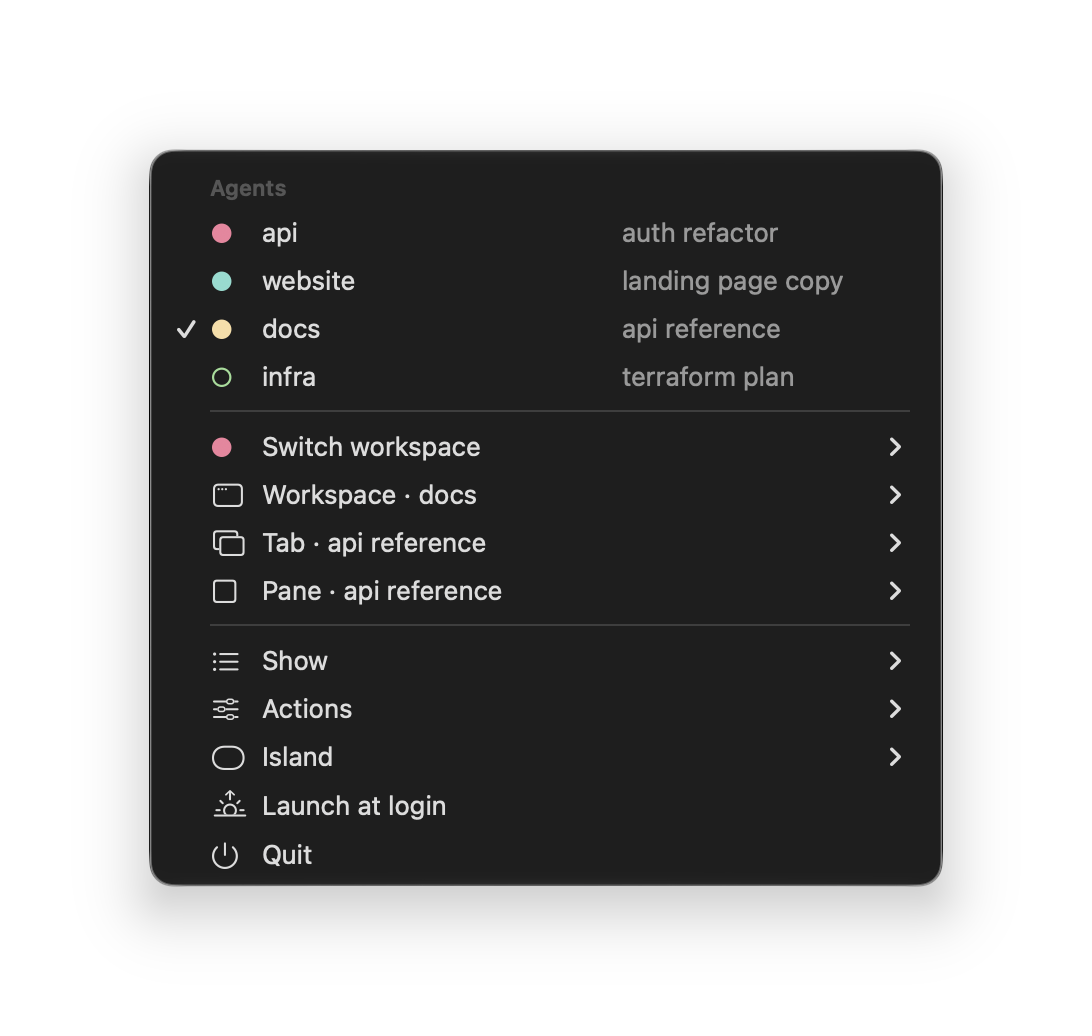
- Agents at the top of the menu, with herdr's status dots. Click one to jump to it.
- A badge on the remora when an agent needs you (see the badge below).
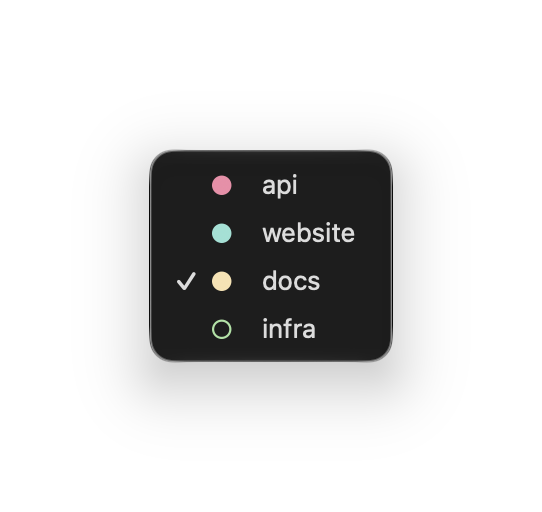
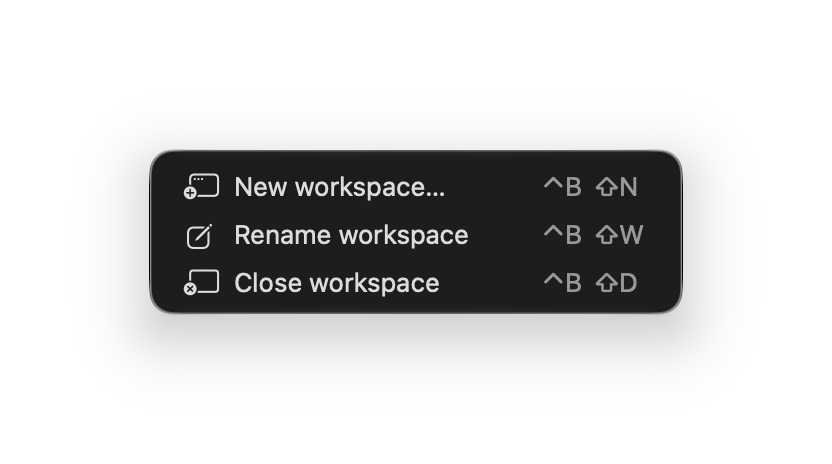
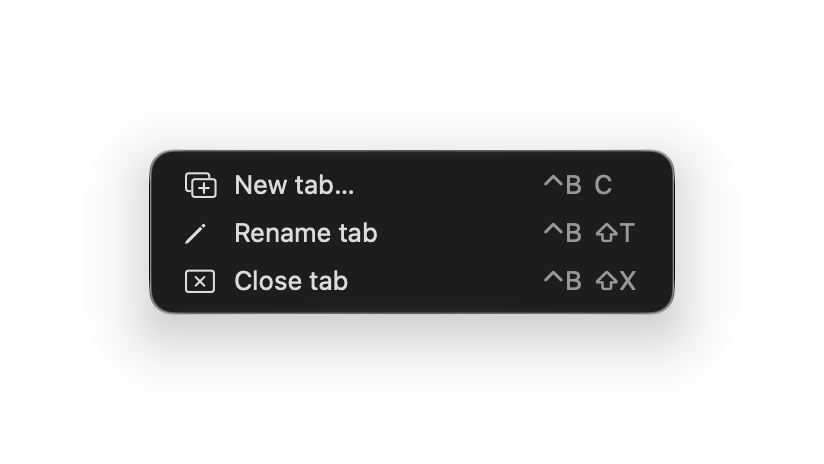
- One-click actions for panes (split, zoom, focus, resize, swap, close), tabs and workspaces (new, rename, close), each section in a submenu named after the focused one, plus Switch workspace to jump between your workspaces.
New tab… and New workspace… ask for a name first; hold ⌥ Option for the quick versions, which create them straight away like herdr's keybinds. - herdr's keybind next to each action, so the menu doubles as a cheat sheet.
- An island around your MacBook's notch for your herdr, Rex and cmux agents: what each one is doing, a ping when one needs you, and permission and plan cards you can answer from the notch (see the island below).
Why Remora?
It started as HerdrMenu, a menu for herdr. Now it drives Rex and cmux as well, so the old name sold it short. A remora is a fish that attaches itself to a bigger one and travels with it, and that's what this app does with your terminal app: it rides along with whichever one you use, without being one itself. Remoras are harmless hitchhikers (they even keep their hosts clean), which felt right for a companion app.
Submenus
| Switch workspace | Workspace |
|---|---|
 |
 |
| Tab | Pane |
 |
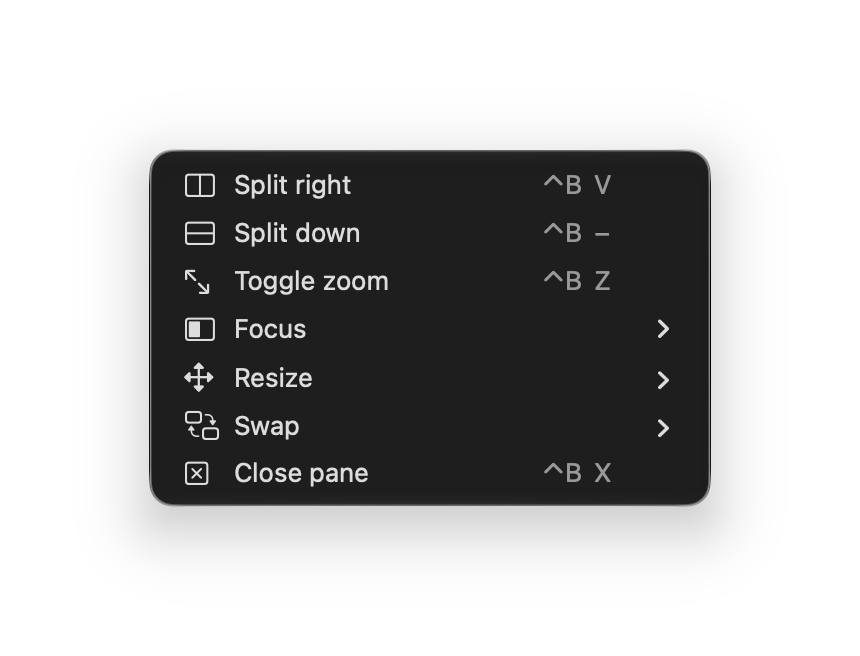 |
It calls the herdr CLI rather than faking keystrokes, so it acts on whichever pane you're looking at and doesn't need Accessibility permission. After a click, it brings your terminal to the front. The icon only appears while herdr is open.
The badge
| Icon | What it means |
|---|---|
 |
herdr, Rex or cmux is open and no agent needs you |
 |
An agent is blocked, waiting on you (for example, for an approval) |
 |
An agent has finished and you haven't looked at it yet |
Hover over the remora to see how many agents are blocked or done. Viewing a finished agent in herdr clears its badge.
Several machines
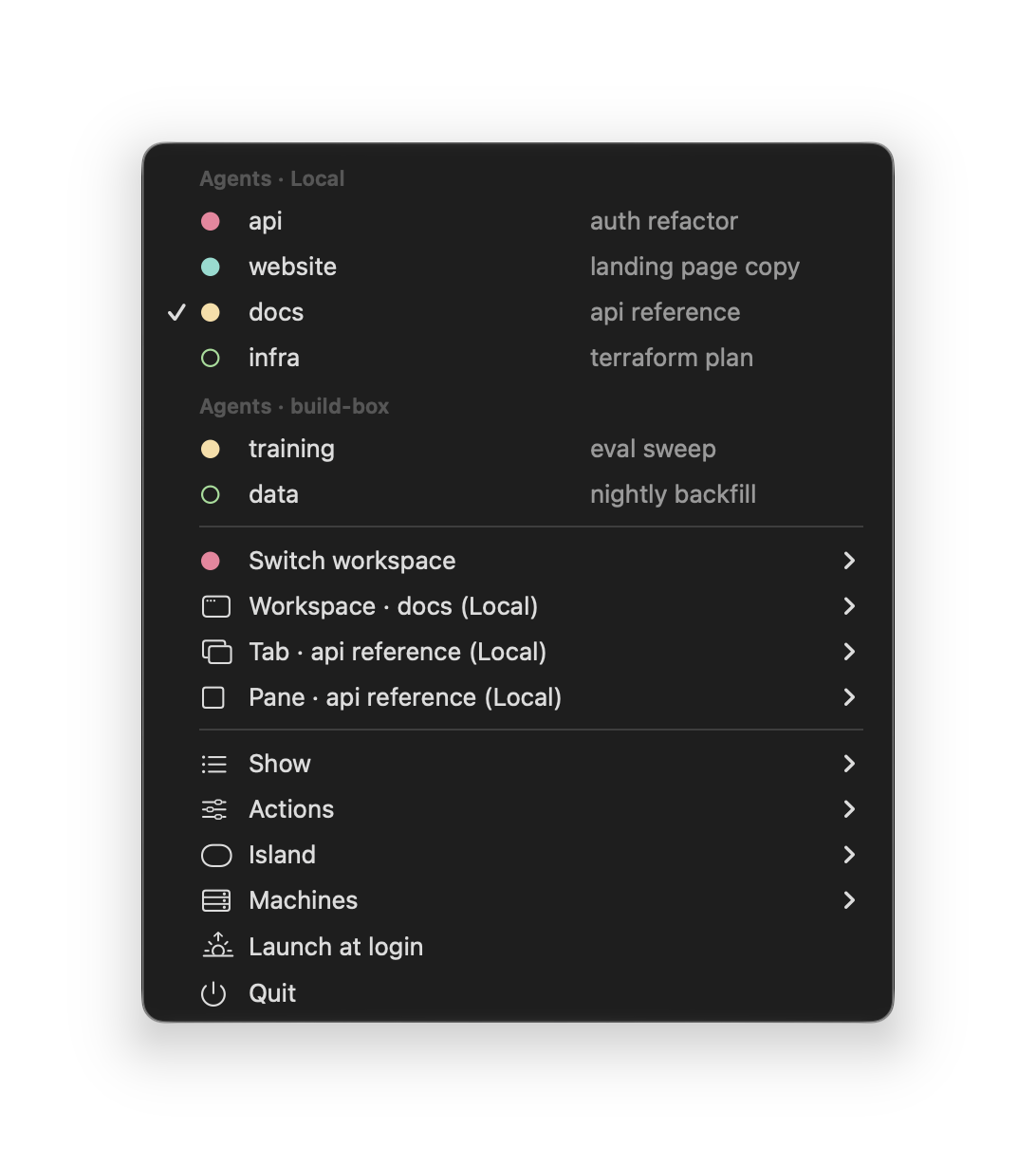
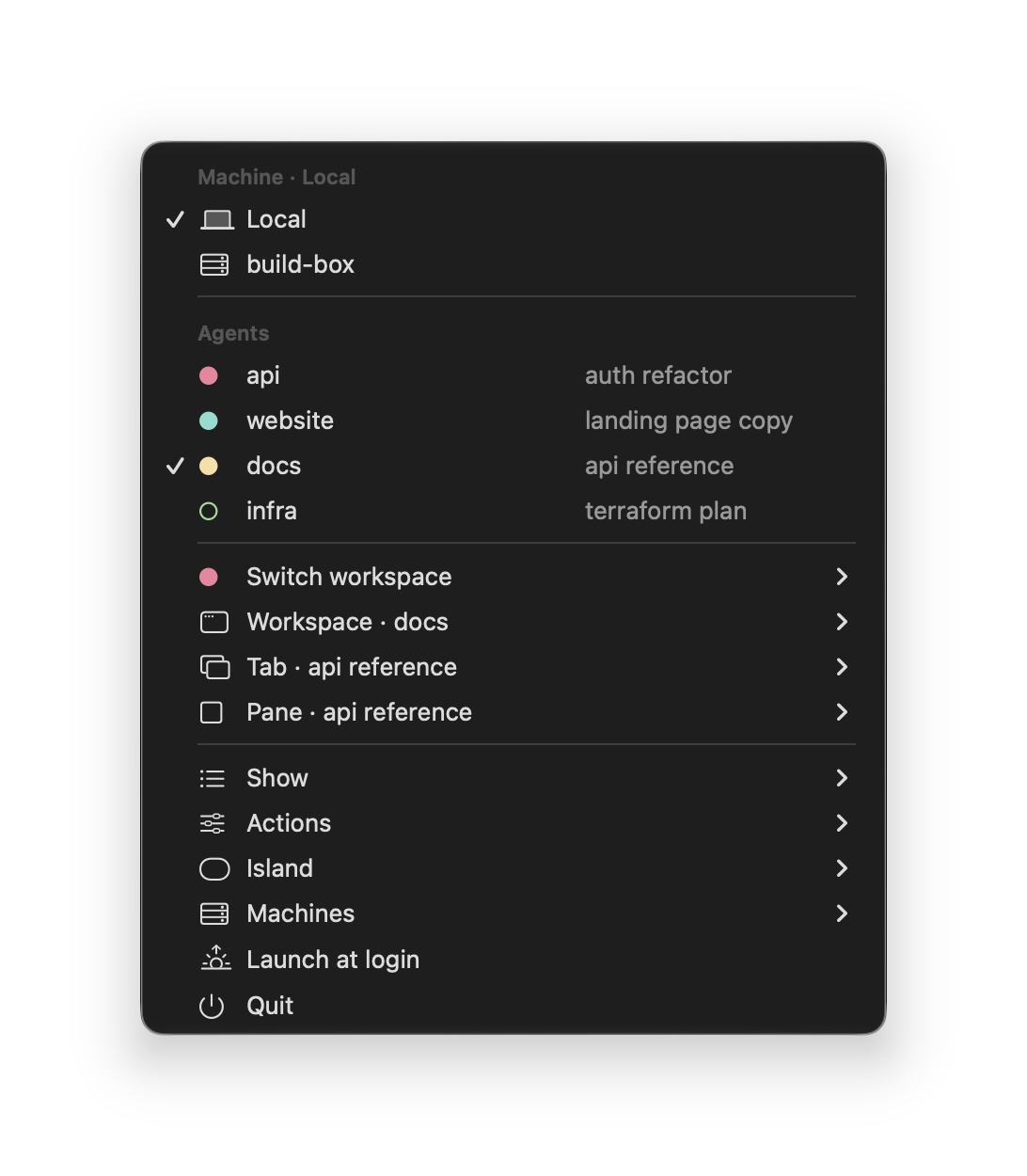
If you've saved SSH machines with herdr machine add, the remora's badge counts agents on all of them. Machines chooses how the menu shows them:
- All together (default): each enabled machine's agents under their own heading, and every machine's workspaces. The Workspace, Tab and Pane actions act on the machine the herdr TUI is showing, or Local, named in their headers.
- One at a time: a Machine section at the top picks one machine, and the rest of the menu shows and acts on just that one.
Everything goes through herdr --machine <id> ..., so it needs herdr 0.9.5 or later on both ends. A machine that doesn't answer within 3 seconds shows as Not reachable.
Clicking a remote agent moves focus on that machine's server. You only see it if your TUI is showing that machine, because the CLI can't switch the TUI's machine for you.
Rex
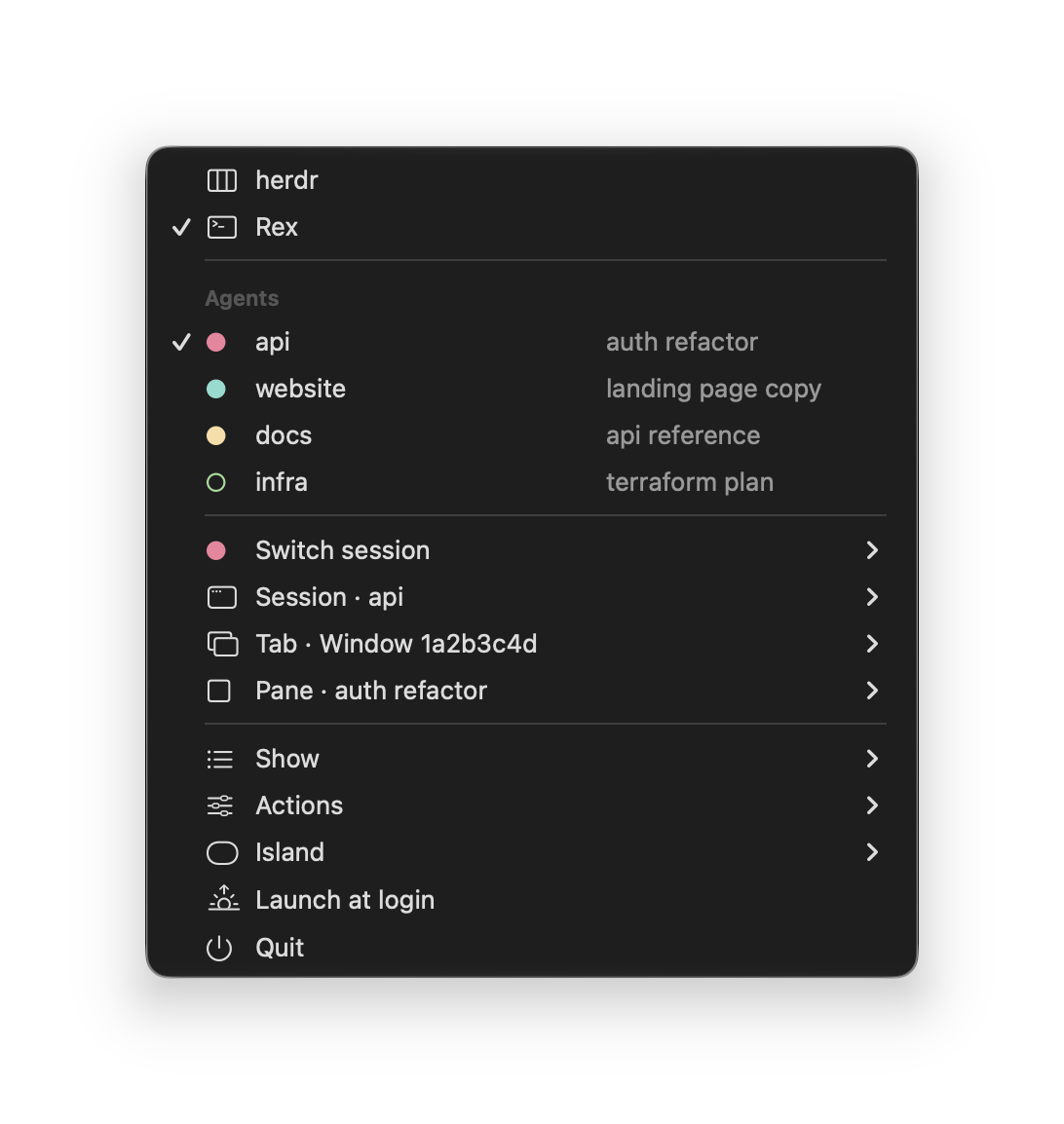
The menu drives whichever of herdr, Rex and cmux is open. When several are, a switch at the top of the menu picks one. In Rex mode the menu works the same way, in Rex's words:
- Agents are terminals whose program reports a status to Rex (OSC 7501, as Claude Code does), with the same dots and badge. Click one to show its session in the Rex app and focus it. Rex keeps an agent done until it works again, so the menu does what herdr does: an agent is done (teal) from when it finishes until you look at its session in the Rex app, then idle. Agents that finished before the menu started count as seen.
- Workspaces are sessions, tabs are tabs (Rex's windows), and panes are panes (Rex's blocks). Swap is Move, Rex's name for it.
- Machines are hosts: everything in
rex hostsis listed, throughrex -S <host> .... - The actions run the Rex app's own actions (
rex do pane.split.rightand so on), so they act on whatever has focus in Rex. Renaming uses the app's inline rename, and new tabs and sessions don't ask for a name. - The section rows name the session, tab and pane the Rex app is showing, with a checkmark on that session and its agents, as in herdr mode. The Rex server doesn't report which session the app shows, so the menu works it out from the app resizing a session's terminals when it shows them. Until you switch sessions once after the menu starts, nothing is named.
- Keybinds shown are the ones in your
init.lua(rex keymap). The app's built-in shortcuts aren't visible to the server, so they don't show.
The icon shows while a herdr client, the Rex app or cmux is open. The badge counts the agents of the one the menu drives. It needs the rex CLI that comes with Rex.
cmux
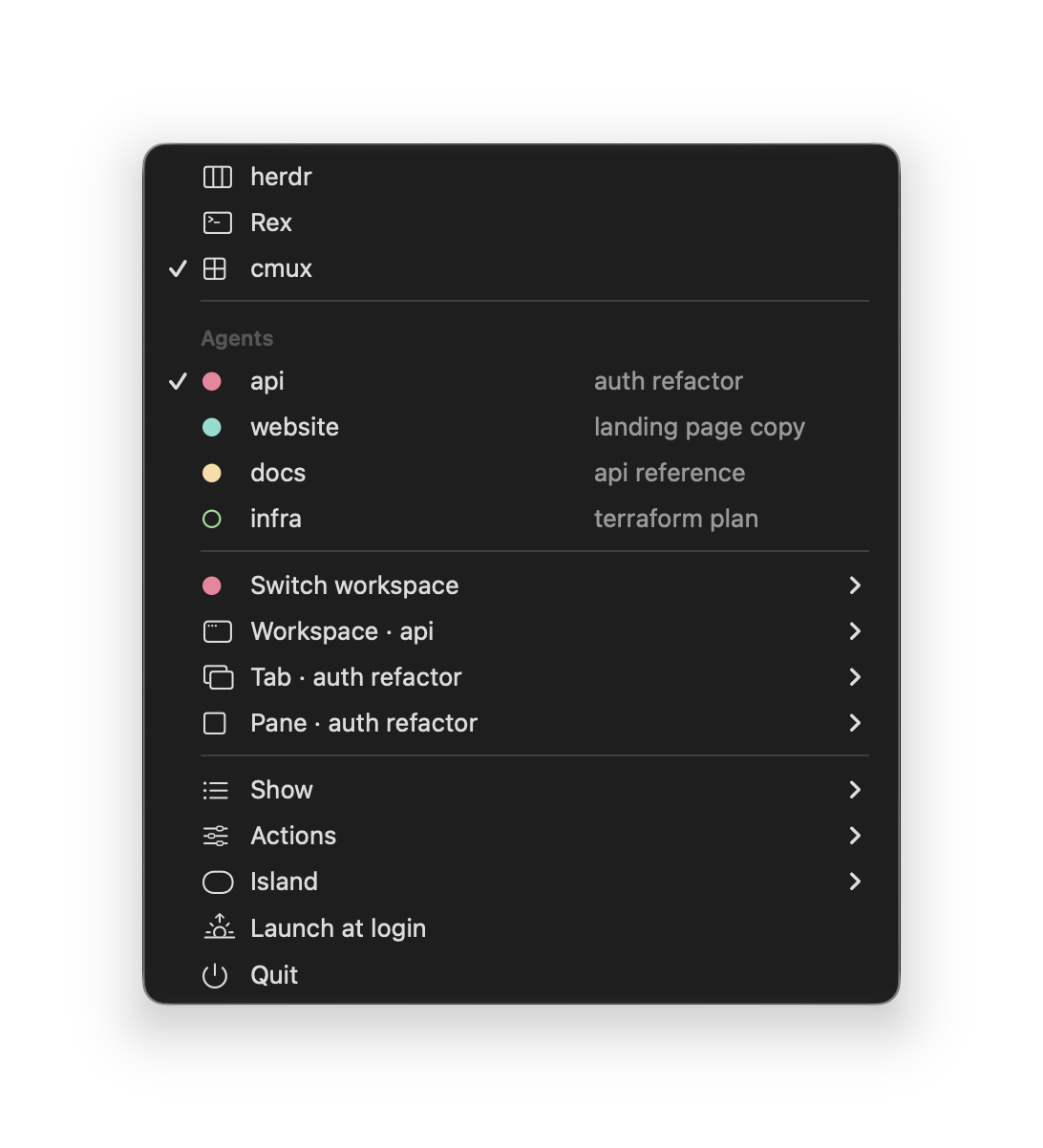
The menu drives cmux too, and its agents show in the island alongside herdr's and Rex's.
- Agents are cmux tabs whose program reports a status (OSC 7501, as Claude Code does), from
cmux events, named after their workspace and tab. Click one to switch cmux to it. Like Rex's, an agent is done (teal, and ✓ in the island) from when it finishes until cmux is in front showing its workspace. - Workspaces are workspaces. cmux nests the other way round from herdr, a pane (split) holding tabs, so Tab is the focused tab and Pane the split it's in.
- The actions go through the
cmuxCLI and act on whatever is focused in cmux: split right or down, resize, new, rename and close tab, and new, rename and close workspace (closing a workspace asks first). If cmux refuses one, say resizing past the edge, its message shows. - Not yet: focus and move by direction, zoom, closing a whole pane (cmux's CLI only closes tabs), and keybinds next to the actions.
- Socket access: by default cmux only lets processes started inside cmux use its socket, which shuts the island out. In cmux's Settings → Automation, set Socket Control Mode to Automation mode, which also accepts other apps running as you. Password mode works too once you've set a socket password there. Don't use Full open access: it lets any local process drive your terminals.
- cmux's own alerts (rings, badges, notifications) still go off, so you may see things twice. Turn some off in cmux's Settings if you want; the island leaves them alone.
- Not yet in the island: permission and plan cards, and what each agent is doing, don't work in cmux panes.
It finds cmux wherever the app is installed, and uses the cmux CLI inside it.
The island

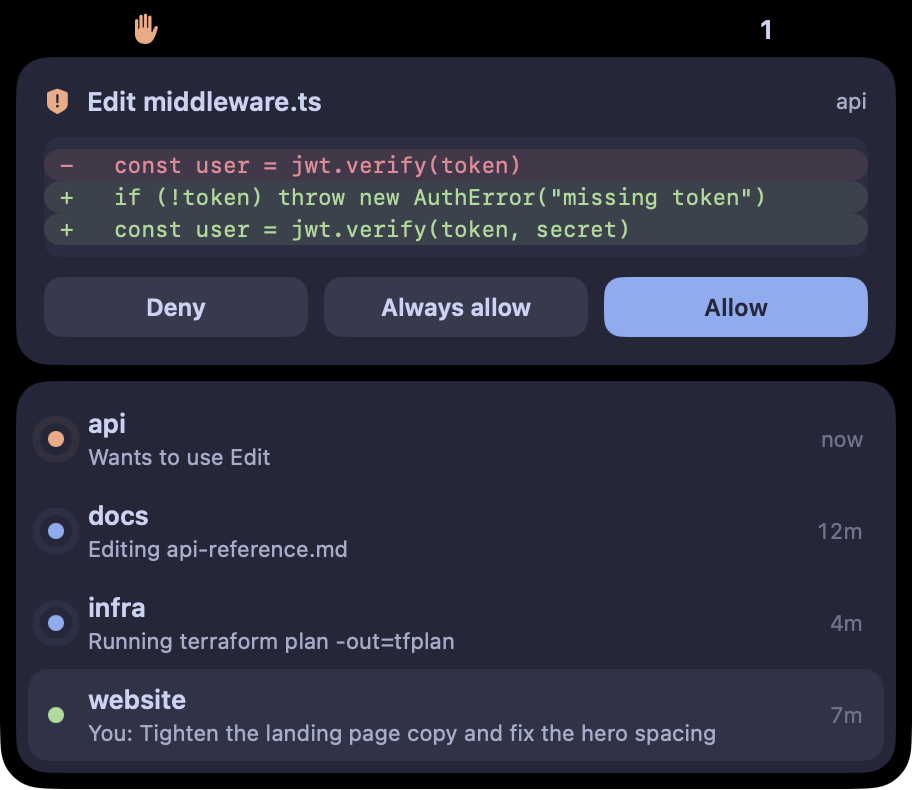
While herdr, Rex or cmux is open, a black pill sits around your MacBook's notch, a bit like the iPhone's Dynamic Island. It shows the agents of all three, whichever one the menu drives:
- The sides of the notch show the most urgent thing: ✋ when an agent needs you, ✓ when one has finished and you haven't looked at it yet, a spinning ✦ while agents work. The number is how many. When nothing's happening, the pill hides behind the notch.
- Hover to see every agent: its workspace or session, what it's doing right now ("Editing api-reference.md", "Running terraform plan") and for how long. A finished one shows your last prompt. Click one to jump to it.
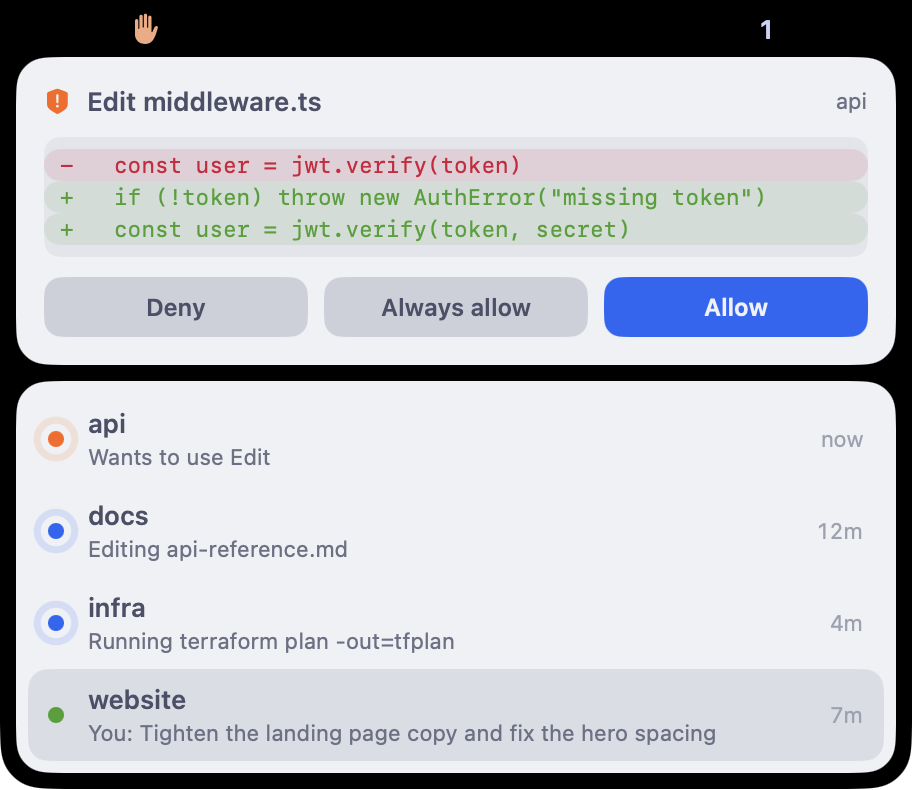
- Permission requests drop down from the notch with the command or diff: Deny, Allow, or Always allow when Claude offers a rule. The prompt in the terminal still works too, and whichever you answer first wins.
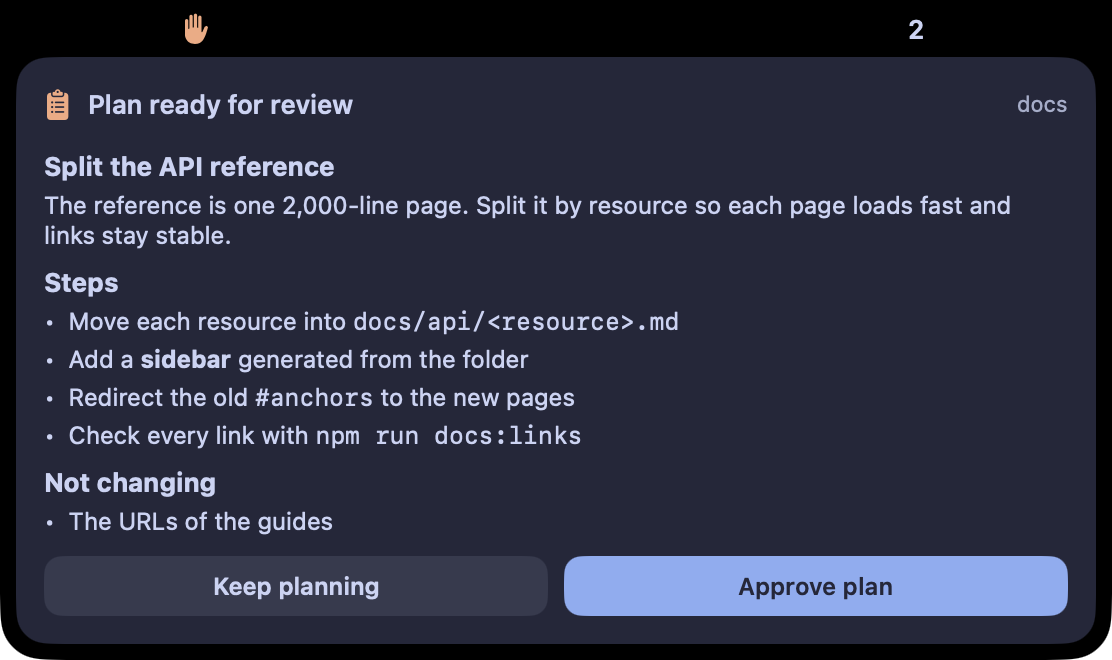
- Plans from plan mode show up with their Markdown, and Keep planning or Approve plan.
- It pings you with a drop-down and a sound when an agent gets blocked or finishes, except when you're already looking at it: Rex in front showing that session, or herdr's terminal in front on that workspace.
- Colours are Catppuccin Macchiato in dark mode and Latte in light mode, with the Catppuccin colour nearest your macOS accent colour. The pill itself stays black, so it blends with the notch.
| Plan review | Light mode |
|---|---|
 |
 |
The agents and their states come from herdr, and from Rex (Claude Code reports them there with OSC 7501). A Rex agent's ✓ stays until you look at its session, like herdr's own done. cmux's agents come from cmux, see cmux. For what each one is doing, and the permission and plan cards, install the Claude Code hooks with Island › Install Claude Code hooks…, then restart your Claude sessions. That adds three hooks to ~/.claude/settings.json which run this app with --hook. If the menu isn't running, or a session isn't in a herdr or Rex pane, the hook exits straight away and Claude carries on as normal. On a screen without a notch, the island is a small pill at the top centre.
Settings
- herdr / Rex / cmux at the top, while more than one is open: which one the menu drives (
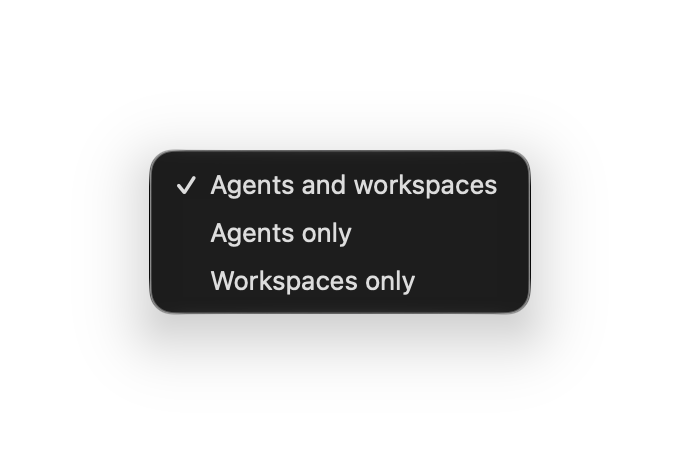
defaults write dev.pierre-charles.remora backend rex). - Show: agents and workspaces (default), agents only, or workspaces only (listed in the menu itself rather than under Switch workspace).
- Actions: turn the Workspace, Tab and Pane submenus on or off (all on by default). Switch workspace stays either way.
- Machines (Hosts for Rex): all together or one at a time (only with saved SSH machines or Rex hosts).
- Island: show the island, its sounds, its height (the notch's, or down to where the menu bar ends), and install or remove the Claude Code hooks.
These are stored in the app's defaults, e.g. defaults write dev.pierre-charles.remora show agents or defaults write dev.pierre-charles.remora actions.pane off.
Requirements
- macOS 14 or later
- The Xcode command line tools (
xcode-select --install), forswiftc - herdr 0.9.1 or later, installed in
~/.local/bin(herdr's install script),/opt/homebrew/binor/usr/local/bin. If you've updated herdr, make sure the running server is the new version too:herdr statusshould showserver_binary_stale: no.
Install
git clone https://github.com/pierre-charles/remora.git
cd remora
./build.sh
open ~/Applications/Remora.app
build.sh builds and signs the app into ~/Applications. Then open herdr, Rex or cmux, click the remora in the menu bar and tick Launch at login so it starts every time you log in. It's listed in System Settings → General → Login Items.
Update
git pull
./build.sh
build.sh restarts the app if it's running, so the new version takes over straight away. Coming from HerdrMenu? The same two commands work (GitHub forwards the old repo address). build.sh removes HerdrMenu.app, and on its first launch Remora copies HerdrMenu's settings, points the Claude Code hooks at itself, and asks whether to open at login. Restart your Claude sessions so they pick up the new hook path.
Uninstall
If you installed the Claude Code hooks, choose Island › Remove Claude Code hooks first. Then untick Launch at login, choose Quit, and delete ~/Applications/Remora.app.
Notes
- The keybinds shown are your own: the menu reads
~/.config/herdr/config.tomleach time it opens and resolves them the way herdr does (yourprefixand[keys]entries win, and a default that shares a key with one of your bindings, including[[keys.command]]keys, is dropped). Bindings must be on one line, e.g.new_tab = "prefix+t"ornew_tab = ["prefix+t", "ctrl+alt+t"]; the first one is shown. - The screenshots show made-up workspaces and agents, from fake
herdrandrexCLIs fed to a throwaway copy of the app, so no real names reach the repo. - Status colours are herdr's Catppuccin palette, its default theme.
- The icons are drawn by
icon/make.pyas SVG and rendered toicon/remora.png(the app icon),icon/menubar.png(the menu bar's template image) and the badge screenshots. Runpython3 icon/make.pyafter changing it.
Licence
Remora's code is released under the MIT License.
Remora is an unofficial companion app and isn't affiliated with herdr, Rex or cmux.
Yorumlar (0)
Yorum birakmak icin giris yap.
Yorum birakSonuc bulunamadi