pignal
Health Warn
- License — License: GPL-3.0
- Description — Repository has a description
- Active repo — Last push 0 days ago
- Low visibility — Only 5 GitHub stars
Code Fail
- exec() — Shell command execution in core/src/directives/registry.ts
Permissions Pass
- Permissions — No dangerous permissions requested
No AI report is available for this listing yet.
Pignal — A lightweight, self-hosted content platform powered by Cloudflare

Pignal — AI-native website platform powered by Cloudflare




One Worker, one database, any domain. Pignal gives you a production website — blog, wiki, shop, portfolio, recipes, and 24 templates total — with a single deploy to Cloudflare Workers + D1.
High-value websites — built-in SEO, JSON-LD structured data, sitemaps, Atom feeds, and E-E-A-T validation. Every page is optimized from the moment it's published.
AI-native — every site is an MCP server with 36 tools. Manage the full content lifecycle — create items with custom fields, build pages, link related content — from Claude, Cursor, or any MCP client.
Custom fields & catalog — define structured metadata per type (price, images, stock, availability). EAV storage with indexed queries. Dedicated catalog admin with dynamic columns, filtering, and sorting.
Static pages — About, Pricing, FAQ, Contact with flexible header/footer positioning. Markdown content with directives ({{action:contact}}, {{linked:sells}}).
LLM-discoverable — every site ships llms.txt, raw markdown endpoints, and structured data. Your content is natively readable by AI systems.
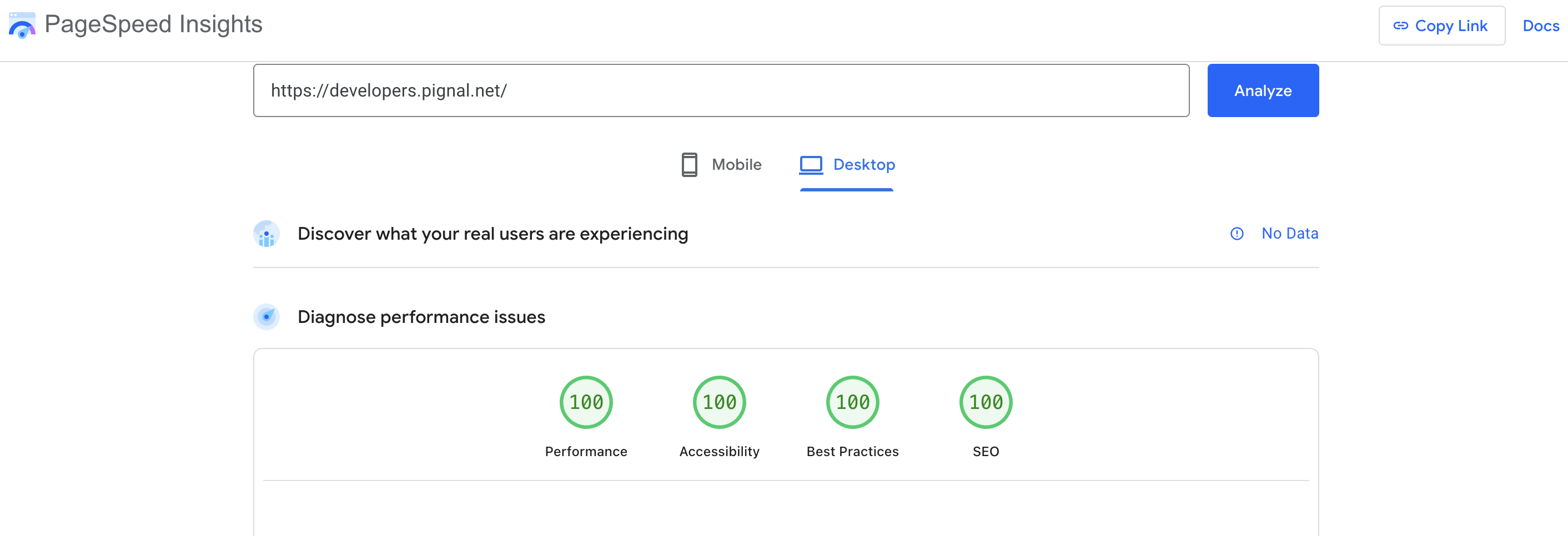
Edge-first — SSR at Cloudflare's 300+ edge locations with Lighthouse 100 scores and sub-50ms responses. Free tier compatible.
Open source (AGPL-3.0). Self-hosted, no third-party dependencies. Your data, your code, yours to customize.
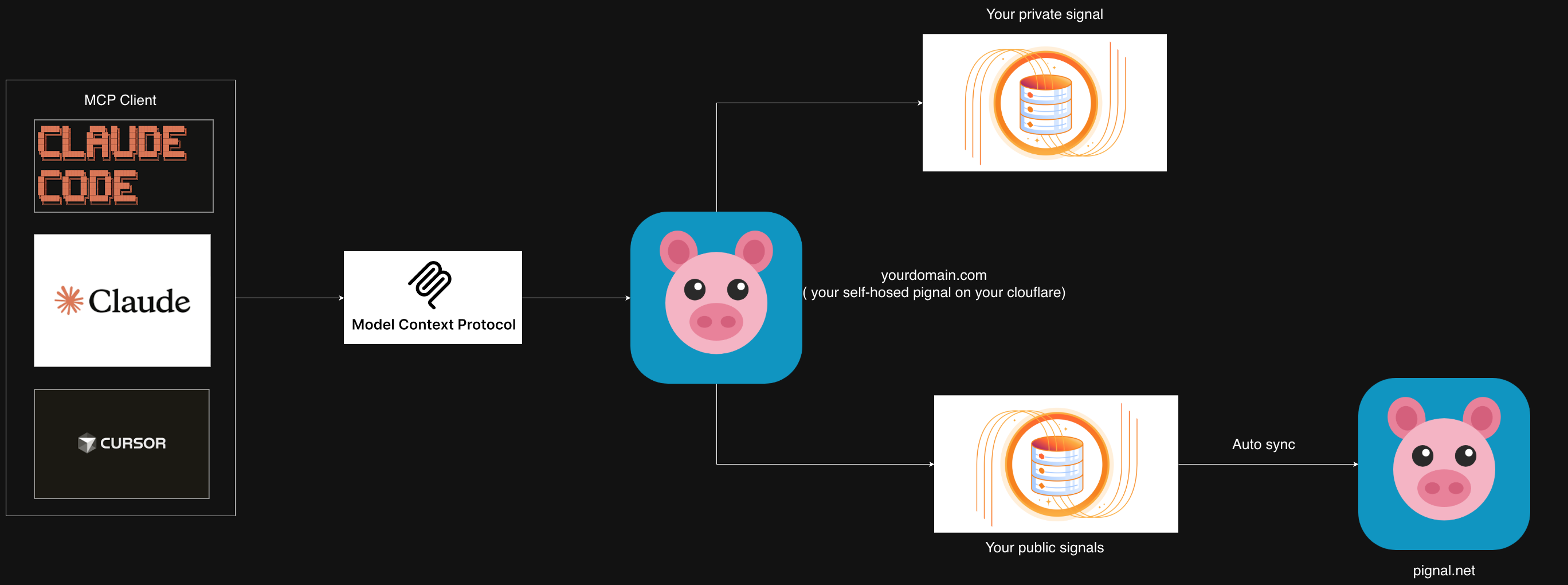
What's Inside
- 24 templates — blog, shop, services, wiki, portfolio, recipes, menu, course, directory, and more
- Custom fields — define structured metadata per item type (price, images, stock, availability). EAV storage with SQL-indexed typed columns
- Static pages — About, Pricing, FAQ, Contact with flexible header/footer positioning via page placements
- Type links — relate items to types (a blog post can "sell" products, a course lesson links to its module)
- MCP server — 36 tools for AI-native content management
- REST API — full CRUD at
/api/*with bearer token auth and API keys - Web dashboard — manage items, types, custom fields, pages, and catalog at
/pignal - Catalog admin — type-scoped management with dynamic metadata columns, search, sort, filter
- Content directives — embed forms (
{{action:slug}}), CTAs, linked items ({{linked:sells}}), and pages in markdown - Public pages — SEO-optimized HTML, JSON-LD, Atom feeds, sitemaps,
llms.txt
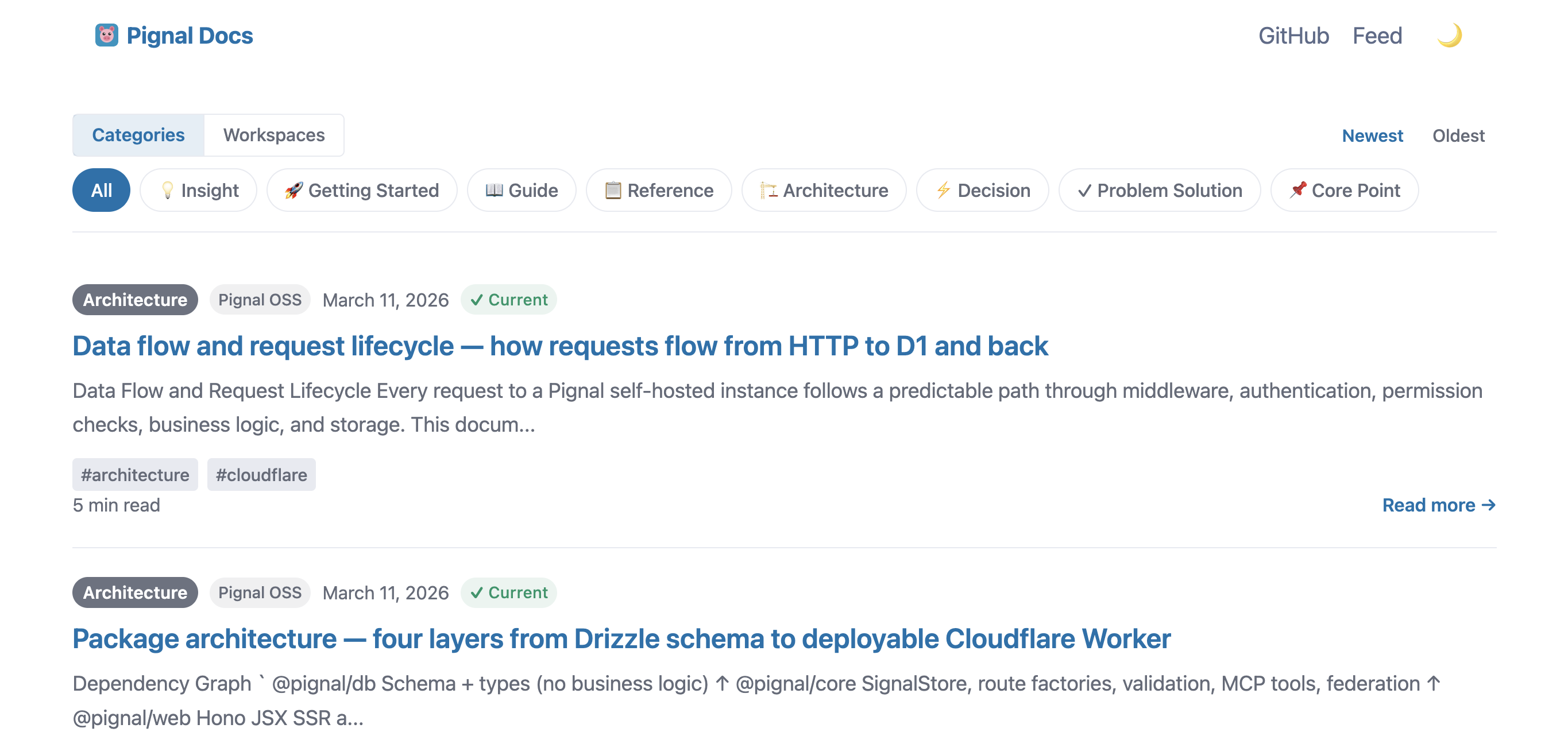
Live at developers.pignal.net
Lighthouse scores (Desktop)




Deploy
Prerequisites
- Node.js 18+
- A free Cloudflare account
1. Clone and install
git clone https://github.com/pignal-net/pignal.git
cd pignal
pnpm install
2. Authenticate with Cloudflare
npx wrangler login
3. Create D1 database
cd server
npx wrangler d1 create pignal-server-db
Copy the database_id from the output.
4. Configure
cp wrangler.toml.example wrangler.toml
Edit wrangler.toml and replace the placeholder database_id with the value from step 3.
To use a non-default template, set TEMPLATE = "shop" (or your template name) under [vars] in wrangler.toml, then run pnpm resolve-template (this runs automatically with pnpm dev:server).
5. Set your secret token
openssl rand -hex 32
# Copy the output, then:
npx wrangler secret put SERVER_TOKEN
# Paste the token when prompted
6. Apply migrations and seed data
pnpm db:migrate:prod                                             # Create tables in production D1
npx wrangler d1 execute pignal-server-db --remote --file=../templates/seeds/blog.sql   # Seed blog template data
Replace blog.sql with shop.sql (or your template's seed file) if using a different template.
7. Deploy
pnpm run deploy # Deploy the Worker
8. Verify
curl https://pignal-server.<your-subdomain>.workers.dev/health
Connect Claude
Claude Code (CLI)
claude mcp add --transport sse pignal \
  https://pignal-server.<your-subdomain>.workers.dev/mcp \
  --header "Authorization: Bearer <your-token>"
Claude Desktop
Add to claude_desktop_config.json (requires mcp-remote):
{
  "mcpServers": {
    "pignal": {
      "command": "npx",
      "args": [
        "mcp-remote@latest",
        "https://pignal-server.<your-subdomain>.workers.dev/mcp",
        "--header",
        "Authorization: Bearer ${SERVER_TOKEN}"
      ],
      "env": {
        "SERVER_TOKEN": "<your-token>"
      }
    }
  }
}
Project .mcp.json
{
  "mcpServers": {
    "pignal": {
      "type": "sse",
      "url": "https://pignal-server.<your-subdomain>.workers.dev/mcp",
      "headers": {
        "Authorization": "Bearer ${SERVER_TOKEN}"
      }
    }
  }
}
MCP Tools
36 tools organized by domain. Tool descriptions and field-level schema guidance adapt automatically to the active template.
Content Management
| Tool | Description |
|---|---|
get_metadata |
Get types, workspaces, settings, pages, positions, link types — call first |
save_item |
Create an item with custom field values |
list_items |
Browse items with filters (type, workspace, archived, visibility) |
search_items |
Full-text search across all items |
update_item |
Edit an existing item (including field values) |
validate_item |
Record that you confirmed, applied, or revisited an item |
vouch_item |
Change item visibility (private/unlisted/vouched) |
batch_vouch_items |
Change visibility for multiple items at once |
delete_item |
Permanently delete an item |
archive_item |
Soft-delete (recoverable) |
unarchive_item |
Restore an archived item |
Custom Fields
| Tool | Description |
|---|---|
manage_type_fields |
Define or update custom field schema for a type (price, image, stock, etc.) |
Fields support 10 types: text, number, url, email, date, select, boolean, textarea, color, image_url. Each field has showOnPublic to control visibility on public item pages vs admin-only.
Pages
| Tool | Description |
|---|---|
save_page |
Create or update a static page (upsert by slug) with positions |
list_pages |
List all static pages with visibility and position settings |
delete_page |
Permanently delete a static page |
Pages support 3 layouts (default, landing, minimal) and flexible positioning (header-nav, footer).
Type Links
| Tool | Description |
|---|---|
link_item_type |
Link an item to a type (e.g., blog post "sells" products) |
unlink_item_type |
Remove a type link |
list_item_links |
List all type links for an item |
Organization
| Tool | Description |
|---|---|
create_type |
Create a new item type with validation actions |
update_type |
Update a type's name, description, or guidance |
delete_type |
Delete a type (fails if items exist) |
add_type_action |
Add a validation action to a type |
remove_type_action |
Remove a validation action |
create_workspace |
Create a new workspace |
update_workspace |
Update workspace name, description, or visibility |
delete_workspace |
Delete a workspace |
update_settings |
Update site settings (title, branding, SEO, webhooks) |
Forms & Submissions
| Tool | Description |
|---|---|
create_action |
Create a site action (contact form, newsletter signup) |
update_action |
Update a site action |
list_actions |
List all site actions |
delete_action |
Delete a site action and its submissions |
list_submissions |
List form submissions with filters |
manage_submission |
Update submission status (read, replied, archived, spam) |
delete_submission |
Delete a submission |
get_submission_stats |
Aggregated submission statistics |
export_submissions |
Export submissions as JSON or CSV |
Templates
24 templates covering knowledge, commerce, creative, professional, and personal domains:
| Domain | Templates |
|---|---|
| Knowledge | blog (default), wiki, til, glossary, course, awesome-list, changelog |
| Commerce | shop, services, menu |
| Creative | portfolio, writing, podcast, reviews |
| Professional | resume, case-studies |
| Community | directory, bookshelf |
| Operations | runbook, incidents |
| Media | magazine |
| Personal | journal, recipes, flashcards |
Each template defines vocabulary (item/type/workspace names), SEO hints, MCP instructions, custom field seeds, page seeds, and link types.
Switching templates
Set TEMPLATE = "shop" under [vars] in wrangler.toml, then redeploy.
Creating a new template
pnpm template:create <name>
This scaffolds templates/src/<name>/ with config, source-page, item-post, and layout. See templates/TEMPLATE_GUIDE.md for the full contract.
Architecture
pignal/
├── db/         @pignal/db         Drizzle ORM schemas + TypeScript types (13 tables)
├── core/       @pignal/core       ItemStore, PageStore, ActionStore, route factories, MCP tools, validation
├── render/     @pignal/render     Shared rendering: components, lib, i18n, static assets, styles
├── templates/  @pignal/templates  24 self-contained templates (config + JSX), seed SQL, build-time resolution
├── web/        @pignal/web        Admin dashboard (HTMX), catalog, pages admin, public page rendering
└── server/     @pignal/server     Hono Worker with D1 storage, token auth, REST + MCP + Web
Data Model
items              Content posts (keySummary, content, typeId, tags, visibility, slug)
item_types         Categories with guidance and validation actions
type_fields        Custom field definitions per type (name, fieldType, showOnPublic)
item_field_values  Field values (EAV: value_text, value_number, value_boolean — all indexed)
item_type_links    Item-to-type relationships (link_type: "sells", "prerequisite", etc.)
pages              Static structural pages (title, slug, content, layout, visibility)
page_placements    Flexible page positioning (header-nav, footer, etc.)
workspaces         Item grouping (collections, packages, sections)
settings           Key-value configuration (branding, SEO, CTAs, webhooks)
site_actions       Form definitions (contact, newsletter, lead capture)
submissions        Form responses
Request Flow
Request → Worker → Token Auth → Store Middleware → Route Handler → ItemStore/PageStore → D1
Public pages: Request → Template Source Page/Item Post → Directives → HTML
Form submit:  POST /form/:slug → ActionStore.submitForm → D1 + EventBus → Webhook
Custom Fields (EAV Model)
Each item type can define custom fields via type_fields. Field values are stored in item_field_values with typed columns (value_text, value_number, value_boolean) — each indexed for efficient SQL filtering and sorting. This replaces JSON metadata for production-grade querying.
Fields support showOnPublic (boolean) — controls whether a field renders on public item pages. Admin catalog always shows all fields. Internal tracking fields (error counts, return rates) can be hidden from customers.
Content Directives
Markdown content supports {{directive:param}} tokens processed during rendering:
| Directive | Usage |
|---|---|
{{action:slug}} |
Embed a form inline |
{{cta:title="..." button="..."}} |
Call-to-action block |
{{linked:sells limit=3}} |
Render items from linked types |
{{page:about}} |
Embed another page's content |
{{testimonials}} |
Testimonial card grid |
{{latest type="Article" limit=5}} |
Recent items grid |
{{gallery tag="photos"}} |
Image gallery |
Federation
Every instance serves /.well-known/pignal with owner info, capabilities, tool manifest, and stats. Optionally register with pignal.net for directory listing and cross-instance discovery.
Local Development
pnpm install
cd server
cp .dev.vars.example .dev.vars   # set SERVER_TOKEN
pnpm db:migrate                  # create tables in local D1
pnpm db:seed:blog                # seed blog data (or db:seed:shop, db:seed:shop-demo)
pnpm dev                         # http://localhost:8787
The shop-demo seed includes 8 items with EAV field values (prices, images, stock), 6 pages with positions, and 2 forms.
Admin Pages
| URL | Description |
|---|---|
/pignal |
Dashboard |
/pignal/items |
Item management |
/pignal/catalog |
Type-scoped catalog with dynamic columns |
/pignal/pages |
Static page management |
/pignal/types |
Type + custom field management |
/pignal/settings |
Site configuration |
Resource Usage
Runs within Cloudflare's free tier: 100K requests/day (Workers), 10 GB D1 storage, no egress charges.
License
AGPL-3.0 — see LICENSE.
Reviews (0)
Sign in to leave a review.
Leave a reviewNo results found