ADD
Health Gecti
- License — License: MIT
- Description — Repository has a description
- Active repo — Last push 0 days ago
- Community trust — 15 GitHub stars
Code Gecti
- Code scan — Scanned 12 files during light audit, no dangerous patterns found
Permissions Gecti
- Permissions — No dangerous permissions requested
Bu listing icin henuz AI raporu yok.
ADD . one LOOP skill ⟳ 5 Specs ⟳ 8 Growth-Steps
AI-Driven Development
A complete, practical book on building software when AI writes the code
Edition: 1.11.0 · Type: AI Workflow Methodology
📖 Read the book online: https://pilotspace.github.io/ADD/
Why ADD
- Approve once, then let it run — one human sign-off at the frozen contract; the agent builds the rest.
- Proof, not promises — verify on observed behavior and pre-declared build-expectations, not code-reading.
- Security never gets waved through — any security finding is a HARD-STOP; release gates can't be
--forced. - You decide how much rope — a per-task autonomy dial; a
risk: hightask is fail-closed until trust is lowered. - Prototype to production — task → milestone → graduate (analytics-gated) → recorded release, one method.
- Smarter as you go — competency deltas fold into a living, compacting foundation carried across milestones.
- See it before you build it — a UDD wireframe + zero-dependency HTML mock, approved before any code.
- Built for teams — git-native multi-user, N parallel milestones, DAG-scheduled waves (
add.py waves). - Works with your AI — Claude, Copilot, Cursor, Codex, Gemini; install via npm, pip, or the Claude Code plugin.
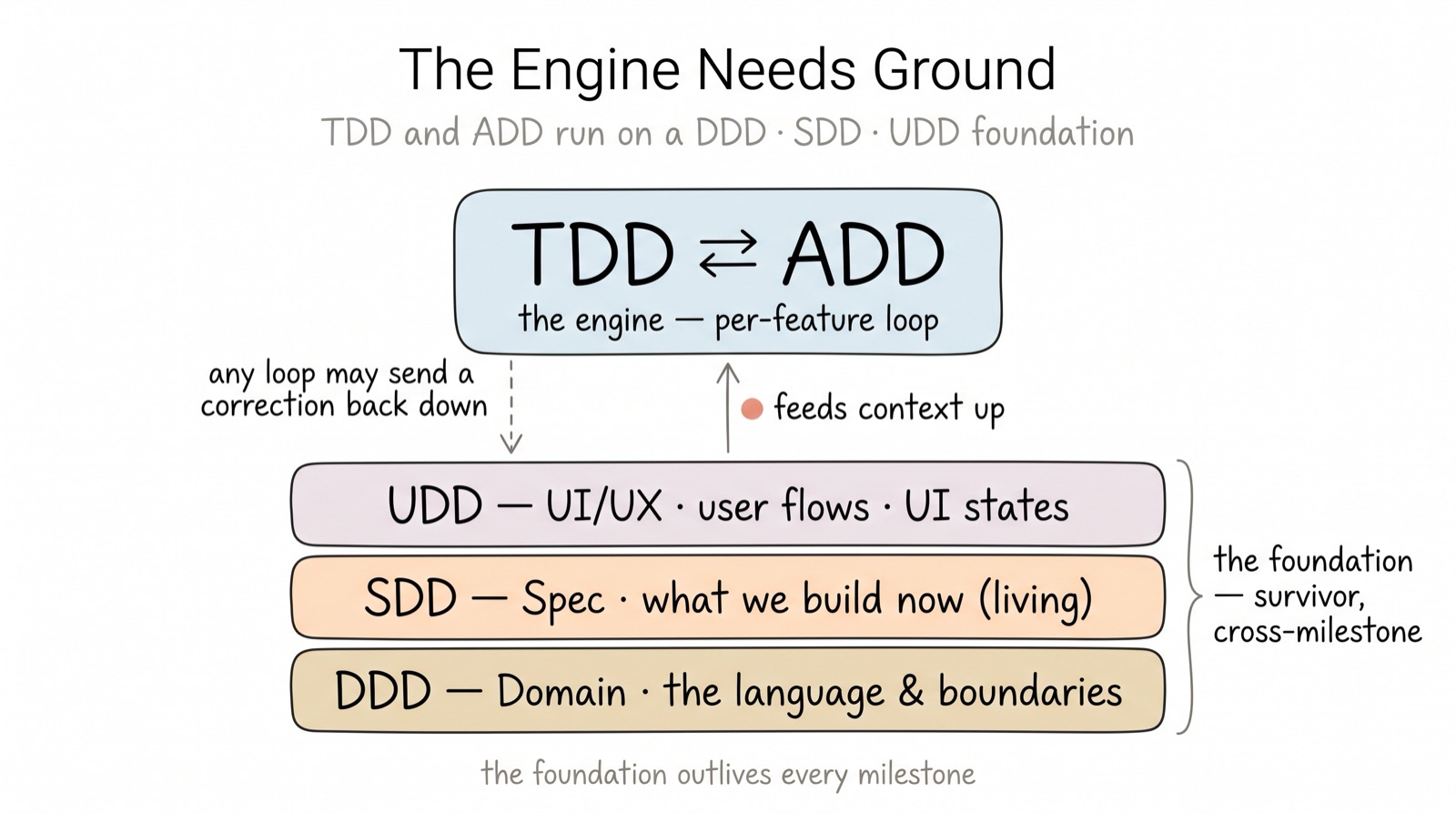
What this book is
This is a complete guide to AIDD (AI-Driven Development) — a way of building software in which an AI agent writes most of the code and people do the two things AI cannot reliably do alone: decide what to build, and verify that what was built is correct.
It is written to be read once front to back, then kept open beside you as a working manual. The early chapters explain why the method has the shape it does; the middle chapters explain each step in detail; the later chapters explain how to operate it across a real team and product; the appendices are copy-paste reference material.
Who it is for
Anyone who builds software with AI in the loop: engineers, architects, testers, designers, product owners, and the managers who lead them. No part assumes you have read the others; cross-references point you to what you need.
The method in one paragraph in SDLC
For every feature, before AI writes any code, you write four short artifacts in order — the rules it must obey, those rules as pass/fail scenarios, the data and interface contract, and the failing tests — and then you direct the AI to make the tests pass without changing them, and finally you verify the result through evidence rather than inspection. That ordered set of artifacts is the method. The code is disposable; the artifacts are the durable asset. Direction comes before speed, and trust comes from passing tests rather than from reading code and finding it plausible.
The flow
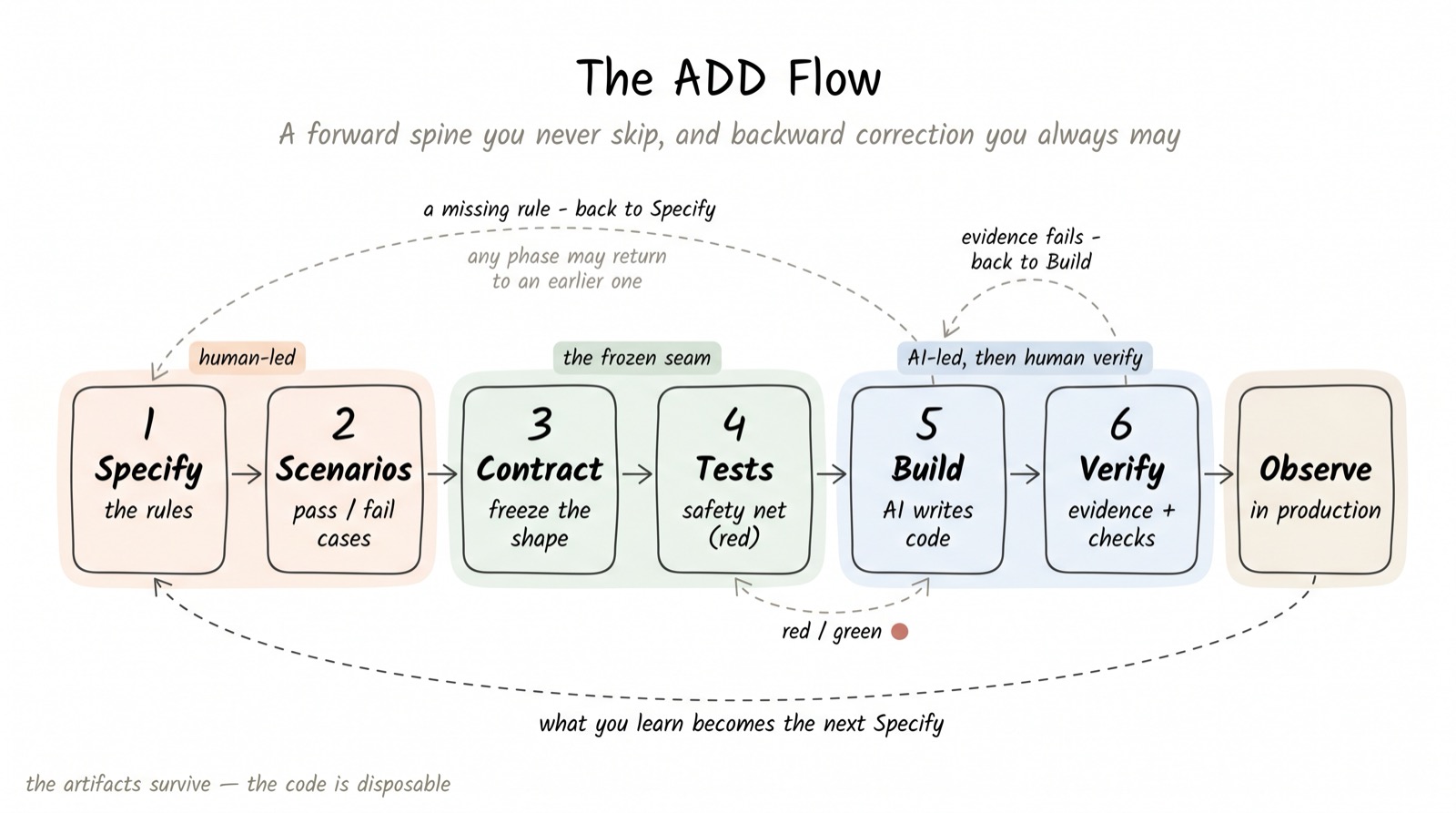
Specify → Scenarios → Contract → Tests → Build → Verify → observe, then repeat.
Install and run your first feature
ADD ships as AI Agent skill — you install it once, then
talk to the agent and it drives the method.
Here is the whole path, from nothing to your first running feature.
- Prerequisites: Node ≥ 18 (npm path) or Python ≥ 3.10 (pip path)
- CLI Coding Agent: Claude Code, Codex, ...
- Maximize performance with agent's skillset: https://github.com/ccsk-org/ccsk-cli (recommended - opt-in)
1 · Install into your project
From your project root (an empty folder or an existing repo), pick either ecosystem:
# Node / npm
npx @pilotspace/add init
or
# Python / pip
pip install pilotspace-add && pilotspace-add init
or, on Claude Code, install the skill straight from the marketplace — no npm or pip needed:
/plugin marketplace add pilotspace/ADD
/plugin install add@add-method
Open /add and say what you want to build. On first run the skill materializes the engine
and the AIDD book into your project (.add/tooling/ + .add/docs/) straight from the plugin,
then scaffolds .add/. The result is self-contained and portable — identical to an npm or pip
install, so every agent and a human at the shell can run python3 .add/tooling/add.py.
2 · Spawn your first feature — talk to the agent
In Claude Code, run /add and say what you want to build:
/add 'Describe your goal'
From there the agent runs the on-ramp for you:
- Orients from
add.py status(the resume point) — never re-reading your repo. - Sizes your request into a milestone (goal · scope · breadth-first tasks ·
exit criteria) — you confirm the shape. - Drafts each feature's one-approval front — Spec + Scenarios + Contract + Tests
as one bundle — you give one approval at the frozen contract. - Runs build → verify to green; a security finding always stops back to you.
So your first feature is: describe it → confirm the milestone → approve the contract
→ review the result. Everything in between is the agent.
3 · Resume anytime
/add
AI will report to you how are current status of this project?
State lives on disk, not in the chat — close your laptop, come back tomorrow, and this
tells you exactly where you left off. No context rot.
Go deeper: the 2-minute Getting Started · the
full hands-on walkthrough (one real feature, end to
end) · package source · CHANGELOG.
Releases: @pilotspace/add (npm) · pilotspace-add (PyPI) — one tag publishes both
(see .github/workflows/publish.yml).
Table of contents
Part I — Foundations
Part II — The method, step by step
- 03 · Step 1 — Specify
- 04 · Step 2 — Scenarios
- 05 · Step 3 — Contract
- 06 · Step 4 — Tests
- 07 · Step 5 — Build
- 08 · Step 6 — Verify
- 09 · The loop — observe and learn
Part III — Operating the method
- 10 · Project setup and stages
- 11 · Governance
- 12 · Roles and responsibilities
- 13 · Adoption and onboarding
- 14 · The foundation: project context across milestones
Lineage
Releasing
Components
Part IV — Reference
- Appendix A · Templates
- Appendix B · Prompt library
- Appendix C · Glossary
- Appendix D · The worked example, end to end
- Appendix E · Checklists
- Appendix F · Document requirements matrix (Project → Milestone → Task)
- Appendix G · References & lineage
Conventions used in this book
- ▶ Example marks the running worked example.
- Do / Don't boxes give the rule in its shortest form.
- A gate is a checkpoint with an explicit pass/fail exit. Its outcome is always one of
PASS,RISK-ACCEPTED(a signed waiver), orHARD-STOP. - File names like
SPEC.md,features/*.feature,contracts/*refer to the artifacts you create per feature; see Appendix A. - Where this book uses a plain step name, the formal phase name (for teams mapping to a larger standard) appears once in Appendix C.
Yorumlar (0)
Yorum birakmak icin giris yap.
Yorum birakSonuc bulunamadi