Describe what you want in plain language and your AI coding assistant does it in the Unreal Editor: builds Blueprints, edits the ones you already have, lays out UMG screens, creates assets, generates levels, runs tests. PinWright is an editor plugin that runs a local MCP server and connects the assistant you already use (Claude Code, Codex, Cursor, Gemini CLI, VS Code Copilot, or any other MCP client) to the editor itself. If you use one of these, you have everything you need: PinWright needs no subscription, API key or credits of its own and works through the AI plan you already pay for.
Install
Open your AI coding assistant (Claude Code, Codex CLI, Cursor in agent mode, Gemini CLI, Cline) in your Unreal project's folder and give it this prompt. Give it the same prompt again later to update. To install by hand, see Install it yourself.
Install PinWright into this Unreal project and connect yourself to it by following https://github.com/PinWright/pinwright-ue/blob/master/AGENT_INSTALL.md
How it compares
PinWright fully supports more features than any other Unreal MCP tool. Each product was graded on 341 features from its own source code (full matrix with evidence; graded 2026-09-28, PinWright re-checked 2026-10-03):
|
Yes |
Partial |
No |
| PinWright |
224 |
87 |
30 |
| ue-mcp |
177 |
115 |
49 |
| Monolith |
110 |
151 |
79 |
| ChiR24 Unreal_mcp |
100 |
132 |
109 |
| Epic UE 5.8 MCP |
73 |
124 |
142 |
| VibeUE |
59 |
188 |
94 |
What you can ask for
Talk to your agent about the game, and it works in the editor you have open:
- "Build the settings menu from this mockup." It authors the widget tree, styles and bindings in UMG, and you see the result in the designer.
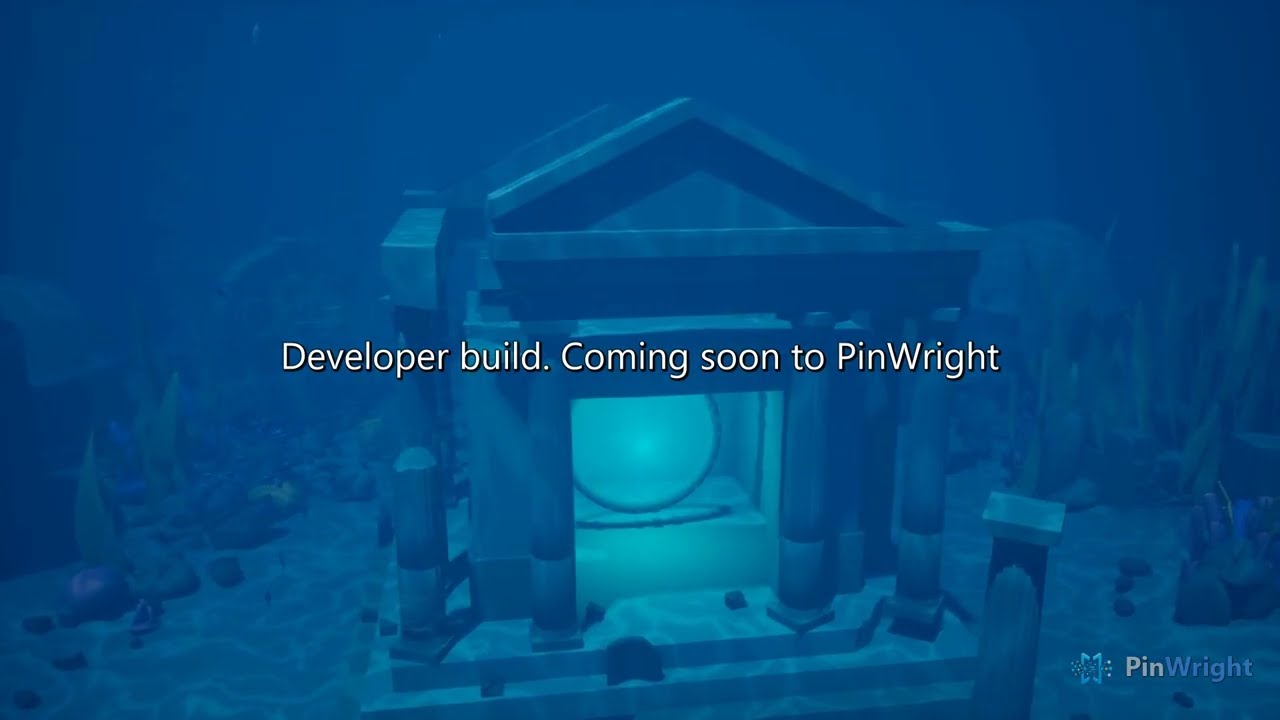
- "Make a forest level with a river and a cabin." Landscape, foliage, sky and props, placed by measurement rather than guessed coordinates. The video below is one such level.
- "Create a jump pad Blueprint that launches the character upward on overlap." Gameplay logic from a sentence, compiled and ready to place.
- "Find every Blueprint that still reads the old Health variable and fix them." It dumps the project to text, greps it, edits the graphs and compiles them.
- "The door in the lobby does not open when the player walks up to it. Find out why and fix it." The agent starts Play-In-Editor, sends input to reproduce the bug, reads live game state and logs, fixes the Blueprint or C++, rebuilds, and plays again to confirm the fix.
- "Why did the HUD go blank in the last playtest?" It queries the recorded Play-In-Editor session (gameplay data needs instrumentation in your project).
- "Model a spur gear and a chess rook for the workshop scene." Both become Static Mesh assets from short text recipes; the same recipes ship as examples.
- "Set up sunset lighting: directional light, sky atmosphere, height fog, warm color grading." Placed and tuned in the open level.
Example: a level from one prompt
Landscape, foliage, sky and placed props, generated by an agent through PinWright's level-generation namespaces from a single prompt. The video is the unedited result.
What it is
An editor-only Unreal Engine plugin that speaks MCP (Model Context Protocol) on a loopback port. The assistant reads your project first, makes the change, compiles, and shows you the result. It also keeps everything it could already do on its own, including writing your C++ and rebuilding it through Unreal Build Tool; PinWright adds the editor side on top. We use it daily on a commercial UE5 title. It is strongest at inspecting and dumping a project, authoring Blueprints and UMG widgets, creating data assets, and recording Play-In-Editor sessions. It also generates meshes, skeletons and animation from text recipes, builds levels (terrain, foliage, sky, precise placement), and authors materials and Niagara systems. 1,309 operations across 68 namespaces, developed against 5,839 automated tests.
Quick start
Install it yourself
Get the plugin. Download the prebuilt zip for your engine version from Releases (Windows), install from Fab through the Epic Launcher, or clone this repository and build it (Windows and Linux). All three are the same code under MIT:
git clone https://github.com/PinWright/pinwright-ue.git <Project>/Plugins/PinWright
If you cloned it elsewhere, move the PinWright folder into your project's Plugins directory or the engine's.
Build and open. Regenerate project files if your project is a C++ source checkout, build the editor target if Unreal asks for a rebuild, then open the editor and confirm the plugin under Editor Preferences -> Plugins -> PinWright.
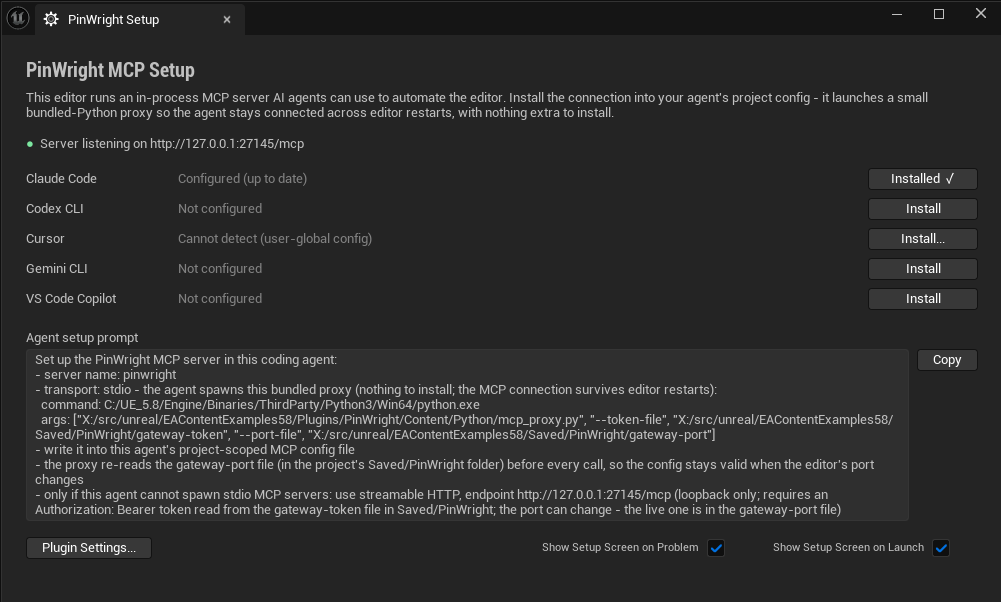
Click Install for your agent. The PinWright Setup screen opens on startup (Tools -> PinWright Setup reopens it). One click writes that agent's project-local MCP config with the endpoint and token already filled in, so there is no file to edit and no port to look up.
Ask for something small. For example: "Dump /Game/UI to text, then tell me which widget bindings point at variables that no longer exist."
Features
| Area |
What it does |
Maturity |
| Project inspection and dumps |
Inspect assets, query dependencies, import, rename and organize; dump any asset or folder to readable text for review and accurate agent context |
Core |
| Graph text IRs |
Round-trip for Blueprint (BPIR), material (MGIR), animation Blueprint (AGIR), Control Rig (CRIR); decompile-to-text for behavior tree, sound cue, MetaSound, Niagara, PCG |
Core |
| Blueprints and data assets |
Create and edit classes, variables, functions, events and graphs; compile and decompile; author Data Tables and other data assets |
Core |
| Widgets (UMG) |
Author the widget tree, styles, bindings and animations; export and import as XML |
Core |
| Actors, levels and system operations |
Spawn actors, edit transforms, manage levels, inspect world state, read logs, run editor commands and build or test helpers |
Core |
| Playtesting and bug fixing |
Start Play-In-Editor, send input, read live game state and logs; an agent can reproduce a bug, fix it, rebuild, and play again to verify the fix |
Core |
| Session recorder |
Record a Play-In-Editor session and query it to debug what happened (needs small documented C++ hooks in your game for gameplay values) |
Core |
| Model generation |
.pwmodel text recipes of geometry operations compile into Static Mesh assets, with materials, collision and UVs; live modeling helpers on placed meshes (geometry, model) |
Core |
| Skeleton and animation generation |
.pwskel defines skeletons, skin weights, sockets and physics assets; .pwanim compiles animation clips; helpers for montages, blend spaces, IK and retargeting (skeleton, animation, anim) |
Core |
| Level generation |
Landscape terrain (grid spawn, sculpting, noise seeding), foliage, sky, fog and time of day, plus spatial reasoning: raycasts, surface placement and annotated captures so the agent places things by measurement (landscape, environment, foliage, spatial) |
Core |
| Materials and Niagara |
Material graph authoring through MGIR; Niagara system and emitter editing |
Core |
All 67 public namespaces (1308 operations)
Every operation is documented in the in-editor wiki; the agent reads call("<namespace>") for any of these.
Not listed: internal plumbing namespaces, not intended for direct use - pipeline (1 operation).
Project & assets
asset: Operate on /Game/... content packages - discover, load, dump, import, rename/move, delete, and read dependencies (40 operations, Core)
| Operation |
What it does |
asset.bulk_delete |
Delete many assets in a single call. |
asset.bulk_rename |
Apply prefix/suffix/search-replace transformations to many asset names in one call. |
asset.create_folder |
Create a folder in the content browser |
asset.delete |
Delete one or more assets or whole content folders. |
asset.dependencies |
Get assets that reference this asset (inbound referencers). |
asset.dump |
Dump an asset's full inspectable state to disk as separate text files. |
asset.dump_folder |
Start an async dump of every asset under a content folder. |
asset.duplicate |
Duplicate an asset or folder |
asset.exists |
PIE-safe existence probe via the asset registry, loaded objects, and mounted package files. |
asset.find_by_tag |
Search the asset registry for assets whose UMetaData contains a given tag, optionally filtered by tag value. |
asset.find_objects_by_tag |
Find actors and components in the world by tag |
asset.fixup_redirectors |
Walk redirectors left behind by asset.rename / asset.move. |
asset.generate_lods |
Auto-generate UE's standard LOD chain for one or more StaticMesh assets using the default reduction settings. |
asset.generate_thumbnail |
Render an asset's thumbnail offscreen and optionally write it to disk. |
asset.get |
Read summary metadata (name, class, package, asset registry tags) for one asset by path. |
asset.get_asset_graph |
Get asset dependency graph via BFS traversal |
asset.get_dependencies |
Return assets that the given asset directly hard-references (Hard package dependencies). |
asset.get_dependencies_classified |
Get classified asset dependencies with mode and role filtering |
asset.get_material_stats |
Get a material's compiled shader statistics. |
asset.get_metadata |
Read all UMetaData key/value entries plus class-derived tags for one asset. |
asset.import |
Import a file from the local filesystem into the content browser using the matching UFactory. |
asset.is_dirty |
Read whether ONE loaded package currently needs saving. |
asset.list |
Browse a FOLDER: assets plus subfolders under one package path, with filtering and pagination. |
asset.list_material_instances |
List material instances that use a given parent material |
asset.map_references |
Return soft-UWorld UPROPERTY references for a single loaded asset, matching map_references.json from asset.dump. |
asset.mark_dirty |
Mark ONE loaded package dirty without writing anything to disk. |
asset.move |
Move an asset to a different folder and leave a redirector at the old path. |
asset.nanite_rebuild_mesh |
Toggle Nanite and/or rebuild its data for a StaticMesh. |
asset.references |
Get both directions for one asset. |
asset.reload |
Force-evict a loaded asset package and re-read it from disk within the current editor session. |
asset.rename |
Rename an asset and create a redirector at the old path so existing references keep resolving. |
asset.reset_instance_parameters |
Reset all parameter overrides on a material instance |
asset.save |
Persist ONE loaded asset to disk. |
asset.search |
FIND AN ASSET BY NAME - the answer to "which asset is called something like X?". |
asset.search_assets |
List assets by CLASS and/or package path - the no-name-in-hand path ("every SoundWave", "everything under /Game/Maps"). |
asset.set_metadata |
Write key/value metadata onto an asset's UMetaData store. |
asset.set_tags |
Write boolean metadata tags on an asset (each tag is stored as key=true in UMetaData). |
asset.source_control_checkout |
Check out assets from source control |
asset.source_control_submit |
Submit assets to source control |
asset.validate |
Validate if an asset exists and can be loaded |
blueprint: Author Blueprint classes (88 operations, Core)
| Operation |
What it does |
blueprint.add_construction_script |
Ensure a construction script graph exists on a blueprint |
blueprint.add_dispatcher |
Add an Event Dispatcher member variable and delegate signature graph to a Blueprint. |
blueprint.add_enum_entries |
Append enumerators to an existing user-defined enum. |
blueprint.add_event |
Add an event entry node to a Blueprint's EventGraph. |
blueprint.add_function |
Create a new UFunction graph on a Blueprint with caller-specified input/output pins. |
blueprint.add_interface |
Make a Blueprint implement a Blueprint Interface. |
blueprint.add_macro |
Create a new Blueprint macro graph with caller-specified tunnel input/output pins. |
blueprint.add_struct_field |
Add a field to a user-defined Blueprint struct. |
blueprint.add_variable |
Add a member variable to a Blueprint class. |
blueprint.build_api_index |
Scan all UClasses via reflection and write a Blueprint-callable API index to Saved/AI/ApiIndex.json |
blueprint.compile |
Run UE's Blueprint compiler on the named asset and return any compile errors/warnings. |
blueprint.compile_batch |
Compile many Blueprints in ONE call (an explicit list or a content folder) and report one row per Blueprint. |
blueprint.compile_bpir |
Compile BPIR (Blueprint IR) code into Blueprint graph nodes |
blueprint.create |
Create a new UBlueprint asset deriving from a parent UClass. |
blueprint.create_bpir_expression |
Create a BPIR expression node in a blueprint graph |
blueprint.create_enum |
Create a UUserDefinedEnum asset usable in Blueprint variables and pin defaults. |
blueprint.create_struct |
Create a UUserDefinedStruct asset usable in Blueprint variables and as a TMap value type. |
blueprint.decompile |
Decompile Blueprint graphs into BPIR (Blueprint IR) text |
blueprint.decompile_function |
Decompile a specific Blueprint function to BPIR text |
blueprint.decompile_macro |
Decompile a specific Blueprint macro to BPIR text |
blueprint.delete_unused_variables |
Find and optionally delete unused member variables in a Blueprint |
blueprint.ensure_exists |
Idempotent BP existence guard: probes the asset and creates it (via blueprint.create) when missing. |
blueprint.exists |
Check whether a blueprint asset exists |
blueprint.get |
Return summary metadata for a Blueprint. |
blueprint.get_node_connections |
Get pin connections for a node (upstream and downstream) |
blueprint.graph.break_pin_links |
Break all links on a pin |
blueprint.graph.connect_pins |
Wire an output pin to an input pin between two existing graph nodes. |
blueprint.graph.connect_pins_batch |
Wire many output->input pin pairs in one Blueprint graph in one call and one undo transaction. |
blueprint.graph.create_node |
Spawn a single graph node in an existing UEdGraph and return its node id. |
blueprint.graph.create_reroute_node |
Create a reroute (knot) node |
blueprint.graph.delete_node |
Delete a node from a blueprint graph |
blueprint.graph.delete_orphaned_nodes |
Delete orphaned nodes (unconnected, side-effect-free) from a blueprint graph. |
blueprint.graph.find_node_types |
Search the Blueprint action database for spawnable node types. |
blueprint.graph.find_nodes |
Search for nodes matching a query string |
blueprint.graph.find_orphaned_nodes |
Find blueprint graph nodes unreachable from any entry point (read-only) |
blueprint.graph.get_execution_flow |
Walk execution pin connections from a starting node (BFS) |
blueprint.graph.get_graph_connections |
Get all connections in a blueprint graph |
blueprint.graph.get_graph_details |
Get details about a specific graph including its nodes |
blueprint.graph.get_node_details |
Get detailed information about a specific node |
blueprint.graph.get_node_details_batch |
Get details for multiple nodes in one call |
blueprint.graph.get_node_type_pins |
Return the expected pin list for a node type id from blueprint.graph.find_node_types (spawn-and-scan) |
blueprint.graph.get_nodes |
Get all nodes in a blueprint graph |
blueprint.graph.get_pin_details |
Get details about a node's pins |
blueprint.graph.get_pin_details_batch |
Get pin details for multiple nodes in one call |
blueprint.graph.list_graphs |
Enumerate every UEdGraph in a Blueprint. |
blueprint.graph.list_node_types |
List all available K2Node types for node creation |
blueprint.graph.reconstruct_node |
Reconstruct one K2 node in memory after a shape-changing reflected property write, refresh the graph. |
blueprint.graph.replace_node |
Substitute one node for another in place, transferring matched pin connections and defaults. |
blueprint.graph.set_node_property |
Set one supported presentation property on a Blueprint graph node. |
blueprint.graph.set_pin_default_value |
Set the default value on a node's input pin |
blueprint.graph.set_pin_default_values |
Batch set default values on multiple node pins |
blueprint.insert_bpir_at_node |
Insert BPIR code after a selected node in the graph |
blueprint.insert_bpir_before_node |
Insert BPIR code before a selected node in the graph |
blueprint.inspect |
Blueprint summary: metadata, variables, functions, events, components, graphs, references, and warnings. |
blueprint.list |
Enumerate blueprint assets with filters and paging. |
blueprint.list_struct_fields |
List fields in a user-defined Blueprint struct |
blueprint.modify_scs |
Batch modify Blueprint Simple Construction Script (SCS) components |
blueprint.preview_construction |
Run an Actor Blueprint's construction scripts (SCS + UserConstructionScript) on a throwaway transient. |
blueprint.probe_handle |
Lightweight check for blueprint existence without loading |
blueprint.record_dispatcher |
Record a Blueprint Event Dispatcher (or any dynamic multicast delegate) firing on a live object. |
blueprint.references |
Find asset/class references used by blueprint graph nodes and pins |
blueprint.remove_event |
Remove an event from a Blueprint |
blueprint.remove_function |
Remove a function or macro graph from a Blueprint |
blueprint.remove_interface |
Remove a Blueprint Interface implementation from a Blueprint. |
blueprint.remove_struct_field |
Remove a field from a user-defined Blueprint struct |
blueprint.remove_variable |
Remove a variable from a blueprint |
blueprint.rename_variable |
Rename a variable in a blueprint |
blueprint.reparent |
Change the parent UClass of a Blueprint. |
blueprint.scs.add_component |
Add a component template to a Blueprint's class-level SCS tree (every spawned instance will get this component). |
blueprint.scs.duplicate_component |
Duplicate a Blueprint SCS component template, optionally copying children, properties, attachment. |
blueprint.scs.get |
Read the Simple Construction Script (SCS) component tree of a Blueprint class. |
blueprint.scs.remove_component |
Remove a component from a Blueprint's SCS |
blueprint.scs.reparent_component |
Reparent a component in a Blueprint's SCS hierarchy |
blueprint.scs.set_property |
Set a UPROPERTY on an SCS component template (class-level default), so every newly spawned instance picks it up. |
blueprint.scs.set_spline_points |
Author the point data of a USplineComponent that lives in a Blueprint's SCS (class template). |
blueprint.scs.set_transform |
Set transform of a component in a Blueprint's SCS |
blueprint.search |
Search all indexed Blueprint assets using UE's Find-in-Blueprints system |
blueprint.search_api |
Keyword search over the API index built by blueprint.build_api_index |
blueprint.set_default |
Mutate the Blueprint's class default object (CDO) so every newly spawned instance starts with this value. |
blueprint.set_enum_entries |
Replace user-defined Blueprint enum entries with new names. |
blueprint.set_function_settings |
Set Blueprint function settings (access, pure/const/exec, call-in-editor, category) |
blueprint.set_metadata |
Set metadata on a blueprint asset |
blueprint.set_struct_field_default |
Set the default value for an existing user-defined struct field. |
blueprint.set_struct_field_metadata |
Set or clear a metadata key on an existing user-defined struct field. |
blueprint.set_variable_metadata |
Apply metadata to a Blueprint variable |
blueprint.set_variable_settings |
Set Blueprint variable settings (visibility, editable/read-only, expose-on-spawn, replication, and category) |
blueprint.undo_last_bpir |
Undo the last BPIR compilation by deleting created nodes |
blueprint.update_bpir_expression |
Update the BPIR text of an existing expression node |
data_table: Author and inspect UDataTable rows (6 operations, Core)
| Operation |
What it does |
data_table.add_row |
Add a new row to a DataTable. |
data_table.create |
Create a new UDataTable asset bound to a row struct, so the row-CRUD verbs have a table to author. |
data_table.list_rows |
Return the DataTable's rowStruct, rowCount, and rows map (same shape as data_table.json asset dumps). |
data_table.remove_row |
Remove a row from a DataTable. |
data_table.set_row |
Overwrite an existing row's values from JSON. |
data_table.set_row_struct |
Rebind a DataTable to a different row struct. |
chooser: Author UChooserTable assets (6 operations, Core)
| Operation |
What it does |
chooser.add_column |
Append a first-slice chooser column. |
chooser.add_row |
Append a chooser row and initialize column cell storage. |
chooser.compile |
Compile a chooser table and return diagnostics. |
chooser.create |
Create a UChooserTable asset. |
chooser.set_cell |
Set a chooser cell value using the stored column kind. |
chooser.set_result |
Set a chooser row result. |
input: Authors Enhanced Input assets (5 operations, Core)
| Operation |
What it does |
input.add_mapping |
Bind a hardware key to an Input Action inside an Input Mapping Context. |
input.create_input_action |
Create a new Enhanced Input UInputAction asset at the given folder. |
input.create_input_mapping_context |
Create a new Enhanced Input UInputMappingContext (IMC) asset. |
input.get_input_info |
Inspect an Input Action or Input Mapping Context asset. |
input.remove_mapping |
Unbind every key currently mapped to an Input Action inside an Input Mapping Context. |
texture: Inspect, transform, and configure texture assets, plus create render targets, procedural patterns (27 operations, Core)
| Operation |
What it does |
texture.adjust_curves |
Adjust color curves |
texture.adjust_levels |
Adjust levels |
texture.blur |
Blur texture |
texture.channel_extract |
Extract channel |
texture.channel_pack |
Pack channels |
texture.combine_textures |
Full-frame blend of two same-size textures (no placement; overlay alpha ignored) |
texture.configure_virtual_texture |
Configure VT settings |
texture.create_from_pixels |
Create a texture from caller-supplied pixel data (base64 RGBA8 or Gray8 bytes, row-major from the top-left). |
texture.create_gradient_texture |
Create a procedural gradient texture |
texture.create_noise_texture |
Create a procedural FBM noise texture (Perlin value noise or Worley/Voronoi cellular) |
texture.create_normal_from_height |
Generate a normal map from height |
texture.create_pattern_texture |
Create a procedural pattern texture |
texture.create_render_target |
Create render target |
texture.create_text_texture |
Create a texture with text rasterised from a real font. |
texture.desaturate |
Desaturate texture |
texture.describe |
Describe any UTexture subclass using the texture dump JSON shape |
texture.get_pixel_stats |
Read live source-mip pixel content (per-channel mean/min/max, grayscale flag, content hash) so. |
texture.get_texture_info |
Get texture info |
texture.invert |
Invert texture |
texture.resize_texture |
Resize texture |
texture.set_compression_settings |
Set texture compression settings |
texture.set_lod_bias |
Set texture LOD bias |
texture.set_streaming_priority |
Set streaming priority |
texture.set_texture_filter |
Set filter |
texture.set_texture_group |
Set texture group |
texture.set_texture_wrap |
Set wrap mode |
texture.sharpen |
Sharpen texture |
geometry: Create and modify procedural or existing mesh geometry with editor modeling helpers, including UVs, collision (93 operations, Core)
| Operation |
What it does |
geometry.append_buffers |
Bulk-append vertices + indexed triangles (with optional per-vertex normals/UVs/colors) to a DynamicMeshActor. |
geometry.append_triangle |
Add a triangle to a dynamic mesh by specifying three vertex positions |
geometry.append_vertex |
Add a single vertex to a dynamic mesh |
geometry.array_linear |
Merge offset copies of a dynamic mesh into its own geometry (does not spawn new actors) |
geometry.array_radial |
Merge rotated copies of a dynamic mesh into its own geometry around a center (does not spawn new actors) |
geometry.audit_skeletal_animation_floating |
Evaluate a skeletal mesh in the actual frames of an animation sequence and report the component islands. |
geometry.audit_static_meshes |
Sweep a folder (or a named set) of SAVED StaticMesh assets in ONE call and report the ones that are. |
geometry.auto_uv |
Alias of geometry.unwrap_uv (same XAtlas auto-unwrap); accepts uvChannel, defaults to channel 0 |
geometry.bake_ambient_occlusion |
Ray-cast a dynamic mesh against itself and write the resulting ambient-occlusion term into chosen. |
geometry.bend |
Apply bend deformer to a dynamic mesh |
geometry.bevel |
Apply bevel to safe polygroup edges of a dynamic mesh. |
geometry.bind_skin_weights |
Bind a DynamicMeshActor's mesh to a skeleton, writing BASE skin weights for every vertex in one call. |
geometry.boolean_intersection |
Perform boolean intersection of two dynamic mesh actors |
geometry.boolean_subtract |
Perform boolean subtraction of two dynamic mesh actors |
geometry.boolean_trim |
Trim a mesh using another mesh as a cutting tool. |
geometry.boolean_union |
Perform boolean union of two dynamic mesh actors |
geometry.bridge |
Bridge between boundary loops of a dynamic mesh with a single triangle strip |
geometry.check_health |
Report geometry defects of a dynamic mesh (read-only). |
geometry.convert_to_skeletal_mesh |
Bake a DynamicMeshActor into a SkeletalMesh asset and force it to disk. |
geometry.convert_to_static_mesh |
Bake a dynamic mesh into a StaticMesh asset. |
geometry.create_arch |
Create an arch (partial torus) dynamic mesh actor |
geometry.create_box |
Create a box/cube dynamic mesh actor. |
geometry.create_capsule |
Create a capsule dynamic mesh actor |
geometry.create_cone |
Create a cone dynamic mesh actor |
geometry.create_cylinder |
Create a cylinder dynamic mesh actor |
geometry.create_disc |
Create a disc dynamic mesh actor |
geometry.create_from_skeletal_mesh |
Load an existing SkeletalMesh asset into an editable DynamicMeshActor. |
geometry.create_from_static_mesh |
Load an existing StaticMesh asset (or the mesh of a placed actor) into an editable DynamicMeshActor. |
geometry.create_pipe |
Create a hollow pipe dynamic mesh actor |
geometry.create_plane |
Create a plane/rectangle dynamic mesh actor |
geometry.create_procedural_mesh |
Create an empty DynamicMeshActor for procedural mesh building |
geometry.create_ramp |
Create a ramp (wedge) dynamic mesh actor |
geometry.create_ring |
Create a ring (disc with hole) dynamic mesh actor |
geometry.create_sphere |
Create a box-topology sphere dynamic mesh actor: a rounded cube, with no poles and no seam. |
geometry.create_spiral_stairs |
Create a curved/spiral staircase dynamic mesh actor |
geometry.create_stairs |
Create a linear staircase dynamic mesh actor |
geometry.create_torus |
Create a torus dynamic mesh actor |
geometry.cylindrify |
Project vertices of a dynamic mesh toward a cylinder |
geometry.delete_triangle |
Remove a triangle from a dynamic mesh |
geometry.delete_triangles_by_bone_influence |
Delete a skinned dynamic mesh's triangles by skin weight. |
geometry.delete_vertex |
Remove a vertex from a dynamic mesh (also removes connected triangles) |
geometry.difference |
Perform boolean subtraction (alias for boolean_subtract) |
geometry.duplicate_along_spline |
Duplicate an actor along a spline path |
geometry.edge_split |
Split edges of a dynamic mesh by inserting midpoint vertices |
geometry.export_obj |
Export a DynamicMeshActor's mesh as Wavefront OBJ text (v/vt/vn/f). |
geometry.export_stl |
Export a DynamicMeshActor's mesh as STL (ASCII by default, or binary). |
geometry.extrude |
Extrude faces of a dynamic mesh |
geometry.extrude_along_spline |
Extrude a profile along a spline path |
geometry.fill_holes |
Fill all holes in a dynamic mesh |
geometry.flip_normals |
Flip all normals on a dynamic mesh |
geometry.generate_collision |
Generate collision shapes for a dynamic mesh |
geometry.generate_complex_collision |
Generate complex collision using convex decomposition |
geometry.get_mesh_info |
Get information about a dynamic mesh. |
geometry.get_vertex_position |
Get the position of a vertex in a dynamic mesh |
geometry.import_obj |
Import Wavefront OBJ (from text or filePath) into a NEW DynamicMeshActor. |
geometry.import_stl |
Import STL (ASCII from text or filePath; binary from filePath only) into a NEW DynamicMeshActor. |
geometry.inset |
Inset faces of a dynamic mesh (shrink inward) |
geometry.loft |
Loft a surface between cross-section profiles |
geometry.measure |
Measure a dynamic mesh (read-only). |
geometry.merge_vertices |
Merge nearby vertices on a dynamic mesh |
geometry.mirror |
Mirror a dynamic mesh across a specified axis. |
geometry.noise_deform |
Apply Perlin noise deformation to a dynamic mesh |
geometry.offset_faces |
Offset faces of a dynamic mesh along normals |
geometry.outset |
Outset faces of a dynamic mesh (expand outward) |
geometry.pack_uv_islands |
Repack the existing UV islands of a dynamic mesh into the unit square, leaving the seams where they are |
geometry.poke |
Poke faces of a dynamic mesh (offset + subdivide) |
geometry.project_uv |
Apply UV projection (box, planar, or cylindrical) to a dynamic mesh |
geometry.recalculate_normals |
Recalculate normals on a dynamic mesh |
geometry.recompute_tangents |
Recompute tangents on a dynamic mesh. |
geometry.relax |
Apply relax (Laplacian smoothing) to a dynamic mesh |
geometry.remesh_uniform |
Apply uniform remeshing to a dynamic mesh |
geometry.remove_degenerates |
Repair degenerate triangles on a dynamic mesh in place, keeping a closed mesh closed. |
geometry.revolve |
Create a dynamic mesh actor by revolving an open profile path around the local Z axis. |
geometry.self_union |
Apply self-union to resolve self-intersections in a mesh |
geometry.set_lod_settings |
Configure LOD reduction settings for a specific LOD level |
geometry.set_uvs |
Set UV coordinates on a dynamic mesh vertex |
geometry.set_vertex_color |
Set vertex colors on a dynamic mesh |
geometry.set_vertex_position |
Set the position of a vertex in a dynamic mesh |
geometry.shell |
Apply shell/solidify to a dynamic mesh (creates inner wall) |
geometry.simplify_collision |
Simplify mesh and regenerate collision with fewer hulls |
geometry.simplify_mesh |
Simplify a dynamic mesh to a target percentage of triangles |
geometry.smooth |
Apply iterative smoothing to a dynamic mesh |
geometry.spherify |
Project vertices of a dynamic mesh toward a sphere |
geometry.split_normals |
Split normals on a dynamic mesh based on angle threshold |
geometry.stretch |
Stretch a dynamic mesh along an axis |
geometry.subdivide |
Subdivide a dynamic mesh (PN tessellation) |
geometry.sweep |
Sweep a cross-section profile along a path or spline |
geometry.taper |
Apply taper/flare deformer to a dynamic mesh |
geometry.transform_uvs |
Transform UV coordinates (translate, scale, rotate) |
geometry.translate_mesh |
Translate (move) an entire dynamic mesh |
geometry.twist |
Apply twist deformer to a dynamic mesh |
geometry.unwrap_uv |
Auto-generate UV unwrapping for a dynamic mesh using XAtlas (geometry.auto_uv is an alias of this verb) |
geometry.weld_vertices |
Weld edges with matching vertices on a dynamic mesh |
model: Compile a .pwmodel text recipe of geometry operations into exactly one Static Mesh asset (3 operations, Core)
| Operation |
What it does |
model.compile |
Compile a .pwmodel source file into exactly one UStaticMesh or USkeletalMesh asset. |
model.describe_ops |
Index the .pwmodel vocabulary, or return complete metadata for one op or parameter set. |
model.validate |
Parse and compile a .pwmodel document without writing an asset. |
Inspect, debug & data
property: Reflection-based UPROPERTY accessors (set, reset, get, list) on any UObject (4 operations, Core)
| Operation |
What it does |
property.get |
Read a UPROPERTY value from a UObject by name and return it as JSON. |
property.list |
List properties on a UObject with current/default/override state |
property.reset |
Reset a UPROPERTY to its class default and clear explicit override metadata. |
property.set |
Set a UPROPERTY value on a UObject by name using property reflection. |
container: Per-element CRUD on TArray, TMap, and TSet UPROPERTYs of any UObject (16 operations, Core)
| Operation |
What it does |
container.array.append |
Append an element to an array property |
container.array.clear |
Clear all elements from an array property |
container.array.get |
Get an element from an array by index |
container.array.insert |
Insert an element into an array at an index |
container.array.remove |
Remove an element from an array by index |
container.array.set |
Set an element in an array by index |
container.map.clear |
Clear all entries from a map property |
container.map.get |
Get a value from a map property by key |
container.map.get_keys |
Get all keys from a map property |
container.map.has_key |
Check if a map property contains a key |
container.map.remove |
Remove a key from a map property |
container.map.set |
Set a value in a map property |
container.set.add |
Add an element to a set property |
container.set.clear |
Clear all elements from a set property |
container.set.contains |
Check if a set property contains an element |
container.set.remove |
Remove an element from a set property |
object: Generic UObject UFunction-invocation escape hatch (1 operation, Core)
| Operation |
What it does |
object.call_function |
Invoke a UFUNCTION on any UObject (actor, component, asset, subsystem) by full path. |
static_mesh: Dump-parity live read plus targeted editing for UStaticMesh assets (4 operations, Core)
| Operation |
What it does |
static_mesh.bake_transform |
Bake a rotation/translation/uniform-scale transform into a StaticMesh asset in place. |
static_mesh.describe |
Return read-only StaticMesh metadata using the same JSON shape as static_mesh.json asset dumps. |
static_mesh.set_collision_complexity |
Set a StaticMesh asset's collision trace mode, recook its physics data, refresh loaded components, and optionally save. |
static_mesh.set_material |
Assign a material asset to a StaticMesh material slot by index and save the asset to disk. |
recorder: Query the editor-side debug journal recorder (8 operations, Core)
| Operation |
What it does |
recorder.describe_session |
MANDATORY FIRST CALL for any recorder query. |
recorder.find_events |
Find recorded events matching a filter - the 'locate the bad moment' tool. |
recorder.get_series |
Get the change-point series of one tag of one object over a time window, reduced to a bounded set of points. |
recorder.get_state |
Get the as-of value of one recorded object's tags at a specific timestamp. |
recorder.list_segments |
Pair the session's boundary events into named, typed segment windows. |
recorder.list_sessions |
List discoverable journal-recorder sessions under Saved/PinWright/Recordings, newest first. |
recorder.query |
Run a small Python snippet over a recorded journal session. |
recorder.summarize_change |
The workhorse delta summary. |
insights: Drive Unreal Insights capture from the editor (6 operations, Core)
| Operation |
What it does |
insights.export_trace |
Extract an Unreal Insights .utrace into CSV data products. |
insights.get_trace_path |
Read-only probe that returns the current Unreal Insights trace destination and connection state without. |
insights.set_channels |
Mutate the active Unreal Insights channel set mid-trace by forwarding to the 'Trace.Enable' / 'Trace.Disable'. |
insights.snapshot |
Flush the in-memory trace ring buffer to a .utrace file via FTraceAuxiliary::WriteSnapshot without stopping. |
insights.start_session |
Start an Unreal Insights file trace (FTraceAuxiliary::Start, auto-named .utrace in the profiling directory). |
insights.stop_session |
Stop the active Unreal Insights trace via FTraceAuxiliary::Stop. |
performance: Scalability, CVar, and performance-capture helpers for the active editor or PIE session (19 operations, Core)
| Operation |
What it does |
performance.apply_baseline_settings |
Set a curated bundle of r.* render CVars (VSync, HDR, motion blur, DoF, bloom, shadow, anisotropy) tuned. |
performance.configure_lod |
Configure LOD bias and forced LOD level |
performance.configure_nanite |
Enable or disable Nanite rendering |
performance.configure_occlusion_culling |
Configure occlusion culling settings |
performance.configure_texture_streaming |
Configure texture streaming settings. |
performance.enable_gpu_timing |
Enable or disable GPU timing stats |
performance.generate_memory_report |
Run UE's 'memreport' console command and write the breakdown (or 'memreport -full' for the detailed variant). |
performance.merge_actors |
Combine 2+ static-mesh actors into a single merged StaticMeshActor (UE's mesh-merge utilities). |
performance.optimize_draw_calls |
Configure draw call optimization CVars |
performance.optimize_shaders |
Recompile shaders by mode |
performance.run_benchmark |
Measure editor frame time over a window. |
performance.set_frame_rate_limit |
Set maximum FPS limit |
performance.set_resolution_scale |
Set screen percentage / resolution scale |
performance.set_scalability |
Set the engine scalability quality level. |
performance.set_vsync |
Enable or disable VSync |
performance.show_fps |
Toggle the on-screen FPS overlay (issues 'stat fps'). |
performance.show_stats |
Toggle an on-screen stat category overlay by issuing 'stat <category>'. |
performance.start_profiling |
Begin a stat-file capture by issuing 'stat startfile'. |
performance.stop_profiling |
Finalize the stat-file capture started by performance.start_profiling (issues 'stat stopfile') and return. |
Editor & system
editor: Drive the editor application itself (45 operations, Core)
| Operation |
What it does |
editor.close_asset |
Close every editor window currently displaying the named asset. |
editor.console_command |
Execute a console command in the editor world or, via the optional 'world' selector. |
editor.create_bookmark |
Save the current viewport camera transform into one of the 10 indexed level bookmarks (Ctrl+0..9 in the editor). |
editor.create_utility_widget |
Create a new UEditorUtilityWidgetBlueprint asset (a Blutility widget). |
editor.delete_selected_graph_nodes |
Delete the currently selected nodes in the active Blueprint graph editor and mark the Blueprint dirty. |
editor.dismiss_notifications |
Close every open editor notification toast. |
editor.eject |
Eject the player controller from its possessed pawn during PIE so the camera flies free. |
editor.focus_actor |
Frame the named actor in the active viewport (equivalent to selecting it and pressing F). |
editor.frame_graph |
Frame/zoom the on-screen node graph inside a target editor window. |
editor.get_content_browser_path |
Return the folder path currently focused in the Content Browser (e.g. /Game/Foo). |
editor.get_content_browser_selection |
Return the assets currently selected in the active Content Browser as a list of {name, path, class} entries. |
editor.get_selected_graph_nodes |
Return information about every node currently selected in the most recently activated Blueprint graph editor. |
editor.jump_to_bookmark |
Move the viewport camera to a previously stored bookmark slot (0..9). |
editor.launch_standalone |
Launch one or more separate -game processes against the current project. |
editor.list_dirty_packages |
Read-only diagnostic: list every dirty (unsaved) content and world package currently in memory (count + package names). |
editor.open_asset |
Open the named asset in its default editor (Blueprint editor, material editor, etc.). |
editor.open_level |
Load and open a level (.umap) in the editor as the active world. |
editor.pause |
Pause the active Play-In-Editor session. |
editor.pie_status |
Read-only probe enumerating every live PIE world context. |
editor.play |
Start a Play-In-Editor (PIE) session for the current level and answer only after the PIE world exists. |
editor.possess |
Possess the named actor with the player controller during PIE. |
editor.quit |
Gracefully request the editor to exit. |
editor.redo |
Redo the most recently undone editor transaction(s) (Ctrl+Y equivalent). |
editor.resize_window |
Resize a top-level editor window's CLIENT area (chrome excluded). |
editor.resume |
Resume a paused Play-In-Editor session. |
editor.run_utility_blueprint |
Execute UEditorUtilitySubsystem::TryRun on a UEditorUtilityBlueprint or UEditorUtilityWidgetBlueprint. |
editor.save_all |
Save every dirty world and content package. |
editor.screenshot |
Capture a PNG screenshot into Saved/Screenshots/. |
editor.screenshot_window |
Capture a full top-level editor window (including its chrome) to a PNG under Saved/Screenshots/EditorWindow. |
editor.set_camera |
Teleport the active level-editor viewport camera to a world-space location and orientation. |
editor.set_game_view |
Toggle 'Game View' in the active viewport. |
editor.set_preferences |
Set multiple console variables in one call by passing a {cvarName: value} map. |
editor.set_view_mode |
Switch the level viewport's rendering view mode. |
editor.set_viewport_realtime |
Enable or disable continuous (realtime) rendering of the active level-editor viewport. |
editor.set_window_state |
Set a top-level editor window's maximize/minimize/restore state. |
editor.simulate_input |
Inject a synthetic keyboard or mouse event. |
editor.spawn_utility_widget_tab |
Spawn and register a dockable tab for a UEditorUtilityWidgetBlueprint, returning the tab id for later closure. |
editor.standalone_status |
Observe a -game process spawned by editor.launch_standalone in this editor session. |
editor.start_recording |
Begin a network demo recording in the active PIE game world. |
editor.status |
Read-only probe for PIE / editor state. |
editor.step_frame |
Advance the paused PIE session by exactly one frame of deltaSeconds and freeze again, world and UI together. |
editor.stop |
Stop an active or pending Play-In-Editor session and answer only after Unreal reports that no PIE session. |
editor.stop_recording |
Stop the active network demo recording via the 'DemoStop' console command. |
editor.undo |
Undo the most recent editor transaction(s) (Ctrl+Z equivalent). |
editor.undo_history |
Read-only: the editor transaction buffer. |
system: Process- and engine-level controls (27 operations, Core)
| Operation |
What it does |
system.console.search |
Substring-search the live IConsoleManager registry for variables/commands matching query. |
system.console_command |
Run a console command at the process / GEngine scope. |
system.identity |
Identity of the editor PROCESS answering this call. |
system.inspect.find_by_class |
Find every actor in the resolved world (PIE-first in 'auto') whose class name (or path) matches the query. |
system.inspect.find_by_tag |
Find every actor in the resolved world (PIE-first in 'auto') that has the given Tags entry. |
system.inspect.find_objects_by_class |
Enumerate live UObject INSTANCES of a class across the whole object graph. |
system.inspect.get_game_instance |
Return the live UGameInstance for the selected world (see world) as { objectPath, className }. |
system.inspect.get_game_mode |
Return the live authoritative AGameModeBase for the selected world (see world) as { objectPath, className }. |
system.inspect.get_game_state |
Return the live AGameStateBase for the selected world (see world) as { objectPath, className }. |
system.inspect.get_local_players |
Return the live ULocalPlayers for the selected world (see world) as an array. |
system.inspect.get_player_controllers |
Return the live APlayerControllers for the selected world (see world) as an array. |
system.inspect.get_player_states |
Return the live APlayerStates for the selected world (see world) as an array of { objectPath, className, playerIndex }. |
system.inspect.get_selected_actors |
Return the actors currently selected in the level editor as {name, path, class} entries. |
system.inspect.get_viewport_info |
Return the active viewport's pixel width/height plus the level-editor camera transform. |
system.inspect.inspect_class |
Resolve a UClass by short name, U/A-prefixed name, /Script/ path. |
system.inspect.inspect_object |
Inspect a UObject (typically an actor) by path or display name and report its properties, transform. |
system.inspect.list_actor_classes |
Enumerate the distinct actor classes present in the resolved world (PIE-first in 'auto') as {class, count}. |
system.inspect.list_actor_tags |
Enumerate the distinct AActor::Tags in use across the resolved world (PIE-first in 'auto') as {tag, count}. |
system.inspect.list_objects |
Enumerate AActors in the resolved world (PIE-first in 'auto') as {name, label, path, class} entries. |
system.inspect.list_subsystems |
Enumerate live UEngine/UEditor/UGameInstance/UWorld/ULocalPlayer subsystem instances. |
system.inspect.search_classes |
Ranked keyword search over the native UClass catalog with parent / module / flag filters. |
system.job_cancel |
Stop a running long-running job. |
system.job_list |
List active and recently-completed long-running jobs |
system.job_status |
Return the status of a previously started long-running job |
system.live_coding_compile |
Trigger the editor's own in-process Live Coding compile (Ctrl+Alt+F11 equivalent), wait for it. |
system.live_coding_status |
Report in-process Live Coding availability. |
system.run_tests |
Run UE automation tests and report pass/fail counts. |
python: Run code (or a .py file path) inside UE's built-in Python interpreter for editor APIs exposed (2 operations, Core)
| Operation |
What it does |
python.callbacks |
List or clear the Slate tick / Python shutdown callbacks Python scripts registered. |
python.execute |
Execute Python code or a .py file via UE's built-in Python interpreter |
source_control: Query and mutate the editor's source-control provider state (6 operations, Core)
| Operation |
What it does |
source_control.connect |
Switch to / bring up a source-control provider so the namespace becomes usable |
source_control.get_provider |
Return the active source-control provider's name and connectivity flags |
source_control.log |
Return revision history for a single asset |
source_control.mark_for_add |
Mark a batch of asset paths for add |
source_control.revert |
Discard local changes for a batch of asset paths, and resynchronize the loaded packages with the reverted bytes. |
source_control.status |
Refresh and return source-control state for a batch of asset paths |
localization: Run the Unreal Localization Dashboard's GatherText commandlet from a tracked PinWright job (2 operations, Core)
| Operation |
What it does |
localization.compile |
Run the named project's Unreal localization Compile config as a tracked commandlet job. |
localization.gather |
Run the named project's Unreal localization Gather config as a tracked commandlet job. |
misc: Catch-all for cross-cutting editor primitives that don't justify their own namespace (5 operations, Core)
| Operation |
What it does |
misc.create_camera |
Spawn an ACameraActor (or, with cine=true / cameraClass="cine", an ACineCameraActor) in the active level. |
misc.create_post_process_volume |
Spawn an APostProcessVolume actor in the active level. |
misc.set_camera_fov |
Set the FieldOfView property on an existing camera actor (degrees). |
misc.set_game_speed |
Set the global TimeDilation on the active world (1.0 = real-time, 0.5 = half-speed slow-mo, 2.0 = double-speed). |
misc.set_replication |
Set bReplicates and bReplicateMovement on the actor CDO of an Actor Blueprint asset. |
UI & widgets
widget: Asset-side UMG authoring: create Widget Blueprints, edit their tree and properties, bind events, and drive animations (32 operations, Core)
| Operation |
What it does |
widget.add |
Add any widget type to a widget blueprint by class name |
widget.add_animation_keyframe |
Add a finite float key to a validated reflected float-property track without partial error-path mutation |
widget.add_animation_track |
Add a reflected float-property track for a widget after validating and staging the complete edit |
widget.bind |
Bind a widget property or bindable event to a handler function on the widget blueprint. |
widget.bind_event |
Verify/refresh an existing widget event binding. |
widget.create_widget_animation |
Create a new widget animation in a UMG widget blueprint |
widget.create_widget_blueprint |
Author a new UWidgetBlueprint asset (UMG widget). |
widget.delete_animation |
Delete a widget animation from a blueprint |
widget.describe |
Describe a widget blueprint: tree with overridden properties, slot info, and bindings per widget |
widget.duplicate |
Duplicate a widget-tree child, optionally copying its subtree, authored properties, slot data, and placement. |
widget.export_animations_json |
Export persisted UWidgetAnimation MovieScene tracks as JSON. |
widget.export_xml |
Export a widget blueprint tree as XML/HTML-like markup with all overridden properties |
widget.get_animation_info |
Get information about widget animations |
widget.get_animation_section_ranges |
Read the [start, end) range of each section in a widget animation. |
widget.get_class_properties |
Return all editable properties for one or more UMG widget classes, with struct field recursion |
widget.get_designer_visibility |
Get the editor-only Widget Blueprint hierarchy eye visibility for a widget-tree child. |
widget.import_animations_json |
Import persisted UWidgetAnimation JSON into a widget blueprint. |
widget.import_xml |
Import XML markup to build or replace a widget tree |
widget.remove_animation_binding |
Remove a specific widget binding from an animation |
widget.remove_widget |
Delete a child widget from a UWidgetBlueprint's widget tree by name. |
widget.rename_widget |
Rename a child widget within a UWidgetBlueprint's widget tree. |
widget.reparent_widget |
Move a child widget to a different parent panel within the same UWidgetBlueprint. |
widget.replace_class |
Replace a widget's class while preserving its children and (for non-root) its parent slot. |
widget.screenshot_designer |
Capture the Widget Blueprint Designer preview or containing editor window as a PNG under. |
widget.set |
Set properties and slot properties on a widget by name |
widget.set_animation_loop |
Returns NOT_SUPPORTED. |
widget.set_animation_playback_range |
Set the playback range (duration) of a widget animation |
widget.set_animation_section_range |
Set the start and/or end of every matched section in a widget animation. |
widget.set_animation_speed |
Returns NOT_SUPPORTED. |
widget.set_designer_visibility |
Set the editor-only Widget Blueprint hierarchy eye visibility for a widget-tree child without changing. |
widget.set_image_brush |
Set an FSlateBrush UPROPERTY (default 'Brush') on a widget instance from a texture/material/atlas resource. |
widget.wrap |
Wrap an existing non-root widget with a new panel widget. |
ui: Runtime UMG operations on live widget instances (10 operations, Core)
| Operation |
What it does |
ui.activatable_pop |
Pop the active (or named) activatable widget off a stack. |
ui.activatable_push |
Instantiate an activatable widget and push it onto a UCommonActivatableWidgetContainerBase. |
ui.create_hud |
Construct a UMG widget instance from a UWidgetBlueprint and add it to the player viewport at runtime. |
ui.get_active_widget |
Return the currently-active (top) activatable widget on a stack. |
ui.list_stack_widgets |
List all activatable widgets currently on a stack, top -> bottom. |
ui.remove_widget_from_viewport |
Remove a UMG widget instance from the player viewport, undoing a prior ui.create_hud. |
ui.screenshot |
Capture a screenshot of the active viewport. |
ui.set_widget_image |
Set the Brush texture on a runtime UImage widget by name. |
ui.set_widget_text |
Set the Text property on a runtime UTextBlock widget by name (live in the viewport). |
ui.set_widget_visibility |
Set the ESlateVisibility on a runtime widget by name. |
drive: The agent-facing surface for observing, acting on, and verifying live running UI (13 operations, Core)
| Operation |
What it does |
drive.click |
Click a live UI element by handle (re-resolves the target, then settles before responding). |
drive.drag |
Drag from one live UI element to a second element or absolute point, then settle. |
drive.events_since |
Read the journal delta (events + changed variables) since a cursor; empty delta when no PIE/session is active. |
drive.expect |
Evaluate a condition against a live surface immediately (synchronous, no settle/wait). |
drive.hover |
Hover a live UI element by handle (mouse-move to its center, then settle). |
drive.input_state |
Read the live mouse-capture and focus state. |
drive.key |
Inject a key event to the focused widget; with a handle, clicks it to focus first. |
drive.list_windows |
List open top-level editor windows (title, type, geometry, index, maximized state) so an agent can target editor chrome. |
drive.observe |
Observe a live UI surface: its elements plus an optional Set-of-Mark screenshot and journal delta. |
drive.os_gesture |
Real-pointer (os_input) click or drag at a PIE game-viewport pixel or world actor, with button. |
drive.scroll |
Scroll over a live UI element by handle (mouse-wheel at its center, then settle). |
drive.type |
Type text into a live UI element by handle (clicks to focus, then types, then settles). |
drive.wait_for |
Wait for a condition to hold on a live surface, polling each frame until met or timed out. |
Audio
audio: Runtime audio playback and mix control for a live editor or PIE world (99 operations, Core)
| Operation |
What it does |
audio.analysis.analyze |
Measure one sound. |
audio.analysis.audit_folder |
Sweep a content folder of USoundWaves in ONE call and flag technical defects. |
audio.analysis.compare |
Measure what a candidate render differs from a reference recording BY, and in which direction. |
audio.analysis.decompose |
Take a sound apart into the three layers the synthesizer can put back together. |
audio.analysis.to_recipe |
Analysis by resynthesis. |
audio.authoring.add_cue_node |
Add a node to a SoundCue graph |
audio.authoring.add_metasound_input |
Add a graph input to a MetaSound |
audio.authoring.add_metasound_interface |
Attach a named interface to a MetaSound graph (add/remove required I/O vertices) |
audio.authoring.add_metasound_node |
Add a node to a MetaSound graph |
audio.authoring.add_metasound_output |
Add a graph output to a MetaSound |
audio.authoring.add_metasound_variable |
Add a typed graph variable to a MetaSound |
audio.authoring.add_mix_modifier |
Add a sound class modifier to a SoundMix |
audio.authoring.add_source_effect |
Add a source effect to an effect chain |
audio.authoring.compile_metasound |
Force a MetaSound to rebuild its referenced asset classes and run validation |
audio.authoring.configure_distance_attenuation |
Configure distance attenuation settings |
audio.authoring.configure_mix_eq |
Configure EQ settings on a SoundMix |
audio.authoring.configure_occlusion |
Configure occlusion settings |
audio.authoring.configure_reverb_send |
Configure reverb send settings |
audio.authoring.configure_spatialization |
Configure spatialization settings |
audio.authoring.connect_cue_nodes |
Connect two nodes in a SoundCue graph. |
audio.authoring.connect_metasound_nodes |
Connect two MetaSound nodes via an edge |
audio.authoring.create_attenuation_settings |
Create a new SoundAttenuation asset |
audio.authoring.create_dialogue_voice |
Create a new DialogueVoice asset |
audio.authoring.create_dialogue_wave |
Create a new DialogueWave asset |
audio.authoring.create_metasound |
Create an empty UMetaSoundSource asset (procedural audio graph). |
audio.authoring.create_metasound_patch |
Create an empty UMetaSoundPatch asset (a reusable MetaSound sub-graph). |
audio.authoring.create_metasound_preset |
Create a MetaSound preset asset that references an existing MetaSoundSource or MetaSoundPatch and overrides. |
audio.authoring.create_reverb_effect |
Create a new ReverbEffect asset |
audio.authoring.create_sound_class |
Create a USoundClass asset (groups sounds for shared volume/pitch/EQ control). |
audio.authoring.create_sound_concurrency |
Create a USoundConcurrency asset (a shared voice-limit group). |
audio.authoring.create_sound_cue |
Create a new USoundCue asset. |
audio.authoring.create_sound_mix |
Create a USoundMix asset (a stackable mixdown profile applying volume/pitch adjusters per SoundClass). |
audio.authoring.create_sound_submix |
Create a USoundSubmix asset (a bus in the submix routing graph). |
audio.authoring.create_sound_wave_from_pcm |
Create a USoundWave asset from raw interleaved float PCM sent inline as JSON. |
audio.authoring.create_source_effect_chain |
Create a source effect preset chain |
audio.authoring.create_source_effect_preset |
Create a USoundEffectSourcePreset asset (e.g. Filter/EQ/BitCrusher) so add_source_effect has a preset to reference. |
audio.authoring.decompile_metasound |
Decompile a MetaSound asset to MSIR text. |
audio.authoring.decompile_sound_cue |
Decompile a SoundCue graph into SCIR text. |
audio.authoring.describe_attenuation |
Describe a SoundAttenuation asset as structured JSON. |
audio.authoring.describe_dialogue_voice |
Describe a DialogueVoice asset as structured JSON. |
audio.authoring.describe_dialogue_wave |
Describe a DialogueWave asset as structured JSON. |
audio.authoring.describe_metasound |
Describe a MetaSound Source or Patch graph as structured JSON |
audio.authoring.describe_sound_class |
Describe a SoundClass as structured JSON. |
audio.authoring.describe_sound_cue |
Describe a SoundCue graph and cue-level settings (concurrency/attenuation/soundClass/volume/pitch) as structured JSON |
audio.authoring.describe_sound_mix |
Describe a SoundMix as structured JSON. |
audio.authoring.describe_sound_wave |
Describe a SoundWave as structured JSON. |
audio.authoring.disconnect_metasound_nodes |
Disconnect an edge between two MetaSound nodes by source-output / target-input names. |
audio.authoring.get_audio_info |
Get information about an audio asset |
audio.authoring.list_metasound_interfaces |
List all registered MetaSound interfaces with their input/output vertex shapes |
audio.authoring.remove_metasound_input |
Remove a graph input from a MetaSound by name |
audio.authoring.remove_metasound_interface |
Detach a named interface from a MetaSound graph |
audio.authoring.remove_metasound_node |
Remove a node from a MetaSound graph by GUID. |
audio.authoring.remove_metasound_output |
Remove a graph output from a MetaSound by name |
audio.authoring.remove_metasound_variable |
Remove a graph variable from a MetaSound |
audio.authoring.rename_metasound_input |
Rename a MetaSound graph input, preserving its type, default, and connections |
audio.authoring.rename_metasound_output |
Rename a MetaSound graph output, preserving its type and connections |
audio.authoring.search_metasound_nodes |
Search the MetaSound Frontend class registry. |
audio.authoring.set_class_parent |
Set the parent SoundClass |
audio.authoring.set_class_properties |
Set properties on a SoundClass |
audio.authoring.set_cue_attenuation |
Set attenuation settings on a SoundCue |
audio.authoring.set_cue_concurrency |
Set concurrency settings on a SoundCue |
audio.authoring.set_cue_root |
Make an existing cue node the graph's root (USoundCue::FirstNode) - the node the audio device starts playback from. |
audio.authoring.set_dialogue_context |
Add or replace a dialogue context mapping |
audio.authoring.set_metasound_default |
Set the default value of a MetaSound graph input. |
audio.authoring.set_metasound_node_input_default |
Set the literal on a node's input pin inside a MetaSound graph (not a graph input). |
audio.authoring.set_metasound_variable_default |
Set the default value of a MetaSound graph variable. |
audio.authoring.set_sound_wave_gain |
Rescale an existing USoundWave's PCM in place to a peak (dBFS) or integrated-loudness (LUFS) target. |
audio.authoring.set_sound_wave_properties |
Set per-wave properties on a USoundWave (bLooping, volume, pitch, soundGroup, compressionQuality, bMature, bSingleLine). |
audio.authoring.set_submix_parent |
Set the parent SoundSubmix for a USoundSubmix asset (mirrors set_class_parent) |
audio.authoring.validate_metasound |
Run builder-level validation on a MetaSound and return diagnostics |
audio.clear_sound_mix_class_override |
Clear a SoundMix class override |
audio.create_ambient_sound |
Spawn an AAmbientSound actor (looping/persistent audio source) at a world position with the given Sound asset. |
audio.create_audio_component |
Create a UAudioComponent in the world (attached to an actor or freestanding at a location) bound to a USoundBase. |
audio.fade_sound_in |
Fade in a sound on an actor's audio component |
audio.fade_sound_out |
Linearly ramp the volume of an actor's first AudioComponent down to a target level over fadeTime seconds. |
audio.list_active_sounds |
Read-only snapshot of every sound the audio device(s) are playing right now. |
audio.music.build_interactive |
Build one interactive MetaSound Source that plays the given stem assets as loopable, crossfadeable layers. |
audio.music.describe_schema |
Machine-readable grammar of the audio.music score. |
audio.music.export_stems |
Write each stem candidate into the project as its own USoundWave asset, named from its track name. |
audio.music.render_stems |
Render a music score to one seamless PCM stem per track. |
audio.play_sound_2d |
Non-spatialized one-shot playback of a USoundBase routed to the master submix (UI/HUD audio shape). |
audio.play_sound_at_location |
Spatialized one-shot playback of a USoundBase (cue/wave) at a world position. |
audio.play_sound_attached |
Play a sound from an AudioComponent that follows a target actor (optionally a socket). |
audio.pop_sound_mix |
Pop a SoundMix modifier from the audio stack |
audio.prime_sound |
Prime a sound asset for immediate playback |
audio.push_sound_mix |
Activate a USoundMix on the global mix stack so its class adjusters take effect (volume/pitch tweaks per SoundClass). |
audio.set_base_sound_mix |
Set the base SoundMix for the world |
audio.set_sound_mix_class_override |
Set a SoundMix class override for volume/pitch |
audio.spawn_sound_at_location |
Spawn a sound component at a world location |
audio.synth.audition |
Play a sound out loud through the editor's preview audio device (no PIE session or editor world needed), or stop it. |
audio.synth.describe_schema |
Machine-readable grammar of the audio.synth recipe. |
audio.synth.discard |
Discard one or more synth candidates by id, or every candidate with all=true. |
audio.synth.export |
Write a candidate's audio into the project as a USoundWave asset. |
audio.synth.generate |
Render a synth recipe into a session candidate and report what the render measured. |
audio.synth.get_recipe |
Return a resident candidate's CANONICAL recipe. |
audio.synth.list_candidates |
List the rendered synth candidates held in this session, newest first. |
audio.synth.patch |
Apply an RFC-6902 JSON Patch to a candidate's canonical recipe, re-parse it and render the result as a NEW candidate. |
audio.synth.render_metasound |
Render an existing MetaSound Source asset offline to PCM and measure it. |
audio.synth.variations |
Render N seeded perturbations of a candidate's recipe and return their ids beside a compact metric table. |
Scene, level & world
actor: Operate on placed actors in the active editor world: spawn, transform, query, tag, snapshot, attach and edit components (41 operations, Core)
| Operation |
What it does |
actor.add_component |
Add an instance-level component to a placed actor (level instance, not the BP class). |
actor.add_instances |
Append instances to an ISM/HISM component on a placed actor, in one batch, and report the indices they landed at. |
actor.add_tag |
Add an FName tag to the actor's Tags array (idempotent - adding an existing tag is a no-op and reports wasPresent=true). |
actor.apply_force |
Apply an instantaneous physics force (in unreal units, world space) to the actor's first primitive component. |
actor.attach |
Attach one actor to another using KeepWorldTransform. |
actor.create_snapshot |
Save the actor's current FTransform (location, rotation, scale) to a named in-memory snapshot keyed. |
actor.delete |
Destroy one or more actors in the current level via UEditorActorSubsystem. |
actor.delete_by_tag |
Bulk-destroy every actor in the current level whose Tags array contains the given FName. |
actor.describe |
Read a compact JSON description of one live placed actor, including identity, transform. |
actor.detach |
Detach an actor from its current parent using KeepWorldTransform. |
actor.duplicate |
Duplicate a placed actor in the same world via UEditorActorSubsystem::DuplicateActor and translate the copy. |
actor.duplicate_component |
Duplicate an instance-level component on a placed actor, optionally copying properties, attachment, transform. |
actor.export |
Serialize an actor and its components to UE's T3D (text) format and return the text in the response. |
actor.find_by_class |
Iterate the resolved world (PIE-first in 'auto') for actors of the given UClass (and subclasses). |
actor.find_by_name |
Search the current level for actors whose label, name, or path contains a case-insensitive substring. |
actor.find_by_tag |
List actors in the resolved world (PIE-first in 'auto') that match the given Tag. |
actor.get |
Read summary metadata for one placed actor: name, label, path, class, tags, location, and scale. |
actor.get_bounding_box |
Compute the actor's world-space axis-aligned bounding box including all primitive components (visible and hidden). |
actor.get_component_property |
Read a single UPROPERTY value from a named component of a placed actor and return it as JSON. |
actor.get_components |
List every component on an actor instance (or, if a Blueprint asset path is passed, the BP's CDO components). |
actor.get_instances |
Read the per-instance transforms of an ISM/HISM component on a placed actor. |
actor.get_transform |
Read the actor's current world transform. |
actor.list |
Enumerate actors in the resolved world (PIE-first in 'auto') as label/name/path/class. |
actor.nudge |
Move and/or rotate an actor by a RELATIVE delta (not an absolute transform). |
actor.remove_component |
Destroy an instance-level component on a placed actor by name (case-insensitive match). |
actor.remove_instances |
Remove instances from an ISM/HISM component on a placed actor. |
actor.remove_tag |
Remove an FName tag from the actor's Tags array. |
actor.restore_snapshot |
Restore an actor to the FTransform previously captured by actor.create_snapshot for that actor + snapshot name. |
actor.select |
Select actors in the level editor by name. |
actor.set_blueprint_variables |
Set one or more Blueprint UPROPERTY values on a placed actor instance (level instance, not the BP class default). |
actor.set_collision |
Toggle collision on the actor's root primitive component between QueryAndPhysics (enabled) and NoCollision (disabled). |
actor.set_component_properties |
Set one or more UPROPERTY values on a named component of a placed actor. |
actor.set_folder |
Assign one or more actors to a World Outliner folder path via SetFolderPath. |
actor.set_instance_transforms |
Write per-instance transforms on an ISM/HISM component, in one batch, and report what each instance WAS. |
actor.set_label |
Rename a placed actor's DISPLAY LABEL - the name the World Outliner shows - via SetActorLabel. |
actor.set_transform |
Set an actor's world transform (location, rotation, scale), optionally aiming it with lookAt. |
actor.set_visibility |
Toggle whether an actor is hidden in the level. |
actor.spawn |
Spawn an actor in the editor world. |
actor.spawn_batch |
Spawn or duplicate many actors in one call, one per entry in transforms[]. |
actor.spawn_from_blueprint |
Spawn an instance of a Blueprint class into the editor world by asset path. |
actor.spawn_shape |
Spawn a /Engine/BasicShapes primitive (cube, sphere, cylinder, cone, plane) as a StaticMeshActor in one call. |
level: Day-to-day "open and edit a map" surface for ULevel / UWorld assets (38 operations, Core)
| Operation |
What it does |
level.add_sublevel |
Attach a level package to the active world as a streaming sublevel using. |
level.audit |
Sweep every actor in the level ONCE and report the ones that are demonstrably wrong. |
level.build_all |
Run the editor's full Build All sequence: geometry, navigation, lighting, and reflection captures. |
level.build_lighting |
Build static lighting / lightmaps for the active level at the requested quality. |
level.build_navigation |
Build the navigation mesh (recast) for the active world. |
level.create |
Create a new empty (non-World-Partition) level asset. |
level.delete |
Delete a level package from the content browser. |
level.describe_offline |
List a map's actors by reading its .umap file from disk. |
level.duplicate |
Duplicate an existing level package to a new location without modifying the source. |
level.export |
Export a level to a text-format .t3d file on disk. |
level.get_actors |
List every actor that belongs to the named level (not the entire world). |
level.get_bounds |
Return the world-space axis-aligned bounding box that encloses every actor in the level (origin + extent). |
level.get_info |
Return descriptive metadata about a level. |
level.get_lighting_scenarios |
List every streaming sublevel in the active world that is flagged as a lighting scenario. |
level.list |
List the persistent level + every streaming sublevel in the active editor world. |
level.load |
Load a level package and make it the active editor world. |
level.remove_from_world |
Detach a streaming sublevel from the active world. |
level.rename |
Rename / move a level package, fixing up redirectors so existing references continue to resolve. |
level.save |
Save the active editor world's persistent level package. |
level.save_as |
Save the active editor world's persistent level under a new package path (Save As). |
level.set_locked |
Lock or unlock a level for editing. |
level.set_visibility |
Toggle the visibility flag on a streaming sublevel without unloading it. |
level.stream |
Toggle a streaming sublevel's loaded and visible state independently. |
level.structure.add_level_blueprint_node |
Add an UNBOUND stub node of the requested class to the level Blueprint's event graph. |
level.structure.assign_actor_to_data_layer |
Add the named actor to a World Partition data layer so it inherits that layer's visibility and streaming policy. |
level.structure.configure_grid_size |
Set the cell size and loading range of a World Partition grid. |
level.structure.configure_hlod_layer |
Create or update a Hierarchical LOD layer. |
level.structure.configure_level_streaming |
Update streaming-method, initial visibility, and load-on-startup flags on an existing streaming level. |
level.structure.connect_level_blueprint_nodes |
Wire two nodes in the level Blueprint's event graph by name (and optionally pin name). |
level.structure.create_data_layer |
Create a UDataLayerInstance asset and register it with the active World Partition. |
level.structure.create_level |
Create a new level package, optionally as a World-Partition map. |
level.structure.create_level_instance |
Spawn an ALevelInstance actor that embeds a level asset by reference at the given transform. |
level.structure.create_minimap_volume |
Spawn a World Partition minimap volume defining the area captured into the WP minimap texture. |
level.structure.create_packed_level_actor |
Spawn a Packed Level Actor. |
level.structure.enable_world_partition |
Report the active level's World-Partition state. |
level.structure.get_level_structure_info |
Return a structural overview of the active world. |
level.structure.open_level_blueprint |
Open the level Blueprint editor for the active level. |
level.structure.set_streaming_distance |
Configure level-streaming-volume distances and usage mode for the named streaming level. |
world_partition: Operate on World Partition editor systems for partitioned maps (4 operations, Core)
| Operation |
What it does |
world_partition.cleanup_invalid_datalayers |
Remove data layer instances with missing assets |
world_partition.create_datalayer |
Create a new data layer |
world_partition.load_cells |
Load world partition cells in a region |
world_partition.set_datalayer |
Assign an actor to a data layer |
volume: Place, inspect, resize, configure, and remove level volume actors, including blocking, trigger, post process (26 operations, Core)
| Operation |
What it does |
volume.add_blocking_volume |
Add a blocking volume at an existing actor's location |
volume.add_cull_distance_volume |
Add a cull distance volume at an existing actor's location |
volume.add_kill_z_volume |
Add a kill-Z volume at an existing actor's location |
volume.add_physics_volume |
Add a physics volume at an existing actor's location |
volume.add_post_process_volume |
Add a post-process volume at an existing actor's location |
volume.add_trigger_volume |
Add a trigger volume at an existing actor's location |
volume.create_audio_volume |
Create an audio volume |
volume.create_blocking_volume |
Create a blocking volume |
volume.create_camera_blocking_volume |
Create a camera blocking volume |
volume.create_cull_distance_volume |
Create a cull distance volume |
volume.create_kill_z_volume |
Create a kill-Z volume |
volume.create_lightmass_importance_volume |
Create a lightmass importance volume |
volume.create_nav_mesh_bounds_volume |
Create a nav mesh bounds volume |
volume.create_nav_modifier_volume |
Create a nav modifier volume |
volume.create_pain_causing_volume |
Create a pain-causing volume |
volume.create_physics_volume |
Create a physics volume |
volume.create_post_process_volume |
Create a post-process volume |
volume.create_precomputed_visibility_volume |
Create a precomputed visibility volume |
volume.create_reverb_volume |
Create a reverb volume (AudioVolume with reverb settings) |
volume.create_trigger_capsule |
Create a trigger capsule in the editor world |
volume.create_trigger_sphere |
Create a trigger sphere in the editor world |
volume.create_trigger_volume |
Create a trigger volume in the editor world |
volume.get_volumes_info |
Get information about all volumes in the level |
volume.set_volume_bounds |
Set volume bounds using WORLD min/max corners. |
volume.set_volume_extent |
Set the extent of an existing volume. |
volume.set_volume_properties |
Set properties on an existing volume |
spline: Create and edit spline actors, spline components, spline points, spline mesh components (14 operations, Core)
| Operation |
What it does |
spline.add_spline_point |
Add a point to a spline component on an actor |
spline.configure_spline_mesh_axis |
Set the forward axis on a SplineMeshComponent |
spline.create_spline_actor |
Spawn a new actor with a spline component in the world |
spline.create_spline_mesh_actor |
Spawn a new actor with a SplineMeshComponent |
spline.get_splines_info |
Get information about spline components on actors in the world |
spline.remove_spline_point |
Remove a point from a spline component |
spline.scatter_meshes_along_spline |
Scatter static meshes along a spline. |
spline.set_spline_mesh_asset |
Set the static mesh on a SplineMeshComponent |
spline.set_spline_mesh_material |
Set a material on a SplineMeshComponent |
spline.set_spline_point_position |
Set the position of a spline point |
spline.set_spline_point_rotation |
Set the rotation for a spline point |
spline.set_spline_point_scale |
Set the scale for a spline point. |
spline.set_spline_point_tangents |
Set the tangent vectors for a spline point |
spline.set_spline_type |
Set the spline point type for one or all points |
foliage: Edit foliage assets and placed foliage instances in the current level, including foliage type setup (6 operations, Core)
| Operation |
What it does |
foliage.add_instances |
Add foliage instances with full transform support. |
foliage.add_type |
Create a new foliage type asset from a static mesh. |
foliage.create_procedural |
Create a procedural foliage volume with spawner |
foliage.get_instances |
Get foliage instances, optionally filtered by type. |
foliage.paint |
Paint foliage instances at the supplied locations. |
foliage.remove |
Remove foliage instances by type or all |
landscape: Create and edit ALandscape actors (9 operations, Core)
| Operation |
What it does |
landscape.audit_shape |
Measure whether a landscape's height-change boundaries CURVE or follow the heightfield's own cell lattice. |
landscape.create |
Spawn a new ALandscape actor in the active world with the given component grid and starter material. |
landscape.create_grass_type |
Create a ULandscapeGrassType asset configured to scatter the given static mesh as grass. |
landscape.create_procedural_terrain |
Paint a weight-blended layer on a landscape across an optional region - a misnomer-named alias for layer paint. |
landscape.edit |
Bulk-modify a landscape's heightmap by writing raw uint16 height samples (operation='set') or by applying. |
landscape.flush_grass |
Invalidate and rebuild the grass instances every landscape in the editor world built from one. |
landscape.get_heights |
Read back a landscape's heightmap over a region. |
landscape.sculpt |
Sweep a sculpt brush (Raise / Lower / Flatten / Smooth) along a world-space path. |
landscape.set_material |
Replace the LandscapeMaterial on a landscape actor with the named material asset and rebuild. |
water: Spawn and configure UE Water plugin actors (6 operations, Core)
| Operation |
What it does |
water.set_river_depth_at_spline_point |
Set a river's depth at one spline point (pointIndex) or at every point (allPoints). |
water.set_river_width_at_spline_point |
Set a river's width at one spline point (pointIndex) or at every point (allPoints). |
water.set_water_body_material |
Set materials on an AWaterBody's UWaterBodyComponent. |
water.set_water_body_underwater_post_process |
Wire up the underwater post-process material and settings on the body's UWaterBodyComponent. |
water.spawn_water_body |
Spawn a water body actor (river/lake/ocean/custom). |
water.spawn_water_zone |
Spawn an AWaterZone actor. |
environment: Coordinate environment building and live level-world ambience, terrain, sky, fog, and time-of-day state (10 operations, Core)
| Operation |
What it does |
environment.build |
Build environment actions (legacy dispatcher) |
environment.build.create_procedural_terrain |
Create a procedural terrain mesh actor |
environment.build.create_sky_sphere |
Create a sky sphere actor in the level |
environment.build.set_time_of_day |
Set time of day via sky sphere |
environment.control.set_skylight_intensity |
Set skylight intensity |
environment.control.set_sun_intensity |
Set directional light (sun) intensity |
environment.control.set_time_of_day |
Set time of day via directional light rotation |
environment.spawn_reflection_capture |
Spawn a Sphere or Box reflection capture actor and apply properties to its UReflectionCaptureComponent |
environment.spawn_sky_atmosphere |
Spawn an ASkyAtmosphere actor and apply properties to its USkyAtmosphereComponent |
environment.spawn_volumetric_cloud |
Spawn an AVolumetricCloud actor and apply properties to its UVolumetricCloudComponent |
navigation: Configure editor navigation data, nav agent settings, NavAreas, NavModifier components (12 operations, Core)
| Operation |
What it does |
navigation.configure_nav_area_cost |
Configure nav area cost settings |
navigation.configure_nav_link |
Configure an existing NavLinkProxy |
navigation.configure_nav_mesh_settings |
Configure RecastNavMesh settings |
navigation.configure_smart_link_behavior |
Configure smart link behavior settings |
navigation.create_nav_link_proxy |
Spawn a NavLinkProxy actor |
navigation.create_nav_modifier_component |
Add a NavModifierComponent to a blueprint |
navigation.create_smart_link |
Spawn a smart NavLinkProxy with custom link component |
navigation.get_navigation_info |
Get navigation system info and status |
navigation.rebuild_navigation |
Trigger full navigation rebuild |
navigation.set_nav_agent_properties |
Set nav agent properties (radius, height, slope, step height) |
navigation.set_nav_area_class |
Set the nav area class on a NavModifierComponent |
navigation.set_nav_link_type |
Set NavLink type to simple or smart |
spatial: Deterministic spatial reasoning over the editor world (12 operations, Core)
| Operation |
What it does |
spatial.find_clear_placement |
SEARCH for somewhere a footprint fits, instead of verifying a spot already chosen. |
spatial.ground_actors |
Seat a BATCH of actors on the ground and report, per actor, whether it actually happened. |
spatial.ground_instances |
Seat individual ISM/HISM INSTANCES on the ground and report, per instance, whether it actually happened. |
spatial.measure_distance |
Measure the distance between two actors by deterministic box math (no screenshots). |
spatial.measure_overlap |
Non-mutating AABB overlap test between two actors. |
spatial.place_on_surface |
Rest an EXISTING actor ON a surface. |
spatial.place_relative |
Place actor B relative to an anchor actor A by world-AABB arithmetic (no raycast). |
spatial.raycast |
Cast a world-space line trace and report the hit. |
spatial.raycast_screen |
Map a pixel from a prior capture back to a world-space ray and its first blocking hit. |
spatial.scatter_layout |
GENERATE a set of transforms from a rule. |
spatial.verify_grounding |
Measure ground-contact quality for a BATCH of actors. |
spatial.verify_placement |
Verify an actor's placement with deterministic box math instead of eyeballing a screenshot. |
Rendering & look
material: Material asset authoring, material instance parameter editing, and material graph import/export (77 operations, Core)
| Operation |
What it does |
material.audit |
Validate the expression GRAPH of one or more UMaterials in one read-only call. |
material.authoring.add_append |
Add an AppendVector node to a material |
material.authoring.add_collection_parameter_node |
Drop a CollectionParameter node into a material's graph, bound atomically to (collection, parameterName, parameterId). |
material.authoring.add_collection_scalar_parameter |
Append a scalar parameter to an existing UMaterialParameterCollection. |
material.authoring.add_collection_vector_parameter |
Append a vector (FLinearColor) parameter to an existing UMaterialParameterCollection. |
material.authoring.add_component_mask |
Add a ComponentMask node to a material |
material.authoring.add_cross_product |
Add a CrossProduct node to a material |
material.authoring.add_custom_expression |
Add a UMaterialExpressionCustom node containing inline HLSL code. |
material.authoring.add_desaturation |
Add a Desaturation node to a material |
material.authoring.add_dot_product |
Add a DotProduct node to a material |
material.authoring.add_fresnel |
Add a Fresnel node to a material |
material.authoring.add_function_input |
Add an input to a material function. |
material.authoring.add_function_output |
Add an output to a material function |
material.authoring.add_if |
Add an If conditional node to a material |
material.authoring.add_landscape_layer |
Create a shared ULandscapeLayerInfoObject asset for one target layer. |
material.authoring.add_math_node |
Add a math operation node (Add, Subtract, Multiply, Divide, Lerp, Clamp, Power, Frac, OneMinus, Append). |
material.authoring.add_noise |
Add a Noise node to a material |
material.authoring.add_panner |
Add a Panner node to a material |
material.authoring.add_pixel_depth |
Add a PixelDepth node to a material |
material.authoring.add_reflection_vector |
Add a ReflectionVectorWS node to a material |
material.authoring.add_rotator |
Add a Rotator node to a material (UE 5.1+) |
material.authoring.add_scalar_parameter |
Add a scalar parameter expression to a material |
material.authoring.add_static_switch_parameter |
Add a static switch parameter to a material |
material.authoring.add_switch |
Add an If comparator node (alias of add_if; not a bool true/false switch) |
material.authoring.add_texture_coordinate |
Add a texture coordinate node to a material |
material.authoring.add_texture_sample |
Add a texture sample or texture sample parameter to a material |
material.authoring.add_vector_parameter |
Add a vector parameter expression to a material |
material.authoring.add_vertex_normal |
Add a VertexNormalWS node to a material |
material.authoring.add_voronoi |
Add a Voronoi noise node to a material (Noise with VoronoiALU function) |
material.authoring.add_world_position |
Add a WorldPosition node to a material |
material.authoring.auto_layout |
Re-flow expression positions on a UMaterial or UMaterialFunction with the layered graph layout. |
material.authoring.clear_parameter_override |
Clear a single parameter override on a UMaterialInstanceConstant, returning it to the parent value. |
material.authoring.compile_material |
Force a material to recompile its shaders synchronously. |
material.authoring.configure_layer_blend |
Declare a landscape material's paintable TARGET LAYERS by writing them into a LandscapeLayerBlend node. |
material.authoring.connect_nodes |
Connect a source expression output to a target expression input or main material node. |
material.authoring.create_decal_material |
Create a UMaterial pre-configured for deferred decal use (DeferredDecal domain, Translucent blend). |
material.authoring.create_landscape_material |
Create a UMaterial pre-configured for landscape use (Surface domain, Opaque blend). |
material.authoring.create_material |
Create a new material asset with optional domain, blend mode, and shading model. |
material.authoring.create_material_function |
Create a UMaterialFunction asset - a reusable subgraph that can be called from many materials. |
material.authoring.create_material_instance |
Create a UMaterialInstanceConstant asset that inherits from a parent UMaterial. |
material.authoring.create_material_layer |
Create a UMaterialFunctionMaterialLayer asset. |
material.authoring.create_material_layer_blend |
Create a UMaterialFunctionMaterialLayerBlend asset - combines two adjacent material layers into one. |
material.authoring.create_parameter_collection |
Create a UMaterialParameterCollection asset. |
material.authoring.create_post_process_material |
Create a UMaterial pre-configured for post-process effects (PostProcess domain, Opaque blend). |
material.authoring.get_material_info |
Get information about a material. |
material.authoring.get_material_instance_info |
Read parent + per-type overrides + inherited (parent default) values + the parent's parameter metadata. |
material.authoring.get_material_node_details |
Get details about a specific material expression node |
material.authoring.get_parameter_collection_info |
Return both parameter arrays of an MPC as JSON. |
material.authoring.remove_collection_parameter |
Drop a parameter from an MPC's scalar or vector array. |
material.authoring.set_blend_mode |
Set the blend mode on a material (Opaque, Masked, Translucent, etc.). |
material.authoring.set_collection_parameter_default |
Overwrite an existing MPC parameter's default value. |
material.authoring.set_light_function_atlas_compatible |
Set UMaterial::bForceCompatibleWithLightFunctionAtlas ("Compatible With Light Function Atlas") and report. |
material.authoring.set_material_domain |
Set the material domain (Surface, DeferredDecal, LightFunction, Volume, PostProcess, UI). |
material.authoring.set_material_instance_base_property_overrides |
Override base material properties (blend mode, shading model, two-sided, opacity mask clip value, ...). |
material.authoring.set_material_instance_parameters |
Batch-apply scalar/vector/texture/staticSwitch overrides on a UMaterialInstanceConstant. |
material.authoring.set_material_instance_parent |
Reassign the parent material of a UMaterialInstanceConstant. |
material.authoring.set_material_layer_stack |
Populate a UMaterialExpressionMaterialAttributeLayers node's Layers/Blends arrays from asset paths. |
material.authoring.set_scalar_parameter_value |
Override a named scalar parameter on a UMaterialInstanceConstant. |
material.authoring.set_shading_model |
Set the shading model on a material (Unlit, DefaultLit, Subsurface, ClearCoat, Hair, etc.). |
material.authoring.set_static_switch_parameter_value |
Override a static switch parameter on a UMaterialInstanceConstant. |
material.authoring.set_texture_parameter_value |
Override a named texture parameter on a UMaterialInstanceConstant by pointing it at a UTexture asset path. |
material.authoring.set_texture_sample_texture |
Assign or change the texture on an existing TextureSample / TextureSampleParameter2D node. |
material.authoring.set_two_sided |
Toggle the bTwoSided flag on a UMaterial so it renders both faces (foliage / cloth / decals). |
material.authoring.set_vector_parameter_value |
Override a named FLinearColor / vector parameter on a UMaterialInstanceConstant. |
material.authoring.use_material_function |
Insert a material function call node into a material's graph, exposing the function's inputs/outputs as wireable pins. |
material.compile_mgir |
Compile MGIR text into material graph assets, applying any property Name. |
material.decompile_mgir |
Decompile a material or material function asset into MGIR text. |
material.graph.add_expression |
Add a material expression node identified by class name to a UMaterial or UMaterialFunction graph. |
material.graph.add_node |
Add a UMaterialExpression node of the requested type to a UMaterial or UMaterialFunction graph at the given (x, y). |
material.graph.add_texture_sample |
Add a UMaterialExpressionTextureSample referencing the given UTexture asset. |
material.graph.break_connections |
Disconnect every wire on a material expression node, or just the named pin. |
material.graph.connect_nodes |
Wire one expression's output to another's named input pin, in a UMaterial or UMaterialFunction graph. |
material.graph.create_nodes |
Add many material expression nodes in a single call by passing an array. |
material.graph.get_node_details |
Return detailed info (class, position, pin connectivity, parameter name) for one node. |
material.graph.list_expression_types |
List all UMaterialExpression subclasses with class name, category, pin layout. |
material.graph.remove_node |
Delete a material expression from a UMaterial or UMaterialFunction graph by GUID, name, or path. |
material.graph.search_expression_types |
Keyword-ranked search across UMaterialExpression subclasses. |
niagara: Niagara VFX asset inspection and authoring (59 operations, Core)
| Operation |
What it does |
niagara.add_data_interface |
Add a data interface entry to a Niagara parameter store. |
niagara.add_emitter |
Add one existing UNiagaraEmitter asset to a UNiagaraSystem as an inherited child of that asset. |
niagara.add_event_handler |
Add a particle event handler to a Niagara emitter. |
niagara.add_module |
Add one Niagara stack module to a graph. |
niagara.add_parameter |
Add one Niagara parameter-store value. |
niagara.add_renderer |
Add one Niagara renderer to an emitter. |
niagara.add_simulation_stage |
Add a simulation stage to a Niagara emitter. |
niagara.apply_issue_fix |
Apply one engine stack-issue fix (issueId/fixId from niagara.list_stack_issues). |
niagara.audit_level |
Sweep every LIVE Niagara system in the level ONCE and report the ones that are fatal on their next tick. |
niagara.bind_curve_asset |
Bind a UCurveFloat / UCurveLinearColor asset to a Niagara curve data interface. |
niagara.clear_module_overrides |
Remove all override-pin inputs and reset all non-default static-switch caller pins for a given stack module. |
niagara.compile |
Compile a Niagara system or emitter asset. |
niagara.compile_status |
Return a compact, non-blocking compile state for a Niagara system or emitter asset. |
niagara.connect_pin |
Connect one Niagara graph pin pair. |
niagara.create_emitter |
Create an empty UNiagaraEmitter asset. |
niagara.create_module_script |
Create a standalone Niagara module script whose body is one CustomHlsl node. |
niagara.create_ribbon |
Spawn a ribbon/beam ANiagaraActor configured with the engine's stock ribbon emitter for quick lasers / trails. |
niagara.create_system |
Create an empty UNiagaraSystem asset. |
niagara.decompile_model |
Decompile a Niagara system or emitter asset into the compact semantic Niagara model JSON. |
niagara.decompile_nir |
Decompile a Niagara System / Emitter / Module Script to NIR text (v1a: System+Emitter shell). |
niagara.disconnect_pin |
Disconnect one Niagara graph pin pair. |
niagara.get_compiled_script |
Read what the last compile produced for each script of a Niagara system, emitter or standalone script asset. |
niagara.get_curve_keys |
Read the keys of an inline Niagara curve data interface, addressed by parameter store or by stack module input. |
niagara.graph.connect_pins |
Wire two pins on Niagara script-graph nodes (UNiagaraNode). |
niagara.graph.create_node |
Create a new node in a Niagara script graph. |
niagara.graph.get |
Read Niagara graph metadata, nodes, pins, links, and function-call script references for a system, emitter. |
niagara.graph.list_node_types |
Enumerate UNiagaraNode subclasses and their payload kinds. |
niagara.graph.remove_node |
Delete a node from a Niagara script graph by id, breaking any incident connections. |
niagara.graph.search_ops |
Search the Niagara op registry by name/category/keywords. |
niagara.inspect |
Inspect a Niagara system, emitter, or script asset using the same structured aspects emitted by asset.dump. |
niagara.list_orphan_data_interfaces |
List the resolved data interfaces a Niagara system's compiled scripts no longer reference. |
niagara.list_stack_issues |
List the Niagara editor stack's own issues for a system (what the stack panel flags), each with an issueId. |
niagara.modify_parameter |
Set a user-exposed parameter on a spawned ANiagaraActor's component (runtime override). |
niagara.move_module |
Move one Niagara stack module. |
niagara.move_renderer |
Move one Niagara renderer from index to toIndex. |
niagara.refresh_emitter |
Merge changes made to a parent emitter asset into the UNiagaraSystem handles that inherit from it. |
niagara.remove_data_interface |
Remove a Niagara data interface entry by parameter name. |
niagara.remove_emitter |
Remove an emitter handle from a UNiagaraSystem by Guid or name. |
niagara.remove_event_handler |
Remove a Niagara emitter event handler by id or index. |
niagara.remove_module |
Remove one Niagara stack module. |
niagara.remove_orphan_data_interfaces |
Remove the resolved data interfaces a Niagara system's compiled scripts no longer reference. |
niagara.remove_parameter |
Remove one Niagara parameter-store value. |
niagara.remove_renderer |
Remove one Niagara renderer by index. |
niagara.remove_simulation_stage |
Remove a Niagara simulation stage by id or index. |
niagara.rename_parameter |
Rename a Niagara user parameter through exported UE APIs. |
niagara.reset_module_input |
Reset one Niagara module input override back to its default. |
niagara.search_modules |
Search Niagara module scripts by usage, stage, and keywords. |
niagara.set_curve_keys |
Replace the keys on an inline Niagara curve data interface. |
niagara.set_module_input |
Set one Niagara module input value. |
niagara.set_module_script |
Swap the script asset behind an existing Niagara stack module entry. |
niagara.set_parameter |
Set one Niagara parameter-store value. |
niagara.set_pin_default |
Set one Niagara graph pin default value. |
niagara.set_property |
Set one reflected property on a resolved Niagara target. |
niagara.set_scalability_property |
Set a scalability override field on the system or a per-quality emitter override. |
niagara.set_stack_enabled |
Enable or disable one Niagara stack module entry. |
niagara.set_static_switch |
Set the resolved value of a static switch input on a stack module. |
niagara.simulate |
Run a Niagara system in a private preview world for a bounded number of fixed steps and report each emitter's. |
niagara.spawn_actor |
Spawn an ANiagaraActor in the active world that plays the given UNiagaraSystem. |
niagara.validate |
Validate a Niagara system, emitter, or script asset and return structured issues. |
lighting: Configure level lighting systems and light actors, including spawned lights, skylight setup, exposure (13 operations, Core)
| Operation |
What it does |
lighting.build_lighting |
Build/bake lighting for the current level |
lighting.configure_shadows |
Set r.Shadow.Virtual.Enable. |
lighting.create_lighting_enabled_level |
Create a new level with basic directional and sky lighting |
lighting.create_lightmass_volume |
Create a Lightmass Importance Volume with real box brush geometry. |
lighting.ensure_single_sky_light |
Ensure only one sky light exists, removing duplicates |
lighting.list_light_types |
List all available light types |
lighting.set_ambient_occlusion |
Configure ambient occlusion settings via a PostProcessVolume. |
lighting.set_exposure |
Configure auto-exposure settings via a PostProcessVolume |
lighting.setup_global_illumination |
Configure global illumination method |
lighting.setup_light_shafts |
Set bEnableLightShaftBloom and/or bEnableLightShaftOcclusion on a directional light. |
lighting.setup_volumetric_fog |
Enable volumetric fog on the level's ExponentialHeightFog, spawning one if the level has none. |
lighting.spawn_light |
Spawn a light actor (point, directional, spot, rect, sky, or custom). |
lighting.spawn_sky_light |
Spawn a sky light actor. |
post_process: Typed setters for the most-used FPostProcessSettings knobs on an unbound APostProcessVolume (6 operations, Core)
| Operation |
What it does |
post_process.set_anti_aliasing |
Configure anti-aliasing via CVars (no per-volume override exists in FPostProcessSettings). |
post_process.set_bloom |
Set bloom settings on the unbound PostProcessVolume. |
post_process.set_color_grading |
Set white balance and global color-grading values on the unbound PostProcessVolume. |
post_process.set_lumen_gi |
Toggle Lumen Global Illumination + tune the per-volume Lumen GI knobs. |
post_process.set_lumen_reflections |
Toggle Lumen reflections + tune per-volume Lumen reflection knobs. |
post_process.set_motion_blur |
Configure motion blur on the unbound PostProcessVolume. |
rendering: Typed read/write surface for URendererSettings (4 operations, Core)
| Operation |
What it does |
rendering.get_project_settings |
Read URendererSettings UPROPERTYs (DefaultEngine.ini → [/Script/Engine.RendererSettings]) |
rendering.set_dynamic_gi_method |
Set GI method on URendererSettings (with optional persistence + live CVar mirror) |
rendering.set_lumen_method |
Set the highest-traffic Lumen fields with persistence (UPROPERTY-backed) |
rendering.set_project_settings |
Write URendererSettings UPROPERTYs and (optionally) persist to DefaultEngine.ini |
render: Rendering and viewport capture helpers for editor-visible assets and levels (12 operations, Core)
| Operation |
What it does |
render.attach_render_target_to_volume |
Attach a render target to a post process volume via material |
render.capture_actor_preview |
Capture ONE actor, framed to its own component bounds, as an exact-size PNG without placing anything in the level. |
render.capture_animation_preview |
Capture a skinned mesh IN ISOLATION at one or more instants of an animation. |
render.capture_annotated |
Capture a viewport. |
render.capture_asset_preview |
Open an asset editor preview viewport and capture it as an exact-size PNG without spawning the asset into the level. |
render.capture_mesh |
Capture a Static Mesh or Skeletal Mesh into a private transient preview scene as an exact-size PNG. |
render.capture_open_level |
Capture the active opened Level Editor viewport from a caller-specified camera as an exact-size PNG. |
render.capture_ortho_tiles |
Render the open level orthographically over a world extent. |
render.create_render_target |
Create a render target asset |
render.detect_z_fighting |
Detect z-fighting in the current level from one camera and return an affected-pixel count. |
render.lumen_update_scene |
Trigger a Lumen scene recapture |
render.nanite_rebuild_mesh |
Enable Nanite and rebuild a static mesh |
image: Working from a reference image (3 operations, Core)
| Operation |
What it does |
image.annotate |
Draw a world-aligned grid, crosshairs, boxes and labels onto an image or one of its tiles. |
image.compare |
Write a side-by-side and a per-channel difference composite for two images, with measured difference statistics. |
image.tile |
Cut an image file into a georeferenced N x M tile grid. |
camera: Give an agent multi-angle "eyes" on the scene by posing the live Level Editor viewport and reading back a PNG (3 operations, Core)
| Operation |
What it does |
camera.animation_shots |
Capture a frame burst of a placed, animated skeletal mesh. |
camera.frame_actor |
Frame one subject from a given azimuth/elevation and capture a PNG, fitting its bounds to the FOV. |
camera.orbit_shots |
Capture a set of shots around a placed actor, a world point. |
effect: Runtime/editor preview helpers for transient visual effects in the active world (10 operations, Core)
| Operation |
What it does |
effect.activate_niagara |
Activate a Niagara system on an actor. |
effect.advance_simulation |
Advance Niagara simulation by bounded steps and report the actual simulated duration |
effect.cleanup |
Remove actors whose label starts with a filter string |
effect.clear_debug_shapes |
Clear all persistent debug shapes |
effect.deactivate_niagara |
Deactivate a Niagara system on an actor. |
effect.draw_debug_shape |
Draw a debug shape in the editor viewport |
effect.list_debug_shapes |
List available debug shape types |
effect.set_niagara_parameter |
Set a parameter on a Niagara component |
effect.spawn_niagara |
Spawn and activate a compiled Niagara system, then report the measured component state |
effect.step_and_capture |
Reset and activate a placed Niagara system, settle viewport exposure, freeze editor-world time. |
mrq: Drive Movie Render Queue (8 operations, Core)
| Operation |
What it does |
mrq.clear_queue |
Remove every job from the editor-global MoviePipeline queue. |
mrq.create_job |
Queue a MoviePipeline render job (sequence + level + optional preset). |
mrq.create_preset |
Create and save a new UMoviePipelinePrimaryConfig preset asset holding exactly the settings named. |
mrq.list_jobs |
Enumerate the editor-global MoviePipeline queue, including each job's identity. |
mrq.list_presets |
Enumerate UMoviePipelinePrimaryConfig preset assets in the project for client discovery. |
mrq.remove_job |
Remove one job from the editor-global MoviePipeline queue by its current positional index. |
mrq.run_jobs |
Execute the current MoviePipeline queue using the requested executor (default: UMoviePipelinePIEExecutor). |
mrq.set_preset_settings |
Change values on an existing UMoviePipelinePrimaryConfig preset asset and save it. |
Animation & rigging
animation: Skeletal animation convenience helpers for Animation Blueprints, AnimSequences, AnimMontages, Blend Spaces (80 operations, Core)
| Operation |
What it does |
animation.add_notify |
Add a single AnimNotify event to an AnimSequence at a given time. |
animation.authoring.add_aim_offset_sample |
Add an animation sample to an aim offset |
animation.authoring.add_blend_node |
Add a blend node to an animation blueprint |
animation.authoring.add_blend_sample |
Add an animation sample to a blend space |
animation.authoring.add_bone_track |
Add a bone track to an animation sequence |
animation.authoring.add_cached_pose |
Add a save cached pose node to an animation blueprint |
animation.authoring.add_composite_segment |
Append an animation segment to a UAnimComposite track and update the composite length. |
animation.authoring.add_graph_node |
Generic typed creator for any UAnimGraphNode_* class on an AnimBlueprint graph. |
animation.authoring.add_ik_chain |
Add a retarget chain to an IK Rig (UIKRigDefinition). |
animation.authoring.add_layered_blend_per_bone |
Add a layered blend per bone node to an animation blueprint |
animation.authoring.add_modify_bone |
Add a UAnimGraphNode_ModifyBone skeletal-control node with typed transform spaces and modification modes |
animation.authoring.add_montage_notify |
Add a notify to a montage |
animation.authoring.add_montage_section |
Add a section to an animation montage |
animation.authoring.add_montage_slot |
Add an animation to a montage slot |
animation.authoring.add_notify |
Add an anim notify to an animation asset |
animation.authoring.add_notify_state |
Add an anim notify state to an animation asset |
animation.authoring.add_slot_node |
Add a slot node to an animation blueprint |
animation.authoring.add_state |
Add a state to a state machine in an animation blueprint |
animation.authoring.add_state_alias |
Add a UAnimStateAliasNode to a state machine (imperative peer to AGIR state_alias) |
animation.authoring.add_state_machine |
Add a state machine to an animation blueprint |
animation.authoring.add_sync_marker |
Add a sync marker to an animation sequence |
animation.authoring.add_transition |
Add a transition between two states in a state machine |
animation.authoring.add_two_bone_ik |
Add a UAnimGraphNode_TwoBoneIK skeletal-control node with typed bone targets. |
animation.authoring.bind_player_asset |
Bind a UAnimationAsset (Sequence/BlendSpace/PoseAsset/AimOffset) to an asset-player AnimGraph node. |
animation.authoring.create_aim_offset |
Create an aim offset blend space |
animation.authoring.create_anim_blueprint |
Create a UAnimBlueprint asset bound to a Skeleton (authoring path with explicit parentClass override). |
animation.authoring.create_animation_sequence |
Create an empty UAnimSequence asset bound to a Skeleton with caller-specified length and frame rate. |
animation.authoring.create_blend_space_1d |
Create a 1D blend space asset |
animation.authoring.create_blend_space_2d |
Create a 2D blend space asset |
animation.authoring.create_composite |
Create an empty UAnimComposite asset bound to a Skeleton. |
animation.authoring.create_control_rig |
Create a UControlRigBlueprint asset (procedural rig graph). |
animation.authoring.create_ik_retargeter |
Create an IK Retargeter asset |
animation.authoring.create_ik_rig |
Create a UIKRigDefinition asset (modern IK + retargeting source). |
animation.authoring.create_montage |
Create a new UAnimMontage asset bound to a Skeleton with one slot and an empty 'Default' section. |
animation.authoring.create_pose_library |
Create a pose library (pose asset) |
animation.authoring.get_animation_info |
Get detailed information about an animation asset |
animation.authoring.get_curve_keys |
Read every key (time, frame, value, interpolation, tangents) of Float curves on an AnimSequence. |
animation.authoring.link_sections |
Link two montage sections (set next section) |
animation.authoring.list_curves |
List Float and Transform curves on an animation sequence |
animation.authoring.list_notifies |
List anim notifies on an animation sequence or montage |
animation.authoring.list_sync_markers |
List sync markers on an animation sequence |
animation.authoring.remove_curve |
Remove whole Float or Transform curves from an AnimSequence as one undoable edit. |
animation.authoring.remove_curve_key |
Remove keys, selected by frame or time, from one Float curve of an AnimSequence as one undoable edit. |
animation.authoring.remove_sync_marker |
Remove every occurrence of a named sync marker from an animation sequence |
animation.authoring.rename_curve |
Rename a Float or Transform curve on an AnimSequence, keeping its keys. |
animation.authoring.set_additive_settings |
Configure additive animation settings on a sequence |
animation.authoring.set_anim_graph_node_value |
Set a property value on an AnimGraph node by name |
animation.authoring.set_anim_graph_pin_exposed |
Toggle 'Expose as Pin' on an AnimGraph node's optional property (ShowPinForProperties entry). |
animation.authoring.set_anim_graph_pins_exposed |
Batch variant of set_anim_graph_pin_exposed - applies one Modify+Save after iterating the pins[] array. |
animation.authoring.set_blend_in |
Set blend-in settings for a montage |
animation.authoring.set_blend_out |
Set blend-out settings for a montage |
animation.authoring.set_bone_track_keys |
Write dense local-space position, quaternion rotation, and scale keys to one AnimSequence bone track. |
animation.authoring.set_curve_key |
Set a curve key value at a specific frame |
animation.authoring.set_curve_keys |
Write many keys to one Float curve of an AnimSequence as one undoable edit. |
animation.authoring.set_interpolation_settings |
Configure interpolation settings on a blend space |
animation.authoring.set_layered_blend_layers |
Rewrite the LayerSetup / BlendMode / blend-mask asset on an existing UAnimGraphNode_LayeredBoneBlend |
animation.authoring.set_notify_state_property |
Set a reflected property value on an anim notify-state instance |
animation.authoring.set_retarget_chain_mapping |
Map a source retarget chain to a target chain in an IK Retargeter (UIKRetargeterController::SetSourceChain). |
animation.authoring.set_root_motion_settings |
Configure root motion settings on an animation sequence |
animation.authoring.set_section_timing |
Update section timing in a montage |
animation.authoring.set_sequence_length |
Resize an existing AnimSequence by setting frame count and frame rate. |
animation.authoring.set_state_machine_entry |
Rewires a state machine's entry node to the named state |
animation.authoring.set_sync_group |
Set the sync group and role on an asset-player AnimGraph node via FAnimNode_AssetPlayerBase |
animation.authoring.set_sync_markers |
Replace all sync markers on an animation sequence atomically |
animation.authoring.set_transition_rules |
Update transition rules between states in a state machine |
animation.authoring.set_transition_settings |
Update advanced transition properties (logic type, blend mode, blend curve, disabled) |
animation.check_morph_curves |
Audit whether animation curves will actually drive a skeletal mesh's morph targets. |
animation.cleanup |
Bulk-delete animation assets by path. |
animation.create_animation_asset |
Generic creator that produces an empty AnimSequence or AnimMontage bound to a Skeleton. |
animation.create_animation_bp |
Create an Animation Blueprint asset bound to a Skeleton (or to the skeleton extracted from a SkeletalMesh). |
animation.create_blend_space |
Create a Blend Space asset (1D or 2D) bound to a target Skeleton. |
animation.create_state_machine |
Add a state machine sub-graph (with states and transitions) to an existing Animation Blueprint's AnimGraph. |
animation.describe_sequence |
Return read-only AnimSequence metadata using the same JSON shape as anim_sequence.json asset dumps. |
animation.get_live_pose |
Read the CURRENT evaluated pose of a placed skeletal mesh component (PIE or editor world). |
animation.list_graph_nodes |
Enumerate every UAnimGraphNode_* class registered in the editor. |
animation.measure_motion |
Numeric pass/fail gate over an AnimSequence's authored motion. |
animation.play_montage |
Trigger AnimMontage playback on a placed actor's first SkeletalMeshComponent through its AnimInstance. |
animation.retarget_animations |
Retarget AnimSequences from sourceMesh to targetMesh through an IK Retargeter. |
animation.search_graph_nodes |
Rank UAnimGraphNode_* classes by keyword match across className / category / description. |
animation.setup_retargeting |
Duplicate AnimSequence assets and assign the target Skeleton pointer to each copy. |
anim: The anim namespace contains two unrelated text families (5 operations, Core)
| Operation |
What it does |
anim.compile |
Compile a .pwanim source file into exactly one UAnimSequence. |
anim.compile_agir |
Compile AGIR text into a target UAnimBlueprint. |
anim.decompile_agir |
Decompile a UAnimBlueprint asset into AGIR text. |
anim.describe_ops |
Emit the .pwanim key vocabulary and the timebase, bone-header and sync-marker parameter sets. |
anim.validate |
Parse and compile a .pwanim document without writing an asset. |
controlrig: Text-IR compile and decompile for UControlRigBlueprint RigVM graphs (2 operations, Core)
| Operation |
What it does |
controlrig.compile_crir |
Compile CRIR text into a target UControlRigBlueprint. |
controlrig.decompile_crir |
Decompile a UControlRigBlueprint asset into CRIR text. |
skeleton: Author USkeleton, SkeletalMesh, PhysicsAsset, sockets, virtual bones, morph targets, cloth, skin weights (46 operations, Core)
| Operation |
What it does |
skeleton.add_bone |
Append a new bone to a USkeleton's reference skeleton, optionally as a child of an existing bone. |
skeleton.add_physics_body |
Create a new physics body on a UPhysicsAsset for the given bone. |
skeleton.add_physics_constraint |
Create a joint constraint between two existing physics bodies in a UPhysicsAsset, identified by bone name pair. |
skeleton.assign_cloth_asset_to_mesh |
Attach an existing UClothingAsset (named by clothAssetName) to a specific section of a SkeletalMesh. |
skeleton.audit_skin_weights |
Numeric pass/fail gate over a SkeletalMesh's BASE skinning. |
skeleton.auto_skin_weights |
NOT SUPPORTED through this RPC. |
skeleton.bind_cloth_to_skeletal_mesh |
Bind an ALREADY-EXISTING UClothingAsset. |
skeleton.compile |
Compile a .pwskel source file into exactly one USkeleton asset. |
skeleton.configure_constraint_limits |
Set angular swing/twist and linear translation limits on an existing physics constraint between two bones. |
skeleton.configure_physics_body |
Update settings on an existing physics body in a UPhysicsAsset. |
skeleton.configure_socket |
Update an existing USkeletalMeshSocket's parent bone, relative transform, or scale. |
skeleton.copy_weights |
Transfer skin weights from a source SkeletalMesh to a target SkeletalMesh by closest vertex. |
skeleton.create_cloth_from_section |
Author a NEW UClothingAsset from a SkeletalMesh section (editor 'Create Clothing Data from Section'). |
skeleton.create_morph_target |
Create a UMorphTarget on a SkeletalMesh (the asset that holds per-vertex deltas for blendshapes / facial expressions). |
skeleton.create_physics_asset |
Create a new UPhysicsAsset (collision capsules + joint constraints) for a SkeletalMesh OR a bare authored. |
skeleton.create_skeleton |
Create a USkeleton asset. |
skeleton.create_socket |
Add a USkeletalMeshSocket at a relative offset from a bone, as an attachment anchor for weapons, props or particles. |
skeleton.create_virtual_bone |
Create a virtual bone. |
skeleton.delete_morph_target |
Delete a UMorphTarget from a SkeletalMesh by name. |
skeleton.delete_socket |
Remove a USkeletalMeshSocket by name. |
skeleton.delete_virtual_bone |
Remove a virtual bone from a USkeleton by name. |
skeleton.describe_mesh |
Return read-only SkeletalMesh metadata using the same JSON shape as skeletal_mesh.json asset dumps. |
skeleton.describe_ops |
Emit the .pwskel vocabulary from the same parser table that validates bone declarations. |
skeleton.describe_skin_weights |
Read-only readback of BOTH halves of a SkeletalMesh's skinning. |
skeleton.edit_mesh_bones |
Edit the bones of a SkeletalMesh itself. |
skeleton.get_bone_transform |
Read the reference (bind) pose transform of a single bone by name. |
skeleton.get_info |
Read summary metadata about a USkeleton: bone count, socket count, virtual bone count, plus the asset path. |
skeleton.get_physics_asset_info |
Read summary metadata about a UPhysicsAsset. |
skeleton.list_bones |
Enumerate bones in a USkeleton's reference skeleton, returning name, index, parent index/name. |
skeleton.list_morph_targets |
Enumerate every UMorphTarget on a SkeletalMesh by name, with each morph target's vertex-delta count. |
skeleton.list_physics_bodies |
Enumerate physics bodies in a UPhysicsAsset, returning per-body bone name. |
skeleton.list_sockets |
Enumerate every USkeletalMeshSocket visible on a Skeleton. |
skeleton.list_virtual_bones |
Enumerate every virtual bone defined on a USkeleton. |
skeleton.normalize_weights |
Renormalize each vertex's influences so they sum to 1.0 and write the result into a NAMED ALTERNATE. |
skeleton.prune_weights |
Drop bone influences below a weight threshold, renormalize the survivors. |
skeleton.remove_bone |
Delete a bone from a USkeleton's reference skeleton. |
skeleton.remove_physics_body |
Delete a physics body from a UPhysicsAsset by bone name. |
skeleton.rename_bone |
Rename a bone on a USkeleton. |
skeleton.set_bone_parent |
Reparent a bone to a different parent within the skeleton hierarchy. |
skeleton.set_bone_transform |
Overwrite the reference (bind) pose transform of a bone in a USkeleton. |
skeleton.set_morph_target_deltas |
Write per-vertex position (and optional normal) deltas into an existing UMorphTarget. |
skeleton.set_morph_target_value |
Drive a morph target weight (0..1) on a USkeletalMeshComponent of a level actor. |
skeleton.set_physics_asset |
Assign a UPhysicsAsset to a SkeletalMesh's PhysicsAsset slot. |
skeleton.set_preview_mesh |
Set the USkeletalMesh a USkeleton opens with in its preview viewport. |
skeleton.set_vertex_weights |
Overwrite the influences of named vertices in a NAMED ALTERNATE skin-weight profile (default CustomWeights). |
skeleton.validate |
Parse a .pwskel document without creating or writing a USkeleton asset. |
pose_search: Author UPoseSearchSchema and UPoseSearchDatabase assets used by Motion Matching AnimGraph nodes (3 operations, Core)
| Operation |
What it does |
pose_search.add_database_animation |
Append a UAnimSequence entry to an existing UPoseSearchDatabase. |
pose_search.create_database |
Create a UPoseSearchDatabase asset, bind a schema, and optionally add sequence entries. |
pose_search.create_schema |
Create a UPoseSearchSchema asset, bind its skeleton, and append feature channels of any kind. |
physics: Configure physics assets and ragdoll behavior (6 operations, Core)
| Operation |
What it does |
physics.activate_ragdoll |
Activate or deactivate ragdoll physics on a named actor |
physics.get_project_settings |
Read UPhysicsSettings config UPROPERTYs (DefaultEngine.ini -> [/Script/Engine.PhysicsSettings]). |
physics.set_project_settings |
Write UPhysicsSettings config UPROPERTYs (with PostEditChange) and optionally persist to DefaultEngine.ini. |
physics.set_surface_types |
Register EPhysicalSurface names (UPhysicsSettings::PhysicalSurfaces). |
physics.setup_physics_simulation |
Create a physics asset for a skeletal mesh and optionally assign it |
physics.setup_ragdoll |
Enable ragdoll physics on a named actor's skeletal mesh |
sequencer: Author and play back ULevelSequence assets (56 operations, Core)
| Operation |
What it does |
sequence.add_keyframe |
Add a keyframe to a track in a level sequence |
sequencer.add_actor |
Add a single actor - or one named component of it - to a level sequence as a possessable binding. |
sequencer.add_actors |
Add multiple actors - or the same named component of each of them - to a level sequence as possessable bindings. |
sequencer.add_animation_track |
Add a UMovieSceneSkeletalAnimationTrack to a level sequence binding so the bound skeletal mesh actor plays. |
sequencer.add_audio_track |
Add a UMovieSceneAudioTrack to a level sequence. |
sequencer.add_camera |
Spawn a camera and bind it to a level sequence |
sequencer.add_camera_rig_crane |
Bind an ACameraRig_Crane to a level sequence. |
sequencer.add_camera_rig_rail |
Bind an ACameraRig_Rail to a level sequence. |
sequencer.add_camera_track |
Add a UMovieSceneCameraCutTrack to a level sequence so it switches between cameras during playback. |
sequencer.add_controlrig_track |
Add a Control Rig track to a skeletal-mesh binding (FK fallback when no rigClass given). |
sequencer.add_keyframe |
Insert a keyframe on an existing float track in a ULevelSequence at the given seconds-based time. |
sequencer.add_keyframes |
Write many transform keys onto ONE binding in one all-or-nothing, single-undo step. |
sequencer.add_level_visibility_track |
Add a UMovieSceneLevelVisibilityTrack section to a level sequence. |
sequencer.add_section |
Add a section to a track in a level sequence |
sequencer.add_spawnable_from_class |
Add a spawnable object to a level sequence from a class name |
sequencer.add_sub_sequence |
Add a sub-sequence section to a parent level sequence's sub-track |
sequencer.add_track |
Add a track to a binding in a level sequence. |
sequencer.add_transform_track |
Add a UMovieScene3DTransformTrack to a level sequence binding so the bound actor's location/rotation/scale. |
sequencer.bake_control_space |
Bake one Control Rig control into a target parent space over a display-frame range while preserving evaluated. |
sequencer.bake_to_controlrig |
Bake a skeletal binding's evaluated animation into an editable Control Rig track. |
sequencer.create |
Create a new level sequence asset. |
sequencer.export_anim_sequence |
Bake a skeletal binding's evaluated performance out to an AnimSequence asset. |
sequencer.export_fbx |
Export a Level Sequence's bound-object animation (transform + animated property tracks) to an external .fbx. |
sequencer.get_binding_transform |
Evaluate a binding's transform track at a display-rate frame and return the composited location/rotation/scale. |
sequencer.get_bindings |
List every object binding in a level sequence, with its place in the binding hierarchy. |
sequencer.get_camera_cut_track |
Get the camera-cut track in a level sequence |
sequencer.get_control_value |
Read a Control Rig control's keyed channel value(s) at a display-rate frame. |
sequencer.get_control_values |
Read many Control Rig controls at many display frames. |
sequencer.get_properties |
Get playback range and frame rate of a level sequence |
sequencer.import_fbx |
Import animation from an external .fbx file onto a Level Sequence's object bindings. |
sequencer.key_controls |
Key Control Rig controls at a frame. |
sequencer.list_controls |
List the Control Rig controls (name, type) on a binding's Control Rig track. |
sequencer.list_sections |
List all sections in a level sequence |
sequencer.list_track_types |
List all available sequencer track types |
sequencer.list_tracks |
List all tracks in a level sequence |
sequencer.manage_track |
Add or remove a float-property track on an existing sequencer binding. |
sequencer.measure_motion |
Measure the MOTION of one binding's 3D transform track. |
sequencer.pause |
Pause the currently playing level sequence |
sequencer.pin_controls |
Pin Control Rig controls (a planted foot, a hand on a rail) at a world transform over a display-frame range. |
sequencer.play |
Open and play a level sequence in the editor |
sequencer.remove_actors |
Remove actor bindings from a level sequence |
sequencer.remove_track |
Remove a track from a level sequence |
sequencer.repoint_actor |
Replace the locator for one existing top-level possessable actor while preserving its binding GUID and authored data |
sequencer.set_control_keys |
Key many Control Rig controls at many display frames in one undoable call, in local (channel values) or world space. |
sequencer.set_display_rate |
Set the display rate (FPS) of a level sequence |
sequencer.set_playback_speed |
Set playback speed on the currently open sequencer |
sequencer.set_playhead |
Move the Sequencer playhead to an exact position so the editor evaluates that frame in place, without entering PIE. |
sequencer.set_properties |
Set playback range, frame rate, and other properties on a level sequence |
sequencer.set_sub_section_range |
Mutate the range (and optionally time-scale) of an existing sub-section by GUID |
sequencer.set_tick_resolution |
Set the tick resolution of a level sequence |
sequencer.set_track_locked |
Lock or unlock a track's sections in a level sequence |
sequencer.set_track_muted |
Mute or unmute a track in a level sequence |
sequencer.set_track_solo |
Solo a track (simulated by muting all others) |
sequencer.set_view_range |
Set the view range of a level sequence in the editor |
sequencer.set_work_range |
Set the work range of a level sequence |
sequencer.stop |
Stop playback and reset to start |
AI & gameplay
ai: Create and configure AI assets, controller Blueprints, and AI-related components (33 operations, Core)
| Operation |
What it does |
ai.add_blackboard_key |
Add a key to a Blackboard asset |
ai.add_composite_node |
Add a composite node to a Behavior Tree |
ai.add_decorator |
Add a decorator to a Behavior Tree |
ai.add_eqs_context |
Deprecated alias for eqs.set_context_class |
ai.add_eqs_generator |
Deprecated alias for eqs.add_generator |
ai.add_eqs_test |
Deprecated alias for eqs.add_test |
ai.add_mass_spawner |
Not implemented. |
ai.add_service |
Add a service to a Behavior Tree |
ai.add_smart_object_component |
Add a Smart Object component to a blueprint |
ai.add_smart_object_slot |
Add a slot to a Smart Object Definition |
ai.add_state_tree_state |
Add a state to a State Tree (UE 5.3+) |
ai.add_state_tree_transition |
Add a transition between states in a State Tree (UE 5.3+) |
ai.add_task_node |
Add a task node to a Behavior Tree |
ai.assign_behavior_tree |
Assign a Behavior Tree to an AI Controller blueprint |
ai.assign_blackboard |
Assign a Blackboard asset to an AI Controller blueprint |
ai.configure_mass_entity |
Configure a Mass Entity Config asset |
ai.configure_slot_behavior |
Configure behavior for a Smart Object slot |
ai.configure_test_scoring |
Deprecated alias for eqs.set_test_scoring |
ai.create_blackboard |
Create a Blackboard asset (alias for create_blackboard_asset) |
ai.create_blackboard_asset |
Create a new Blackboard data asset |
ai.create_eqs_query |
Deprecated alias for eqs.create |
ai.create_mass_entity_config |
Create a new Mass Entity Config asset |
ai.create_nav_modifier |
Create a navigation modifier component on a blueprint |
ai.create_smart_object_definition |
Create a new Smart Object Definition asset |
ai.create_state_tree |
Create a new State Tree asset (UE 5.3+) |
ai.get_ai_info |
Get information about AI assets (controllers, behavior trees, blackboards, EQS) |
ai.get_runtime_state |
Read the live state of a RUNNING AI during PIE. |
ai.run_behavior_tree |
Assign a Behavior Tree to run on an AI Controller (alias for assign_behavior_tree) |
ai.set_ai_movement |
Configure AI movement parameters on a blueprint's CharacterMovementComponent |
ai.set_ai_perception |
Configure AI perception (sight, hearing, damage) on an AI Controller blueprint |
ai.set_blackboard_value |
Set a default value on a Blackboard key (UE 5.5+ for value setting) |
ai.set_key_instance_synced |
Set instance sync flag on a Blackboard key |
ai.stop_behavior_tree |
Remove behavior tree assignment from an AI Controller |
behavior_tree: Author and inspect Behavior Tree assets and their editor graph structure (13 operations, Core)
| Operation |
What it does |
behavior_tree.add_node |
Add a node to a Behavior Tree graph |
behavior_tree.attach_decorator |
Attach a decorator subnode to a Behavior Tree task or composite graph node |
behavior_tree.attach_service |
Attach a service subnode to a Behavior Tree task or composite graph node |
behavior_tree.break_connections |
Break all connections on a Behavior Tree node |
behavior_tree.connect_nodes |
Connect two nodes in a Behavior Tree graph |
behavior_tree.create |
Create a new Behavior Tree asset. |
behavior_tree.create_decorator_blueprint |
Create a UBTDecorator_BlueprintBase Blueprint asset. |
behavior_tree.create_service_blueprint |
Create a UBTService_BlueprintBase Blueprint asset. |
behavior_tree.create_task_blueprint |
Create a UBTTask_BlueprintBase Blueprint asset. |
behavior_tree.decompile |
Decompile a Behavior Tree or Blackboard asset into BTIR text. |
behavior_tree.remove_node |
Remove a node from a Behavior Tree graph |
behavior_tree.set_child_order |
Set the execution order of a composite's children. |
behavior_tree.set_node_properties |
Set properties on a Behavior Tree node |
eqs: Author Environment Query System (UEnvQuery) assets (8 operations, Core)
| Operation |
What it does |
eqs.add_generator |
Add a persisted generator option to an EQS Query |
eqs.add_test |
Add a persisted test under an EQS generator option |
eqs.create |
Create a new EQS Query asset |
eqs.remove_test |
Remove a test from an EQS generator option; later test indices shift down by one |
eqs.set_context_class |
Assign a UEnvQueryContext subclass to a generator or test context property |
eqs.set_test_filter |
Set EQS test filter fields |
eqs.set_test_purpose |
Change an existing EQS test's purpose (filter, score, or filter_and_score) |
eqs.set_test_scoring |
Set EQS test scoring fields; curve is rejected on UE 5.6 |
state_tree: Author UStateTree assets (5 operations, Core)
| Operation |
What it does |
state_tree.add_condition |
Add a native StateTree condition node to a state's enter conditions or to a transition. |
state_tree.add_evaluator |
Add a native StateTree evaluator node by UScriptStruct name or path. |
state_tree.add_task |
Add a native StateTree task node to a state by UScriptStruct name or path. |
state_tree.bind_property |
Add an editor property binding between two StateTree node property paths. |
state_tree.set_transition_trigger |
Set an existing StateTree transition trigger and optional OnEvent tag/payload. |
gas: Create and wire Gameplay Ability System assets (27 operations, Core)
| Operation |
What it does |
gas.add_attribute |
Add a gameplay attribute to an AttributeSet blueprint |
gas.add_effect_cue |
Add a gameplay cue to a GameplayEffect |
gas.add_effect_execution_calculation |
Add an execution calculation to a GameplayEffect |
gas.add_effect_modifier |
Add a modifier to a GameplayEffect |
gas.add_tag_to_asset |
Add a gameplay tag to a GAS asset |
gas.create_ability_set |
Create a data asset to hold granted abilities and effects |
gas.create_attribute_set |
Create a new AttributeSet blueprint |
gas.create_execution_calculation |
Create a GameplayEffectExecutionCalculation blueprint |
gas.create_gameplay_ability |
Create a new GameplayAbility blueprint |
gas.create_gameplay_cue_notify |
Create a gameplay cue notify blueprint (static or actor) |
gas.create_gameplay_effect |
Create a new GameplayEffect blueprint |
gas.get_gas_info |
Get GAS information about an asset |
gas.set_ability_cooldown |
Set the cooldown gameplay effect for an ability |
gas.set_ability_costs |
Set the cost gameplay effect for an ability |
gas.set_ability_input |
Bind an input ID (and optional InputAction soft-ref) on a GameplayAbility blueprint CDO |
gas.set_ability_tags |
Set gameplay tags on a GameplayAbility |
gas.set_activation_policy |
Set the network execution policy for an ability |
gas.set_attribute_base_value |
Set the base value of an attribute via reflection |
gas.set_effect_duration |
Set the duration policy and magnitude for a GameplayEffect |
gas.set_effect_period |
Configure periodic settings on a GameplayEffect (Period, ExecuteOnApplication, InhibitionPolicy) |
gas.set_effect_stacking |
Configure stacking behavior for a GameplayEffect |
gas.set_effect_tags |
Set granted tags on a GameplayEffect |
gas.set_execution_capture |
Populate RelevantAttributesToCapture on a GameplayEffectExecutionCalculation blueprint CDO |
gas.set_instancing_policy |
Set the instancing policy for an ability |
gas.set_modifier_attribute |
Bind an existing GameplayEffect modifier to the attribute it modifies |
gas.set_modifier_magnitude |
Set the magnitude of an existing modifier on a GameplayEffect |
gas.set_modifier_magnitude_setbycaller |
Convert a modifier magnitude to SetByCaller (DataTag and/or DataName) |
gameplay_tags: Authoring surface for the project's GameplayTagsManager registry and FGameplayTagQuery values on configured assets (6 operations, Core)
| Operation |
What it does |
gameplay_tags.add |
Add an explicit gameplay tag to an INI-backed tag source |
gameplay_tags.add_source |
Add an INI gameplay tag source |
gameplay_tags.build_query |
Build an FGameplayTagQuery from a recursive JSON expression tree and optionally write it into a target asset property |
gameplay_tags.find_referencers |
List the saved packages that reference each gameplay tag (the check the engine runs before refusing a tag delete) |
gameplay_tags.list |
List gameplay tags with source, comment, and explicitness metadata |
gameplay_tags.remove |
Remove an explicit gameplay tag from an INI-backed tag source |
character: Configure Character Blueprint components and movement behavior (13 operations, Core)
| Operation |
What it does |
character.add_custom_movement_mode |
Add a custom movement mode with state tracking variables |
character.configure_camera_component |
Configure spring arm and camera on a character blueprint |
character.configure_capsule_component |
Configure the capsule component on a character blueprint |
character.configure_crouch |
Configure crouch parameters on a character blueprint |
character.configure_footstep_fx |
Configure footstep visual/audio effect scaling |
character.configure_jump |
Configure jump parameters on a character blueprint |
character.configure_mesh_component |
Configure the skeletal mesh component on a character blueprint |
character.configure_movement_speeds |
Configure various movement speeds on a character blueprint |
character.configure_nav_movement |
Configure navigation movement properties |
character.configure_rotation |
Configure rotation settings on a character blueprint |
character.configure_sprint |
Configure sprint parameters with state variables |
character.get_character_info |
Get information about a character blueprint |
character.map_surface_to_sound |
Map a physical surface type to a footstep sound |
game_framework: Configure Unreal gameplay framework classes and match rules (9 operations, Core)
| Operation |
What it does |
game_framework.configure_game_rules |
Configure game rules on a GameMode blueprint (max players, friendly fire, etc.) |
game_framework.configure_player_start |
Configure player start points in the level |
game_framework.configure_round_system |
Configure round-based gameplay on a GameMode blueprint |
game_framework.configure_scoring_system |
Configure scoring system on a GameMode blueprint |
game_framework.configure_spawn_system |
Configure spawn system on a GameMode blueprint |
game_framework.configure_spectating |
Configure spectating on a GameMode blueprint |
game_framework.configure_team_system |
Configure team system on a GameMode blueprint |
game_framework.get_game_framework_info |
Get information about the current game framework setup |
game_framework.set_respawn_rules |
Configure respawn rules on a GameMode blueprint |
game_features (1 operation, Core)
| Operation |
What it does |
game_features.list |
List every registered Game Feature plugin with its URL and current lifecycle state. |
interaction: Create and configure gameplay interaction surfaces on Blueprints and placed actors (9 operations, Core)
| Operation |
What it does |
interaction.add_destruction_component |
Add a destruction component with health variables to a Blueprint |
interaction.add_interaction_events |
Add interaction event dispatchers to a Blueprint |
interaction.configure_chest_properties |
Configure properties on a chest Blueprint |
interaction.configure_door_properties |
Configure properties on a door Blueprint |
interaction.configure_interaction_trace |
Configure interaction trace settings on a Blueprint |
interaction.configure_interaction_widget |
Configure interaction widget on a Blueprint |
interaction.configure_switch_properties |
Configure properties on a switch Blueprint |
interaction.create_interaction_component |
Add an interaction sphere component to a Blueprint |
interaction.get_interaction_info |
Get info about an interactable Blueprint or actor |
session: Local-multiplayer PIE testing (4 operations, Core)
| Operation |
What it does |
session.add_local_player |
Add a local player to the active game instance |
session.get_sessions_info |
Get current session and multiplayer status information |
session.host_lan_server |
Host a LAN server on a specified map |
session.remove_local_player |
Remove a local player from the active game instance |
networking: Configure Blueprint replication, RPC functions, actor relevance, prediction (22 operations, Core)
| Operation |
What it does |
networking.add_network_prediction_data |
Add a replicated variable for network prediction data |
networking.check_has_authority |
Check if an actor has authority |
networking.check_is_locally_controlled |
Check if an actor/pawn is locally controlled |
networking.configure_client_prediction |
Configure client-side prediction on a character blueprint |
networking.configure_movement_prediction |
Configure movement prediction smoothing on a character blueprint |
networking.configure_net_cull_distance |
Configure network cull distance on a blueprint |
networking.configure_net_priority |
Configure network priority on a blueprint |
networking.configure_net_update_frequency |
Configure network update frequency on a blueprint |
networking.configure_replicated_movement |
Enable or disable movement replication on a blueprint |
networking.configure_rpc_validation |
Clear an unsupported validation flag from a Blueprint RPC; enabling validation is refused |
networking.configure_server_correction |
Configure server correction smoothing on a character blueprint |
networking.create_rpc_function |
Create a new RPC function on a blueprint. |
networking.get_networking_info |
Get networking information for a blueprint or actor |
networking.set_always_relevant |
Set an actor blueprint as always relevant |
networking.set_autonomous_proxy |
Configure autonomous proxy replication on replicated properties |
networking.set_net_dormancy |
Set network dormancy mode on a blueprint |
networking.set_only_relevant_to_owner |
Set an actor blueprint as only relevant to its owner |
networking.set_owner |
Set or clear the owner of an actor in the world |
networking.set_property_replicated |
Set a blueprint property as replicated or not |
networking.set_replicated_using |
Set RepNotify function for a replicated property |
networking.set_replication_condition |
Set the replication condition for a blueprint property |
networking.set_rpc_reliability |
Set the reliability of an RPC function |
vehicle: Author Chaos Vehicles assets (5 operations, Core)
| Operation |
What it does |
vehicle.create_wheel_asset |
Create a new UChaosVehicleWheel Blueprint asset. |
vehicle.remove_wheel_setup |
Remove a FChaosWheelSetup entry by index from a UChaosWheeledVehicleMovementComponent. |
vehicle.set_suspension |
Edit suspension fields on the wheel-asset CDO referenced by WheelSetups[idx].WheelClass. |
vehicle.set_wheel_asset_property |
Write a single property on a wheel-asset CDO via reflection. |
vehicle.set_wheel_setup |
Mutate or append a FChaosWheelSetup entry on a UChaosWheeledVehicleMovementComponent. |
pcg: Author UPCGGraph assets and their node/edge structure (15 operations, Core)
| Operation |
What it does |
pcg.add_graph_parameter |
Add (upsert) a graph-level user parameter to a UPCGGraph with an optional initial value. |
pcg.add_node |
Append a node to a UPCGGraph by settings-class path. |
pcg.add_noise_filter |
Append a spatial or attribute noise node to a UPCGGraph. |
pcg.add_slope_filter |
Append a normal-to-density (slope) filter node to a UPCGGraph with typed knobs. |
pcg.add_subgraph |
Append a UPCGSubgraphSettings node referencing another UPCGGraph(Interface) asset. |
pcg.connect_pins |
Wire a source output pin to a target input pin in a UPCGGraph. |
pcg.create_graph |
Create a new UPCGGraph asset at the given content path. |
pcg.decompile |
Decompile a UPCGGraph asset into PCGIR text. |
pcg.generate |
Trigger PCG generation on a placed actor's UPCGComponent (adding one if absent, optionally assigning a graph). |
pcg.inspect |
Read-side dump of a UPCGGraph: nodes (with class/position/pin labels) and edges. |
pcg.list_graph_parameters |
List the graph-level user parameters of a UPCGGraph, each with name, type, and (for scalar types) current value. |
pcg.remove_graph_parameter |
Remove a graph-level user parameter from a UPCGGraph by name. |
pcg.remove_node |
Delete a node from a UPCGGraph (and its incident edges). |
pcg.set_node_property |
Write one reflected property on a PCG node's UPCGSettings object. |
pcg.set_self_pruning_settings |
Write typed knobs into a UPCGSelfPruningSettings node's nested Parameters struct. |
Requirements
Unreal Engine 5.3-5.8 editor build with C++ plugin support, on Windows or Linux. Per-version notes and known engine-specific caveats are in docs/engine-version-support.md. The modules are editor-only and add nothing to your packaged game. PinWright enables the standard Epic engine plugins it integrates with (Niagara, ControlRig, GeometryScripting, PCG, Enhanced Input, GameplayAbilities and others; the full list is in PinWright.uplugin).
How it works

Your client posts an MCP request to the editor, PinWright runs it on the game thread, and the result comes back as text, or as a job ticket for long work. The plugin itself makes no network calls; what reaches a model provider is up to the assistant and model you choose, which can be local.
Under the hood, graphs are text. This is BPIR, the Blueprint IR, and the capture underneath is the graph blueprint.compile_bpir built from exactly these four lines. Decompiling returns the text, so you can compare two versions of a graph line by line.
entry custom_event AddPoints(int Points) {
    %new = call Add_IntInt(A: $Score, B: $Points)
    set Score = %new
    call_dispatcher OnScoreChanged(NewScore: %new)
}
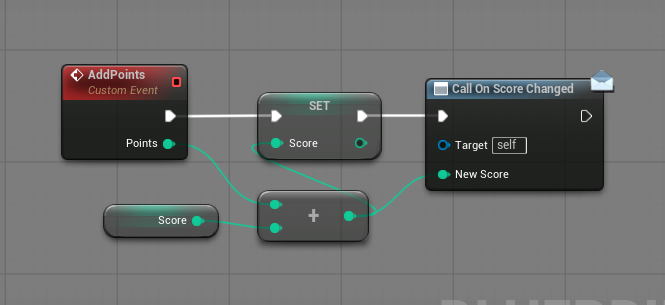
Whole assets and whole folders convert the same way, which makes a project greppable:
call("asset.dump_folder", { folderPath: "/Game/UI", recursive: true })
-> Saved/PinWright/asset-dumps/Game/UI/WBP_HUD/
     meta.json  properties.json  tree.xml  bpir.txt
Why it is different
- Graphs have a text form. The agent builds new Blueprints, materials, animation Blueprints and Control Rigs from text, changes existing ones through editor commands, and decompiles any of them to text to check the result. Behavior trees, sound cues, MetaSounds, Niagara and PCG decompile to text for reading.
- Whole assets and folders dump to text.
asset.dump and asset.dump_folder mirror packages into per-asset sidecars (meta.json, properties.json, bpir.txt, tree.xml, mgir.txt and more), so the agent knows your structure, classes and naming before it changes anything. That context is why new assets come out matching your project's conventions.
- Play-In-Editor sessions are recorded and can be queried. The agent asks what happened in a session rather than reading a log tail. Capturing gameplay data needs instrumentation in the host project.
- There is nothing to teach it. PinWright documents itself: the assistant discovers every operation and looks up its usage over the same MCP connection (
call() lists the namespaces, call("<namespace.method>") returns that operation's page). You never paste documentation or install skill packs, and the reference always matches the version you run.
- Meshes, skeletons and clips have a text form too.
.pwmodel, .pwskel and .pwanim recipes compile into Static Meshes, skeletal rigs and animation clips, so generated content stays in source control as text the agent can edit again. Fourteen mesh recipes and a rigged arm ship under Examples/.
- Local and authenticated by default: the listener binds to
127.0.0.1 and requires a bearer token.
Agent setup
The setup screen installs Claude Code, Codex CLI, Cursor, Gemini CLI and VS Code Copilot with one click. For any other client, copy the Agent setup prompt from that screen and paste it to your agent, or use the snippets below. The port is per-project by default (derived from the project path, in the range 19880-30119) and the token lives at Saved/PinWright/gateway-token; docs/wiki-src/mcp-transport.md has the transport defaults, port derivation and the stdio proxy's lifecycle tools.
Manual setup (fallback): per-agent config files
Manual equivalents of the one-click buttons. Substitute your project's resolved port for 19880; <project> is the UE project the plugin is installed into.
Claude Code, <project>/.mcp.json, or claude mcp add --transport http --scope project pinwright http://127.0.0.1:19880/mcp. Project-scoped servers get a one-time approval prompt.
{ "mcpServers": { "pinwright": { "type": "http", "url": "http://127.0.0.1:19880/mcp" } } }
Codex CLI, <project>/.codex/config.toml, loaded only after you trust the project (the first codex run in the folder prompts). codex mcp add pinwright --url http://127.0.0.1:19880/mcp registers it user-globally instead.
[mcp_servers.pinwright]
url = "http://127.0.0.1:19880/mcp"
startup_timeout_sec = 5.0
tool_timeout_sec = 300.0
Cursor, Settings -> Tools & MCP -> Add, or <project>/.cursor/mcp.json. No type key, Cursor auto-detects the transport; recent versions add project-file servers disabled, so enable it in Settings.
{ "mcpServers": { "pinwright": { "url": "http://127.0.0.1:19880/mcp" } } }
Gemini CLI, <project>/.gemini/settings.json. The key is httpUrl, not url, because url means SSE in Gemini. Project config loads only for trusted folders (gemini trust).
{ "mcpServers": { "pinwright": { "httpUrl": "http://127.0.0.1:19880/mcp" } } }
VS Code (GitHub Copilot), <project>/.vscode/mcp.json. The top-level key is servers, not mcpServers, and VS Code prompts once to trust and start the server. User-level alternative: code --add-mcp "{\"name\":\"pinwright\",\"type\":\"http\",\"url\":\"http://127.0.0.1:19880/mcp\"}".
{ "servers": { "pinwright": { "type": "http", "url": "http://127.0.0.1:19880/mcp" } } }
Windsurf, ~/.codeium/windsurf/mcp_config.json (user-level only), "mcpServers" entry { "serverUrl": "http://127.0.0.1:19880/mcp" }. Cline, cline_mcp_settings.json in VS Code globalStorage, entry { "type": "streamableHttp", "url": "http://127.0.0.1:19880/mcp" }.
Stdio-only clients bridge through the bundled proxy: run Plugins/PinWright/Content/Python/mcp_proxy.py with any Python 3, passing --token-file and --port-file pointing at the gateway-token / gateway-port files in Saved/PinWright (and optionally --uproject to select the project explicitly). It forwards stdio to the HTTP endpoint, sends the bearer token, follows the live port, and adds the local lifecycle tools, which is what the generated configs do.
Security
This is editor automation with asset-mutation privileges: a request can create, edit, save, delete and compile project assets. Treat it as a local developer tool.
- The plugin runs inside your editor, makes no network calls of its own, and the listener binds to
127.0.0.1. Your assistant sends project content to whatever model it uses, as it already does with your code. Do not expose the port to a LAN, VPN, container bridge or the internet, and do not put a reverse proxy in front of it.
- A bearer token is required by default: 64 hex characters, generated on editor start at
Saved/PinWright/gateway-token. It stops browser drive-by requests and other OS users; it is not a defense against code already running as you.
- Direct-HTTP agent configs embed the literal token, so keep them machine-local and never commit them; the stdio-proxy config carries only the token file path.
- Use trusted clients only, keep the project in source control, and review generated changes before committing.
Threat model, rotation steps and vulnerability reporting: SECURITY.md.
Documentation
The agent's reference is built in: every editor launch generates the full method wiki into the project's Saved/PinWright/wiki/, one flat page per namespace and method, which is what call("<path>") serves. Relocate it with Wiki Output Directory under Project Settings -> Plugins -> PinWright (Project). Compilable IR samples ship in Examples/: .mgir materials such as Examples/mgir/M_PwReview_Neutral.mgir, plus .pwmodel, .pwskel and .pwanim sources. docs/index.md indexes the documentation, docs/wiki-src/README.md holds the hand-written wiki pages and their authoring rules, CONTRIBUTING.md covers build, test and documentation conventions, and CHANGELOG.md is the release history.
Support
Bug reports, critical gaps in existing features and feature requests all go through GitHub issues on PinWright/pinwright-ue. Use the bug report form for a defect or a critical gap in an existing feature, the compatibility report form when the plugin does not load or build at all on your engine, and a plain issue for a new feature idea.
License and attribution
MIT, see LICENSE. Contributions are accepted under MIT with no CLA. Third-party components and their required notices are listed in THIRD_PARTY_NOTICES.md; portions are derived from ChiR24/Unreal_mcp (MIT, (c) 2025 Unreal Engine MCP Server Contributors).