ai-software-factory
Health Warn
- No license — Repository has no license file
- Description — Repository has a description
- Active repo — Last push 0 days ago
- Community trust — 10 GitHub stars
Code Warn
- crypto private key — Private key handling in secrets/secret-github-app.yaml
Permissions Pass
- Permissions — No dangerous permissions requested
No AI report is available for this listing yet.
AI Software Factory running on Kubernetes / OpenShift with Tekton and vLLM
AI Software Factory on Kubernetes / OpenShift
A self-hosted "software factory" that turns GitHub issues and comments into pull requests.
GitHub events are received by Tekton Triggers, executed as Tekton pipelines, and handled by a
coding agent (OpenCode) that talks to an open model served by
vLLM on GPU nodes in the same cluster. Nothing leaves the cluster except
the calls to GitHub.
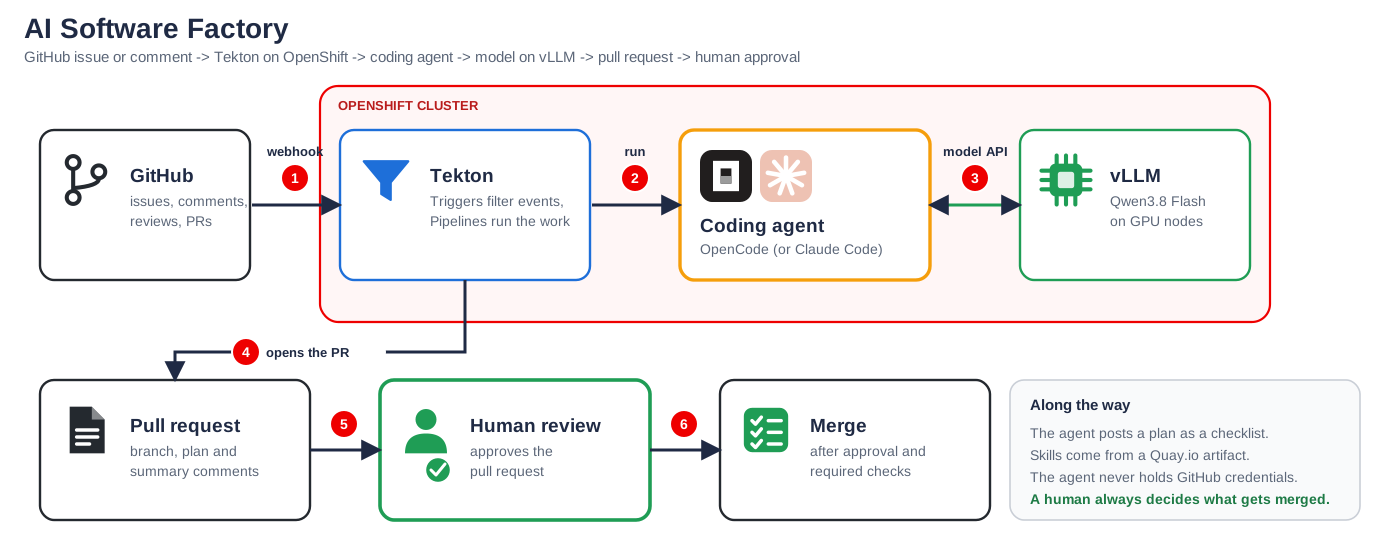
The factory at a glance: GitHub, Tekton on OpenShift, the coding agent and the model on vLLM.
GitHub (issue, comment, review)
   │  webhook
   ▼
OpenShift Route ──► EventListener (Tekton Triggers)
                      ├─ github interceptor  (HMAC signature check)
                      └─ cel interceptor     (who / what / which event is allowed)
                         │
                TriggerBinding ─► TriggerTemplate ─► PipelineRun
                                                        │
              ┌─────────────────────────────────────────┘
              ▼
   print-event ─► fetch-skills ─► prepare ─► plan ─► agent ─► verify ─► publish
                      │              │        │       │         │          │
                 OCI artifact     clone +   plan as  OpenCode   build,     commit, push,
                 (skills, agents) branch    comment  + vLLM     test, fix   PR, reply
                                                      (Qwen)
What it does
| Pipeline | Triggered by | What happens |
|---|---|---|
issue-agent |
a new issue (issues / opened) |
Posts a checklist plan as an issue comment, implements the issue on a new branch, opens a pull request, enables auto-merge and replies with a summary. |
issue-comment-agent |
an issue comment starting with @ai |
Treats the comment as an instruction. A question gets an answer; a change request gets a plan, a branch and a pull request. |
pr-comment-agent |
a pull request review or review comment | Reads the whole PR conversation, pushes the requested change to the PR branch (or answers a question) and replies on the PR. |
Every trigger only accepts events from users whose author_association is OWNER or MEMBER
and ignores bots. Forks and closed issues or pull requests are skipped.
Why these technologies
| Technology | Why |
|---|---|
| Kubernetes / OpenShift | One platform for everything: pipelines, agents and models. Each agent run is an isolated pod, so many agents run in parallel and the scheduler places them. GPU nodes, secrets, RBAC and network policies come built in. |
| Tekton | Kubernetes-native CI. Tekton Triggers turn a GitHub webhook straight into a PipelineRun, with signature checks and CEL filters. Every run is a recorded object that can be retried, logged and timed. |
| vLLM | High-throughput inference with continuous batching, so parallel agents share one GPU deployment. It serves an OpenAI-compatible API, supports tool calling and tensor parallelism, and runs open models in the cluster. |
| Open model (Qwen) | Code and issue text never leave the cluster, there is no per-token cost, and you can swap the model by changing one config entry. |
| OpenCode | Open-source coding agent that works with any OpenAI-compatible endpoint, so it does not tie the factory to a single model vendor. Permissions are declared in a config file. |
| GitHub App | Short-lived installation tokens instead of personal access tokens, with fine-grained permissions and its own bot identity. |
| OCI artifact for skills | Skills and subagents are versioned and pulled from the same registry as images, with no extra infrastructure. |
Showcase
The approach described here is in use in a sample application repository:
piomin/ai-software-factory-showcase.
The GitHub App from this guide is installed there, and the repository has an AGENTS.md with the
rules the agent follows. Browse its closed issues and merged pull requests to see the factory at
work: the plan comment on a new issue, the pull request opened by the bot, the human approval and
the auto-merge. The GitHub screenshots in this README come from that repository.
Event flows
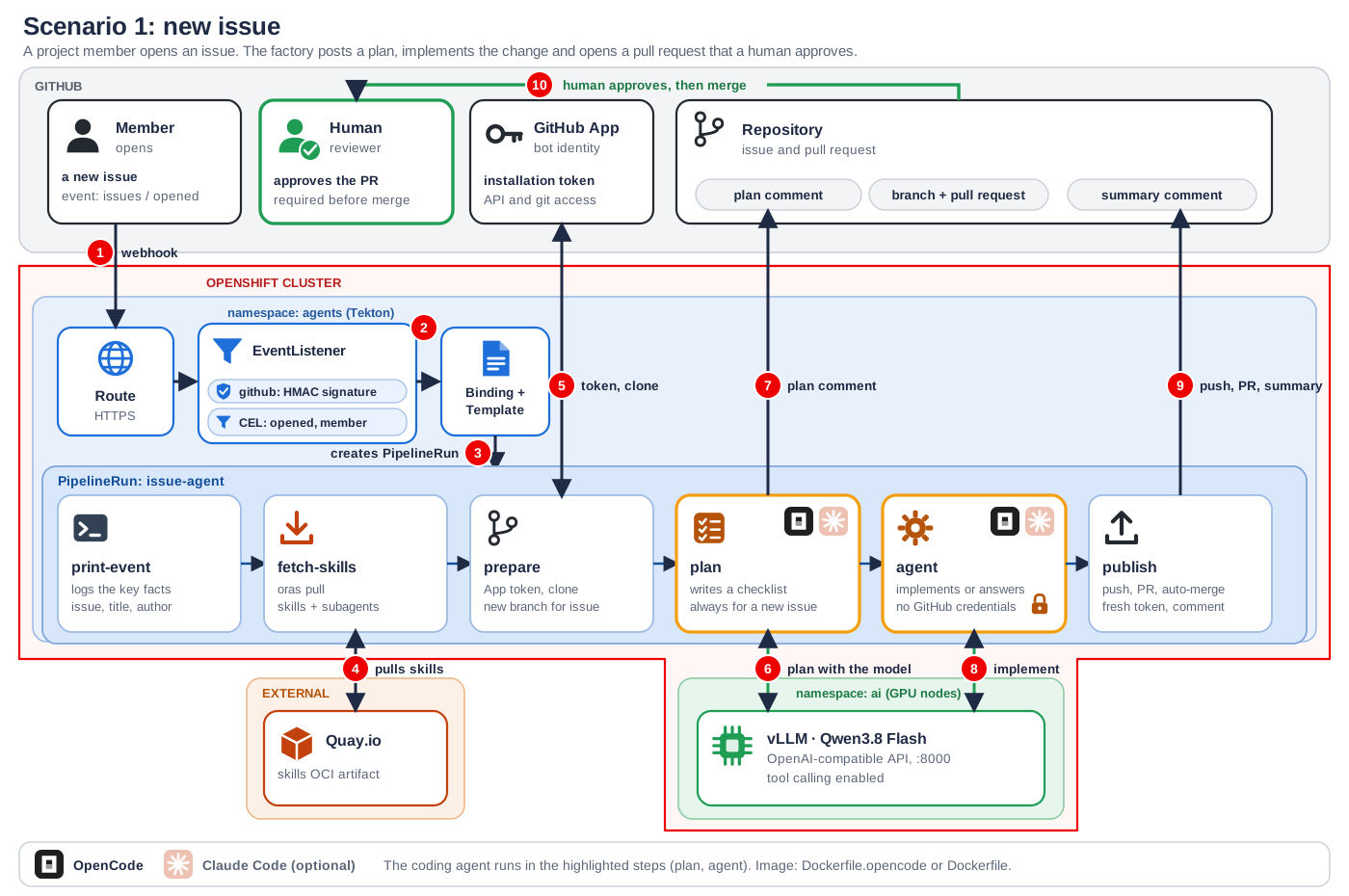
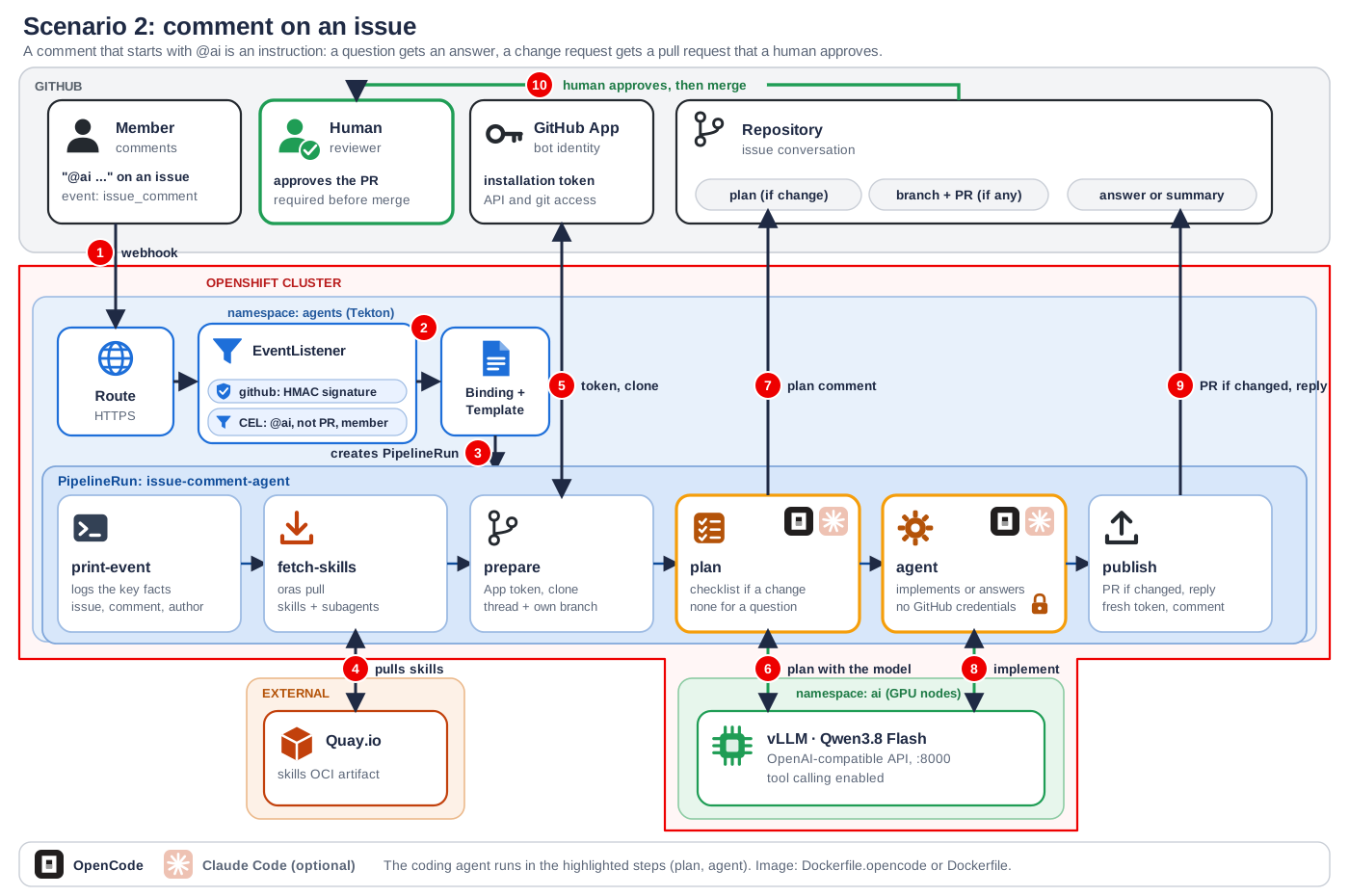
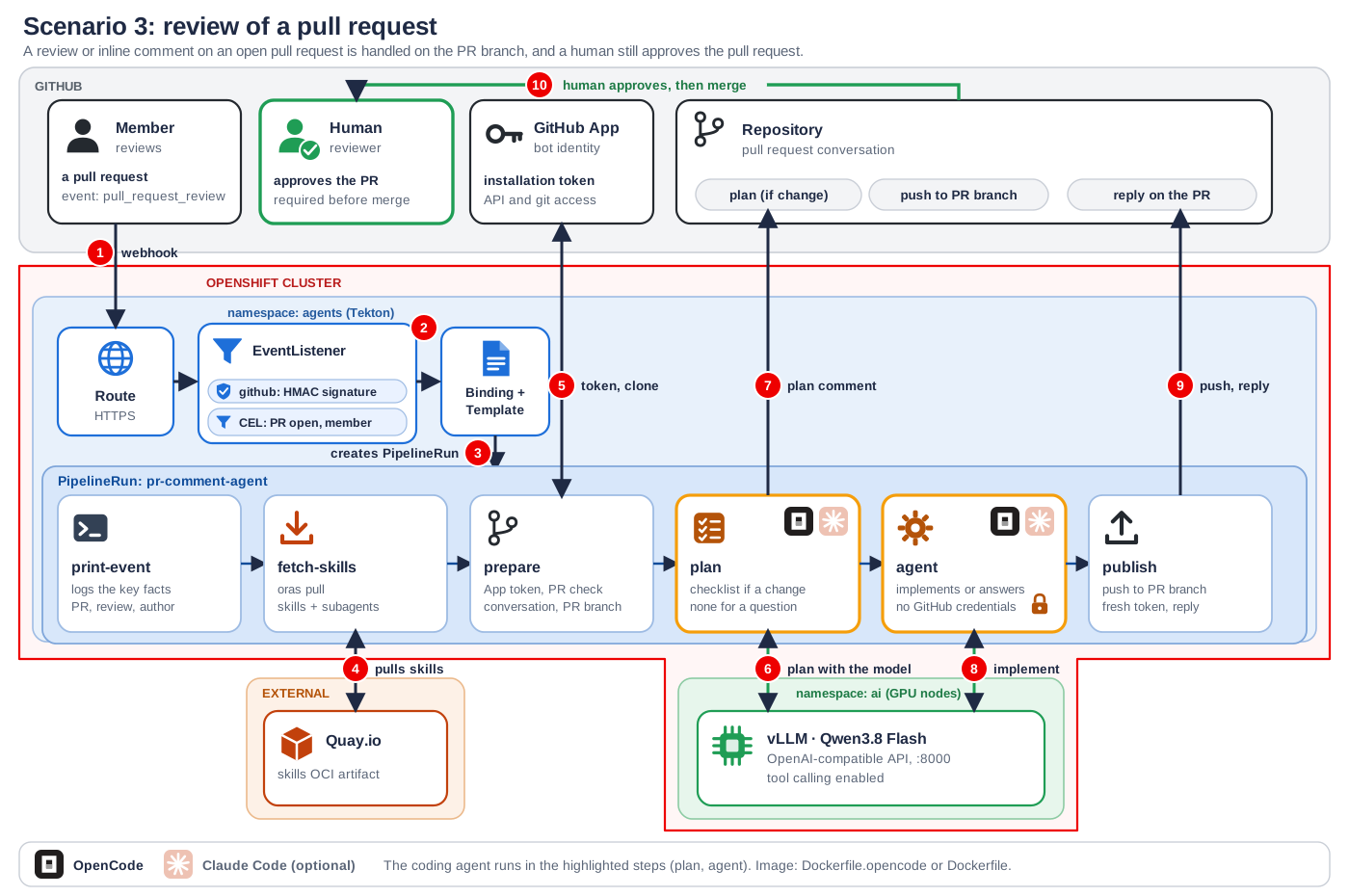
Each diagram follows one event from GitHub through the OpenShift cluster (Route, EventListener,
PipelineRun in the agents namespace) to the model on vLLM (ai namespace) and back to GitHub.
The numbers show the order of the main interactions. The orange-framed steps (plan, agent) are
where the coding agent runs: OpenCode, which the pipelines use, or the optional Claude Code image.
Quay.io only serves the skills artifact. The OpenCode and Claude Code icons are simplified
drawings, not the official logos.
Scenario 1: new issue
Scenario 2: comment on an issue
Scenario 3: review of a pull request
Repository layout
.
├── agents/                              the agent: images and shared configuration
│   ├── Dockerfile.opencode              reference Dockerfile of the agent image (the pipelines pull it from Quay)
│   ├── Dockerfile                       same tooling with Claude Code (optional, not used by the pipelines)
│   └── configmap-agent-config.yaml      OpenCode config (model, permissions) and the GitHub App token script
├── tekton/                              pipelines and everything that triggers them
│   ├── pipeline-*.yaml                  the three Tekton pipelines
│   ├── triggerbinding-*.yaml            map webhook payloads to pipeline parameters
│   ├── triggertemplate-*.yaml           create the PipelineRuns
│   ├── eventlistener-new-issue.yaml     the single EventListener with four triggers and their filters
│   ├── task-*.yaml                      shared tasks: fetch-skills, verify-build, report-failure
│   ├── resourcequota-agents.yaml        optional cap on parallel runs
│   ├── route-new-issue.yaml             public HTTPS endpoint for the GitHub webhook
│   └── serviceaccount-*.yaml, rolebinding-*.yaml   service account and RBAC for the EventListener
├── secrets/                             secret skeletons with placeholders only (never commit real values)
│   └── secret-github-app.yaml, secret-github-webhook-secret.yaml, secret-hf-token.yaml, ...
├── ai/                                  the model: cache volume, Deployment and Service for qwen38-flash and qwen3-coder
└── docs/
    ├── diagrams/                        SVG diagrams of the three event flows
    └── images/                          screenshots used in this README
Namespaces used: ai for models and agents for pipelines and triggers.
1. Prerequisites
1.1 Cluster and GPU nodes
- An OpenShift cluster (the setup was built on ROSA) with permissions to install operators.
- At least one GPU machine pool. Each model deployment in
ai/requests 2 GPUs
(--tensor-parallel-size=2), 180 GiB of memory and a 300 GiB cache volume. Both deployments
ship withreplicas: 0; run only one at a time unless you have 4 GPUs. - The model manifests tolerate the
nvidia.com/gpu:NoScheduletaint. If you taint your GPU nodes
differently, change thetolerationsinai/. - The checkpoints are NVFP4 quantized. Check the vLLM release notes for the GPU generation you
use, because FP4 kernels are primarily aimed at Blackwell GPUs. - A default
StorageClassthat supportsReadWriteOnce(the manifests usegp3-csi). - Access to
registry.redhat.iofor the vLLM images (the cluster pull secret normally covers it).
1.2 Operators
Install from OperatorHub, in this order:
- Node Feature Discovery Operator. After installing, create a
NodeFeatureDiscovery
instance (the defaults are fine). It labels nodes that have NVIDIA hardware. - NVIDIA GPU Operator. After installing, create the default
ClusterPolicy. It installs
the driver, container toolkit and device plugin on GPU nodes. - Red Hat OpenShift Pipelines (Tekton Pipelines and Tekton Triggers). It provides the
githubandcelcluster interceptors and thepipelineservice account.
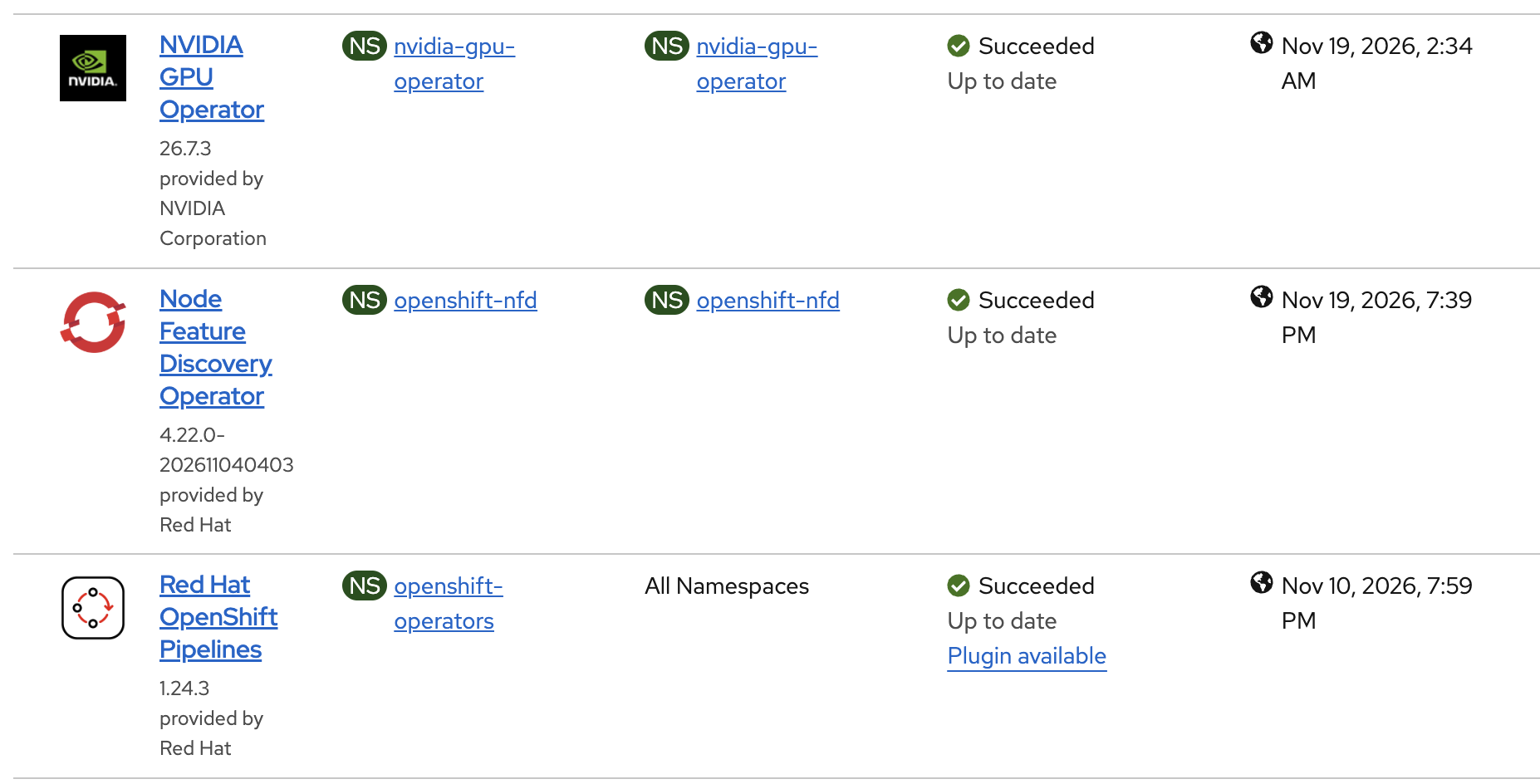
Installed Operators: Node Feature Discovery, NVIDIA GPU Operator and Red Hat OpenShift Pipelines.
Verify:
# GPU nodes are discovered and advertise GPUs
oc get nodes -l feature.node.kubernetes.io/pci-10de.present=true
oc describe node <gpu-node> | grep -A2 'nvidia.com/gpu'

# Tekton is running
oc get pods -n openshift-pipelines
oc get clusterinterceptors

A GPU node with the nvidia.com/gpu resource in its capacity and allocatable lists.
1.3 Local tools
oc, optionally tkn and gh. podman and oras are only needed if you build your own agent
image or publish your own skills artifact (section 4).
1.4 Namespaces
oc new-project ai
oc new-project agents
2. GitHub
2.1 Create the GitHub App
Create a GitHub App (Settings, Developer settings, GitHub Apps) with:
- Repository permissions: Contents read and write, Pull requests read and write,
Issues read and write, Metadata read-only. - Subscribe to events: Issues, Issue comment, Pull request review, Pull request review comment.
- Webhook: leave it for later (section 7); you need the route host first. Set a webhook secret
now (you will store it asgithub-webhook-secret).
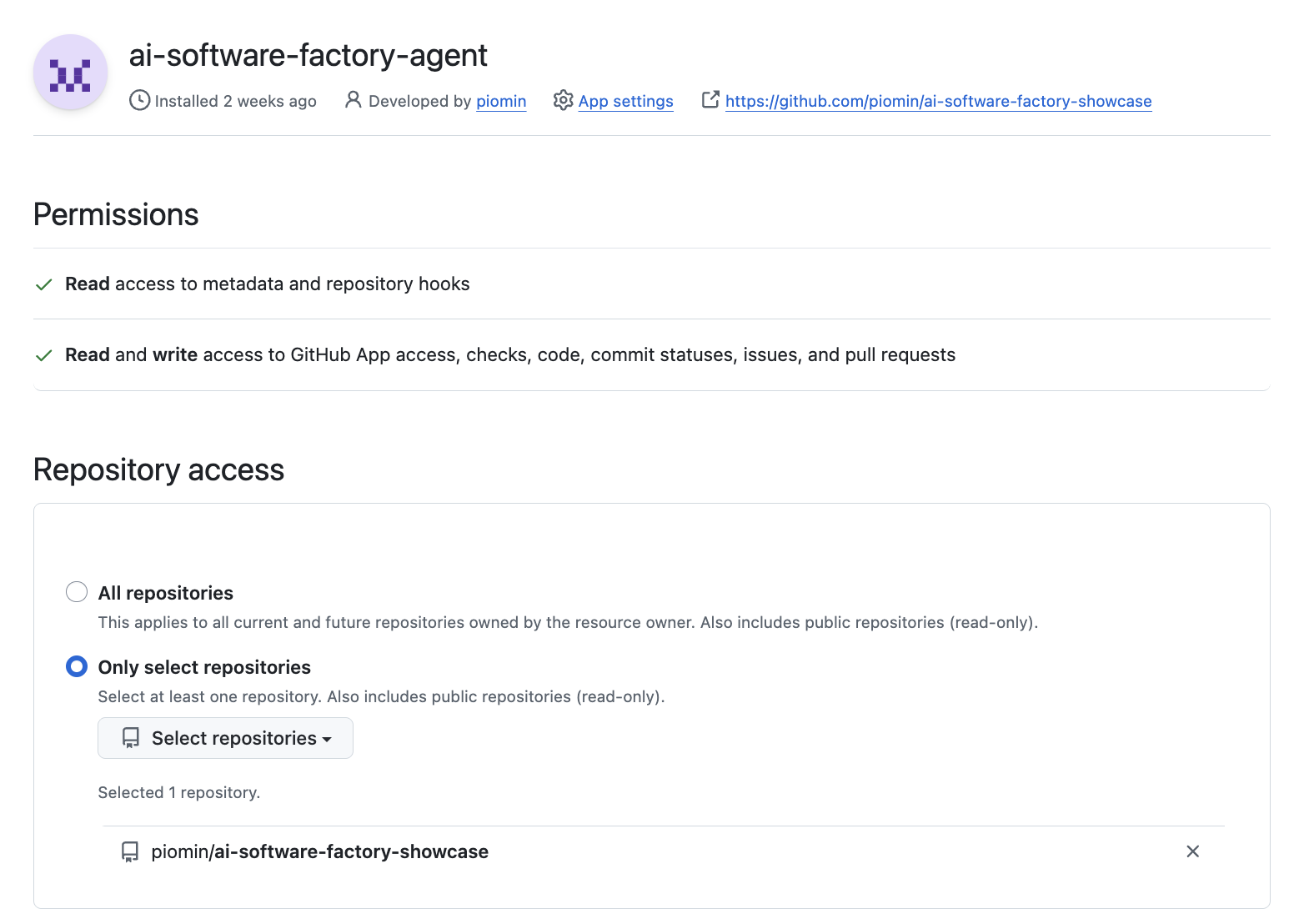
Repository permissions of the GitHub App: Contents, Pull requests and Issues set to read and write.
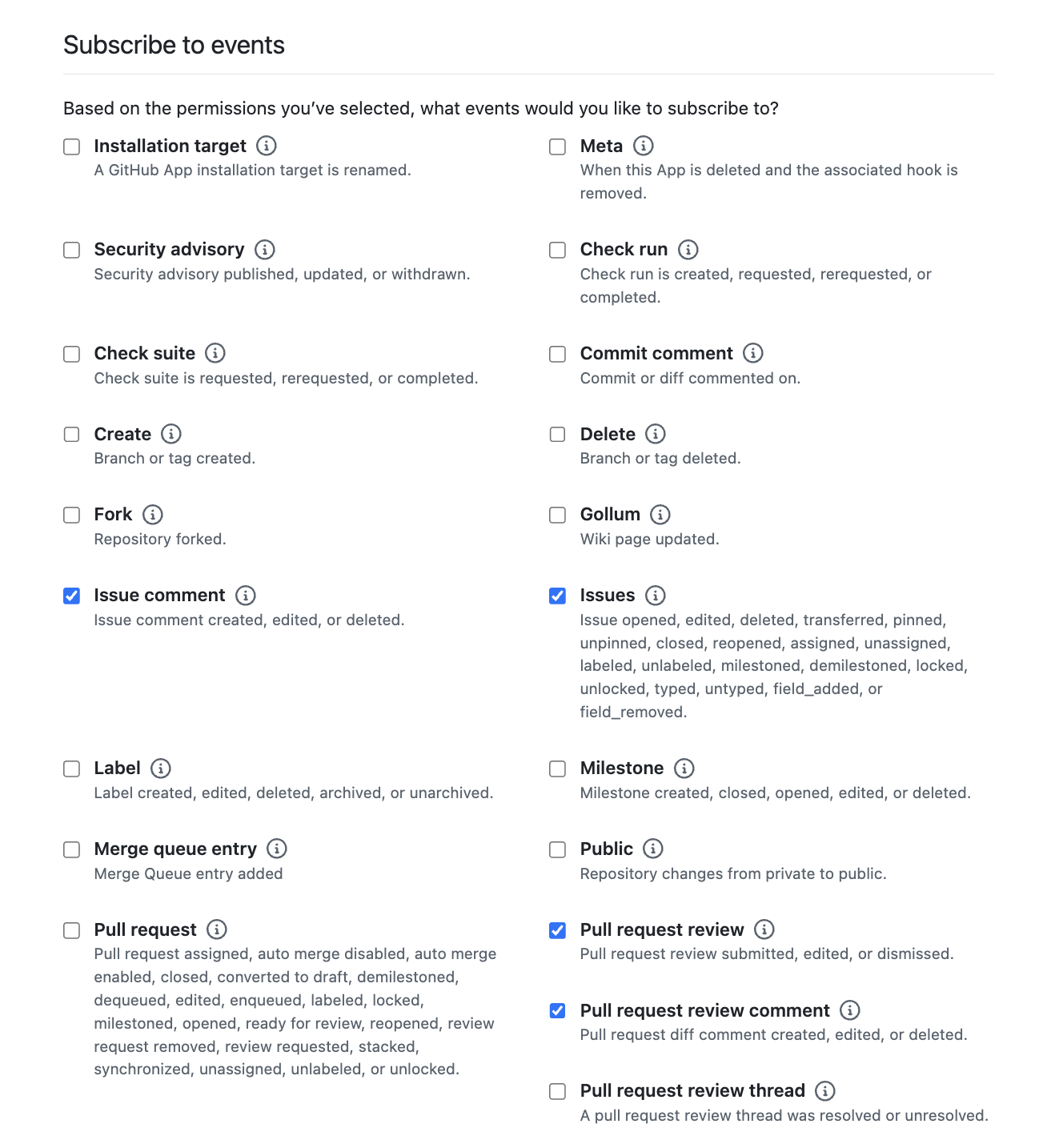
Events the app subscribes to: Issues, Issue comment, Pull request review and Pull request review comment.
The app acts as its own bot user. The pipelines authenticate as the app by minting short-lived
installation tokens, so no personal access token is needed.
2.2 Install the app and collect identifiers
- Install the app on the repository (or repositories) the factory should work on.
- Collect:
- App ID: shown on the app's settings page.
- Installation ID: the number at the end of
https://github.com/settings/installations/<ID>after you open the installation. - Private key: generate one on the app's settings page and keep the
.pemfile.
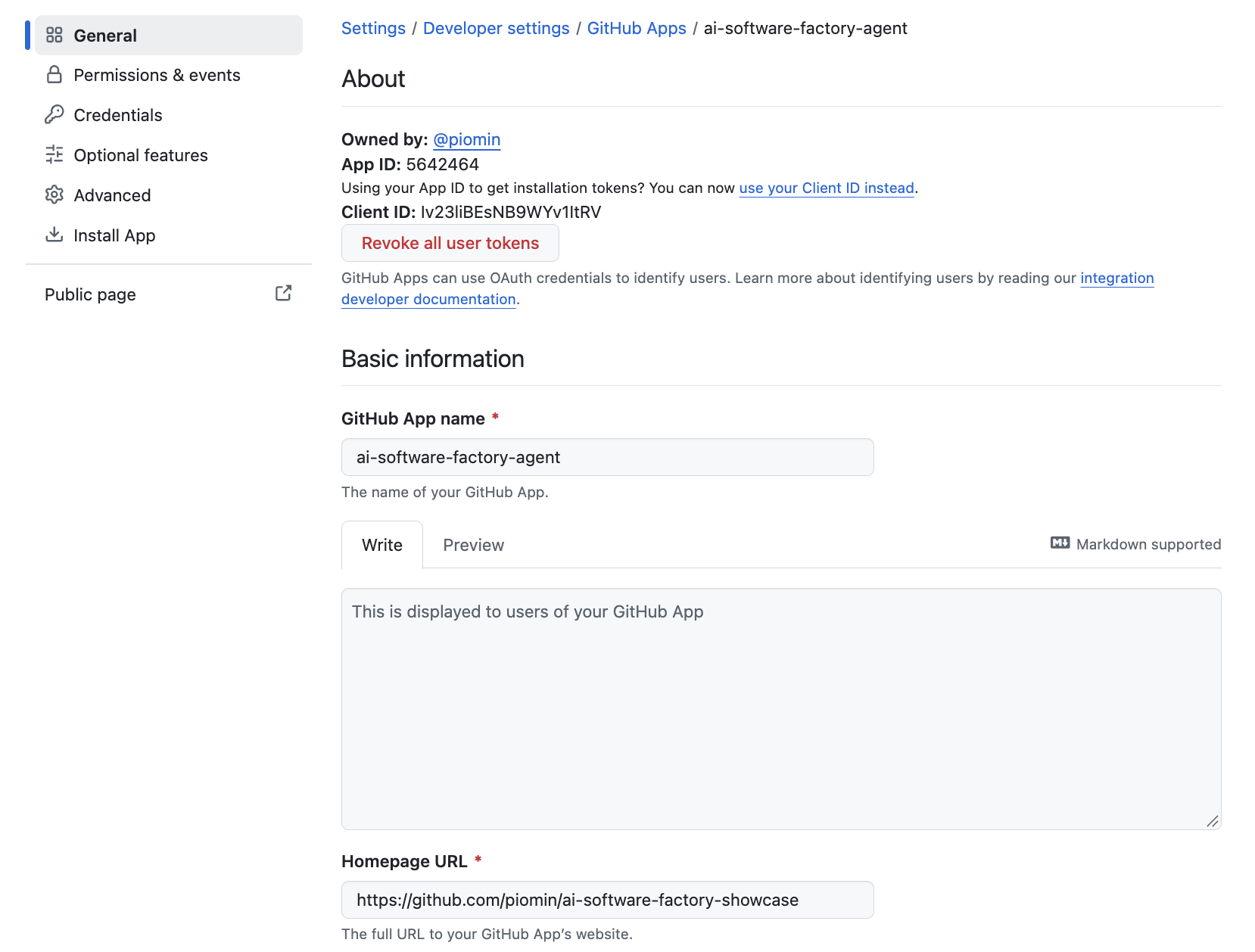
The app's settings page: the App ID is shown under About.
2.3 Repository settings
- Enable Allow auto-merge in the repository settings. The pipelines call
gh pr merge --auto. Auto-merge only waits for something if branch protection requires
reviews or checks, so configure branch protection on the default branch. Without it a pull
request is merged right away.
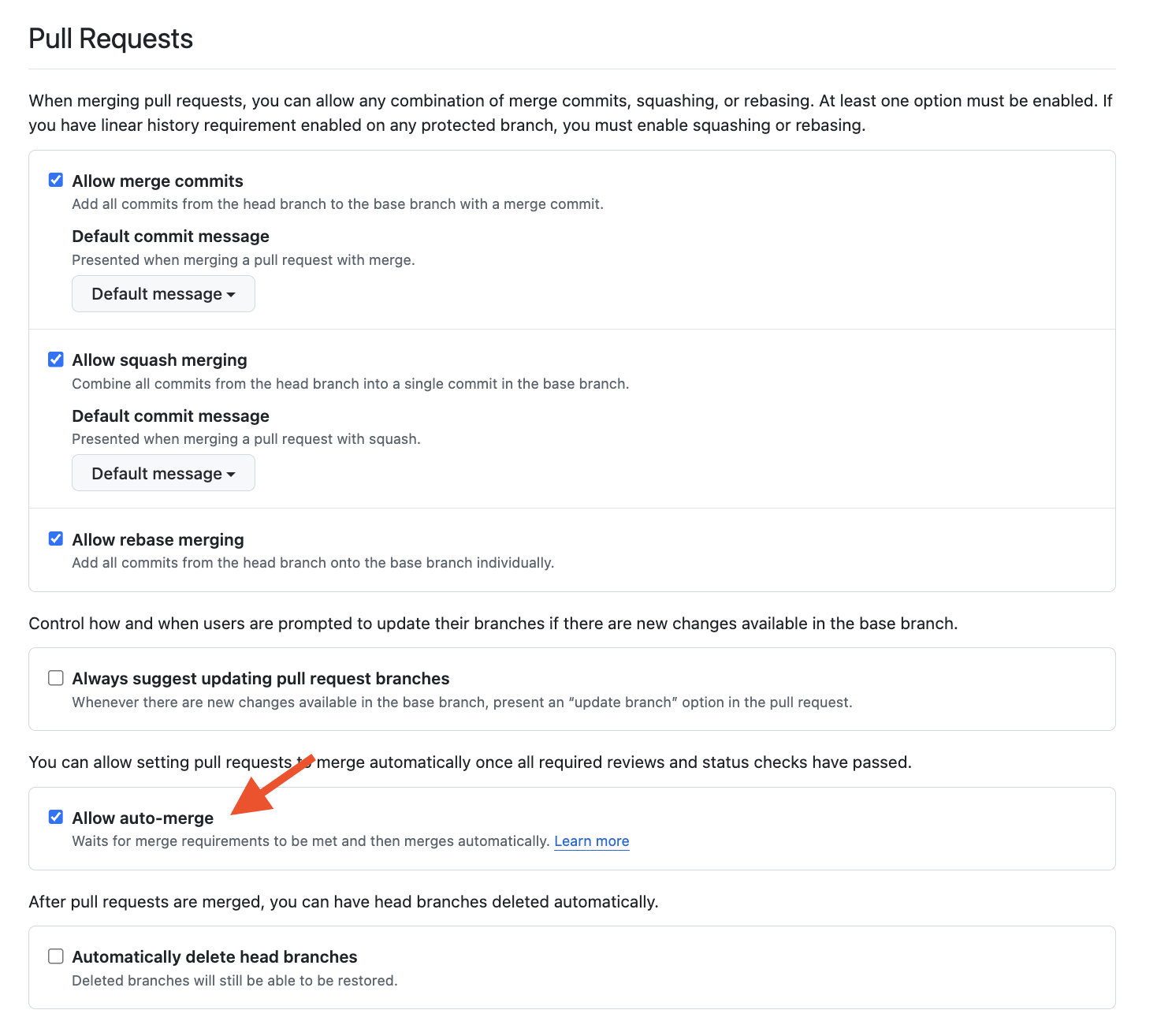
Repository settings: Allow auto-merge enabled and a branch protection rule requiring a review and status checks.
- Put an
AGENTS.mdin each target repository. The agent follows it. Typical content:
coding conventions, "do not edittarget/", how to build and test the project, and an instruction
to run the tests and report the result honestly. Nothing verifies the code after the agent
finishes, so these rules are the quality gate.
2.4 Commit identity
The pipelines set the commit author to ai-software-factory-agent[bot] with an email like5642464+ai-software-factory-agent[bot]@users.noreply.github.com. Replace the name and the
number in the GIT_AUTHOR_* and GIT_COMMITTER_* variables of the publish steps with your
app's slug and bot user id:
gh api "/users/<app-slug>%5Bbot%5D" --jq .id
3. Secrets on OpenShift
The secrets/ directory holds secret skeletons with placeholders only. Never commit real
values: fill in a local copy (or use oc create secret instead) and apply it.
GitHub App credentials (secrets/secret-github-app.yaml). They are used to mint short-lived
installation tokens. Keep the private key as a multi-line block:
apiVersion: v1
kind: Secret
metadata:
  name: github-app
  namespace: agents
type: Opaque
stringData:
  app-id: "<APP_ID>"
  installation-id: "<INSTALLATION_ID>"
  private-key.pem: |
    -----BEGIN RSA PRIVATE KEY-----
    <PRIVATE_KEY_BODY>
    -----END RSA PRIVATE KEY-----
oc apply -f secrets/secret-github-app.yaml
Webhook secret (secrets/secret-github-webhook-secret.yaml). The same value must be set as the
webhook secret in the GitHub App. The EventListener uses it to verify every delivery:
apiVersion: v1
kind: Secret
metadata:
  name: github-webhook-secret
  namespace: agents
type: Opaque
stringData:
  secret: "<WEBHOOK_SECRET>"
oc apply -f secrets/secret-github-webhook-secret.yaml
Hugging Face token (secrets/secret-hf-token.yaml). The model deployment uses it to download
the weights:
apiVersion: v1
kind: Secret
metadata:
  name: hf-token
  namespace: ai
type: Opaque
stringData:
  token: "<HF_TOKEN>"
oc apply -f secrets/secret-hf-token.yaml
The same secrets can be created without a file, for example:
oc create secret generic github-app -n agents \
  --from-literal=app-id=<APP_ID> \
  --from-literal=installation-id=<INSTALLATION_ID> \
  --from-file=private-key.pem=./<app-private-key>.pem
secrets/secret-claude-github-secrets.yaml (ANTHROPIC_API_KEY, GH_TOKEN) is only needed if you
run a Claude Code based variant. The OpenCode pipelines do not use it.
The default agent image and skills artifact are pulled from quay.io/pminkows. If you host your
own copies in private Quay repositories, create an image pull secret and link it:
oc create secret docker-registry quay-pull -n agents \
  --docker-server=quay.io --docker-username=<user> --docker-password=<token>
oc secrets link pipeline quay-pull --for=pull -n agents
4. Container images and skills
4.1 Agent image
The pipelines pull a ready-made agent image from Quay, quay.io/pminkows/opencode:latest, so you
do not have to build anything to follow this guide. It runs in the prepare, plan, agent andpublish steps. agents/Dockerfile.opencode is included for reference, to show what the image
contains: OpenCode, the GitHub CLI, a JDK, Maven, skaffold and kubectl.
FROM registry.access.redhat.com/ubi9/nodejs-22

USER 0

RUN dnf install -y git jq tar gzip \
    && dnf clean all

RUN npm install -g opencode-ai

# GitHub CLI
ARG GH_VERSION=2.83.2
RUN curl -fsSL \
    "https://github.com/cli/cli/releases/download/v${GH_VERSION}/gh_${GH_VERSION}_linux_amd64.tar.gz" \
    -o /tmp/gh.tar.gz \
    && tar -xzf /tmp/gh.tar.gz -C /tmp \
    && cp /tmp/gh_${GH_VERSION}_linux_amd64/bin/gh /usr/local/bin/gh \
    && rm -rf /tmp/gh*

# Skaffold (build and deploy an application to Kubernetes)
ARG SKAFFOLD_VERSION=2.25.0
RUN curl -fsSL \
    "https://storage.googleapis.com/skaffold/releases/v${SKAFFOLD_VERSION}/skaffold-linux-amd64" \
    -o /usr/local/bin/skaffold \
    && chmod +x /usr/local/bin/skaffold

# kubectl (used by skaffold when it deploys)
ARG KUBECTL_VERSION=1.37.2
RUN curl -fsSL \
    "https://dl.k8s.io/release/v${KUBECTL_VERSION}/bin/linux/amd64/kubectl" \
    -o /usr/local/bin/kubectl \
    && chmod +x /usr/local/bin/kubectl

# OpenJDK 25 (Eclipse Temurin)
RUN mkdir -p /opt/java \
    && curl -fsSL \
    "https://api.adoptium.net/v3/binary/latest/25/ga/linux/x64/jdk/hotspot/normal/eclipse" \
    | tar -xz -C /opt/java --strip-components=1
ENV JAVA_HOME=/opt/java

# Maven
ARG MAVEN_VERSION=3.9.11
RUN mkdir -p /opt/maven \
    && curl -fsSL \
    "https://repo.maven.apache.org/maven2/org/apache/maven/apache-maven/${MAVEN_VERSION}/apache-maven-${MAVEN_VERSION}-bin.tar.gz" \
    | tar -xz -C /opt/maven --strip-components=1
ENV MAVEN_HOME=/opt/maven
ENV PATH="${JAVA_HOME}/bin:${MAVEN_HOME}/bin:${PATH}"

USER 1001
agents/Dockerfile is a variant with Claude Code (npm install -g @anthropic-ai/claude-code)
instead of OpenCode, and without the JDK and Maven. It is optional and not used by the pipelines.
Only if you need a different configuration (another JDK, extra CLIs, another toolchain), adapt
the Dockerfile, build and push your own image, and point the pipelines at it:
podman build -f agents/Dockerfile.opencode -t quay.io/<org>/opencode:<tag> agents/
podman push quay.io/<org>/opencode:<tag>
sed -i 's#quay.io/pminkows/opencode:latest#quay.io/<org>/opencode:<tag>#g' tekton/pipeline-*.yaml
skaffold and kubectl are in the image so that an agent can deploy an application to
Kubernetes. They do nothing by default: the agent pods have no kubeconfig or RBAC. Granting that
is a separate and security-sensitive step, and skaffold also needs a builder (Jib, buildpacks
or Kaniko) and a registry to push to.
4.2 Skills artifact
Skills and subagents are distributed as an OCI artifact: one tar.gz with skills/ andagents/ directories in OpenCode format. The fetch-skills task pulls it with oras, unpacks it
to /skills/opencode, and the prepare step copies it to ~/.config/opencode.
The pipelines pull quay.io/pminkows/claude-ai-spring-boot:1.3.1 by default (theskills-artifact parameter), so there is nothing to publish to get started.
Only if you want your own skills, publish them as an artifact and set the skills-artifact
parameter of the pipelines to it:
tar -czf skills.tar.gz skills agents
oras push quay.io/<org>/<skills-repo>:<version> skills.tar.gz
5. The AI model (vLLM)
The manifests in ai/ run vllm serve for Qwen3.8 Flash (qwen38-flash) and Qwen3 Coder
(qwen3-coder). The pipelines use Qwen3.8 Flash, served as qwen38_flash, with tool calling
enabled and a 128k context.
Cache volume (ai/pvc-qwen38-flash-cache.yaml). The Hugging Face cache lives on a persistent
volume so the weights are downloaded only once:
apiVersion: v1
kind: PersistentVolumeClaim
metadata:
  name: qwen38-flash-cache
  namespace: ai
spec:
  accessModes:
    - ReadWriteOnce
  resources:
    requests:
      storage: 300Gi
  storageClassName: gp3-csi
oc apply -f ai/pvc-qwen38-flash-cache.yaml
Deployment (ai/deployment-qwen38-flash.yaml, shortened). The arguments that matter are the
served model name, tensor parallelism over two GPUs, the context length and the tool-calling
parser, which OpenCode relies on:
apiVersion: apps/v1
kind: Deployment
metadata:
  name: qwen38-flash
  namespace: ai
spec:
  replicas: 0                    # scale to 1 when you want the model running
  strategy:
    type: Recreate               # the cache volume is ReadWriteOnce
  selector:
    matchLabels:
      app: qwen38-flash
  template:
    metadata:
      labels:
        app: qwen38-flash
    spec:
      tolerations:
        - key: nvidia.com/gpu
          operator: Exists
          effect: NoSchedule
      containers:
        - name: vllm
          image: registry.redhat.io/rhaii-preview/vllm-cuda-rhel9:v0.31.0
          command:
            - vllm
            - serve
          args:
            - RedHatAI/Qwen3.8-Flash-Next-NVFP4
            - --port=8000
            - --served-model-name=qwen38_flash
            - --tensor-parallel-size=2
            - --max-model-len=131072
            - --gpu-memory-utilization=0.90
            - --enable-auto-tool-choice
            - --tool-call-parser=qwen3_coder
            - --reasoning-parser=qwen3
            - --enforce-eager
            - --no-enable-flashinfer-autotune
          env:
            - name: HUGGING_FACE_HUB_TOKEN
              valueFrom:
                secretKeyRef:
                  name: hf-token
                  key: token
            - name: HF_HOME
              value: /cache/hf
          ports:
            - containerPort: 8000
          resources:
            requests:
              cpu: "4"
              memory: 180Gi
              nvidia.com/gpu: "2"
            limits:
              cpu: "16"
              memory: 200Gi
              nvidia.com/gpu: "2"
          # startup, liveness and readiness probes on /health:8000 omitted;
          # the startup probe allows about an hour for the first download
          volumeMounts:
            - name: shm
              mountPath: /dev/shm
            - name: cache
              mountPath: /cache/hf
              subPath: hf
            - name: cache
              mountPath: /tmp/vllm
              subPath: vllm
      volumes:
        - name: shm
          emptyDir:
            medium: Memory
            sizeLimit: 32Gi
        - name: cache
          persistentVolumeClaim:
            claimName: qwen38-flash-cache
Service (ai/service-qwen38-flash.yaml). It gives the agents a stable address,http://qwen38-flash.ai.svc.cluster.local:8000/v1:
apiVersion: v1
kind: Service
metadata:
  name: qwen38-flash
  namespace: ai
spec:
  type: ClusterIP
  selector:
    app: qwen38-flash
  ports:
    - port: 8000
      targetPort: 8000
      protocol: TCP
oc apply -f ai/deployment-qwen38-flash.yaml -f ai/service-qwen38-flash.yaml
oc scale deployment/qwen38-flash -n ai --replicas=1
ai/deployment-qwen3-coder.yaml and ai/service-qwen3-coder.yaml define the second model the same
way (RedHatAI/Qwen3-Coder-Next-NVFP4, served as qwen3_coder, no cache volume). Both ship withreplicas: 0; run only one at a time unless you have 4 GPUs.
The first start downloads the weights, which can take a long time. Watch it withoc logs -f deployment/qwen38-flash -n ai.
Verify the endpoint:
oc port-forward svc/qwen38-flash 8000:8000 -n ai &
curl -s localhost:8000/v1/models | jq '.data[].id'     # expect "qwen38_flash"

The qwen38-flash pod is Running and /v1/models lists qwen38_flash.
The agent reaches the model through the address above. That address, the model name and the
context limit live in the agent configuration (section 6.1). To switch models, change the provider
and model there and nothing else. Scale the model down when it is not needed (--replicas=0) to
release the GPUs.
6. Tekton: pipelines, triggers and the listener
6.1 Agent configuration (ConfigMap)
agents/configmap-agent-config.yaml is shared by all pipelines and mounted at /config. It has
three files: the script that mints GitHub App installation tokens and two OpenCode configs. The
model, its endpoint and the permissions of the agent are defined here.
apiVersion: v1
kind: ConfigMap
metadata:
  name: agent-config
  namespace: agents
data:
  # Prints a GitHub App installation token (valid 1h). Run it right before every step that talks to GitHub.
  gh-app-token.sh: |
    #!/usr/bin/env bash
    set -euo pipefail
    b64url() { openssl base64 -A | tr '+/' '-_' | tr -d '='; }
    now="$(date +%s)"
    header="$(printf '{"alg":"RS256","typ":"JWT"}' | b64url)"
    payload="$(printf '{"iat":%s,"exp":%s,"iss":"%s"}' "$((now - 60))" "$((now + 540))" "$GITHUB_APP_ID" | b64url)"
    signature="$(printf '%s.%s' "$header" "$payload" | openssl dgst -sha256 -sign <(printf '%s\n' "$GITHUB_APP_PRIVATE_KEY") | b64url)"
    curl -fsS -X POST \
      -H "Authorization: Bearer ${header}.${payload}.${signature}" \
      -H "Accept: application/vnd.github+json" \
      "https://api.github.com/app/installations/${GITHUB_APP_INSTALLATION_ID}/access_tokens" | jq -er .token
  opencode.json: |
    {
      "$schema": "https://opencode.ai/config.json",
      "model": "qwen38-flash/qwen38_flash",
      "permission": {
        "edit": "allow",
        "skill": "allow",
        "task": "allow",
        "webfetch": "deny",
        "external_directory": "allow",
        "bash": {
          "*": "allow",
          "git commit*": "deny",
          "git push*": "deny",
          "gh *": "deny"
        }
      },
      "tools": {
        "todowrite": false
      },
      "provider": {
        "qwen38-flash": {
          "npm": "@ai-sdk/openai-compatible",
          "name": "Qwen3.8 Flash",
          "options": {
            "baseURL": "http://qwen38-flash.ai.svc.cluster.local:8000/v1",
            "apiKey": "none"
          },
          "models": {
            "qwen38_flash": {
              "name": "Qwen3.8 Flash",
              "limit": {
                "context": 131072,
                "output": 8192
              }
            }
          }
        }
      }
    }
  # Used by the plan steps only: same as opencode.json, but the agent may post its plan with `gh issue comment` / `gh pr comment`.
  opencode-plan.json: |
    {
      ...
      "permission": {
        ...
        "bash": {
          "*": "allow",
          "git commit*": "deny",
          "git push*": "deny",
          "gh *": "deny",
          "gh issue comment*": "allow",
          "gh pr comment*": "allow"
        }
      },
      ...
    }
oc apply -f agents/configmap-agent-config.yaml
6.2 Listener service account and RBAC
The EventListener runs under its own service account, bound to the cluster role that Tekton
Triggers provides for listeners:
apiVersion: v1
kind: ServiceAccount
metadata:
  name: issue-agent-listener
  namespace: agents
---
apiVersion: rbac.authorization.k8s.io/v1
kind: RoleBinding
metadata:
  name: issue-agent-listener
  namespace: agents
roleRef:
  apiGroup: rbac.authorization.k8s.io
  kind: ClusterRole
  name: tekton-triggers-eventlistener-roles
subjects:
  - kind: ServiceAccount
    name: issue-agent-listener
    namespace: agents
oc apply -f tekton/serviceaccount-issue-agent-listener.yaml -f tekton/rolebinding-issue-agent-listener.yaml
6.3 Pipelines
All three pipelines have the same shape: print-event, fetch-skills, one long task
(prepare, plan and agent steps), verify and publish. A finally task, report-failure,
comments on the issue or pull request when the run fails. The steps that are the same in every
pipeline are shared Task resources (tekton/task-*.yaml), referenced with taskRef:
| Task | Used for |
|---|---|
fetch-skills |
pulls and unpacks the skills artifact |
verify-build |
builds and tests the result, the agent fixes a red build |
report-failure |
comments on the issue or pull request when the run failed |
The pipelines keep only what differs: the event parameters and the prepare, plan, agent andpublish logic. Two optional parameters control verify: verify-command (default:mvn -B -ntp verify when there is a pom.xml, skip disables it) and max-fix-attempts
(default 3). Two workspaces are volumes that every PipelineRun creates for itself: skills
(the unpacked skills) and work (the clone, the plan and the summary, shared by all tasks afterfetch-skills).
oc apply -f tekton/task-fetch-skills.yaml -f tekton/task-verify-build.yaml -f tekton/task-report-failure.yaml
tekton/pipeline-issue-agent.yaml (shortened; the scripts keep only their key commands):
apiVersion: tekton.dev/v1
kind: Pipeline
metadata:
  name: issue-agent
  namespace: agents
spec:
  params:
    - name: repo-url
      type: string
    - name: repo-full-name
      type: string
    - name: issue
      type: string
    - name: issue-title
      type: string
    - name: issue-body
      type: string
      default: ""
    - name: base-branch
      type: string
      default: master
    - name: skills-artifact
      type: string
      default: quay.io/pminkows/claude-ai-spring-boot:1.3.1
    # issue-id and issue-author are also declared; they are only printed
  workspaces:
    - name: skills
    - name: work
  tasks:
    - name: print-event                       # logs the key facts of the event
      taskSpec:
        steps:
          - name: print
            image: registry.access.redhat.com/ubi9/ubi-minimal:latest
            # script: echo repository, issue number, title, author and body

    - name: fetch-skills                      # shared Task
      runAfter:
        - print-event
      taskRef:
        name: fetch-skills
      params:
        - name: skills-artifact
          value: $(params.skills-artifact)
      workspaces:
        - name: skills
          workspace: skills

    - name: implement-and-create-pr
      runAfter:
        - fetch-skills
      workspaces:
        - name: skills
          workspace: skills
        - name: work                             # mounted at /workspace: clone, plan, summary
          workspace: work
      taskSpec:
        volumes:
          - name: config
            configMap:
              name: agent-config
        steps:
          - name: prepare                        # holds the GitHub App key
            image: quay.io/pminkows/opencode:latest
            env:
              # GITHUB_APP_ID and GITHUB_APP_INSTALLATION_ID come from the same secret
              - name: GITHUB_APP_PRIVATE_KEY
                valueFrom:
                  secretKeyRef:
                    name: github-app
                    key: private-key.pem
            script: |
              cp -R /skills/opencode/. "$HOME/.config/opencode/"
              GH_TOKEN="$(bash /config/gh-app-token.sh)"; export GH_TOKEN
              gh auth setup-git
              ( umask 077; printf '%s' "$GH_TOKEN" > /workspace/gh-token )   # for the plan step only
              git clone --branch "$BASE_BRANCH" -- "$REPO_URL" /workspace/repo
              git switch -c "issue-${ISSUE_NUMBER}-${SLUG}"

          - name: plan                           # no App key, only the short-lived token
            image: quay.io/pminkows/opencode:latest
            env:
              - name: OPENCODE_CONFIG
                value: /config/opencode-plan.json
            script: |
              GH_TOKEN="$(cat /workspace/gh-token)"; export GH_TOKEN; rm -f /workspace/gh-token
              timeout 15m opencode run "Write an implementation plan as a checklist to
                /workspace/out/plan.md and post it with: gh issue comment ... (only gh command allowed)"
              git reset -q --hard && git clean -qfd   # planning must not leave changes behind

          - name: agent                          # no GitHub credentials at all
            image: quay.io/pminkows/opencode:latest
            env:
              - name: OPENCODE_CONFIG
                value: /config/opencode.json
            script: |
              PROMPT="Implement this GitHub issue, following the repository's AGENTS.md. ... $(cat /workspace/issue.txt)"
              [ -s /workspace/out/plan.md ] && PROMPT="$PROMPT Follow this plan: $(cat /workspace/out/plan.md)"
              timeout 3h opencode run "$PROMPT"
              # the agent writes a short summary to .agent-summary.md; it is moved out of the repository


    - name: verify                               # shared Task: build and test, the agent fixes a red build
      runAfter:
        - implement-and-create-pr
      taskRef:
        name: verify-build
      # workspaces and params omitted

    - name: publish
      runAfter:
        - verify
      taskSpec:
        steps:
          - name: publish                        # mints a fresh token: the agent may run longer than 1h
            image: quay.io/pminkows/opencode:latest
            script: |
              GH_TOKEN="$(bash /config/gh-app-token.sh)"; export GH_TOKEN
              git add -A && git commit -m "feat: implement issue #${ISSUE_NUMBER}" && git push origin "$BRANCH"
              PR_URL="$(gh pr create --base "$BASE_BRANCH" --head "$BRANCH" $DRAFT_FLAG --body "Closes #${ISSUE_NUMBER}" ...)"
              gh pr merge "$PR_URL" --auto --merge     # waits for the required review and checks (not for a draft)
              gh issue comment "$ISSUE_NUMBER" --body-file /workspace/out/summary.md

  finally:
    - name: report-failure                       # shared Task: runs only when the pipeline failed
      taskRef:
        name: report-failure
      # when expression and params omitted
oc apply -f tekton/pipeline-issue-agent.yaml
The other two pipelines differ in what they read and where they write:
tekton/pipeline-issue-comment-agent.yaml:preparefetches the whole issue thread through the
API and creates a branch per comment (issue-<n>-<slug>-c<comment id>).planposts a plan
only when the comment asks for a code change.publishopens a pull request only if files
changed, and always replies on the issue.tekton/pipeline-pr-comment-agent.yaml:preparechecks that the PR is open and not from a
fork, collects the description, comments, reviews and inline comments, and clones the PR branch.publishpushes to that branch and replies on the pull request.
oc apply -f tekton/pipeline-issue-comment-agent.yaml -f tekton/pipeline-pr-comment-agent.yaml
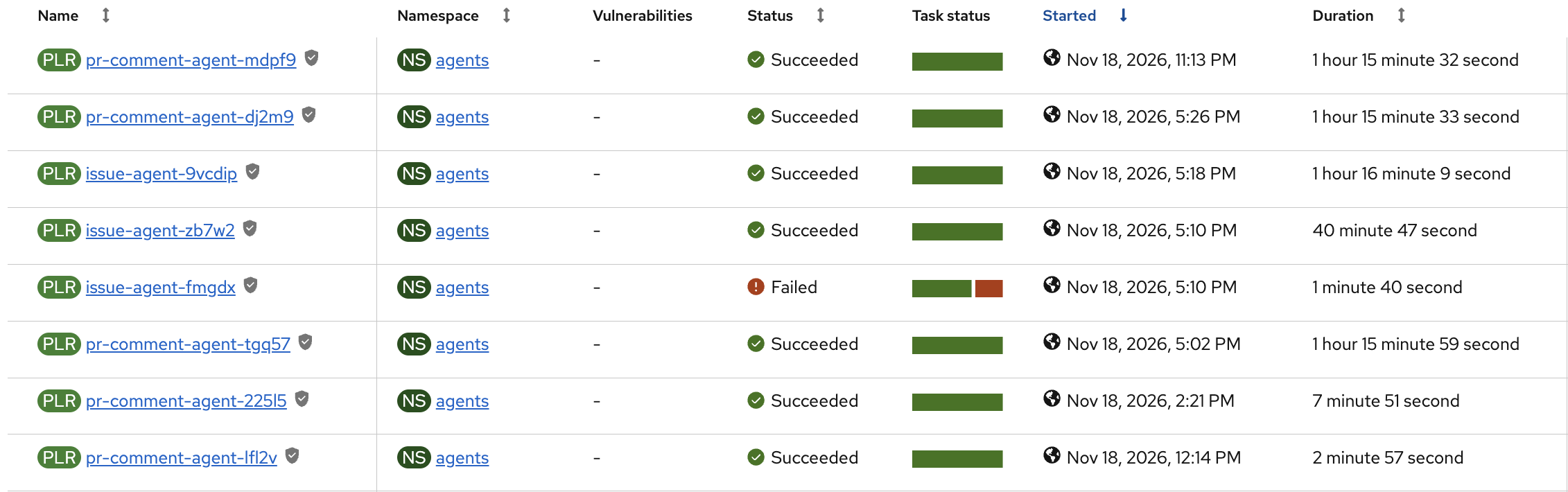
PipelineRuns of the three pipelines in the agents namespace, in the OpenShift Pipelines console.
6.4 Trigger bindings and templates
A TriggerBinding copies fields from the GitHub webhook payload into parameters. The one for
new issues (tekton/triggerbinding-new-issue.yaml):
apiVersion: triggers.tekton.dev/v1beta1
kind: TriggerBinding
metadata:
  name: new-issue
  namespace: agents
spec:
  params:
    - name: repo-url
      value: $(body.repository.clone_url)
    - name: repo-full-name
      value: $(body.repository.full_name)
    - name: issue
      value: $(body.issue.number)
    - name: issue-title
      value: $(body.issue.title)
    - name: issue-body
      value: $(body.issue.body)
    - name: base-branch
      value: $(body.repository.default_branch)
    - name: issue-id
      value: $(body.issue.id)
    - name: issue-author
      value: $(body.issue.user.login)
The binding for issue comments (tekton/triggerbinding-issue-comment.yaml) adds the event type
($(header.X-Github-Event)) and the comment ($(body.comment.id), $(body.comment.user.login),$(body.comment.body)). The two pull request bindings read $(body.pull_request.number),$(body.pull_request.title) and $(body.pull_request.head.ref), and take the author and text
from body.comment (review comment) or body.review (review).
A TriggerTemplate turns those parameters into a PipelineRun. The one for new issues
(tekton/triggertemplate-new-issue.yaml, shortened):
apiVersion: triggers.tekton.dev/v1beta1
kind: TriggerTemplate
metadata:
  name: new-issue
  namespace: agents
spec:
  params:
    - name: repo-url
    - name: repo-full-name
    - name: issue
    - name: issue-title
    - name: issue-body
    - name: base-branch
    - name: issue-id
      default: ""
    - name: issue-author
      default: ""
  resourcetemplates:
    - apiVersion: tekton.dev/v1
      kind: PipelineRun
      metadata:
        name: issue-agent-$(tt.params.issue-id)      # fixed name: a redelivered webhook cannot start a second run
      spec:
        pipelineRef:
          name: issue-agent
        timeouts:
          pipeline: 3h15m0s
          tasks: 3h0m0s
          finally: 15m0s
        params:
          - name: repo-url
            value: $(tt.params.repo-url)
          - name: issue
            value: $(tt.params.issue)
          # ... one entry per parameter above
        workspaces:
          - name: skills
            volumeClaimTemplate:
              spec:
                accessModes:
                  - ReadWriteOnce
                resources:
                  requests:
                    storage: 1Gi
          - name: work                           # same volumeClaimTemplate, 10Gi
            volumeClaimTemplate:
              spec:
                accessModes:
                  - ReadWriteOnce
                resources:
                  requests:
                    storage: 10Gi
The templates for comments and pull requests are the same with another pipelineRef, other
parameters and taskRunTemplate.serviceAccountName: pipeline.
oc apply -f tekton/triggerbinding-new-issue.yaml \
         -f tekton/triggerbinding-issue-comment.yaml \
         -f tekton/triggerbinding-pr-review.yaml \
         -f tekton/triggerbinding-pr-review-comment.yaml \
         -f tekton/triggertemplate-new-issue.yaml \
         -f tekton/triggertemplate-issue-comment.yaml \
         -f tekton/triggertemplate-pr-comment.yaml
6.5 EventListener and Route
The EventListener (tekton/eventlistener-new-issue.yaml) is the single entry point. Every
trigger first verifies the webhook signature (github interceptor) and then filters with CEL
(cel interceptor). Only events that pass both reach a binding and a template.
apiVersion: triggers.tekton.dev/v1beta1
kind: EventListener
metadata:
  name: new-issue
  namespace: agents
spec:
  serviceAccountName: issue-agent-listener
  triggers:
    - name: new-issue
      interceptors:
        - ref:
            kind: ClusterInterceptor
            name: github
          params:
            - name: secretRef
              value:
                secretName: github-webhook-secret
                secretKey: secret
            - name: eventTypes
              value:
                - issues
        - ref:
            kind: ClusterInterceptor
            name: cel
          params:
            - name: filter
              value: >-
                body.action == 'opened'
                && body.issue.author_association in ['OWNER', 'MEMBER']
      bindings:
        - kind: TriggerBinding
          ref: new-issue
      template:
        ref: new-issue

    - name: issue-comment
      interceptors:
        - ref:
            kind: ClusterInterceptor
            name: github
          params:
            - name: secretRef
              value:
                secretName: github-webhook-secret
                secretKey: secret
            - name: eventTypes
              value:
                - issue_comment
        - ref:
            kind: ClusterInterceptor
            name: cel
          params:
            - name: filter
              value: >-
                body.action == 'created' && body.issue.state == 'open'
                && !has(body.issue.pull_request) && body.sender.type != 'Bot'
                && body.comment.author_association in ['OWNER', 'MEMBER']
                && body.comment.body.startsWith('@ai')
      bindings:
        - kind: TriggerBinding
          ref: issue-comment
      template:
        ref: issue-comment

    - name: pr-review-comment
      interceptors:
        - ref:
            kind: ClusterInterceptor
            name: github
          params:
            - name: secretRef
              value:
                secretName: github-webhook-secret
                secretKey: secret
            - name: eventTypes
              value:
                - pull_request_review_comment
        - ref:
            kind: ClusterInterceptor
            name: cel
          params:
            - name: filter
              value: >-
                body.action == 'created' && body.pull_request.state == 'open'
                && body.sender.type != 'Bot'
                && body.comment.author_association in ['OWNER', 'MEMBER']
      bindings:
        - kind: TriggerBinding
          ref: pr-review-comment
      template:
        ref: pr-comment

    - name: pr-review
      interceptors:
        - ref:
            kind: ClusterInterceptor
            name: github
          params:
            - name: secretRef
              value:
                secretName: github-webhook-secret
                secretKey: secret
            - name: eventTypes
              value:
                - pull_request_review
        - ref:
            kind: ClusterInterceptor
            name: cel
          params:
            - name: filter
              value: >-
                body.action == 'submitted' && body.pull_request.state == 'open'
                && body.sender.type != 'Bot'
                && body.review.author_association in ['OWNER', 'MEMBER']
                && body.review.body != null && body.review.body != ''
      bindings:
        - kind: TriggerBinding
          ref: pr-review
      template:
        ref: pr-comment
The Route exposes the listener service over HTTPS. Its host is generated by OpenShift and is
the payload URL for the GitHub webhook (section 7):
apiVersion: route.openshift.io/v1
kind: Route
metadata:
  name: new-issue
  namespace: agents
spec:
  to:
    kind: Service
    name: el-new-issue          # created by Tekton Triggers for the EventListener
  port:
    targetPort: http-listener
  tls:
    termination: edge
    insecureEdgeTerminationPolicy: Redirect
oc apply -f tekton/eventlistener-new-issue.yaml -f tekton/route-new-issue.yaml
All manifests of this section in one go, in a safe order:
oc apply -f agents/configmap-agent-config.yaml
oc apply -f tekton/serviceaccount-issue-agent-listener.yaml -f tekton/rolebinding-issue-agent-listener.yaml
oc apply -f tekton/task-fetch-skills.yaml -f tekton/task-verify-build.yaml -f tekton/task-report-failure.yaml
oc apply -f tekton/pipeline-issue-agent.yaml -f tekton/pipeline-issue-comment-agent.yaml -f tekton/pipeline-pr-comment-agent.yaml
oc apply -f tekton/triggerbinding-new-issue.yaml -f tekton/triggerbinding-issue-comment.yaml \
         -f tekton/triggerbinding-pr-review.yaml -f tekton/triggerbinding-pr-review-comment.yaml \
         -f tekton/triggertemplate-new-issue.yaml -f tekton/triggertemplate-issue-comment.yaml \
         -f tekton/triggertemplate-pr-comment.yaml
oc apply -f tekton/eventlistener-new-issue.yaml -f tekton/route-new-issue.yaml
6.6 How events become pipeline runs
The new-issue EventListener has four triggers. Each verifies the webhook signature with thegithub-webhook-secret secret, filters with CEL, and then maps the payload with a binding.
| Trigger | GitHub event | CEL filter (all conditions) | Template, pipeline |
|---|---|---|---|
new-issue |
issues |
action opened, author is OWNER or MEMBER |
new-issue, issue-agent |
issue-comment |
issue_comment |
action created, issue open, not a pull request, not a bot, author OWNER or MEMBER, body starts with @ai |
issue-comment, issue-comment-agent |
pr-review-comment |
pull_request_review_comment |
action created, PR open, not a bot, author OWNER or MEMBER |
pr-comment, pr-comment-agent |
pr-review |
pull_request_review |
action submitted, PR open, not a bot, author OWNER or MEMBER, non-empty body |
pr-comment, pr-comment-agent |
Each PipelineRun gets its own volumes (volumeClaimTemplate): 1 GiB for the skills workspace and
10 GiB for the work workspace (the clone and the Maven cache). The only Tekton timeouts are
global, set in the TriggerTemplates: 3 hours for all tasks together and 15 minutes reserved forfinally, so the failure comment can still be posted. The steps bound themselves with timeout in
their scripts (agent 3 h, planning 15 min, each build 20 min, each fix 15 min, and a 45 minute
budget for the whole fix loop).
The name of a PipelineRun is fixed and built from the event: issue-agent-<issue id>,issue-comment-agent-<comment id> and pr-comment-agent-<c|r><comment or review id>. GitHub
redelivers a webhook after a timeout or on request, and Tekton refuses a second run with the same
name, so one event never produces two pull requests. To run an event again on purpose, delete the
old PipelineRun and redeliver the webhook.
To limit how many runs work at the same time, apply tekton/resourcequota-agents.yaml (optional).
It caps the pods in the agents namespace, and Tekton keeps the extra TaskRuns waiting instead of
failing them. The waiting time counts against the timeout.
6.7 What a run does
print-event: prints the key facts of the event to the log.fetch-skills:oras pullof the skills artifact, then unpack.prepare: mints a GitHub App installation token, fetches the issue or PR conversation,
clones the repository and creates the working branch. This is the only step besidespublish
that holds the GitHub App private key.plan: the agent decides whether code changes are needed. If so, it writes a checklist
(- [ ] ...) and posts it as a comment on the issue or pull request. Questions are not planned
(issue-agentalways plans, because a new issue is always a task).agent: OpenCode implements the change against the vLLM endpoint, following the plan and
the repository'sAGENTS.md. It writes a short summary to.agent-summary.md. It has 3 hours.verify(its own task): builds and tests the result (the script is in theverify-buildTask). If the
build fails, the agent gets the end of the log and fixes the code, up tomax-fix-attempts
times and within 45 minutes. The step never fails: it leaves a note with the result.publish(its own task): mints a fresh token, commits and pushes. The issue pipelines also open a pull
request and enable auto-merge;pr-comment-agentpushes to the existing PR branch. The agent's
summary is then posted as a comment, preceded by the verification result. If the build stays
red, the pull request is opened as a draft, auto-merge is not enabled and the comment
contains the end of the build log.report-failure(finally): only when the run failed or timed out. Comments on the issue
or pull request with the name of thePipelineRunand how to read its logs, so a failure is
not silent.
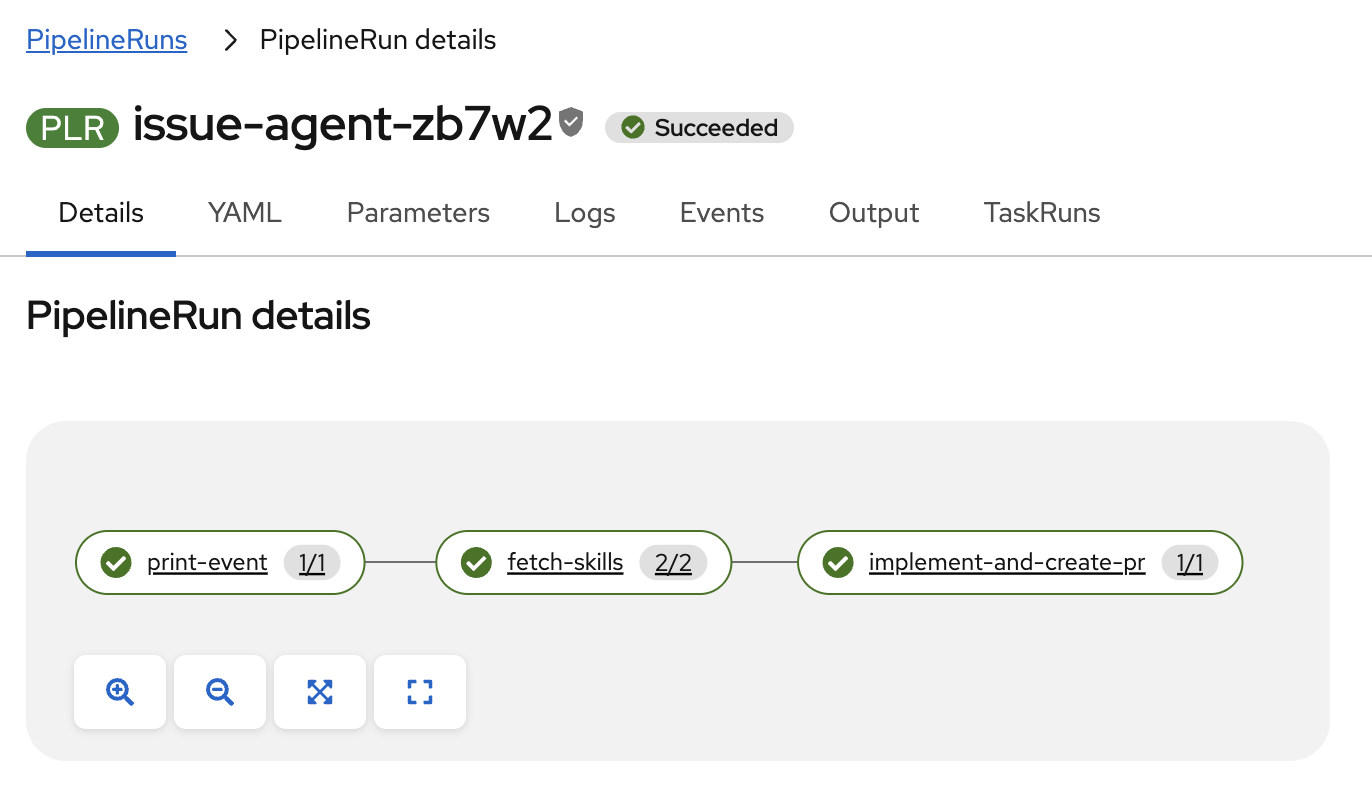
A finished issue-agent run: print-event, fetch-skills and implement-and-create-pr.
6.8 Security model
- The
agentstep has no GitHub credentials. Committing, pushing and anyghcommand are
denied inopencode.json, and the model only sees code and the issue text. - The
planstep receives a one-hour installation token (not the private key) and may only rungh issue commentorgh pr comment(opencode-plan.json). - A fresh token is minted in
publish, because an agent run can exceed the one-hour token
lifetime. - Only
OWNERandMEMBERaccounts can trigger runs, bot events are ignored, and
pull requests from forks are rejected. - Issue and comment text is untrusted input that reaches the model. The agent runs with a broad
bashpermission inside its pod, so keep the pods free of cluster credentials, and consider aNetworkPolicythat limits egress to the model, GitHub and your Maven repositories.
7. Connect GitHub to the cluster
Get the public URL of the listener:
oc get route new-issue -n agents -o jsonpath='https://{.spec.host}{"\n"}'
In the GitHub App settings (or as a repository webhook) set:
- Payload URL: the URL above
- Content type:
application/json - Secret: the value stored in
github-webhook-secret - Events: Issues, Issue comment, Pull request review, Pull request review comment
Check Recent deliveries on GitHub. A 202 means the listener accepted the event; a 4xx
usually means a wrong secret.
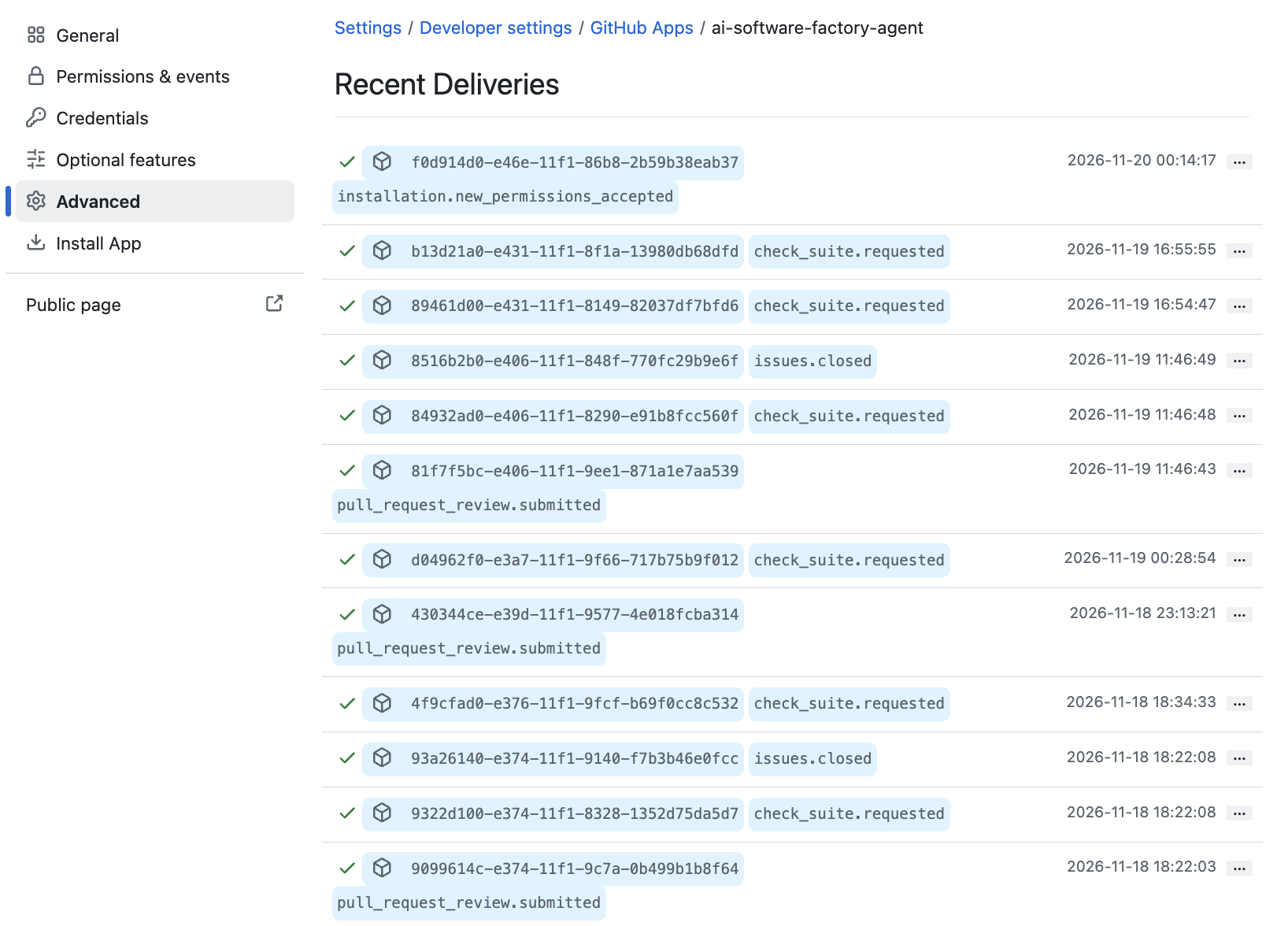
Recent deliveries of the app webhook: a green tick means GitHub got a successful response.
8. Try it
Open an issue in the repository as an owner or member (for example, "Add a
/healthendpoint").Watch the run:
oc get pipelinerun -n agents
tkn pipelinerun logs -f -n agents --last
The issue gets a plan comment, then a pull request and a summary comment appear.

The bot posts the plan as a checklist before it starts the implementation.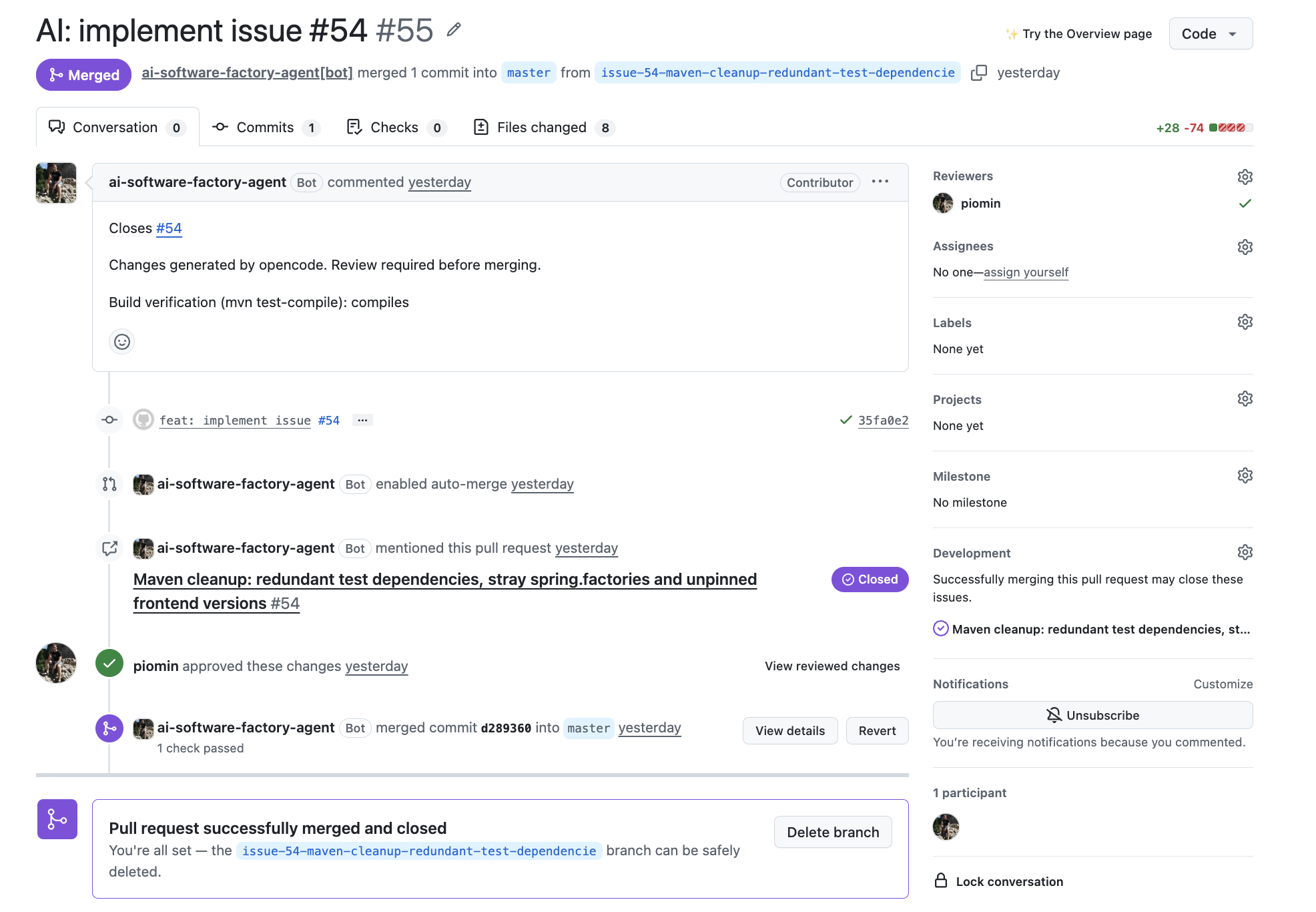
The resulting pull request: opened by the GitHub App, approved by a human reviewer and then merged.Comment
@ai please also add a unit teston the issue, or review the pull request with a
comment, to trigger the follow-up pipelines.
9. Troubleshooting
| Symptom | Check |
|---|---|
No PipelineRun is created |
Webhook deliveries on GitHub; oc logs deployment/el-new-issue -n agents; the sender's author_association and the CEL filter. |
fetch-skills fails |
skills-artifact reference and registry access; the artifact must contain a .tar.gz. |
prepare fails when minting a token |
App ID, installation ID, key format of the github-app secret; the app must be installed on the repository. |
agent hangs or loops |
vLLM health (oc logs deployment/qwen38-flash -n ai), context limit, and the 3 hour limit of the step. A small model sometimes needs more explicit AGENTS.md rules. |
Pods stay Pending in ai |
GPU capacity, taints and tolerations, and that the NVIDIA GPU Operator is healthy. |
publish fails on push |
App permissions (Contents write), branch protection rules, and that the branch does not already exist. |
| Auto-merge could not be enabled | Repository setting Allow auto-merge and branch protection on the base branch. |
| The pull request is a draft | verify could not make the build pass. The comment shows the end of the build log. Fix it by hand or comment on the pull request. |
verify runs the wrong build |
Set the verify-command parameter of the pipeline (for example ./gradlew build), or skip. |
| A webhook redelivery does nothing | The PipelineRun of that event already exists (oc get pipelinerun -n agents). Delete it to run the event again. |
10. Known limitations
verifyonly runs the build and tests of the repository (Maven by default). It does not replace
required status checks and reviews through branch protection, and a repository without a
recognised build is not verified.- The agent step has a 3 hour limit, but the 3 hours of the whole run are shared with the clone,
planning,verifyandpublish. A run that uses them up is cut off by Tekton beforepublish,
and then no pull request is created. Thereport-failurecomment tells you about it. - The model context is 128k tokens (
--max-model-len=131072). It needs enough GPU memory for the KV cache: if
the pod fails to start or runs out of memory, lower the value inai/deployment-qwen38-flash.yamland thecontextlimit in the agent ConfigMap. Long issue threads or large repositories still reduce quality. - Comments on pull requests that start with
@aiare not handled byissue-comment-agent
(the trigger skips pull requests). Pull requests are handled by the review triggers.
11. Possible next steps
Ideas for features and architecture changes, none of them implemented yet.
- Reviewer agent. A second agent reviews the pull request before the human does. Splitting
the roles (planner, implementer, reviewer) usually helps more than a bigger model, and the second
model inai/(Qwen3 Coder) can take the reviewer role. - Self-healing after CI.
check_runorworkflow_runevents with a failure startpr-comment-agentautomatically, so the loop "pull request, red CI, fix" closes without a human.
It needs a limit on the number of automatic attempts per pull request. - Preview environments.
skaffoldandkubectlare already in the agent image. An ephemeral
namespace per pull request with end-to-end tests would be a much stronger check than the build
alone. It needs a separate service account and RBAC for the agent pods, which is the
security-sensitive part. - Plan approval gate. For larger issues the agent posts the plan and waits for a label or a
comment such as@ai gobefore it implements anything. For unclear issues it asks questions
instead of guessing. A triage step could also reject or split issues that are too big. - Evaluation set. A set of reference issues in the showcase repository, with a measured share of
runs that end in a green and merged pull request. Without it you cannot tell whether a new model,
prompt, skill orAGENTS.mdrule improves the results or breaks them. - Model routing. Simple issues go to a cheaper model and hard ones to a stronger one, based on a
triage step. An external model could serve as a fallback; a Claude Code variant of the agent
image already exists. - Observability. vLLM metrics (Prometheus), duration and result of every run (Tekton Results)
and the share of pull requests merged without changes, in one Grafana dashboard. The last number
tells whether the factory actually helps. - Many repositories. Per-repository settings (base branch, verify command, model) in one place,
instead of assuming a single repository and a single stack. - Hardening.
NetworkPolicylimiting egress to the model, GitHub and the Maven repositories,automountServiceAccountToken: falsefor the agent pods, image digests instead of:latest,
a signed skills artifact, and secrets from External Secrets or Vault instead ofoc apply.
Reviews (0)
Sign in to leave a review.
Leave a reviewNo results found