llm-mock
Health Gecti
- License — License: MIT
- Description — Repository has a description
- Active repo — Last push 0 days ago
- Community trust — 18 GitHub stars
Code Basarisiz
- exec() — Shell command execution in bin/llmock.js
- process.env — Environment variable access in bin/llmock.js
- network request — Outbound network request in bin/llmock.js
Permissions Gecti
- Permissions — No dangerous permissions requested
Bu listing icin henuz AI raporu yok.
A local mock LLM server for early front end development work
LLMock — Local Mock LLM API


A lightweight local server that simulates LLM APIs for development and testing. Build and test AI-powered applications without API costs or an internet connection.
Using a coding agent? Point it at
llms.txt(shipped in the npm package atnode_modules/llmock/llms.txt) — a compact reference to the CLI, config schema, response shapes and gotchas.
Table of Contents
- Why LLMock?
- Quick Start
- Installation Options
- Configuration
- Features
- Integration Guide
- Supporting Different LLM Providers
- Docker Support
- Troubleshooting
- License
Why LLMock?
- Free and fast — no API costs, instant responses for rapid prototyping
- Simple and lightweight — easier to set up than a local model and uses far fewer system resources
- Consistent testing — predictable, repeatable responses for testing UI logic
- Offline capable — works without internet connectivity
- Full visibility — complete request logging and a live dashboard
- Realistic simulation — configurable delays, SSE streaming, and mock embeddings
- OpenAI-compatible — works with ChatGPT, Grok, Llama, DeepSeek, Gemini, and any OpenAI-style API
- Anthropic Messages API — built-in
claudepreset with the SDK's streaming event format - Fixture replies — return canned text or JSON for requests that contain a chosen string
- Your own reply pools — pick at random from a set of your own texts, per rule or as the default reply
Built on Fastify for high performance and reliability.
Quick Start
Prerequisites: Node.js 20 or later (24 LTS recommended; it is the version LLMock is tested on)
The fastest way to get started is with the scaffolding tool, which creates a complete project with configuration files and example templates:
npm create llmock@latest my-project
cd my-project
npm install
npm run llmock:start
Open http://localhost:8001 to see the live dashboard.
That's it. To run against a specific model preset:
npm run llmock:chatgpt      # OpenAI ChatGPT-style (default)
npm run llmock:gemini       # Google Gemini format
npm run llmock:claude       # Anthropic Claude Messages API (/v1/messages)
npm run llmock:streaming    # OpenAI-style with SSE streaming
npm run llmock:embeddings   # Optimised for embeddings/RAG testing
Scaffolded project layout
my-project/
├── package.json
├── .llmockrc.json
├── README.md
├── Dockerfile
├── docker-compose.yml
├── request-templates/
│   ├── openai_req.json
│   ├── gemini_req.json
│   └── claude_req.json
└── response-templates/
    ├── openai_res.json
    ├── gemini_res.json
    └── claude_res.json
The template folders contain editable copies of the built-in OpenAI, Gemini and Claude templates. The server uses them for request validation and response shape. To add your own provider, see Template locations.
Installation Options
Option 1: Scaffolded project (recommended)
npm create llmock@latest my-project
Generates a ready-to-use project with configuration, templates, and Docker support.
Option 2: Add to an existing project
npm install llmock
# or globally
npm install -g llmock
Then use the CLI directly:
llmock start                        # uses defaultModel from .llmockrc.json (chatgpt if none), port 8001
llmock start --model=gemini
llmock start --model=claude         # Anthropic Messages API
llmock start --port=3000 --stream=true
llmock stop                         # add --port=3000 if not on 8001
llmock config                       # show current settings (accepts --model)
llmock help
All CLI flags support both --key=value and --key value formats and override .llmockrc.json at runtime. start is the default command, so llmock --model=claude works too.
llmock start returns once the server is answering. If the server cannot start (for example a config error), or one is already running on that port, it exits with an error instead; run with --foreground to see the server's own output.
Foreground Mode
For Docker containers or when you want the server to stay attached to your terminal:
llmock start --foreground
The --foreground flag keeps the server process attached and forwards all output to your console. This is essential for Docker containers and useful for debugging. Without this flag, the server runs as a detached background process.
On Windows the background server starts without opening a console window. Use llmock stop to shut it down, or llmock start --foreground to keep it visible in your terminal.
Option 3: Docker
npm create llmock@latest my-project
cd my-project
npm run docker:start
See Docker Support for full details, including how to run LLMock in Docker from your own project without the scaffolding.
Configuration
Configuration file (.llmockrc.json)
All settings live in .llmockrc.json in your project root. CLI flags always override these values. defaultModel names the preset used when you don't pass --model.
The config file is read once at startup, so restart the server after changing it. Fixture files and the stored responses file are read on every request, so edits to those apply straight away.
{
  "defaultModel": "chatgpt",
  "models": {
    "chatgpt": {
      "name": "openai",
      "model": "gpt-4o",
      "endpoint": "chatgpt/chat/completions",
      "responseType": "lorem",
      "maxLoremParas": 8,
      "validateRequests": true,
      "logRequests": true,
      "debug": false,
      "stream": false,
      "responseDelay": {
        "min": 3000,
        "max": 5000
      },
      "embeddings": {
        "enabled": true,
        "dimensions": 128
      }
    }
  },
  "server": {
    "port": 8001,
    "host": "0.0.0.0"
  }
}
Configuration reference:
| Option | Description |
|---|---|
name |
Required. LLM provider name (used for template loading) |
model |
Model identifier (e.g. gpt-4o, gemini-pro) |
endpoint |
Required. API endpoint path (not v1/embeddings while embeddings are enabled) |
responseType |
"lorem" (random text) or "stored" (predefined responses) |
storedResponsesFile |
Optional JSON file of your own texts for "stored" (see Response types) |
maxLoremParas |
Max sentences in lorem ipsum responses |
validateRequests |
Validate incoming requests against templates |
logRequests |
Save the most recent requests to the log file |
maxLoggedRequests |
How many requests the log keeps (default 10, at most 100) |
debug |
Enable verbose console logging |
stream |
Return SSE streaming responses (the claude preset decides per request instead) |
responseDelay.min/max |
Response delay range in milliseconds |
responseRules |
Optional list of { match, file } or { match, files } fixture replies (see Response rules) |
embeddings.enabled |
Enable the /v1/embeddings endpoint |
embeddings.dimensions |
Embedding vector size |
server.port / server.host |
Port and address the server listens on (8001, 0.0.0.0) |
Only name and endpoint are required in a preset. Anything left out uses: responseType lorem, maxLoremParas 8, maxLoggedRequests 10, no delay, and validation, logging, debug, streaming and embeddings off.
Adding custom models
Extend the models object with any additional preset, then start with --model=<name>:
{
  "models": {
    "my-model": {
      "name": "openai",
      "model": "gpt-3.5-turbo",
      "endpoint": "api/v1/chat/completions",
      "responseType": "stored",
      "validateRequests": true,
      "logRequests": false,
      "debug": true,
      "stream": false,
      "responseDelay": { "min": 1000, "max": 2000 },
      "embeddings": { "enabled": false, "dimensions": 64 }
    }
  }
}
llmock start --model=my-model
Response types
Lorem ipsum — generates random placeholder text, good for testing variable-length content in the UI:
{ "responseType": "lorem", "maxLoremParas": 8 }
Stored responses — returns one text from a pool, picked at random on each request. Without further settings the pool is a small set of fixed sentences bundled with the package:
{ "responseType": "stored" }
To use your own pool, point storedResponsesFile at a JSON file:
{ "responseType": "stored", "storedResponsesFile": "fixtures/replies.json" }
The file is a JSON array of strings:
["First canned reply.", "Second canned reply.", "Third canned reply."]
- Entries can also be objects with a string
content, the shape of the bundled data:[{ "id": 1, "content": "First canned reply." }]. Other keys are ignored. - The path is resolved relative to the folder holding the config file.
- A path that is empty or not a string stops the server at startup. When the response type is
stored, so does a file that is missing, unreadable, not valid JSON, not an array, an empty array, or that has an entry of any other shape. - The file is checked at startup and then read again on every request, so you can edit it without restarting. If it becomes invalid while the server is running, requests return an error rather than falling back to the bundled sentences.
- A matching response rule still wins. Use rules for a specific reply to a specific request, and stored responses for random variety on everything else.
- Works with every preset and with both static and streamed replies.
Response rules (fixture replies)
Lorem text is fine for UI work, but some callers expect a specific shape, such as JSON that gets parsed. Add responseRules to a preset to return the contents of a file whenever the request contains a given string:
{
  "models": {
    "chatgpt": {
      "responseRules": [
        { "match": "Classify this support ticket", "file": "fixtures/triage.json" },
        { "match": "Summarise the thread", "file": "fixtures/summary.txt" }
      ]
    }
  }
}
With a request whose message contains Classify this support ticket, the server replies with fixtures/triage.json as the message text, so the client can JSON.parse it. Anything that matches no rule gets the normal response for the preset's responseType.
matchis a case-sensitive substring, tested against every string value in the request body (message text, system prompt, content blocks), not against JSON keys.- Rules are checked in order and the first match wins.
matchandfilemust be non-empty strings. - GET requests have no body, so rules never apply to them.
- Matching covers the whole request, including earlier turns of a conversation. A rule that matched an early message keeps matching on every later turn, so use distinctive markers and put more specific rules first.
fileis resolved relative to the folder holding the config file, and is read exactly as written (including any trailing newline). It is read on every request, so you can edit it without restarting.- For varied replies to the same kind of request, give a rule
filesinstead offile:{ "match": "Summarise the thread", "files": ["fixtures/summary-a.txt", "fixtures/summary-b.txt"] }. One of the files is picked at random on each matching request. A rule has eitherfileorfiles, not both, andfilesmust be a non-empty list of non-empty strings. - A malformed rule stops the server at startup. An unreadable fixture (including any entry of
files) logs a warning at startup, and a request that needs it returns an error rather than falling back to generated text. - Works with every preset and with both static and streamed replies.
Streaming responses
Enable OpenAI-style Server-Sent Events (SSE) streaming in your config or via CLI:
{ "stream": true }
llmock start --stream=true
For the claude preset streaming is chosen per request instead: it streams when the request body has "stream": true, whatever this setting says (see Anthropic).
When enabled, the endpoint returns a chunked SSE stream. The server waits for the configured response delay, then sends the chunks at least 50 ms apart.
data: {"id":"chatcmpl-123","object":"chat.completion.chunk","choices":[{"delta":{"role":"assistant"}}]}

data: {"id":"chatcmpl-124","object":"chat.completion.chunk","choices":[{"delta":{"content":"Hello"}}]}

data: [DONE]
Response delay simulation
Simulate realistic API latency to test loading states, timeout handling, and UX:
{
  "responseDelay": { "min": 800, "max": 2500 }
}
Set both values to 0 for instant responses. The server picks a random value in the range for each request.
| Profile | min | max |
|---|---|---|
| Instant (development) | 0 | 0 |
| Fast | 100 | 300 |
| Realistic production | 800 | 2500 |
| Slow / timeout testing | 3000 | 8000 |
| Fixed delay | 1000 | 1000 |
Custom API paths
Set the endpoint to match any provider's path structure:
endpoint |
URL |
|---|---|
chatgpt/chat/completions |
http://localhost:8001/chatgpt/chat/completions |
models/gemini-pro:generateContent |
http://localhost:8001/models/gemini-pro:generateContent |
Write the path without a leading slash.
Environment variables
LLMock does not read any of these itself. They are a suggested convention for your own app, so it can switch between the mock and the real provider (the LangChain example uses them):
TEST_MODE=true
TEST_BASE_URL=http://localhost:8001/chatgpt
TEST_EMBEDDING_URL=http://localhost:8001/v1/embeddings
With TEST_MODE=false your app talks to the real LLM service again.
Features
Dashboard
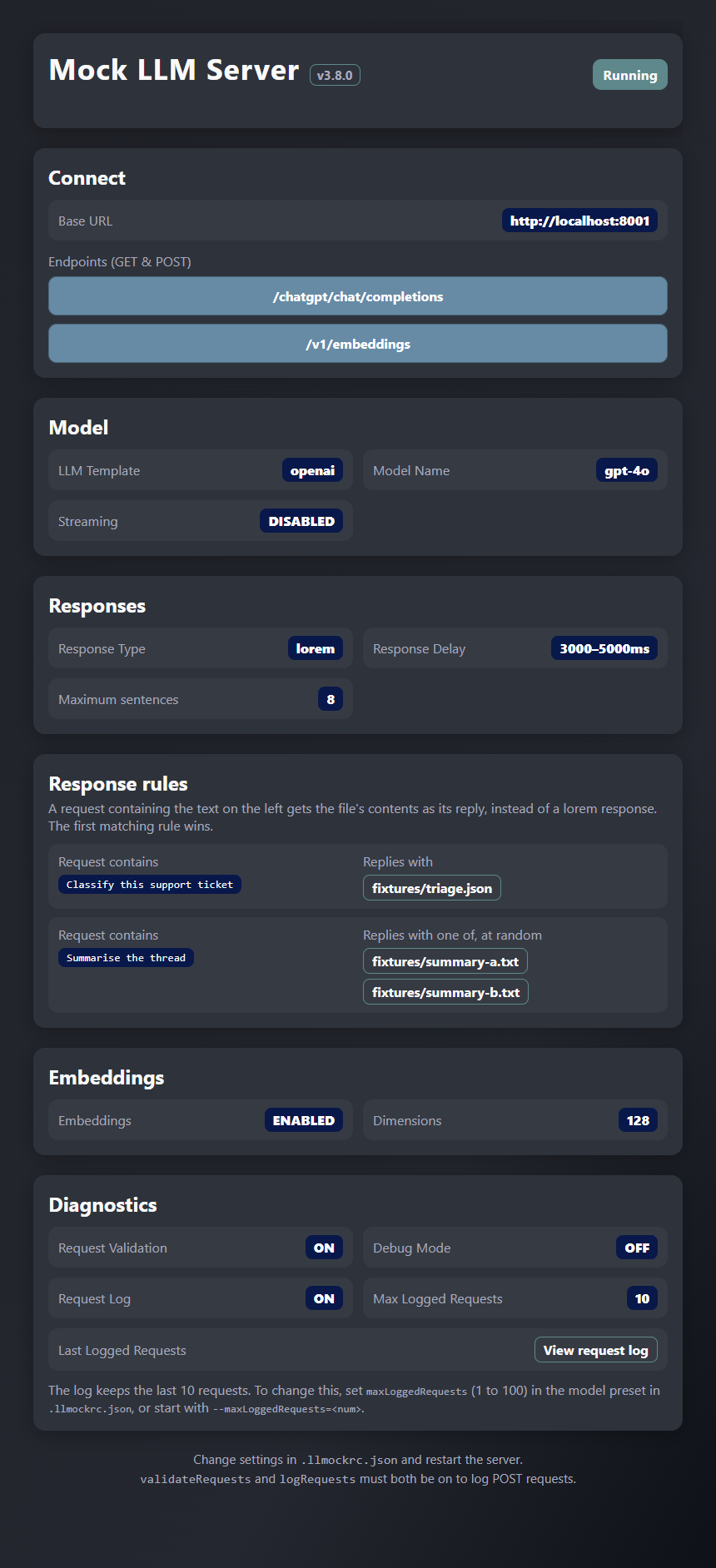
Once running, open http://localhost:8001 for the live dashboard:
| URL | Purpose |
|---|---|
http://localhost:8001 |
Main dashboard |
http://localhost:8001/ping |
Health check |
The dashboard shows server status, the llmock version, current configuration, available endpoints, and the most recent logged request. Settings are grouped into Connect, Model, Responses, Response rules, Embeddings and Diagnostics. It refreshes automatically every 2 seconds.
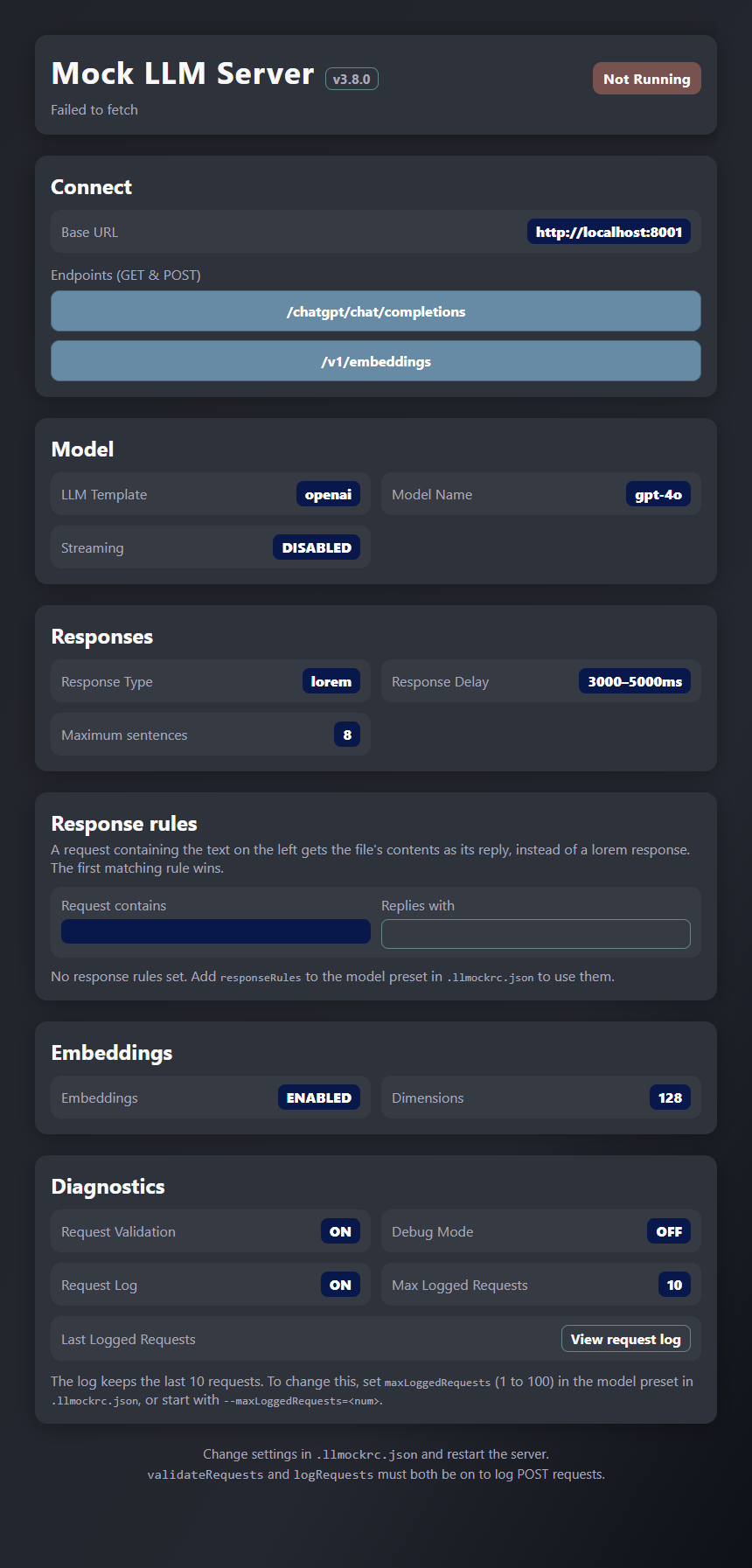
With responseType: "stored" the dashboard names the stored responses file in use (or Bundled); click it to read every response in the pool. The Response rules box lists each of the preset's responseRules as its match text beside the file(s) it replies with; click a file to read its contents. With no rules set, the box shows a blank rule with a note pointing to the setting.
Available endpoints
| Endpoint | Description |
|---|---|
Configurable (default: /chatgpt/chat/completions) |
Chat completions |
/v1/messages (with the claude preset) |
Anthropic Messages API |
/v1/embeddings |
OpenAI-compatible mock embeddings |
Request validation
Validate incoming requests against templates to confirm API compatibility:
- Enable validation:
"validateRequests": true - For a provider that is not built in, add a template to the
request-templates/folder (see Template locations)
A request passes when it contains every top-level key of the template. The built-in templates require model and messages (OpenAI), contents (Gemini), and model, max_tokens and messages (Claude). Invalid requests return a 400; the missing keys are shown under View request log on the dashboard.
Request logging
Enable with "logRequests": true and view the most recent requests, newest first, with View request log on the dashboard (as JSON at http://localhost:8001/ui-request-log). The viewer shows one request at a time with Back and Next, and Clear logs empties the log after asking you to confirm. The log keeps the last 10 requests; set "maxLoggedRequests" (or --maxLoggedRequests=<num>) to keep between 1 and 100. The log file holds those requests only, at:
| Platform | Log location |
|---|---|
| Windows | C:\Users\{name}\AppData\Local\llm-mock-nodejs\Log\ |
| macOS | ~/Library/Logs/llm-mock-nodejs/ |
| Linux | ~/.local/state/llm-mock-nodejs/ |
Debug mode
Enable verbose console output to see incoming request details, validation results, response generation steps, and timing:
llmock start --debug=true
Integration Guide
Chat completions
Standard (non-streaming)
curl http://localhost:8001/chatgpt/chat/completions \
  -H "Content-Type: application/json" \
  -d '{
    "model": "gpt-4o-mini",
    "messages": [{"role": "user", "content": "Hello"}],
    "temperature": 1,
    "stream": false
  }'
{
  "id": "chatcmpl-6sf37lXn5paUcuf8UaurpMIKRMsTe",
  "object": "chat.completion",
  "created": 1678485525,
  "model": "gpt-3.5-turbo-0301",
  "choices": [{"message": {"role": "assistant", "content": "Generated response"}}]
}
Streaming
Enable stream: true in your config, then use the same endpoint:
curl -N http://localhost:8001/chatgpt/chat/completions \
  -H "Content-Type: application/json" \
  -d '{
    "model": "gpt-4o-mini",
    "messages": [{"role": "user", "content": "Hello"}],
    "stream": true
  }'
Embeddings API
The mock server provides an OpenAI-compatible embeddings endpoint at /v1/embeddings:
curl http://localhost:8001/v1/embeddings \
  -H "Content-Type: application/json" \
  -d '{
    "model": "text-embedding-3-small",
    "input": "Your text string goes here"
  }'
Pass an array of strings for multiple embeddings in one call:
-d '{"model": "text-embedding-ada-002", "input": ["First text", "Second text"]}'
Response format:
{
  "object": "list",
  "data": [
    {
      "object": "embedding",
      "index": 0,
      "embedding": [0.1234, -0.5678, 0.9012]
    }
  ],
  "model": "text-embedding-3-small",
  "usage": { "prompt_tokens": 6, "total_tokens": 6 }
}
Key characteristics of mock embeddings: deterministic (same input always returns the same vector), configurable dimensions, model-name-sensitive, and OpenAI-compatible in shape. Note that vectors are pseudo-random — they have the correct shape for testing but are not real semantic embeddings.
Using with LangChain
Point your ChatOpenAI client at the mock server when TEST_MODE is enabled:
import { ChatOpenAI } from '@langchain/openai';

const chatModel = new ChatOpenAI({
  openAIApiKey: process.env.OPENAI_API_KEY,
  modelName: 'gpt-3.5-turbo',
  configuration:
    process.env.TEST_MODE === 'true'
      ? { baseURL: process.env.TEST_BASE_URL } // http://localhost:8001/chatgpt
      : {},
});
For embeddings, use LangChain's built-in fake embeddings or call the mock endpoint directly:
class MockEmbeddingsAPI {
  async embedDocuments(texts) {
    return Promise.all(texts.map(text => this.embedQuery(text)));
  }

  async embedQuery(text) {
    const response = await fetch(process.env.TEST_EMBEDDING_URL, {
      method: 'POST',
      headers: { 'Content-Type': 'application/json' },
      body: JSON.stringify({ input: text, model: 'text-embedding-ada-002' }),
    });
    const data = await response.json();
    return data.data[0].embedding;
  }
}

const embeddings =
  process.env.TEST_MODE === 'true'
    ? new MockEmbeddingsAPI()
    : new OpenAIEmbeddings({ openAIApiKey: process.env.OPENAI_API_KEY });
Supporting Different LLM Providers
LLMock supports any provider that uses the OpenAI chat completion format: ChatGPT, Grok, Llama, DeepSeek, Mistral, Gemini, and more. Anthropic's Messages API has its own built-in preset (below). For other providers with different request/response shapes, create custom templates.
Anthropic (Claude Messages API)
The claude preset serves POST /v1/messages. It is included in scaffolded projects and in the built-in defaults. If your .llmockrc.json predates it, add:
{
  "models": {
    "claude": {
      "name": "claude",
      "model": "claude-opus-5-5",
      "endpoint": "v1/messages",
      "responseType": "lorem",
      "maxLoremParas": 8,
      "validateRequests": true,
      "stream": false,
      "responseDelay": { "min": 200, "max": 800 },
      "embeddings": { "enabled": false, "dimensions": 128 }
    }
  }
}
llmock start --model=claude
Point the official SDK at it with a base URL and a dummy key (the SDK refuses to send without one):
ANTHROPIC_BASE_URL=http://localhost:8001 ANTHROPIC_API_KEY=mock-key node app.js
import Anthropic from '@anthropic-ai/sdk';

const client = new Anthropic({ baseURL: 'http://localhost:8001', apiKey: 'mock-key' });
const message = await client.messages.stream({
  model: 'claude-opus-5-5',
  max_tokens: 256,
  messages: [{ role: 'user', content: 'Hello' }],
}).finalMessage();
Or with curl:
curl http://localhost:8001/v1/messages \
  -H "Content-Type: application/json" \
  -H "x-api-key: mock-key" \
  -H "anthropic-version: 2023-06-01" \
  -d '{
    "model": "claude-opus-5-5",
    "max_tokens": 256,
    "messages": [{"role": "user", "content": "Hello"}]
  }'
Behaviour:
- Request validation requires only
model,max_tokensandmessages. Extra fields (system,output_config,temperature, ...) are accepted. - Streaming is per request.
"stream": truereturns Anthropic SSE events in order:message_start,content_block_start,content_block_delta(text deltas that rejoin to the full text),content_block_stop,message_delta(stop_reason: "end_turn"),message_stop. Otherwise a singlemessageobject is returned. - Responses have a unique
msg_id, echo the requestedmodel, and report estimatedusage(about 4 characters per token). - Response rules and stored responses work here too. Rules match against
systemas well asmessages.
Template locations
The framework checks two locations, in priority order:
./request-templates/and./response-templates/in the folder that holds your.llmockrc.jsonsrc/request-templates/andsrc/response-templates/in the package source
Templates are named <name>_req.json and <name>_res.json, where <name> is the preset's name field. Scaffolded projects already have these folders; otherwise create them yourself. Project-level templates take priority, so you can add custom templates without modifying the package.
Creating a custom provider template
Step 1 — Request template (request-templates/<name>_req.json):
The file is a JSON array holding one example request. Its top-level keys are the ones a request must contain when validation is on:
[
  {
    "model": "string",
    "messages": [
      { "role": "string", "content": "string" }
    ]
  }
]
Step 2 — Response template (response-templates/<name>_res.json):
Also a JSON array holding one object. Use DYNAMIC_CONTENT_HERE as the placeholder for the reply text:
[
  {
    "id": "chatcmpl-123",
    "object": "chat.completion",
    "choices": [
      {
        "message": {
          "role": "assistant",
          "content": "DYNAMIC_CONTENT_HERE"
        },
        "finish_reason": "stop"
      }
    ]
  }
]
Step 3 — Model preset (.llmockrc.json):
The name field must match your template filename prefix:
{
  "models": {
    "mymodel": {
      "name": "mymodel",
      "model": "my-custom-model-v1",
      "endpoint": "api/v1/chat/completions",
      "responseType": "lorem",
      "maxLoremParas": 8,
      "validateRequests": true,
      "stream": false,
      "responseDelay": { "min": 1000, "max": 2000 },
      "embeddings": { "enabled": true, "dimensions": 128 }
    }
  }
}
Step 4 — Start and test:
llmock start --model=mymodel

curl http://localhost:8001/api/v1/chat/completions \
  -H "Content-Type: application/json" \
  -d '{"model": "my-custom-model-v1", "messages": [{"role": "user", "content": "Hello"}]}'
Docker Support
Docker is included when you use the scaffolding tool and is useful for CI/CD pipelines and consistent team environments.
Available scripts
| Script | Description |
|---|---|
npm run docker:start |
Start the container in detached mode |
npm run docker:stop |
Stop the container and remove volumes |
npm run docker:rebuild |
Rebuild and restart the container |
npm run docker:restart |
Stop and start the container |
Configuration
The Docker container uses the same .llmockrc.json as the local setup, mounted as a read-only volume. Update settings and restart to apply changes — no rebuild required:
vim .llmockrc.json
npm run docker:restart
How Docker Works
The Docker container uses the --foreground flag to keep the LLMock server process attached. This prevents the container from restarting continuously, which would happen if the server ran as a detached background process. The container includes:
- Dockerfile: Node 24 Alpine image that runs the server as a non-root user
- docker-compose.yml: Port 8001 exposed, config file mounted read-only
- docker-start script: Runs
llmock start --foregroundto keep the server attached
Standalone Docker setup (no scaffolding)
You don't need create-llmock to run LLMock in Docker. The published llmock package can run from a small Dockerfile inside your own project, so only your config and fixtures live in your repo.
your-project/
└── docker/
    └── llmock/
        ├── Dockerfile
        ├── docker-compose.yml
        ├── .llmockrc.json
        └── fixtures/
            └── summary.json
Dockerfile
FROM node:24-alpine
WORKDIR /app
RUN npm install --omit=dev llmock
EXPOSE 8001
CMD ["npx", "llmock", "start", "--foreground"]
docker-compose.yml
services:
  llmock:
    build: .
    ports:
      - "8001:8001"
    restart: unless-stopped
    volumes:
      - ./.llmockrc.json:/app/.llmockrc.json:ro
      - ./fixtures:/app/fixtures:ro
.llmockrc.json
{
  "defaultModel": "claude",
  "models": {
    "claude": {
      "name": "claude",
      "model": "claude-opus-5-5",
      "endpoint": "v1/messages",
      "responseType": "lorem",
      "stream": true,
      "responseDelay": { "min": 300, "max": 500 },
      "responseRules": [
        { "match": "Summarise this document", "file": "fixtures/summary.json" }
      ]
    }
  },
  "server": { "port": 8001, "host": "0.0.0.0" }
}
Start it and point your app at http://localhost:8001:
docker compose -f docker/llmock/docker-compose.yml up --build
Config and fixtures are mounted from your project, so neither needs a rebuild: restart the container after editing the config, while fixture edits apply on the next request. Requests containing a match string get the fixture file back (see Response rules); everything else gets generated lorem text.
If you use storedResponsesFile, keep that file in the mounted fixtures folder (or mount it separately) so it sits at the same path relative to the config inside the container. The same goes for every file a rule names.
You can wrap the command in an npm script such as "mock:start".
Manual Docker commands
docker compose up -d --force-recreate       # build and start
docker compose logs -f                      # view logs
docker compose down --volumes               # stop and clean up
docker compose down --volumes && docker compose up -d --force-recreate --build  # rebuild
Note: LLMock is intended for local development and testing only.
Troubleshooting
Server not responding
Confirm the server is running and the port matches .llmockrc.json. Open http://localhost:8001 — if it's unreachable, the server may not have started.
llmock start exits with an error
Run llmock start --foreground with the same options to see the server's output. If it reports a server already running on the port, run llmock stop (with --port if it isn't 8001) first.
The server refuses to start on a malformed responseRules entry, or on a storedResponsesFile that is missing or not valid; the message names the setting and the file.
Port already in use
Change the port in .llmockrc.json or pass it as a flag:
llmock start --port=8002
Request validation failures
- For the
claudepreset,model,max_tokensandmessagesare all required - Confirm your request template matches the provider's API format
- Check the request shape with View request log on the dashboard
- Verify the
namefield in your model config matches the template filename prefix
Response delays not applied
Ensure responseDelay.min or responseDelay.max is greater than 0, then restart the server.
A fixture or stored reply returns an error
The file could not be read when the request arrived. Check that the path is relative to the folder holding .llmockrc.json and, in Docker, that the file is mounted into the container.
License
MIT — see LICENSE for details.
Yorumlar (0)
Yorum birakmak icin giris yap.
Yorum birakSonuc bulunamadi