ponko
Health Uyari
- License — License: Apache-2.0
- Description — Repository has a description
- Active repo — Last push 0 days ago
- Low visibility — Only 5 GitHub stars
Code Gecti
- Code scan — Scanned 12 files during light audit, no dangerous patterns found
Permissions Gecti
- Permissions — No dangerous permissions requested
Bu listing icin henuz AI raporu yok.
A performance-oriented 2D/3D game engine in Rust, with C and C++ bindings. Code-first, built for large simulations and AI-assisted development.
Ponko
A general-purpose, performance-oriented 2D/3D game engine with a code-first workflow.
Ponko aims to provide the power of a serious game engine through clear APIs,
measured performance, and first-class support for AI-assisted development.
Large simulations are a strength, alongside ordinary 2D and 3D games.
Rust is the primary API; C and C++ bindings support native integrations.
No large visual editor is required.
Project vision · Roadmap ·
Architecture · Contribute ·
Guide source · API
Formerly Crabby Engine. The package is ponko; source folders still usecrabby_*, and the C/C++ headers and ABI retain their existing names.
The current package version is 0.0.1. Read STABILITY.md
for the published compatibility contracts; the rename does not authorize
weakening those contracts.
Why Ponko instead of Bevy or Unity?
The difference is the combination of choices and workflow. Individual features
such as parallel ECS queries, inspection, or AI integration are not exclusive.
| Area | Ponko today and direction | Bevy | Unity |
|---|---|---|---|
| Primary language and API | Rust Game/Ctx; C ABI and C++17 wrapper |
Rust, ECS-oriented App and systems |
C# gameplay API; native engine |
| Architectural philosophy | Integrated defaults; modular internals with gradual boundary improvements planned | Modular plugins with standard defaults | Integrated editor and modular packages |
| ECS and scheduling | Archetype ECS, parallel queries; opt-in parallel scheduling of systems that declare their access | ECS with automatic scheduling of compatible systems in parallel | GameObjects and optional high-performance Entities/DOTS |
| Rendering | Custom wgpu 2D/3D renderer; ongoing maintenance and capability work | Extensible 2D/3D renderer and render graph | Multiple render pipelines and extensive graphics tooling |
| Workflow and editor | Code-first; optional runtime inspector and external asset tools | Code-first; no large editor required | Primarily visual-editor-centered, with code and CLI workflows |
| AI-assisted development | MCP for launch, state, stepping, screenshots and diagnostics | Remote protocol can support external tools and agents | Official Assistant and CLI MCP integration |
| Inspection and debugging | Reflected components, runtime inspector, logs, traces and profiling | Remote ECS inspection and mutation, diagnostics | Editor inspection, debugging and profiling tools |
| Headless simulation | Fixed-tick runs without a window or GPU; optional dependencies | Headless applications supported | Dedicated Server and batch workflows |
| Networking | Built-in lockstep and message APIs; application-specific validation required | Ecosystem networking integrations | Official multiplayer packages and services |
| Extensibility | Gameplay systems, WGSL materials and compute; narrower rendering boundaries planned | Plugins, systems, shaders and render extensions | Packages, scripting, native plugins and render extensions |
| Ecosystem maturity | Smaller contributor base and integration surface; verify your game's requirements | Larger Rust ecosystem and community | Much broader platform, asset, tooling and shipped-game experience |
Choose Ponko when its Game/Ctx model, integrated simulation tools, C++ API,
and inspect–step–measure loop fit your project, and you can help validate a
younger engine. It aims to become a compelling alternative to Bevy; it does
not claim overall superiority or feature parity.
Bevy may be a better fit for its established Rust ecosystem, plugin integrations,
and mature parallel scheduling. Unity may be a better fit for editor-led teams,
production tooling, platform coverage, asset workflows, and deployment experience.
Neither requires giving up performance-oriented ECS or runtime tooling.
Full technical comparison and sources.
Last reviewed 2026-11-08 against official Bevy features,
Bevy Remote,
Unity Entities,
Unity AI, and
Unity CLI MCP.
Unity's CLI MCP replaces the deprecated in-editor Assistant MCP server.
Start with an ordinary game
Use a recent stable Rust meeting the MSRV in Cargo.toml. On Linux, default
audio and gamepad features need the development headers described in the
getting-started guide.
cargo new my_game
cd my_game
cargo add ponko
Put crab.png in the project's assets/ folder, then use this in src/main.rs:
use ponko::prelude::*;

fn main() {
    Game::new("My Game", 800, 600).run(|ctx| {
        let sprite = ctx.load_texture("crab.png");
        let mut position = vec2(400.0, 300.0);
        move |ctx: &mut Ctx| {
            if ctx.key_down(Key::Right) { position.x += 200.0 * ctx.dt(); }
            if ctx.key_down(Key::Left) { position.x -= 200.0 * ctx.dt(); }
            if ctx.key_pressed(Key::Escape) { ctx.quit(); }
            ctx.draw(&sprite, position);
        }
    });
}
Setup runs once and returns the per-frame closure. Grow into entities and
fixed-step systems when the game needs them. See the paired Rust/C++ examples
in Getting started and the
C/C++ guide. The native headers remain crabby.h andcrabby.hpp, with the crabby C++ namespace.
Scale simulation separately
Large workloads use the same engine API. This separate example moves one
million entities for 600 fixed ticks without opening a window:
use ponko::prelude::*;

struct Velocity(Vec2);

fn movement(ctx: &mut Ctx) {
    let dt = ctx.dt();
    ctx.world.query::<(&mut Transform2D, &Velocity)>()
        .par_for_each(|(transform, velocity)| transform.position += velocity.0 * dt);
}

fn main() {
    let world = Game::new("Simulation", 1, 1)
        .sim_system(movement)
        .setup(|ctx| {
            ctx.world.spawn_batch((0..1_000_000).map(|i| (
                Transform2D::at(vec2(i as f32, 0.0)),
                Velocity(vec2(1.0, 0.0)),
            )));
        })
        .run_headless(600);
    assert_eq!(world.len(), 1_000_000);
}
Use default-features = false for a minimal headless dependency. Running
headless alone does not disable compiled dependencies. Parallel query iteration
is implemented, and systems that declare their access can opt into parallel
scheduling (Game::parallel_systems); &mut Ctx systems stay sequential. Determinism depends on game code, build/version, math and physics settings:
see the contract.
Current capabilities
- 2D and 3D: sprites, tilemaps, text, cameras, PBR meshes, glTF, animation,
custom WGSL materials, shadows, clustered lights, terrain and post effects.
Enable3dfor 3D andphysics/physics3dfor Rapier integration. - Game systems: fixed-step simulation, resources, events, scenes and
prefabs, save/load, input/action maps, UI, audio, physics and networking.
These are available building blocks; complete genre and platform readiness
still needs validation for each game. - Iteration: runtime inspection, reflected state, asset reload, optional
code hot patching, structured control endpoints, traces and profiling. - Build choices: Cargo features select windowing, audio, inspection,
gamepads, 3D, physics and other optional integrations. Desktop CI covers
Windows, macOS and Linux; web builds target WebGPU/WebGL2 with feature limits.
The renderer already exists. Clearer resource, pipeline, scene and pass
boundaries, incremental updates, and broader validation are planned evolution,
not a renderer replacement. See current status and gaps.
AI-assisted development with evidence
Install and connect the runtime tools to an MCP client:
cargo install ponko_mcp
# Example for a client supporting this command:
claude mcp add ponko -- ponko-mcp
A concrete workflow is to edit code, use launch to build/start a headless
paused example, inspect world_summary and reflected components, run exactly
600 ticks with run_ticks, then compare entity_stats and system_timings.
For visual evidence, launch with headless: false and use screenshot;
headless instances do not produce screenshots. Use perf_report andrecord_trace to investigate frame cost, then rerun the same scenario.
Reflected components/resources and explicit seeds make that loop useful.
These runtime tools exist today. Reliable autonomous creation of complete
games, broader machine-readable capability discovery, and systematic agent
acceptance suites remain development goals. See
Working with AI agents, control,
and profiling.
Examples
git clone https://github.com/ponkoengine/ponko
cd ponko
cargo run --release --example window
cargo run --release --example terrain --features 3d
AGENTS=1000000 TICKS=600 cargo run --release --example headless
| Example | What it demonstrates |
|---|---|
| window / ui | Input, drawing and interface basics |
| battle / boids | Large simulations and spatial queries |
| headless | Simulation without window or GPU |
| coin_dash | A small complete game: title, settings (UI scale, rebindable controls), play, pause and result screens, sound, saved best time with recovery from a damaged save, tested headlessly by tests/coin_dash.rs, packaged for the desktop and smoke-tested (scripts/package-coin-dash.py), and built for the web (see the guide) |
| terrain / shaders | 3D terrain and custom materials |
| physics3d / vehicle | Characters and raycast-wheel vehicles |
| C++ examples | Native wrapper usage |
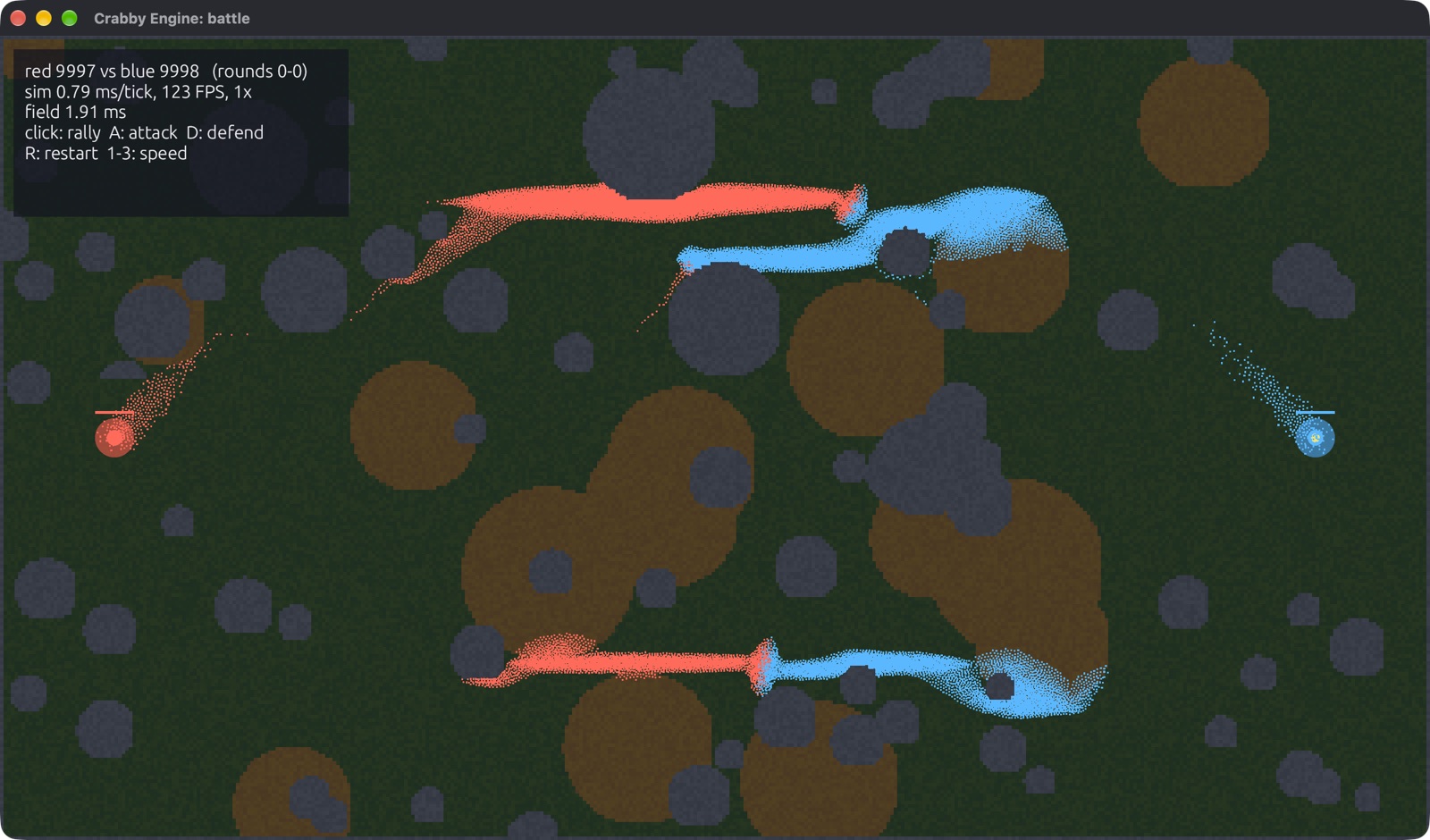
The existing browser demo sources remain in web/. Follow the
web build guide to build them locally; public hosting is
being reconfigured during the rename. The source guide and API links above
remain the starting points until the new website is deployed.
Performance
Historical measurements retained from the existing documentation (then named
Crabby Engine), not rerun for this update. Native release builds on a MacBook
Pro (M4 Max); web builds run on one thread and are slower. Reproduction commands
and workload context are on the benchmarks page.
| Workload | Time |
|---|---|
| ECS iteration, 1M entities: Ponko / bevy_ecs / hecs | 0.15 / 0.36 / 1.77 ms |
| Headless simulation, 10M agents | 8.7 ms per tick |
| Battle, 1M units: flow fields, spatial grids, fighting | 18.9 ms per tick |
| Ant colonies, 1M ants | 15 ms per tick |
| Boids, 1M, with neighbor search | ~33 ms per tick |
| 100k events sent and read | 0.42 ms per tick |
| 1M moving sprites (1.6 px), rendered | 120 FPS (display cap) |
| 3D, 100k spinning cubes with shadows: Ponko / Unity 6 (details) | 402 / 54 FPS (7.5x) |
| Memory per entity, 1M agents | 76 bytes |
3D: Ponko vs Unity 6
The documented workload uses N spinning, tinted cubes, 12 PBR spheres, a sun
with soft shadows and 4x MSAA. The Unity implementation uses one GameObject
with an Update() script per cube and URP. Fullscreen, native resolution,
vsync off, M4 Max, median of three 10-second runs. Implementation and rendering
differences are detailed in the linked notes.
| Spinning cubes | Unity 6 | Ponko | CPU per frame: Unity / Ponko |
|---|---|---|---|
| 1,000 | 728 FPS | 750 FPS | 0.65 / 0.17 ms |
| 10,000 | 398 FPS | 724 FPS (1.8x) | 2.51 / 0.43 ms |
| 100,000 | 54 FPS | 402 FPS (7.5x) | 18.7 / 2.48 ms |
What's not equal, and how to rerun both sides, is on the
benchmarks page.
The measurements above are retained from the existing documentation, not
rerun for this documentation update. The Unity comparison uses GameObjects
with per-object Update, not Entities/DOTS; it does not establish a general
engine ranking. GPU feature parity, scene differences, dependency versions,
and workload details matter. Consult the linked reproduction notes before
using a number to choose an engine.
Modular internals, integrated experience
Common things should work immediately. Advanced things should be customizable.
Neither should require understanding the entire engine. Existing Cargo features
provide compile-time choices; internal module boundaries and selective extension
APIs should improve maintainability without a mandatory plugin assembly step.
New crates and abstractions need concrete benefits. This is an architectural
direction, not a claim that every subsystem is already decoupled.
Contributing and compatibility
Start with CONTRIBUTING.md, the roadmap,
and coding-agent rules. Performance changes need representative
measurements; correctness and compatibility come first. The
published stability commitments cover API/ABI, saved worlds,
MCP contracts and determinism within their stated scope.
Follow the code of conduct. Report vulnerabilities through
SECURITY.md.
License
Created by Leon Mamić and contributors; see NOTICE.
Dual licensed under MIT or Apache-2.0, at your option.
Unless explicitly stated otherwise, contributions intentionally submitted for
inclusion are licensed under both on the same terms.
Yorumlar (0)
Yorum birakmak icin giris yap.
Yorum birakSonuc bulunamadi