bkit-claude-code
Health Gecti
- License — License: Apache-2.0
- Description — Repository has a description
- Active repo — Last push 0 days ago
- Community trust — 483 GitHub stars
Code Basarisiz
- rm -rf — Recursive force deletion command in bkit.config.json
- fs module — File system access in evals/ab-tester.js
Permissions Gecti
- Permissions — No dangerous permissions requested
This tool is a Claude Code plugin that provides structured AI-assisted development workflows using the PDCA (Plan-Do-Check-Act) methodology and automated context management.
Security Assessment
The overall risk is rated as Medium. The scan flagged a recursive force deletion command (`rm -rf`) inside a configuration file (`bkit.config.json`). If triggered unintentionally, this could result in unexpected data loss on the user's machine. Additionally, there is a warning for direct file system access within an evaluation script (`evals/ab-tester.js`), which introduces the potential for local file manipulation. The tool does not request explicitly dangerous permissions, but as an agent executing complex workflows and scripts, it inherently processes user prompts and interacts with the local development environment.
Quality Assessment
The project appears to be highly maintained and well-documented. It is licensed under the permissive Apache-2.0 license, and the repository is very active with the most recent push occurring today. It demonstrates solid community trust, currently boasting 483 GitHub stars. The documentation outlines a sophisticated architecture, though the deep layering of hooks, automated state management, and domain rules means users should expect a learning curve.
Verdict
Use with caution — the plugin is a high-quality, popular tool, but developers must inspect the `rm -rf` command in the configuration file before running it to prevent accidental data deletion.
bkit Vibecoding Kit - PDCA methodology + Claude Code mastery for AI-native development
bkit - Vibecoding Kit




PDCA methodology + CTO-Led Agent Teams + AI coding assistant mastery for AI-native development
bkit is a Claude Code plugin that transforms how you build software with AI. It provides structured development workflows, automatic documentation, and intelligent code assistance through the PDCA (Plan-Do-Check-Act) methodology.
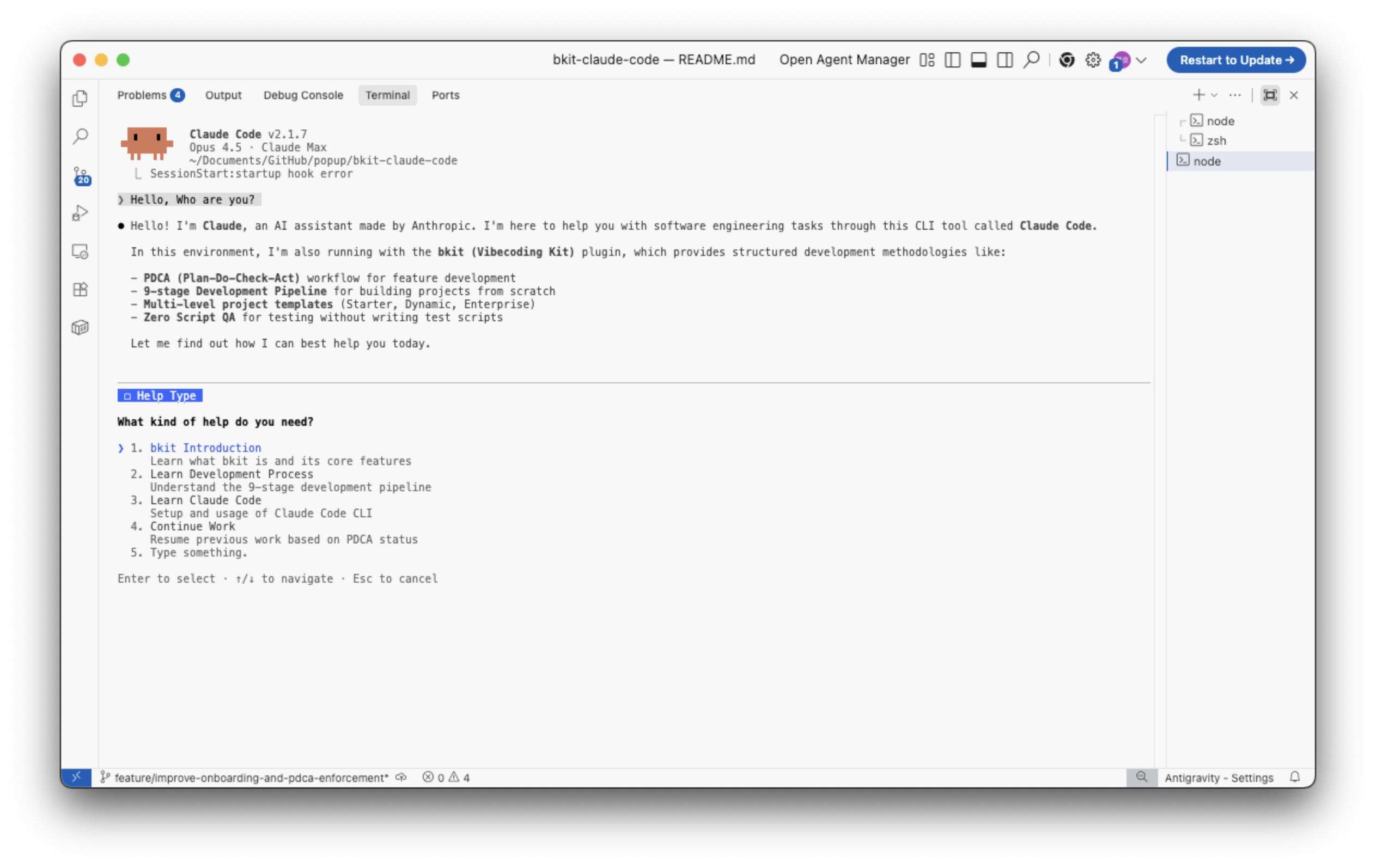
What is Context Engineering?
Context Engineering is the systematic curation of context tokens for optimal LLM inference—going beyond simple prompt crafting to build entire systems that consistently guide AI behavior.
Traditional Prompt Engineering:
  "The art of writing good prompts"

Context Engineering:
  "The art of designing systems that integrate prompts, tools, and state
   to provide LLMs with optimal context for inference"
bkit is a practical implementation of Context Engineering, providing a systematic context management system for Claude Code.
bkit's Context Engineering Architecture
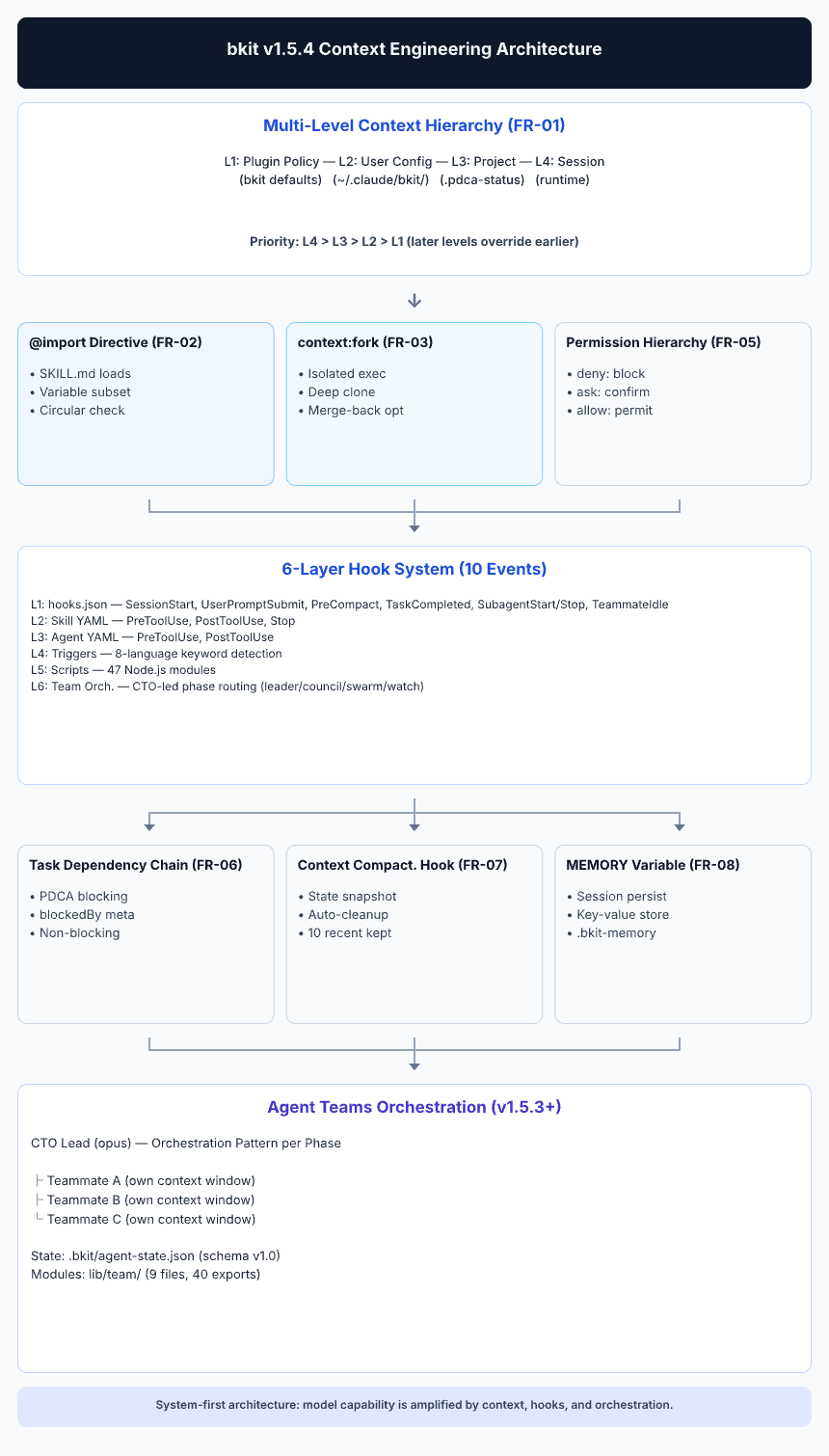
bkit implements Context Engineering through three interconnected layers:
| Layer | Components | Purpose |
|---|---|---|
| Domain Knowledge | 37 Skills | Structured expert knowledge (phases, levels, specialized domains) |
| Behavioral Rules | 32 Agents | Role-based constraints with model selection (opus/sonnet/haiku) |
| State Management | ~620+ Functions | PDCA state machine, workflow engine, automation control, audit, quality gates, intent detection, team coordination |
6-Layer Hook System
Context injection occurs at six distinct layers:
Layer 1: hooks.json (Global)     → SessionStart, UserPromptSubmit, PreCompact, PostCompact, PreToolUse, PostToolUse, Stop, StopFailure + 10 more (18 events)
Layer 2: Skill Frontmatter       → Domain-specific hooks (deprecated in v1.4.4, use hooks.json)
Layer 3: Agent Frontmatter       → Task-specific hooks with constraints
Layer 4: Description Triggers    → Semantic matching in 8 languages
Layer 5: Scripts (21 modules)    → Actual Node.js execution logic with unified handlers
Layer 6: Plugin Data Backup      → ${CLAUDE_PLUGIN_DATA} persistent state management
Learn more: See Context Engineering Principles for detailed implementation.
Features
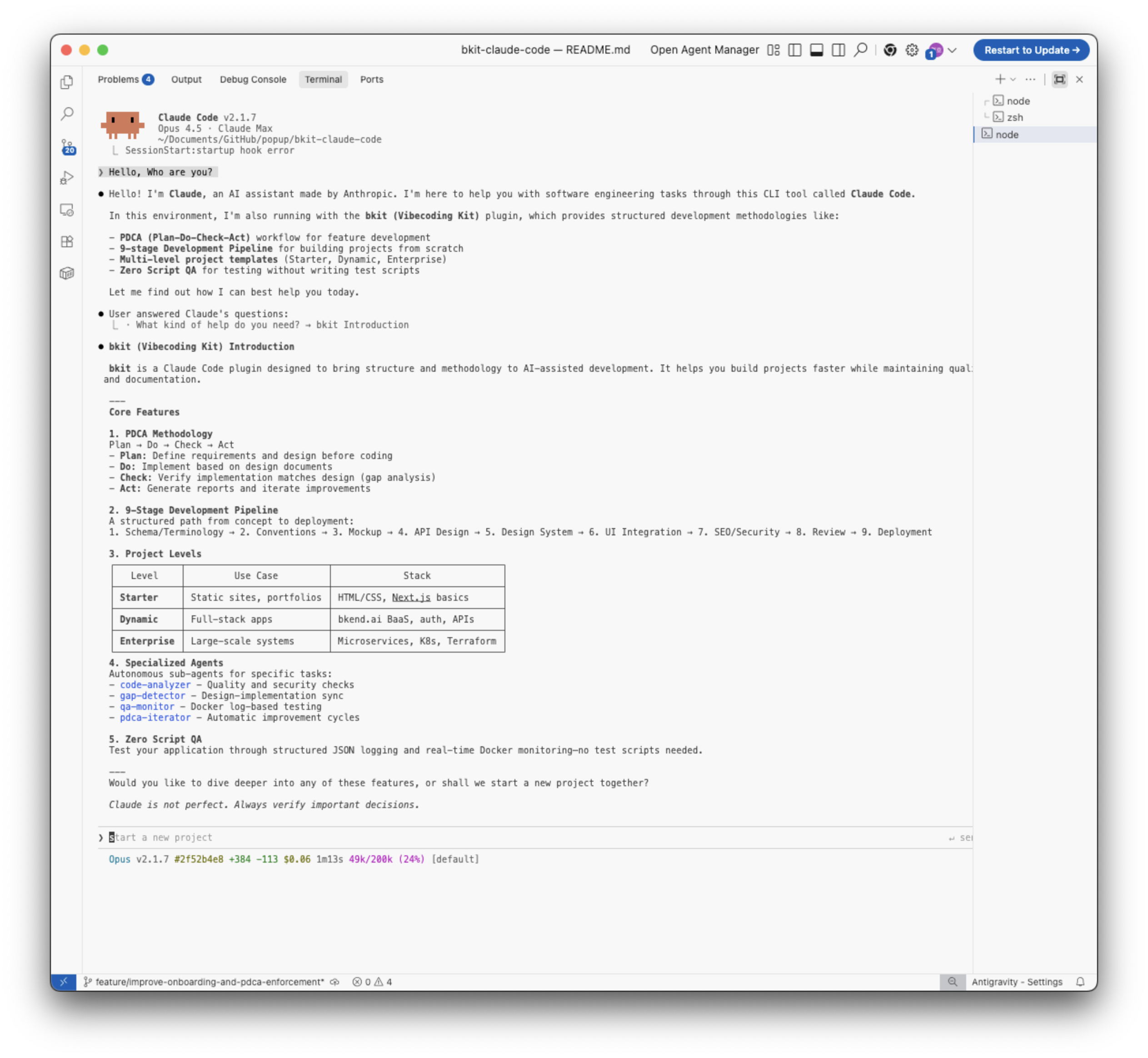
- CC v2.1.86 Compatibility + Skills Discoverability (v2.0.8) - 34 skills description optimized for 250-char cap (/skills listing), Hook
ifconditional field documentation (CC v2.1.85+), Enterprise org policy documentation, CC v2.1.86+ recommended, 52 consecutive compatible releases (v2.1.34~v2.1.86) - Living Context System + Self-Healing + PDCA Handoff Fix (v2.0.6) - 4-Layer Living Context (
lib/context/7 modules), Self-Healing agent (opus) for automated error recovery, Deploy skill with 3-environment state machine, PDCA Handoff Loss Fix Phase 2+3 (PRD→Code context preservation 30-40% → 75-85%), 11 infrastructure templates (ArgoCD, Terraform, observability), 88 lib modules, 37 skills, 32 agents, 57 scripts - PM Skills Integration + Interactive Checkpoints (v2.0.3) - PM Agent Team expanded from 9→43 frameworks (pm-skills MIT), PDCA Interactive Checkpoints 1~5 (AskUserQuestion-gated), code-analyzer Confidence-Based Filtering (≥80%), Design phase 3 Architecture Options (Minimal/Clean/Pragmatic), btw CTO Team Integration, pm-prd template v2.0 with Execution Deliverables (Pre-mortem, User/Job Stories, Test Scenarios, Stakeholder Map, Growth Loops)
- Cross-Project Isolation Fix (v2.0.1) - PLUGIN_DATA backup/restore project identity guard via meta.json, globalCache project namespace, prevents cross-project PDCA state leakage (#48)
- AI Native Development OS (v2.0.0) - Declarative PDCA state machine (20 transitions), YAML workflow DSL (3 presets), L0-L4 controllable AI automation, CLI dashboard (progress-bar, workflow-map, control-panel), audit logging + decision tracing, quality gates (7 stages), checkpoint/rollback, destructive operation detector (8 rules), MCP servers (bkit-pdca + bkit-analysis), 3,175+ TC, ~620+ exports, 88 lib modules, 37 skills, 32 agents, 18 hook events
- CC v2.1.78 Full Integration (v1.6.2) - 14 ENH items (ENH-117~130), PostCompact/StopFailure hooks, ${CLAUDE_PLUGIN_DATA} persistent backup, agent effort/maxTurns, 1M context default, 128K output, 1186 TC (99.7%), 260+ exports, 54 scripts, CC v2.1.78 recommended
- CTO Orchestration Redesign + Quality Hardening (v1.6.1) - Main Session as CTO pattern (CC v2.1.69+ compatibility), P0 bug fixes (4), Config-Code synchronization, 3-Tier Agent Security Model, 1073 TC comprehensive test (99.6% pass), CE Level 5 assessment (88/100), 72 files ~1,400 LOC
- Skills 2.0 Complete Integration (v1.6.0) - 19 ENH items (ENH-85~103), Skill Evals framework with 28 eval definitions, Skill Classification (Workflow/Capability/Hybrid), A/B testing, template-validator, frontmatter hooks migration, context:fork deprecation, PM Agent Team integration
- Executive Summary & Preview UX (v1.5.9) - Auto-generated 4-perspective summaries (Problem/Solution/Function & UX Effect/Core Value), AskUserQuestion with rich Markdown previews, ENH-74~81 CC v2.1.69 compatibility, 199 exports
- Studio Support & Path Registry (v1.5.8) - Centralized state file path management (
lib/core/paths.js), PDCA doc path registry, config cleanup (dead keys removed, missing keys added), state directory migration to.bkit/{state,runtime,snapshots}/, auto-migration with EXDEV fallback, 190 exports - /simplify + /batch PDCA Integration (v1.5.7) - CC built-in /simplify and /batch commands integrated into PDCA Check→Report flow, CC_COMMAND_PATTERNS 8-language awareness, HTTP Hooks documentation, English conversion for 3 stop scripts
- Auto-Memory Integration (v1.5.6) - CC v2.1.59 auto-memory official support, /copy guidance, multi-agent memory optimization, ENH-48~51 enhancements, 186 exports
- Plan Plus Skill (v1.5.5) - Brainstorming-enhanced PDCA planning with intent discovery, alternatives exploration, and YAGNI review
- bkend MCP Accuracy Fix (v1.5.4) - MCP tool coverage 19→28+, accurate tool names, dynamic Base URL, search_docs workflow
- Team Visibility & State Writer (v1.5.3) - Agent Teams state management with
.bkit/agent-state.jsonfor Studio IPC - SubagentStart/SubagentStop Hooks (v1.5.3) - 2 new hook events for agent lifecycle tracking (10 hook events total)
- Output Styles Auto-Discovery (v1.5.3) -
outputStylesin plugin.json + 4th stylebkit-pdca-enterprise - CTO-Led Agent Teams (v1.5.1) - CTO agent orchestrates parallel PDCA execution with multi-agent teams (Dynamic: 3, Enterprise: 5 teammates)
- Output Styles (v1.5.1) - Level-based response formatting (bkit-learning, bkit-pdca-guide, bkit-enterprise, bkit-pdca-enterprise)
- Agent Memory (v1.5.1) - Cross-session context persistence for all 32 agents (auto-active)
- Natural Feature Discovery (v1.5.1) - Auto-trigger integration aligned with "Automation First" philosophy
- Task Management + PDCA Integration (v1.4.7) - Task Chain Auto-Creation, Task ID Persistence, Check↔Act Iteration
- Core Modularization (v1.4.7) - lib/common.js split into 5 modules (lib/core/, lib/pdca/, lib/intent/, lib/task/, lib/team/)
- Context Engineering (v1.4.4) - Systematic context curation with 7 library modules and unified hook system
- PDCA Methodology - Structured development workflow with automatic documentation
- PDCA Skill Integration (v1.4.4) - Unified
/pdcaskill with 8 actions (plan, design, do, analyze, iterate, report, status, next) - Evaluator-Optimizer Pattern - Automatic iteration cycles from Anthropic's agent architecture
- 9-Stage Development Pipeline - From schema design to deployment
- 3 Project Levels - Starter (static), Dynamic (fullstack), Enterprise (microservices)
- Multilingual Support - 8 languages (EN, KO, JA, ZH, ES, FR, DE, IT)
- 37 Skills - Domain-specific knowledge (18 Workflow / 18 Capability / 1 Hybrid)
- 32 Agents - Specialized AI assistants (11 opus / 19 sonnet / 2 haiku) including CTO/PM Team + PDCA Eval agents
- 21 Hook Scripts - Hook execution with unified handlers across 18 event types
- ~620+ Utility Functions - 88 lib modules across 11 subdirectories (core, pdca, intent, task, team, ui, audit, control, quality, adapters, context)
- Check-Act Iteration Loop - Automatic gap analysis and fix cycles with max 5 iterations (90% threshold)
Skill Evals: Data-Driven Skill Quality Management
Claude Code introduced Skill Evals in Skills 2.0—a framework for measuring skill quality through automated testing. bkit extends this concept into a complete skill lifecycle management system that answers a question no other plugin addresses: "Are my skills still worth keeping?"
What Are Skill Evals?
Skill Evals run automated quality checks against skills by sending test prompts and comparing outputs against expected results. Think of them as unit tests for AI skills—they catch regressions when models update and measure whether a skill still adds value.
How bkit Enhances Skill Evals
bkit builds three layers on top of Claude Code's native Evals:
| Layer | Claude Code Native | bkit Enhancement |
|---|---|---|
| Eval Execution | Basic eval runner | evals/runner.js with benchmark mode, 29 pre-built eval definitions |
| A/B Testing | Not available | evals/ab-tester.js compares skill performance across models (e.g., Sonnet 4.6 vs Opus 4.6) |
| Skill Classification | Not available | All 37 skills classified as Workflow (18) / Capability (18) / Hybrid (1) with deprecation-risk scoring |
evals/
├── config.json              # Global settings (thresholds, classifications)
├── runner.js                # Eval execution engine (CLI + module)
├── reporter.js              # Markdown/JSON result reporting
├── ab-tester.js             # Model comparison + parity testing
├── workflow/{10 skills}/     # Eval definitions for permanent skills
├── capability/{18 skills}/  # Eval definitions for model-dependent skills
└── hybrid/{1 skill}/        # Eval definitions for single dual-purpose skill
Skill Classification & Lifecycle
Not all skills age the same way. bkit classifies each skill to manage its lifecycle:
| Classification | Count | Purpose | What Evals Measure |
|---|---|---|---|
| Workflow | 17 | Process automation (PDCA, pipelines) | Quality regression only—these skills are permanent |
| Capability | 18 | Model ability augmentation (mockups, APIs) | Parity testing—can the model match this skill's output without it? |
| Hybrid | 1 | Both process + capability | Both regression and parity |
When a model upgrade makes a Capability skill redundant, the Model Parity Test detects it:
# Does the model now produce equivalent results without this skill?
node evals/ab-tester.js --parity phase-3-mockup --model claude-opus-4-6

# Compare skill performance between two models
node evals/ab-tester.js --skill pdca --modelA claude-sonnet-4-6 --modelB claude-opus-4-6

# Run all 29 skill evaluations
node evals/runner.js --benchmark
What Changes for Users
| Before (v1.5.9) | After (v1.6.1 with Evals) |
|---|---|
| 28 skills, no quality measurement | 37 skills, 29 with automated eval definitions |
| No way to know if a skill degraded after model update | Benchmark detects regression across all skills |
| Manual judgment on skill usefulness | Data-driven deprecation recommendations |
| Skills accumulate indefinitely | Skill lifecycle: create → eval → deprecate → remove |
| "Does this skill help?" is a guess | Parity test gives a quantified answer |
Integration with PDCA
Skill Evals connect directly to bkit's PDCA workflow:
- Skill Creator (
skill-creator/) generates new skills with eval templates pre-included - Template Validator ensures PDCA documents maintain required sections
- Classification metadata in every SKILL.md frontmatter enables automated lifecycle decisions
- Quarterly benchmarks track skill quality trends over time
Philosophy: bkit's third principle is "No Guessing." Skill Evals replace intuition with measurement—you never have to guess whether a skill is still earning its place in your workflow.
New to Claude Code?
First time using Claude Code?
Start with bkit-starter!
- Beginner-friendly guide
- No programming experience required
- Build your first project hands-on
/plugin enable bkit-starterbkit is the advanced extension designed for users who have mastered bkit-starter.
Requirements
| Requirement | Minimum Version | Notes |
|---|---|---|
| Claude Code | v2.1.78+ | Required. bkit v2.0.4 uses agent frontmatter (effort/maxTurns/disallowedTools), 18 hook events, MCP servers, and ${CLAUDE_PLUGIN_DATA}. Recommended: v2.1.81+. |
| Node.js | v18+ | For hook script execution |
| Agent Teams (optional) | Set CLAUDE_CODE_EXPERIMENTAL_AGENT_TEAMS=1 |
Required only for CTO-Led Agent Teams feature |
Troubleshooting: If you see
"Failed to load hooks"error after installation, update Claude Code to the latest version:claude update
Quick Start
Note: bkit is designed for Claude Code. For Gemini CLI, see bkit-gemini.
Option 1: Marketplace Installation (Recommended)
The easiest way to install bkit is through the Claude Code marketplace.
# Step 1: Add bkit marketplace
/plugin marketplace add popup-studio-ai/bkit-claude-code

# Step 2: Install bkit plugin
/plugin install bkit
Managing Marketplaces
Use /plugin command and navigate to Marketplaces tab to manage your plugin sources:
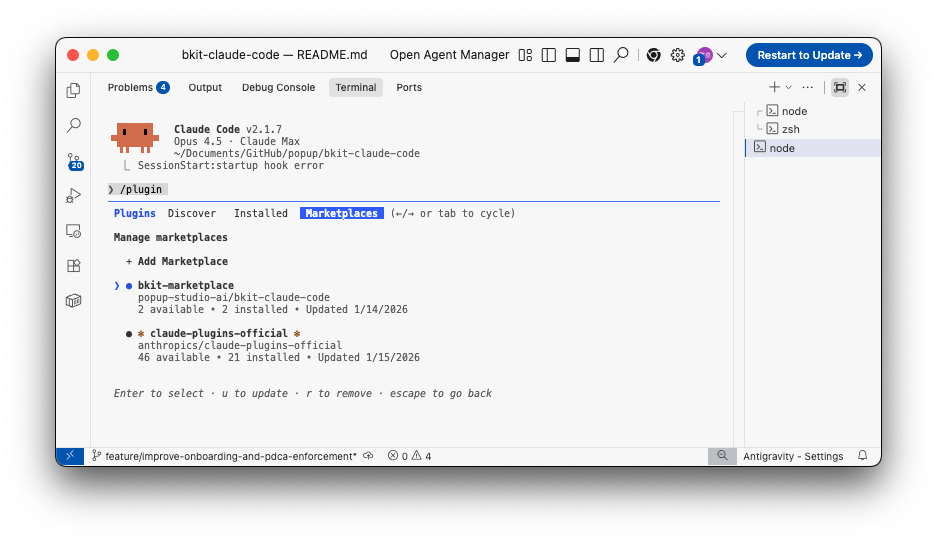
- bkit-marketplace: Contains bkit and bkit-starter plugins
- claude-plugins-official: Official Anthropic plugins
Discovering Plugins
Navigate to Discover tab to browse and install available plugins:
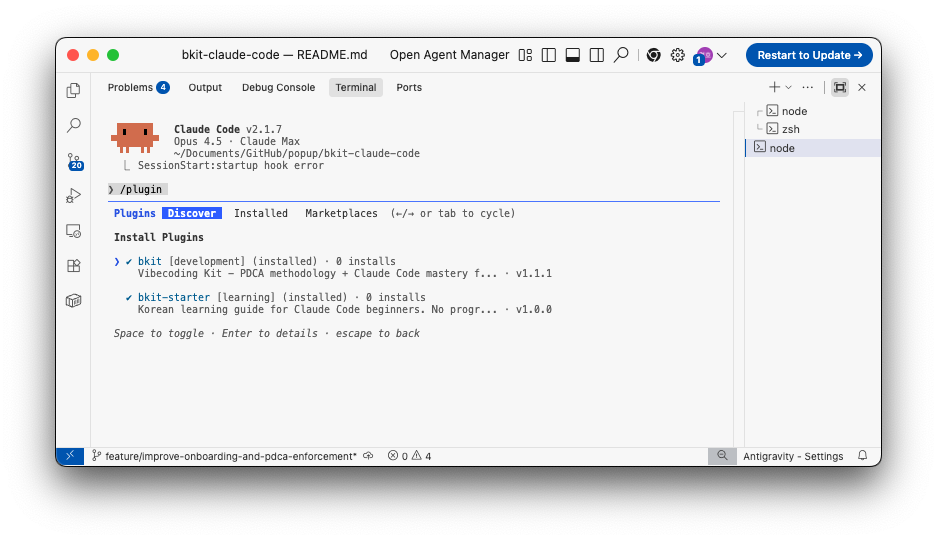
| Plugin | Description | Best For |
|---|---|---|
| bkit | Full PDCA methodology + Claude Code mastery | Experienced developers |
| bkit-starter | Korean learning guide for beginners | First-time Claude Code users |
Auto-Update Configuration
Keep your plugins up-to-date automatically by configuring auto-update in your settings:
// ~/.claude/settings.json
{
  "plugins": {
    "autoUpdate": true
  }
}
Update Commands:
- Press
uin the Marketplaces view to update all plugins - Press
rto remove a marketplace - Use
Spaceto toggle plugin selection in Discover view
Plugin Structure
bkit-claude-code/
├── .claude-plugin/
│   ├── plugin.json          # Claude Code plugin manifest
│   └── marketplace.json     # Marketplace registry
├── agents/                  # Specialized AI agents
├── commands/                # CLI command definitions
├── skills/                  # Domain knowledge
├── hooks/                   # Event hooks (hooks.json)
├── evals/                   # Skill eval definitions & runner
├── scripts/                 # Hook execution scripts
├── servers/                 # MCP servers (bkit-pdca, bkit-analysis)
├── lib/                     # Shared utilities (88 modules across 11 subdirs)
├── output-styles/           # Level-based response formatting
├── templates/               # Document templates
└── bkit.config.json         # Centralized configuration
Customization
After installing bkit via the marketplace, you can customize any component by copying it to your project's .claude/ folder.
Comprehensive Guide: See CUSTOMIZATION-GUIDE.md for detailed instructions on customizing bkit for your organization, including platform-specific paths, component examples, and license attribution requirements.
How It Works
Claude Code searches for configuration files in this priority order:
- Project
.claude/(highest priority - your customizations) - User
~/.claude/ - Plugin installation (default)
Customization Steps
# Step 1: Find the plugin installation location
ls ~/.claude/plugins/bkit/

# Step 2: Copy only the files you want to customize
mkdir -p .claude/skills/starter
cp ~/.claude/plugins/bkit/skills/starter/SKILL.md .claude/skills/starter/

# Step 3: Edit the copied file in your project
# Your project's .claude/skills/starter/SKILL.md will override the plugin's version

# Step 4: Commit to version control (optional)
git add .claude/
git commit -m "feat: customize bkit starter skill"
Available Components for Customization
| Component | Location | Description |
|---|---|---|
| Skills | ~/.claude/plugins/bkit/skills/ |
Domain knowledge, context and slash commands (e.g., /pdca plan) |
| Agents | ~/.claude/plugins/bkit/agents/ |
Specialized AI assistants |
| Templates | ~/.claude/plugins/bkit/templates/ |
Document templates |
| Scripts | ~/.claude/plugins/bkit/scripts/ |
Hook scripts |
| Config | ~/.claude/plugins/bkit/bkit.config.json |
Central configuration |
Important Notes
- Customized files don't receive plugin updates. When bkit is updated, your customized files remain unchanged while non-customized files are updated automatically.
- Check the CHANGELOG periodically for updates that might affect your customizations.
- Delete a customized file to revert to the plugin's default version.
- Attribution required: When creating derivative plugins, follow the License & Attribution guidelines.
Usage
Start Learning
/claude-code-learning
Initialize a Project
/starter      # Static website (Starter level)
/dynamic      # Fullstack with BaaS (Dynamic level)
/enterprise   # Microservices with K8s (Enterprise level)
PDCA Workflow (v2.0.3)
v2.0.3: Each phase now includes Interactive Checkpoints that pause for user confirmation before proceeding. Plan confirms requirements, Design presents 3 architecture options, Do confirms implementation scope, Check offers fix strategy choices.
/pdca pm {feature}       # PM analysis & PRD generation (43 frameworks)
/pdca plan {feature}     # Create plan document (Checkpoint 1-2)
/pdca design {feature}   # Create design document (Checkpoint 3: 3 architecture options)
/pdca do {feature}       # Implementation guide
/pdca analyze {feature}  # Run gap analysis
/pdca iterate {feature}  # Auto-fix with Evaluator-Optimizer pattern
/pdca report {feature}   # Generate completion report
/pdca status             # Check current PDCA status
/pdca next               # Guide to next PDCA step
CTO-Led Agent Teams (v1.5.1)
CTO-Led Agent Teams enable parallel PDCA execution with multiple AI agents orchestrated by a CTO lead agent.
# Start CTO Team for a feature
/pdca team {feature}

# Monitor team progress
/pdca team status

# Cleanup team resources
/pdca team cleanup
How it works:
- CTO lead agent (opus) analyzes the feature and selects the optimal team composition
- Teammates are spawned in parallel (Dynamic: 3, Enterprise: 5 agents)
- Each teammate handles a specific area (QA, frontend, backend, security, etc.)
- CTO orchestrates task assignment, progress monitoring, and result aggregation
- Team is cleaned up after work is complete
Requirements:
- Set environment variable:
CLAUDE_CODE_EXPERIMENTAL_AGENT_TEAMS=1 - Claude Code v2.1.32+
Available Team Agents:
| Team | Agent | Model | Role |
|---|---|---|---|
| CTO | cto-lead | opus | Team orchestration, PDCA workflow management |
| CTO | frontend-architect | sonnet | UI/UX design, component architecture |
| CTO | product-manager | sonnet | Requirements analysis, feature prioritization |
| CTO | qa-strategist | sonnet | Test strategy, quality metrics coordination |
| CTO | security-architect | opus | Vulnerability analysis, auth design review |
| PM | pm-lead | opus | PM Team orchestration, PRD synthesis |
| PM | pm-discovery | sonnet | Opportunity Solution Tree analysis |
| PM | pm-strategy | sonnet | Value Proposition, Lean Canvas |
| PM | pm-research | sonnet | Personas, competitors, market sizing |
| PM | pm-prd | sonnet | PRD document generation |
PM Agent Team (v1.6.0)
PM Agent Team runs before the Plan phase to produce a comprehensive PRD (Product Requirements Document) through automated product discovery.
# Run PM analysis before planning
/pdca pm user-authentication

# Then proceed with PDCA planning (PRD auto-referenced)
/pdca plan user-authentication
How it works:
- pm-lead (opus) collects project context and git history
- Three agents run in parallel with 43 frameworks:
- discovery: Opportunity Solution Tree + Brainstorm + Assumption Risk Assessment
- strategy: JTBD + Lean Canvas + SWOT + PESTLE + Porter's Five Forces + Growth Loops
- research: Personas + Competitors + TAM/SAM/SOM + Customer Journey Map + ICP
- pm-prd synthesizes all findings into a PRD with 6 sections + Execution Deliverables (Pre-mortem, User/Job Stories, Test Scenarios, Stakeholder Map, Battlecards) at
docs/00-pm/{feature}.prd.md - Plan phase automatically references the PRD for higher-quality planning
Frameworks: Based on pm-skills by Pawel Huryn (MIT License)
Project Levels
| Level | Description | Stack |
|---|---|---|
| Starter | Static websites, portfolios | HTML, CSS, JS |
| Dynamic | Fullstack applications | Next.js, BaaS |
| Enterprise | Microservices architecture | K8s, Terraform, MSA |
Is bkit Only for Development?
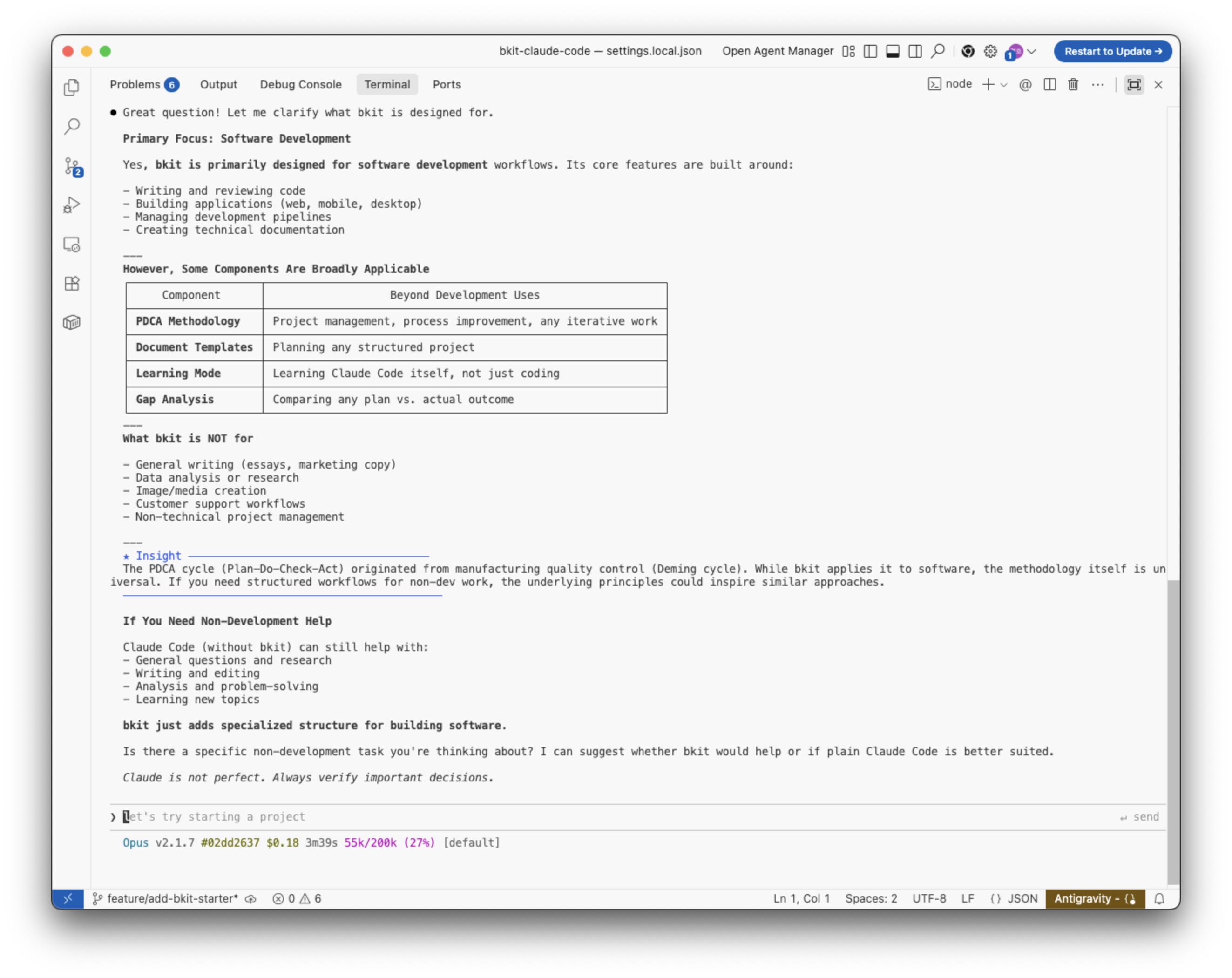
bkit is primarily designed for software development. However, some components can inspire structured workflows beyond coding:
| Component | Beyond Development Uses |
|---|---|
| PDCA Methodology | Project management, process improvement |
| Document Templates | Planning any structured project |
| Gap Analysis | Comparing any plan vs. actual outcome |
Note: For general writing, research, or non-technical tasks, plain Claude Code (without bkit) is better suited.
Documentation
Customization Guide
- CUSTOMIZATION-GUIDE.md - Complete guide to customizing bkit for your organization
- Platform-specific configuration paths (macOS, Linux, Windows, WSL)
- Component customization (agents, skills, commands, hooks, templates)
- License attribution requirements for derivative works
- bkit design philosophy and architecture decisions
Current Reference (bkit-system/)
- System Architecture - Plugin structure and trigger system overview
- Context Engineering - LLM context curation principles (v1.4.2)
- Core Mission & Philosophy - 3 core philosophies (Automation First, No Guessing, Docs=Code)
- AI-Native Principles - AI-Native development and 3 core competencies
- PDCA Methodology - PDCA cycle and 9-stage pipeline relationship
- Graph Index - Obsidian-optimized component graph
Component Reference
- Development Pipeline - 9-stage pipeline skill
- Skills Reference - 36 domain skills (17 Workflow / 18 Capability / 1 Hybrid)
- Agents Reference - 31 specialized agents (10 opus / 19 sonnet / 2 haiku)
PDCA Documents
- Active PDCA - Current plan/design/analysis documents
- Archive - Completed PDCA + legacy documents
Other
- Changelog - Version history and release notes
Visualize with Obsidian
The bkit-system/ documentation is optimized for Obsidian's Graph View:
- Open
bkit-system/as an Obsidian vault - Press
Ctrl/Cmd + Gto open Graph View - Explore component relationships visually
See bkit-system/README.md for detailed instructions.
Language Support
bkit automatically detects your language from trigger keywords:
| Language | Trigger Keywords |
|---|---|
| English | static website, beginner, API design |
| Korean | 정적 웹, 초보자, API 설계 |
| Japanese | 静的サイト, 初心者, API設計 |
| Chinese | 静态网站, 初学者, API设计 |
| Spanish | sitio web estático, principiante |
| French | site web statique, débutant |
| German | statische Webseite, Anfänger |
| Italian | sito web statico, principiante |
Setting Response Language
Claude Code supports configuring your preferred response language through the language setting in your settings file.
Configuration Files (Priority Order)
| File | Scope | Git Tracked |
|---|---|---|
.claude/settings.local.json |
Project (personal) | No (gitignored) |
.claude/settings.json |
Project (shared) | Yes |
~/.claude/settings.json |
User (global) | N/A |
How to Configure
Add the language key to any settings file:
{
  "language": "korean"
}
Supported Languages
| Language | Setting Value |
|---|---|
| English | "english" (default) |
| Korean | "korean" |
| Japanese | "japanese" |
| Chinese | "chinese" |
| Spanish | "spanish" |
| French | "french" |
| German | "german" |
| Italian | "italian" |
Note: Trigger keywords work in any language. The
languagesetting only affects Claude's response language.
Contributing
We welcome contributions! Please see CONTRIBUTING.md for guidelines.
Branch Protection
- Only
adminteam members can merge tomain - All changes require pull request review
- Version releases are managed through Git tags
Design Philosophy
bkit is not a productivity hack. It is an attempt to bring engineering discipline to AI-native development.
The software industry has spent decades refining how humans write code—version control, code review, CI/CD, testing pyramids. But when AI enters the development loop, most of that discipline evaporates. Developers prompt, accept, and ship. The feedback loop disappears. Documentation becomes an afterthought. Quality becomes a matter of luck.
bkit exists because we believe AI-assisted development deserves the same rigor as traditional engineering.
What we optimize for
Process over output. A single feature built through proper planning, design, implementation, and verification is worth more than ten features hacked together. The PDCA cycle is not overhead—it is the product.
Verification over trust. AI generates plausible code. Plausible is not correct. Every implementation goes through gap analysis against its design document. If the match rate falls below 90%, the system iterates automatically. We do not ship hope.
Context over prompts. A well-structured prompt helps once. A well-structured context system helps every time. bkit's ~620+ functions across 88 modules, 37 skills, and 32 agents exist to ensure the AI receives the right context at the right moment—not through clever prompting, but through systematic engineering.
Constraints over features. We intentionally limit what bkit does. Three project levels, not infinite configuration. A fixed 9-stage pipeline, not a customizable workflow builder. Opinionated defaults, not a framework for frameworks. Constraints eliminate decision fatigue and make the system learnable.
What this means in practice
When you use bkit, you will write a plan document before writing code. You will generate a design specification before implementation. You will run gap analysis after every feature. You will produce a completion report that captures what was built, what was verified, and what was learned.
This is slower than prompting and shipping. It is also how software that lasts gets built.
"We do not offer a hundred features. We engineer each one through proper design and verification. That is the difference between a tool and a discipline."
License
Copyright 2024-2026 POPUP STUDIO PTE. LTD.
Licensed under the Apache License, Version 2.0. See LICENSE for details.
You must include the NOTICE file in any redistribution.
Support
- Issues: GitHub Issues
- Email: [email protected]
Made with AI by POPUP STUDIO
Yorumlar (0)
Yorum birakmak icin giris yap.
Yorum birakSonuc bulunamadi