Zer0Fit
Health Uyari
- License — License: Apache-2.0
- Description — Repository has a description
- Active repo — Last push 0 days ago
- Low visibility — Only 7 GitHub stars
Code Gecti
- Code scan — Scanned 5 files during light audit, no dangerous patterns found
Permissions Gecti
- Permissions — No dangerous permissions requested
Bu listing icin henuz AI raporu yok.
Zero-shot forecasting, tabular classification, and regression via MCP — exposes Google TimesFM 2.5 and TabFM v1.0.0 to AI assistants. Just attach a CSV and describe what you want to predict.
Zer0Fit — Zero-Shot Forecasting & Tabular MCP Server

Zer0Fit exposes Google's TimesFM 2.5 (time-series forecasting) and TabFM v1.0.0 (tabular classification/regression) foundation models to AI assistants via the Model Context Protocol (SSE/Streamable HTTP).
Zero-shot means no training required — just connect the MCP to a chat client / harness + LLM of your choice, attach a CSV, and describe what you want to predict. No ML expertise, no hyperparameter tuning, no feature engineering.
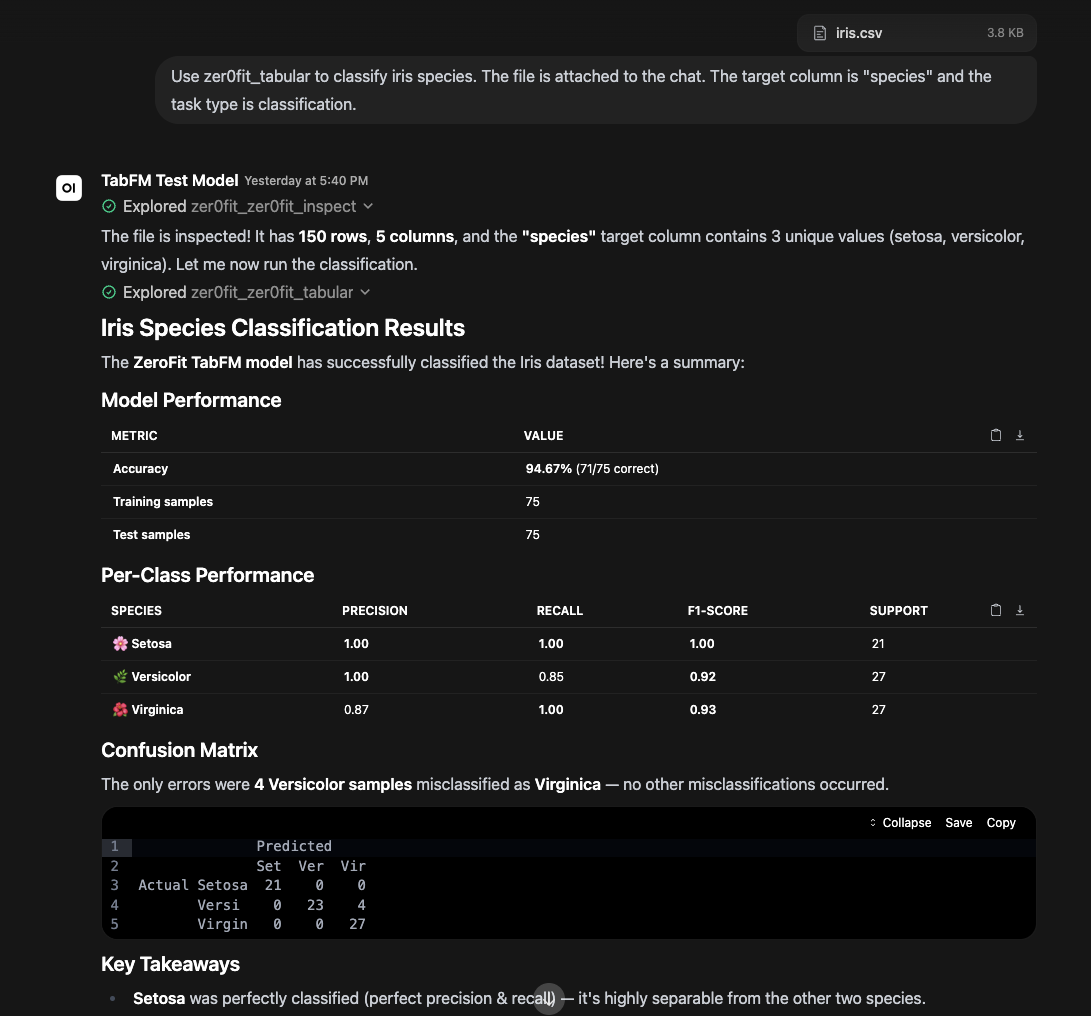
(Example output from Open WebUI connected to Zer0Fit MCP processing the iris.csv dataset combined with a user prompt)
⚠️ Disclaimer — Use at Your Own Risk
Zer0Fit is provided "AS IS" without warranties of any kind, and is intended for research and educational purposes only. The developer is not responsible for the accuracy of predictions, classifications, or forecasts produced by the underlying models or the LLM interpreting them. This software must not be used as a basis for financial, medical, legal, safety-critical, or employment decisions. TabFM model weights are non-commercial — see the full Disclaimer.

Features
| Feature | Details |
|---|---|
| Time-series forecasting | Google TimesFM 2.5 (200M params) — predicts future values from historical data |
| Tabular classification | Google TabFM v1.0.0 — predicts categories/labels from tabular data |
| Tabular regression | Google TabFM v1.0.0 — predicts continuous numeric values from tabular data |
| Chat-attached file support | Use Open WebUI file IDs directly — attach a file in the chat, and zer0fit_inspect resolves it automatically |
| File upload tool | zer0fit_upload_csv for files not already attached in chat — supports CSV, XLSX, XLS, JSON, JSONL |
| Automatic file inspection | zer0fit_inspect discovers column names, data types, and row counts so the LLM picks the right target |
| Pre-computed metrics | Classification: accuracy, per-class precision/recall/F1, confusion matrix. Regression: R², MAE, RMSE, MAPE |
| Automatic file cleanup | Uploaded files auto-delete after 6 hours (configurable) |
| Privacy & security | UUID-based filenames prevent cross-user file discovery; no data sent to third parties |
| VRAM management | TTL-based auto-unload, mutual exclusion (one model hot at a time) |
| Multi-architecture | ARM64 (DGX Spark / Blackwell) and x86_64 (RTX 3090 / H100) |
| One-command install | ./install.sh detects architecture, configures, builds, and launches |
| MCP Streamable HTTP + SSE | Compatible with Open WebUI 0.5+ and 0.10+ transport modes |
Prerequisites
Before running install.sh, you need a Linux server with an NVIDIA GPU and Docker set up. The installer will check for these and exit with an error if any are missing.
Hardware
| Requirement | Minimum | Notes |
|---|---|---|
| NVIDIA GPU | 16GB VRAM | Tested on RTX 3090 (24GB), H100 (80GB), DGX Spark GB10 (128GB) |
| RAM | 32GB | For loading CSVs into host memory before GPU chunking |
| Disk | 20GB free | Docker image + model weights (~1.5GB each) |
Software
| Requirement | Version | Install Guide |
|---|---|---|
| OS | Ubuntu 24.04 (x86_64 or ARM64) | — |
| NVIDIA Driver | 545+ (x86_64) / 570+ (ARM64) | NVIDIA Driver Downloads |
| Docker Engine | 24.0+ | Install Docker Engine on Ubuntu |
| Docker Compose | v2+ | Included with Docker Engine 24+ (docker compose) |
| NVIDIA Container Toolkit | Latest | Install NVIDIA Container Toolkit |
Verify Your Setup
Run these commands before starting the install. If any fail, install the missing prerequisite using the links above.
# 1. Verify NVIDIA driver is installed and GPU is visible
nvidia-smi
# Should show your GPU name, driver version, and CUDA version

# 2. Verify Docker is installed
docker --version
# Should show Docker version 24.0 or higher

# 3. Verify Docker Compose v2 is available
docker compose version
# Should show Docker Compose version v2.x

# 4. Verify NVIDIA Container Toolkit
docker run --rm --gpus all nvidia/cuda:12.4.1-base-ubuntu24.04 nvidia-smi
# Should show your GPU inside the container — if this fails, the
# NVIDIA Container Toolkit is not properly configured
Note: Zer0Fit runs entirely inside Docker. You do not need to install CUDA, PyTorch, or Python on the host — only the NVIDIA driver, Docker, and the NVIDIA Container Toolkit. The Docker image includes everything else.
Quick Start
1. Deploy on a GPU Server
git clone https://github.com/porespellar/Zer0Fit.git
cd Zer0Fit
./install.sh
The installer detects your architecture (ARM64 or x86_64), selects the correct CUDA base image and PyTorch wheels, builds the Docker container, and launches the server.
2. Connect to Open WebUI
Admin Settings → Integrations → Manage Tool Servers → Add Connection
- Type: MCP / Streamable HTTP
- URL:
http://YOUR-SERVER-IP:8002/mcp(Streamable HTTP, preferred for OWUI 0.10+) - URL:
http://YOUR-SERVER-IP:8002/sse(SSE fallback)
You'll see four tools registered:
zer0fit_inspect— discover column names and data types from a filezer0fit_upload_csv— upload data files from chat (fallback)zer0fit_forecast— time-series forecastingzer0fit_tabular— classification and regression
3. Install the Skill (Recommended)
Workspace → Skills → Import Skill → upload openwebui/skill_content.md
This teaches the LLM which tool to use and how to interpret metrics.
How Tool Selection Works
The LLM chooses the tool based on your prompt words — not by analyzing the data. The same CSV could be used for forecasting or classification; the LLM decides based on what you ask for.
Typical Workflow (Chat-Attached File)
- Attach a CSV file in Open WebUI chat
- The LLM extracts the file ID from the
<file>tag Open WebUI injects - LLM calls
zer0fit_inspectwith the file ID → discovers column names, types, row count - LLM calls the appropriate tool based on your request:
- Forecasting:
zer0fit_forecast(file_id, target_column, horizon) - Classification:
zer0fit_tabular(file_id, target_column, task_type="classification") - Regression:
zer0fit_tabular(file_id, target_column, task_type="regression")
- Forecasting:
- The tool returns predictions plus pre-computed metrics — the LLM presents both
Prompt → Tool Mapping
| If your prompt says… | Tool called | Model | task_type |
|---|---|---|---|
| "forecast", "future", "predict next N months", "extrapolate" | zer0fit_forecast |
TimesFM 2.5 | forecast |
| "classify", "categorize", "what species", "label" | zer0fit_tabular |
TabFM v1.0.0 | classification |
| "predict prices", "estimate", "regression", "continuous value" | zer0fit_tabular |
TabFM v1.0.0 | regression |
| (file attached to chat) | zer0fit_inspect → then appropriate tool |
(auto) | (auto) |
Suggested Prompts to Try
Forecasting (TimesFM)
Attach a time-series CSV and type: "Forecast the next 12 months."
Or: "Predict future values for the
Passengerscolumn with a horizon of 12."
Classification (TabFM)
Attach
iris.csvand type: "Classify the species."Or: "Predict which category each row belongs to. Target column is
species."
Regression (TabFM)
Attach
california_housing_small.csvand type: "Run a regression on this data predictingMedHouseVal."Or: "Predict the target column. Use regression."
Performance (Tested on DGX Spark GB10)
| Dataset | Type | Accuracy / R² | Time |
|---|---|---|---|
| Iris (150 rows) | Classification | 94.67% | ~76s |
| Boston Housing (506 rows) | Regression | R² = 0.91, MAE = 1.84 | ~90s |
| Airline Passengers (144 points) | Forecast | Captured seasonal pattern | ~11s |
MCP Tool Reference
zer0fit_inspect
Discover column names, data types, and row count from a data file.
| Parameter | Type | Required | Description |
|---|---|---|---|
file_path |
string | ✅ | File ID (from chat attachment), upload path, or /app/data filename |
Returns: Column metadata (name, dtype, non-null count, unique count, sample values).
zer0fit_upload_csv
Upload a data file to the server (for files not already attached in chat).
| Parameter | Type | Required | Description |
|---|---|---|---|
filename |
string | ✅ | Name for the file (must end in .csv, .xls, .xlsx, .json, or .jsonl) |
content_base64 |
string | ✅ | Base64-encoded file content |
Returns: Server-side file path. Files auto-delete after 6 hours.
zer0fit_forecast
Zero-shot time-series forecasting via Google TimesFM 2.5.
| Parameter | Type | Required | Description |
|---|---|---|---|
file_path |
string | ✅ | File ID, upload path, or /app/data filename |
target_column |
string | ✅ | Numeric column to forecast |
horizon |
int | ✅ | Number of future steps to predict (1–256) |
datetime_column |
string | — | Optional datetime column for temporal spacing |
Returns: Point forecasts, quantile forecasts (confidence intervals), and series length.
zer0fit_tabular
Zero-shot tabular classification/regression via Google TabFM v1.0.0.
| Parameter | Type | Required | Description |
|---|---|---|---|
file_path |
string | ✅ | File ID, upload path, or /app/data filename |
target_column |
string | ✅ | Column to predict |
task_type |
enum | ✅ | classification or regression |
max_chunks |
int | — | Max 1,000-row chunks to process (default 1, max 10, 0 = max) |
Returns: Predictions, ground truth, plus a metrics block:
Classification metrics:
accuracy— overall percent correct (e.g. 0.9467 = 94.67%)per_class— per-class precision, recall, F1, supportconfusion— misclassification counts (e.g."versicolor→virginica": 4)
Regression metrics:
r_squared— coefficient of determinationmae— mean absolute error (in target units)rmse— root mean squared errormape_pct— mean absolute percentage errorprediction_range/ground_truth_range— min/max values
Clients & Integrations
Zer0Fit speaks standard MCP over SSE and Streamable HTTP. The following clients have been tested and verified:
Open WebUI (Primary)
Admin Settings → Integrations → Manage Tool Servers → Add Connection
- Type: MCP / Streamable HTTP
- URL:
http://YOUR-SERVER-IP:8002/mcp - Fallback:
http://YOUR-SERVER-IP:8002/sse
All four tools (zer0fit_inspect, zer0fit_upload_csv, zer0fit_forecast, zer0fit_tabular) are automatically discovered. For best results, also install the Zer0Fit skill.
Claude Code
Configure via the CLI (--transport sse):
claude mcp add --transport sse zer0fit http://YOUR-SERVER-IP:8002/sse
Or add to your ~/.claude/settings.json:
{
  "mcpServers": {
    "zerofit": {
      "transport": "sse",
      "url": "http://YOUR-SERVER-IP:8002/sse"
    }
  }
}
All tools are discovered automatically. Call them from Claude Code using natural language — e.g., "Inspect the iris dataset and classify the species."
Project context: The repo includes a CLAUDE.md file (auto-loaded by Claude Code) with architecture, conventions, and common commands. A Claude Code skill at .claude/skills/zerofit-workflow.md teaches Claude how to use the four MCP tools correctly.
Codex CLI
Configure via the CLI (--url for Streamable HTTP):
codex mcp add zer0fit --url http://YOUR-SERVER-IP:8002/mcp
Then use with codex exec:
codex exec "Use zer0fit to inspect the data and classify the species."
Project context: The repo includes an AGENTS.md file (auto-loaded by Codex CLI) with architecture, conventions, common commands, and Zer0Fit MCP tool usage instructions.
Not Supported Natively
| Client | Reason |
|---|---|
| OpenCode | MCP support limited to stdio transport only; does not support SSE/HTTP connections natively |
| Variable | Default | Description |
|---|---|---|
ZER0FIT_VRAM_TTL |
300 |
Idle seconds before auto-unloading model from GPU VRAM |
ZER0FIT_PORT |
8002 |
Port exposed by the MCP server |
ZER0FIT_UPLOAD_TTL_HOURS |
6 |
Hours before auto-deleting uploaded files |
ZER0FIT_LOG_LEVEL |
INFO |
Python logging level |
ZER0FIT_UPLOAD_DIR |
/app/data/uploads |
Directory for uploaded files |
ZER0FIT_WEBUI_DIR |
/app/webui_data/uploads |
Open WebUI uploads directory for file ID resolution |
ZER0FIT_MAX_UPLOAD_MB |
50 |
Maximum upload file size in MB |
ZER0FIT_DEBUG |
false |
Enable Starlette debug mode (leaks tracebacks — for development only) |
Limits & Configurability
Zer0Fit enforces several limits to protect the GPU server from OOM crashes, runaway predictions, and oversized JSON responses. These are hardcoded constants in server.py that you can adjust for your hardware.
| Limit | Default | Location | Why It Exists | How to Change |
|---|---|---|---|---|
| Forecast horizon | 1–256 | server.py zer0fit_forecast handler |
TimesFM is compiled with max_horizon=256; larger values cause inference errors |
Edit the validation check, also update max_horizon in model_manager.py:_load_timesfm_locked() |
| Max chunks (tabular) | 10 | server.py MAX_CHUNKS_LIMIT |
Each chunk = 1,000 rows. Unbounded chunks cause GPU OOM and massive JSON responses that crash the MCP connection | Change MAX_CHUNKS_LIMIT constant in server.py |
| Chunk size | 1,000 rows | pipelines.py TABFM_CHUNK_SIZE |
Controls how many rows fit in a single GPU forward pass | Edit the constant; larger = more context but more VRAM |
| In-context size | 512 rows | pipelines.py TABFM_IN_CONTEXT_SIZE |
Rows from each chunk used as "examples" for zero-shot learning | Edit the constant; larger = better accuracy but more VRAM |
| Context window | 1,024 tokens | model_manager.py max_context in ForecastConfig |
TimesFM input ceiling for the compiled model | Edit max_context in _load_timesfm_locked() |
| Upload TTL | 6 hours | ZER0FIT_UPLOAD_TTL_HOURS env var |
Auto-cleans uploaded files to prevent disk fill | Set the env var in docker-compose.yml |
| VRAM TTL | 300 seconds | ZER0FIT_VRAM_TTL env var |
Auto-unloads idle models to free GPU memory | Set the env var in docker-compose.yml |
| Allowed data paths | /app/data/, /app/webui_data/ |
server.py ALLOWED_ABS_DIRS |
Security — restricts which directories the server can read files from | Edit the tuple in _resolve_path() |
| Upload filename entropy | 128-bit UUID | server.py uuid.uuid4().hex |
Prevents predictable filenames and cross-user file discovery | Not recommended to change |
Increasing the Tabular Chunk Limit
If you have a large GPU (e.g., 80GB H100) and need to process more than 10,000 rows per request:
# In server.py, change:
MAX_CHUNKS_LIMIT = 10    # → 20, 50, etc.
Increasing the Forecast Horizon
If you need forecasts beyond 256 steps, both the validation and the model config must be updated:
# 1. In server.py, update the validation:
if horizon <= 0 or horizon > 512:  # was 256

# 2. In model_manager.py, update the ForecastConfig:
tfm.compile(
    timesfm.ForecastConfig(
        max_horizon=512,  # was 256
        ...
    )
)
Project Structure
Zer0Fit/
├── install.sh               # One-command installer (architecture-aware)
├── .env.example              # Config reference
├── Dockerfile                # Multi-arch (ARM64 + x86_64)
├── docker-compose.yml        # GPU profile, reads from .env
├── requirements.txt          # Pinned Python deps
├── model_manager.py          # VRAM governor (TTL, mutual exclusion)
├── pipelines.py              # Multi-format reader, chunking, downsampling
├── server.py                 # MCP server (port 8002, Streamable HTTP + SSE)
├── README.md                 # This file
├── ARCHITECTURE.md           # Technical design doc
├── DISCLAIMER.md            # No warranty, use-at-your-own-risk notice
├── CLAUDE.md                # Claude Code project context (auto-loaded)
├── AGENTS.md                # Codex CLI project instructions (auto-loaded)
├── LICENSE                   # Apache 2.0
├── ATTRIBUTION.md            # Third-party model attributions
├── .claude/
│   └── skills/
│       └── zerofit-workflow.md  # Claude Code skill for Zer0Fit MCP tools
├── docs/
│   └── DEPLOYMENT_GUIDE.md   # Full guide for non-ML experts
├── openwebui/
│   └── skill_content.md      # Open WebUI skill (markdown)
└── data/
    ├── iris.csv              # Sample: classification (150 rows)
    ├── california_housing_small.csv  # Sample: regression (2,500 rows)
    └── airline_passengers.csv  # Sample: forecasting (144 points)
Documentation
| Document | Audience | Contents |
|---|---|---|
| Disclaimer | All users | No warranty, research-use-only, limitation of liability |
| Deployment & Usage Guide | Everyone | Full deployment + Open WebUI setup + examples + troubleshooting |
| ARCHITECTURE.md | Developers | VRAM state machine, pipeline topology, hardware matrix |
| Open WebUI Skill | Open WebUI admins | Skill for guiding LLM tool selection |
| CLAUDE.md | Claude Code users | Project context — architecture, conventions, commands (auto-loaded) |
| Claude Code Skill | Claude Code users | Skill for using Zer0Fit's MCP tools — workflow, limits, interpretation |
| AGENTS.md | Codex CLI users | Project instructions — architecture, commands, MCP tool usage (auto-loaded) |
Attribution & Licenses
This project is licensed under the Apache License, Version 2.0. See LICENSE for details.
Google TimesFM 2.5
- Source: google-research/timesfm
- License: Apache License, Version 2.0
- Copyright: 2024–2026 Google LLC
- Citation: Das, A., et al. "A decoder-only foundation model for time-series forecasting." ICML 2024. — Paper
Google TabFM v1.0.0
- Source: google-research/tabfm
- License: TabFM Non-Commercial License v1.0 (weights); Apache 2.0 (source code)
- Copyright: 2026 Google LLC
- Citation: TabFM: A Zero-Shot Foundation Model for Tabular Data — Google Research Blog
Sample Datasets
- Iris — R.A. Fisher, 1936. Public domain benchmark dataset.
- Airline Passengers — Box & Jenkins, 1976. Public domain time-series dataset.
- California Housing — Pace & Barry, 1997. Public domain regression dataset.
TimesFM is used under the terms of the Apache License 2.0. TabFM source code is Apache 2.0, but TabFM model weights are licensed under the TabFM Non-Commercial License v1.0 — commercial use of the weights is prohibited. No modifications have been made to the original model weights. This project provides a server/transport layer around these models — the models themselves are separate works with their own licenses. See DISCLAIMER.md and ATTRIBUTION.md for details.
Yorumlar (0)
Yorum birakmak icin giris yap.
Yorum birakSonuc bulunamadi