postgresai
Health Pass
- License — License: Apache-2.0
- Description — Repository has a description
- Active repo — Last push 0 days ago
- Community trust — 140 GitHub stars
Code Fail
- rm -rf — Recursive force deletion command in .gitlab-ci.yml
- process.env — Environment variable access in cli/lib/aas-onboard.ts
- network request — Outbound network request in cli/lib/aas-onboard.ts
- process.env — Environment variable access in cli/lib/checkup-api.ts
- network request — Outbound network request in cli/lib/checkup-api.ts
Permissions Pass
- Permissions — No dangerous permissions requested
No AI report is available for this listing yet.
postgresai – Postgres observability built for humans and AI agents
postgresai
AI-native PostgreSQL observability





Monitoring, health checks, and root cause analysis — built for humans and AI agents
Battle-tested in PostgresAI team's work with companies like GitLab, Miro, Chewy, Suno, Supabase, Gadget, and more — now packaged for easy use by humans and AI agents.
Why postgresai?
Traditional monitoring tools give you dashboards. postgresai gives AI agents the context they need to actually fix problems.
- Structured for AI — Reports and metrics designed for LLM consumption
- Issues workflow — Track problems from detection to resolution
- 45+ health checks — Bloat, indexes, queries, settings, security
- Active Session History — Postgres's answer to Oracle ASH
- Expert dashboards — Four Golden Signals methodology
Part of Self-Driving Postgres — PostgresAI's open-source initiative to make Postgres autonomous.
Get started
1. Sign up
Create a free account at postgres.ai
2. Authenticate
npx postgresai auth
This opens your browser to log in and saves your API key locally.
3. Run health checks
PGPASSWORD=secret npx postgresai checkup postgresql://user@host:5432/dbname
4. View results
Open console.postgres.ai to see:
- Detailed reports with suggested fixes
- Issues workflow to track remediation
- Historical data across all your projects
See demoOffline mode: Add
--no-uploadto run locally without an account or sending report data to the PostgresAI API.
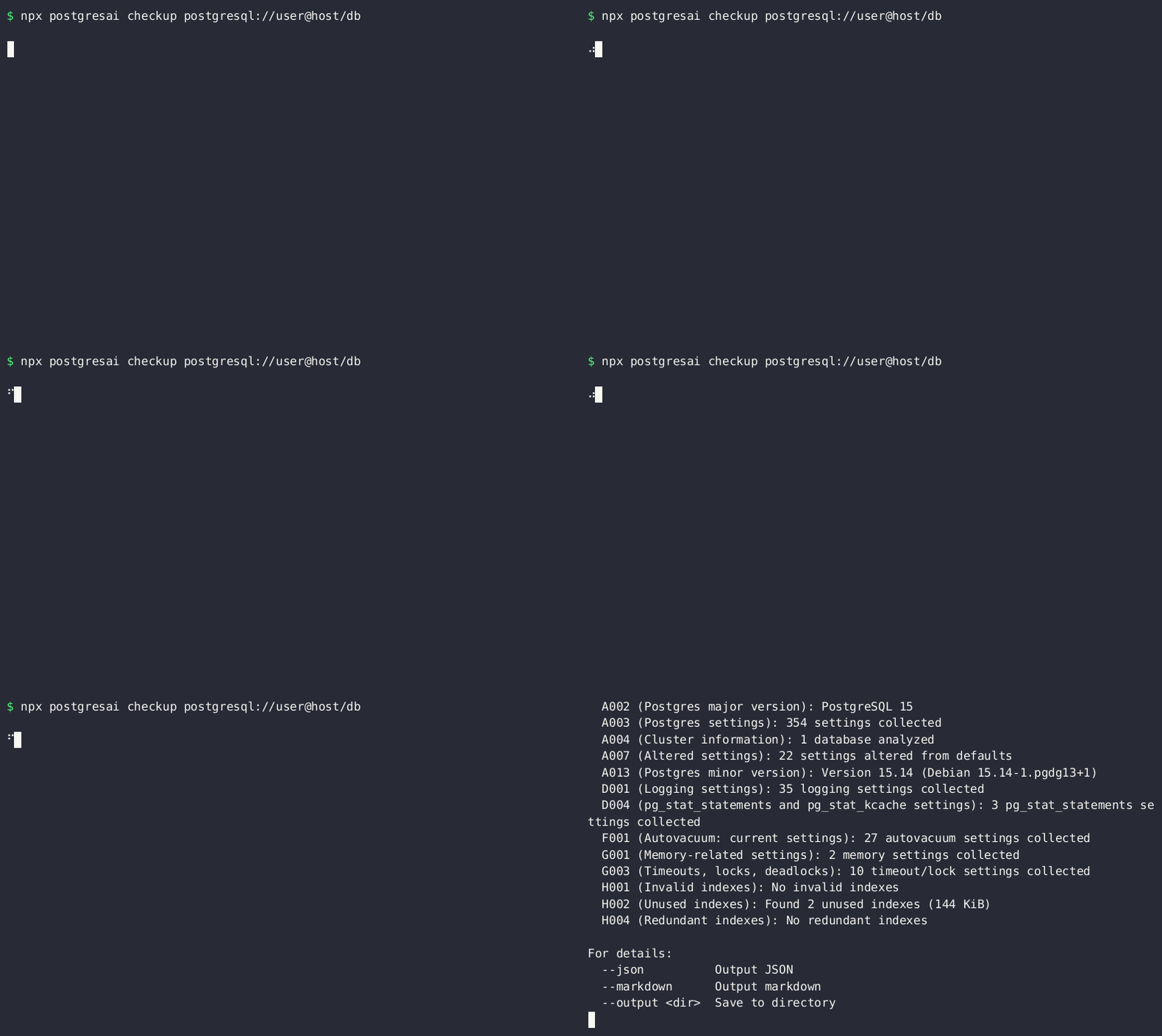
Express Checkup
Run specific checks or work offline:
# Run a specific check
npx postgresai checkup --check-id H002 postgresql://...

# Local JSON output only (no upload)
npx postgresai checkup --no-upload --check-id H002 postgresql://...
Markdown conversion is performed by the PostgresAI API and transmits the full
report JSON. Therefore, --markdown cannot be combined with --no-upload. For
local-only output, use --json or --output instead.
Tips:
npx pgai checkupalso works.bunx postgresaiif you prefer Bun.
Full monitoring stack
For continuous monitoring with dashboards, install the full stack on a Linux machine with Docker:
# Quick demo with sample data
npx postgresai mon local-install --demo
# → Open http://localhost:3000

# Production setup (Linux + Docker required)
npx postgresai prepare-db postgresql://admin@host:5432/dbname  # Create monitoring role with minimal permissions
npx postgresai mon local-install --api-key=YOUR_TOKEN --db-url="postgresql://..."
Get your API key at console.postgres.ai — or use the fully managed version there.
Production-safe
All diagnostic queries are carefully designed to avoid the observer effect — they use timeouts, row limits, and non-blocking approaches. Battle-tested on production databases with dozens of TiB of data, hundreds of kTPS, and millions of DB objects.
Preview the setup SQL before running:
npx postgresai prepare-db --print-sql postgresql://... # Review what will be created
The prepare-db step creates a read-only postgres_ai_mon user with minimal permissions, enables pg_stat_statements, and creates postgres_ai schema with a few helper views.
What's inside
| Component | Purpose |
|---|---|
| Express checkup | Instant health checks — no setup needed |
| Grafana dashboards | 13+ expert views: Node Overview, Query Analysis, Wait Events, Indexes, Tables, Replication, and more |
| Scheduled reports | 45+ metrics collected continuously via pgwatch |
| Metrics collection | pgwatch v3 + VictoriaMetrics |
| AI-ready output | Structured JSON for Claude, GPT, and other agents |
| Claude Code plugin | Slash commands for health checks in your IDE |
| MCP server | Work with Issues from console.postgres.ai in AI coding tools |
For AI developers
postgresai is designed to feed AI agents with structured PostgreSQL diagnostics.
Claude Code plugin
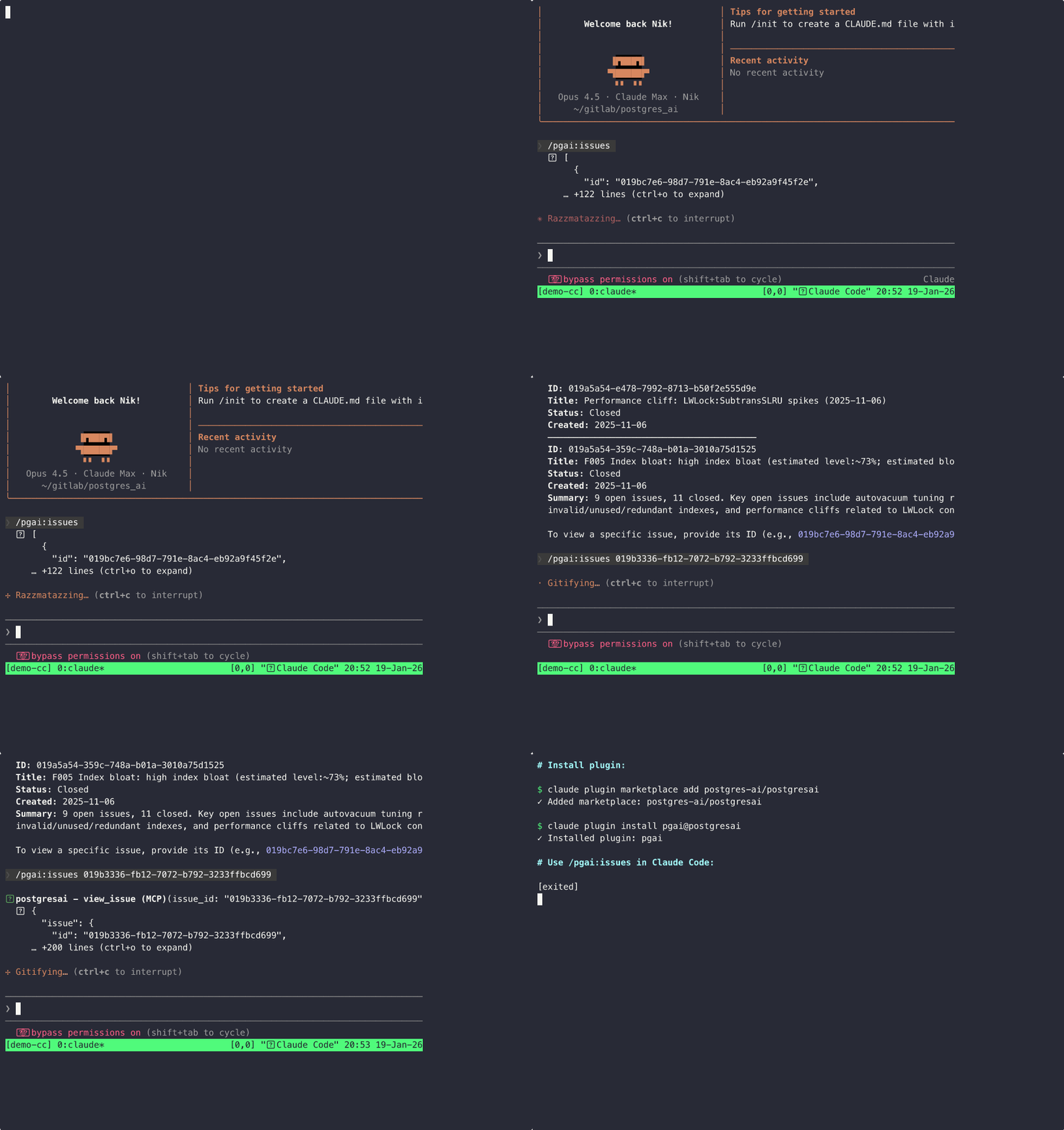
Install from the marketplace:
claude plugin marketplace add postgres-ai/postgresai
claude plugin install pgai@postgresai
Then ask Claude to check your database. The postgresai skill
(SKILL.md) deploys PostgresAI
monitoring and reports the problems with exact fixes. Other agents
install the skill with npx skills add postgres-ai/postgresai --skill postgresai.
Work with Issues from console.postgres.ai:
/pgai:issues
MCP server (Claude Code, Cursor, Windsurf)
# Install MCP server for your AI coding tool
npx postgresai mcp install
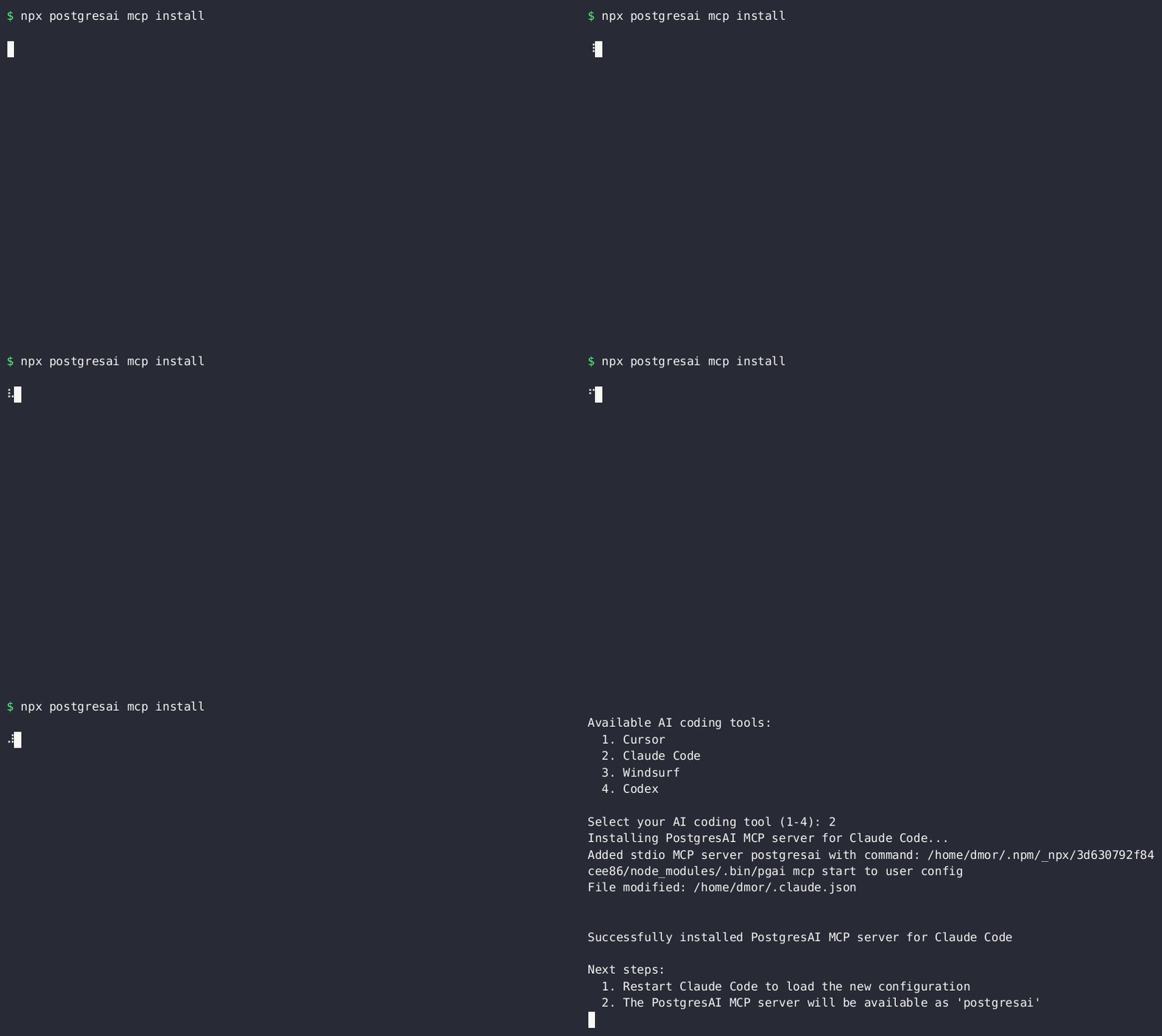
This enables AI agents to work with Issues and Action Items from console.postgres.ai directly within your IDE.
CLI + LLM
# Pipe checkup output to any LLM
npx postgresai checkup --json postgresql://... | llm -s "analyze this Postgres health report"

# Or use with Claude directly
npx postgresai checkup --json postgresql://... | claude -p "find issues and suggest fixes"
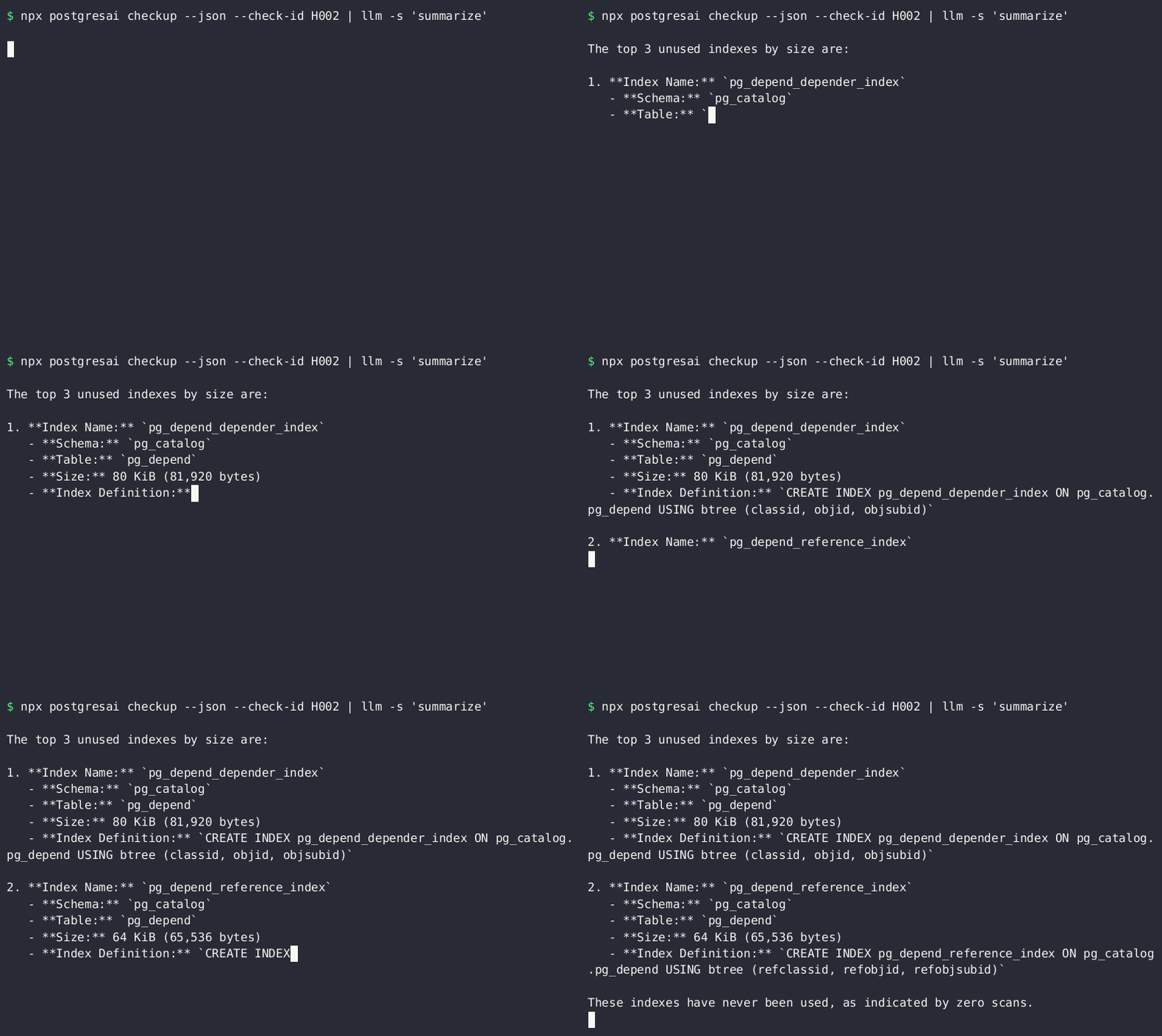
Sample AI workflow
- AI agent detects slow query from application logs
- Runs
postgresai checkup --check-id H002→ finds unused indexes - Gets structured JSON with analysis
- Suggests
DROP INDEXor creates PR
Requirements
For checkup (express mode):
- Node.js 18+ (includes npm/npx)
- Network access to PostgreSQL 14-18
For full monitoring stack:
- Linux machine with Docker
pg_stat_statementsextension enabled
Tips
- Short alias:
npx pgai checkupworks too - Can I use it without registration on console.postgres.ai? Yes, both express checkup and full-fledged monitoring are open-source and can be used without any connection to console.postgres.ai. In instructions above, just skip
npx postgresai authand:- Express checkup: use
--no-upload - Full monitoring: omit
--api-key
- Express checkup: use
- Managed version: Express checkup finds problems. The managed version at console.postgres.ai also explains how to fix them and provides an Issues workflow to track fixes
Links
| Demo | demo.postgres.ai (login: demo / demo) |
| Docs | postgres.ai/docs |
| Issues | GitLab |
| Community | Postgres.FM · Postgres.TV |
PostgresAI — Self-Driving Postgres
🎯 Use cases
For developers:
postgresai mon local-install --demo
Get a complete monitoring setup with demo data in under 2 minutes.
For production:
postgresai mon local-install --api-key=your_key
# Then add your databases
postgresai mon targets add "postgresql://user:pass@host:port/DB"
🔧 Management commands
# Instance management
postgresai mon targets add "postgresql://user:pass@host:port/DB"
postgresai mon targets list
postgresai mon targets test my-DB

# Service management
postgresai mon status
postgresai mon logs
postgresai mon restart

# Health check
postgresai mon health
🔄 Upgrading
⚠️ Breaking change in 0.15.0 — bundled PostgreSQL 15 → 17 requires a data migration.
0.15.0 upgrades the stack's bundled PostgreSQL from 15 to 17 (
sink-postgres, and on the
demotarget-db/target-standby). PostgreSQL's on-disk format is not compatible across major
versions, so the new images refuse to start on a PostgreSQL 15 data directory — an in-place
upgrade will not come up until you migrate the data. Nothing is deleted automatically, and your
externally-monitored databases are unaffected, but you must act on the bundled databases before
bringing the stack up.
sink-postgresstores your historical monitoring measurements, so choose one:
- Preserve history — while still on the old images, dump it, then restore after the upgrade:
# before `mon stop`/upgrade, with sink-postgres (PG15) running: docker compose exec sink-postgres pg_dumpall -U postgres > sink-pg15.sql # after the stack is on PG17 (sink-postgres recreated empty): docker compose exec -T sink-postgres psql -U postgres < sink-pg15.sql- Start fresh — remove its volume so PostgreSQL 17 initializes a clean data directory.
This discards all previously collected monitoring measurements (new metrics accumulate
from scratch); find the volume withdocker volume ls | grep sink_postgres_data, thendocker volume rm <name>while the stack is stopped.The demo
target-db/target-standbyhold only throwaway sample data — just reset their
volumes the same way (or re-runpostgresai mon local-install --demoto recreate them).Keep the old PostgreSQL 15 volume as a backup until you have verified PostgreSQL 17. The full
upgrade steps are below; see also the
monitoring upgrade docs.
To upgrade postgres_ai monitoring to a newer version:
Step 1: Update the CLI
npm install -g [email protected]
Or if you're using npx:
npx [email protected] --version # verify the new version
Step 2: Stop running services
postgresai mon stop
Step 3: Pull new Docker images and restart
mon update migrates .env (adds any newly-required keys), refreshes docker-compose.yml to the new stack version, and pulls images — all while preserving your user-managed instances.yml. It does not change PGAI_TAG, so set the new image tag yourself first — otherwise mon update just re-pulls and restarts the old version:
# In your monitoring directory (typically ~/.postgres_ai/), edit .env and set
# PGAI_TAG to the version you are upgrading to (it should match your new CLI
# version), e.g. for the 0.15 line:  PGAI_TAG=0.15.0
postgresai mon update
postgresai mon start
This will:
- Add any newly required
.envkeys for the newer stack (existing values, your secrets, andinstances.ymltargets are preserved) - Refresh
docker-compose.ymlto match the new stack version on non-git installs (e.g. npx /npm install -g), backing up the old file asdocker-compose.yml.bak-<oldtag>-<hash>(the original is never overwritten on repeated runs) — this is what wires newly-required service config such asVM_AUTH_*onsink-prometheus. The fetched compose is validated before it replaces your working one, so a network proxy/login page can never clobber it. Git checkouts already get this viagit pull, so it is skipped for them. - Pull the Docker images for the
PGAI_TAGyou set - Start the services on the new images
Note: The
.envfile contains configuration for the monitoring stack, includingPGAI_TAG(the Docker image version tag),REPLICATOR_PASSWORD(generated password for the demo standby replication user),VM_AUTH_USERNAME,VM_AUTH_PASSWORD, and optionallyGF_SECURITY_ADMIN_PASSWORD(Grafana admin password) andPGAI_REGISTRY(custom Docker registry).postgresai mon local-installpreserves existingREPLICATOR_PASSWORDandVM_AUTH_*values or generates new ones when they are missing; Docker Compose requires these values and does not use known default passwords. It also holds the VictoriaMetrics admin-endpoint keysVM_DELETE_AUTH_KEY,VM_SNAPSHOT_AUTH_KEY,VM_FORCE_MERGE_AUTH_KEYandVM_PPROF_AUTH_KEY(added in 0.17, see #359), which follow the same preserve-or-generate lifecycle and guard the endpoints that can destroy the metrics store.
In-place upgrade note: Newer stack versions can require both additional
.envkeys and a matchingdocker-compose.yml(e.g.,VM_AUTH_USERNAME/VM_AUTH_PASSWORDand thesink-prometheusauth wiring were added in 0.15 for VictoriaMetrics basic auth).postgresai mon local-install -y,postgresai mon update, andpostgresai mon update-configall perform a purely-additive.envmigration on every run (existing values preserved verbatim; newly-required keys appended with safe random defaults) and refreshdocker-compose.ymlto the new stack version on non-git installs (npx /npm install -g), backing up the old compose asdocker-compose.yml.bak-<oldtag>-<hash>(the pristine original is preserved across repeated runs; the fetched compose is validated as a real stack file before it replaces yours). This closes the prior gap where npx upgrades kept a stale 0.14 compose andsink-prometheuscrashed withmissing "VM_AUTH_USERNAME" env var. If you rundocker composedirectly and maintain.envyourself, addVM_AUTH_USERNAME=vmauthand a non-emptyVM_AUTH_PASSWORDbefore upgrading, or runpostgresai mon update-configonce to have the CLI fill them in (and refresh the compose) for you. To rotate the VictoriaMetrics auth password, runVM_AUTH_PASSWORD="$(openssl rand -base64 18)" ./scripts/rotate-vm-auth.shfrom the monitoring directory; the script updates.envand recreatessink-prometheusplusgrafanatogether so datasource provisioning cannot reinsert stale credentials on restart. 0.17 added the VictoriaMetrics admin-endpoint keys the same way (VM_DELETE_AUTH_KEY,VM_SNAPSHOT_AUTH_KEY,VM_FORCE_MERGE_AUTH_KEY,VM_PPROF_AUTH_KEY); because those flags live on thesink-prometheuscommand line,mon updateandmon update-configbring that one service in line with the compose file after adding them — a plainmon restartisdocker compose restartand would report success while leaving the old, keyless container running.rotate-vm-auth.shdoes not touch the admin keys: to rotate one, edit.envand rundocker compose up -d --no-deps sink-prometheuson a running stack (--no-depsavoids re-runningconfig-init, which would re-seedprometheus.ymlfrom the image).
Alternative: Manual upgrade
If you prefer more control:
# Update the PGAI_TAG in .env to match your target stack version
# Edit .env and set PGAI_TAG=0.15.0

# Migrate .env to add any newly-required keys (e.g. VM_AUTH_* for 0.15+)
postgresai mon update-config

# Pull new images
docker compose pull

# Start services
postgresai mon start
Verify the upgrade
After upgrading, verify services are running correctly:
postgresai mon status
postgresai mon health
Check Grafana dashboards at http://localhost:3000 to confirm metrics are being collected.
☸️ Kubernetes deployment
Deploy postgres_ai monitoring to Kubernetes using helm:
# Install from the helm chart directory
helm install postgres-ai-monitoring ./postgres_ai_helm

# Or install from a release (replace <VERSION> with the desired release, e.g. 0.14.0)
curl -LO https://gitlab.com/postgres-ai/postgresai/-/releases/helm-v<VERSION>/downloads/postgres-ai-monitoring-chart.tgz
helm install postgres-ai-monitoring postgres-ai-monitoring-chart.tgz

# Customize installation
helm install postgres-ai-monitoring ./postgres_ai_helm -f custom-values.yaml
Helm chart features
- Complete monitoring stack for Kubernetes
- pgwatch, VictoriaMetrics, and Grafana
- Automated report generation via CronJobs
- Node exporter and cAdvisor for system metrics
- Configurable resource limits and persistence
Helm chart documentation
- README: Quick start and overview
- INSTALLATION_GUIDE: Detailed installation instructions
- RELEASE: Release process for maintainers
Creating helm releases
For maintainers creating new helm chart releases:
cd postgres_ai_helm

# Test the chart locally
./test-release.sh

# Create a new release (e.g. 0.14.0)
./release.sh <VERSION>
This automatically:
- Updates Chart.yaml with the new version
- Creates a git tag
- Triggers GitLab CI/CD to package and publish the chart
- Creates a GitLab release with the packaged chart
📋 Checkup reports
postgres_ai monitoring generates automated health check reports based on postgres-checkup. Each report has a unique check ID and title:
A. General / Infrastructural
| Check ID | Title |
|---|---|
| A001 | System information |
| A002 | Version information |
| A003 | Postgres settings |
| A004 | Cluster information |
| A005 | Extensions |
| A006 | Postgres setting deviations |
| A007 | Altered settings |
| A008 | Disk usage and file system type |
D. Monitoring / Troubleshooting
| Check ID | Title |
|---|---|
| D004 | pg_stat_statements and pg_stat_kcache settings |
F. Autovacuum, Bloat
| Check ID | Title |
|---|---|
| F001 | Autovacuum: current settings |
| F004 | Autovacuum: heap bloat (estimated) |
| F005 | Autovacuum: index bloat (estimated) |
| F009 | Xmin horizon and blockers |
F009 includes a 500-character query preview only when the checkup role can read all
statistics. Disable preview capture withPGOPTIONS='-c postgresai.capture_query_preview=off' postgresai checkup ....
G. Performance / Connections / Memory-related settings
| Check ID | Title |
|---|---|
| G001 | Memory-related settings |
H. Index analysis
| Check ID | Title |
|---|---|
| H001 | Invalid indexes |
| H002 | Unused indexes |
| H004 | Redundant indexes |
K. SQL query analysis
| Check ID | Title |
|---|---|
| K001 | Globally aggregated query metrics |
| K003 | Top queries by total time (total_exec_time + total_plan_time) |
| K004 | Top queries by temp bytes written |
| K005 | Top queries by WAL generation |
| K006 | Top queries by shared blocks read |
| K007 | Top queries by shared blocks hit |
M. SQL query analysis (top queries)
| Check ID | Title |
|---|---|
| M001 | Top queries by mean execution time |
| M002 | Top queries by rows (I/O intensity) |
| M003 | Top queries by I/O time |
N. Wait events analysis
| Check ID | Title |
|---|---|
| N001 | Wait events grouped by type and query |
🌐 Access points
After running local-install:
- 🚀 MAIN: Grafana Dashboard: http://localhost:3000 (login:
monitoring; password is shown at the end of local-install)
Technical URLs (for advanced users):
- Demo DB: postgresql://postgres:postgres@localhost:55432/target_database
- Monitoring: http://localhost:58080 (pgwatch)
- Metrics: http://localhost:59090 (VictoriaMetrics)
📖 Help
postgresai --help
postgresai mon --help
🔑 PostgresAI access token
Get your access token at PostgresAI for automated report uploads and advanced analysis.
🛣️ Roadmap
- Host stats for on-premise and managed Postgres setups
pg_wait_samplingandpg_stat_kcacheextension support- Additional expert dashboards: autovacuum, checkpointer, lock analysis
- Query plan analysis and automated recommendations
- Enhanced AI integration capabilities
🧪 Testing
Python-based report generation lives under reporter/ and now ships with a pytest suite.
Installation
Install dev dependencies (includes pytest, pytest-postgresql, psycopg, etc.):
python3 -m pip install -r reporter/requirements-dev.txt
Running tests
Unit tests only (fast, no external services required)
Run only unit tests with mocked Prometheus interactions:
pytest tests/reporter
This automatically skips integration tests. Or run specific test files:
pytest tests/reporter/test_generators_unit.py -v
pytest tests/reporter/test_formatters.py -v
All tests: unit + integration (requires PostgreSQL)
Run the complete test suite (both unit and integration tests):
pytest tests/reporter --run-integration
Integration tests create a temporary PostgreSQL instance automatically and require PostgreSQL binaries (initdb, postgres) on your PATH. No manual database setup or environment variables are required - the tests create and destroy their own temporary PostgreSQL instances.
Summary:
pytest tests/reporter→ Unit tests only (integration tests skipped)pytest tests/reporter --run-integration→ Both unit and integration tests
Test coverage
Generate coverage report:
pytest tests/reporter -m unit --cov=reporter --cov-report=html
View the coverage report by opening htmlcov/index.html in your browser.
🤝 Contributing
We welcome contributions from Postgres experts! Please check our GitLab repository for:
- Code standards and review process
- Dashboard design principles
- Testing requirements for monitoring components
📄 License
This project is licensed under the Apache License 2.0 - see the LICENSE file for details.
🏢 About PostgresAI
postgres_ai monitoring is developed by PostgresAI, bringing years of Postgres expertise into automated monitoring and analysis tools. We provide enterprise consulting and advanced Postgres solutions for fast-growing companies.
📞 Support & community
Visualization standard
Wait-event charts in monitoring and supporting materials follow the
PostgresAI color scheme.
Reviews (0)
Sign in to leave a review.
Leave a reviewNo results found