agent-hub
Health Uyari
- License — License: MIT
- Description — Repository has a description
- Active repo — Last push 0 days ago
- Low visibility — Only 7 GitHub stars
Code Basarisiz
- child_process — Shell command execution capability in auth.js
- process.env — Environment variable access in auth.js
- child_process — Shell command execution capability in lib/local.js
- execSync — Synchronous shell command execution in lib/local.js
- process.env — Environment variable access in lib/local.js
- os.homedir — User home directory access in lib/shell.js
- child_process — Shell command execution capability in lib/ssh.js
Permissions Gecti
- Permissions — No dangerous permissions requested
Agent Hub is a macOS-native desktop application that unifies multiple AI agent CLIs (Claude Code, Codex, Hermes, OpenClaw) into a single graphical interface. It allows users to run these agents locally or route them to remote machines via SSH.
Security Assessment
Risk Rating: Medium
The application requires access to highly sensitive system resources to function as intended. It extensively uses child_process and execSync to spawn and interact with the underlying agent binaries. It also reads environment variables (likely to retrieve API keys and SSH credentials) and accesses the user's home directory (os.homedir) to locate configurations.
While these are expected behaviors for a tool that wraps command-line utilities and handles remote SSH connections, the combination of environment variable access and dynamic shell execution creates a significant attack surface. However, the repository does not request any inherently dangerous application-level permissions, and no hardcoded secrets or unexpected telemetry were detected in the scan.
Quality Assessment
The project is licensed under the permissive MIT license and was actively updated recently (last push was today). Despite being actively maintained, it has extremely low community visibility with only 7 GitHub stars. This means the codebase has undergone very little peer review. As an Electron-based app, it relies on standard web technologies, but its current lack of widespread community adoption makes it difficult to independently verify its overall stability and trustworthiness.
Verdict
Use with caution. The tool legitimately requires access to your shell and environment variables to manage external agents, but you should carefully review its code before granting it access to your local system, filesystem, and remote SSH credentials.
One place to talk to all your agents

Agent Hub
One place to talk to all your AI agents.
Claude Code, Codex, Hermes, and OpenClaw in a single native macOS app — local or over SSH.
agent-hub.tools · Claude Code GUI · Download · Contributing





What is Agent Hub?
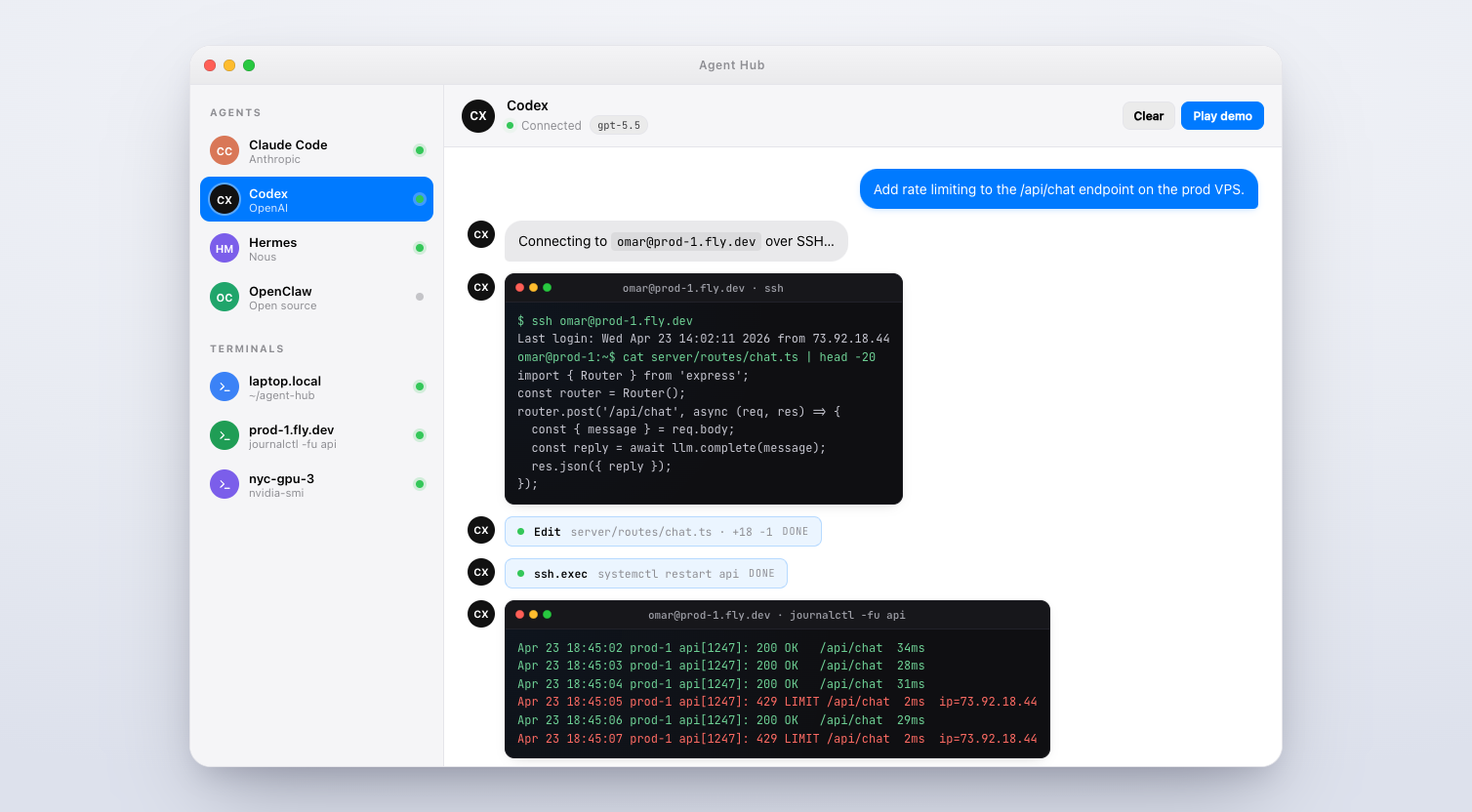
Agent Hub is an open-source native macOS app that unifies the AI agent CLIs you already use — Claude Code (Anthropic), Codex (OpenAI), Hermes (Nous Research), and OpenClaw — into one calm, keyboard-first chat window.
Point it at your laptop and it spawns the agent CLI locally. Point it at [email protected] and it runs over SSH. Same UI, same thread history, same slash commands, same permission model. The terminal version of these agents is great; Agent Hub is what you reach for when you want multiple parallel threads, visual tool-approval with diffs, image paste, and a sidebar of remote hosts.
Highlights
- Real CLIs under the hood. Agent Hub wraps the official
claude,codex,hermes, andopenclawbinaries. Every feature the CLI has —CLAUDE.md, MCP servers, memory files, slash commands — works identically. - Local or SSH, per thread. Switch a thread's target host in one click. Your Mac is the front-end; the agent runs wherever you tell it to.
- Granular permissions. Per-agent
ask,acceptEdits, orbypassPermissions. The approval dialog shows the exact tool call and arguments before anything runs. - Slash commands, fuzzy-found.
/plan,/review,/compact,/memory,/cost— every command registered by every provider, keyboard-searchable. - Paste images, drop files. Screenshots from the clipboard and files from Finder go straight into the thread.
- Hot-swap models per thread.
claude-opus-4.7→claude-sonnet-4.6→gpt-5.5without restarting. - Any OpenAI-compatible endpoint. llama.cpp, vLLM, Groq, Together — use the
openai-compatprovider. - Zero telemetry. No analytics. Your conversations go only to whichever provider that thread is configured for.
Screenshot
Supported agents
| Agent | Provider | Local | SSH | Notes |
|---|---|---|---|---|
| Claude Code | Anthropic | ✓ | ✓ | Uses your claude CLI session. claude-opus-4.7, sonnet-4.6, haiku-4.5. |
| Codex | OpenAI | ✓ | ✓ | gpt-5.5 with effort levels. |
| Hermes | Nous Research | ✓ | ✓ | Long-horizon research with tool use. |
| OpenClaw | Open source | ✓ | ✓ | Desktop automation (click, type, file ops). |
| Terminal | Local/SSH | ✓ | ✓ | Full PTY-backed xterm tab. |
openai-compat |
Any | ✓ | ✓ | Point at llama.cpp, vLLM, Groq, etc. |
Install
Download (recommended)
Grab the latest .dmg from GitHub Releases. Requires macOS 11+ on Apple Silicon. ~183 MB.
From source
git clone https://github.com/Potarix/agent-hub.git
cd agent-hub
npm install
npm start
Convenience launcher (detached, closes terminal):
./launch.sh
# or
npm run start-bg
Create an unsigned local DMG/ZIP build:
CSC_IDENTITY_AUTO_DISCOVERY=false npm run dist:mac
Release signing, notarization, and in-app update publishing are documented in RELEASE.md.
Prerequisites (for the agents you want to use)
Agent Hub doesn't re-implement any agent — it spawns the real CLIs. Install the ones you want:
npm install -g @anthropic-ai/claude-code   # Claude Code (Anthropic)
npm install -g @openai/codex               # Codex (OpenAI)
Then claude login / codex login, or drop an API key into Agent Hub's provider settings.
Usage
New thread: ⌘N, then pick a provider and a target host (local or any SSH host you've configured).
Slash commands: type / in the composer. Fuzzy-search to narrow.
Tool approvals: when an agent wants to run a tool, a dialog shows the exact call. ⌘↵ approves, ⌘⌫ denies. Per-agent profiles let you auto-approve safe edits.
Switch models: /model in any thread, or click the model pill in the header.
Per-agent permission modes:
ask— prompt for every tool call.acceptEdits— auto-approve safe in-repo edits (Read, Write, Edit).bypassPermissions— never ask. Use sparingly.
How it works
┌──────────────────┐        ┌─────────────────────┐
│ Agent Hub (UI)   │ stdio  │ claude / codex /    │
│ native macOS app │ ─────► │ hermes / openclaw   │
└──────────────────┘ pty    │  (real CLIs)        │
        │                   └─────────────────────┘
        │ ssh
        ▼
┌──────────────────┐
│ any VPS you own  │  ← agent runs HERE, not on your laptop
└──────────────────┘
For each thread, Agent Hub spawns the provider's CLI (locally via node-pty, or remotely via ssh), captures stdout/stderr, parses tool calls and model events, and renders them as a native chat UI. Your messages go into the CLI's stdin. Nothing is proxied, nothing is rewritten, nothing is logged.
FAQ
Does it work on Windows or Linux? Today it's macOS-only (Apple Silicon). Intel and universal builds are supported by electron-builder but not yet shipped.
Does Agent Hub store my API keys? No. Keys live in the OS keychain on the machine where the CLI runs — locally on your Mac, or on the remote host in SSH mode.
Does it send any data to a server? No. Zero telemetry. Conversations go only to whichever provider that thread is configured for.
Can I use my own models? Yes. Any OpenAI-compatible endpoint works via the openai-compat provider.
Can I add a new provider? One file in providers/ — see CONTRIBUTING.md. providers/openai-compat.js is a good starting point.
Why Electron? Agent Hub is mostly plumbing around real CLIs — the perf-sensitive work (model inference, shell commands) happens in the CLI processes, not the UI. Electron gets us native-feel on macOS fastest.
Contributing
Pull requests welcome. See CONTRIBUTING.md for the full guide. If you're adding a new provider, look at providers/openai-compat.js first — it's the cleanest template.
Found a bug? Open an issue.
Security issue? Please email [email protected] instead of opening a public issue. Details in SECURITY.md.
Related
- Website: agent-hub.tools
- Claude Code GUI page: agent-hub.tools/claude-code-gui
- Claude Code docs: docs.claude.com/en/docs/claude-code
- Codex docs: developers.openai.com/codex
License
MIT © Omar Dadabhoy / Potarix
Made for the terminal-folk.
Yorumlar (0)
Yorum birakmak icin giris yap.
Yorum birakSonuc bulunamadi