FoundryOS
Health Warn
- License — License: MIT
- Description — Repository has a description
- Active repo — Last push 0 days ago
- Low visibility — Only 6 GitHub stars
Code Pass
- Code scan — Scanned 1 files during light audit, no dangerous patterns found
Permissions Pass
- Permissions — No dangerous permissions requested
No AI report is available for this listing yet.
Open-source Agentic Operating System for building AI teams. Create modular Skills, Agents, Meta-Agents, Workflows, Memory, Brand OS, and Slash Commands. Designed for Claude, ChatGPT, Cursor, and modern AI-first development.
FoundryOS





Build Anything. Think Like a Team.
Open Source Agentic Operating System
One prompt in, one coherent cross-functional answer out. Drop FoundryOS into any AI assistant that can read files, type /gtm, /prd, /robotics, or /brand, and it runs the right specialists — CPO, CTO, CIO, CFO, CRO, CBO, and more — in the right order, then merges their output into a single executive answer instead of ten disconnected ones. No install, no API keys, no lock-in — it's markdown, and it works the moment you point your assistant at the repo.
See It In Action
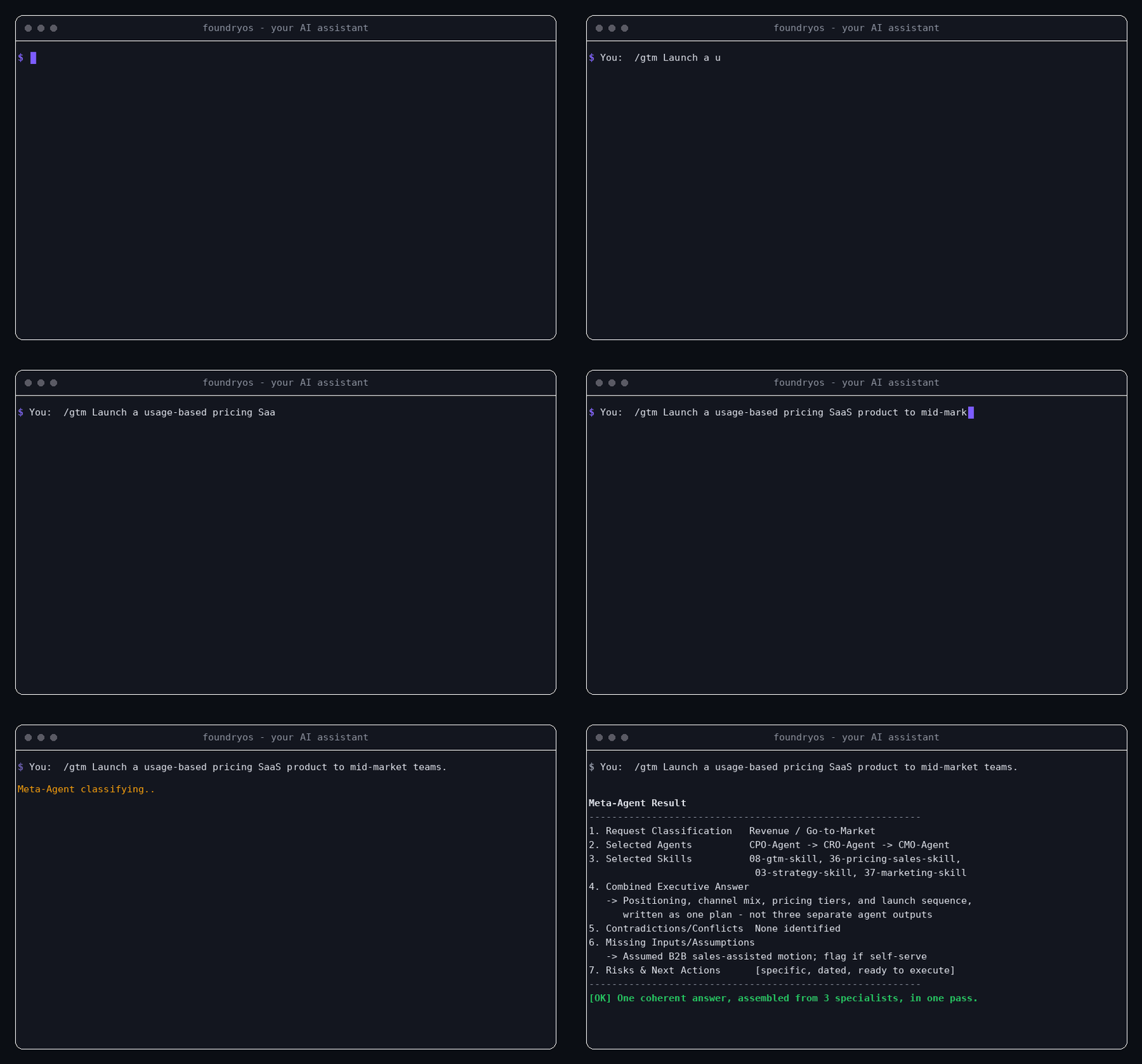
(Real terminal recreation of an actual run — same command, same output, just typed live instead of a static block. It plays out inside whatever AI assistant you already use; see Supported Environments below. Full asset spec: docs/SHOWCASE.md.)
$ You:  /gtm Launch a usage-based pricing SaaS product to mid-market teams.

Meta-Agent Result
──────────────────────────────────────────────────────────────
1. Request Classification   Revenue / Go-to-Market
2. Selected Agents          CPO-Agent → CRO-Agent → CMO-Agent
3. Selected Skills          08-gtm-skill, 36-pricing-sales-skill,
                             03-strategy-skill, 37-marketing-skill
4. Combined Executive Answer
   → Positioning, channel mix, pricing tiers, and launch sequence,
     written as one plan — not three separate agent outputs
5. Contradictions/Conflicts  None identified
6. Missing Inputs/Assumptions
   → Assumed B2B sales-assisted motion; flag if self-serve
7. Risks & Next Actions      [specific, dated, ready to execute]
──────────────────────────────────────────────────────────────
✓ One coherent answer, assembled from 3 specialists, in one pass.
Quick Win: 60 Seconds to a Real Output
- Drop this repo into Claude, ChatGPT, Cursor, or Windsurf (see Quick Start below).
- Type one line:
/prd Write a PRD for a usage-based billing feature. - Get back a structured PRD — problem statement, ICP, requirements, and scorecard — produced by CPO-Agent's
04-prd-skill, with assumptions flagged instead of silently guessed.
That's the whole workflow. No config file, no onboarding flow, no account. See examples/ for nine fully worked runs across AI products, robotics, SaaS, fundraising, manufacturing, team scaling, and brand/identity.
Why FoundryOS
- Multi-agent by default. Real requests cut across domains; one generalist persona covering everything shallowly is the old way. FoundryOS runs the right specialists in the right order automatically.
- One coherent answer, not ten. The Meta-Agent merges multi-agent output into a single voice and explicitly surfaces contradictions and missing inputs — most multi-agent setups leave that stitching to you.
- Brand built in, not bolted on. A full Brand Operating System — strategy, naming, identity, design system, voice — runs through CBO-Agent and attaches to every Workflow, not a standalone "marketing" afterthought.
- Memory that compounds. The Advanced Layer means the system gets measurably better at a given kind of decision the second time, not just the first.
- Zero install, zero lock-in. It's markdown. Works anywhere an AI assistant can read files; nothing to run, build, or host — and nothing to migrate away from later.
Who it's for: founders who want a structured starting point instead of a blank page; engineers and technical leads who need a CTO/CIO-level second opinion without hiring one yet; product managers who want PRDs, scorecards, and roadmaps in a consistent format; researchers and builders prototyping something new who need the right specialist framing without context-switching between five different mental models; teams who need a name, a logo, a voice, or a design system and don't yet have a CBO to ask; and teams who want their AI assistant to think like a full cross-functional org instead of one generalist.
Where it stacks up against the alternatives:
| Approach | What you actually get |
|---|---|
| One generalist prompt | A single shallow pass across every function at once — no specialist depth, nothing flags what's missing |
| Hand-chaining specialist prompts yourself | Real per-function depth, but you own the classification, sequencing, and merging, from scratch, every single time |
| FoundryOS | The Meta-Agent classifies the request, sequences the right specialists, and merges their output into one answer — contradictions and missing inputs surfaced, not buried |
Where it's headed next: v4.1 added a decision-modeling reasoning layer for ambiguous, non-artifact requests; v5.0.0-preview.1 (current) adds a declarative MCP layer — a Skill can now name a specific live-data need instead of guessing silently. It's a pre-release toward the full v5.0.0 major, not the complete thing: a Runtime and an Execution Engine for closed-loop, unattended execution remain planned. Full detail in Roadmap below.
Worked Examples
Nine fully worked, end-to-end runs — not toy snippets — showing exactly what comes out the other side:
| Example | Scenario | Agents Involved |
|---|---|---|
ai-product-example.md |
Shipping an AI product feature | CPO, CTO, CEO |
robotics-product-example.md |
Designing a robotics product from scratch | CIO, CTO, CPO, COO |
saas-dashboard-example.md |
Architecting a SaaS analytics dashboard | CTO, CPO, CMO |
investor-readiness-example.md |
Getting fundraising-ready | CEO, CFO, CPO, CRO, CTO |
manufacturing-plan-example.md |
Building a hardware manufacturing readiness plan | CIO, COO, CFO |
team-scaling-example.md |
Designing org structure, hiring system, and culture at 15 people | CEO, COO, CHRO, CBO, CFO |
brand-identity-example.md |
Building a brand, name, logo, and design system from zero | CEO, CBO |
brand-narrative-community-example.md |
Website, launch narrative, and community for an open-source launch | CBO, CRO |
decision-modeling-example.md |
Three worked decisions (AI inference hosting cost trade-off, SaaS pricing tier, manufacturing inspection automation) | CEO, CTO, CFO, COO |
See docs/EXAMPLES.md for the indexed guide, or jump straight to Quick Start below to run one yourself.
Architecture
179 Modules
      ↓
 59 Skills
      ↓
 10 Agents
      ↓
 1 Meta-Agent
      ↓
 11 Workflows
      ↓
 Memory
      ↓
 Reflection Agent
      ↓
 Critic Agent
      ↓
 Planner Agent
      ↓
 Knowledge Graph
      ↓
 Brand Intelligence
      ↓
 42 Commands
      ↓
 MCP Layer
      ↓
 Artifacts
This is the layer inventory — what exists, bottom-up. Three things worth being precise about:
The actual runtime loop those middle five (Memory → Reflection → Critic → Planner → Knowledge Graph) run in is slightly different and is documented precisely in ADVANCED_LAYER.md: Memory feeds the Planner, the Planner's roadmap executes, Reflection writes the outcome back into Memory, and the Critic checks new plans against Memory before they ship — the Knowledge Graph is the map of all of it, not a step in the sequence.
Brand Intelligence is not a separate add-on bolted onto the end — it's CBO-Agent's Skills, Memory files, and Artifacts woven into every layer above it (see brand/BRAND_OS.md and knowledge-graph/BRAND_GRAPH.md). It's listed as its own stripe in this diagram only because the Knowledge Graph layer needed an explicit name for "where brand connects everything else," not because brand work happens in a separate phase after the rest of the system has already run.
And the diagram ends at Artifacts, not Commands — Commands are how you trigger the system, Artifacts are what you actually walk away with (a PRD, a BOM, a financial model, a Brand Strategy Brief). Earlier versions of this diagram stopped at Commands, which described the entry point but not the output; see knowledge-graph/ARTIFACT_GRAPH.md for how Artifacts map back to the Workflows and Agents that produce them.
Modules are the atomic layer — 179 self-contained units of domain knowledge (e.g. 01_Discovery_OS, 35_AI_Architecture_OS, 42_Regulatory_OS, 58_Brand_Roadmap_OS, 176_Solution_Formula_OS), numbered 00–177 with one legacy duplicate at 99 (flagged in AUDIT_REPORT.md). Modules are never called directly; they're the raw material Skills are built from.
Skills (59) are reusable capabilities, each compiled from 3–12 Modules — 04-prd-skill, 31-ai-architecture-skill, 41-mechatronics-skill, 46-logo-system-skill. Every Skill has a defined input, source Modules, and output (see registry/SKILL_REGISTRY.md). Seventeen of the 59 (42 through 58) are CBO-Agent's brand domain; one, 59-problem-solving-decision-modeling-skill, is a cross-cutting reasoning engine (owned by CEO-Agent) rather than a domain — it frames a problem, builds a causal/metric model, and selects reusable quantitative formulas for a decision, and combines with whichever domain Skill(s) that decision touches instead of replacing them.
Agents (10) are C-suite-shaped owners of a cluster of Skills — CEO, CPO, CTO, CIO, COO, CFO, CRO, CMO, CBO, CHRO (see registry/AGENT_REGISTRY.md). One Skill, 35-npi-manufacturing-skill, is intentionally co-owned by CIO-Agent and COO-Agent because hardware NPI genuinely sits at the intersection of engineering and operations. CBO-Agent (Chief Brand Officer) sits directly after CPO-Agent in the default execution order, attaching name, voice, and visual identity to a product before anyone builds or sells it.
Meta-Agent (1) reads a request, classifies it, decides which Agent(s) and Skill(s) should run, sequences them, and merges their output into one executive answer — flagging contradictions and missing inputs instead of guessing silently. It auto-activates CBO-Agent on any request that signals brand, identity, naming, logo, tagline, voice, design system, community, or visual-identity intent, even if the word "brand" never appears, and combines 59-problem-solving-decision-modeling-skill into any request that's actually a decision ("should we," "which option," "is this worth it") rather than a request for a known artifact. Full spec: meta-agent/META_AGENT.md.
Workflows (11) are named, reusable sequences for the most common request shapes — new product, SaaS, hardware, AI, robotics, fundraising, GTM, company building, hiring, strategic planning, and problem solving/decision modeling. CBO-Agent runs inside the original 10 by default in 9 of them (09-hiring-workflow treats it as conditional); the 11th, 11-problem-solving-decision-workflow, is the reasoning layer those ten call into at their own decision gates and can also run standalone. See workflows/.
Advanced Layer — Memory (13 persistent files: 7 cross-domain, 6 brand-specific), Reflection Agent, Critic Agent, Planner Agent, and a Knowledge Graph (6 files, including BRAND_GRAPH.md) — lets the system accumulate context and self-critique across runs instead of starting from zero each time, including brand consistency, voice consistency, and narrative quality. Full explanation: ADVANCED_LAYER.md.
Commands (43) expose every Agent, Workflow, and Advanced-Layer component as a short slash command — /cpo, /saas, /critic, /fundraising, /brand, /logo, /voice, /solve, /mcp, /idea-discovery. A command is a pointer into logic that already exists; it adds no new behavior. See COMMANDS.md.
MCP Layer (new in v5.0.0-preview.1) sits between Commands and Artifacts as a declaration contract, not a runtime: any Skill whose output would be meaningfully better with a live external fact — current competitor pricing, what's actually in an existing codebase — can append an MCP Tool Request (Need / Category / fallback) instead of guessing silently. FoundryOS still executes nothing itself; whichever MCP-capable assistant is running the session fulfills the request, or the Meta-Agent's existing Missing Inputs/Assumptions handling absorbs the gap. This is deliberately the smaller half of the planned v5.0.0 major — a Runtime and an Execution Engine for unattended, closed-loop execution remain unshipped. Full spec: mcp-layer/MCP_LAYER.md; how it connects to Commands and Artifacts: knowledge-graph/MCP_GRAPH.md.
Artifacts are the concrete deliverables a run produces — PRD, System Architecture, BOM, Financial Model, GTM Plan, Roadmap, Brand Strategy Brief, Logo System, Design System, and so on. Every Artifact traces back to the Workflow and Agent(s) that produced it; see knowledge-graph/ARTIFACT_GRAPH.md.
More Features
- Reusable Workflows. The 11 most common request shapes are pre-sequenced so they don't have to be re-derived from scratch every time.
- Slash commands everywhere. 43 commands give you a fast, explicit way to invoke any Agent, Workflow, or Advanced-Layer component.
- Fully generic templates. No placeholder company, product, or example-brand names baked into the system — every template is written to be reused as-is for whatever you're actually building.
(See Why FoundryOS above for the headline differentiators.)
Supported Environments
| Environment | Slash commands | Setup guide |
|---|---|---|
| Claude (Projects) | Via instruction | docs/CLAUDE_SETUP.md |
| Claude Code | Native | docs/CLAUDE_SETUP.md |
| ChatGPT (Projects / Custom GPT) | Via instruction | docs/CHATGPT_SETUP.md |
| Cursor | Via .cursorrules |
docs/CURSOR_SETUP.md |
| Windsurf | Via .windsurfrules |
docs/WINDSURF_SETUP.md |
| Any other agentic environment with file access | Via instruction | Follow the Claude Projects pattern |
Quick Start
Download and extract the repository — see
INSTALL.md.Point your assistant at it using the setup guide for your environment (table above).
Run a command:
/startup Help me go from idea to a fundable, buildable plan for [your idea].
See GETTING_STARTED.md for the 30-second / 5-minute / 30-minute onboarding paths, and QUICKSTART.md for how the Meta-Agent's plain-English routing works if you'd rather not use a command.
Commands
42 slash commands cover every Agent, Workflow, and Advanced-Layer component — /cpo, /cto, /cio, /coo, /cfo, /cro, /cmo, /chro, /ceo, /planner, /critic, /reflection, /mcp, /idea-discovery, /prd, /gtm, /fundraising, /startup, /company-builder, /saas, /hardware, /robotics, /ai-product, /strategy, /market, /finance, /architecture, /operations, /solve, /brand, /logo, /naming, /tagline, /story, /design-system, /identity, /community, /website, /copy, /voice, /colors, /social-assets. Full table and usage: COMMANDS.md.
Claude Code slash commands
The commands/ folder above is documentation — Purpose, Activated Agents, Activated Skills, Workflows, Output, Example — written for a human (or any assistant) to read and follow. .claude/commands/ is the executable layer on top of it: 43 matching files, in Claude Code's native slash-command format, that ship pre-built in this repo. Open the repo in Claude Code and /cpo, /robotics, /brand, and the rest just work — no setup step.
Each generated file is a thin wrapper, not a duplicate. It instructs Claude Code to read the relevant Agent file(s) (and meta-agent/META_AGENT.md for multi-Agent commands) live off disk before answering, carries the full command spec inline, and points to the Meta-Agent merge pattern in QUICKSTART.md for commands that activate more than one Agent. This keeps .claude/commands/ honest as the system evolves — it reads the Agent/Meta-Agent files as they exist today rather than freezing a snapshot of their content at generation time.
commands/ remains the source of truth. If you add a new command or change an existing one, run python3 scripts/generate_claude_commands.py to regenerate .claude/commands/ to match — see docs/CLAUDE_SETUP.md for how the two folders relate, and CONTRIBUTING.md for the full add-a-command checklist.
Folder Structure
FoundryOS/
├── README.md                    ← you are here
├── INSTALL.md                   ← download + extract, then pick an environment
├── QUICKSTART.md                ← plain-English routing, example prompts
├── GETTING_STARTED.md           ← 30-second / 5-minute / 30-minute onboarding
├── COMMANDS.md                  ← full command table
├── FAQ.md
├── CONTRIBUTING.md
├── CODE_OF_CONDUCT.md           ← Contributor Covenant v2.1
├── SECURITY.md                  ← vulnerability reporting process
├── .gitignore
├── .github/
│   ├── ISSUE_TEMPLATE/
│   │   ├── bug_report.md        ← inconsistency / broken reference
│   │   └── feature_request.md   ← new Skill / Agent / Workflow / Command proposal
│   └── PULL_REQUEST_TEMPLATE.md
├── .claude/
│   └── commands/                ← 42 pre-built Claude Code slash commands (generated from commands/)
│       └── {name}.md
├── ADVANCED_LAYER.md            ← how Memory/Reflection/Critic/Planner/Graph interact
├── VERSION.md                   ← current version + structural roadmap
├── VERSIONING.md                ← versioning policy: major/minor/patch, release & tag rules
├── CHANGELOG.md                 ← version history, file-by-file
├── RELEASE_NOTES.md             ← publish-ready summary per version, for GitHub Releases
├── AUDIT_REPORT.md              ← v4.0 release audit (detailed)
├── FINAL_RELEASE_AUDIT.md       ← consolidated audit, auto-fix report, and publish checklist
├── LICENSE                      ← MIT
├── docs/                        ← secondary & reference documentation
│   ├── TUTORIALS.md             ← beginner / intermediate / advanced
│   ├── ROADMAP.md               ← v1 → v5 and future vision
│   ├── SHOWCASE.md              ← GitHub showcase kit: diagrams, banner & screenshot prompts
│   ├── EXAMPLES.md              ← index into examples/
│   ├── CLAUDE_SETUP.md
│   ├── CHATGPT_SETUP.md
│   ├── CURSOR_SETUP.md
│   └── WINDSURF_SETUP.md
├── assets/                      ← rendered visuals once produced — see docs/SHOWCASE.md for specs
├── brand/                       ← brand/BRAND_OS.md — the Brand OS charter and how it threads through every layer
├── skills/                      ← 59 Skills, each compiled from a Modules cluster (17 are CBO-Agent's brand domain,
│                                   1 — `59-problem-solving-decision-modeling-skill` — is a cross-cutting reasoning layer)
│                                   (no standalone modules/ folder — 179 module files live inside skills/{NN}-{name}-skill/)
│   └── {NN}-{name}-skill/
│       ├── SKILL.md
│       └── (source module files)
├── agents/                      ← 10 C-suite Agents, each owning a Skills cluster
│   └── {Role}-Agent/
│       ├── AGENT.md
│       └── (copies of owned skill folders)
├── meta-agent/
│   └── META_AGENT.md            ← the orchestrator
├── workflows/                   ← 11 named, reusable multi-agent sequences (10 product/company-shaped + 1 reasoning layer)
│   └── {NN}-{name}-workflow/
│       └── WORKFLOW.md
├── memory/                      ← 13 persistent context files (7 cross-domain, 6 brand-specific)
├── reflection-agent/
│   └── REFLECTION_AGENT.md
├── critic-agent/
│   └── CRITIC_AGENT.md
├── planner-agent/
│   └── PLANNER_AGENT.md
├── knowledge-graph/              ← 7 dependency-map files (incl. ARTIFACT_GRAPH.md, BRAND_GRAPH.md, MCP_GRAPH.md)
├── mcp-layer/
│   └── MCP_LAYER.md              ← declarative MCP tool-request contract (v5.0.0-preview.1, spec only)
├── commands/                     ← 42 slash-command definitions
│   └── {name}.md
├── scripts/
│   └── generate_claude_commands.py  ← regenerates .claude/commands/ from commands/
├── registry/
│   ├── AGENT_REGISTRY.md        ← every Agent: mandate, skills, outputs, dependencies
│   └── SKILL_REGISTRY.md        ← every Skill: purpose, source modules, outputs, dependencies
├── examples/                     ← worked end-to-end runs
│   ├── ai-product-example.md
│   ├── robotics-product-example.md
│   ├── saas-dashboard-example.md
│   ├── investor-readiness-example.md
│   ├── manufacturing-plan-example.md
│   ├── team-scaling-example.md
│   ├── brand-identity-example.md
│   ├── brand-narrative-community-example.md
│   └── decision-modeling-example.md
└── tests/                        ← routing, agent-selection, and brand-consistency test specs
Screenshots
The terminal side is covered by the demo GIF at the top of this README. The rest is coming soon — this is a markdown-only system with no UI of its own, so "screenshots" beyond the terminal means it running inside each supported assistant's chat interface. Those mockups, banner, and demo-video specs are already written up in docs/SHOWCASE.md; once rendered they land in assets/. They'll show: a Claude Project with FoundryOS loaded, a /cpo command running in Claude Code, and a Meta-Agent Result rendered end to end inside a chat window. If you'd like to contribute one from your own setup, see CONTRIBUTING.md.
Roadmap
v1 shipped the core four layers (Modules → Skills → Agents → Meta-Agent). v2 added Workflows and the Advanced Layer. v3 added Commands and a full onboarding doc set. v4 is the FoundryOS rename, the docs//assets/ restructure, the Commands → Artifacts architecture fix, and a full Brand Operating System (CBO-Agent, 17 brand Skills, 6 brand Memory files, BRAND_GRAPH.md, and 13 brand Commands) integrated into every layer rather than appended as a tenth Agent that runs in isolation. v4.1 added a Problem Solving and Decision Modeling reasoning layer — 59-problem-solving-decision-modeling-skill (CEO-Agent), a 29-formula reusable quantitative library, 11-problem-solving-decision-workflow, and the /solve command — that frames ambiguous problems, builds causal and metric models, and selects the right quantitative formula for a decision instead of defaulting every request to a PRD.
v5.0.0-preview.1 (current) adds the MCP Layer — a declaration contract, not a runtime: any Skill can now append an MCP Tool Request (Need / Category / fallback) naming a specific live-data need instead of guessing silently, fulfilled by whichever MCP-capable assistant is running the session. This is a pre-release tag toward the full v5.0.0 major, not the complete thing — see VERSIONING.md's new pre-release tag convention (§11). Still planned before the plain v5.0.0 tag is cut: a Runtime (state held across Workflow steps) and an Execution Engine (steps that run in order, unattended, without a human re-prompting between each one) — together enabling autonomous, closed-loop workflows. Full detail: docs/ROADMAP.md. Versioning policy — what counts as major/minor/patch, and why the public release is v4.0.0 rather than v1.0.0: VERSIONING.md. Per-version publish notes: RELEASE_NOTES.md. Full v4.0 audit: AUDIT_REPORT.md. Consolidated final audit, auto-fix report, and GitHub publish checklist: FINAL_RELEASE_AUDIT.md.
Community
This is an open-source-ready knowledge system. Contributions that add Modules, propose new Skills, refine Agent mandates, or add a new command are welcome — see CONTRIBUTING.md, and use the issue/PR templates under .github/ to propose one or report a broken reference. Questions are probably already answered in FAQ.md. Participation is governed by the Code of Conduct; see SECURITY.md to report a vulnerability privately rather than via a public issue.
License
MIT — see LICENSE.
Reviews (0)
Sign in to leave a review.
Leave a reviewNo results found