the-frontend-testing-skill
Health Uyari
- License — License: MIT
- Description — Repository has a description
- Active repo — Last push 0 days ago
- Low visibility — Only 6 GitHub stars
Code Basarisiz
- spawnSync — Synchronous process spawning in docs/explainer-deck/.claude/skills/hyperframes/scripts/package-loader.mjs
- process.env — Environment variable access in docs/explainer-deck/.claude/skills/hyperframes/scripts/package-loader.mjs
Permissions Gecti
- Permissions — No dangerous permissions requested
Bu listing icin henuz AI raporu yok.
A robust agent skill that packs 55 testing best practices, beautiful reports with deep insights, and a structured workflow
The Frontend Testing Skill
300+ hours in the making · already in use by a few teams
You may have a thousand agents producing endless pull requests per day. Without trusting their tests, you're still moving at a human pace.
The testing skill makes those tests trustworthy: anytime your coding agent works on a feature, a page, or a component, it follows 55 battle-tested testing rules, proves how good each test is, and keeps tests consistent across the codebase.
- 🧭 A thoughtful test planner — intelligently ranks and realizes the most important test cases for the mission.
- 🛡️ A neat test verifier — a zero-trust agent that ensures all test metrics, coverage, and rules are satisfied.
- 🔧 Self-healing tests — agents and tools that fix failing and flaky tests.
- 📖 55 testing rules — the century's greatest testing books, distilled straight into your agent's mind.
- 🧩 Your stack — Playwright, Vitest Browser Mode, React, and any other frontend stack you already use.
- 📚 Proven foundations — built on our JavaScript Testing Best Practices by Yoni Goldberg (25,000 ⭐) and our engagement with 50+ firms around the globe.
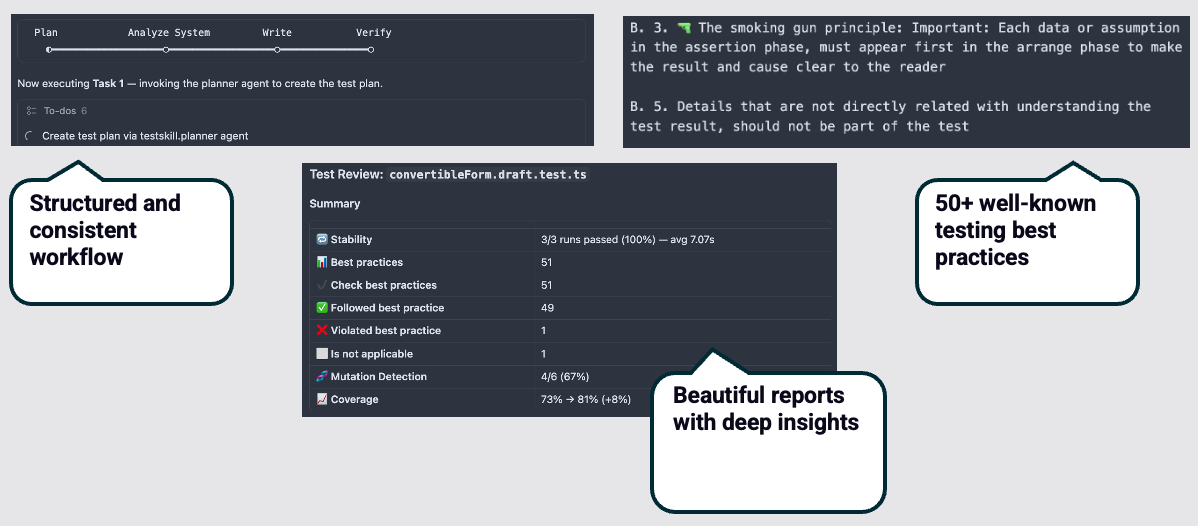
Table of Contents
- Install from the Claude Marketplace
- Quick Start
- Comprehensive Overview Video
- Features
- Commands & Agents
- Example Apps
- How It Works
- Create Your Canonical Test
- License
Install from the Claude Marketplace
If you use Claude Code, this is the recommended way to install — it pulls in the skill, all commands, and all agents in one step.
1. Add the marketplace (one-time):
/plugin marketplace add practicajs/the-frontend-testing-skill
2. Install the plugin:
/plugin install frontend-testing@frontend-testing-skill-marketplace
Or run /plugin, open the Discover tab, find frontend-testing, and install it interactively.
3. Reload to activate:
/reload-plugins
Then set up your project with /testskill.init (see Quick Start).
To update later, run /plugin marketplace update frontend-testing-skill-marketplace. To remove, run /plugin uninstall frontend-testing@frontend-testing-skill-marketplace.
Quick Start
Once the skill is installed (see Install from the Claude Marketplace above), configure it and you're ready.
1. Run /testskill.init
It sets everything up for you — creates testskill.config.toml in your project root, detects your frameworks, installs the required MCP servers, and asks you a question or two to fill in the essentials.
You're welcome to open the generated config and revise the values. The key sections to glance at:
[framework]
integration_test_framework = "playwright"   # or "vitest-browser-mode"
network_interception_framework = "playwright-route"   # or "msw" with Vitest Browser Mode

[commands]
test_run_command = "pnpm test:page"
app_start_command = "pnpm dev"

[canonical_example]
path = "src/pages/Products/Products.page.test.ts"
Everything else has a sensible default — see the config template for the full list. In a monorepo, keep one testskill.config.toml per app (beside each package.json).
2. Get going
Just prompt for a feature the way you normally do. The testing skill activates automatically and ensures great test coverage alongside your code.
Test already-existing untested code (recommended way to get started) — use the dedicated command:
/testskill.write-test Cart pageThe skill plans, analyzes, writes, and verifies — then hands you a report.
Comprehensive Overview Video
Features
55 Testing Rules, Enforced Automatically
Every test is written and checked against numbered rules covering anatomy, assertions, mocking, DOM interaction, data factories, and file organization. Not guidelines — guardrails. Based on our JavaScript Testing Best Practices repo.
Here's a taste of what the rules catch:
// ❌ page.getByTestId('submit-btn')                    → prefer ARIA: getByRole('button', { name: 'Submit' })
// ❌ await page.waitForTimeout(1000)                    → use auto-retriable assertions and actions
// ❌ page.locator('.btn-primary > div:nth-child(2)')    → fragile CSS selector
Trace-Based Failure Fixing
When a test fails, the test-fixer agent reads the Playwright or Vitest Browser Mode trace file, identifies the root cause, and patches the test — no manual debugging required.
Integration Tests for Real Pages
Writing unit tests with AI is easy. This skill targets the hard part: rendering full pages, mocking API calls, and simulating user flows. It writes page and component tests that check what users actually see, not just isolated utility functions.
Markdown & HTML Reports
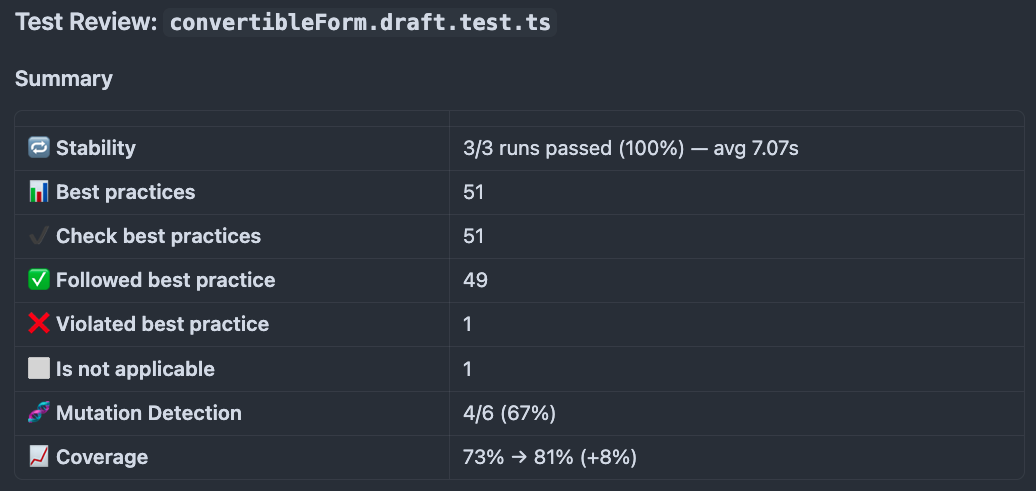
Every session produces a test results report with pass/fail status, flakiness detection (tests run multiple times), best practice violations, and coverage data.
Major Framework Support
- Playwright — page & integration tests
- Vitest Browser Mode — page & integration tests
- Vitest / Jest — unit tests
Storybook support coming later.
Fully Configurable
One testskill.config.toml at your project root adapts the entire skill to your project:
[workflow]
max_amount_of_test_to_plan = 4
how_many_executions_to_ensure_stability = 3

[commands]
test_run_command = "pnpm test:page"
app_start_command = "pnpm dev"

# ... 30+ other keys for paths, outputs, patterns, and more
Coverage Before & After
Our bundled test coverage MCP records a coverage baseline before any test is written and diffs it afterwards, so every session shows exactly which lines the new tests cover.
Bundled Tools and Scripts
Beyond using well-known MCP tools like Playwright MCP, we also bundle our own test coverage MCP and scripts for analyzing trace failures — so the agents have deep insight into what went wrong and what's covered.
Commands & Agents
| Command | Agent | What It Does |
|---|---|---|
| (automatic) | Planner + Verifier | Triggers for any feature request — tests serve as the north star for the coding agent |
/testskill.write-test <page> |
Planner, Page Analyzer, Verifier | Full workflow: plan → analyze → write → verify with stability and mutation checks |
/testskill.plan <page> |
Planner | Reads page source, proposes test scenarios, outputs test-plan.md for review |
/testskill.fix-test <test-file> |
Test Fixer | Reads trace files, identifies root cause, applies fix, verifies stability across multiple runs |
/testskill.fix-flaky <test-file> |
Flaky Fixer | Reproduces a flaky test, compares passing and failing traces, applies a fix |
/testskill.verify <plan-path> |
Verifier, Mutator | Runs tests multiple times for flakiness, checks 55 rules, mutation testing, generates report |
/testskill.review <test-file> |
Reviewer | Scores test against 55 rules, flags violations with fix suggestions |
/testskill.generate-test-review-report |
— | Builds the HTML report from the verification data |
/testskill.init |
— | Installs MCP servers, detects frameworks, creates config scaffolding |
/testskill.setup-playwright |
— | Sets up Playwright: config, browsers, CI, rules |
/testskill.setup-vite |
— | Sets up Vitest Browser Mode: config, browsers, CI, rules |
/testskill.toolbox-checklist |
— | Scans the project for key testing tools and prints a checklist |
/testskill.update-skill |
— | Safely applies a small change to the skill itself |
Example Apps
Want to try the skill hands-on? Pick your flavor:
- Playwright —
cd example-app-playwright - Vitest Browser Mode —
cd example-app-vitest-browser
Each contains a React e-commerce app with products, cart, and checkout. Follow the README inside — you'll install dependencies, run existing tests, then use the testing skill to write tests for the Cart page. Ten minutes, full workflow, end to end.
How It Works
The skill follows the Double Gate principle: no test is written without a plan, no test is shipped without verification.
┌──────────────┐     ┌──────────────┐     ┌──────────────┐     ┌──────────────┐
│ 1. Plan      │ ──► │ 2. Analyze   │ ──► │ 3. Write     │ ──► │ 4. Verify    │
│              │     │              │     │              │     │              │
│ Test planner │     │ Page analyzer│     │ Code tests   │     │ Run, check,  │
│ creates      │     │ captures DOM,│     │ following    │     │ mutate,      │
│ scenarios    │     │ APIs, ARIA   │     │ 55 rules     │     │ report       │
└──────────────┘     └──────────────┘     └──────────────┘     └──────────────┘
       ▲                                                              ▲
       └── Gate 1: plan approved              Gate 2: tests verified ─┘
Step 1 — Plan. The planner agent reads the page code, identifies what's testable, and produces a test-plan.md with specific scenarios. You review and approve.
Step 2 — Analyze. The page analyzer captures network calls, interactive elements, and ARIA attributes — either from a live browser or from source code analysis.
Step 3 — Write. Tests are written following the 55 rules: flat structure, no internal mocks, smoking-gun assertions, factory-based data, ARIA-first selectors.
Step 4 — Verify. Tests run multiple times to detect flakiness. The mutator plants bugs to confirm tests catch real failures. A final report summarizes everything.
Create Your Canonical Test
The skill assumes your project already has one test that represents the quality bar — the canonical example. Every new test the skill writes learns from it: structure, naming, selectors, factories, mocking patterns.
Point to it in testskill.config.toml:
[canonical_example]
path = "src/pages/Products/Products.page.test.ts"
title = "When API returns products, then they are all visible"
If you don't have a canonical test yet:
- Choose your integration test framework — Playwright or Vitest Browser Mode
- Pick a page with at least one API call and a few interactive elements
- Write one test that renders the page, mocks the API, and asserts on visible output
- Run
/testskill.reviewagainst the file — the reviewer scores it against the 55 rules and flags specific violations - Fix the flagged issues and re-run
/testskill.reviewuntil the score is where you want it - Set the path in
testskill.config.tomlunder[canonical_example]
From that point on, every test the skill writes follows the patterns in your canonical example.
License
Yorumlar (0)
Yorum birakmak icin giris yap.
Yorum birakSonuc bulunamadi