ogcode
Health Uyari
- License — License: MIT
- Description — Repository has a description
- Active repo — Last push 0 days ago
- Low visibility — Only 5 GitHub stars
Code Basarisiz
- rm -rf — Recursive force deletion command in .github/workflows/release.yml
- rm -rf — Recursive force deletion command in docs/install.sh
- rm -rf — Recursive force deletion command in install.sh
Permissions Gecti
- Permissions — No dangerous permissions requested
Bu listing icin henuz AI raporu yok.
A web UI coding agent that handles the full development loop: understand your codebase, plan features collaboratively, spin up isolated branch agents, write the code, and ship PRs — all in parallel. Written in Go.
Ogcode

An agentic coding assistant with a web UI, written in Go.
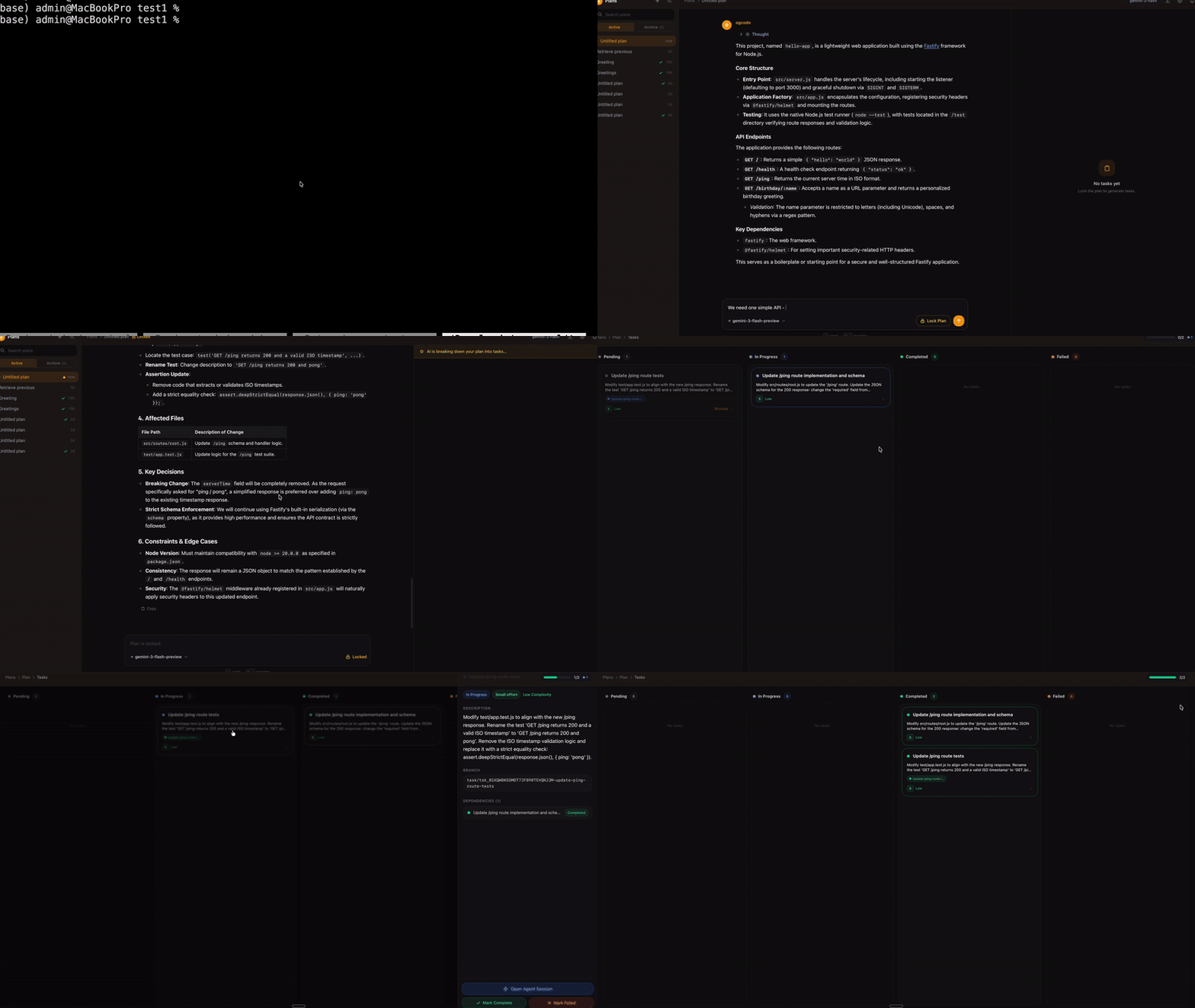
Ogcode acts as a pair programmer that actually codes with you. It doesn't just suggest snippets; it understands your entire codebase, plans complex features, and executes them by creating branches and PRs automatically. It can even run multiple tasks in parallel across different branches, allowing you to ship entire features in a fraction of the time. Whether you're hunting a bug or building a zero-to-one feature, Ogcode handles the heavy lifting so you can focus on the architecture.
Ogcode gives you two ways to work with AI on your codebase:
- Build Mode — Chat directly with an AI agent that can read, write, edit, and execute code in your project.
- Plan Mode — Collaboratively plan a feature or refactor with a read-only planning agent, then break the plan into tasks. Each task gets its own git branch and an isolated agent session. Completed tasks auto-create pull requests. Multiple tasks can run in parallel, drastically speeding up complex feature implementations.
Roadmap
- Advanced Task Planning & Parallel Execution: Enhanced plan decomposition, allowing users to manually or automatically assign coding agents to tasks, with full parallel execution support.
- AI Daily Standups: Voice-enabled daily meetings where all agents assigned to a project can report progress and discuss their work. This includes natural voice interactions, project-specific memory, and the ability to take and remember human feedback.
- Ogland Integration: A dedicated space within Ogcode to connect external services like Slack, Email, Jira, and more, enabling their use during the planning phase.
- Agentic Deployment: Full end-to-end agentic deployment support for all major cloud providers, starting with AWS.
Installation
macOS / Linux
curl -fsSL http://ogcode.xyz/install.sh | sh
The installer auto-detects your platform, downloads the latest release, and installs to /usr/local/bin (uses sudo if needed).
Windows
irm http://ogcode.xyz/install.ps1 | iex
This downloads the latest release, extracts it to %LOCALAPPDATA%\ogcode, and adds it to your PATH automatically.
Via winget (after next release):
winget install prasenjeet-symon.ogcode
Manual install:
- Go to the releases page and download
ogcode_Windows_x86_64.zip(or_arm64.zipif you have an ARM device). - Extract the zip file to a folder (e.g.
C:\Tools\ogcode). - Add that folder to your
Pathenvironment variable:- Press
Win + S, search for Edit environment variables for your account - Under User variables, find
Pathand click Edit - Click New and add the path to your ogcode folder (e.g.
C:\Tools\ogcode) - Click OK on all dialogs
- Press
- Open a new PowerShell or Command Prompt and run:
ogcode version
Go Install
go install github.com/prasenjeet-symon/ogcode@latest
Docker
docker run -p 8080:8080 -v $(pwd):/workspace -w /workspace ghcr.io/prasenjeet-symon/ogcode:latest
Configuration
Ogcode auto-detects available AI providers based on environment variables. No config files are required.
Required: AI Provider
Set at least one API key (or use Ollama):
| Variable | Provider |
|---|---|
ANTHROPIC_API_KEY |
Anthropic (Claude) |
OPENAI_API_KEY |
OpenAI (GPT) |
OPENROUTER_API_KEY |
OpenRouter |
OLLAMA_API_KEY |
Ollama Cloud (see below) |
OLLAMA_BASE_URL |
Ollama (local / cloud URL) |
Ollama (local models)
Ogcode auto-detects Ollama on macOS/Linux if the binary is installed at a common path. On Windows, or if you have a non-standard install, set OLLAMA_BASE_URL explicitly.
Local setup (default):
# macOS / Linux — auto-detected if ollama is installed
ollama serve
ogcode

# Or be explicit on any OS:
export OLLAMA_BASE_URL=http://localhost:11434/v1
ogcode
On Windows (PowerShell):
$env:OLLAMA_BASE_URL = "http://localhost:11434/v1"
ogcode
Remote or Ollama Cloud:
export OLLAMA_BASE_URL=https://api.ollama.com/v1   # or your custom endpoint
export OLLAMA_API_KEY=your-api-key                  # required for cloud / authenticated endpoints
ogcode
On Windows (PowerShell):
$env:OLLAMA_BASE_URL = "https://api.ollama.com/v1"
$env:OLLAMA_API_KEY = "your-api-key"
ogcode
Set a default model:
export OLLAMA_MODEL=codellama # defaults to qwen3-coder-next if not set
Available models in the UI include: qwen3, codellama, llama3.1, deepseek-coder-v2, mistral, and others. Any model you have pulled in Ollama will work — just select it from the model dropdown in the web UI.
Optional: Agentic Memory
To give the agent long-term memory across sessions, set:
export OGCODE_AGENTIC_MEMORY_MODE=true
This connects to an MCP-compatible memory server (configure via MCP_SERVER_* env vars).
Optional: Custom Models
You can add custom models (e.g. fine-tuned endpoints) through the web UI at Settings → Models.
Usage
Start in Build Mode (default)
ogcode
Opens the web UI at http://localhost:8080. Chat with the agent, ask it to read files, write code, run commands, or search the codebase.
Start in Plan Mode
ogcode plan
Opens the planning interface. Describe what you want to build. The planning agent will understand your codebase and discuss the approach with you. When you are satisfied, click Lock Plan — the agent breaks it into tasks with dependencies, effort, and complexity estimates.
Use a custom port
ogcode -p 3000
ogcode plan -p 3000
Check version
ogcode version
The Plan Mode Workflow
- Describe — Open a new plan and describe your goal. The planning agent reads your codebase and helps refine the approach.
- Lock — When ready, lock the plan. The agent generates a structured task breakdown.
- Review — View tasks in the Kanban board. Each task has a title, description, effort (S/M/L/XL), complexity, and dependencies.
- Execute — Start tasks. Each one gets its own git branch and an isolated agent session. You can watch the agent work in real time.
- Complete — When a task finishes, the agent commits its changes and a pull request is automatically created. Ogcode manages dependencies between tasks and runs independent tasks in parallel.
- Retry — If a task fails, retry it. The stale branch is removed and the task starts fresh.
Plans are archived as markdown files in .ogcode/archives/ once all tasks are completed.
Community
Join the Ogcode community on Discord for discussions, support, and updates:

- Ask questions and get help
- Share feedback and feature ideas
- Stay up to date with releases and announcements
License
MIT License — see LICENSE for details.
Yorumlar (0)
Yorum birakmak icin giris yap.
Yorum birakSonuc bulunamadi