tally
Health Warn
- License — License: MIT
- Description — Repository has a description
- Active repo — Last push 0 days ago
- Low visibility — Only 5 GitHub stars
Code Fail
- rm -rf — Recursive force deletion command in build-app.sh
- child_process — Shell command execution capability in npm/bin/tally.js
- spawnSync — Synchronous process spawning in npm/bin/tally.js
- fs.rmSync — Destructive file system operation in npm/bin/tally.js
- os.homedir — User home directory access in npm/bin/tally.js
- process.env — Environment variable access in npm/bin/tally.js
- fs module — File system access in npm/bin/tally.js
- network request — Outbound network request in npm/bin/tally.js
- child_process — Shell command execution capability in npm/lib/wrapped.js
- exec() — Shell command execution in npm/lib/wrapped.js
- os.homedir — User home directory access in npm/lib/wrapped.js
- process.env — Environment variable access in npm/lib/wrapped.js
- fs module — File system access in npm/lib/wrapped.js
- network request — Outbound network request in npm/lib/wrapped.js
- network request — Outbound network request in npm/scripts/pin-release.mjs
Permissions Pass
- Permissions — No dangerous permissions requested
No AI report is available for this listing yet.
macOS menu bar app for AI coding subscriptions: live limits, resets, runway, cost and value, in a dithered style
Tally
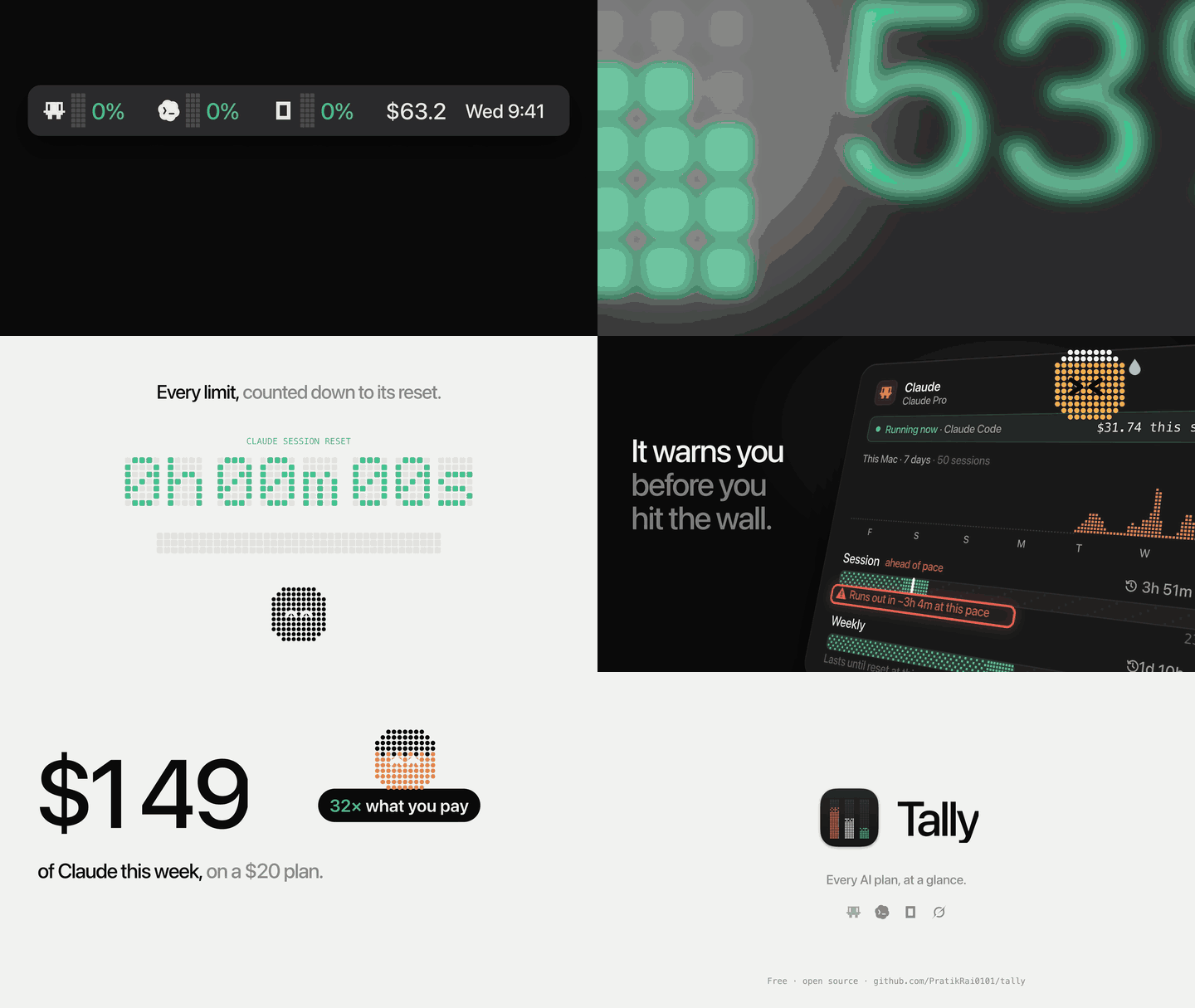
Every AI subscription, at a glance.
A native macOS menu bar app for Claude, Codex, Cursor, Grok, Gemini, and OpenCode.
See how much of each plan's limit is left, when it resets, how fast you're burning it, and what it would have cost at API prices.
Website · Install · Download · Issues · Contribute


Install in one line, no Apple "could not verify" prompt:
npx tally-menubar
Get your AI coding Wrapped (any OS, nothing to install)
npx tally-menubar wrapped
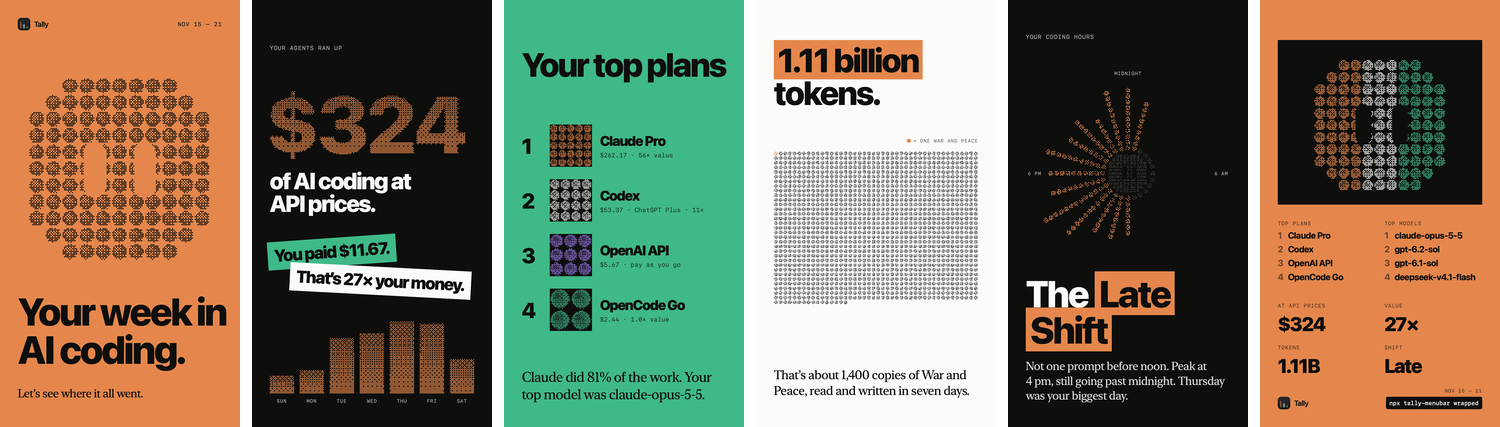
Reads the logs Claude Code, Codex, Pi, OpenCode, Grok CLI, Antigravity and Gemini CLI already keep, and opens your last 24 hours, 7 days or 30 days as six story slides and a card for X: your total at API prices, what your plans cost, your top plans and models, tokens counted in copies of War and Peace, the hours you code, and every time a plan locked you out. Works on macOS, Linux and Windows with Node 18+. Nothing is uploaded and no project names appear.
[!NOTE]
Tally isn't notarized by Apple yet.npx tally-menubar(or the Terminal install) works straight away; if you download the zip in a browser, macOS asks you to approve it once in System Settings.
Why Tally?
If you code with several AI agents, your limits live in several places: Claude's usage page, ChatGPT's settings, the OpenCode console. None of them tell you which plan has room left right now, whether you'll hit the wall before the reset, or whether a $20 plan is earning its keep.
Tally reads the session logs your agents already write and the usage endpoints your CLIs already sign in to, and puts all of it in one place: a few dithered meters in the menu bar, and a panel that explains them. No accounts, no server, nothing to configure.
See Tally in action
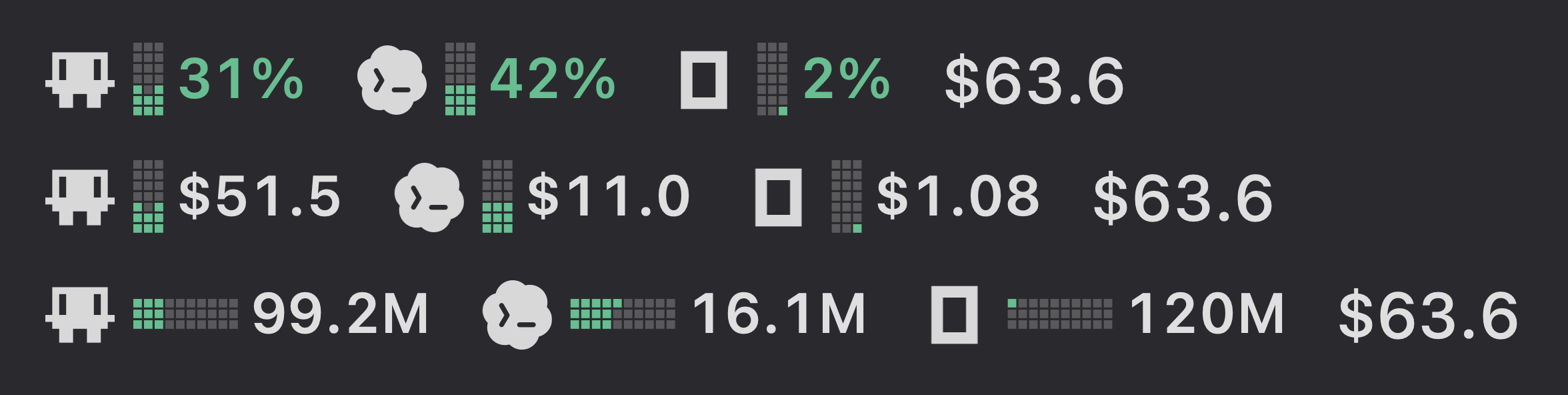
One meter per plan: label each with % used, cost, or tokens, and end with today's total.
 |
 |
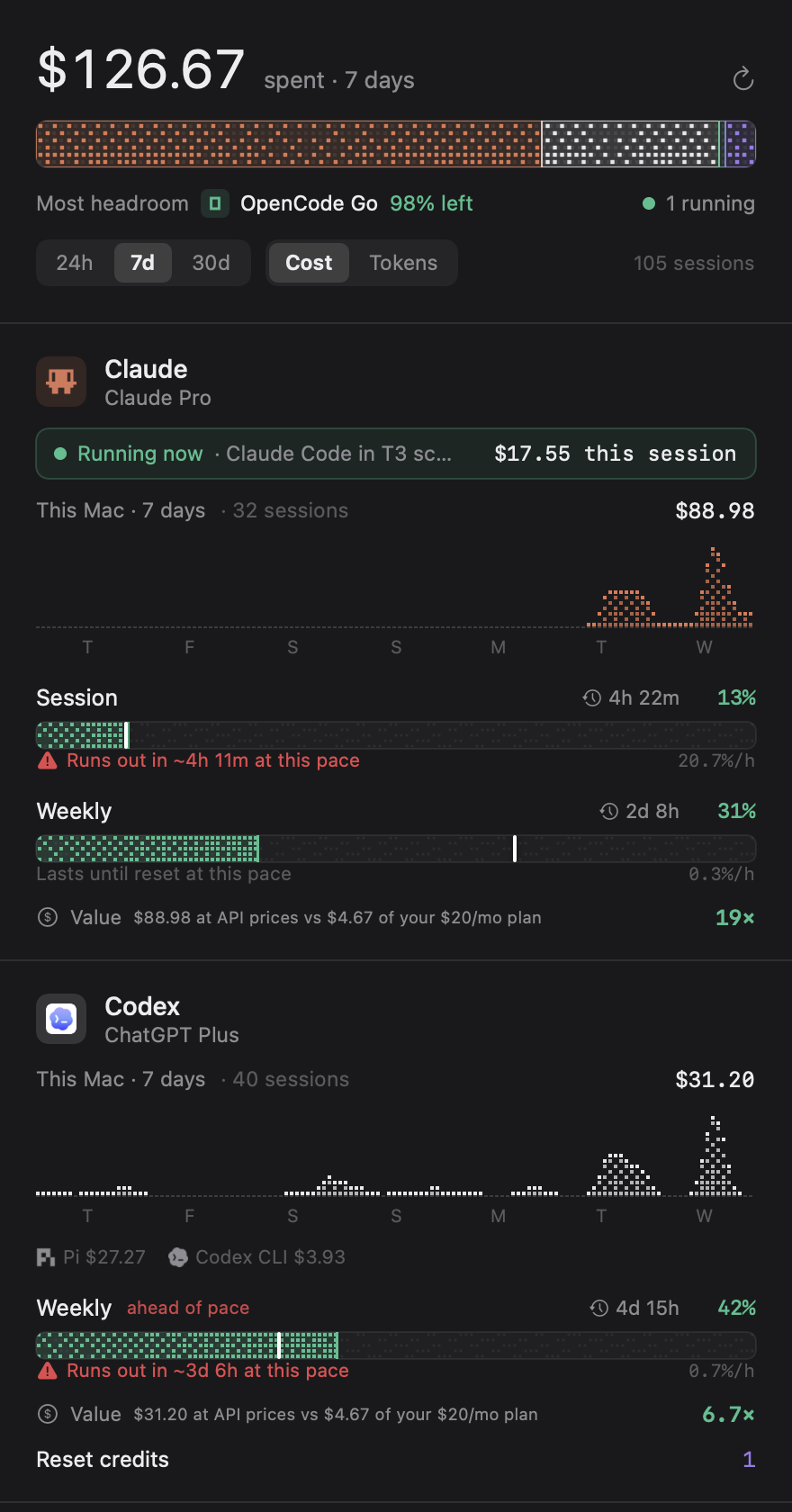
| Know where every limit stands Reset countdowns, pace, runway forecasts, and plan value |
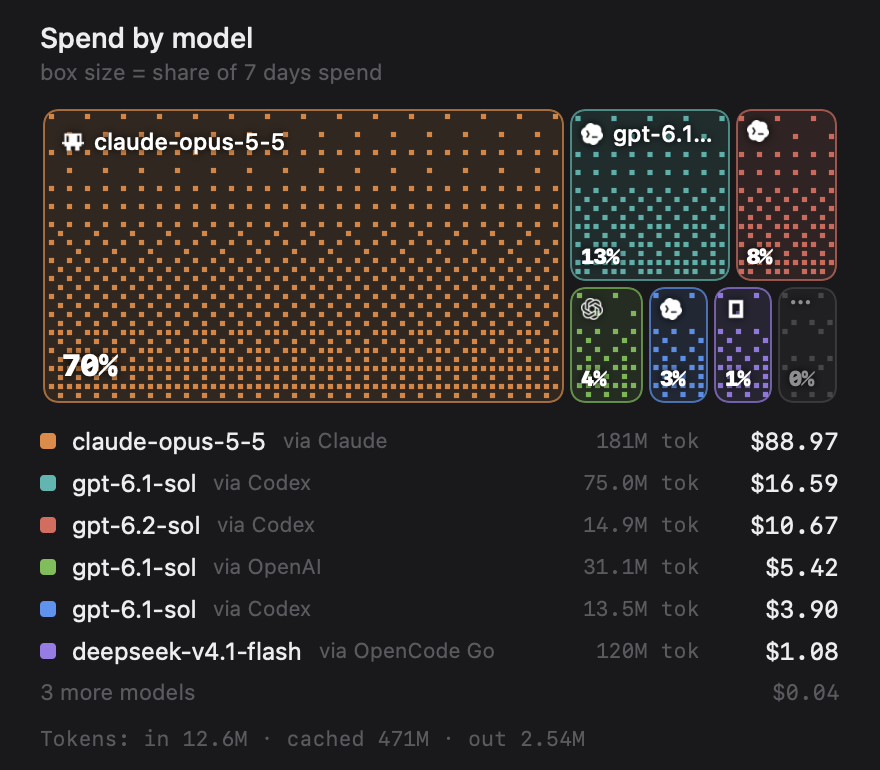
See where the money went Spend by model, with which plan paid for it |
Actual Tally interface with real usage.
What it does
Watch every limit from the menu bar
- One dithered meter per plan, as columns or bars, coloured green → amber → red as usage climbs
- Choose what each meter tracks: the tightest limit, the session, or the weekly window
- Label meters with the limit's %, the plan's cost, or its tokens for today / 7 days / 30 days, always or only at high usage
- End with a total in dollars or tokens, or hide it
- Pick which plans appear in the menu bar separately from the panel
- A small green dot shows while an agent is running
- Open the panel from anywhere with ⌥⌘U
Know when you'll run out
- Every limit shows % used (or % left, if you prefer counting down), a reset countdown, and a tick marking where an even pace would put you
- Pace forecasts: "At this pace you'll hit the limit 8:35 pm, 1h 40m before reset" when you're heading for a lockout, or "On track: about 69% used by reset" when you're not. Session limits use your recent pace; weekly limits use your average since the week began, because nobody codes around the clock
- Freshness on every reading: "live · 2m ago", "last checked 25m ago" or "estimate from logs · 47m ago". If a check fails (an expired token, a locked Keychain, a network blip), Tally keeps your last good numbers, dimmed, and says why
- Most headroom points to the plan with the most room right now
- Alerts at 80% and 95%, when a limit resets, and when you're on pace to run out before it resets, shown even while the panel is open
- Before-cutoff hook: run your own script when an alert fires, to save work, stop an agent or ping a chat (see below)
See what you're getting for the money
- Spend and tokens per plan over 24 hours, 7 days, or 30 days, with hover readouts on every chart
- Plan value: what your usage would cost at API prices versus what the plan costs for the same stretch (e.g. 16× value)
- Running now: a live badge with the current session's spend and the project it's in
- Spend by project: groups usage by the folder your agent worked in, folding worktrees into their repo
- Spend by model: a dithered treemap with a legend naming each model and the plan that paid for it
- Usage split by tool, so you can see how much came from Codex CLI versus Pi on the same plan
- Tally Wrapped: the share button turns your day, week or month into a Wrapped-style deck: six 1080×1920 story slides (your total at API prices, top plans, tokens counted in copies of War and Peace, your coding hours and shift, a summary) plus a 1200×630 card for X. Copy one, save them all, or post. Project names are never included. Without the app:
npx tally-menubar wrapped.
Make it yours
- Drag to reorder plans; turn each on or off for the panel and the menu bar
- Light, dark, or system appearance
- Editable plan prices for the value calculation
- Launch at login
Before-cutoff hook
Make an executable script at ~/.config/tally/hook and Tally runs it whenever an alert fires, even with notifications turned off. Tally never creates, downloads or edits this file, and it skips the hook unless the file is yours and nobody else can write to it (chmod 755).
The details arrive as environment variables:
| Variable | Example |
|---|---|
TALLY_EVENT |
threshold, pace (on pace to run out before reset), reset, or test |
TALLY_SERVICE / TALLY_SERVICE_NAME |
claude / Claude (also codex, opencodeGo) |
TALLY_WINDOW |
session, weekly, monthly |
TALLY_PERCENT |
82 |
TALLY_THRESHOLD |
80 or 95 (threshold events only) |
TALLY_RESETS_AT / TALLY_RESETS_IN |
2026-11-23T21:00:00Z / seconds until reset |
TALLY_TITLE / TALLY_MESSAGE |
the notification's text |
For example, commit work in progress when a session limit is close:
#!/bin/sh
# ~/.config/tally/hook
[ "$TALLY_EVENT" = threshold ] && [ "$TALLY_THRESHOLD" = 95 ] || exit 0
cd ~/code/my-project && git add -A && git commit -qm "wip: $TALLY_TITLE" --no-verify
Check your script with ~/Applications/Tally.app/Contents/MacOS/Tally --test-hook, which runs it once with a sample event. Each run gets up to a minute.
Supported plans
| Plan | Live limits | Usage read from |
|---|---|---|
| Claude (Pro / Max) | Session (5h), weekly, per-model weekly | Claude Code |
| Codex (ChatGPT Plus / Pro) | Session, weekly, reset credits | Codex CLI, Pi (openai-codex) |
| OpenCode Go | Rolling 5h, weekly, monthly | Pi (opencode-go), OpenCode |
| Cursor (Hobby / Pro / Pro+ / Ultra / Teams) | Monthly included usage, Auto vs API split, on-demand spend | — (Cursor keeps no local usage logs; the card appears once Cursor is signed in) |
| Grok (SuperGrok / Heavy) | Weekly or monthly credits | Grok CLI (Grok Build), including cost and daily free-tier lockouts |
| Gemini (Google AI Pro / Ultra) | Session (5h), weekly, and per-model-group limits | Antigravity (app, IDE, CLI, T3 Code ACP), Gemini CLI, Pi / OpenCode (google) |
| OpenCode Zen | — (free models) | OpenCode |
| OpenAI | — | Pi (openai) |
Cards are grouped by plan, not by app. If one tool spends on several plans (Pi often does), each plan gets its own share.
Install
Requirements
- macOS 14 (Sonoma) or later, on Apple Silicon or Intel
- At least one of Claude Code, Codex, Pi, OpenCode, Cursor, Grok CLI, Antigravity, or Gemini CLI, signed in
- Node 18 or later for the npx install, or Homebrew
npx (recommended)
npx tally-menubar
This downloads the latest release from GitHub, checks it against the SHA-256 pinned in the tally-menubar package, installs it to ~/Applications (or updates it where it already is), and opens it. macOS doesn't flag files that Node downloads, so there's no "Apple could not verify" prompt.
| Command | What it does |
|---|---|
npx tally-menubar@latest update |
Update to the newest release |
npx tally-menubar usage |
Print spend, tokens and limits in the terminal |
npx tally-menubar uninstall |
Remove Tally (--purge also removes its settings) |
The installer's source is in npm/.
Homebrew
brew install --cask pratikrai0101/tally/tally
Update with brew upgrade --cask tally. The cask lives in PratikRai0101/homebrew-tally; since Tally isn't notarized yet, it clears the quarantine flag after install so there's no Gatekeeper prompt.
Terminal, without Node
curl -fsSL https://github.com/PratikRai0101/tally/releases/latest/download/Tally.zip -o /tmp/Tally.zip \
  && ditto -x -k /tmp/Tally.zip /Applications && open /Applications/Tally.app
Download
Get Tally.zip from the latest release, unzip it, and drag Tally into Applications. The first time you open it, macOS will block it because it isn't notarized: open System Settings → Privacy & Security, scroll down, and click Open Anyway.
To uninstall, run npx tally-menubar uninstall, or right-click the menu bar meters → Quit Tally and delete Tally from Applications.
Quick start
- Open Tally. Its meters appear in the menu bar; there's no Dock icon.
- Allow notifications if you want limit alerts.
- Click the meters (or press ⌥⌘U) to open the panel. Switch between 24h, 7d, and 30d, or between cost and tokens.
- Right-click the meters → Settings to choose what the menu bar shows, set your plan prices, and turn on Launch at login.
The first scan of your logs takes a few seconds; after that Tally refreshes every minute and only re-reads files that changed.
Privacy by design
Tally has no account, analytics, or telemetry, and no server of its own. Everything it shows comes from files already on your Mac, plus each provider's own usage endpoint:
| Data | Where it comes from |
|---|---|
| Spend and tokens | Session logs in ~/.claude/projects, ~/.codex/sessions, ~/.pi/agent/sessions, ~/.grok/sessions, ~/.gemini (Antigravity SQLite databases & Gemini CLI sessions), and OpenCode's ~/.local/share/opencode/opencode.db |
| Claude limits | The Claude Code login in your Keychain (Claude Code-credentials) → api.anthropic.com/api/oauth/usage |
| Codex limits | ~/.codex/auth.json → chatgpt.com/backend-api/wham/usage, falling back to the rate limits in Codex's own logs |
| OpenCode Go limits | The Go API key from Pi or OpenCode (or OPENCODE_GO_API_KEY) → opencode.ai/zen/go/v1/usage |
| Cursor limits | Cursor's sign-in in its local state database (read-only) → cursor.com/api/usage-summary. Newer Cursor versions encrypt it, so macOS asks once for access to Cursor Safe Storage |
| Grok limits | ~/.grok/auth.json → cli-chat-proxy.grok.com/v1/billing |
| Gemini limits | Antigravity's antigravity-oauth-token (or Gemini CLI's ~/.gemini/oauth_creds.json) → daily-cloudcode-pa.googleapis.com/v1internal:retrieveUserQuotaSummary |
| Prices | The LiteLLM price table: T3 Code's cached copy if present, otherwise downloaded once |
Each credential is sent only to its own provider. Tally never refreshes or rewrites a login, so your CLIs' sessions are left alone. These usage endpoints are undocumented and may change.
Build from source
Requirements
- macOS 14 or later
- Xcode 15.3 or later (Swift 5.10+)
- Git
git clone https://github.com/PratikRai0101/tally.git
cd tally
./build-app.sh             # build, install to ~/Applications/Tally.app, and launch
./build-app.sh --package   # universal (Apple Silicon + Intel) build into dist/Tally.zip
Handy while developing:
swift build -c release
.build/release/Tally --dump                 # print totals and limits in the terminal
.build/release/Tally --snapshot out.png     # render the panel to a PNG
--snapshot also takes TALLY_PERIOD=24h|7d|30d, TALLY_TOKENS=1, TALLY_LIGHT=1, TALLY_MENUBAR=menubar.png, TALLY_SETTINGS=1, and TALLY_ICON=1.
Architecture
Tally is a Swift package with a SwiftUI panel inside an AppKit status item. It has no third-party dependencies.
 session logs ──► UsageScanner ──┐
 (Claude, Codex,   (cached by    │
  Pi, OpenCode)     mtime/size)  ├──► UsageStore ──► PopoverView (cards, charts, treemap)
                                 │     totals,    ├─► MenuBarRenderer (status item image)
 usage endpoints ─► LimitsFetcher┘     forecasts  └─► Notifier (alerts)
 (Anthropic, ChatGPT, OpenCode)        live state
| File | Responsibility |
|---|---|
Scanners.swift |
Reads each agent's logs into usage records; caches files by modification time and size |
Limits.swift |
Fetches live limits from each provider using the CLIs' saved logins |
Pricing.swift |
Loads the LiteLLM price table and resolves model names to per-token rates |
Store.swift |
Aggregates records by plan, model, project, and time; tracks live sessions |
Insights.swift |
Project naming, runway forecasts, plan value, alerts, and the global shortcut |
Views.swift · Dither.swift |
The panel, the Bayer-dithered meters and charts, and the squarified treemap |
App.swift |
Status item, menu bar rendering, and the --dump / --snapshot tools |
Settings.swift |
Preferences and the Settings window |
Logos.swift · AppIcon.swift |
Embedded SVG logos and the dithered app icon |
Project status
Tally works day to day on the plans above. Next up:
- Signed and notarized builds
- Daily and weekly budgets with menu bar warnings
- CSV export
- Desktop widget
Contributing
Issues and focused pull requests are welcome.
- Check the open issues, or open one first for anything large.
- To add a provider, add a parser to
Scanners.swift, aServicecase inModels.swift, and, if it has limits, a fetcher inLimits.swift. - Check UI changes with
--snapshotin both light and dark appearances. - Keep credentials local: never log them, and only send each one to its own provider.
Found a security problem? Please report it privately, as described in SECURITY.md.
Credits
- Brand logos from LobeHub Icons (MIT). The Claude pixel mascot is redrawn from Claude Code. All logos and names are trademarks of their owners; Tally isn't affiliated with any of them.
- Pricing data from LiteLLM.
License
Tally is available under the MIT License.
Support the project
If Tally is useful to you, star the repository; it helps other people who juggle AI subscriptions find it.
Reviews (0)
Sign in to leave a review.
Leave a reviewNo results found