llm-wiki
Health Pass
- License — License: MIT
- Description — Repository has a description
- Active repo — Last push 0 days ago
- Community trust — 18 GitHub stars
Code Pass
- Code scan — Scanned 12 files during light audit, no dangerous patterns found
Permissions Pass
- Permissions — No dangerous permissions requested
This tool acts as a local knowledge base that aggregates and indexes your session transcripts from AI coding assistants like Claude Code, Cursor, and Codex CLI. It builds a searchable web interface so you can easily reference your past AI-driven development work.
Security Assessment
Overall risk: Low. The tool processes your local AI session logs, which may contain sensitive source code or proprietary ideas, but it keeps everything locally hosted on your machine (at 127.0.0.1:8765) without routing data to external servers. An automated code scan across 12 files found no hardcoded secrets, no dangerous code execution patterns, and no excessive file system or network permissions requested. While it uses shell scripts (`setup.sh`, `build.sh`, `serve.sh`) to operate, this is standard behavior for a local development utility.
Quality Assessment
The project demonstrates strong overall health and reliability. It is licensed under the highly permissive MIT license, making it freely available for personal and commercial use. The repository is actively maintained, with the most recent code push occurring today. It has earned 18 GitHub stars, indicating a moderate but growing level of community trust and user validation. The documentation is excellent, providing clear setup instructions, safe demo data, and transparent contribution guidelines.
Verdict
Safe to use.
LLM WIKI
llmwiki
LLM-powered knowledge base from your Claude Code, Codex CLI, Cursor, Gemini CLI, and Obsidian sessions.
Built on Andrej Karpathy's LLM Wiki pattern.
👉 Live demo: pratiyush.github.io/llm-wiki
Rebuilt on every master push from the synthetic sessions in examples/demo-sessions/. No personal data. Shows every feature of the real tool (activity heatmap, tool charts, token usage, model info cards, vs-comparisons, project topics) running against safe reference data.





Every Claude Code, Codex CLI, and Cursor session writes a full transcript to disk. You already have hundreds of them and never look at them again.
llmwiki turns that dormant history into a beautiful, searchable, interlinked knowledge base — locally, in two commands. Plus, it produces AI-consumable exports (llms.txt, llms-full.txt, JSON-LD graph, per-page .txt + .json siblings) so other AI agents can query your wiki directly.
./setup.sh                         # one-time install
./build.sh && ./serve.sh           # build + serve at http://127.0.0.1:8765
Contributing in one line: read CONTRIBUTING.md, keep PRs focused (one concern each), use feat: / fix: / docs: / chore: / test: commit prefixes, never commit real session data (raw/ is gitignored), no new runtime deps. CI must be green to merge.
Screenshots
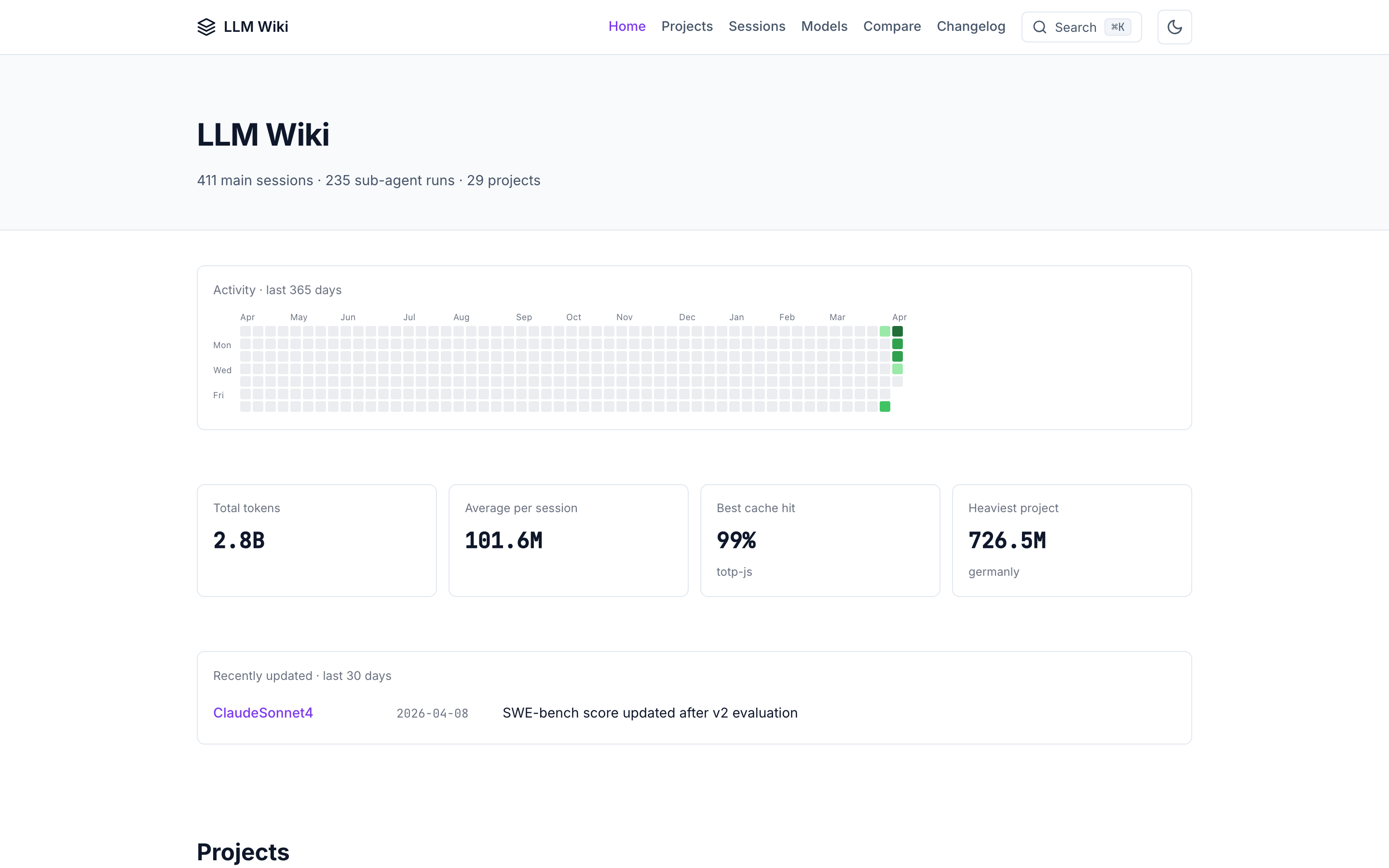
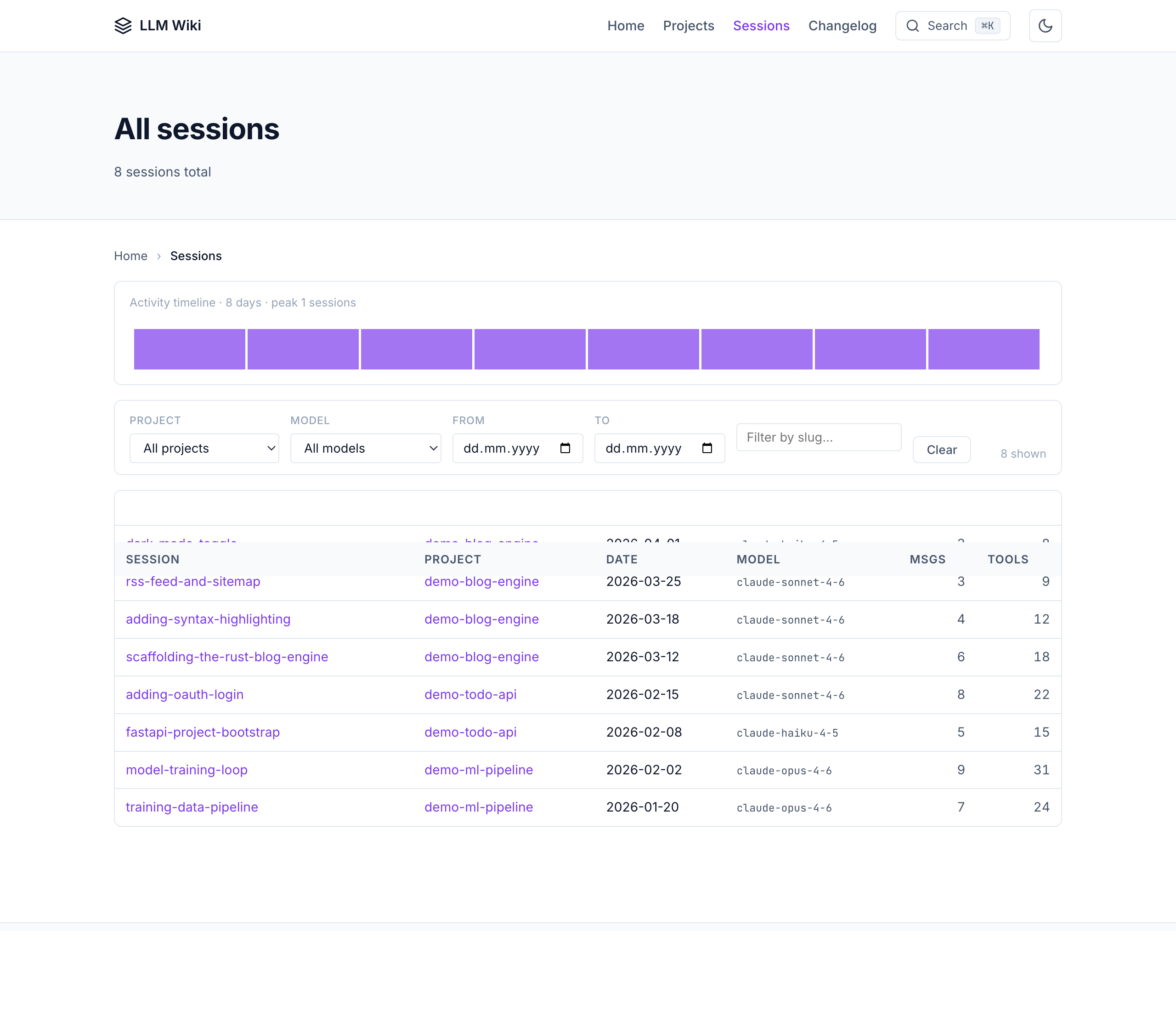
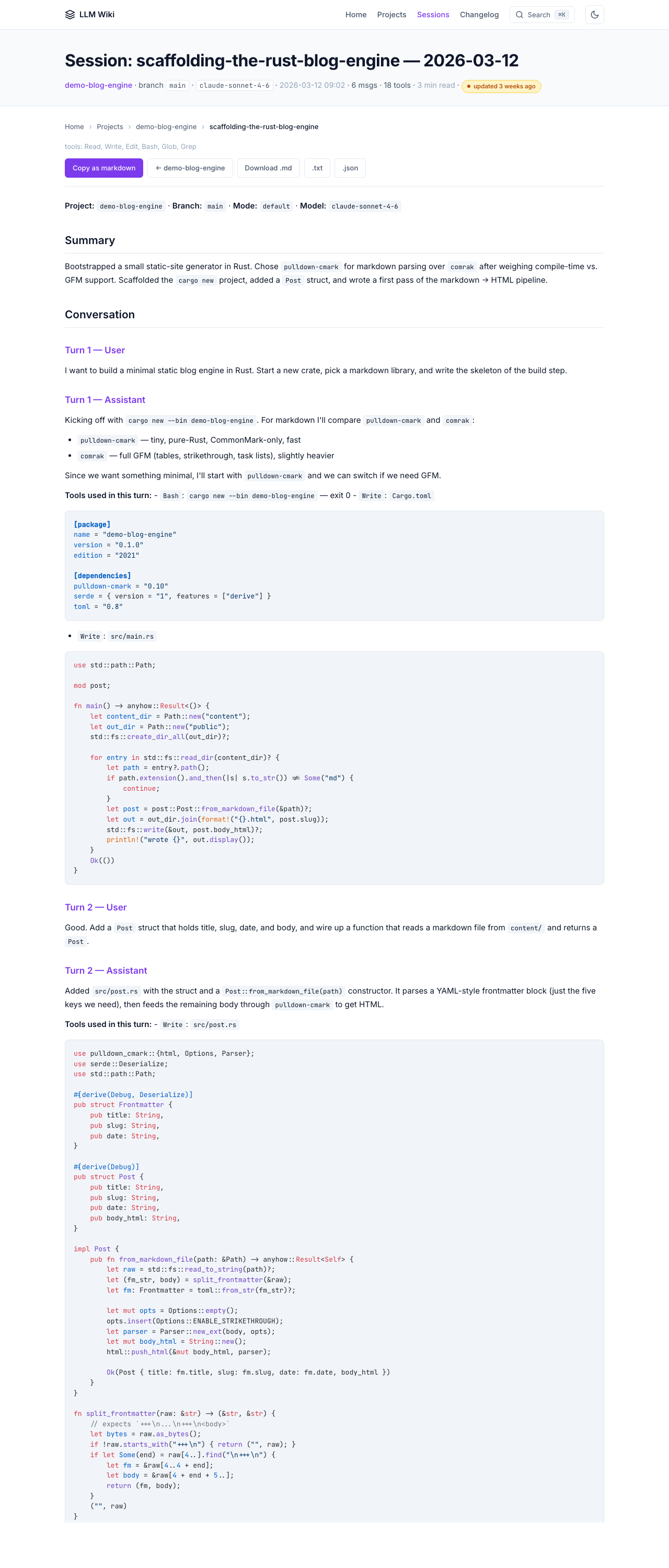
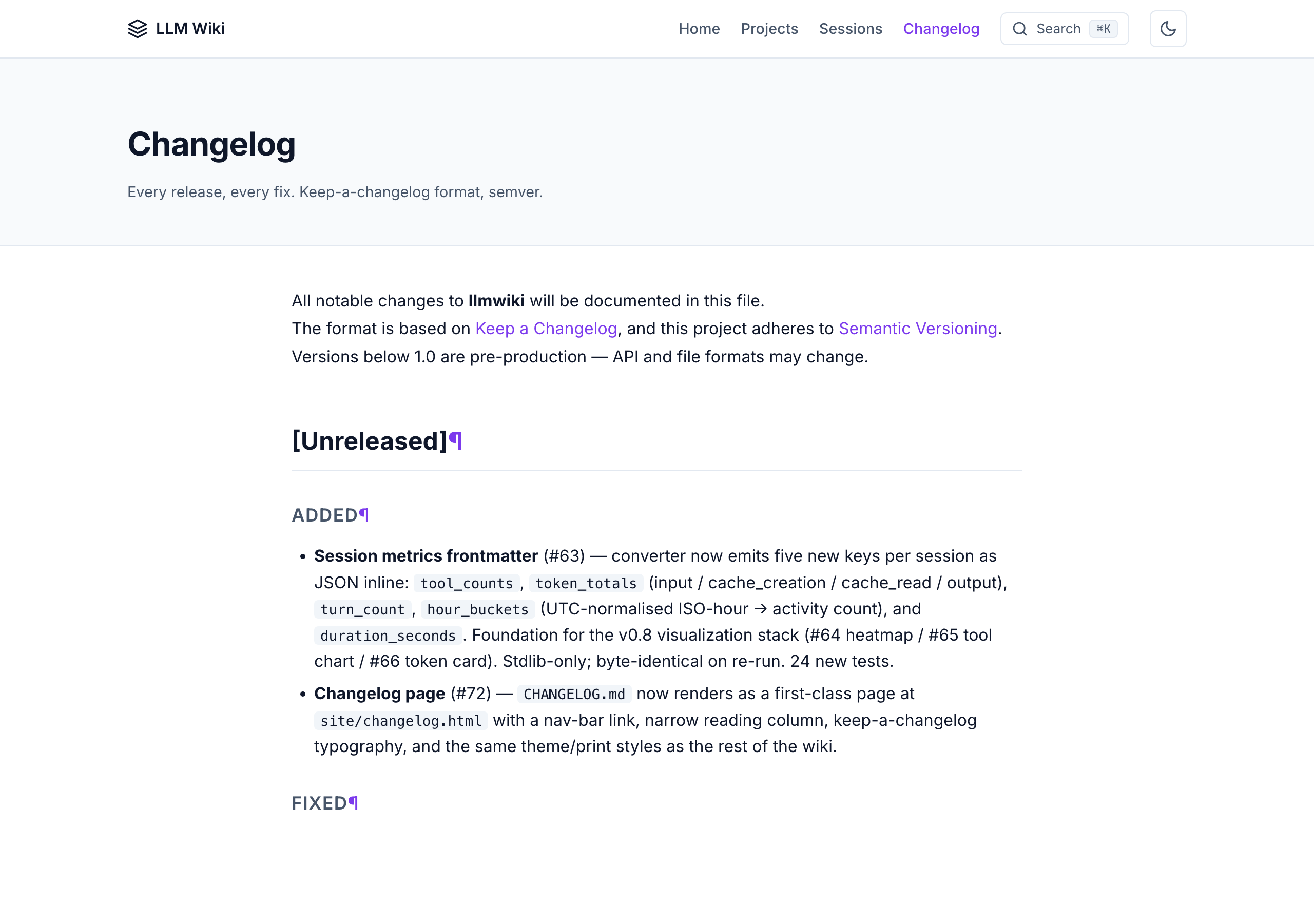
All screenshots below are from the public demo site which is built on every master push from the dummy example sessions. Your own wiki will look identical — just with your real work.
Home — projects overview with activity heatmap
All sessions — filterable table across every project
Session detail — full conversation + tool calls
Changelog — renders CHANGELOG.md as a first-class page
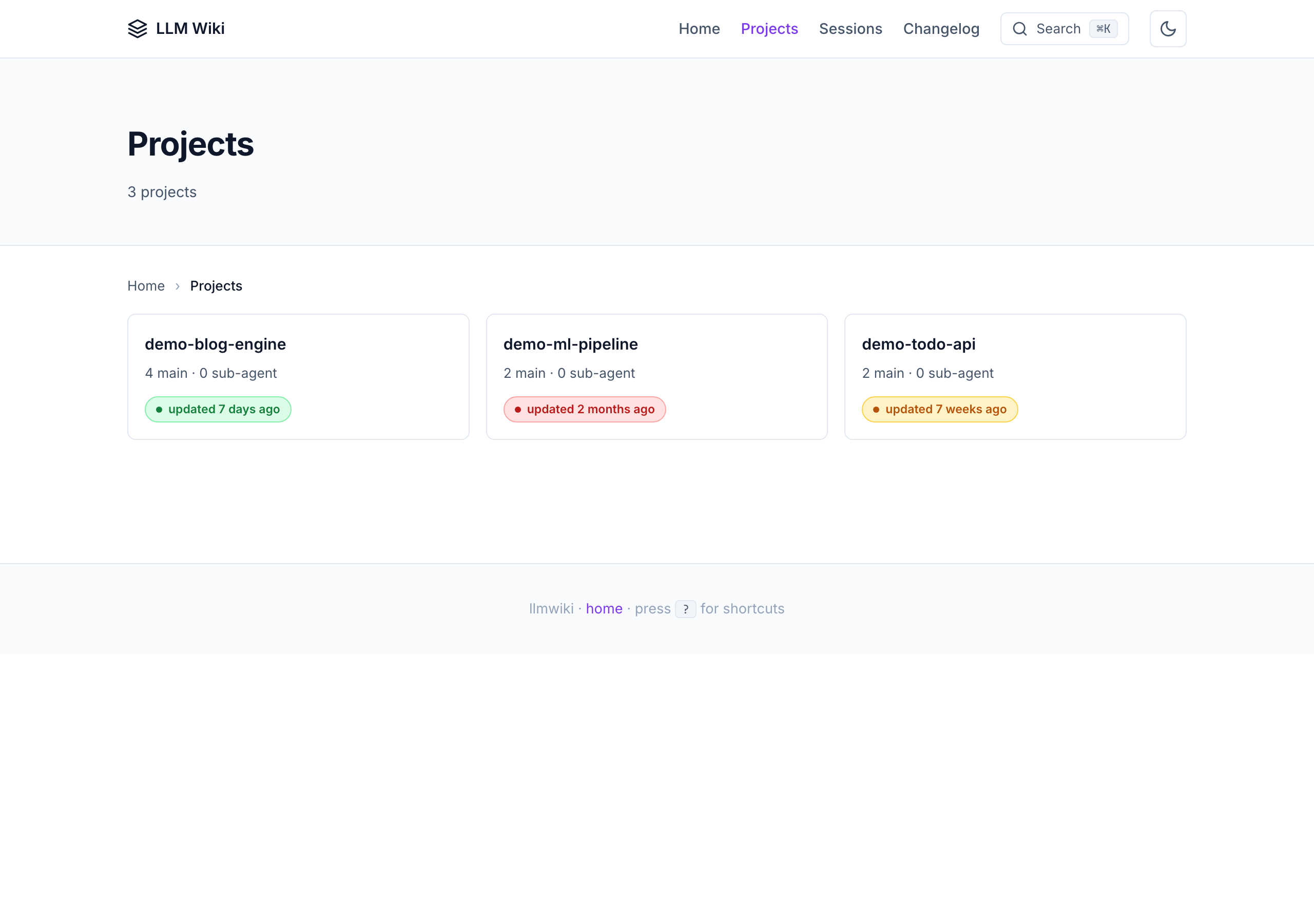
Projects index — freshness badges + per-project stats
What you get
Human-readable
- All your sessions, converted from
.jsonlto clean, redacted markdown - A Karpathy-style wiki —
sources/,entities/,concepts/,syntheses/,comparisons/,questions/linked with[[wikilinks]] - A beautiful static site you can browse locally or deploy to GitHub Pages
- Global search (Cmd+K command palette with fuzzy match over pre-built index)
- highlight.js client-side syntax highlighting (light + dark themes)
- Dark mode (system-aware + manual toggle with
data-theme) - Keyboard shortcuts:
/search ·g h/p/snav ·j/krows ·?help - Collapsible tool-result sections (auto-expand > 500 chars)
- Copy-as-markdown + copy-code buttons
- Breadcrumbs + reading progress bar
- Filter bar on sessions table (project/model/date/text)
- Reading time estimates (
X min read) - Related pages panel at the bottom of every session
- Activity heatmap on the home page
- Hover-to-preview wikilinks
- Deep-link icons next to every heading
- Mobile-responsive + print-friendly
AI-consumable (v0.4)
Every HTML page has sibling machine-readable files at the same URL:
<page>.html— human HTML with schema.org microdata<page>.txt— plain text version (no HTML tags)<page>.json— structured metadata + body
Site-level AI-agent entry points:
| File | What |
|---|---|
/llms.txt |
Short index per llmstxt.org spec |
/llms-full.txt |
Flattened plain-text dump (~5 MB cap) — paste into any LLM's context |
/graph.jsonld |
Schema.org JSON-LD entity/concept/source graph |
/sitemap.xml |
Standard sitemap with lastmod |
/rss.xml |
RSS 2.0 feed of newest sessions |
/robots.txt |
AI-friendly robots with llms.txt reference |
/ai-readme.md |
AI-specific navigation instructions |
/manifest.json |
Build manifest with SHA-256 hashes + perf budget |
Every page also includes an <!-- llmwiki:metadata --> HTML comment that AI agents can parse without fetching the separate .json sibling.
Automation
- SessionStart hook — auto-syncs new sessions in the background on every Claude Code launch
- File watcher —
llmwiki watchpolls agent stores with debounce and runs sync on change - MCP server — 7 production tools (
wiki_query,wiki_search,wiki_list_sources,wiki_read_page,wiki_lint,wiki_sync,wiki_export) queryable from any MCP client (Claude Desktop, Cline, Cursor, ChatGPT desktop) - No servers, no database, no npm — Python stdlib +
markdown. Syntax highlighting loads from a highlight.js CDN at view time.
How it works
┌─────────────────────────────────────┐
│  ~/.claude/projects/*/*.jsonl       │  ← Claude Code sessions
│  ~/.codex/sessions/**/*.jsonl       │  ← Codex CLI sessions
│  ~/Library/.../Cursor/workspaceS…   │  ← Cursor
│  ~/Documents/Obsidian Vault/        │  ← Obsidian
│  ~/.gemini/                         │  ← Gemini CLI
└──────────────┬──────────────────────┘
               │
               ▼   python3 -m llmwiki sync
┌─────────────────────────────────────┐
│  raw/sessions/<project>/            │  ← immutable markdown (Karpathy layer 1)
│     2026-04-08-<slug>.md            │
└──────────────┬──────────────────────┘
               │
               ▼   /wiki-ingest  (your coding agent)
┌─────────────────────────────────────┐
│  wiki/sources/<slug>.md             │  ← LLM-generated wiki (Karpathy layer 2)
│  wiki/entities/<Name>.md            │
│  wiki/concepts/<Name>.md            │
│  wiki/syntheses/<Name>.md           │
│  wiki/comparisons/<Name>.md         │
│  wiki/questions/<Name>.md           │
│  wiki/index.md, overview.md, log.md │
└──────────────┬──────────────────────┘
               │
               ▼   python3 -m llmwiki build
┌─────────────────────────────────────┐
│  site/                              │  ← static HTML + AI exports
│  ├── index.html, style.css, ...     │
│  ├── sessions/<project>/<slug>.html │
│  ├── sessions/<project>/<slug>.txt  │  (AI sibling)
│  ├── sessions/<project>/<slug>.json │  (AI sibling)
│  ├── llms.txt, llms-full.txt        │
│  ├── graph.jsonld                   │
│  ├── sitemap.xml, rss.xml           │
│  ├── robots.txt, ai-readme.md       │
│  ├── manifest.json                  │
│  └── search-index.json              │
└─────────────────────────────────────┘
See docs/architecture.md for the full 3-layer Karpathy + 8-layer build breakdown.
Install
macOS / Linux
git clone https://github.com/Pratiyush/llm-wiki.git
cd llm-wiki
./setup.sh
Windows
git clone https://github.com/Pratiyush/llm-wiki.git
cd llm-wiki
setup.bat
With pip (v0.3+)
pip install -e .                # basic — everything you need
pip install -e '.[pdf]'         # + PDF ingestion
pip install -e '.[dev]'         # + pytest + ruff
pip install -e '.[all]'         # all of the above
Syntax highlighting is now powered by highlight.js, loaded from a CDN at view time — no optional deps required.
What setup does
- Creates
raw/,wiki/,site/data directories - Installs the
llmwikiPython package in-place - Detects your coding agents and enables matching adapters
- Optionally offers to install the
SessionStarthook into~/.claude/settings.jsonfor auto-sync - Runs a first sync so you see output immediately
For maintainers
Running the project? The governance scaffold lives under docs/maintainers/ and is loaded by a dedicated skill:
| File | What it's for |
|---|---|
CONTRIBUTING.md |
Short rules for contributors — read this first |
CODE_OF_CONDUCT.md |
Contributor Covenant 2.1 |
SECURITY.md |
Disclosure process for redaction bugs, XSS, data leaks |
docs/maintainers/ARCHITECTURE.md |
One-page system diagram + layer boundaries + what NOT to add |
docs/maintainers/REVIEW_CHECKLIST.md |
Canonical code-review criteria |
docs/maintainers/RELEASE_PROCESS.md |
Version bump → CHANGELOG → tag → build → publish |
docs/maintainers/TRIAGE.md |
Label taxonomy + stale-issue policy |
docs/maintainers/ROADMAP.md |
Near-term plan + release themes |
docs/maintainers/DECLINED.md |
Graveyard of declined ideas with reasons |
Four Claude Code slash commands automate the common ops:
/review-pr <N>— apply the REVIEW_CHECKLIST to a PR and post findings/triage-issue <N>— label + milestone + priority a new issue/release <version>— walk the release process step by step/maintainer— meta-skill that loads every governance doc as context
Running E2E tests
The unit suite (pytest tests/ — 439 tests) runs in milliseconds and
covers every module. The end-to-end suite under tests/e2e/ is
separate: it builds a minimal demo site, serves it on a random port,
drives a real browser via Playwright,
and runs scenarios written in Gherkin
via pytest-bdd.
Why both? Unit tests lock the contract at the module boundary;
E2E locks the contract at the user's browser. A diff that passes
unit tests but breaks the Cmd+K palette will fail E2E.
Install the extras (one-time, ~300 MB for Chromium):
pip install -e '.[e2e]'
python -m playwright install chromium
Run the suite:
pytest tests/e2e/ --browser=chromium
Run a single feature:
pytest tests/e2e/test_command_palette.py --browser=chromium -v
The E2E suite is excluded from the default pytest tests/ run
(see the --ignore=tests/e2e addopt in pyproject.toml) so you
can iterate on the unit suite without waiting for browser installs.
CI runs the E2E job as a separate workflow (.github/workflows/e2e.yml)
that only fires on PRs touching build.py, the viz modules, ortests/e2e/**.
Feature files live under tests/e2e/features/ — one per UI area
(homepage, session page, command palette, keyboard nav, mobile nav,
theme toggle, copy-as-markdown, responsive breakpoints, edge
cases, accessibility, visual regression). Step definitions
are all in tests/e2e/steps/ui_steps.py. Adding a new scenario is
usually a 2-line change to a .feature file plus maybe one new step.
Run locally with an HTML report:
pytest tests/e2e/ --browser=chromium \
  --html=e2e-report/index.html --self-contained-html
open e2e-report/index.html     # macOS — opens the browseable report
Where to see test reports:
| What | Where |
|---|---|
| Unit test results | GitHub Actions → ci.yml → latest run → lint-and-test job logs |
| E2E HTML report | GitHub Actions → e2e.yml → latest run → Artifacts → e2e-html-report (14-day retention) |
| Visual regression screenshots | Same run → Artifacts → e2e-screenshots |
| Playwright traces (failed runs only) | Same run → Artifacts → playwright-traces (open with playwright show-trace <zip>) |
| Demo site deploy status | GitHub Actions → pages.yml → latest run |
Locally, the HTML report is one file (e2e-report/index.html) that
you can open in any browser — pass/fail per scenario, duration,
stdout/stderr, screenshot on failure.
Scheduled sync
Templates for running llmwiki sync automatically on a daily schedule:
| OS | Template | Install guide |
|---|---|---|
| macOS | launchd.plist |
docs/scheduled-sync.md |
| Linux | systemd.timer + .service |
docs/scheduled-sync.md |
| Windows | task.xml |
docs/scheduled-sync.md |
See docs/scheduled-sync.md for full instructions.
CLI reference
llmwiki init                    # scaffold raw/ wiki/ site/
llmwiki sync                    # convert .jsonl → markdown
llmwiki build                   # compile static HTML + AI exports
llmwiki serve                   # local HTTP server on 127.0.0.1:8765
llmwiki adapters                # list available adapters
llmwiki graph                   # build knowledge graph (v0.2)
llmwiki watch                   # file watcher with debounce (v0.2)
llmwiki export-obsidian         # write wiki to Obsidian vault (v0.2)
llmwiki eval                    # 7-check structural quality score /100 (v0.3)
llmwiki check-links             # verify internal links in site/ (v0.4)
llmwiki export <format>         # AI-consumable exports (v0.4)
llmwiki manifest                # build site manifest + perf budget (v0.4)
llmwiki version
Each subcommand has its own --help. All commands are also wrapped in one-click shell/batch scripts: sync.sh/.bat, build.sh/.bat, serve.sh/.bat, upgrade.sh/.bat.
Works with
| Agent | Adapter | Status | Added in |
|---|---|---|---|
| Claude Code | llmwiki.adapters.claude_code |
✅ Production | v0.1 |
| Obsidian (input) | llmwiki.adapters.obsidian |
✅ Production | v0.1 |
| Obsidian (output) | llmwiki.obsidian_output |
✅ Production | v0.2 |
| Codex CLI | llmwiki.adapters.codex_cli |
✅ Production | v0.3 |
| Cursor | llmwiki.adapters.cursor |
🟡 Discovery scaffold | v0.2 |
| Gemini CLI | llmwiki.adapters.gemini_cli |
🟡 Discovery scaffold | v0.3 |
| PDF files | llmwiki.adapters.pdf |
🟡 Scaffold (requires pypdf + config) |
v0.3 |
| OpenCode / OpenClaw | — | ⏸ Deferred to v0.5+ | — |
Adding a new agent is one small file — subclass BaseAdapter, declare SUPPORTED_SCHEMA_VERSIONS, ship a fixture + snapshot test.
MCP server
llmwiki ships its own MCP server (stdio transport, no SDK dependency) so any MCP client can query your wiki directly.
python3 -m llmwiki.mcp # runs on stdin/stdout
Seven production tools:
| Tool | What |
|---|---|
wiki_query(question, max_pages) |
Keyword search + page content (no LLM synthesis) |
wiki_search(term, include_raw) |
Raw grep over wiki/ (+ optional raw/) |
wiki_list_sources(project) |
List raw source files with metadata |
wiki_read_page(path) |
Read one page (path-traversal guarded) |
wiki_lint() |
Orphans + broken-wikilinks report |
wiki_sync(dry_run) |
Trigger the converter |
wiki_export(format) |
Return any AI-consumable export (llms.txt, jsonld, sitemap, rss, manifest) |
Register in your MCP client's config — e.g. for Claude Desktop, add to ~/Library/Application Support/Claude/claude_desktop_config.json:
{
  "mcpServers": {
    "llmwiki": {
      "command": "python3",
      "args": ["-m", "llmwiki.mcp"]
    }
  }
}
Configuration
Single JSON config at examples/sessions_config.json. Copy to config.json and edit:
{
  "filters": {
    "live_session_minutes": 60,
    "exclude_projects": []
  },
  "redaction": {
    "real_username": "YOUR_USERNAME",
    "replacement_username": "USER",
    "extra_patterns": [
      "(?i)(api[_-]?key|secret|token|bearer|password)...",
      "sk-[A-Za-z0-9]{20,}"
    ]
  },
  "truncation": {
    "tool_result_chars": 500,
    "bash_stdout_lines": 5
  },
  "adapters": {
    "obsidian": {
      "vault_paths": ["~/Documents/Obsidian Vault"]
    }
  }
}
All paths, regexes, truncation limits, and per-adapter settings are tunable. See docs/configuration.md.
.llmwikiignore
Gitignore-style pattern file at the repo root. Skip entire projects, dates, or specific sessions without touching config:
# Skip a whole project
confidential-client/
# Skip anything before a date
*2025-*
# Keep exception
!confidential-client/public-*
Karpathy's LLM Wiki pattern
This project follows the three-layer structure described in Karpathy's gist:
- Raw sources (
raw/) — immutable. Session transcripts converted from.jsonl. - The wiki (
wiki/) — LLM-generated. One page per entity, concept, source. Interlinked via[[wikilinks]]. - The schema (
CLAUDE.md,AGENTS.md) — tells your agent how to ingest and query.
See docs/architecture.md for the full breakdown and how it maps to the file tree.
Design principles
- Stdlib first — only mandatory runtime dep is
markdown.pygmentsandpypdfare optional. - Works offline — no CDN, no fonts from Google by default (use system fonts).
- Redact by default — username, API keys, tokens, emails all get redacted before entering the wiki.
- Idempotent everything — re-running any command is safe and cheap.
- Agent-agnostic core — the converter doesn't know which agent produced the
.jsonl; adapters translate. - Privacy by default — localhost-only binding, no telemetry, no cloud calls.
- Dual-format output (v0.4) — every page ships both for humans (HTML) and AI agents (TXT + JSON + JSON-LD + sitemap + llms.txt).
Docs
- Getting started — 5-minute quickstart
- Architecture — Karpathy 3-layer + 8-layer build breakdown
- Configuration — every tuning knob
- Privacy — redaction rules +
.llmwikiignore+ localhost binding - Windows setup — Windows-specific gotchas
- Framework — Open Source Framework v4.1 adapted for agent-native dev tools
- Research — Phase 1.25 analysis of 15 prior LLM Wiki implementations
- Feature matrix — all 161 features across 16 categories
- Roadmap — Phase × Layer × Item MoSCoW table
- v0.4 roadmap — AI & Human Dual-Format plan
- Translations: i18n/zh-CN, i18n/ja, i18n/es
Per-adapter docs:
Releases
| Version | Focus | Tag |
|---|---|---|
| v0.1.0 | Core release — Claude Code adapter, god-level HTML UI, schema, CI, plugin scaffolding | v0.1.0 |
| v0.2.0 | Extensions — 3 new slash commands, 3 new adapters, Obsidian bidirectional, full MCP server | v0.2.0 |
| v0.3.0 | PyPI packaging, eval framework, i18n scaffold | v0.3.0 |
| v0.4.0 | AI + human dual format — per-page .txt/.json siblings, llms.txt, JSON-LD graph, sitemap, RSS, schema.org microdata, reading time, related pages, activity heatmap, deep-link anchors, build manifest, link checker, wiki_export MCP tool |
v0.4.0 |
Roadmap
Active milestones on GitHub: v0.5.0 · v0.6.0 · v0.7.0 · v0.8.0 · v0.4.x polish.
| Milestone | Focus | Tracking |
|---|---|---|
| v0.5.0 — Synthesis & Automation | Optional local LLM synthesis via Ollama, auto-ingest hook on sync, candidate/approval workflow, _context.md folder metadata, and graduating three scaffold adapters (Cursor, Gemini CLI, PDF) to production. Default install stays stdlib + markdown only. |
Epic #34 |
| v0.6.0 — Distribution & Reach | brew install llmwiki, PyPI release automation via OIDC, two more adapters (OpenCode/OpenClaw, ChatGPT conversation export, qmd export), content-freshness badges, and GitLab Pages deployment workflow alongside the existing GitHub Pages one. |
Epic #40 |
| v0.7.0 — Structured Data | Structured model-profile schema with YAML frontmatter (context window, pricing, license, benchmarks), append-only changelog field for time-series tracking, and auto-generated vs-comparison pages. | Milestone |
| v0.8.0 — Analytics & Visualization | Session metrics frontmatter, GitLab-style activity heatmap, per-session tool-calling bar chart, and token-usage card with cache-hit-ratio — all rendered as pure SVG at build time (stdlib only). | Milestone |
| v0.4.x — Quality & Polish | Cross-cutting quality work — Playwright E2E tests, WCAG 2.1 AA accessibility audit, lazy-loading the search index in per-project chunks, and scheduled-sync templates for launchd/systemd/Windows Task Scheduler. | Milestone |
Deployment targets
- GitHub Pages — shipped in v0.1 via
.github/workflows/pages.yml(triggers on push to master). - GitLab Pages — copy
.gitlab-ci.yml.example→.gitlab-ci.yml. Seedocs/deploy/gitlab-pages.mdfor full setup. - Any static host —
llmwiki buildwrites tosite/, which you canrsync/scpanywhere.
Acknowledgements
- Andrej Karpathy for the LLM Wiki idea
- SamurAIGPT/llm-wiki-agent, lucasastorian/llmwiki, xoai/sage-wiki, and bashiraziz/llm-wiki-template — prior art that shaped this.
- Python Markdown and Pygments for the rendering pipeline.
- llmstxt.org for the llms.txt spec used in v0.4.
License
MIT © Pratiyush
Reviews (0)
Sign in to leave a review.
Leave a reviewNo results found