preloop
Health Uyari
- License — License: Apache-2.0
- Description — Repository has a description
- Active repo — Last push 0 days ago
- Low visibility — Only 9 GitHub stars
Code Basarisiz
- rm -rf — Recursive force deletion command in backend/preloop/agents/container.py
Permissions Gecti
- Permissions — No dangerous permissions requested
Bu listing icin henuz AI raporu yok.
Preloop is the Safety Layer for AI agents: MCP firewall, human approvals, event-driven flows
 Preloop: The Policy Engine for AI Agents


Preloop is a comprehensive MCP firewall that gives you complete control over what AI agents can do. Define access policies, approval workflows, and audit trails. Allow, deny, or require approval based on conditions.
Preloop is also evolving into an AI workforce control plane for managed runtimes. Flows can now route model traffic through a Preloop-owned OpenAI-compatible gateway so usage, spend, runtime identity, and budgets can be enforced centrally.
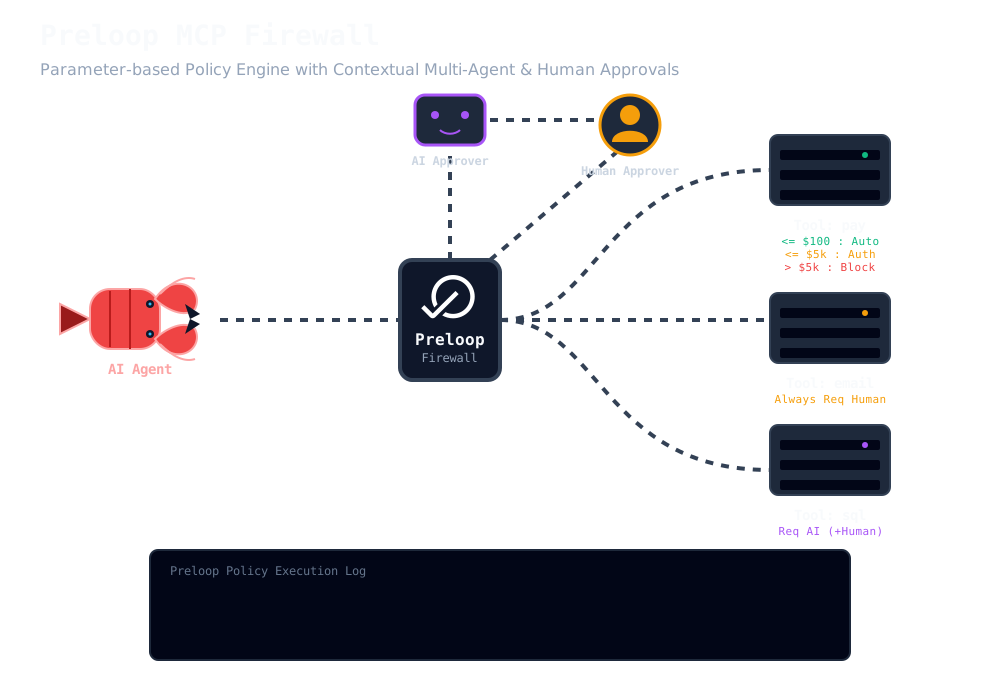
Works with OpenClaw, Claude Code, Cursor, Codex, and any MCP-compatible agent.
Read the official documentation: Full guides and tutorials are available at docs.preloop.ai.
Why Preloop?
AI agents like Claude Code, Cursor, and OpenClaw are transforming how we work. But with great power comes great risk:
- Accidental deletions. One wrong command and your production database is gone.
- Leaked secrets. API keys pushed to public repos before anyone notices.
- Runaway costs. Agents spinning up expensive resources without limits.
- Breaking changes. Untested deployments to production at 3am.
Most teams face an impossible choice: give AI full access and move fast (but dangerously), or lock everything down and lose the productivity gains.
Preloop solves this. Define policies that allow safe operations, deny dangerous ones, and require human approval for everything in between. You stay in control. AI handles the routine work.
Core Capabilities
Access Policies
Define fine-grained access controls for any AI tool or operation:
- Tools support multiple ordered access rules (not just simple approval/deny)
- Rules are evaluated in priority order; first matching rule wins
- Each rule has an action (allow/deny/require_approval), optional CEL condition, and optional denial message
- Rules can be reordered via drag-and-drop in the UI
Approval Workflows
When AI attempts a protected operation, Preloop pauses and notifies you:
- Instant notifications via mobile app, email, Slack, or Mattermost
- One-tap approvals from your phone, watch, or desktop
- Async approval mode — tool returns immediately with a polling handle; the agent polls
get_approval_statusuntil approved, then receives the tool result (Enterprise) - Per-tool justification — require or optionally request agents to explain why a tool is being called before approval (Enterprise)
- Team-based approvals with quorum requirements (Enterprise)
- Escalation policies for time-sensitive operations (Enterprise)
Policy-as-Code
Define policies in YAML, manage via CLI or API:
# Example: Require approval for production deployments
version: "1.0"
metadata:
  name: "Production Safeguards"
  description: "Require approval before deploying to production"
  tags: [security, production]

approval_workflows:
  - name: "deploy-approval"
    timeout_seconds: 600
    required_approvals: 1
    async_approval: true          # Agent polls instead of blocking

tools:
  - name: "bash"
    source: mcp
    approval_workflow: "deploy-approval"
    justification: required        # Agent must explain the call
    conditions:
      - expression: "args.command.contains('deploy') && args.command.contains('production')"
        action: require_approval
        description: "Production deployments require approval"
- Version control your policies alongside your code
- GitOps workflows for policy changes
- CLI management for automation and scripting
- API access for programmatic policy management
Complete Audit Trail
Every AI action is logged with full context:
- What was attempted (tool, parameters, context)
- Which policy matched and why
- Who approved or rejected (and when)
- Execution result and duration
Essential for security reviews, compliance, and debugging.
AI Model Gateway
Preloop can terminate model traffic on behalf of managed runtimes instead of handing provider credentials directly to agent containers:
- OpenAI-compatible gateway endpoints:
GET /openai/v1/models,POST /openai/v1/chat/completions,POST /openai/v1/responses - Anthropic-compatible gateway endpoint:
POST /anthropic/v1/messages - SSE streaming support for chat completions and responses
- Per-request attribution to account, flow, flow execution, API key, and runtime principal
- Token and estimated-cost accounting persisted to the gateway usage ledger
- Account-level and flow-level budget enforcement with soft-limit annotations and hard stops
- Product-facing usage summary endpoints for account and flow monitoring
- Account-scoped runtime session explorer endpoints for browsing managed sessions beyond flows
- Execution-scoped gateway event inspection via
GET /api/v1/flows/executions/{execution_id}/gateway-events - Console surfaces for browsing recent runtime sessions and searching captured gateway interactions
Secret Custody
Preloop now stores AI model credentials behind a provider-agnostic secret abstraction:
- Built-in
local_encryptedbackend for simple self-hosted deployments - Hash-only runtime API tokens for flow executions
- Optional external secret backend path for Vault/OpenBao-compatible KV v2 stores
- Agent runtimes can receive short-lived Preloop gateway tokens instead of provider secrets
Comparison with AWS Agent Core
| Feature | Preloop | AWS Agent Core |
|---|---|---|
| Open source | ✅ | ❌ |
| Self-hosted option | ✅ | ❌ |
| Policy-as-code (YAML) | ✅ | Limited |
| MCP native | ✅ | ❌ |
| Works with any agent | ✅ | AWS-focused |
| Human approval workflows | ✅ | ✅ |
| Audit trail | ✅ | ✅ |
| CLI management | ✅ | AWS CLI |
| GitOps-friendly | ✅ | Limited |
| Mobile app approvals | ✅ | ❌ |
| Team-based approvals | ✅ (Enterprise) | ✅ |
Preloop is the open-source alternative to AWS Agent Core for teams who want vendor-neutral, self-hosted AI governance.
AI Agent -> Preloop -> [Policy check] -> Allow / Deny / Require Approval -> Execute
How it works:
- Define policies for each tool: allow, deny, or require approval
- Policies can be fine-grained, checking parameter values and context
- AI agents call tools through Preloop's MCP proxy
- Actions are allowed, denied, or paused for approval based on your policies
- Full audit trail of every action and decision
Key Features
Safety & Control
- Policy Engine. Define allow, deny, and approval workflows for any tool or action.
- Access Rules. Multiple ordered rules per tool with allow/deny/require approval actions.
- Drag-and-Drop Priority. Reorder rule evaluation priority visually.
- Fine-Grained Rules. Policies can check tool names, parameter values, and context.
- Instant Notifications. Get alerts on mobile, email, Slack, or Mattermost.
- One-Tap Approvals. Approve or reject from your phone, watch, or desktop.
- Full Audit Trail. Complete log of every AI action and policy decision.
- Async Approval Mode. Non-blocking approval: tool returns immediately, agent polls
get_approval_statusuntil the human decides. - Per-Tool Justification. Require agents to provide a reason for each tool call. Mode:
required(blocks without it) oroptional(agent may provide one). - Flexible Conditions. Use CEL expressions for context-aware rules (Enterprise).
- AI Approval (Enterprise). AI-driven approval with configurable model, prompt, confidence threshold, and fallback behavior.
- Team Approvals. Require quorum from multiple team members for critical ops (Enterprise).
Integration & Compatibility
- MCP Proxy. Works with any Model Context Protocol-compatible AI agent.
- Zero Infrastructure Changes. Drop-in solution, no code modifications needed.
- Built-in Tools. 11 tools for issue and PR/MR management included.
- External MCP Servers. Proxy any external MCP server through Preloop's safety layer.
- Issue Tracker Sync. Connect Jira, GitHub, GitLab for full context.
Automation Platform
- Agentic Flows. Build event-driven workflows triggered by webhooks, schedules, or tracker events.
- Gateway-Routed Model Access. Managed flows can use a Preloop-owned model gateway for centralized cost controls, telemetry, and key custody.
- Vector Search. Intelligent similarity search using embeddings.
- Duplicate Detection. Automatically identify overlapping issues.
- Compliance Metrics. Evaluate and improve issue quality.
- Web UI. Modern interface built with Lit, Vite, and Shoelace.
Looking for Enterprise features? Preloop Enterprise Edition adds RBAC, team-based approvals, advanced audit logging, and more. See Enterprise Features below.
Open Source vs Enterprise (important)
- Open Source: single-user approvals with email, mobile app, Slack, and Mattermost notifications.
- Enterprise: adds advanced conditions (CEL), team-based approvals (quorum), and escalation.
- Mobile & Watch apps: the iOS/Watch and Android apps can be used with self-hosted / open-source Preloop deployments.
Supported Issue Trackers
- Jira Cloud and Server
- GitHub Issues
- GitLab Issues
- (More to be added in future releases, including Azure DevOps and Linear)
Architecture
Preloop features a modular architecture designed to provide a secure control plane for AI agents, separating the core API server, database models, backend synchronization services, and the web frontend console.
For a complete conceptual overview of the system components, data flows, and infrastructure, please see the Architecture Document.
Frontend & CLI
- Preloop Console (Frontend): Located in the
frontenddirectory, the web interface gives you governance controls, tool management, and dashboard visibility. See frontend/README.md for details. - Preloop CLI: Manage policies and system state from the command line. See cli/README.md for usage.
Installation
Prerequisites
- Python 3.11+
- PostgreSQL 14+
- PGVector extension for PostgreSQL (for vector search capabilities)
Local Setup
# Clone the repository
git clone https://github.com/preloop/preloop.git
cd preloop

# Create and activate a virtual environment
python -m venv .venv
source .venv/bin/activate  # On Windows: .venv\Scripts\activate

# Install dependencies
pip install -e ".[dev]"

# Set up the database

# Configure your environment
cp .env.example .env
# Edit .env with your settings
Configuration
Environment Variables
Preloop is configured via environment variables. Copy .env.example to .env and customize as needed.
Core Settings
| Variable | Default | Description |
|---|---|---|
DATABASE_URL |
postgresql+psycopg://postgres:postgres@localhost/preloop |
PostgreSQL connection string |
SECRET_KEY |
(required) | Secret key for JWT tokens |
ENVIRONMENT |
development |
Environment (development, production) |
LOG_LEVEL |
INFO |
Log level (DEBUG, INFO, WARNING, ERROR) |
ROOT_LOG_LEVEL |
WARNING |
Root logger verbosity level |
Model Gateway & Secrets
| Variable | Default | Description |
|---|---|---|
PRELOOP_MODEL_GATEWAY_URL |
http://host.docker.internal:8000/openai/v1 |
Default gateway URL injected into gateway-enabled runtimes |
MODEL_GATEWAY_CAPTURE_CONTENT |
false |
Include truncated content previews in emitted model-call events |
MODEL_GATEWAY_MAX_PREVIEW_CHARS |
512 |
Max characters retained when content capture is enabled |
VAULT_KV_V2_ENABLED |
false |
Enable the optional Vault/OpenBao-compatible KV v2 secret backend |
VAULT_KV_V2_URL |
unset | Base URL for the external secret backend |
VAULT_KV_V2_TOKEN |
unset | Access token for the external secret backend |
VAULT_KV_V2_NAMESPACE |
unset | Optional namespace header for Vault/OpenBao |
VAULT_KV_V2_MOUNT |
secret |
KV v2 mount name |
VAULT_KV_V2_PATH_PREFIX |
unset | Optional path prefix applied to external secret references |
Feature Flags
| Variable | Default | Description |
|---|---|---|
REGISTRATION_ENABLED |
true |
Enable self-registration. Set to false to disable public signups and require admin invitation. |
Disabling Self-Registration
For private deployments where you want to control who can access the system:
# In your .env file or Docker environment
REGISTRATION_ENABLED=false
When registration is disabled:
- The "Sign Up" button is hidden from the UI
- The
/registerpage redirects to/login - The
/api/v1/auth/registerAPI endpoint returns 403 Forbidden - preventing direct API registration attempts - New users must be invited by an administrator
Security Note: With REGISTRATION_ENABLED=false, the backend API enforces the restriction at the endpoint level. Any attempt to register via the API (including scripts or direct HTTP requests) will be rejected with a 403 status code.
To invite users when registration is disabled, use the admin API or CLI (Enterprise Edition includes a full admin dashboard for user management).
GitHub App (Optional)
For enhanced GitHub integration including PR status checks and bot reactions:
| Variable | Default | Description |
|---|---|---|
GITHUB_APP_ID |
GitHub App ID (from app settings page) | |
GITHUB_APP_SLUG |
GitHub App slug (the URL-friendly name) | |
GITHUB_APP_PRIVATE_KEY |
Base64-encoded private key from GitHub App | |
GITHUB_APP_CLIENT_ID |
OAuth client ID for user authentication | |
GITHUB_APP_CLIENT_SECRET |
OAuth client secret | |
GITHUB_APP_WEBHOOK_SECRET |
Secret for verifying webhook payloads |
These are optional and only needed if you're using a GitHub App for authentication or advanced features like reaction management on PRs.
OAuth Sign-In (Enterprise)
Enable OAuth sign-in/sign-up via GitHub, Google, and/or GitLab. Users can authenticate with their existing provider accounts instead of creating a Preloop-specific password.
| Variable | Default | Description |
|---|---|---|
GOOGLE_OAUTH_CLIENT_ID |
Google OAuth 2.0 client ID | |
GOOGLE_OAUTH_CLIENT_SECRET |
Google OAuth 2.0 client secret | |
GITLAB_OAUTH_CLIENT_ID |
GitLab OAuth client ID | |
GITLAB_OAUTH_CLIENT_SECRET |
GitLab OAuth client secret | |
GITLAB_OAUTH_BASE_URL |
https://gitlab.com |
GitLab instance URL (for self-hosted) |
GitHub OAuth sign-in reuses the GitHub App credentials above. Enable via Helm values:
mcpOauth:
  enabled: true
googleOauth:
  enabled: true
  clientId: "your-google-client-id"
  clientSecret: "your-google-client-secret"
gitlabOauth:
  enabled: true
  clientId: "your-gitlab-client-id"
  clientSecret: "your-gitlab-client-secret"
Supported flows:
- GitHub: Sign-in + automatic tracker setup prompt
- Google: Sign-in only (no tracker created)
- GitLab: Sign-in + automatic tracker setup prompt
MCP OAuth 2.1 Server
Preloop includes a built-in OAuth 2.1 Authorization Server for MCP client authentication (e.g., Claude Desktop). This is enabled automatically when mcpOauth.enabled=true.
| Variable | Default | Description |
|---|---|---|
PRELOOP_URL |
http://localhost:8000 |
Public URL of your Preloop instance (used for OAuth discovery endpoints) |
Discovery endpoints:
GET /.well-known/oauth-authorization-server— RFC 8414 metadataGET /.well-known/oauth-protected-resource— RFC 9728 metadata
OAuth endpoints:
POST /oauth/register— Dynamic Client Registration (RFC 7591)GET /oauth/authorize— Authorization endpoint (redirects to consent page)POST /oauth/token— Token exchange (Authorization Code + PKCE for MCP, JWT for CLI)POST /oauth/revoke— Token revocation
Docker Setup
# Clone the repository
git clone https://github.com/preloop/preloop.git
cd preloop

# Run the full development stack (backend + workers + frontend with HMR)
docker compose up

# Run with tagged release images (production)
PRELOOP_VERSION=0.8.0 SECRET_KEY=$(openssl rand -hex 32) \
  docker compose -f docker-compose.release.yaml up -d
Quick installers are also available:
# Install the standalone CLI
curl -fsSL https://preloop.ai/install/cli | sh

# Install the OSS stack
curl -fsSL https://preloop.ai/install/oss | sh
Set PRELOOP_VERSION=0.8.0 before either command to pin a specific release, or use https://preloop.ai/install/
Yorumlar (0)
Yorum birakmak icin giris yap.
Yorum birakSonuc bulunamadi