openbot
Health Uyari
- License — License: MIT
- Description — Repository has a description
- Active repo — Last push 0 days ago
- Low visibility — Only 5 GitHub stars
Code Basarisiz
- spawnSync — Synchronous process spawning in .github/scripts/check-public-source.test.mjs
- process.env — Environment variable access in .github/workflows/verify.yml
- exec() — Shell command execution in deploy/download-worker.mjs
- network request — Outbound network request in deploy/download-worker.mjs
Permissions Gecti
- Permissions — No dangerous permissions requested
Bu listing icin henuz AI raporu yok.
The open-source alternative to OpenAI dots, Grok Bot and Siri AI: a team of AI teammates that works in your own Mac apps and asks before it acts. Free, private, no subscription.
OpenBot
The open-source alternative to OpenAI dots, Grok Bot and Siri AI.
A small team of AI teammates on your Mac. They work in your own Mail, Calendar and Notes — and ask before anything important.
Free, open source, no subscription, and powered by the AI you already use.
Website · Try it · What it does · How it compares · Contribute


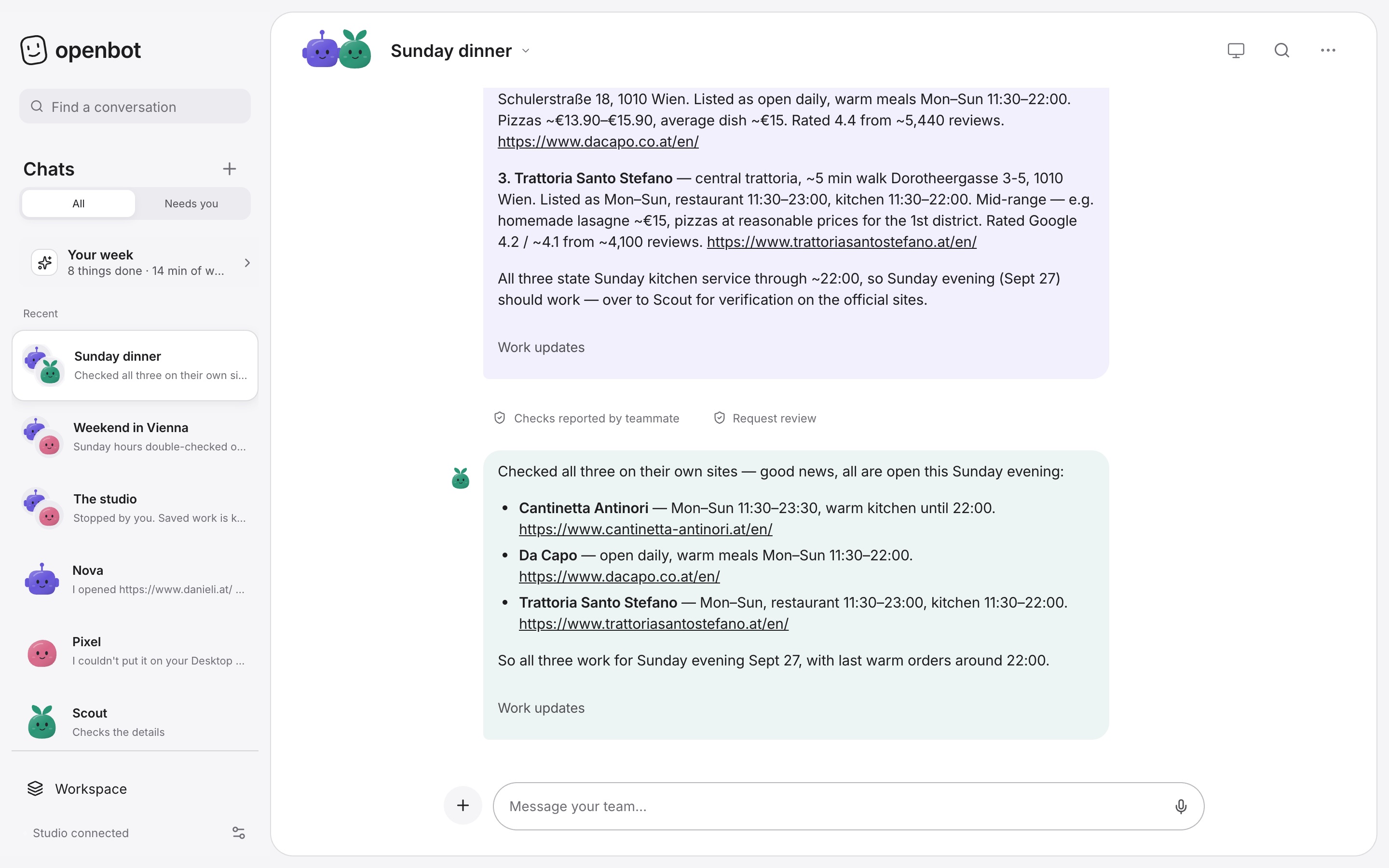
A real run: “Nova, find three Italian restaurants near Stephansplatz open on Sunday. Scout, double-check their hours.”
Why OpenBot
Hosted AI agents rent you their computer for $20–300 a month. OpenBot gives you the same kind of team on your Mac, for free.
- No new bill. Sign in with ChatGPT, Claude, Grok or GitHub Copilot you already pay for, start free with a Gemini key, or run a model on your Mac.
- A real team, not one bot. Every teammate has a name, a job, a private workspace and its own browser. When one builds on another’s work, it waits for the answer.
- You stay in charge. Reading and searching just happen. Sending, buying, signing in or submitting waits for your okay by default — with the website and the exact button. Trust a teammate completely? Turn on Autopilot for it.
- Nothing hidden. No account, no tracking. Your studio is a folder on your Mac, and every line of OpenBot is here.
Try it
One-line install (macOS 13+, Apple silicon or Intel):
curl -fsSL https://openbots.foundation/install.sh | sh
No administrator password. It checks the download’s fingerprint, runs OpenBot in the background and adds it to your Dock. Read the installer first if you like.
Or run from source (Node.js 22.13+):
git clone https://github.com/PrisacariuRobert/openbot.git
cd openbot
npm ci
npm run dev
Open http://127.0.0.1:4310, connect your AI, create a teammate and say hello.
What it does
 |
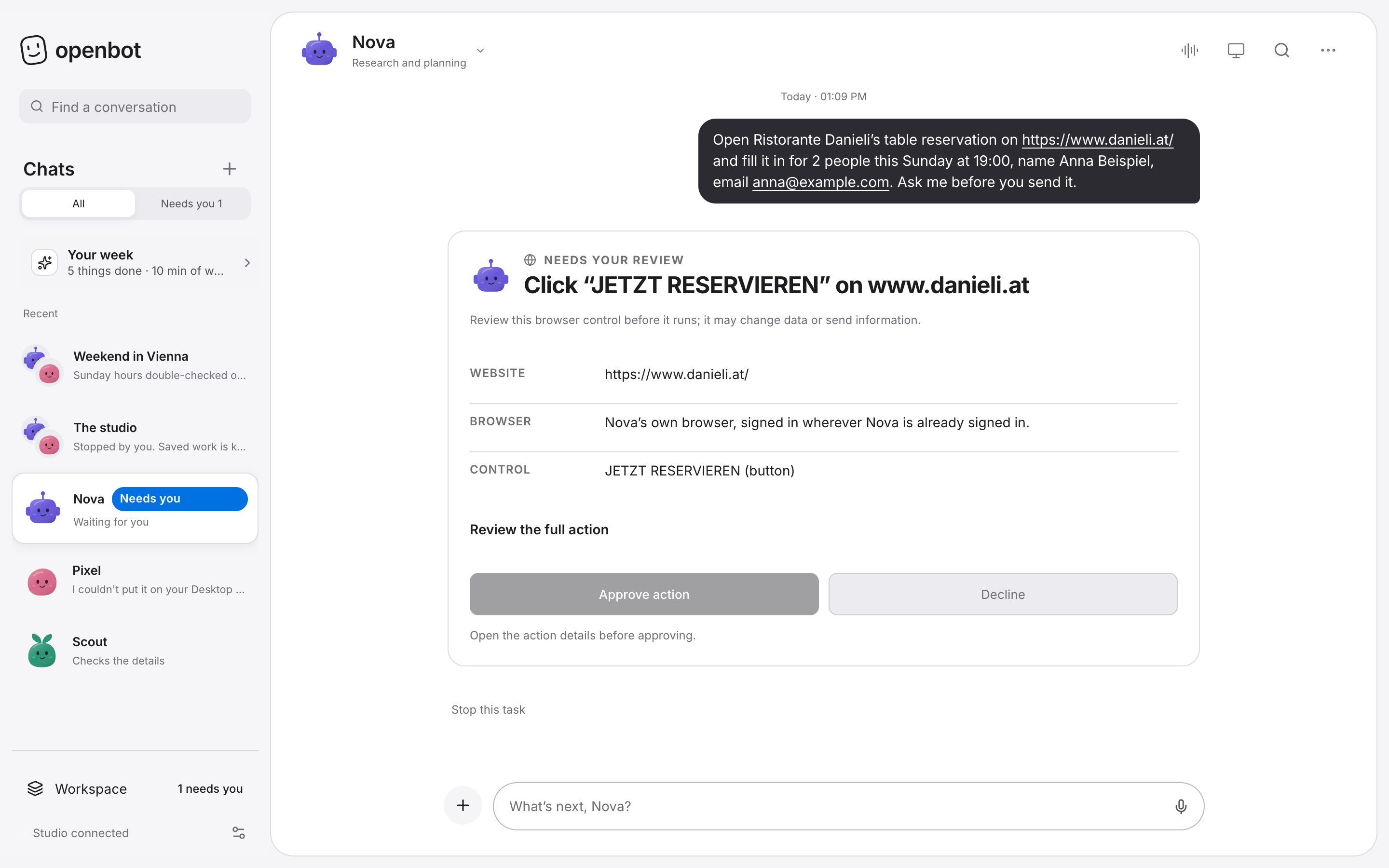 |
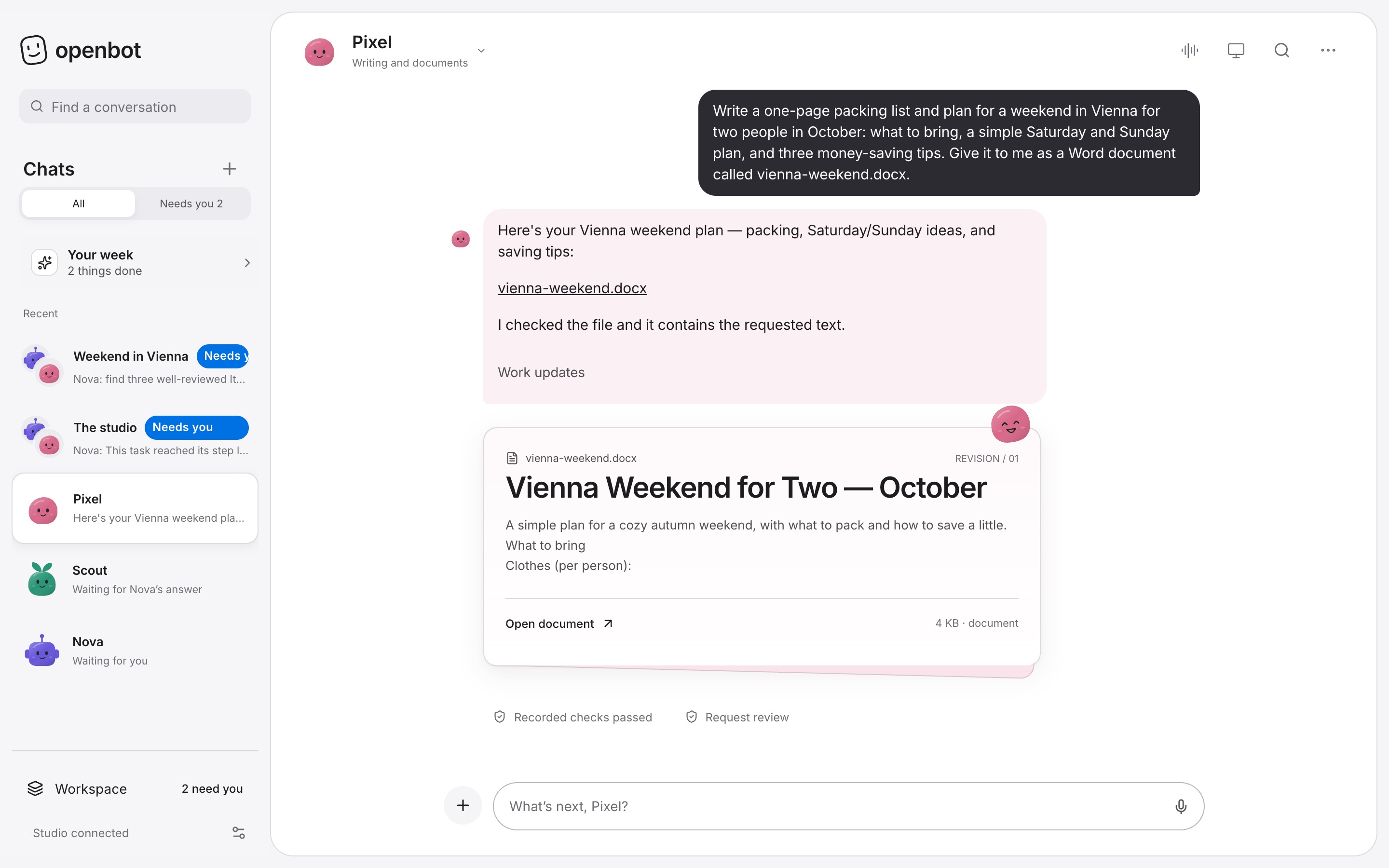
| Real files. Word documents, spreadsheets and plans arrive as files you can open and share. Drop in a PDF and your teammate reads it first. | Asks before it acts. Anything with consequences stops and shows you the website, the button and what will change. Say no and the teammate finishes honestly without it. Prefer no questions? Autopilot, per teammate, is off until you turn it on. |
- Research with sources — each teammate browses in its own private browser and links what it found; when something can’t be checked, it says so.
- Group chats — write “Nova: find… Scout, double-check…” and each does their part, in order.
- Routines — “Every Monday at 9, plan my week.” Plus a Sunday look back at what got done.
- Voice and phone — talk hands-free, or pair your iPhone with one scan to chat and approve from your Home Screen.
- Skills — teach a teammate a method once, or add reviewed skills from the community.
- Bring your setup — one-click import from Hermes Agent and OpenClaw, including automations.
Your AI, your choice
| Start free | Google Gemini (free key — a Google account, no card) |
| Use your subscription | ChatGPT · Claude · Grok · GitHub Copilot (Pro, Pro+, Business) |
| Pay per use | OpenCode Go · any OpenAI-compatible API |
| Stay private | Models on your Mac with Ollama |
Each teammate can use a different AI. OpenBot never resells tokens or adds a fee; each provider’s own terms and limits apply.
How it compares
| Cloud agents (OpenAI dots, Grok Bot, Meta Muse) | Siri AI (macOS 27) | Hermes Desktop, OpenClaw | OpenBot | |
|---|---|---|---|---|
| Price | $0–300/month plans | Free, with daily limits | Free + your models | Free + your models |
| Runs on | Their cloud computers | Your Mac + Apple's cloud | Your machine | Your Mac |
| Uses your Mac's apps and files | No | Quick actions | Files and scripts | Mail, Calendar, files, apps — with your okay |
| Long jobs on websites | Yes, in their browser | No | Yes | Yes, each teammate in its own browser |
| A team of named teammates | Grok Bot only | No | Hermes Bot Mode | Yes |
| Scheduled work | Yes | No | Yes | Yes, and your Mac wakes for it |
| Asks before acting | Yes | Yes | Configurable | By default, with the exact button — or Autopilot |
| Choose your AI | No | No | Yes | Yes — ChatGPT, Claude, Gemini, local… |
| Open source | No | No | Yes (MIT) | Yes (MIT) |
Siri is great for quick questions — OpenBot is for the whole job, and works with Siri (“Hey Siri, Ask OpenBot”). OpenAI dots is not available in the EU, UK or Switzerland; OpenBot works wherever your Mac does. Competitor details as of 30 September 2026, from their public pages. See the full scorecard.
Privacy and safety
Your studio, conversations and files live on your Mac. When a teammate works, what it needs is sent to the AI you chose, under that provider’s terms — pick a local model to keep everything on your Mac. Teammate browsers are separate profiles, not a security sandbox. Read the security model, and report vulnerabilities privately through SECURITY.md.
Status
OpenBot 0.41.1 is a public beta (release notes). Known gaps are tracked openly in the product gap audit and the roadmap.
What's new in 0.41.1
- Tidier screens. The morning brief card, the "What they know" notice, shared-teammate previews and "Add from a link" are cleaned up.
- An easier install. A progress bar while the download runs, and a faster route for it.
Since 0.41.0
- Autopilot. Turn it on for a teammate you trust and it acts like a person: it sends, books, posts and buys without asking first. It's off until you switch it on, one teammate at a time (or for everyone in Control center → Advanced). You see a clear warning first, a note appears in the teammate's chat, a chip shows who is on Autopilot, and every action is logged in the activity feed. It still stops for sign-ins, CAPTCHAs, more AI spending and saving new instructions, and it is never part of a shared teammate.
- A new comparison page and plain-text facts for AI assistants, so OpenBot is easy to find and quote accurately.
Everything earlier is in the changelog and the releases.
For developers
Web studio (desktop + phone)  →  OpenBot service  →  teammates' runtimes
                                       │               (OpenCode, Claude Code)
                               SQLite + your files      browser · Mac access · tools
| Path | What lives there |
|---|---|
src/studio/ |
The app — one interface for desktop and phone |
src/server/ |
Service: conversations, teammates, tools, approvals, scheduling |
src/shared/ |
Types and behavior shared by both |
site/ |
The website and the Mac installer |
desktop/ |
Electron shell and packaging |
deploy/ |
Always-on hosting on your own Linux server |
skills/, mcp/ |
Bundled skills and the MCP interface |
npm run verify     # guards, types, build and ~1,000 tests
npm start          # production build on 127.0.0.1:4311
More in the docs, desktop guide and private runner guide.
Contributing
Issues and pull requests are welcome — especially for onboarding, reliability, accessibility and new skills. Start with CONTRIBUTING.md.
License
MIT. Bundled dependencies keep their own notices — see THIRD_PARTY_NOTICES.md.
Yorumlar (0)
Yorum birakmak icin giris yap.
Yorum birakSonuc bulunamadi