claude-usage-widget
Health Warn
- License — License: MIT
- Description — Repository has a description
- Active repo — Last push 0 days ago
- Low visibility — Only 5 GitHub stars
Code Fail
- child_process — Shell command execution capability in scripts/build-demo-gif.js
- process.env — Environment variable access in scripts/build-demo-gif.js
- fs module — File system access in scripts/build-demo-gif.js
- fs module — File system access in scripts/build-icon.js
- child_process — Shell command execution capability in scripts/build-og-image.js
- process.env — Environment variable access in scripts/build-og-image.js
- fs module — File system access in scripts/build-og-image.js
- child_process — Shell command execution capability in scripts/launch.js
- process.env — Environment variable access in scripts/launch.js
- fs module — File system access in src/config.js
- fs module — File system access in src/history.js
Permissions Pass
- Permissions — No dangerous permissions requested
No AI report is available for this listing yet.
Always-on-top floating widget that shows your claude.ai plan usage in real time. Cloudflare-immune OAuth auth via ~/.claude/.credentials.json. Windows-first, portable EXE, 7-day history graph, configurable thresholds and reset hooks.
Claude Usage Widget
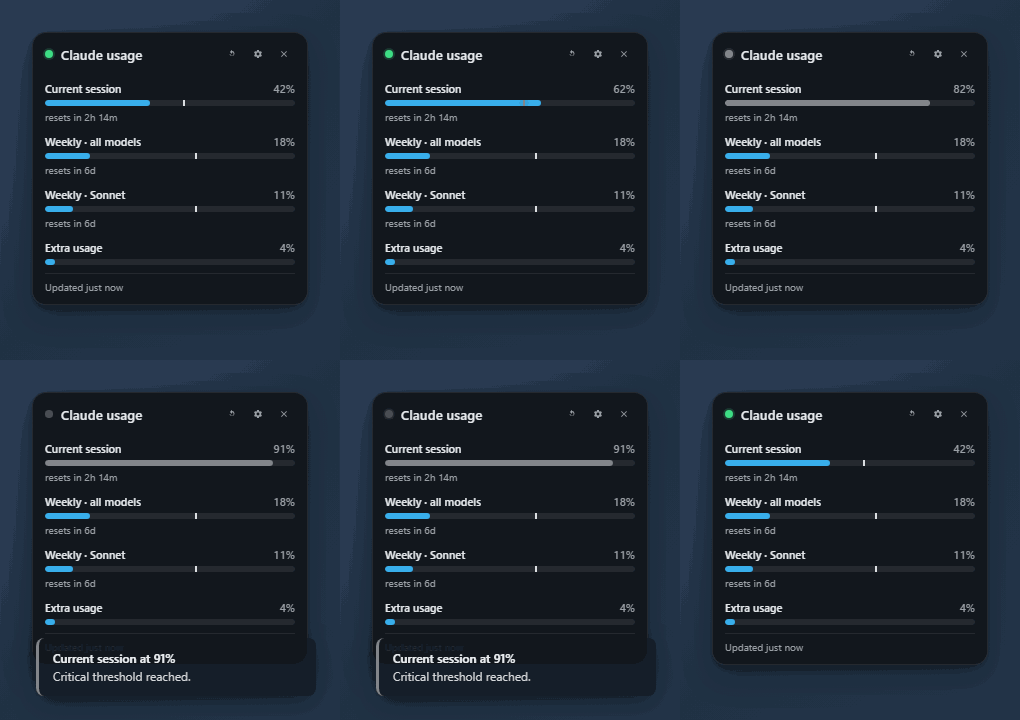
An always-on-top floating widget that shows your claude.ai plan usage in real time, on Windows. Built specifically around the OAuth token Claude Code already keeps on your machine, so it cannot be broken by Cloudflare changes that take down cookie-scraping trackers.
➡ Download the latest portable .exe — 70 MB, single file, no install. Tested on Windows 11.
First-launch note: the EXE is unsigned (we're applying for free OSS code signing — paying $300/yr for a cert is on hold until v1.0). SmartScreen will say "Windows protected your PC." Click More info → Run anyway. One-time click per machine.
What it shows
The same bars as Settings → Usage on claude.ai, plus things they don't:
- Current session (5-hour rolling window)
- Weekly · all models / Sonnet / Opus / Cowork — whichever your plan exposes
- Extra usage credits if your plan has a credit pool
- Reset countdowns per limit
- A pace marker on each bar — a vertical line that turns red when you're burning faster than the timer
- An optional 7-day SVG history graph for any limit you pick
- Threshold notifications and shell hooks that fire when a limit resets
How it's different
TL;DR. It's the only Windows widget that combines the Cloudflare-immune OAuth auth path with an always-on-top floating UX, a 7-day history graph, multiple tray icon styles, per-quota reset hooks, and a snapshot-tested parser.
| Feature | This | jens-duttke | SlavomirDurej | thanoban | Usage4Claude | ClaudeMeter |
|---|---|---|---|---|---|---|
| OS | Win | Win | Win/Mac/Linux | Win | macOS | macOS |
| OAuth Bearer auth (Cloudflare-immune) | ✅ | ✅ | ❌ | ❌ | ❌ | ❌ |
| Always-on-top floating widget | ✅ | ❌ tray | ✅ | ❌ tray | ❌ menu bar | ❌ menu bar |
| 7-day history graph | ✅ | ❌ | ✅ | ❌ | ❌ | ❌ |
| Multiple tray icon styles | 4 + dynamic | 1 | 1 | 1 | 1 | 6 |
| Dynamic tray icon (reflects live state) | ✅ | ❌ | ❌ | ❌ | ❌ | partial |
| Per-quota reset shell hooks | ✅ | ✅ | ❌ | ❌ | ❌ | ❌ |
| Configurable warn + critical thresholds with per-state colors | ✅ | partial | ✅ | ❌ | ✅ | ✅ |
| Desktop notifications at thresholds | ✅ | ❌ | ❌ | ❌ | ❌ | ✅ |
| Adaptive polling (active / idle / deep idle / locked) | ✅ | ✅ | ❌ | ❌ | ✅ | ❌ |
| Reset-aligned refresh (bar zeroes the instant the window rolls) | ✅ | ✅ | ❌ | ❌ | ❌ | ❌ |
| Snapshot tests for the API response shape | ✅ | ❌ | ❌ | ❌ | ❌ | ❌ |
| Codex / other-provider support | planned | ❌ | ❌ | ❌ | ✅ | ❌ |
Built from the lessons learned across all of the above. Borrowed patterns:
| Pattern | From |
|---|---|
OAuth Bearer from ~/.claude/.credentials.json |
jens-duttke/usage-monitor-for-claude |
| Adaptive polling tiers + 10 s manual-refresh debounce | jens-duttke + f-is-h/Usage4Claude |
Honor Retry-After, exponential backoff, stale-data badge |
jens-duttke |
| Re-read credentials on 401 (picks up token refreshes from other Claude Code sessions) | this project |
| Always-on-top re-assertion every 30 s | niccolo-sabato/claude-usage-widget |
| "Essential" compact layout | niccolo-sabato |
| Light/Dark/System theming, draggable header, circular countdowns | SlavomirDurej/claude-usage-widget |
| Configurable warn/critical thresholds + native notifications | eddmann/ClaudeMeter |
| Pace marker / burn-rate indicator | jens-duttke + eddmann |
on_reset_command shell hook per quota |
jens-duttke |
| Multiple tray icon styles | eddmann/ClaudeMeter |
What we explicitly avoided:
- DPAPI Chrome cookie SQLite reads (thanoban) — breaks on every Chrome key rotation.
- Hitting
claude.aidirectly from Node — Cloudflare blocks the runtime's TLS fingerprint. - Hardcoding three quota types — the OAuth endpoint returns a dynamic set; we iterate.
Install
You need Claude Code installed and logged in either way, because the widget reads the OAuth token it maintains at ~/.claude/.credentials.json.
Windows — download the EXE
- Download the latest portable .exe from Releases.
- Double-click it. SmartScreen → More info → Run anyway.
- Right-click the tray icon for options, or click the cog inside the widget for the full settings panel.
macOS, Linux, or anyone who'd rather build from source
You already have the perfect tool to set this up: your own Claude Code. Paste the prompt below into a Claude Code session and let it handle the install. Works on macOS (Apple Silicon and Intel), Linux, and Windows.
Set up the Claude Usage Widget from https://github.com/projectvelox/claude-usage-widget on this machine.

1. Clone the repo into ~/Applications/claude-usage-widget (create the parent
   directory if needed; on Linux feel free to use ~/.local/share instead).
2. Run `npm install` in that directory.
3. Run `npm start` and confirm the floating widget appears in a corner of my
   screen. If it does, leave it running.
4. If I ask for a redistributable binary, run `npm run build:mac` (macOS),
   `npm run build:linux` (Linux), or `npm run build` (Windows) and tell me
   the path of the artifact under dist/.

If Node 18+ is not installed, install it via Homebrew (macOS) or my system
package manager (Linux) after asking permission. Do not modify shell rc
files. The widget reads ~/.claude/.credentials.json, so once it launches
it should start showing live usage within ~60 seconds.
After the first run, you can use whichever pattern you prefer for re-launching:
- macOS: double-click the built
.app(inside the.dmg), ornpm startfrom the cloned dir. - Linux: run the
.AppImage, ornpm startfrom the cloned dir. - Windows: double-click the portable
.exe, ornpm startfrom the cloned dir.
To make it auto-launch with your OS: open the widget, click the settings cog → Startup → Start with [OS].
For developers
git clone https://github.com/projectvelox/claude-usage-widget
cd claude-usage-widget
npm install
npm start
npm test            # snapshot tests for the parser
npm run icons       # regenerate the tray + window icons
npm run demo-gif    # regenerate assets/demo.gif from the demo HTML
npm run build       # portable EXE in dist/
npm run build:installer  # NSIS one-click installer in dist/
Cosmetic options
| Section | Options |
|---|---|
| Layout | Expanded / Compact / Essential, always-on-top, click-through, show/hide header, reset countdown, pace marker, stale badge |
| Look | System / Dark / Light theme, accent color, opacity (40–100 %), corner radius (0–28 px), font scale (85–160 %), font family, background blur on/off |
| Tray icon | Bars · Battery · Gauge · Minimal · Dynamic (gauge that reflects the worst current limit) |
| History graph | Toggle on/off, pick which limit to plot (all-models / Sonnet / Opus / session / extra) |
| Thresholds | Warn % and Critical % (default 75 / 90), per-state colors (OK / warn / critical) |
| Notifications | Toggle warn-level and critical-level desktop notifications |
| Reset hooks | Shell command per limit; env vars CLAUDE_RESET_ID, CLAUDE_RESET_LABEL, CLAUDE_RESET_AT |
| Startup | Start with Windows, Open hidden (tray only) |
Config persists to %APPDATA%\claude-usage-widget\config.json; history samples to %APPDATA%\claude-usage-widget\history.json.
Auth — and what we don't touch
The widget reads the OAuth access token that Claude Code already maintains. There is no separate login, no browser cookie scraping, no Cloudflare hassle.
If the token expires:
- The widget shows an
authbadge. - On the next poll, it re-reads the credentials file. If Claude Code (or another concurrent Claude session) has refreshed the token, the new value is used immediately.
- If the token is truly expired, run
claudein a terminal to refresh, and the widget catches up on the next poll.
The token is sent only to https://api.anthropic.com/api/oauth/usage — Anthropic's official endpoint, and nothing else. See SECURITY.md for the full statement.
File layout
src/
  main.js       Electron main process, IPC, tray, login items, reset hooks
  preload.js    Sandboxed bridge between renderer and main
  usage.js      OAuth Bearer fetch, normalize, auth-retry on 401
  poller.js     Adaptive polling, reset detection, backoff
  history.js    Append-only sample store, 7-day trim
  config.js     Persisted settings + deep merge
  icon.js       Pure-Node PNG encoder + 4 tray icon styles + dynamic gauge
renderer/
  widget.html / .css / .js     Always-on-top floating widget + SVG history graph
  settings.html / .css / .js   Live-editing settings panel
  demo.html                    Self-contained widget clone for GIF capture
tests/
  normalize.test.js   Snapshot tests against the live response shape
scripts/
  launch.js          Strips ELECTRON_RUN_AS_NODE before spawning the GUI
  build-icon.js      Pre-bakes tray + window + preview icons
  build-demo-gif.js  Headless Electron capture + gifenc → assets/demo.gif
.github/
  workflows/release.yml        Builds the portable EXE on tag push
  ISSUE_TEMPLATE/              Bug + feature templates
Roadmap
- Multi-account / multi-org switcher (cross-cutting top demand)
- Codex usage alongside Claude (Usage4Claude has this, we want it)
- Burn-down projection line on the history graph ("at this rate, you hit 100% by Thu 6 pm")
- Mac and Linux builds in the same CI workflow
- Signed Windows binary via SignPath OSS
winget installdistribution
See open issues for the current state.
Contributing
PRs welcome — please skim CONTRIBUTING.md first. Security issues go through SECURITY.md, not the public issue tracker.
License
MIT.
Reviews (0)
Sign in to leave a review.
Leave a reviewNo results found