protocolith
Health Gecti
- License — License: Apache-2.0
- Description — Repository has a description
- Active repo — Last push 0 days ago
- Community trust — 10 GitHub stars
Code Gecti
- Code scan — Scanned 12 files during light audit, no dangerous patterns found
Permissions Gecti
- Permissions — No dangerous permissions requested
Bu listing icin henuz AI raporu yok.
Records, verifies and issues trial records

Records, verifies and issues trial records.



Why
A result is easy to believe and hard to check when the protocol was written after the run, the history can be
edited silently, or a failed run quietly disappears. Protocolith keeps a small local record that makes those
three things visible: what was fixed beforehand, what happened, and whether the history still adds up.
It does not run experiments, fetch data or judge whether a protocol is a good one. It is a ledger with rules.
What it does
| Stage | Command | What is stored |
|---|---|---|
| 1. Freeze a protocol before the run | protocolith freeze protocol.json |
The protocol and its SHA-256 |
| 2. Record the outcome against that protocol | protocolith record record.json |
Status, outcome, source hashes, claim boundary |
| 3. Verify the hash-chained history | protocolith verify-ledger |
Nothing; it reports rule violations (R1 to R11) |
| 4. Issue a card from a verified record | protocolith issue SEQ |
A JSON and SVG card, plus an issue entry |
Everything lives in one append-only file, .protocolith/ledger.jsonl, one canonical JSON line per entry.
Each line contains the hash of the line before it. The core uses only the Python standard library.
Quickstart (2 minutes)
You need the repository checkout with its environment active (see Install). The example files are inexamples/quickstart/: protocol.json, record.json and the source results.txt.
source .venv/bin/activate          # Windows: .venv\Scripts\activate
mkdir demo && cd demo
cp ../examples/quickstart/protocol.json ../examples/quickstart/record.json ../examples/quickstart/results.txt .
protocolith freeze protocol.json
protocolith record record.json
protocolith verify-ledger
protocolith issue 1
protocolith log
protocolith head
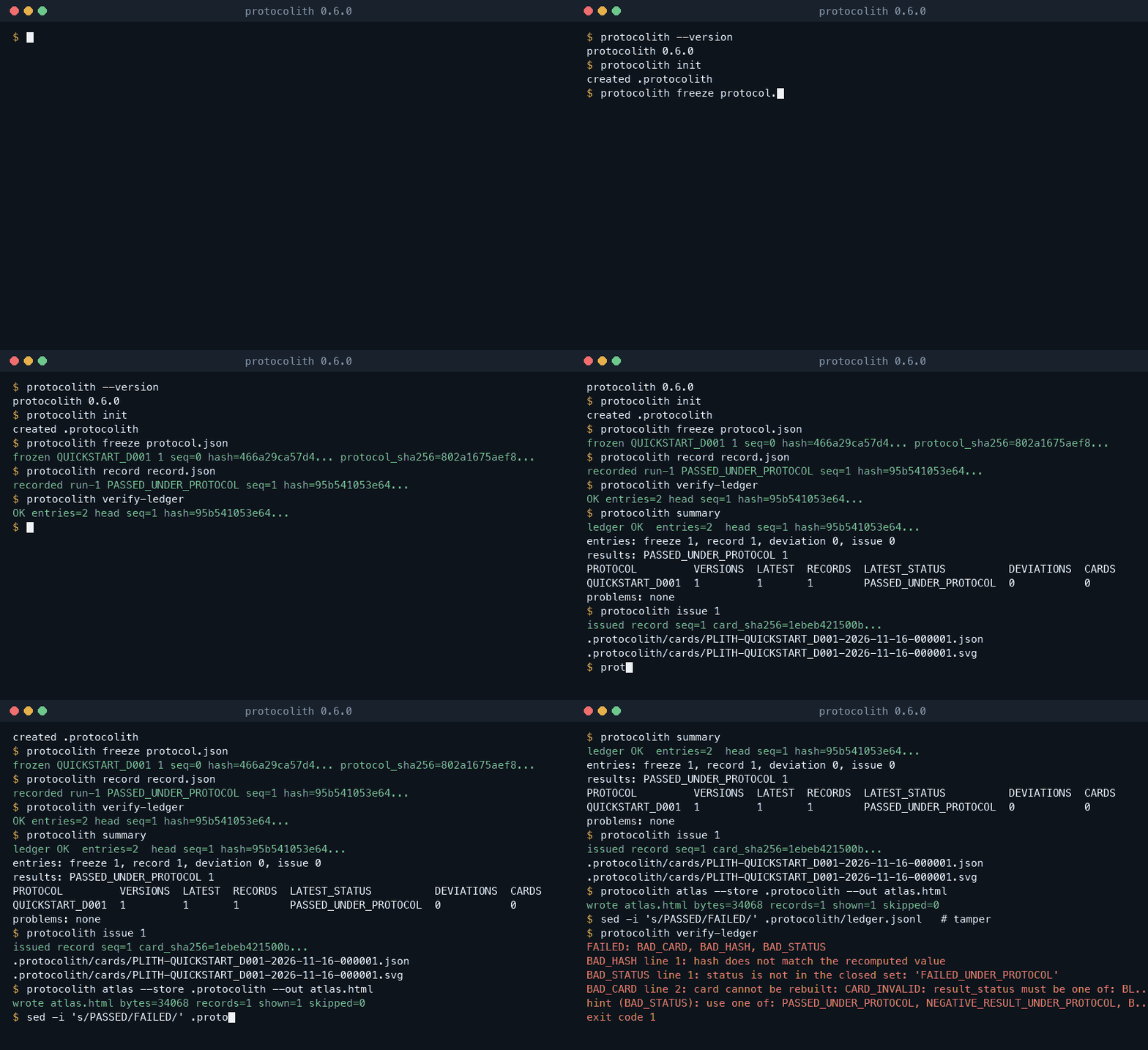
Real output of one run (hashes and times differ in yours, because the entries contain the time):
$ protocolith freeze protocol.json
frozen QUICKSTART_D001 1 seq=0 hash=5bbd5c8c75437c20d77415469374ac990993803c1c9deed91ff6adf2f74714b2 protocol_sha256=802a1675aef8623a44d79272ca50c036ffc7c2d2ecd267ca440afdb19948369f
$ protocolith record record.json
recorded run-1 PASSED_UNDER_PROTOCOL seq=1 hash=...
$ protocolith verify-ledger
OK entries=2 head seq=1 hash=...
$ protocolith issue 1
issued record seq=1 card_sha256=...
.protocolith/cards/PLITH-QUICKSTART_D001-<date>-000001.json
.protocolith/cards/PLITH-QUICKSTART_D001-<date>-000001.svg
$ protocolith log
0 freeze <time> 5bbd5c8c7543 QUICKSTART_D001 1
1 record <time> e6fdb7f2c7f6 run-1 PASSED_UNDER_PROTOCOL
2 issue <time> 7e991c8d63f3 record_seq=1
$ protocolith head
seq=2 hash=7e991c8d63f3f661894015c450b41cdb3809af305af4f562f8224466314eecd7
The protocol_sha256 printed by freeze is already written into record.json; a record that names a hash
that was not frozen earlier is rejected (UNKNOWN_PROTOCOL). To see verification fail, change one character in.protocolith/ledger.jsonl and run protocolith verify-ledger again: it prints the violated rules and exits with 1.
Exit codes: 0 ok, 1 the stored ledger does not verify, 2 the operation was rejected and nothing was written,3 I/O or environment error. --json prints canonical JSON for every command. These steps are run bytests/test_readme_examples.py.
Query the ledger
protocolith summary                  # what was done and which results are honest, in one call
protocolith log --status BLOCKED_SOURCE
protocolith show 1
Python API
from pathlib import Path

from protocolith import core

store = core.Store(".protocolith")
core.freeze(store, core.decode(Path("protocol.json").read_bytes()))
core.record(store, core.decode(Path("record.json").read_bytes()))

verdict = core.verify(store)
print(verdict.ok, verdict.count)          # True 2

result = core.issue(store, 1)
print(result["json_path"])
print(core.head(store))                   # {'count': 3, 'hash': '...', 'seq': 2}
Errors are exceptions with a stable code (core.InputError, core.EnvError, core.VerificationFailed).
See the Python API guide.
Atlas: browse the experiments
protocolith atlas builds one self-contained HTML page (inline CSS and JavaScript, no network, works from file://)
from the local ledger or a directory of evidence cards: summary tiles, a status chart and monthly timeline, search,
filters, a sortable paged table and a detail drawer with permalinks. Languages other than English come only from
files you supply. See the atlas guide.
protocolith atlas --out atlas.html            # the local ledger
protocolith atlas --cards docs/evidence_cards --out site/
MCP client configuration
protocolith mcp is a stdio server with eleven tools (protocolith_summary, protocolith_log, protocolith_show,protocolith_schema, protocolith_capture, protocolith_atlas, protocolith_freeze, protocolith_record,protocolith_deviation, protocolith_verify, protocolith_issue) and read-only resources (protocolith://summary, protocolith://ledger,protocolith://schema/<name>), so an agent can discover the formats itself. It uses no network and writes only
inside the store, apart from the atlas page that protocolith_atlas writes inside the working directory. Add it to an MCP client:
{
  "mcpServers": {
    "protocolith": {
      "command": "protocolith",
      "args": ["mcp", "--store", "/path/to/project/.protocolith"]
    }
  }
}
See Use Protocolith from an AI agent and the MCP reference.
Install
From source today (Python 3.11 to 3.15; uv recommended):
git clone https://github.com/protocolith/protocolith.git
cd protocolith
uv sync
uv run protocolith --version      # or: source .venv/bin/activate
pip install protocolith is available from the 0.6.0 release (planned); it is not published with the ledger commands yet.
The package has no required dependencies.
Platforms
macOS, Linux and Windows, Python 3.11 to 3.15, headless (no display, no network, no daemon). Appends are
protected by an advisory file lock (fcntl on POSIX, msvcrt on Windows) and are flushed with fsync.
Commands
| Command | Purpose |
|---|---|
freeze FILE [--supersedes SHA256] |
Freeze a protocol (a new version supersedes the old one) |
record FILE |
Record a run outcome |
deviation FILE |
Record a deviation from a frozen protocol |
verify-ledger [--expect-head SEQ:HASH] |
Check rules R1 to R11, and optionally an anchored head |
issue SEQ [--out DIR] |
Issue the card of a record |
summary [--protocol ID] |
Verdict, head, counts and a per-protocol table in one call |
log [--protocol ID] [--type T] [--status S] [--tail N] / head |
List (filtered) entries / print the last seq and hash |
show SEQ |
One entry with its protocol context |
capture [--file PATH ...] [--env] |
JSON fragment with environment and input file hashes for a record outcome |
schema [NAME] |
JSON Schema of the input bodies and the entry |
init |
Create an empty store (safe to repeat) |
repair --truncate-partial-tail |
Remove a partial last line left by a crash |
mcp |
Run the MCP server on stdio |
All take --store DIR (or PROTOCOLITH_STORE; default .protocolith) and, except mcp, --json. The aliasplith runs the same program. Full list, including the older card commands: docs/CLI.md.
Documentation
- Documentation site: https://protocolith.github.io/protocolith/docs/ (source in docs/, map in docs/docs-map.md)
- Getting started and concepts
- Core specification and conformance vectors
- Error codes, FAQ, roadmap, changelog
What Protocolith does not prove
- Internal consistency and ordering only. A valid ledger shows that every entry follows the rules and that
no entry was changed or reordered without breaking the chain. - No wall-clock proof. Timestamps are written by the machine that appends; the ledger only guarantees they
never decrease. It does not show that an entry was made at the time it states. - No protection against replacing a whole ledger. Someone who can rewrite the file can write a new, valid
one, or cut off its end. Publish or anchor the output ofprotocolith headsomewhere you do not control
alone (for example a signed git tag), then check against it withprotocolith verify-ledger --expect-head SEQ:HASH.
See anchoring the head. - It does not show that a protocol is sound, that data is true, or that a result generalises.
Earlier name and unrelated works
The project was published as ClaimBound Evidence until 0.5.0 and was renamed because unrelated works use a
similar name. It is not a fork of or affiliated with them, and it makes no claim of priority.
See RELATED_WORK_AND_INDEPENDENCE.md.
Contributing, security, license
- CONTRIBUTING.md, DCO.md, GOVERNANCE.md, AGENTS.md
- Report vulnerabilities as described in SECURITY.md; do not open a public issue for them. Questions: SUPPORT.md.
- Apache-2.0.
Yorumlar (0)
Yorum birakmak icin giris yap.
Yorum birakSonuc bulunamadi