Terminal-64
Health Warn
- License — License: MIT
- Description — Repository has a description
- Active repo — Last push 0 days ago
- Low visibility — Only 8 GitHub stars
Code Pass
- Code scan — Scanned 12 files during light audit, no dangerous patterns found
Permissions Pass
- Permissions — No dangerous permissions requested
This tool is a canvas-based terminal emulator and AI workstation that allows users to run multiple terminal sessions, manage AI agents, and embed custom widgets on an interactive pan-and-zoom interface. It integrates directly with AI models and MCP servers to facilitate multi-agent coding workflows.
Security Assessment
The overall risk is rated as Medium. By design, this application inherently requires access to highly sensitive system resources. It explicitly executes shell commands via multi-session PTYs, accesses the local filesystem, and embeds webviews capable of making network requests. It also routes data to external AI services and features a Discord bot integration for remote access, which increases the potential attack surface. The automated code scan checked 12 files and found no dangerous patterns or hardcoded secrets. Furthermore, the application does not request any overtly dangerous permissions. However, because the prebuilt binaries are unsigned, users must bypass OS gatekeepers to run the tool, leaving the responsibility of verifying the executable's integrity to the end user.
Quality Assessment
The project is licensed under the permissive MIT license and is under active development, with its most recent push occurring today. It boasts a comprehensive feature set, a clear README, and continuous integration builds. However, community trust and visibility are currently very low. The repository has only 8 GitHub stars, indicating that it has not been widely peer-reviewed or battle-tested by a large audience.
Verdict
Use with caution—the code itself appears safe and lacks malicious patterns, but the tool's deep system access, unsigned binaries, and low community visibility warrant careful consideration before deploying in sensitive environments.
Canvas-based terminal emulator with multi-agent Claude Code, widgets, and MCP — Tauri + React + xterm.js
Terminal 64
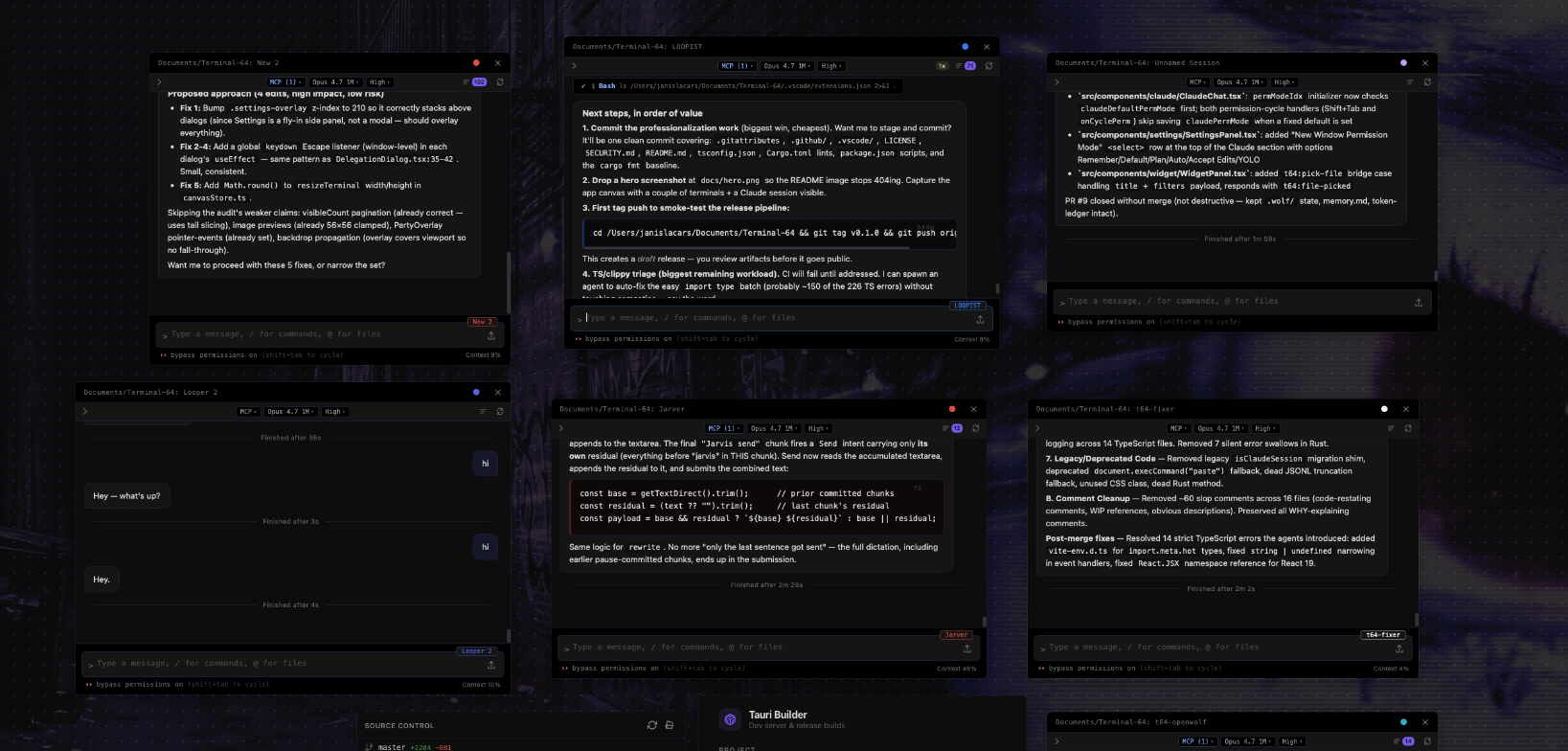
A canvas-based terminal emulator and AI workstation — run terminals, Claude Code agents, widgets, and more on an infinite pan/zoom canvas.



Features
- Terminals — multi-session PTYs (xterm.js + WebGL) on a free-form pan/zoom canvas with snap guides, pop-out windows, activity indicators, and session persistence.
- Claude Code sessions — streaming chat UI, Monaco diff overlay, file tree, rewind/fork history, loop mode, and inline permission handling.
- MCP servers — live Model Context Protocol status and configuration per session.
- Multi-agent delegation —
/delegatesplits work across parallel Claude agents with shared team chat and auto-merge back into the parent session. - Widgets — build HTML/CSS/JS panels with a 40+ command
postMessagebridge (shell, filesystem, terminals, Claude sessions, browser, pub/sub, persistent state) plus hot reload. - Skills — reusable Claude instruction sets stored in
~/.terminal64/skills/, spawned with the target project as CWD. - Party mode — system audio capture → FFT → audio-reactive equalizer bars, edge glow, and theme-locked or rainbow color cycling.
- Browser panels — embedded native webviews positioned on the canvas with URL bar and navigation controls.
- Discord bot — optional session ↔ channel sync for remote access.
- Command palette, quick pastes, AI prompt rewriter, 8 built-in themes, AI-generated Quick Theme.
Install
Prebuilt binaries are published on the Releases page.
| Platform | Download |
|---|---|
| macOS (Apple Silicon / Intel) | .dmg |
| Linux (x86_64) | .AppImage |
| Windows (x86_64) | .msi |
Unsigned builds may require you to bypass OS gatekeepers on first launch (e.g. right-click → Open on macOS).
Dev Setup
Prerequisites
- Rust stable
1.77.2+ - Node.js
v18+ - macOS: Xcode Command Line Tools (
xcode-select --install) - Windows: Visual Studio Build Tools with C++ workload
- Linux: standard Tauri v2 deps (
webkit2gtk-4.1,libayatana-appindicator, etc. — see Tauri prerequisites)
Run
git clone https://github.com/Pugbread/Terminal-64.git
cd Terminal-64
npm install
npm run tauri dev
Production build
npm run tauri build
Outputs a native executable and platform installer under src-tauri/target/release/bundle/.
Architecture
Terminal 64 is a Tauri v2 desktop app: a Rust backend (src-tauri/src/) manages PTYs, the Claude CLI subprocess, the Discord bot, MCP permission server, audio capture, widget HTTP server, and native browser children; a React 19 + TypeScript frontend (src/) renders the canvas, xterm.js terminals, Claude chat, Monaco overlays, widgets, and party-mode visuals. Communication flows via Tauri IPC (invoke + event emitters), with Zustand stores providing persisted client state. For a full module-by-module breakdown — PTY lifecycle, Claude stream-json parsing, delegation orchestration, widget bridge, party-mode audio pipeline, design conventions, and user-data paths — see CLAUDE.md.
Keyboard Shortcuts
| Shortcut | Action |
|---|---|
Ctrl+Shift+P |
Command palette |
Ctrl+V |
Paste |
Ctrl+C |
Copy selection / interrupt |
Ctrl+A |
Select all |
Ctrl+Backspace |
Delete word |
Ctrl+Scroll |
Zoom canvas |
Contributing
Issues and PRs welcome. See .github/ISSUE_TEMPLATE/ for bug report and feature request forms, and SECURITY.md for reporting vulnerabilities.
License
MIT © Pugbread
Reviews (0)
Sign in to leave a review.
Leave a reviewNo results found