pullyard
Health Uyari
- License — License: MIT
- Description — Repository has a description
- Active repo — Last push 0 days ago
- Low visibility — Only 5 GitHub stars
Code Basarisiz
- rm -rf — Recursive force deletion command in .github/workflows/linux.yml
- exec() — Shell command execution in docs/demo.js
- network request — Outbound network request in docs/demo.js
- network request — Outbound network request in docs/site/motion.js
- network request — Outbound network request in docs/stats/stats.js
- Hardcoded secret — Potential hardcoded credential in docs/stats/stats.js
Permissions Gecti
- Permissions — No dangerous permissions requested
Bu listing icin henuz AI raporu yok.
Pull requests, without the browser. A tiny native GitHub client with a Claude Code workspace.

PullYard
Review it. Fix it. Ship it.
A native app for pull requests on macOS, Windows and Linux, with a built-in workspace for AI coding agents that runs Claude Code.
Download for macOS · Windows · Linux · Website · Releases · Buy me a pizza 🍕
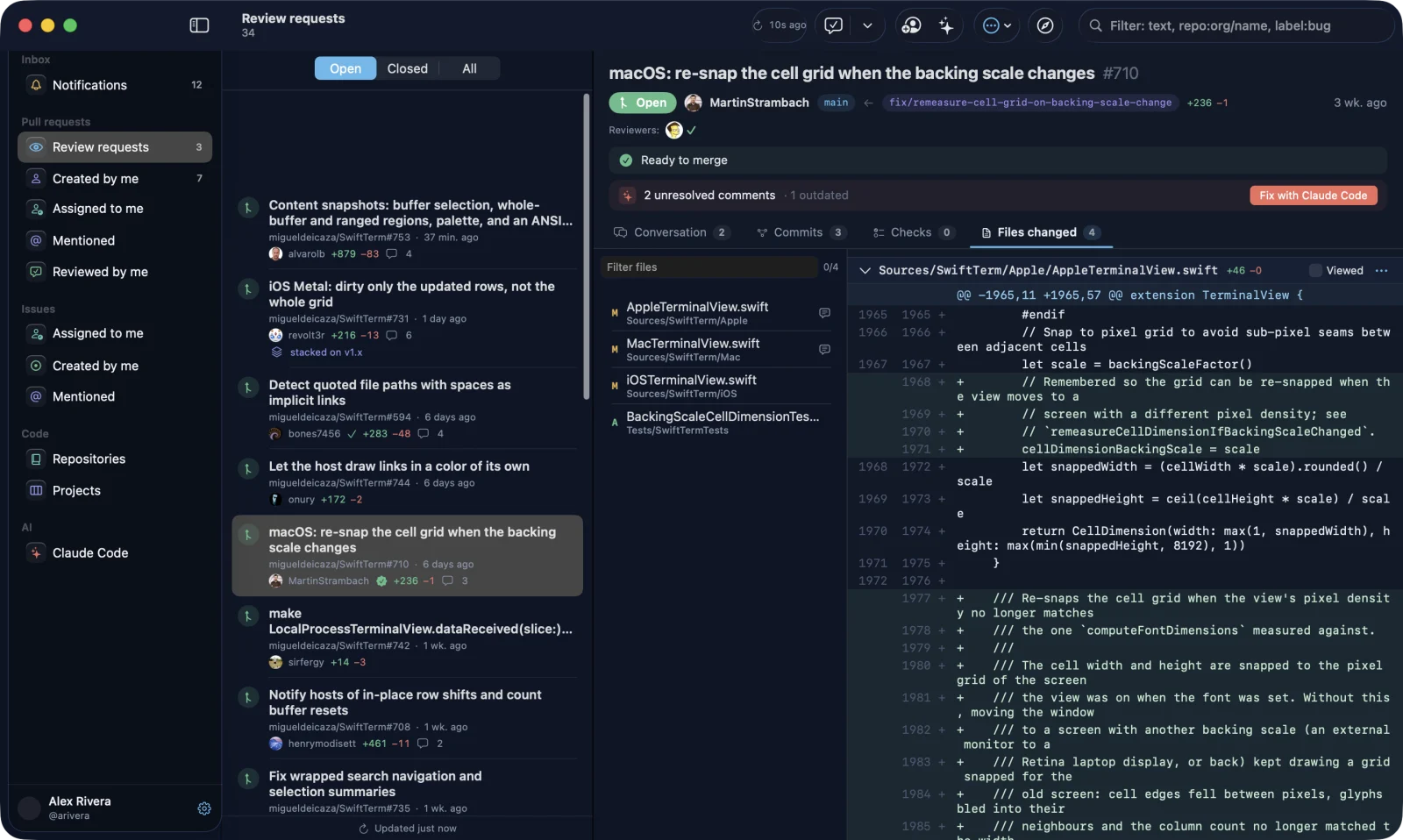
GitHub in a browser tab can take up a gigabyte of memory to show a single diff. PullYard is a native app that takes a pull request from review to merge: SwiftUI on macOS, WinUI 3 on Windows, GTK 4 and libadwaita on Linux. It starts fast, scrolls big diffs without stutter, and can pass review comments to Claude Code.
Features
Pull requests
- Review requests, your own PRs and anything you're involved in, filtered by state
- "My PRs by project": your pull requests grouped by repository, in sections you can collapse
- Conversation, review threads, commits, checks and changed files
- Comment, approve, request changes and merge
- A diff viewer built on
NSTableView, with file headers that stay pinned as you scroll - Stacked pull requests: the PR header shows where the PR sits in its stack, and lists mark what each PR is stacked on
- A Stack tab shows the whole stack as an indented list or, with the Graph switch, as a tree from the base branch down, branches included (
dev ← #1 ← #2, with#3also on#1). Each card shows the branch, base, status (ready, in review, checks running, CI failed, changes requested, draft), the Jira key from the branch name, the last commit and the Claude Code session for that branch. Click a card to open that PR; zoom with the buttons or a pinch - Notes on a stack: add a note, question or decision to any card; it shows as a sticky under the card. Notes stay on your Mac and are never sent to GitHub
- Stacks in the sidebar lists every stack your open pull requests are part of, across repositories
- The stack is built from one request per repository and cached on disk, so it shows up instantly and refreshes in the background
- Lists and the open PR refresh every 30 seconds (you can set 15 s to 15 min in Settings) and again when you switch back to the app. New pull requests show up at the top, briefly highlighted
- Pull to refresh on lists, boards and PR tabs: drag down with two fingers on the trackpad.
⌘Rdoes the same. The footer says when the list was last updated, and shows a Retry link if a refresh fails - Re-request review in one click after you push. PullYard compares the reviewed commit with the branch head, so it notices rebases and force pushes too ("You pushed 3 commits after @sofia reviewed"). Outdated review threads don't count as unresolved
Beyond pull requests
- Notifications and issues
- Repositories with a file browser and syntax highlighting
- GitHub Projects boards
- A menu bar badge with the number of reviews waiting on you
- The PullYard theme in light and dark, or the standard macOS look
- Open any GitHub link inside the app (
⌘L) - Updates from inside the app. PullYard looks for a new release every 6 hours and lets you know with a notification and an "Update to …" item in the sidebar and menu bar. Installing it replaces the app and restarts it. You can also check by hand with PullYard → Check for Updates…
Agents (runs the Claude Code CLI you install)
- A native chat for the official Claude Code CLI, right next to the PR, its changed files and its branch
- Fix with agent: one click starts a new session with the review feedback. If the reviewer left a "Fix prompt", PullYard uses it; otherwise it writes one from the comments
- Session history grouped by project, showing the branch and the PR for each session
- Change the model, effort and permission mode, approve tool calls in the chat, and see a diff for every edit
- A Tasks tab that lists every command and subagent Claude runs, live, with its duration, failures and full output
- Idle sessions go to sleep to free memory and pick up again on your next message
- An overlay with context and plan usage
- Several Claude accounts (say, personal and work), each with its own sign-in and history
- A plain terminal mode if you'd rather use the CLI as is
Install
| Platform | Download | Requirements |
|---|---|---|
| macOS | PullYard.dmg (universal: Apple Silicon and Intel) |
macOS 14 Sonoma or later |
| Windows x64 | PullYard-windows-x64-setup.exe or portable .zip |
Windows 10 1809 or later, or Windows 11; WebView2 Runtime |
| Windows ARM64 | PullYard-windows-arm64-setup.exe or portable .zip |
Windows 10 1809 or later, or Windows 11; WebView2 Runtime |
| Linux x86_64 | pullyard_<version>_amd64.deb, PullYard-linux-x86_64.flatpak or PullYard-linux-x86_64.tar.gz |
GTK 4.14 and libadwaita (Ubuntu 24.04 or later), or any distribution with Flatpak |
Optional on every platform: GitHub CLI for one-click sign-in, Claude Code for the Claude workspace.
macOS
With Homebrew:
brew install --cask pullyard/tap/pullyard
Or by hand:
Download
PullYard.dmg.Open it and drag PullYard to Applications.
The app is not notarized yet, so macOS blocks the first launch. Open System Settings → Privacy & Security → Open Anyway (the DMG includes a How to Install guide), or run:
xattr -dr com.apple.quarantine /Applications/PullYard.app
You only do this once. PullYard removes the quarantine flag from itself on launch, and later updates install from inside the app (PullYard → Check for Updates…), so there's no disk image to open again.
Windows
- Download the setup for your PC:
PullYard-windows-x64-setup.exeorPullYard-windows-arm64-setup.exe. It installs for your user only, with no admin rights, adds a Start menu entry and registerspullyard://links. - The builds are not code-signed yet, so SmartScreen may warn on the first launch: click More info → Run anyway.
Installed copies update themselves: PullYard checks for a new release every 6 hours, downloads the installer and restarts. If you'd rather not install, unzip PullYard-windows-<arch>-portable.zip anywhere and run PullYard.exe; the portable build opens the release page when there's an update.
Linux
Pick one:
sudo apt install ./pullyard_*.deb                     # Ubuntu 24.04+, Debian and derivatives
flatpak install --user PullYard-linux-x86_64.flatpak  # any distribution, uses the GNOME runtime from Flathub
tar xzf PullYard-linux-x86_64.tar.gz && ./PullYard-linux-x86_64/install.sh  # portable, installs to ~/.local
The tarball install updates itself the same way the Windows installer does. The .deb and Flatpak builds tell you about a new release and open the release page.
Sign in to GitHub
Pick one on the welcome screen:
- GitHub CLI: uses the token from
gh auth login. - Personal access token: classic token with
repo,read:org,notifications,workflow, andread:project/projectfor Projects. - Device Flow: enter the Client ID of your own GitHub OAuth App with Device Flow enabled.
The token is stored in the macOS Keychain, Windows Credential Manager or the Secret Service keyring on Linux.
GitLab, Bitbucket, Gitea and GitHub Enterprise (macOS)
The welcome screen has a tab for each service:
- GitHub Enterprise Server: your server address, then
gh auth login --hostname …, a personal access token or Device Flow. Everything works as on github.com. - GitLab (gitlab.com or self-managed):
glab auth login, a personal access token with theapiscope, or Device Flow with your own OAuth application (GitLab 17.1+). - Bitbucket Cloud: your Atlassian account email and an API token.
- Gitea / Forgejo (Codeberg or your own server): an access token.
For GitLab, Bitbucket and Gitea PullYard shows your review requests and your own merge or pull requests; open one in the browser to review it. Changed files, comments and review for these services come later.
You can add several accounts and switch between them from the sidebar or Settings. Each account has its own Claude Code sign-in: the first account keeps the Claude Code you already use (~/.claude, shared with Terminal), and every account you add later starts with a separate, empty Claude Code profile that you sign in to once. Switching keeps every sign-in; PullYard only shows and runs the Claude Code profiles of the active account. Signing out of an account also signs out its Claude Code profiles and leaves the others alone.
Privacy
PullYard has no backend and no analytics. It talks to api.github.com (or the GitLab, Bitbucket or Gitea server you sign in to) directly and runs the claude CLI you installed. It never reads your Claude credentials; you sign in through claude auth login in your browser.
Build from source
The Windows and Linux apps have their own build instructions in windows/README.md and linux/README.md. The macOS app requires Xcode 15.3+ (Swift 5.10).
git clone https://github.com/pullyard/pullyard.git
cd pullyard
./scripts/build.sh            # builds build/PullYard.app
./scripts/build.sh --install  # builds and copies it to /Applications
Other scripts:
UNIVERSAL=1 ./scripts/build.sh: universal binary (arm64 + x86_64)./scripts/release.sh 2.1.0: universal build packed intobuild/PullYard-2.1.0.dmgwith a drag-to-Applications window (needspip3 install --user dmgbuild; Finder applies the background so it also shows on macOS 26)swift scripts/make_icon.swift Resources/Brand/icon.svg build/AppIcon.iconset: regenerate the icon
The build is signed with the first "Apple Development" identity in your keychain, or ad-hoc if there is none. Set SIGN_ID to choose another one.
Read-only API self test:
swift build -c release
PULLYARD_TOKEN=$(gh auth token) .build/release/PullYard --selftest
For screenshots without personal data, set PULLYARD_DEMO_REPO=owner/name to fill every pull request and issue section from a public repository with a placeholder user, and PULLYARD_DEMO_FOLDER=/path to limit the Claude Code history to one folder.
Project layout
Sources/PullYard/
  App/        app entry, routing, settings, deep links (pullyard://)
  API/        GitHub GraphQL + REST client and models
  Auth/       sign-in flows, Keychain
  Features/   PR, Lists, Issue, Repos, Projects, Notifications, MenuBar, Claude, ClaudeFix
  Shared/     diff table, HTML view, tab strip, localization, utilities
linux/        Linux app (Rust, GTK 4, libadwaita)
windows/      Windows app (C#, WinUI 3)
docs/         website (GitHub Pages)
Buy me a pizza 🍕
PullYard is free and open source, and every feature is there for everyone. If it saves you time, you can buy me a pizza: pay what you want, from $3. The link is also in the app under Settings → Support PullYard.
Acknowledgements
- Third-party licenses ship inside every build (Settings → About → Third-Party Licenses on macOS) and are listed in
Resources/THIRD-PARTY-NOTICES.txt. - The terminal mode uses SwiftTerm by Miguel de Icaza (MIT License).
License
PullYard is an independent project and is not affiliated with or endorsed by GitHub, Inc. or Anthropic. GitHub and Claude are trademarks of their respective owners.
Yorumlar (0)
Yorum birakmak icin giris yap.
Yorum birakSonuc bulunamadi