kitty-has-a-job
Health Uyari
- License — License: MIT
- Description — Repository has a description
- Active repo — Last push 0 days ago
- Low visibility — Only 7 GitHub stars
Code Basarisiz
- rm -rf — Recursive force deletion command in build.sh
- rm -rf — Recursive force deletion command in evals/test_cv_pipeline.sh
Permissions Gecti
- Permissions — No dangerous permissions requested
Bu listing icin henuz AI raporu yok.
Claude skill that automates your job search: scores postings, tailors your CV, tracks applications.
Kitty has a job 🐱
      /\_/\      "Are you tired of sending CVs and getting rejections?
     ( o.o )      Kitty is smart. Kitty wants to help."
      > ^ <
     /|   |\
    (_|   |_)    ~ Kitty, job hunter, 4.2 lives remaining
A Claude skill that automates your job search. Paste a job posting link (for LinkedIn, copy the job description instead, since LinkedIn blocks automated readers) and Kitty will:
- Score job fit and tell you if it's worth applying. Over time it learns from your actual interview results.
- Tailor your CV to the role by matching keywords and following CV best practices, so you have a better chance of getting past the recruiter filter to the people who can actually assess your skills.
- Log it in a tracker, so you always know whether you already applied to a job.
- Update statuses for applied roles from your inbox, on a schedule if you like.
- Tell you what actually converts: how many interviews you get at each stage, where the funnel dips, and which types of roles convert better.
And Kitty is a cat. She miaows now and then, and when the search gets rough she can cheer you up with a random cat fact. See Meet Kitty.
Tenets
- Authenticity: Kitty keeps your voice and never changes your template.
- Good citizen: Kitty never invents facts, and she does not scrape websites where that isn't allowed.
- Security and privacy: Kitty never shares your data. Your CV files stay in your own folder, and your tracker and settings live in your own Notion or local files. Nothing goes anywhere except through Claude and the connectors you switch on (Notion, Gmail).
- Honesty: Kitty doesn't promise what she can't do, such as a guaranteed pass through an ATS. She follows common practice and flags layout risks, but every ATS parses differently.
See it in action
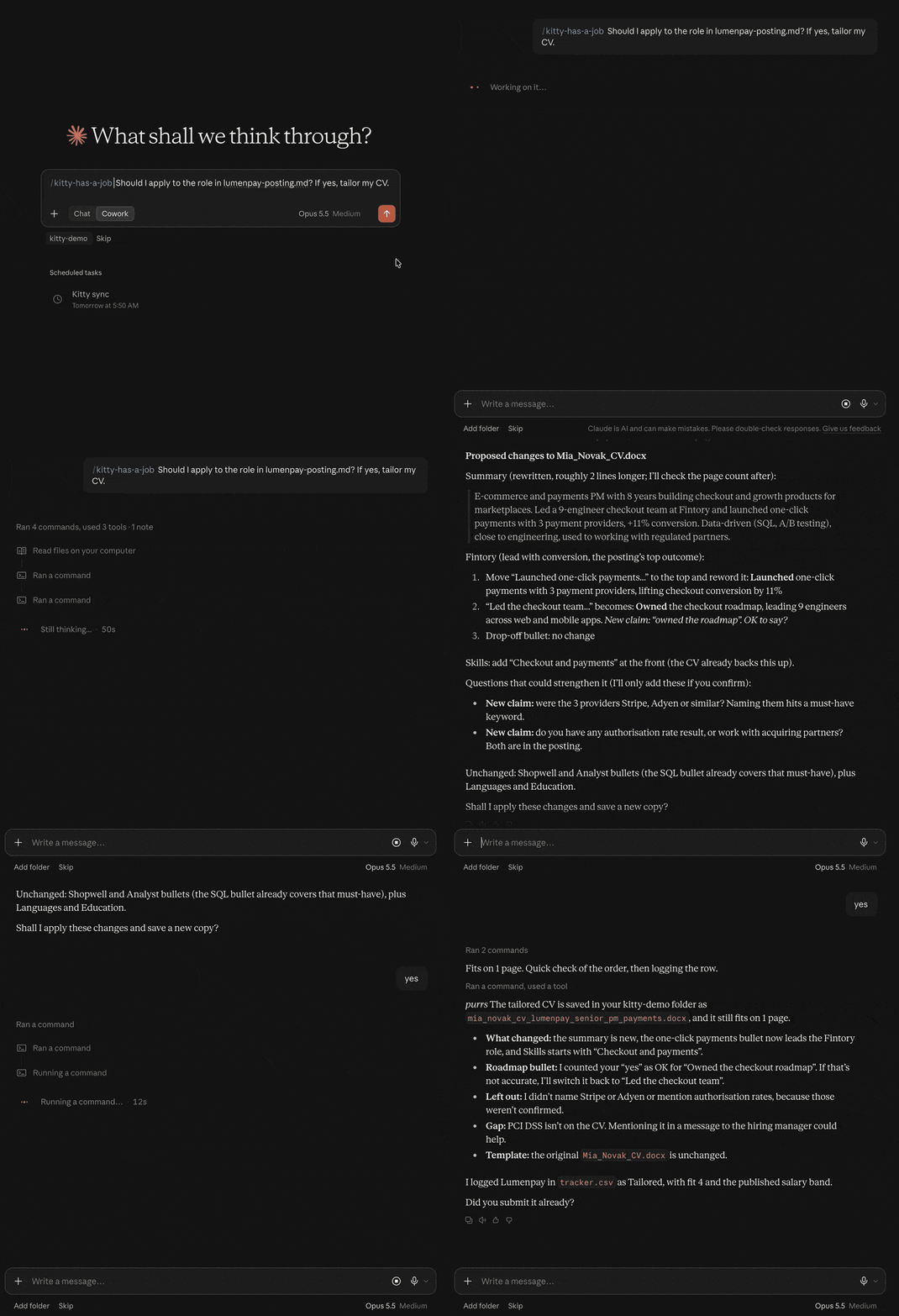
You paste a posting. Kitty answers with a fit card:
Fit: 4/5, apply with an angle
- Role level: match, senior IC with a team of 3-5
- Domain: adjacent, marketplaces instead of fintech
- Must-haves: 6 of 7 covered; missing: SQL dashboards
- Logistics: Berlin, 3 days on-site, English
- Salary: published band 85-100k vs your target 90k
- Link: https://example.com/careers/senior-pm
What it does
| Mode | What happens |
|---|---|
| Score | A 1-5 fit card (level, domain, must-haves, logistics, salary) before any tailoring. |
| Tailor | Analyses your CV and proposes changes that follow best practices: your keywords adjusted to the job description, an authentic voice, an ATS-friendly layout. It never changes your template and always asks before making a change. Edits are length-neutral and checked by rendering to PDF, so your page limit holds. |
| Track | A Notion database or local file that stores all your applications. |
| Sync | Optional daily Gmail scan. It checks your inbox and updates the status in your tracker when an interview moves to the next stage or a rejection arrives. |
| Stats | A fixed funnel report by country. With enough data, fit scoring learns which role levels convert for you. |
| Cheer up | Say "cat fact" or "cheer me up" for a random fact about cats. |
How tailoring works
Tailoring follows the same loop every time, and nothing is edited until you say yes.
- Read. Kitty reads your
.docxtemplate, counts the pages and checks the layout. There is a sample template in the repository that you can use for testing or, after adding your real data, for applying. - Compare. It matches your real experience against the posting: strengths, gaps, and things you did but never put into words.
- Propose. You get the full list of changes by section, with explicit cuts. Any posting term your CV doesn't already support is marked new claim.
- You decide. Approve all, some or none. Missing facts (a metric, a claim) get a question, never a guess.
- Apply. All changes go into a new CV. Your template stays unchanged and can be reused. The page count stays the same, so your CV stays skimmable.
Logic behind CV changes
| Practice | What Kitty does | Why it helps |
|---|---|---|
| Match the posting's words | Uses the posting's exact terms where your CV already backs them up. | ATS keyword search and recruiters both scan for the posting's own wording. |
| Outcome first | Rewrites bullets as result, then how, with a number wherever a true one exists. | Shows results, not duties. |
| Show scope | Brings out users, revenue, budget, team size, number of teams. | Readers judge your level from scope. |
| Strongest proof first | Leads each role with the bullet closest to the posting's top requirement. | The first bullet is the one that gets read. |
| Cut filler | Rewrites "responsible for", "helped with", "various". | Weak verbs hide impact. |
| Tight bullets | One sentence, about two lines, one metric, in your template's style. | Recruiters skim. |
| A fresh summary | Rewrites the 5-6 line summary for each role. | It's the first thing read. |
| Emphasis by company type | Keywords and scope for large structured hiring, ownership and speed for startups, compliance and stakeholders for regulated companies. | Each type screens for something different. |
| ATS-safe layout check | Flags tables, text boxes and header text once, without rebuilding your template. | Some ATS parsers skip or garble them. |
| Page limit holds | Edits are length-neutral and checked by rendering to PDF. | No surprise second page. |
Example: one bullet, before and after
The posting asks for "growth experiments, SQL, and onboarding conversion". The CV bullet below is made up, and so are its numbers: in a real run they would come from elsewhere in your CV or from your answers.
Before
Responsible for the onboarding flow and worked with engineering on various improvements.
Proposed by Kitty
Onboarding: Raised activation from 31% to 38% across 120k monthly signups by redesigning the first-run flow with a team of 5 engineers.
| Change | Why |
|---|---|
| "Responsible for" and "various improvements" are gone | Filler hides the result |
| Result first (31% to 38%), then how | Outcome before duty |
| Scope added (120k signups, team of 5) | Shows your level |
| Uses the posting's word onboarding | Your CV already backs it |
| Still one sentence, about two lines | Length-neutral, so the page limit holds |
Kitty also checks the posting for terms your CV doesn't state. Here it would ask:
The posting says "growth experiments" and "SQL". Your CV says neither. Did you run A/B tests or write SQL in this role? If so, give me one example and I'll add it. Otherwise I'll leave it out.
It never writes "A/B tests" or "SQL" on its own, and it won't invent the 31% to 38% either: the numbers must come from your CV or from you.
Meet Kitty
Kitty is a cat, and sometimes it shows. Expect an occasional "miaow" when you greet her or a role scores well, a purr when something goes right, and the odd bit of cat behaviour. It's one small touch at most per reply, and only in the chat. Your CV, tracker and fit cards stay professional, and she keeps the jokes away when you're stressed or asking something serious.
- Say "hello kitty" to start setup. If Kitty is already set up, she greets you and shows your settings instead of starting over.
- Say "cat fact" or "cheer me up" for a random, true fact about cats. She only does this when you ask.
Quick start
- Install the skill. Download
dist/kitty-has-a-job.zipfrom this repo (open the file on GitHub and click the download icon). No need to unzip or zip anything yourself. Kitty works in Claude Cowork and Claude Code, and in the Claude app with skills support (see What you need). It hasn't been tested elsewhere.- Claude app or Cowork: upload the zip as a skill.
- Claude Code: unzip it into
~/.claude/skills/, so you end up with~/.claude/skills/kitty-has-a-job/.
- Save your template. Save your CV as a
.docxsomewhere Kitty can access. Other formats aren't supported yet, but you can use the template from the repository. - Set it up. Say "hello kitty" (or "set up Kitty has a job"). Claude creates your tracker and a settings page, then asks a few questions: targets, locations, page limit, guardrails, sync schedule. Say yes to sync and Kitty creates a daily Gmail check for you (it needs the Gmail connector). If your Claude has no scheduling tool, she gives you the prompt to paste into your own scheduler.
- Share a posting. Share a job posting link. LinkedIn: paste the job description text instead of the link, because LinkedIn blocks automated readers and Kitty can't open those links. That's it.
No CV handy? Try the sample
examples/sample_cv.docx is a made-up CV (Jordan Lee, senior PM in fintech) you can use to try Kitty before using your own. It is also a reference for a template that works well with the skill:
- One column of normal paragraphs, with no tables or text boxes. Tables and text boxes are the layout risks Kitty flags, because some ATS parsers skip or garble them.
- Standard section headings: Core Competencies, Work Experience, Education.
- A bold lead word on each bullet, with the outcome and a number after it.
- Dates and company names on their own lines, so Kitty can find each role.
- A standard font (Arial), so it looks the same on any machine.
The sample runs to 2 pages, so set your page limit to 2 when you try it. For real applications, use your own CV as the template. The sample is only there to show the shape.
Other things to say:
- "Should I apply to this?" (score only)
- "Tailor my CV for this role"
- "Sync my applications from Gmail"
- "Show my stats"
- "Hello kitty" (start setup)
- "Cat fact" (or "cheer me up")
What you need
| Need | Why | Required? |
|---|---|---|
| Claude with skills support (Claude app, Cowork or Claude Code). The skill hasn't been tested in other environments such as Codex. | Runs the skill | Yes |
Your CV as a .docx template |
Kitty edits a copy and never touches the original | Yes |
Python 3 with pip install python-docx pypdf lxml |
The scripts that edit the CV, update the tracker and build stats | Yes |
LibreOffice (soffice) |
Page counts, so your page limit holds | Yes, for tailoring |
| Notion connector | Tracker and settings live in Notion. Without Notion, Kitty uses local files instead. Notion is nicer to work in, so it's worth setting up. | Recommended |
| Gmail connector | Status sync | Optional |
Installing the dependencies (copy-paste in the terminal)
Python 3 packages (any OS, Python 3.8 or newer):
pip install python-docx pypdf lxml
If pip isn't found, use python3 -m pip install python-docx pypdf lxml. Download Python from python.org if you don't have it.
LibreOffice (used only to count pages). The scripts look for soffice or libreoffice on your PATH.
| OS | Install |
|---|---|
| macOS | brew install --cask libreoffice (Homebrew), or download from libreoffice.org |
| Ubuntu / Debian | sudo apt install libreoffice-writer |
| Windows | Download from libreoffice.org and add the folder with soffice.exe to your PATH |
Check that it worked:
python3 -c "import docx, pypdf, lxml" && echo "Python packages OK"
soffice --version
Connectors (Notion, Gmail) are switched on in Claude's settings under connectors, not installed from this repo.
No Notion?
Local mode keeps everything in files in your CV folder: kitty-settings.md for settings and tracker.csv for the tracker. All modes work. Gmail sync still needs the Gmail connector.
How it works
You paste a job posting (link or description)
        |
        v
+-----------------+     Reads your settings and CV template.
|  Score the fit  |     Level, domain, must-haves, logistics, salary.
|  (fit card)     |     Low score: skipped early, nothing logged.
+-----------------+
        |  worth applying
        v
+-----------------+     Compares your CV with the posting, lists changes,
|  Tailor the CV  |     marks new claims. Nothing is edited until you say yes.
|  (you approve)  |     Checks the page count by rendering to PDF.
+-----------------+
        |
   +----+--------------+
   v                   v
 New CV            Tracker row
 .docx             (Notion or CSV)
                       ^
                       |  Gmail sync moves it forward on
                       |  confirmations, interviews, rejections
                       v
                 Stats: funnel by country, what converts
Claude does the judgment: fit, what to change in the CV, reading emails. Anything that must come out the same every time (editing the Word file, page counts, tracker rules, stats) runs as small Python scripts. That keeps results consistent and saves tokens.
Repo layout
kitty-has-a-job/
├── SKILL.md                    Router: modes, steps with failure paths, fit card, scoring rubric, rules
├── references/
│   ├── common.md               Tracker columns and values, tracker rules, formats (shared by every mode)
│   ├── tracker-csv.md          Tracker operations for a local CSV (and dry run)
│   ├── tracker-notion.md       Tracker operations through the Notion connector
│   ├── tailor.md               Tailoring steps, CV rules, company types, edge cases
│   ├── stats.md                Stats steps and reply format
│   ├── sync.md                 Gmail sync steps and the email → change table
│   ├── setup.md                First-run interview, tracker and settings creation, scheduling
│   └── cv-editing.md           Manual Word editing, only if cv.py cannot do an edit
├── scripts/
│   ├── cv.py                   Read any .docx CV, apply edits (--dry-run), count pages, build file names
│   ├── tracker.py              Find, add, update rows under the tracker rules; sync window; No response
│   └── stats.py                Funnel report with sanity checks (CSV or Notion JSON)
├── build.sh                    Rebuilds dist/kitty-has-a-job.zip (repo only)
├── assets/
│   └── kitty-demo.gif          Demo animation for the README (repo only)
├── dist/
│   └── kitty-has-a-job.zip     Ready-to-install skill (repo only)
├── examples/
│   └── sample_cv.docx          Made-up CV to try the skill with (repo only)
├── evals/                      Repo only: task evals, trigger queries, regression cases, script tests
├── README.md                   This file (repo only)
├── CHANGELOG.md                Version history (repo only)
└── LICENSE
Development
Tests live in evals/ (see evals/README.md). The script tests need no model:
bash evals/test_scripts.sh # add --fast to skip LibreOffice
After changing SKILL.md, references/ or scripts/, run bash build.sh to rebuild the zip in dist/ before committing.
All test data uses a made-up person (Alex Example). Never commit a real CV, real emails or real salaries.
License
MIT
Questions and feedback
For questions and feedback, please open an issue in this repository.
Yorumlar (0)
Yorum birakmak icin giris yap.
Yorum birakSonuc bulunamadi