browsegenie
Health Gecti
- License — License: GPL-3.0
- Description — Repository has a description
- Active repo — Last push 0 days ago
- Community trust — 38 GitHub stars
Code Basarisiz
- Hardcoded secret — Potential hardcoded credential in browsegenie/browser.py
Permissions Gecti
- Permissions — No dangerous permissions requested
This tool is an AI-powered MCP server for automated browser control and web scraping. It uses an LLM to dynamically generate scraping scripts, which are then cached to minimize token usage on repeated visits to the same page layouts.
Security Assessment
The tool inherently interacts with sensitive data by extracting web content and requires an external AI API key to function. The most significant security flag is a FAIL on the hardcoded secret check, specifically within the `browsegenie/browser.py` file. Exposing credentials in source code is a major vulnerability, posing a risk of unintended account compromise or privilege escalation. Furthermore, because the agent relies on AI to generate code dynamically, improper prompting could potentially lead to unintended browser actions. Overall risk is rated as High due to the hardcoded credentials and the dynamic execution risks associated with AI-driven automation.
Quality Assessment
The project demonstrates strong signs of active maintenance, with repository pushes occurring as recently as today. It utilizes standard quality assurance practices, featuring CodeQL analysis and code coverage reporting visible in the documentation. It uses a standard GPL-3.0 license. While the community footprint is currently small with 38 GitHub stars, the active development cycle and compatibility with major CLIs like Claude Code and Cursor indicate a reliable and usable project foundation.
Verdict
Use with caution—verify and remove any hardcoded credentials before deploying, and carefully scope AI permissions to prevent unintended browser actions.
AI Agent which can do any kind of Browser Automation Task & Web Scraping, just using a single prompt!
BrowseGenie
Agentic browser automation and web scraping, just using a prompt



An AI Agent that can do any kind of browser automation task and web scraping, just using a single prompt.
Point it at any website, describe what you want — the agent navigates, clicks, scrolls, and extracts the data for you. No scripts. No selectors. No maintenance.
Under the hood the scraping agent writes a custom BeautifulSoup4 extractor for your target page, caches it against a structural hash of the HTML, and reuses that same code on every subsequent run.
The AI is only ever called once per unique page layout - not on every scrape - so your token spend stays in the single-digit cents range even across thousands of requests.
When the page layout changes the agent detects it automatically and regenerates the extractor, then caches the new version.
Table of Contents
- Web UI - No-Code Mode
- How BrowseGenie Works
- Installation (Recommended)
- Installation
- Quick Start
- Export Formats
- CLI Usage
- MCP Server Usage
- Cache Management
- Advanced Usage
- API Reference
- Output Format
- Common Field Examples
- Multi-Provider AI Support
- Troubleshooting
- Roadmap
- Contributors
- Contributing
- License
- Changelog
Web UI - No-Code Mode
The fastest way to use BrowseGenie - no Python required. Install the package and launch the local web UI with one command:
pip install browsegenie
browsegenie-ui
Your browser opens automatically at http://127.0.0.1:7860.
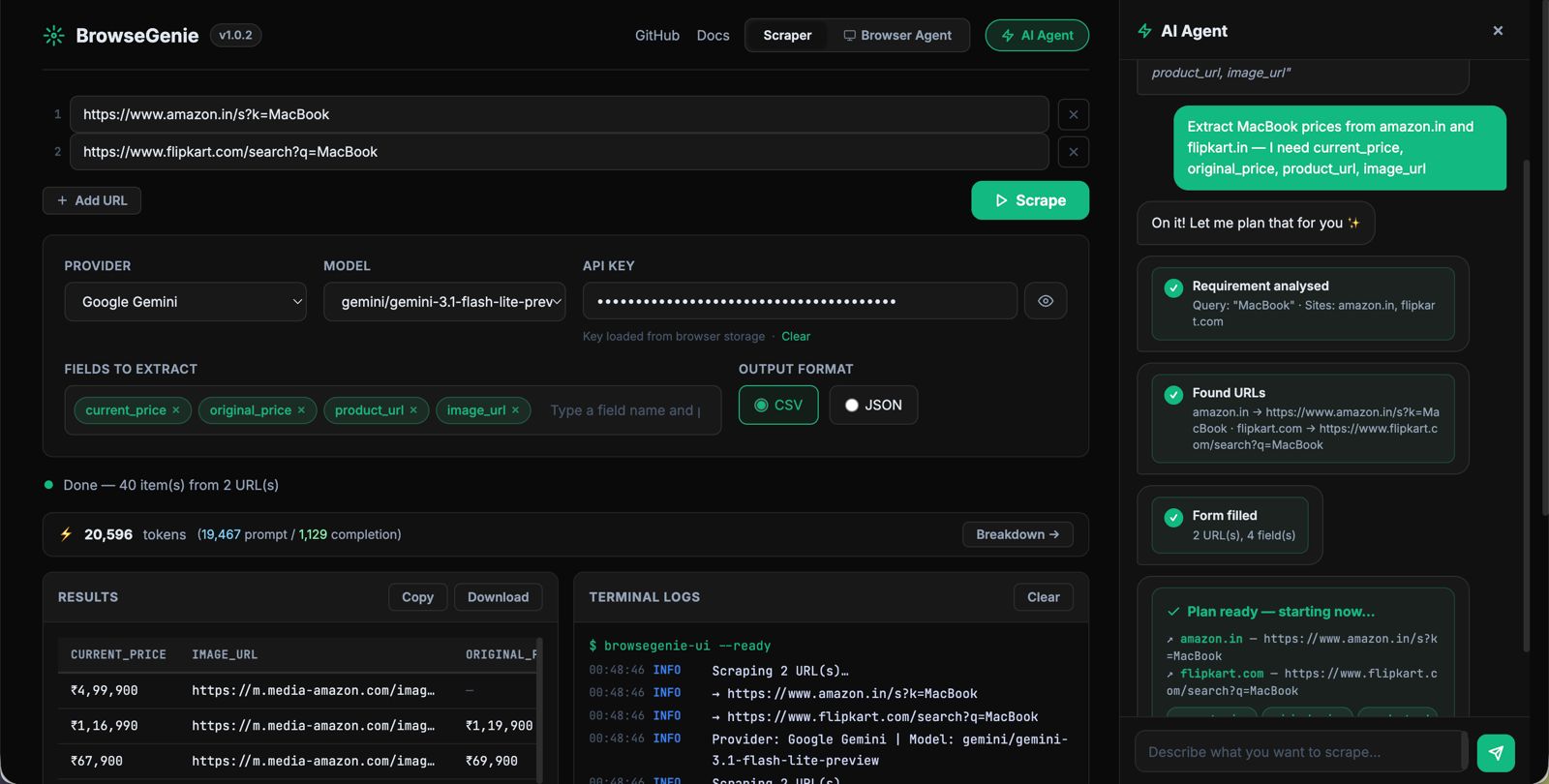
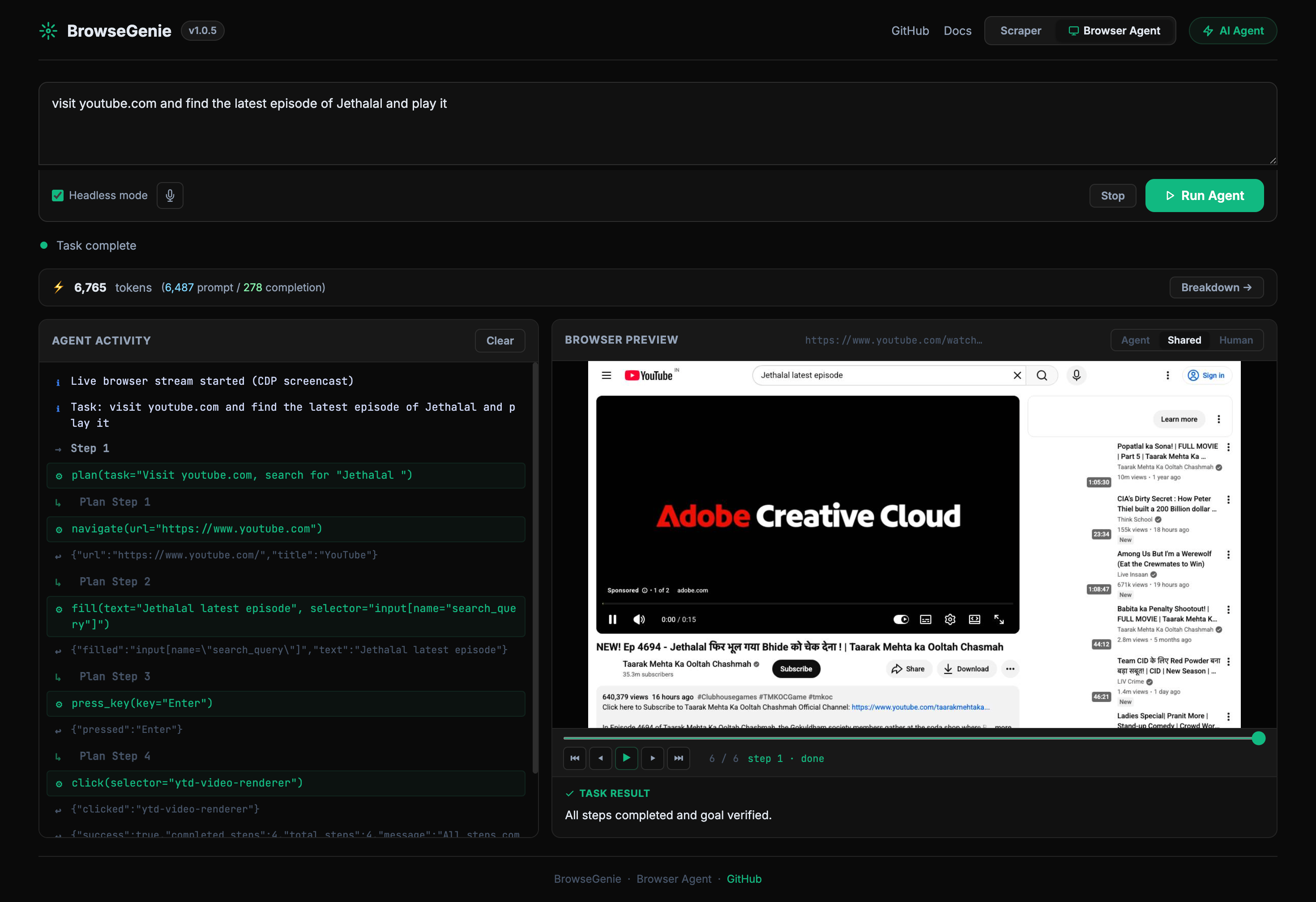
Browser Agent Mode - Do any kind of Browser Automation using Prompt!
What you can do in the UI
| Feature | Details |
|---|---|
| Provider & Model | Select Google Gemini, OpenAI, Anthropic, or Ollama. Models are fetched live from the provider's API when you enter a key - always current, never hardcoded. Falls back to 1,700+ LiteLLM models when no key is entered. Only text/chat models are listed. |
| API Key auto-fill | GEMINI_API_KEY, OPENAI_API_KEY, and ANTHROPIC_API_KEY environment variables are pre-filled on page load. |
| Extraction fields | Add fields as interactive chips (product_name, price, rating …). Press Enter or comma to add; click × to remove. |
| Output formats | JSON → syntax-highlighted result. CSV → rendered as an HTML table in the browser; download exports a proper .csv file. |
| Real-time logs | Live terminal-style stream (Server-Sent Events) showing every internal step - fetch, clean, AI call, cache hit - as the scrape runs. |
| Token usage | After each scrape a token bar shows total tokens used, prompt/completion split, and cache-hit count. Click Breakdown → for a per-API-call modal. |
| Browser Agent | Switch to the Browser Agent tab and describe any task in plain English. The agent opens a real Chromium browser, navigates, clicks, and extracts data step-by-step. |
| Voice input | Click the mic button in the Browser Agent tab to dictate your task. Live interim transcription appears as you speak; click again to stop. Uses the browser's built-in Web Speech API — no external service required. |
| Browser Agent token bar | A live token bar in the Browser Agent tab updates after every LLM call, showing cumulative prompt/completion tokens across all steps. Click Breakdown → for a per-call modal. |
| Screenshot playback | After a browser agent task completes, a timeline scrubber lets you replay every step frame-by-frame with tool name and step labels. |
CLI options
browsegenie-ui --port 8080        # custom port
browsegenie-ui --host 0.0.0.0    # bind to all interfaces
browsegenie-ui --no-browser      # skip auto-opening the browser
Why BrowseGenie?
Traditional scraping and automation is brittle
Writing a scraper the old way means hand-crafting BeautifulSoup4 selectors by reading raw HTML. Browser automation means writing fragile scripts full of hardcoded XPaths and time.sleep() calls. The moment a website updates its layout, everything breaks. Teams end up spending more time maintaining scrapers than using the data they collect.
BrowseGenie fixes this
BrowseGenie is two tools in one:
1. AI Scraper — Instead of hard-coded selectors, the agent generates a custom BeautifulSoup4 extractor on the fly by analysing a compressed snapshot of the page:
| What happens | The numbers |
|---|---|
| HTML cleaned before AI sees it | 98%+ size reduction (e.g. 163 KB → 2.3 KB) |
| AI called to write the extractor | once per unique page layout |
| Same extractor reused on repeat runs | $0.00786 per scrape (~0.7 cents) |
| What would cost with raw HTML sent to AI | 57.5× more tokens, ~$0.45 per call |
| Time to extract hundreds of items | ~5 seconds |
When the page layout changes the agent detects the structural difference, regenerates the extractor automatically, and caches the new version — so you never touch the code.
2. Browser Agent — Describe any browser task in plain English and the agent handles the rest. It opens a real Chromium browser, reads the live page state, and decides which actions to take — navigate, click, type, scroll, extract — step by step, until the task is complete. No scripts to write, no selectors to maintain. Works on JavaScript-heavy SPAs, login-walled pages, and multi-step workflows that a simple HTTP scraper can never reach.
How BrowseGenie Works
For a full technical breakdown — pipeline diagram, live working example, HTML cleaner internals, and token cost comparisons — see HOW_IT_WORKS.md.
Installation (Recommended)
pip install browsegenie
Installation (Global level on Mac)
brew install pipx
sudo pipx install "browsegenie[mcp]" --global
Installation
Clone the repository:
git clone <repository-url>
cd Universal_Scrapper
Install dependencies:
pip install -r requirements.txtOr install manually:
pip install google-genai beautifulsoup4 requests selenium lxml fake-useragent flaskInstall the module:
pip install -e .
Quick Start
1. Set up your API key
Option A: Use Gemini (Default - Recommended)
Get a Gemini API key from Google AI Studio:
export GEMINI_API_KEY="your_gemini_api_key_here"
Option B: Use OpenAI
export OPENAI_API_KEY="your_openai_api_key_here"
Option C: Use Anthropic Claude
export ANTHROPIC_API_KEY="your_anthropic_api_key_here"
Option D: Pass API key directly
# For any provider - just pass the API key directly
scraper = BrowseGenie(api_key="your_api_key")
2. Basic Usage
from browsegenie import BrowseGenie

# Option 1: Auto-detect provider (uses Gemini by default)
scraper = BrowseGenie(api_key="your_gemini_api_key")

# Option 2: Specify Gemini model explicitly
scraper = BrowseGenie(api_key="your_gemini_api_key", model_name="gemini-3.1-flash-lite-preview")

# Option 3: Use OpenAI
scraper = BrowseGenie(api_key="your_openai_api_key", model_name="gpt-4")

# Option 4: Use Anthropic Claude
scraper = BrowseGenie(api_key="your_anthropic_api_key", model_name="claude-3-sonnet-20240229")

# Option 5: Use any other provider supported by LiteLLM
scraper = BrowseGenie(api_key="your_api_key", model_name="llama-2-70b-chat")

# Set the fields you want to extract
scraper.set_fields([
    "company_name",
    "job_title",
    "apply_link",
    "salary_range",
    "location"
])

# Check current model
print(f"Using model: {scraper.get_model_name()}")

# Scrape a URL (default JSON format)
result = scraper.scrape_url("https://example.com/jobs", save_to_file=True)

print(f"Extracted {result['metadata']['items_extracted']} items")
print(f"Data saved to: {result.get('saved_to')}")

# Scrape and save as CSV
result = scraper.scrape_url("https://example.com/jobs", save_to_file=True, format='csv')
print(f"CSV data saved to: {result.get('saved_to')}")
3. Convenience Function
For quick one-off scraping:
from browsegenie import scrape

# Quick scraping with default JSON format
data = scrape(
    url="https://example.com/jobs",
    api_key="your_gemini_api_key",
    fields=["company_name", "job_title", "apply_link"]
)

# Quick scraping with CSV format
data = scrape(
    url="https://example.com/jobs",
    api_key="your_gemini_api_key",
    fields=["company_name", "job_title", "apply_link"],
    format="csv"
)

# Quick scraping with OpenAI
data = scrape(
    url="https://example.com/jobs",
    api_key="your_openai_api_key",
    fields=["company_name", "job_title", "apply_link"],
    model_name="gpt-4"
)

# Quick scraping with Anthropic Claude
data = scrape(
    url="https://example.com/jobs",
    api_key="your_anthropic_api_key",
    fields=["company_name", "job_title", "apply_link"],
    model_name="claude-3-haiku-20240307"
)

print(data['data'])  # The extracted data
4. Browser Agent - browse()
Run any browser automation task from code — the same capability available in the web UI, as a single function call.
from browsegenie import browse

result = browse(
    task="Go to news.ycombinator.com and return the top 5 story titles",
    api_key="your_gemini_api_key",
    model_name="gemini-3.1-flash-lite-preview",
)

print(result["summary"])   # Agent's summary of what it did
print(result["data"])      # Structured data extracted by the agent
print(result["steps"])     # Number of steps taken
print(result["success"])   # True if completed successfully
Logs are printed automatically so you can follow along in real time:
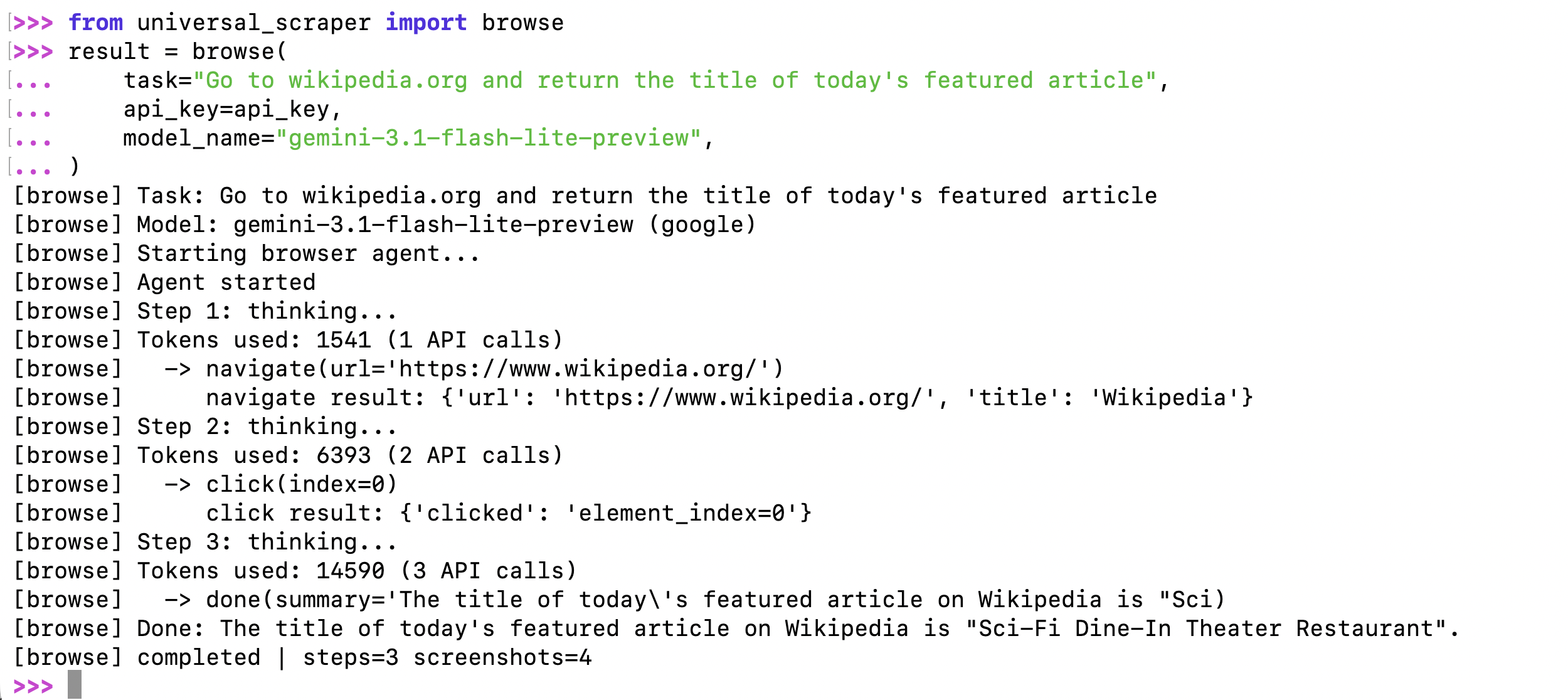
With OpenAI or Anthropic — provider is auto-detected from the model name:
# OpenAI
result = browse(
    task="Search PyPI for 'httpx' and return the latest version number",
    api_key="your_openai_api_key",
    model_name="gpt-4o",
)

# Anthropic Claude
result = browse(
    task="Go to example.com and return the page heading",
    api_key="your_anthropic_api_key",
    model_name="claude-3-5-sonnet-20241022",
)
Silent mode — suppress all logs:
result = browse(
    task="...",
    api_key="your_api_key",
    model_name="gemini-3.1-flash-lite-preview",
    show_logs=False,
)
Stream events — receive real-time events via callback:
def on_event(event_type, data):
    if event_type == "screenshot":
        # data["image"] is a base64 JPEG
        save_screenshot(data["image"])
    elif event_type == "tool_call":
        print(f"Agent called: {data['tool']}")

result = browse(
    task="Go to github.com/trending and extract the top 3 repos",
    api_key="your_gemini_api_key",
    model_name="gemini-3.1-flash-lite-preview",
    on_event=on_event,
)
Visible browser + timeout:
result = browse(
    task="Log in to example.com with [email protected] / pass123 and click Submit",
    api_key="your_gemini_api_key",
    model_name="gemini-3.1-flash-lite-preview",
    headless=False,   # Watch the browser in action
    timeout=120,      # Stop after 2 minutes
)
Return value:
| Key | Type | Description |
|---|---|---|
summary |
str |
Text summary the agent produced when done |
data |
dict |
Structured data extracted by the agent |
screenshots |
list |
All screenshot frames captured during the run |
steps |
int |
Number of steps the agent took |
success |
bool |
True if task completed, False on error/timeout |
error |
str|None |
Error message if success is False |
Parameters:
| Parameter | Type | Default | Description |
|---|---|---|---|
task |
str |
required | Plain-English description of what to do |
api_key |
str |
required | AI provider API key |
model_name |
str |
required | Model name — provider auto-detected |
provider |
str |
auto | Override provider (google, openai, anthropic, …) |
headless |
bool |
True |
Run browser headlessly |
on_event |
callable |
None |
Callback for real-time events |
timeout |
float |
None |
Max seconds before stopping |
show_logs |
bool |
True |
Print progress logs to stdout |
Export Formats
BrowseGenie supports multiple output formats to suit your data processing needs:
JSON Export (Default)
# JSON is the default format
result = scraper.scrape_url("https://example.com/jobs", save_to_file=True)
# or explicitly specify
result = scraper.scrape_url("https://example.com/jobs", save_to_file=True, format='json')
JSON Output Structure:
{
  "url": "https://example.com",
  "timestamp": "2025-01-01T12:00:00",
  "fields": ["company_name", "job_title", "apply_link"],
  "data": [
    {
      "company_name": "Example Corp",
      "job_title": "Software Engineer",
      "apply_link": "https://example.com/apply/123"
    }
  ],
  "metadata": {
    "raw_html_length": 50000,
    "cleaned_html_length": 15000,
    "items_extracted": 1
  }
}
CSV Export
# Export as CSV for spreadsheet analysis
result = scraper.scrape_url("https://example.com/jobs", save_to_file=True, format='csv')
CSV Output:
- Clean tabular format with headers
- All fields as columns, missing values filled with empty strings
- Perfect for Excel, Google Sheets, or pandas processing
- Automatically handles varying field structures across items
Multiple URLs with Format Choice
urls = ["https://site1.com", "https://site2.com", "https://site3.com"]

# Save all as JSON (default)
results = scraper.scrape_multiple_urls(urls, save_to_files=True)

# Save all as CSV
results = scraper.scrape_multiple_urls(urls, save_to_files=True, format='csv')
CLI Usage
# Gemini (default) - auto-detects from environment
browsegenie https://example.com/jobs --output jobs.json

# OpenAI GPT models
browsegenie https://example.com/products --api-key YOUR_OPENAI_KEY --model gpt-4 --format csv

# Anthropic Claude models
browsegenie https://example.com/data --api-key YOUR_ANTHROPIC_KEY --model claude-3-haiku-20240307

# Custom fields extraction
browsegenie https://example.com/listings --fields product_name product_price product_rating

# Batch processing multiple URLs
browsegenie --urls urls.txt --output-dir results --format csv --model gpt-4o-mini

# Verbose logging with any provider
browsegenie https://example.com --api-key YOUR_KEY --model gpt-4 --verbose
🔧 Advanced CLI Options:
# Set custom extraction fields
browsegenie URL --fields title price description availability

# Use environment variables (auto-detected)
export OPENAI_API_KEY="your_key"
browsegenie URL --model gpt-4

# Multiple output formats
browsegenie URL --format json    # Default
browsegenie URL --format csv     # Spreadsheet-ready

# Batch processing
echo -e "https://site1.com\nhttps://site2.com" > urls.txt
browsegenie --urls urls.txt --output-dir batch_results
🔗 Provider Support: All 100+ models supported by LiteLLM work in CLI! See LiteLLM Providers for complete list.
Development Usage (from cloned repo):
python main.py https://example.com/jobs --api-key YOUR_KEY --model gpt-4
MCP Server Usage
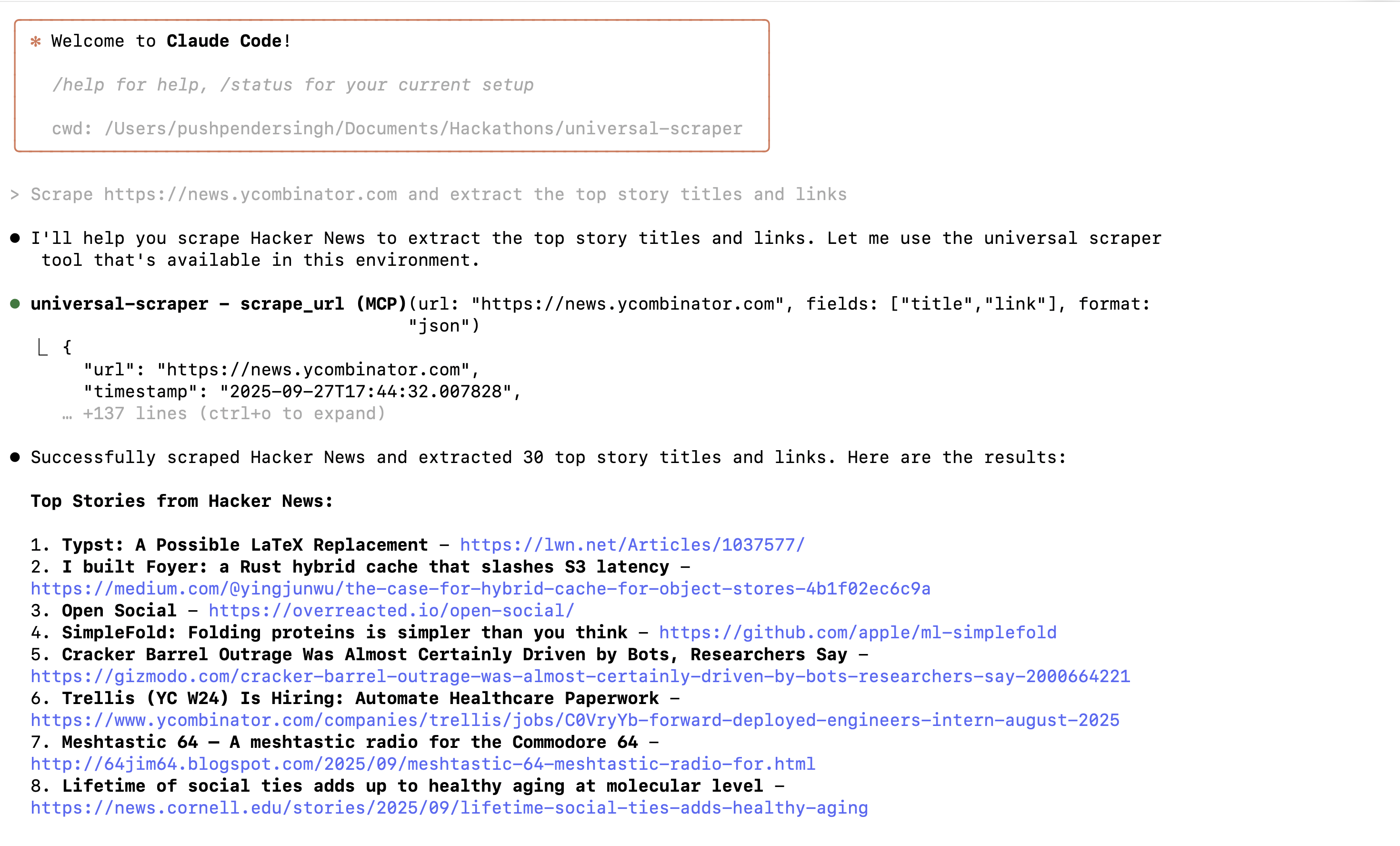
BrowseGenie works as an MCP (Model Context Protocol) server, allowing AI assistants to scrape websites directly.
Quick Setup
- Install with MCP support:
pip install browsegenie
- Set your AI API key:
export GEMINI_API_KEY="your_key" # or OPENAI_API_KEY, ANTHROPIC_API_KEY
Claude Code Setup
Add this to your Claude Code MCP settings:
{
  "mcpServers": {
    "browsegenie": {
      "command": "browsegenie-mcp"
    }
  }
}
or Run this command in your terminal
claude mcp add browsegenie browsegenie-mcp
Cursor Setup
Add this to your Cursor MCP configuration:
{
  "mcpServers": {
    "browsegenie": {
      "command": "browsegenie-mcp"
    }
  }
}
Available Tools
- scrape_url: Scrape a single URL
- scrape_multiple_urls: Scrape multiple URLs
- configure_scraper: Set API keys and models
- get_scraper_info: Check current settings
- clear_cache: Clear cached data
Example Usage
Once configured, just ask your AI assistant:
"Scrape https://news.ycombinator.com and extract the top story titles and links"
"Scrape this product page and get the price, name, and reviews"
Cache Management
scraper = BrowseGenie(api_key="your_key")

# View cache statistics
stats = scraper.get_cache_stats()
print(f"Cached entries: {stats['total_entries']}")
print(f"Total cache hits: {stats['total_uses']}")

# Clear old entries (30+ days)
removed = scraper.cleanup_old_cache(30)
print(f"Removed {removed} old entries")

# Clear entire cache
scraper.clear_cache()

# Disable/enable caching
scraper.disable_cache()  # For testing
scraper.enable_cache()   # Re-enable
Advanced Usage
Multiple URLs
scraper = BrowseGenie(api_key="your_api_key")
scraper.set_fields(["title", "price", "description"])

urls = [
    "https://site1.com/products",
    "https://site2.com/items",
    "https://site3.com/listings"
]

# Scrape all URLs and save as JSON (default)
results = scraper.scrape_multiple_urls(urls, save_to_files=True)

# Scrape all URLs and save as CSV for analysis
results = scraper.scrape_multiple_urls(urls, save_to_files=True, format='csv')

for result in results:
    if result.get('error'):
        print(f"Failed {result['url']}: {result['error']}")
    else:
        print(f"Success {result['url']}: {result['metadata']['items_extracted']} items")
Custom Configuration
scraper = BrowseGenie(
    api_key="your_api_key",
    temp_dir="custom_temp",      # Custom temporary directory
    output_dir="custom_output",  # Custom output directory
    log_level=logging.DEBUG,     # Enable debug logging
    model_name="gpt-4"           # Custom model (OpenAI, Gemini, Claude, etc.)
)

# Configure for e-commerce scraping
scraper.set_fields([
    "product_name",
    "product_price",
    "product_rating",
    "product_reviews_count",
    "product_availability",
    "product_description"
])

# Check and change model dynamically
print(f"Current model: {scraper.get_model_name()}")
scraper.set_model_name("gpt-4")  # Switch to OpenAI
print(f"Switched to: {scraper.get_model_name()}")

# Or switch to Claude
scraper.set_model_name("claude-3-sonnet-20240229")
print(f"Switched to: {scraper.get_model_name()}")

result = scraper.scrape_url("https://ecommerce-site.com", save_to_file=True)
API Reference
BrowseGenie Class
Constructor
BrowseGenie(api_key=None, temp_dir="temp", output_dir="output", log_level=logging.INFO, model_name=None)
api_key: AI provider API key (auto-detects provider, or set specific env vars)temp_dir: Directory for temporary filesoutput_dir: Directory for output fileslog_level: Logging levelmodel_name: AI model name (default: 'gemini-3.1-flash-lite-preview', supports 100+ models via LiteLLM)- See LiteLLM Providers for complete model list and setup
Methods
set_fields(fields: List[str]): Set the fields to extractget_fields() -> List[str]: Get current fields configurationget_model_name() -> str: Get current Gemini model nameset_model_name(model_name: str): Change the Gemini modelscrape_url(url: str, save_to_file=False, output_filename=None, format='json') -> Dict: Scrape a single URLscrape_multiple_urls(urls: List[str], save_to_files=True, format='json') -> List[Dict]: Scrape multiple URLs
Convenience Functions
scrape()
scrape(url: str, api_key: str, fields: List[str], model_name: Optional[str] = None, format: str = 'json') -> Dict
Quick scraping function for simple use cases. Auto-detects AI provider from API key pattern.
browse()
browse(
    task: str,
    api_key: str,
    model_name: str,
    provider: Optional[str] = None,
    headless: bool = True,
    on_event: Optional[Callable] = None,
    timeout: Optional[float] = None,
    show_logs: bool = True,
) -> Dict
Run a browser automation task. The agent opens a real Chromium browser, navigates, clicks, scrolls, and extracts data based on the plain-English task description. Provider is auto-detected from model_name. Returns a dict with summary, data, screenshots, steps, success, and error.
Note: For model names and provider-specific setup, refer to the LiteLLM Providers Documentation.
Output Format
The scraped data is returned in a structured format:
{
  "url": "https://example.com",
  "timestamp": "2025-01-01T12:00:00",
  "fields": ["company_name", "job_title", "apply_link"],
  "data": [
    {
      "company_name": "Example Corp",
      "job_title": "Software Engineer",
      "apply_link": "https://example.com/apply/123"
    }
  ],
  "metadata": {
    "raw_html_length": 50000,
    "cleaned_html_length": 15000,
    "items_extracted": 1
  }
}
Common Field Examples
Job Listings
scraper.set_fields([
    "company_name",
    "job_title",
    "apply_link",
    "salary_range",
    "location",
    "job_description",
    "employment_type",
    "experience_level"
])
E-commerce Products
scraper.set_fields([
    "product_name",
    "product_price",
    "product_rating",
    "product_reviews_count",
    "product_availability",
    "product_image_url",
    "product_description"
])
News Articles
scraper.set_fields([
    "article_title",
    "article_content",
    "article_author",
    "publish_date",
    "article_url",
    "article_category"
])
Multi-Provider AI Support
BrowseGenie now supports multiple AI providers through LiteLLM integration:
Supported Providers
- Google Gemini (Default):
gemini-3.1-flash-lite-preview,gemini-1.5-pro, etc. - OpenAI:
gpt-4,gpt-4-turbo,gpt-3.5-turbo, etc. - Anthropic:
claude-3-opus-20240229,claude-3-sonnet-20240229,claude-3-haiku-20240307 - 100+ Other Models: Via LiteLLM including Llama, PaLM, Cohere, and more
For complete model names and provider setup: See LiteLLM Providers Documentation
Usage Examples
# Gemini (Default - Free tier available)
scraper = BrowseGenie(api_key="your_gemini_key")
# Auto-detects as gemini-3.1-flash-lite-preview

# OpenAI
scraper = BrowseGenie(api_key="sk-...", model_name="gpt-4")

# Anthropic Claude
scraper = BrowseGenie(api_key="sk-ant-...", model_name="claude-3-haiku-20240307")

# Environment variable approach
# Set GEMINI_API_KEY, OPENAI_API_KEY, or ANTHROPIC_API_KEY
scraper = BrowseGenie()  # Auto-detects from env vars

# Any other provider from LiteLLM (see link above for model names)
scraper = BrowseGenie(api_key="your_api_key", model_name="llama-2-70b-chat")
Model Configuration Guide
Quick Reference for Popular Models:
# Gemini Models
model_name="gemini-3.1-flash-lite-preview"        # Fast, efficient
model_name="gemini-1.5-pro"          # More capable

# OpenAI Models
model_name="gpt-4"                   # Most capable
model_name="gpt-4o-mini"             # Fast, cost-effective
model_name="gpt-3.5-turbo"           # Legacy but reliable

# Anthropic Models
model_name="claude-3-opus-20240229"      # Most capable
model_name="claude-3-sonnet-20240229"    # Balanced
model_name="claude-3-haiku-20240307"     # Fast, efficient

# Other Popular Models (see LiteLLM docs for setup)
model_name="llama-2-70b-chat"        # Meta Llama
model_name="command-nightly"          # Cohere
model_name="palm-2-chat-bison"        # Google PaLM
🔗 Complete Model List: Visit LiteLLM Providers Documentation for:
- All available model names
- Provider-specific API key setup
- Environment variable configuration
- Rate limits and pricing information
Model Auto-Detection
If you don't specify a model, the scraper automatically selects:
- Gemini: If
GEMINI_API_KEYis set or API key contains "AIza" - OpenAI: If
OPENAI_API_KEYis set or API key starts with "sk-" - Anthropic: If
ANTHROPIC_API_KEYis set or API key starts with "sk-ant-"
Troubleshooting
Common Issues
- API Key Error: Make sure your API key is valid and set correctly:
- Gemini: Set
GEMINI_API_KEYor pass directly - OpenAI: Set
OPENAI_API_KEYor pass directly - Anthropic: Set
ANTHROPIC_API_KEYor pass directly
- Gemini: Set
- Model Not Found: Ensure you're using the correct model name for your provider
- Empty Results: The AI might need more specific field names or the page might not contain the expected data
- Network Errors: Some sites block scrapers - the tool uses cloudscraper to handle most cases
- Model Name Issues: Check LiteLLM Providers for correct model names and setup instructions
Debug Mode
Enable debug logging to see what's happening:
import logging
scraper = BrowseGenie(api_key="your_key", log_level=logging.DEBUG)
Roadmap
See ROADMAP.md for planned features and improvements.
Contributors
Contributing
- Fork the repository
- Create a feature branch
- Make your changes
- Run
pytestto run testcases - Test PEP Standard:
flake8 browsegenie/ --count --select=E9,F63,F7,F82 --show-source --statistics

flake8 browsegenie/ --count --exit-zero --max-complexity=10 --max-line-length=127 --statistics
- Submit a pull request
License
GPLv3 License - see LICENSE file for details.
Changelog
See CHANGELOG.md for detailed version history and release notes.
Yorumlar (0)
Yorum birakmak icin giris yap.
Yorum birakSonuc bulunamadi