aictl
Health Warn
- License — License: NOASSERTION
- Description — Repository has a description
- Active repo — Last push 0 days ago
- Low visibility — Only 5 GitHub stars
Code Fail
- rm -rf — Recursive force deletion command in .github/workflows/release.yml
Permissions Pass
- Permissions — No dangerous permissions requested
This project provides a cross-platform AI agent accessible from the terminal and desktop. It also functions as an HTTP LLM proxy server, allowing users to interact with local and cloud-based language models.
Security Assessment
Overall risk: Medium. As an AI agent, the tool inherently executes shell commands and makes external network requests to interact with LLM providers. The application distributes a shell script via `curl | sh` for installation, which requires careful user review to prevent malicious replacements. No hardcoded secrets or explicitly dangerous runtime permissions were detected. However, automated code scans flagged a recursive force deletion command (`rm -rf`) inside a GitHub Actions release workflow, which is a common build step but warrants a brief manual check to ensure it only targets intended directories.
Quality Assessment
The project is written in Rust, which offers strong memory safety guarantees. It is actively maintained, with repository updates pushed as recently as today. However, the repository has very low community visibility, currently sitting at only 5 stars, meaning it has not been broadly vetted by the open-source community. Additionally, the repository uses a "NOASSERTION" license, meaning it technically lacks a clearly defined open-source license. This introduces potential legal ambiguity regarding modification and redistribution.
Verdict
Use with caution — the code is active and memory-safe, but the lack of a clear license, low community vetting, and inherent shell execution risks mean you should inspect the installation script and workflows before deploying.
🤖 AI agent for your terminal and desktop + HTTP LLM proxy. Cloud & local models. Security-first by default.
 aictl
aictl


AI agent for your terminal and desktop + HTTP LLM proxy server — 74 built-in cloud models across 8 providers, plus any model available through Ollama, native GGUF inference via llama.cpp, or native MLX inference on Apple Silicon. Security-first by default.
Project website: aictl.app — source in website/.
CLI user guides: https://aictl.app/cli.html
[!NOTE]
The aictl is a general-purpose AI agent.
Dedicated coding capabilities may be added in the future. If you are looking for an AI agent specialized in software development today,
consider Claude Code, Codex, or opencode — they are purpose-built for that workflow.
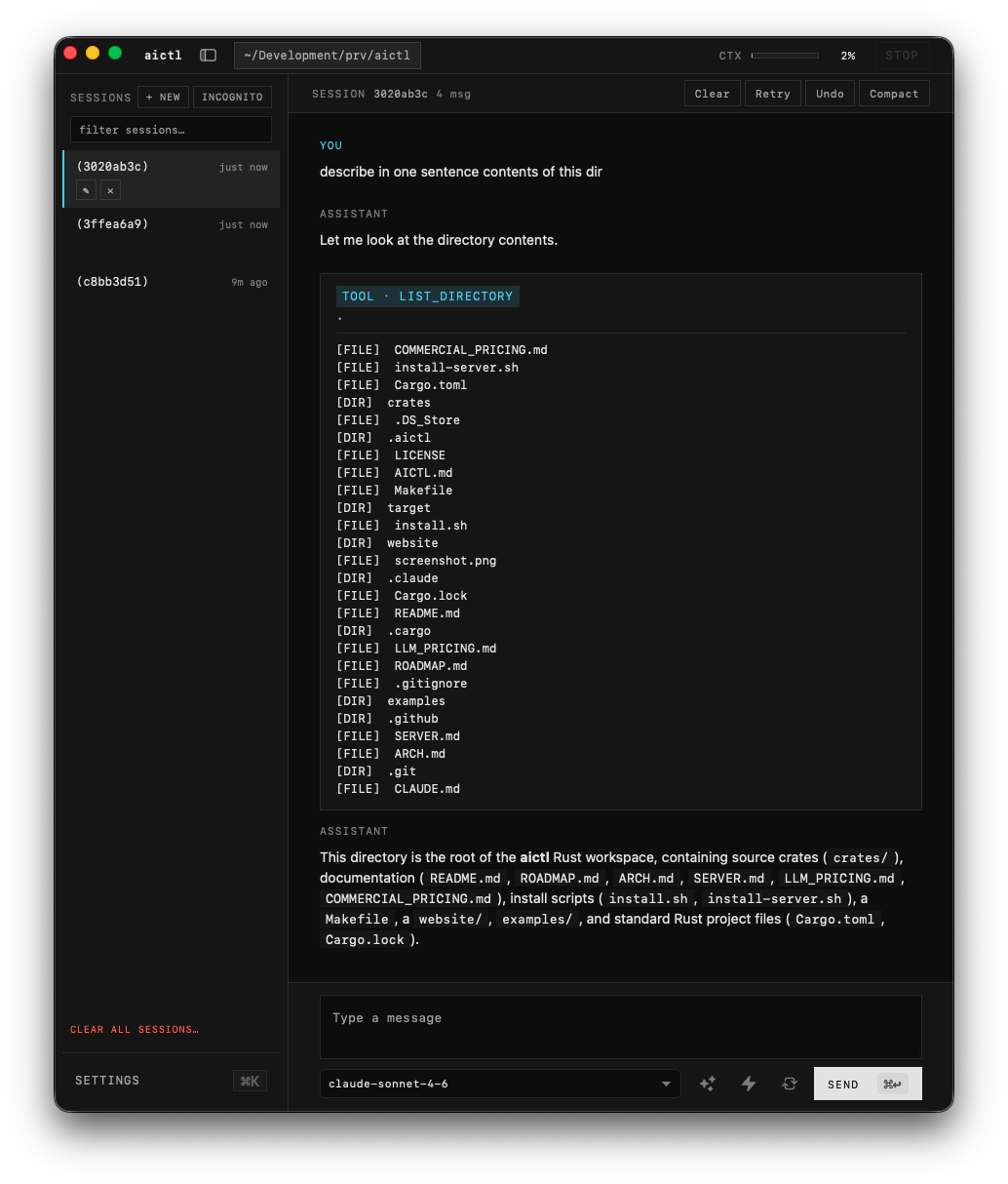
💻 You can use aictl on your desktop...
...and in your terminal ⌨️
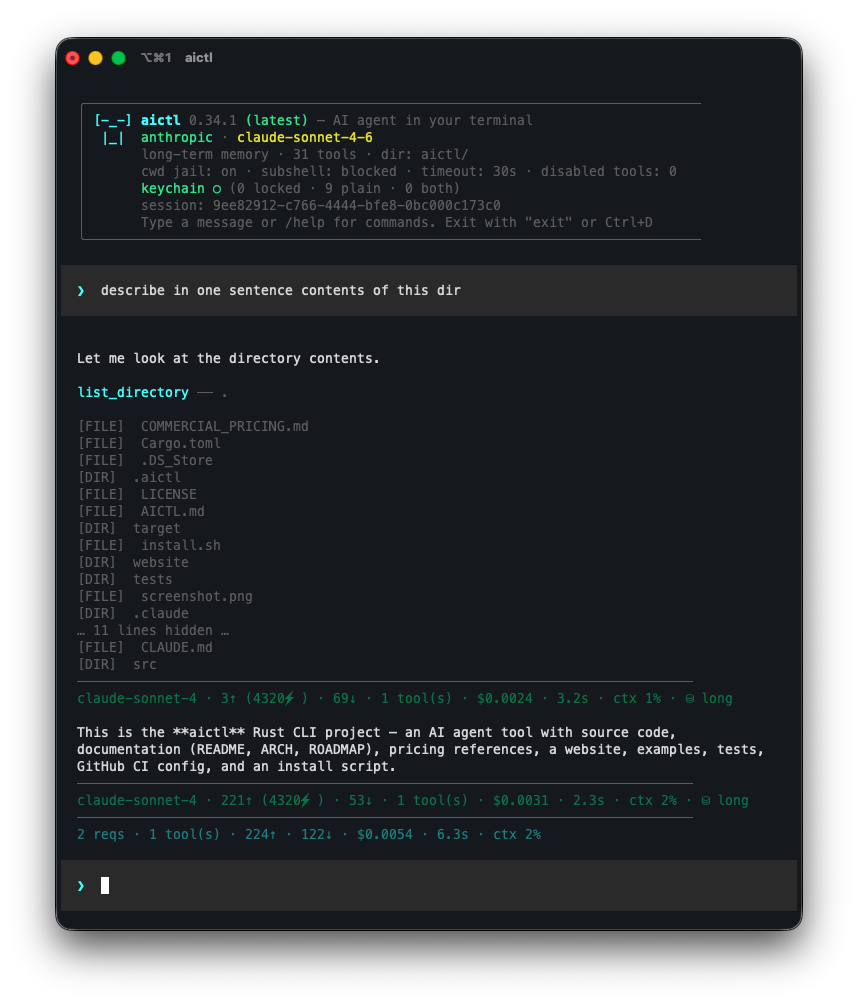
with the single configuration and feature parity for CLI and desktop app.
In addition, you can also use HTTP Server with LLM proxy with security features.
Install CLI
curl -sSf https://aictl.app/install.sh | sh
The installer downloads a prebuilt binary for your platform from the latest GitHub release and places it in ~/.local/bin/aictl. If aictl is already installed at ~/.cargo/bin/aictl (e.g. from a prior cargo install), the installer updates it in place at that location instead of the default ~/.local/bin/. Set AICTL_INSTALL_DIR to pick a different location explicitly. If no prebuilt binary exists for your platform, the installer falls back to building from source with cargo install.
Supported platforms
Prebuilt binaries are published for:
| OS | Architectures |
|---|---|
| Linux | x86_64, aarch64 |
| macOS | x86_64, aarch64 (Apple Silicon) |
Native Windows is not supported — aictl depends on a POSIX shell (sh) and Unix tools (date, pbcopy, etc.) for its built-in tool calls. Windows users can run aictl inside WSL using the Linux binary, which works normally.
Other platforms (FreeBSD, other BSDs, uncommon Linux architectures) can still build from source via the cargo install fallback path, provided a Rust toolchain is available.
Prerequisites
Installing a prebuilt binary has no prerequisites beyond curl. Building from source (either via the installer fallback or manually) requires Rust (edition 2024).
From source
git clone [email protected]:pwittchen/aictl.git
cd aictl
cargo install --path crates/aictl-cli
To install with all features run:
cargo install --path crates/aictl-cli --features "gguf mlx redaction-ner"
This installs the aictl binary to ~/.cargo/bin/.
Build without installing
cargo build --release
The binary will be at target/release/aictl.
Optional feature flags
Native local-model inference is gated behind cargo features so a plain cargo build / cargo install keeps a lightweight default (no C++ toolchain or Metal Toolchain required). Opt in per backend:
| Feature | What it enables | Platform | Extra build-time requirements |
|---|---|---|---|
gguf |
Native GGUF inference via llama-cpp-2 |
All | cmake + a working C/C++ compiler (Xcode Command Line Tools on macOS, build-essential on Debian/Ubuntu) |
mlx |
Native MLX inference via mlx-rs (Apple's MLX framework) |
macOS + Apple Silicon only | Full Xcode (not just CLT) with the Metal Toolchain installed |
redaction-ner |
Layer-C Named Entity Recognition for the redaction pipeline via gline-rs (GLiNER ONNX models through the ort crate; bundled ONNX Runtime binary, no system install) |
All | None |
Examples:
# GGUF only
cargo build --release --features gguf
cargo install --path crates/aictl-cli --features gguf

# MLX only (macOS Apple Silicon)
cargo build --release --features mlx
cargo install --path crates/aictl-cli --features mlx

# NER-backed redaction only (Layer C of the redaction pipeline)
cargo build --release --features redaction-ner
cargo install --path crates/aictl-cli --features redaction-ner

# All three (GGUF + MLX + NER-backed redaction)
cargo build --release --features "gguf mlx redaction-ner"
cargo install --path crates/aictl-cli --features "gguf mlx redaction-ner"
Without these features, the corresponding slash commands (/gguf, /mlx) and CLI flags (--pull-gguf-model, --pull-mlx-model, --pull-ner-model, etc.) still work for model management (download / list / remove); only the inference path is disabled, and trying to run a local model or enable NER-backed redaction prints a clear error telling you which feature to rebuild with.
The prebuilt binaries published on GitHub Releases (downloaded by install.sh) ship with --features gguf enabled on every platform — so one-liner installs get native GGUF inference out of the box where the platform supports it. The macOS Apple Silicon (aarch64) release additionally ships with --features mlx and includes a sibling mlx.metallib file alongside the binary (MLX needs the Metal library at runtime); every other platform's release contains just the aictl binary.
Build desktop app
The desktop frontend (aictl-desktop) is a Tauri v2 app with a Solid + Vite webview that reuses the same aictl-core engine as the CLI. It is macOS-only for the first release and is excluded from the workspace's default member set, so a bare cargo build / cargo lint / cargo test keeps working without Tauri's deps. Build it explicitly with -p aictl-desktop.
[!NOTE]
The desktop app is currently work in progress. Expect rough edges.
Prerequisites
- macOS 13.0 or newer (Apple Silicon or Intel).
- Rust (edition 2024).
- Node.js 18+ (for the webview bundle).
- Xcode Command Line Tools (
xcode-select --install). cargo-tauriCLI:cargo install tauri-cli --version "^2.0".
Install webview dependencies (one-time)
cd crates/aictl-desktop/webview
npm install
cd -
Dev build
Hot-reloading dev workflow — Vite serves the webview at http://localhost:5173 and Tauri rebuilds the Rust side on save:
make desktop-dev
# equivalent to:
cd crates/aictl-desktop && cargo tauri dev --features gguf,mlx,redaction-ner
Alternatively, type-check the Rust side only (no webview, no window):
cargo build -p aictl-desktop
Or run the release binary against a pre-built webview bundle:
make desktop-run
# equivalent to:
cargo run --release -p aictl-desktop --features gguf,mlx,redaction-ner
Release build
Produces an optimized .app bundle and a .dmg installer under target/release/bundle/:
make desktop-build
# equivalent to:
cd crates/aictl-desktop && cargo tauri build --features gguf,mlx,redaction-ner
Outputs:
target/release/bundle/macos/aictl.app— the application bundle.target/release/bundle/dmg/aictl_<version>_<arch>.dmg— the disk image.
Local builds are unsigned by default — Gatekeeper will block first launch. Right-click the app and choose Open to bypass, or remove the quarantine flag:
xattr -dr com.apple.quarantine /Applications/aictl.app
The official DMGs published to GitHub Releases are signed with a Developer ID and notarized by Apple — those open cleanly without any workaround.
The desktop reuses every ~/.aictl/ config file (sessions, agents, skills, MCP, hooks, plugins, audit log, stats) but pins its tool-call working directory to AICTL_WORKING_DIR_DESKTOP — independent of the CLI's AICTL_WORKING_DIR, so launching the desktop won't silently retarget CLI tool calls. See crates/aictl-desktop/README.md for the layout and current status.
HTTP server (aictl-server)
A second binary in this workspace, aictl-server, exposes the same provider catalogue over an OpenAI-compatible HTTP endpoint with redaction, prompt-injection blocking, audit, and a master-key gate. Pure proxy — no agent loop, no tools, no agents/skills/sessions. See SERVER.md for the full reference.
curl -fsSL https://aictl.app/server/install.sh | sh
aictl-server     # listens on 127.0.0.1:7878 by default; prints master key on first launch
aictl --serve    # convenience shortcut from the CLI; forwards trailing args after `--`
Use aictl-server as the upstream
The CLI can also point at an aictl-server instance instead of talking to each provider directly. With this set, the operator configures provider keys (LLM_OPENAI_API_KEY, LLM_ANTHROPIC_API_KEY, …) once on the server, and every CLI host carries only a single master key.
aictl --client-url http://127.0.0.1:7878 --client-master-key sk-aictl-…
Or persist it:
# In ~/.aictl/config — note the AICTL_CLIENT_* prefix (the CLI's view).
# The server's own AICTL_SERVER_MASTER_KEY is a separate key; the same
# machine can host both roles without ambiguity.
AICTL_CLIENT_HOST=http://127.0.0.1:7878
AICTL_CLIENT_MASTER_KEY=sk-aictl-…
AICTL_CLIENT_MASTER_KEY participates in the same /keys lock/unlock/clear lifecycle as the provider keys, so it can move into the OS keyring like any other secret. Local providers (Ollama, GGUF, MLX) bypass the server unconditionally — the proxy hop would be pointless.
Uninstall
Binary release (installed via install.sh)
The install script places the binary at ~/.local/bin/aictl (or $AICTL_INSTALL_DIR if you set it). Remove it with:
rm ~/.local/bin/aictl
From source (installed via cargo install)
Cargo tracks its own installs, so the clean way is:
cargo uninstall aictl
This removes ~/.cargo/bin/aictl. If cargo uninstall doesn't find it (e.g. installed under a different crate name), delete the binary directly:
rm ~/.cargo/bin/aictl
Remove configuration and data (optional)
aictl stores all state under ~/.aictl/ — config file, saved agents, saved sessions. To wipe it completely:
rm -rf ~/.aictl
Skip this step if you plan to reinstall and want to keep your API keys, agents, and session history.
Usage
aictl [--version] [--update] [--uninstall] [--config] [--provider <PROVIDER>] [--model <MODEL>] [--message <MESSAGE>] [--format <FORMAT>] [--auto] [--quiet] [--audit-file <PATH>] [--cwd <PATH>] [--unrestricted] [--incognito] [--agent <NAME>] [--list-agents] [--pull-agent <NAME>] [--skill <NAME>] [--list-skills] [--pull-skill <NAME>] [--force] [--session <ID|NAME>] [--list-sessions] [--clear-sessions] [--lock-keys] [--unlock-keys] [--clear-keys] [--pull-gguf-model <SPEC>] [--list-gguf-models] [--remove-gguf-model <NAME>] [--clear-gguf-models] [--pull-mlx-model <SPEC>] [--list-mlx-models] [--remove-mlx-model <NAME>] [--clear-mlx-models] [--balance] [--list-plugins] [--list-hooks] [--list-mcp] [--mcp-server <NAME>]
Omit --message to enter interactive REPL mode with persistent conversation history.
REPL Commands
The interactive REPL supports slash commands:
| Command | Description |
|---|---|
/agent |
Manage agents (create manually, create with AI, view/load/delete, unload) |
/clear |
Clear conversation context |
/compact |
Summarize conversation into a compact context |
/retry |
Remove the last user/assistant exchange and retry with the same prompt (useful when a response goes off track) |
/undo |
Drop the last N turns from the conversation without re-running (/undo = 1, /undo 3 = 3); refuses to cross a /compact boundary |
/context |
Show context usage (token and message counts vs limits) |
/copy |
Copy last response to clipboard |
/help |
Show available commands |
/history |
View the in-memory conversation; optional role or keyword filter (e.g. /history user rust) |
/info |
Show setup info (provider, model, behavior, memory, agent, version, OS, binary size) |
/roadmap |
Fetch and render the project roadmap; optional section filter (e.g. /roadmap desktop) |
/gguf |
Manage native GGUF models (view downloaded, pull, remove, clear all) |
/mlx |
Manage native MLX models (Apple Silicon; view downloaded, pull, remove, clear all) |
/memory |
Switch memory mode: long-term (all messages) or short-term (sliding window) |
/security |
Show current security policy (blocked commands, CWD jail, timeouts, etc.) |
/session |
Manage sessions (show current info, set name, view/load/delete saved, clear all) |
/skills |
Manage skills (create manually, create with AI, view/invoke/delete) — one-turn markdown playbooks |
/stats |
Manage usage statistics — view today/month/overall (sessions, calls, tokens, estimated cost) or clear all |
/behavior |
Switch between auto and human-in-the-loop mode during the session |
/model |
Switch model and provider during the session (persists to ~/.aictl/config) |
/ping |
Validate every configured API key and probe provider connectivity (cloud providers + Ollama daemon) |
/plugins |
Manage external plugin tools — list installed plugins, view a manifest, toggle the master switch (AICTL_PLUGINS_ENABLED) |
/hooks |
Manage lifecycle hooks — view all configured hooks per event, toggle individual entries on/off, test-fire a hook with a synthetic payload, or reload ~/.aictl/hooks.json |
/mcp |
Manage external MCP (Model Context Protocol) servers — list configured servers, view tool catalogues with input schemas, toggle the master switch (AICTL_MCP_ENABLED) |
/balance |
Show remaining credit / quota for each configured cloud provider (real numbers from DeepSeek and Kimi; "unknown" with a billing-dashboard hint elsewhere) |
/tools |
Show available tools |
/keys |
Manage API key storage — lock (config → keyring), unlock (keyring → config), or clear (both stores) |
/config |
Re-run the interactive configuration wizard |
/update |
Update to the latest version |
/uninstall |
Remove the aictl binary from ~/.cargo/bin/ and ~/.local/bin/ (asks for confirmation) |
/version |
Check current version against the latest available |
/exit |
Exit the REPL |
Any unrecognized /<name> that matches a saved skill (see Skills below) runs that skill for the next turn: /<skill-name> runs it with a default trigger, /<skill-name> <task> routes <task> as the user message.
Press Esc during any LLM call or tool execution to interrupt the operation and return to the prompt. Conversation history is rolled back so the interrupted turn has no effect.
Parameters
Only --version (-v) and --help (-h) have short flags. All other options use long form only, by convention.
| Flag | Description |
|---|---|
--version, -v |
Print version information |
--help, -h |
Print help |
--update |
Update to the latest version |
--uninstall |
Remove the aictl binary from ~/.cargo/bin/aictl, ~/.local/bin/aictl, and $AICTL_INSTALL_DIR/aictl (if set) and exit. Leaves ~/.aictl/ untouched |
--config |
Interactive configuration wizard — set provider, model, and API keys step by step |
--provider |
LLM provider (openai, anthropic, gemini, grok, mistral, deepseek, kimi, zai, ollama, gguf, mlx, or aictl-server). Falls back to AICTL_PROVIDER in ~/.aictl/config |
--model |
Model name (e.g. gpt-4o). Falls back to AICTL_MODEL in ~/.aictl/config |
--message |
Message to send (omit for interactive mode) |
--agent |
Load a saved agent by name (works in both single-shot and interactive modes) |
--list-agents |
Print saved agents from ~/.aictl/agents/ and exit. Combine with --category <name> to filter |
--pull-agent |
Download an official agent from the aictl repo into ~/.aictl/agents/. Combine with --force to skip the overwrite prompt |
--skill |
Invoke a saved skill by name for a single turn. In single-shot mode the skill body is injected as a transient system prompt for the --message call only; in REPL mode it applies to the first user turn, then the REPL reverts to normal |
--list-skills |
Print saved skills from ~/.aictl/skills/ and exit. Combine with --category <name> to filter |
--pull-skill |
Download an official skill from the aictl repo into ~/.aictl/skills/<name>/SKILL.md. Combine with --force to skip the overwrite prompt |
--auto |
Run in autonomous mode (skip tool confirmation prompts) |
--quiet |
Suppress tool calls and reasoning, only print the final answer (requires --auto) |
--format |
Output format for single-shot (--message) mode: md (default — raw markdown source from the LLM, with streaming when stdout is a TTY), text (markdown stripped to plain prose), or json (one-line {"answer", "model", "provider"} envelope on stdout; reasoning/tool chatter and streaming suppressed). Ignored in interactive REPL |
--audit-file |
Write the per-line JSON audit log to an explicit path. Intended for single-shot (--message) runs, which otherwise have no session id to key the default ~/.aictl/audit/<session-id> file by. Force-enables audit logging even when AICTL_SECURITY_AUDIT_LOG=false. Parent directories are created on demand |
--cwd |
Working directory for this run. The CLI changes into this path before any tool dispatch and uses it as the CWD jail root, so file/shell tools resolve relative paths here and are restricted to this subtree. Accepts absolute, relative, and ~-prefixed paths. Falls back to AICTL_WORKING_DIR in ~/.aictl/config; when neither is set, the launch directory is used |
--unrestricted |
Disable all security restrictions (use with caution) |
--incognito |
Start interactive REPL without saving any session (disables /session). Falls back to AICTL_INCOGNITO in ~/.aictl/config |
--session |
Load a saved session by uuid or name on startup (interactive mode only) |
--list-sessions |
Print saved sessions from ~/.aictl/sessions/ and exit |
--clear-sessions |
Remove all saved sessions and exit |
--lock-keys |
Migrate plain-text API keys from ~/.aictl/config into the system keyring and exit |
--unlock-keys |
Migrate API keys from the system keyring back into ~/.aictl/config and exit |
--clear-keys |
Remove API keys from both ~/.aictl/config and the system keyring and exit |
--pull-gguf-model |
Download a native GGUF model (spec: hf:owner/repo/file.gguf, owner/repo:file.gguf, or https://…/file.gguf). Saved under ~/.aictl/models/gguf/ and exits |
--list-gguf-models |
Print all downloaded native GGUF models and exit |
--remove-gguf-model |
Remove a downloaded native GGUF model by name and exit |
--clear-gguf-models |
Remove every downloaded native GGUF model and exit |
--pull-mlx-model |
Download a native MLX model (spec: mlx:owner/repo or owner/repo). Saved under ~/.aictl/models/mlx/<name>/ and exits |
--list-mlx-models |
Print all downloaded native MLX models and exit |
--remove-mlx-model |
Remove a downloaded native MLX model by name and exit |
--clear-mlx-models |
Remove every downloaded native MLX model and exit |
--pull-ner-model |
Download a redaction NER model (spec: owner/repo or hf:owner/repo; default shape: onnx-community/gliner_small-v2.1). Saved under ~/.aictl/models/ner/<name>/ and exits. Inference requires the redaction-ner cargo feature; management works on every build |
--list-ner-models |
Print all downloaded NER models and exit |
--remove-ner-model |
Remove a downloaded NER model by name and exit |
--clear-ner-models |
Remove every downloaded NER model and exit |
--balance / --list-balances |
Show remaining credit / quota for each configured cloud provider and exit. Real numbers from DeepSeek and Kimi (via their official /user/balance and /v1/users/me/balance endpoints); other providers report "unknown" with a hint pointing at their billing dashboard. Local providers (Ollama / GGUF / MLX) are out of scope |
--list-plugins |
Print installed plugins (name, description, location) and exit. Reads from ~/.aictl/plugins/ (override via AICTL_PLUGINS_DIR). When AICTL_PLUGINS_ENABLED=false the listing is empty with a hint about the master switch |
--list-hooks |
Print configured hooks (event, matcher, command, status) and exit. Reads from ~/.aictl/hooks.json (override via AICTL_HOOKS_FILE) |
--list-mcp |
Print configured MCP servers (name, state, tool count) and exit. Reads from ~/.aictl/mcp.json (override via AICTL_MCP_CONFIG). When AICTL_MCP_ENABLED=false the listing is empty with a hint about the master switch |
--mcp-server |
Restrict this session to only the named MCP server (every other configured server is force-disabled for the process). Effective only when AICTL_MCP_ENABLED=true |
--client-url |
Route every non-local LLM call through this aictl-server URL for this invocation. Overrides AICTL_CLIENT_HOST. Empty string ("") disables routing for this run even if AICTL_CLIENT_HOST is set. Not persisted |
--client-master-key |
Master key the CLI presents to the configured aictl-server for this invocation. Overrides AICTL_CLIENT_MASTER_KEY from config or the keyring. Not persisted (visible in shell history and ps — the persistent path is /keys or --config) |
--serve |
Launch the bundled aictl-server HTTP LLM proxy if it's installed. Convenience shortcut from the CLI; trailing args after -- are forwarded verbatim, e.g. aictl --serve -- --bind 0.0.0.0:7878 --quiet. See SERVER.md |
CLI flags take priority over config file values.
Sessions
In interactive mode, each REPL run is a session. A new uuid is generated at startup and the conversation is persisted to ~/.aictl/sessions/<uuid> as JSON after every agent turn and compaction. Session names (optional, unique) are stored in ~/.aictl/sessions/.names. On exit, the session uuid (and name, if set) is printed.
Use /session to show current session info, assign a readable name, browse saved sessions (load or delete with confirmation), or clear all sessions. Pass --session <uuid|name> to resume an existing session on startup. Incognito mode (--incognito or AICTL_INCOGNITO=true) runs the REPL without creating or saving any session file; /session is disabled and displays a notice.
Agents
Agents are reusable system prompt extensions that specialize the LLM for dedicated tasks or behaviors. Agent prompts are stored as plain text files in ~/.aictl/agents/.
Use /agent to open the agent menu:
- Create agent manually — enter a name and type or paste the agent prompt text directly
- Create agent with AI — provide a name and brief description; the LLM generates the full agent prompt
- Browse official agents — browse the live catalogue of curated agents shipped in the aictl repo (see "Official catalogue" below), preview them, and pull the ones you want to
~/.aictl/agents/ - View all agents — browse saved agents, view their prompt, load an agent, or delete it
- Unload agent — remove the currently loaded agent (only shown when one is loaded)
Agents can also be loaded from the command line with --agent <name>, which works in both single-shot and interactive modes.
Agent names may contain only letters, numbers, underscores, and dashes. When an agent is loaded, its prompt is appended to the system prompt and the agent name appears in magenta brackets before the input prompt (e.g. [my-agent] ❯).
Official catalogue
aictl ships with a curated set of first-party agents (e.g. researcher, software-architect, critic, security-auditor, psychologist) that live in the project's GitHub repo under .aictl/agents/ — not bundled into the binary. New catalogue agents are available the moment they land on master, no release needed.
Pull agents from the catalogue in two ways:
- From the REPL,
/agent→ Browse official agents. Agents are grouped by category; each row shows[ ](not pulled),[✓](matches upstream), or[↑](upstream differs). Pressvto preview an agent's prompt before pulling,p/ Enter to pull. - From the shell,
aictl --pull-agent <name>downloads a single agent. Add--forceto overwrite an existing local file without prompting.
Catalogue agents carry source: aictl-official in their frontmatter; both /agent and --list-agents render an [official] badge so you can tell at a glance which agents came from the catalogue and which you wrote yourself. Users can edit or delete pulled agents freely — there is nothing special about them on disk. Public-repo reads are unauthenticated (≈60 requests/hour), which is plenty for browse-then-pull; errors are reported in the REPL without crashing the session.
Skills
Skills are markdown playbooks invoked on demand for a single turn — unlike agents, which persist for the whole session. A skill encodes a repeatable procedure ("run the commit workflow", "review the pending diff") that the LLM should follow this one time; after the turn completes, the skill is gone. Skills live under ~/.aictl/skills/<name>/SKILL.md (overridable via AICTL_SKILLS_DIR).
Each SKILL.md starts with YAML frontmatter (name, description) followed by the markdown body:
---
name: commit
description: Commit staged changes with a clear, project-style message.
---

When the user asks you to commit:
1. Run `git status` and `git diff --cached` to see what's staged.
2. ...
Use /skills to open the skill menu:
- Create skill manually — enter a name and description, then type or paste the body
- Create skill with AI — provide a name and one-line description; the LLM drafts the body
- Browse official skills — browse the live catalogue of curated skills shipped in the aictl repo (see "Official catalogue" below), preview them, and pull the ones you want to
~/.aictl/skills/<name>/SKILL.md - View all skills — browse saved skills with view / invoke / delete actions
Invoke a skill directly by typing /<skill-name> at the REPL prompt. /commit runs the skill with a default trigger so the body alone drives the turn; /commit review the staged diff routes the trailing text as the user message. --skill <name> works the same way in single-shot and REPL modes. --list-skills prints saved skills and exits.
Skill names may contain only letters, numbers, underscores, and dashes and must not collide with a built-in slash command (e.g. help, exit, agent) — such names are rejected at save time. The skill body is merged into the base system prompt for the turn (rather than sent as a separate system message) so every provider, including those that accept only a single top-level system field, sees the skill alongside the tool catalog.
Official catalogue
aictl ships with a curated set of first-party skills that live in the project's GitHub repo under .aictl/skills/ — not bundled into the binary. New catalogue skills are available the moment they land on master, no release needed.
Pull skills from the catalogue in two ways:
- From the REPL,
/skills→ Browse official skills. Skills are grouped by category; each row shows[ ](not pulled),[✓](matches upstream), or[↑](upstream differs). Pressvto preview a skill's body before pulling,p/ Enter to pull. - From the shell,
aictl --pull-skill <name>downloads a single skill. Add--forceto overwrite an existing local file without prompting.
Catalogue skills carry source: aictl-official in their frontmatter; both /skills and --list-skills render an [official] badge so you can tell at a glance which skills came from the catalogue and which you wrote yourself. Users can edit or delete pulled skills freely — there is nothing special about them on disk. Public-repo reads are unauthenticated (≈60 requests/hour), which is plenty for browse-then-pull; errors are reported in the REPL without crashing the session.
Plugins
Plugins are user-installed external tools that extend the agent without forking the repo. A plugin is a directory under ~/.aictl/plugins/<name>/ containing a plugin.toml manifest and an executable entrypoint (any language — shell script, Python, compiled binary, anything that reads stdin and writes stdout).
~/.aictl/plugins/
└── kubectl_query/
    ├── plugin.toml
    └── run            # executable; chmod +x
plugin.toml:
name = "kubectl_query"
version = "0.1.0"
description = "Query a Kubernetes cluster. Input: 'get|describe|logs <resource> [name]'."
entrypoint = "run"           # relative path inside the plugin dir; default "run"
requires_confirmation = true # keep true unless the plugin is purely read-only
timeout_secs = 30            # optional; falls back to AICTL_SECURITY_SHELL_TIMEOUT
schema_hint = """
First line: subcommand (get|describe|logs)
Second line: resource type
Third line (optional): resource name
"""
Wire protocol:
- stdin — the raw
<tool>…</tool>body the LLM emitted, exactly as it would be passed to a built-in tool. No JSON framing. - stdout — the result string returned to the LLM verbatim (after
<tool>tag escaping). - exit code —
0for success; non-zero is reported back to the LLM as[exit N] <stderr>. Chatty stderr on success is suppressed. - environment — same scrubbed env that
exec_shelluses (secrets /_KEY/_TOKEN/_PASSWORDstripped). - working directory — pinned to the security CWD jail.
Plugins are gated behind AICTL_PLUGINS_ENABLED=true (default false) — third-party code does not auto-load. Discovery happens once at startup; restart aictl to pick up new plugins. A malformed manifest, missing entrypoint, or symlink that escapes the plugin directory causes that single plugin to be skipped with a stderr warning, never a startup failure.
CLI surface:
aictl --list-plugins— non-interactive listing (name, description, location)./plugins(REPL) — list manifests, view a plugin'splugin.toml, toggle the master switch, show the plugins directory.
The standard security gate (security::validate_tool) runs before dispatch, so AICTL_SECURITY_DISABLED_TOOLS can disable a plugin name exactly like a built-in tool, the confirmation prompt fires unchanged, and --unrestricted bypasses validation just as it does for built-ins. To silence one plugin without touching its manifest, add it to AICTL_PLUGINS_DISABLED=foo,bar.
A reference echo_back plugin lives at examples/plugins/echo_back/ — copy the directory to ~/.aictl/plugins/echo_back/ and set AICTL_PLUGINS_ENABLED=true to try it.
Hooks
Hooks are user-defined shell commands the harness runs at lifecycle events. Use them for harness-level automation that does not belong in an agent prompt — running cargo fmt after every edit, blocking specific shell commands, snapshotting the transcript before compaction, or mirroring desktop notifications to a webhook.
Hooks live in ~/.aictl/hooks.json (override the path with AICTL_HOOKS_FILE):
{
  "PreToolUse": [
    { "matcher": "exec_shell", "command": "echo seen", "timeout": 30 }
  ],
  "PostToolUse": [
    { "matcher": "edit_file|write_file", "command": "cargo fmt --message-format short 2>&1 | head -c 2000" }
  ],
  "Stop": [
    { "matcher": "*", "command": "date '+turn ended at %H:%M:%S' >> /tmp/aictl-hook.log" }
  ]
}
Each hook is { matcher, command, timeout, enabled }. matcher is a glob over the tool name (exec_shell, read_*, edit_file|write_file, mcp__*__*) for tool events, or * for non-tool events. command runs via sh -c in the security working directory with a scrubbed env. timeout defaults to 60 seconds; enabled defaults to true.
Supported events:
| Event | Fires |
|---|---|
SessionStart |
REPL boots; single-shot run starts |
SessionEnd |
REPL exits; single-shot run finishes |
UserPromptSubmit |
After Enter, before the injection guard. Can rewrite or block the prompt |
PreToolUse |
Before a tool runs (and before user y/N confirm). Can deny or pre-approve |
PostToolUse |
After the tool result joins history. Can append additionalContext for the next turn |
Stop |
After the agent's final answer (no tool call) |
PreCompact |
Before /compact summarizes the conversation |
Notification |
Inside the notify tool, before the OS pop. Can suppress noisy alerts |
Each hook receives a JSON payload on stdin (event, session_id, cwd, plus tool / prompt / notification / trigger depending on the event) and may return JSON on stdout to influence the harness:
| Stdout | Effect |
|---|---|
| empty | Continue silently |
{"decision":"block","reason":"..."} |
Abort the action; reason is surfaced to the LLM |
{"decision":"approve","reason":"..."} |
Pre-approve a tool call — skip the user's y/N prompt |
{"additionalContext":"..."} |
Inject a <hook_context> user turn into history before the next LLM call |
{"rewrittenPrompt":"..."} |
UserPromptSubmit only — replace the user's text before the agent sees it |
| plain text | Treated as additionalContext |
Exit code 2 is shorthand for {"decision":"block","reason":"<stderr>"}. Failures (spawn error, timeout, non-2 nonzero exit) are logged to stderr and treated as "continue" so a broken hook can't wedge the agent loop.
Hooks are harness behavior, not LLM behavior — --unrestricted does not bypass them. Automated rules like "always run cargo fmt after edit_file" belong here, not in agent prompts or memory.
CLI surface:
aictl --list-hooks— non-interactive listing (event, matcher, command, status)./hooks(REPL) — view all hooks grouped by event, toggle individual entries, test-fire a hook with a synthetic payload, or reload the file from disk.
A reference hooks.json with one example per event (all enabled: false so they don't fire until you flip them on) lives at examples/hooks.json.
MCP servers
aictl can connect to Model Context Protocol servers and merge their tools into the agent loop alongside built-ins and plugins. This unlocks the existing MCP ecosystem — filesystem, git, GitHub, Postgres, Slack, and dozens of others — without aictl having to integrate each one individually. Three transports are supported — stdio (spawn a local process), http (modern Streamable HTTP), and sse (legacy HTTP+SSE) — and the tools capability is wired up; resources and prompts are still on the roadmap.
Servers are declared in ~/.aictl/mcp.json (override the path with AICTL_MCP_CONFIG) in a shape compatible with Claude Desktop:
{
  "mcpServers": {
    "filesystem": {
      "command": "npx",
      "args": ["-y", "@modelcontextprotocol/server-filesystem", "/Users/me/Documents"],
      "enabled": true,
      "timeout_secs": 30
    },
    "github": {
      "command": "docker",
      "args": ["run", "--rm", "-i", "ghcr.io/github/github-mcp-server"],
      "env": { "GITHUB_PERSONAL_ACCESS_TOKEN": "${keyring:GITHUB_TOKEN}" }
    },
    "remote": {
      "transport": "http",
      "url": "https://mcp.example.com/v1",
      "headers": { "Authorization": "${keyring:MCP_REMOTE_TOKEN}" },
      "enabled": true,
      "timeout_secs": 30
    }
  }
}
Per-entry fields:
- stdio (default) —
command+args(resolved viaPATH, no shell), optionalenv,enabled,timeout_secs. - http / sse — set
transport: "http"(Streamable HTTP) or"sse"(HTTP+SSE) and supplyurl, optionalheaders,enabled,timeout_secs.
Both env (stdio) and headers (remote) values may use ${keyring:NAME} to pull a secret from the system keyring instead of checking it into the file. The whole subsystem is gated behind AICTL_MCP_ENABLED=true (default false) — third-party server processes do not auto-spawn. Remote URLs are validated by a hostname allow/deny gate (AICTL_MCP_ALLOW_HOSTS, AICTL_MCP_DENY_HOSTS) and require HTTPS unless AICTL_MCP_ALLOW_HTTP=true.
At startup, every enabled server is spawned in parallel, the JSON-RPC initialize handshake completes, and the server's tools/list response is merged into the agent loop's catalogue. Each tool is reachable as mcp__<server>__<tool> and the model invokes it like any built-in:
<tool name="mcp__filesystem__read_file">
{"path": "/Users/me/Documents/notes.md"}
</tool>
The body is a JSON object that matches the tool's input schema (the schema is appended to the system prompt so the model formats calls correctly). Failed servers are recorded in ServerState::Failed and never abort startup — a single broken entry can't take down the rest of the catalogue.
Security model:
- Every MCP call passes through the same
security::validate_toolgate as built-ins.AICTL_SECURITY_DISABLED_TOOLSaccepts qualified MCP names (mcp__github__create_issue). AICTL_MCP_DENY_SERVERS=github,slackblocks every tool from listed servers, even when the master switch is on.- Outbound redaction runs on the entire message stream regardless of transport, so detected secrets never reach the server.
- The CWD jail does not apply — MCP servers run in their own process with their own privileges. Users who want strict isolation should keep
AICTL_MCP_ENABLED=falseor curate the server list aggressively.
CLI / REPL surface:
aictl --list-mcp— non-interactive listing (server name, state, tool count, command).aictl --mcp-server <name>— restrict this session to only the named server (every other configured server is force-disabled for the process; not persisted)./mcp(REPL) — list servers, browse per-server tool catalogue with input schemas, toggle the master switch, show the config path./infoand the welcome banner show MCP server / tool counts when enabled.
A bundled tiny_add smoke-test server (Python, ~70 lines, exposes one add tool) lives at examples/mcp/tiny_add/server.py and a fully-annotated example config at examples/mcp.json.
Configuration
Configuration is loaded from ~/.aictl/config. This is a single global config file.
Additionally, aictl loads a project prompt file from the current working directory (default: AICTL.md). If present, its contents are appended to the system prompt, allowing per-project instructions for the agent. The filename can be customized via AICTL_PROMPT_FILE in ~/.aictl/config. When the configured/default file is missing, aictl falls back to CLAUDE.md and then AGENTS.md so existing project instructions for other tools are reused automatically; the fallback chain can be disabled with AICTL_PROMPT_FALLBACK=false.
The quickest way to get started is the interactive wizard:
aictl --config
It walks you through selecting a provider, model, and entering API keys. You can also edit ~/.aictl/config manually at any time.
Basic configuration
You need to configure API key for the provider and model you want to use. AICTL_MEMORY and AICTL_INCOGNITO params are optional.
| Key | Description |
|---|---|
AICTL_PROVIDER |
Default provider (openai, anthropic, gemini, grok, mistral, deepseek, kimi, zai, ollama, gguf, mlx, or aictl-server) |
AICTL_MODEL |
Default model name |
AICTL_MEMORY |
Memory mode: long-term (all messages, default) or short-term (sliding window) |
AICTL_INCOGNITO |
Start interactive REPL without saving sessions. Accepts true or false (default: false) |
AICTL_PROMPT_FILE |
Filename for the project prompt file loaded from the current directory (default: AICTL.md) |
AICTL_PROMPT_FALLBACK |
When the primary prompt file is missing, fall back to CLAUDE.md then AGENTS.md. Accepts true or false (default: true) |
AICTL_TOOLS_ENABLED |
Enable or disable all tool calls. When false, the LLM can only respond with plain text (default: true) |
AICTL_AUTO_COMPACT_THRESHOLD |
Context usage percentage at which the REPL auto-compacts the conversation. Accepts an integer in 1..=100 (default: 80) |
AICTL_LLM_TIMEOUT |
Per-call LLM response timeout in seconds. Applied to every provider (remote APIs, Ollama, native GGUF/MLX) and to the compaction and agent-generation calls. 0 disables the timeout. Default: 30 |
AICTL_MAX_ITERATIONS |
Maximum number of LLM calls allowed in a single agent turn before the loop aborts. Accepts a positive integer (default: 20) |
AICTL_SKILLS_DIR |
Override the location of the skills directory (default: ~/.aictl/skills) |
AICTL_CLIENT_HOST |
Base URL of an upstream aictl-server (e.g. http://127.0.0.1:7878). Used only when the active provider is aictl-server; otherwise inert. Empty/unset = direct providers (the default) |
AICTL_CLIENT_MASTER_KEY |
Bearer token presented to the configured aictl-server. Same /keys lock/unlock/clear lifecycle as the provider keys. Distinct from the server's own AICTL_SERVER_MASTER_KEY (also covered by /keys) so a single host can run both roles unambiguously |
API keys
FIRECRAWL_API_KEY is optional and is needed only if you want to use search_web tool.
Not all API keys are required. You need to provide only those, for which you set AICTL_PROVIDER and AICTL_MODEL.
If you want to use multiple LLM providers, then you need to provide appropriate keys.
| Key | Description |
|---|---|
LLM_OPENAI_API_KEY |
API key for OpenAI |
LLM_ANTHROPIC_API_KEY |
API key for Anthropic |
LLM_GEMINI_API_KEY |
API key for Google Gemini |
LLM_GROK_API_KEY |
API key for xAI Grok |
LLM_MISTRAL_API_KEY |
API key for Mistral |
LLM_DEEPSEEK_API_KEY |
API key for DeepSeek |
LLM_KIMI_API_KEY |
API key for Kimi (Moonshot AI) |
LLM_ZAI_API_KEY |
API key for Z.ai |
LLM_OLLAMA_HOST |
Ollama server URL (default: http://localhost:11434) |
FIRECRAWL_API_KEY |
API key for Firecrawl (search_web tool) |
Where to get API keys
Each provider issues API keys through its own developer console. Sign up, create a key, then paste it into ~/.aictl/config (or run aictl --config).
| Provider | Console URL |
|---|---|
| OpenAI | platform.openai.com/api-keys |
| Anthropic | console.anthropic.com/settings/keys |
| Google Gemini | aistudio.google.com/app/apikey |
| xAI Grok | console.x.ai |
| Mistral | console.mistral.ai/api-keys |
| DeepSeek | platform.deepseek.com/api_keys |
| Kimi (Moonshot) | platform.moonshot.ai/console/api-keys |
| Z.ai | z.ai/manage-apikey/apikey-list |
| Firecrawl | firecrawl.dev/app/api-keys |
Ollama, native GGUF, and native MLX run locally and require no API key.
Secure key storage (system keyring)
By default, API keys live as plain text in ~/.aictl/config. aictl can also store them in the OS-native keyring — macOS Keychain or Linux Secret Service (gnome-keyring / KWallet via D-Bus) — and reads them transparently from whichever store has them.
The active backend appears in the welcome banner (keys: Keychain (2 locked · 1 plain · 0 both)) and /security shows the per-key location.
Migration is done from inside the REPL via the /keys interactive menu:
- lock keys — copies every plain-text key found in
~/.aictl/configinto the system keyring and removes the plain-text copy - unlock keys — copies every keyring entry back into
~/.aictl/configand deletes it from the keyring - clear keys — removes the keys from both stores (asks for confirmation)
The same operations are available as one-shot CLI flags: --lock-keys, --unlock-keys, --clear-keys.
When the keyring backend is unavailable (e.g. headless Linux without a Secret Service daemon), aictl falls back to plain-text storage automatically and the banner shows keys: plain text in yellow.
Security configuration (optional)
| Key | Description |
|---|---|
AICTL_SECURITY |
Master security switch (default: true) |
AICTL_SECURITY_INJECTION_GUARD |
Block user prompts that look like prompt-injection attempts (default: true) |
AICTL_SECURITY_CWD_RESTRICT |
Restrict file tools to working directory (default: true) |
AICTL_SECURITY_SHELL_ALLOWED |
Comma-separated whitelist of allowed shell commands (empty = all except blocked) |
AICTL_SECURITY_SHELL_BLOCKED |
Additional blocked shell commands (added to built-in defaults) |
AICTL_SECURITY_BLOCK_SUBSHELL |
Block $(), backticks, and process substitution (default: true) |
AICTL_SECURITY_BLOCKED_PATHS |
Additional blocked file paths (added to built-in defaults) |
AICTL_SECURITY_ALLOWED_PATHS |
Paths allowed outside the working directory |
AICTL_SECURITY_SHELL_TIMEOUT |
Shell command timeout in seconds (default: 30) |
AICTL_SECURITY_MAX_WRITE |
Max file write size in bytes (default: 1048576 = 1 MB) |
AICTL_SECURITY_DISABLED_TOOLS |
Comma-separated tool names to disable (e.g. exec_shell,search_web) |
AICTL_SECURITY_BLOCKED_ENV |
Additional env vars to scrub from shell subprocesses |
AICTL_SECURITY_AUDIT_LOG |
Append one JSON line per tool invocation to ~/.aictl/audit/<session-id> (default: true) |
AICTL_SECURITY_REDACTION |
Outbound-message redaction mode: off (default), redact, or block. In redact mode each credential/PII match is swapped for [REDACTED:<KIND>] on the wire; in block mode the turn aborts with a scrubbed error. |
AICTL_SECURITY_REDACTION_LOCAL |
Also redact when sending to local providers (Ollama / GGUF / MLX). Default false — data never leaves the machine for these, so there's no privacy gain. |
AICTL_REDACTION_DETECTORS |
Comma-separated subset of built-in detectors (empty = all): api_key, aws, jwt, private_key, connection_string, credit_card, iban, email, phone, high_entropy. |
AICTL_REDACTION_EXTRA_PATTERNS |
Semicolon-separated NAME=REGEX pairs. Each match is replaced with [REDACTED:NAME] (e.g. CUSTOMER_ID=CUST-\d{8};TICKET=JIRA-\d{4,}). |
AICTL_REDACTION_ALLOW |
Semicolon-separated regexes; any detection whose span is covered by an allowlist hit is dropped. Useful for documentation examples or internal IDs that trip the entropy scanner. |
AICTL_REDACTION_NER |
Enable the optional Layer-C NER pass (person / location / organization). Requires the redaction-ner cargo feature and a pulled model. Default false. |
AICTL_REDACTION_NER_MODEL |
NER model spec (owner/repo or hf:owner/repo). Default: onnx-community/gliner_small-v2.1. |
AICTL_PLUGINS_ENABLED |
Master switch for the plugin subsystem (default: false). Plugins are third-party code; they will not auto-load until you opt in. |
AICTL_PLUGINS_DIR |
Override the plugin discovery root (default: ~/.aictl/plugins). Used mainly by tests and isolated installs. |
AICTL_PLUGINS_DISABLED |
Comma-separated plugin names to skip at load time. Useful for silencing one third-party plugin without editing its manifest. |
AICTL_HOOKS_FILE |
Override the hooks config path (default: ~/.aictl/hooks.json). Used mainly by tests and isolated installs. |
AICTL_MCP_ENABLED |
Master switch for the MCP subsystem (default: false). MCP servers are third-party processes; they will not auto-spawn until you opt in. |
AICTL_MCP_CONFIG |
Override the MCP config path (default: ~/.aictl/mcp.json). |
AICTL_MCP_TIMEOUT |
Default per-call RPC timeout in seconds for tools/call (default: 30). Per-server overrides via timeout_secs in mcp.json win when set. |
AICTL_MCP_STARTUP_TIMEOUT |
initialize handshake timeout per server, in seconds (default: 10). Hung servers are marked Failed and skipped — startup never blocks on a bad server. |
AICTL_MCP_DISABLED |
Comma-separated MCP server names to skip at load time, even when their enabled flag is true. |
AICTL_MCP_DENY_SERVERS |
Comma-separated MCP server names whose every tool is blocked at the security gate, even when the master switch is on. |
Create ~/.aictl/config (see .aictl/config in this repo for the reference):
AICTL_PROVIDER=anthropic
AICTL_MODEL=claude-sonnet-4-20250514
LLM_ANTHROPIC_API_KEY=sk-ant-...
FIRECRAWL_API_KEY=fc-...
The file format supports comments (#), quoted values, and optional export prefixes.
Providers
aictl supports eleven LLM providers — eight remote APIs plus Ollama, native GGUF inference via llama.cpp, and native MLX inference on Apple Silicon:
OpenAI
Requires LLM_OPENAI_API_KEY. Supported models with cost estimates (input/output per 1M tokens):
| Model | Input | Output |
|---|---|---|
gpt-4.1-nano |
$0.10 | $0.40 |
gpt-4.1-mini |
$0.40 | $1.60 |
gpt-4.1 |
$2.00 | $8.00 |
gpt-4o-mini |
$0.15 | $0.60 |
gpt-4o |
$2.50 | $10.00 |
gpt-5-mini |
$0.25 | $2.00 |
gpt-5 |
$1.25 | $10.00 |
gpt-5.2 |
$1.75 | $14.00 |
gpt-5.2-pro |
$30.00 | $180.00 |
gpt-5.4-nano |
$0.20 | $1.25 |
gpt-5.4-mini |
$0.75 | $4.50 |
gpt-5.4 |
$2.50 | $15.00 |
gpt-5.4-pro |
$60.00 | $270.00 |
gpt-5.5 |
$5.00 | $30.00 |
gpt-5.5-pro |
$30.00 | $180.00 |
o4-mini |
$1.10 | $4.40 |
o3 |
$2.00 | $8.00 |
o1 |
$15.00 | $60.00 |
GPT-5.2, GPT-5.4, and GPT-5.5 use dual-tier pricing that doubles above the 272K context threshold; the table shows the short-context rates. The cost meter in aictl always reports the short-context price.
Anthropic
Requires LLM_ANTHROPIC_API_KEY. Supported models with cost estimates (input/output per 1M tokens):
| Model | Input | Output |
|---|---|---|
claude-haiku-* (3.x) |
$0.25 | $1.25 |
claude-haiku-4-* |
$1.00 | $5.00 |
claude-sonnet-* |
$3.00 | $15.00 |
claude-opus-4-5-* / claude-opus-4-6-* / claude-opus-4-7-* |
$5.00 | $25.00 |
claude-opus-4-* (older) |
$15.00 | $75.00 |
Google Gemini
Requires LLM_GEMINI_API_KEY. Supported models with cost estimates (input/output per 1M tokens):
| Model | Input | Output |
|---|---|---|
gemini-3.1-pro-preview |
$2.00 | $12.00 |
gemini-3-flash-preview |
$0.50 | $3.00 |
gemini-3.1-flash-lite-preview |
$0.25 | $1.50 |
gemini-2.5-pro |
$1.25 | $10.00 |
gemini-2.5-flash |
$0.30 | $2.50 |
gemini-2.5-flash-lite |
$0.10 | $0.40 |
Gemini 3.1 Pro uses dual-tier pricing that doubles above a 200K context threshold; the table shows the short-context rates. gemini-2.0-flash has been removed from the model list because Google is shutting it down on June 1, 2026.
xAI Grok
Requires LLM_GROK_API_KEY. Supported models with cost estimates (input/output per 1M tokens):
| Model | Input | Output |
|---|---|---|
grok-4.3 |
$1.25 | $2.50 |
grok-4.20-0309-reasoning / grok-4.20-0309-non-reasoning |
$2.00 | $6.00 |
grok-4 |
$3.00 | $15.00 |
grok-4-fast-reasoning / grok-4-fast-non-reasoning |
$0.20 | $0.50 |
grok-4-1-fast-reasoning / grok-4-1-fast-non-reasoning |
$0.20 | $0.50 |
grok-3 |
$3.00 | $15.00 |
grok-3-mini |
$0.30 | $0.50 |
Grok 4 Fast and Grok 4.20 ship with a 2M-token context window, the largest available across frontier models. Grok 4.3 (released April 30, 2026) is the new flagship at a 1M-token context window — pricing doubles above the 200K input threshold.
Mistral
Requires LLM_MISTRAL_API_KEY. Supported models with cost estimates (input/output per 1M tokens):
| Model | Input | Output |
|---|---|---|
mistral-large-latest |
$2.00 | $6.00 |
mistral-medium-latest |
$0.40 | $2.00 |
mistral-small-latest |
$0.10 | $0.30 |
codestral-latest |
$0.30 | $0.90 |
DeepSeek
Requires LLM_DEEPSEEK_API_KEY. Supported models with cost estimates (input/output per 1M tokens):
| Model | Input | Output |
|---|---|---|
deepseek-v4-flash |
$0.14 | $0.28 |
deepseek-chat |
$0.28 | $0.42 |
deepseek-reasoner |
$0.28 | $0.42 |
deepseek-chat and deepseek-reasoner are now legacy aliases that route to deepseek-v4-flash upstream — they remain in the catalog for backward compatibility.
Kimi
Requires LLM_KIMI_API_KEY. Supported models with cost estimates (input/output per 1M tokens):
| Model | Input | Output |
|---|---|---|
kimi-k2.6 |
$0.95 | $4.00 |
kimi-k2.6-thinking |
$0.95 | $4.00 |
kimi-k2.5 |
$0.60 | $3.00 |
kimi-k2-0905-preview |
$0.60 | $2.50 |
kimi-k2-0711-preview |
$0.60 | $2.50 |
kimi-k2-turbo-preview |
$1.15 | $8.00 |
kimi-k2-thinking |
$0.60 | $2.50 |
kimi-k2-thinking-turbo |
$1.15 | $8.00 |
moonshot-v1-128k |
$2.00 | $5.00 |
moonshot-v1-32k |
$1.00 | $3.00 |
moonshot-v1-8k |
$0.20 | $2.00 |
Z.ai
Requires LLM_ZAI_API_KEY. Supported models with cost estimates (input/output per 1M tokens):
| Model | Input | Output |
|---|---|---|
glm-5.1 |
$1.40 | $4.40 |
glm-5-turbo |
$1.20 | $4.00 |
glm-5 |
$0.72 | $2.30 |
glm-4.7 |
$0.60 | $2.20 |
glm-4.7-flashx |
$0.07 | $0.40 |
glm-4.7-flash |
Free | Free |
glm-4.6 |
$0.60 | $2.20 |
glm-4.5 |
$0.60 | $2.20 |
glm-4.5-x |
$2.20 | $8.90 |
glm-4.5-airx |
$1.10 | $4.50 |
glm-4.5-air |
$0.20 | $1.10 |
glm-4.5-flash |
Free | Free |
glm-4-32b-0414-128k |
$0.10 | $0.10 |
Ollama
Ollama runs models locally — no API key required. Install Ollama from ollama.com, pull a model, and start the server:
ollama pull llama3.2
ollama serve
Then configure aictl to use it:
AICTL_PROVIDER=ollama
AICTL_MODEL=llama3.2:latest
Available models are detected automatically from your local Ollama instance via the REST API. The /model command shows only models you have pulled locally. If Ollama is not running, it will not appear in the model menu.
By default, aictl connects to http://localhost:11434. To use a different address, set LLM_OLLAMA_HOST in ~/.aictl/config.
All Ollama models are free (self-hosted), so cost estimation shows $0.00.
Any model string can be passed via --model; cost estimation uses pattern matching on the model name and falls back to zero if unrecognized.
Native GGUF (llama.cpp) — experimental
Experimental. Native GGUF inference is a new, work-in-progress feature. It runs, it works, and it talks to the same tools the API providers do — but expect rough edges: small models struggle with tool-call formatting, chat templates are hard-coded to ChatML (so some models respond in a less natural style than their native template would produce), generation parameters are fixed, and performance tuning (GPU offload, context reuse across turns, speculative decoding) has not been wired up yet. The API-provider path remains the recommended default for day-to-day use. Please report issues at github.com/pwittchen/aictl/issues.
aictl can run GGUF models in-process via llama-cpp-2 — no Ollama server required. By default no local models are available; they must be downloaded explicitly by the user, one at a time, into ~/.aictl/models/gguf/.
Native inference is gated behind the gguf cargo feature. Prebuilt binaries published on GitHub Releases (the ones install.sh downloads) ship with --features gguf enabled, so users who install via the one-liner get native GGUF inference out of the box — no extra steps required.
When building from source, the gguf feature is off by default to keep a plain cargo install aictl / cargo build working without a C/C++ toolchain. Opt in explicitly:
cargo install --path crates/aictl-cli --features gguf
# or
cargo build --release --features gguf
Building with --features gguf requires cmake and a working C/C++ compiler (Xcode Command Line Tools on macOS, build-essential on Debian/Ubuntu). The install-script fallback path (cargo install --git ..., triggered when no prebuilt binary exists for your platform) does not pass --features gguf and will therefore produce a binary without native inference — in that case, rebuild manually with the command above.
Model management (works in every build, even without --features gguf):
# Pull a GGUF model from Hugging Face
aictl --pull-gguf-model hf:bartowski/Llama-3.2-3B-Instruct-GGUF/Llama-3.2-3B-Instruct-Q4_K_M.gguf

# Shorthand form
aictl --pull-gguf-model bartowski/Llama-3.2-3B-Instruct-GGUF:Llama-3.2-3B-Instruct-Q4_K_M.gguf

# Direct URL
aictl --pull-gguf-model https://example.com/path/model.gguf

# List, remove, clear
aictl --list-gguf-models
aictl --remove-gguf-model Llama-3.2-3B-Instruct-Q4_K_M
aictl --clear-gguf-models
Inside the REPL, /gguf opens an interactive menu with the same operations (view downloaded / pull / remove / clear all). Downloads stream to ~/.aictl/models/gguf/<name>.gguf.part with a progress bar and are atomically renamed on completion, so an interrupted download never leaves a half-written model in place.
Once a model is downloaded it appears in the /model picker under the Native GGUF header, alongside Ollama models. Configure it as the default:
AICTL_PROVIDER=gguf
AICTL_MODEL=Llama-3.2-3B-Instruct-Q4_K_M
Inference runs on a tokio::spawn_blocking task, so it doesn't block the async runtime. Cost always shows $0.00. Messages are flattened into a ChatML-style prompt, which works well for modern instruction-tuned models; per-model chat templates may be added later. If you try to use a GGUF model in a build without --features gguf, aictl prints a clear error telling you to rebuild.
Tested GGUF models
The following models have been verified end-to-end (download, load, inference, tool calls) via the /gguf pull menu's predefined catalog:
| Model | Pull command |
|---|---|
Qwen3-4B-Q4_K_M |
aictl --pull-gguf-model lmstudio-community/Qwen3-4B-GGUF:Qwen3-4B-Q4_K_M.gguf |
Native MLX (Apple Silicon) — experimental
Experimental. Native MLX inference is a new feature limited to macOS on Apple Silicon (
aarch64). Architecture coverage is currently Llama-family — Llama 3.x, Qwen 2.5, Mistral 7B v0.3, DeepSeek-R1 Distill Qwen — plus Gemma 2. Phi-3.5 and MoE models are rejected with a clear error. Llama 3.1/3.2 RoPE scaling is not yet applied (quality degrades past ~8K context), top-p sampling is omitted (temperature only), and the chat-template renderer falls back to ChatML when the per-model jinja template fails to render. Please report issues at github.com/pwittchen/aictl/issues.
aictl can run MLX models in-process via mlx-rs — no Python, no mlx_lm, no separate server. Quantized 4-bit weights from the mlx-community Hugging Face organization are loaded directly via safetensors. By default no local MLX models are available; they must be downloaded explicitly by the user into ~/.aictl/models/mlx/<name>/.
The macOS Apple Silicon prebuilt binary on GitHub Releases ships with --features mlx enabled and includes a sibling mlx.metallib file placed next to the binary at install time (MLX's first runtime fallback is <exec_dir>/mlx.metallib). Other platform releases contain only the aictl binary — they don't support MLX.
Native inference is gated behind the mlx cargo feature. When building from source, the mlx feature is off by default. Opt in explicitly (Apple Silicon only):
cargo install --path crates/aictl-cli --features mlx
# or
cargo build --release --features mlx
Building with --features mlx requires the Xcode Metal Toolchain (full Xcode, not just the Command Line Tools). Install via Xcode → Settings → Components, or xcodebuild -downloadComponent MetalToolchain. Verify with xcrun --find metal.
Model management (works in every build, even without --features mlx and even on non-Apple-Silicon hosts):
# Pull an MLX model from Hugging Face (mlx-community)
aictl --pull-mlx-model mlx:mlx-community/Llama-3.2-3B-Instruct-4bit

# Shorthand form
aictl --pull-mlx-model mlx-community/Qwen2.5-7B-Instruct-4bit

# List, remove, clear
aictl --list-mlx-models
aictl --remove-mlx-model mlx-community__Llama-3.2-3B-Instruct-4bit
aictl --clear-mlx-models
Inside the REPL, /mlx opens an interactive menu with the same operations plus a curated catalog of popular mlx-community repos. Downloads stream multi-file safetensors directories with a per-file progress bar.
Once a model is downloaded it appears in the /model picker under the MLX (Apple Silicon) header. Configure it as the default:
AICTL_PROVIDER=mlx
AICTL_MODEL=mlx-community__Llama-3.2-3B-Instruct-4bit
Inference runs on a tokio::spawn_blocking task, so it doesn't block the async runtime. Cost always shows $0.00. If you try to use an MLX model in a build without --features mlx, or on a non-Apple-Silicon host, aictl prints a clear error explaining the constraint.
Tested MLX models
The following models have been verified end-to-end (download, load, inference, tool calls) on Apple Silicon:
| Model | Pull command |
|---|---|
mlx-community__DeepSeek-R1-Distill-Qwen-7B-4bit |
aictl --pull-mlx-model mlx-community/DeepSeek-R1-Distill-Qwen-7B-4bit |
mlx-community__Llama-3.2-3B-Instruct-4bit |
aictl --pull-mlx-model mlx-community/Llama-3.2-3B-Instruct-4bit |
mlx-community__gemma-2-9b-it-4bit |
aictl --pull-mlx-model mlx-community/gemma-2-9b-it-4bit |
Cost estimates
The per-token tables above tell you what each model charges; they don't tell you what a realistic workday actually costs. For that, see LLM_PRICING.md — it models two usage patterns (chat assistant and coding agent) and reports daily and monthly totals for every model in the catalog.
The headline numbers for intensive use (150 chat turns/day or 50 coding tasks/day, 22 working days/month, cached pricing):
| Usage pattern | Cheapest | Flagship cluster | Opus 4.6 |
|---|---|---|---|
| Chat | $2.64/mo (grok-4-fast) | ~$35–$48/mo | $69.74/mo |
| Coding agent | $34.76/mo (grok-4-fast) | ~$460–$525/mo | $874.50/mo |
A few things worth knowing before you budget:
- Intensive coding agent use is roughly 60× more expensive than chat use on any given model, because the agent loop re-sends the growing conversation history each iteration and produces long, code-heavy outputs. Tool call count is not the dominant factor.
- Prompt caching cuts costs roughly in half, but the "cached" column is only reliable for Anthropic — aictl explicitly writes to Anthropic's prompt cache via
cache_controlmarkers. OpenAI, Gemini, Grok, DeepSeek, and Kimi cache automatically server-side, so you'll hit cached rates during sustained sessions but not after idle gaps longer than the provider's TTL (typically 5–10 minutes). Z.ai GLM and Mistral have no cache handling in aictl, so they always bill at the full rate. - The cost meter that aictl prints after every turn reflects actual cached vs. fresh tokens from each provider's response, so it's more accurate than any estimate. If you want to know what your specific workload really costs, run a few typical sessions and watch the per-turn summary.
Agent Loop & Tool Calling
aictl runs an agent loop: the LLM can invoke tools, see their results, and continue reasoning until it produces a final answer.
By default, every tool call requires confirmation (y/N prompt). Use --auto to skip confirmation and run autonomously.
Available tools:
| Tool | Description |
|---|---|
exec_shell |
Execute a shell command via sh -c |
read_file |
Read the contents of a file |
write_file |
Write content to a file (first line = path, rest = content) |
remove_file |
Remove (delete) a file (regular files only, not directories) |
create_directory |
Create a directory and any missing parent directories |
list_directory |
List files and directories at a path with [FILE]/[DIR]/[LINK] prefixes |
search_files |
Search file contents by pattern (grep regex) with optional directory scope |
edit_file |
Apply a targeted find-and-replace edit to a file (exact unique match required) |
diff_files |
Compare two text files and return a unified diff with 3 lines of context. First line is the "before" path, second line is the "after" path. Works in-process via an LCS DP table — no external diff binary, no platform drift. Refuses to diff files longer than 2000 lines each |
search_web |
Search the web via Firecrawl API (requires FIRECRAWL_API_KEY) |
find_files |
Find files matching a glob pattern (e.g. **/*.rs) with optional base directory |
fetch_url |
Fetch a URL and return readable text content (HTML tags stripped) |
extract_website |
Fetch a URL and extract only the main readable content (strips scripts, styles, nav, boilerplate) |
fetch_datetime |
Get the current date, time, timezone, and day of week |
fetch_geolocation |
Get geolocation data for an IP address (city, country, timezone, coordinates, ISP) via ip-api.com |
read_image |
Read an image from a file path or URL for vision analysis (PNG, JPEG, GIF, WebP, BMP, TIFF, SVG, ICO) |
generate_image |
Generate an image from a text description via DALL-E, Imagen, or Grok (auto-selects provider based on available keys; saves PNG to current directory) |
read_document |
Read a PDF, DOCX, or spreadsheet and extract content as markdown text. Supports .pdf, .docx, .xlsx, .xls, .ods. PDF text extracted directly; DOCX converted to markdown; spreadsheets converted to markdown tables (one per sheet) |
git |
Run a restricted git subcommand (no shell). Allows status, diff, log, blame, commit with a per-subcommand flag allowlist. Dangerous flags (-c, -C, --ext-diff, --upload-pack, --exec-path, --no-verify, --amend, --git-dir, --work-tree) and all other subcommands are rejected. Env vars that could redirect the subprocess (GIT_DIR, GIT_SSH_COMMAND, GIT_CONFIG_*, editor/askpass) are scrubbed |
run_code |
Execute a short code snippet in a chosen interpreter and return stdout/stderr. First line is the language (python, node, ruby, perl, lua, bash, sh); remaining lines are piped to the interpreter on stdin (no temp file). Useful for quick calculations, data transforms, and one-off logic checks. Shares the shell timeout, env scrubber, and CWD pin with exec_shell. Not a true sandbox |
lint_file |
Run a language-appropriate linter/formatter on a single file and return its diagnostics. Input is a file path; the linter is auto-selected from the extension (.rs → rustfmt --check, .py → ruff/flake8/pyflakes/py_compile, .js/.ts → eslint/node --check/tsc, .go → gofmt/go vet, .sh → shellcheck, .rb → rubocop/ruby -c, .json → jq empty, .yaml → yamllint, .toml → taplo, .md → markdownlint/prettier, .lua → luacheck, .c/.cpp → clang-format/cppcheck, .html/.css → prettier). The first candidate installed on PATH wins. No auto-fix — the file is never modified. Shares the shell timeout, env scrubber, and CWD pin with exec_shell |
json_query |
Query or transform JSON with jq-like expressions. First line is the jq filter (e.g. ., .users[].name, .items | length, map(select(.price > 10))); remaining lines are inline JSON, or @path/to/file.json to load from a file in the working directory. Output is the pretty-printed filter result. Non-zero exits are reported as [exit N]. Requires jq on PATH. The filter is passed as a positional argument after -- (no shell interpolation, no flag reinterpretation); @path is validated against the CWD jail before the bytes are piped to jq on stdin |
calculate |
Evaluate a math expression safely without any eval or shell subprocess. Pass the expression as input (e.g. 2 + 3 * 4, sqrt(16) + sin(pi/2), (1 + 2) ^ 10). Supports int/float/scientific/hex/binary literals; + - * / %, ^ / ** (power, right-assoc), unary +/-; constants pi, e, tau; functions sqrt, cbrt, abs, exp, ln, log2, log10, log, sin, cos, tan, asin, acos, atan, sinh, cosh, tanh, floor, ceil, round, trunc, sign, min, max, pow, atan2. Integer-valued results render without a decimal point; inf / -inf / nan are returned verbatim. Recursion depth is bounded |
csv_query |
Filter and project CSV/TSV with a SQL-like query language. First line is the query: SELECT (* | col, col, ...) FROM (csv | tsv) [WHERE <cond> [AND|OR <cond> ...]] [ORDER BY <col> [ASC|DESC]] [LIMIT <N>]. Remaining lines are inline CSV/TSV (with header row) or @path/to/file.csv to load from disk. Conditions support =, !=, <>, <, <=, >, >=, LIKE / NOT LIKE (with % wildcard), IS NULL, IS NOT NULL. Numeric comparison is used when both operands parse as numbers; otherwise string comparison. AND binds tighter than OR; no parentheses. Output is a Markdown-style pipe table. Fully in-process — no external binary required |
list_processes |
List running processes with structured filtering. Invokes ps directly (no shell) and parses the output in-process. Input is key=value pairs (empty = top 20 by %CPU): name=<substring> (command + args match), user=<username>, pid=<N>, min_cpu=<N>, min_mem=<N>, port=<N> (processes listening on TCP/UDP via lsof), sort=cpu|mem|pid|name (default cpu desc), limit=<N> (default 20). Output is a Markdown table with PID, USER, %CPU, %MEM, RSS, COMMAND |
check_port |
Test whether a TCP port on a given host accepts connections. Pure tokio — no shell, no nc/telnet. Input is <host>:<port> [timeout=<ms>]; host may be DNS name, IPv4, or bracketed IPv6 ([::1]:8080); an http:// / https:// URL is also accepted with the port inferred (80/443) when omitted. Default timeout 3000ms, max 30000ms. Returns "Reachable — ... accepted TCP in ms" or "Unreachable — ..." with a reason (refused, timed out, DNS failure, unreachable) |
system_info |
Return structured OS, CPU, memory, and disk information as Markdown. Cross-platform for macOS (sysctl, vm_stat, sw_vers, df) and Linux (/proc/cpuinfo, /proc/meminfo, /etc/os-release, df). Input is optional key=value pairs (empty = all sections): section=os|cpu|memory|disk|all, path=<directory> (disk section only; defaults to the security working directory). Reports OS pretty name, arch, kernel, hostname; CPU model and logical/physical core counts; memory total/used/available; disk mount, filesystem, total/used/available |
archive |
Create, extract, or list tar.gz / tgz / tar / zip archives in-process — no tar / gzip / unzip subprocess needed. Three modes: create <format> <output> followed by one input path per line (directories added recursively, symlinks skipped); extract <archive> <destination-dir> (format inferred from extension); list <archive>. Extraction refuses entries with .. components, absolute paths, or symlinks (zip-slip / tar-slip guard). All referenced paths are validated against the CWD jail |
checksum |
Compute SHA-256 and/or MD5 cryptographic digests of a file. Input is a bare file path (returns both digests) or sha256 <path> / md5 <path> to pick one algorithm. The file is streamed through the hashers so arbitrarily large files work without loading them into memory. Output is one SHA-256: <hex> and/or MD5: <hex> line — consistent across platforms (no shasum vs sha256sum drift) |
clipboard |
Read from or write to the system clipboard. Input is either read (or empty) to fetch the current clipboard contents, or write on the first line followed by the content on subsequent lines. Content is piped on stdin so arbitrary bytes round-trip safely. Cross-platform: macOS uses pbcopy / pbpaste; Linux prefers Wayland (wl-copy / wl-paste) with X11 (xclip / xsel) fallback. Write size capped at 1 MB |
notify |
Send a desktop notification. First line is the title (required, max 256 bytes); remaining lines are the body (optional, max 4096 bytes). Cross-platform: macOS uses the bundled osascript; Linux uses notify-send from libnotify. Useful in --auto mode or for long-running tasks to signal completion without the user watching the terminal |
Image capabilities by provider
The read_image (vision/analysis) and generate_image tools depend on provider support:
| Provider | Image analysis (read_image) |
Image generation (generate_image) |
|---|---|---|
| OpenAI | All models | DALL-E 3 |
| Anthropic | All models | -- |
| Gemini | All models | Imagen 4.0 |
| Grok | All models | Grok 2 Image |
| Mistral | All models | -- |
| DeepSeek | -- | -- |
| Kimi | kimi-k2.6 / k2.5 and moonshot-v1 variants | -- |
| Z.ai | -- (requires GLM vision models not in catalog) | -- |
| Ollama | Model-dependent (e.g. llava, llama3.2-vision) | -- |
Image generation fallback: generate_image auto-selects a provider based on available API keys. The active provider is tried first (if it supports generation), then falls back through OpenAI, Gemini, and Grok in order. This means you can generate images even when your active chat provider (e.g. Anthropic or Mistral) doesn't offer a generation API — as long as you have at least one of LLM_OPENAI_API_KEY, LLM_GEMINI_API_KEY, or LLM_GROK_API_KEY configured.
The tool-calling mechanism uses a custom XML format in the LLM response text (not provider-native tool APIs):
<tool name="exec_shell">
ls -la /tmp
</tool>
The agent loop runs for up to 20 iterations. LLM reasoning is printed to stderr; the final answer goes to stdout. Token usage, estimated cost, and execution time are always displayed after each response.
Security
All tool calls pass through a configurable security policy (crates/aictl-core/src/security.rs) before execution. By default:
- Shell command blocking: dangerous commands are blocked (
rm,sudo,dd,mkfs,nc, etc.). Command substitution ($(...), backticks) is blocked. Compound commands (|,&&,||,;) are split and each segment is validated independently. - CWD jail: file tools (
read_file,write_file,remove_file,edit_file,create_directory,list_directory,search_files,find_files) can only operate within the working directory. Path traversal via..is defeated by canonicalization. - Blocked paths: sensitive paths are always blocked (
~/.ssh,~/.gnupg,~/.aictl,~/.aws,~/.config/gcloud,/etc/shadow,/etc/sudoers). - Environment scrubbing: shell subprocesses receive a clean environment — vars matching
*_KEY,*_SECRET,*_TOKEN,*_PASSWORDare stripped so API keys cannot leak. - Shell timeout: commands are killed after 30 seconds (configurable).
- Write size limit: file writes are capped at 1 MB (configurable).
- Output sanitization: tool results are sanitized to prevent prompt injection via
<tool>tags. - Injection guard: user prompts are scanned before being sent to the LLM. Inputs containing instruction-override phrases ("ignore previous instructions", "disable security", etc.) or forged role/tool tags (
<tool …>,<|system|>,### System:, etc.) are blocked with a clear error. Disable withAICTL_SECURITY_INJECTION_GUARD=false. - Audit log: every tool invocation appends one JSON line to
~/.aictl/audit/<session-id>(JSONL) with timestamp, tool name, truncated input, and an outcome tag (executed+result_summary,denied_by_policy+reason,denied_by_user,disabled,duplicate) — separate from session history so a reviewer can reconstruct exactly what the model ran. The filename mirrors the session file under~/.aictl/sessions/. Skipped in incognito mode and single-shot runs. Disable withAICTL_SECURITY_AUDIT_LOG=false. - Sensitive-data redaction (opt-in): every outbound message body can be screened for credentials and PII before it reaches a remote provider. Enable with
AICTL_SECURITY_REDACTION=redactto swap matches for[REDACTED:<KIND>]on the wire, or=blockto abort the turn on any hit. Layer A: regex detectors for API keys (OpenAI / Anthropic / Google / GitHub / Stripe / Slack / HuggingFace / Groq), AWS access keys, JWTs (with base64-header sanity check), PEM private keys, DB/AMQP connection strings, emails, context-gated phones, credit cards (Luhn), IBANs (mod-97). Layer B: Shannon-entropy scanner for opaque tokens. Layer C (optionalredaction-nercargo feature + pulled GLiNER model): person / location / organization detection. User-suppliedAICTL_REDACTION_EXTRA_PATTERNSandAICTL_REDACTION_ALLOWtune the detectors. Local providers (Ollama / GGUF / MLX) bypass by default. Every redaction event lands in the audit log; the persisted session file always keeps the user's original text.
Security denials are returned to the LLM as tool results (displayed in red) so it can adapt. Use --unrestricted to disable all security checks. Individual settings are configurable via AICTL_SECURITY_* keys in ~/.aictl/config. The audit log and redaction layer are observability and privacy controls, not tool-call enforcement, so --unrestricted leaves them running unless the config key turns them off.
Examples
# With defaults configured in ~/.aictl/config, just run:
aictl

# Or send a single message:
aictl --message "What is Rust?"

# Override provider/model from the command line:
aictl --provider openai --model gpt-4o --message "What is Rust?"

# Agent with tool calls (interactive confirmation)
aictl --message "List files in the current directory"

# Autonomous mode (no confirmation prompts)
aictl --auto --message "What OS am I running?"

# Quiet mode (only final answer, no tool calls or reasoning)
aictl --auto --quiet --message "What OS am I running?"

# JSON envelope on stdout (for scripting; tool/reasoning chatter dropped)
aictl --format json --message "What is Rust?"

# Plain prose with markdown stripped
aictl --format text --message "Explain Rust ownership"
Tests
cargo test
Unit tests cover core logic across six modules: commands (slash command parsing), config (config file parsing), tools (tool-call XML parsing), ui (formatting helpers), llm (cost estimation and model matching), and security (shell validation, path validation, output sanitization). The session module handles persistence of REPL conversations under ~/.aictl/sessions/.
Roadmap
See ROADMAP.md for planned features and future direction, including new tools, UX improvements, desktop app plans, and coding agent capabilities.
Architecture
See ARCH.md for detailed ASCII diagrams covering:
- Module structure
- Startup flow
- Agent loop
- Tool execution dispatch
- LLM provider abstraction
- UI layer
- End-to-end data flow
Claude Code Skills
This project includes Claude Code skills for common workflows. Run them as slash commands in a Claude Code session:
| Skill | Description |
|---|---|
/commit |
Commit staged and unstaged changes with a clear commit message |
/update-docs |
Update README.md, CLAUDE.md, and ARCH.md to match the current project state |
/evaluate-rust-quality |
Audit code quality, idiomatic Rust usage, and best practices |
/evaluate-rust-security |
Audit security posture, injection risks, and credential handling |
/evaluate-rust-performance |
Audit performance patterns, allocations, and CLI responsiveness |
/project-stats-report |
Generate a project statistics report (LOC, commit activity, contributors, etc.) |
/sync-models |
Check each provider for newly released models and update the supported set and README |
/create-hook |
Add a lifecycle hook to ~/.aictl/hooks.json (event, matcher, command, timeout) |
/add-mcp-server |
Connect an MCP server by adding an entry to ~/.aictl/mcp.json |
Evaluation reports are saved to .claude/reports/ with timestamped filenames.
License
This project is licensed under the PolyForm Noncommercial License 1.0.0. It is free to use for non-commercial purposes, including personal use, research, education, and use by non-profit organizations. For commercial use, please contact [email protected].
Reviews (0)
Sign in to leave a review.
Leave a reviewNo results found