mora
Health Warn
- License — License: Apache-2.0
- Description — Repository has a description
- Active repo — Last push 0 days ago
- Low visibility — Only 5 GitHub stars
Code Fail
- rm -rf — Recursive force deletion command in install.sh
Permissions Pass
- Permissions — No dangerous permissions requested
No AI report is available for this listing yet.
Local-first, zero-egress memory for MCP agents: Gmail, Calendar, iMessage, Apple Calendar → entity graph + ranked daily brief + hybrid retrieval

Mora
Local-first memory for your AI agents.





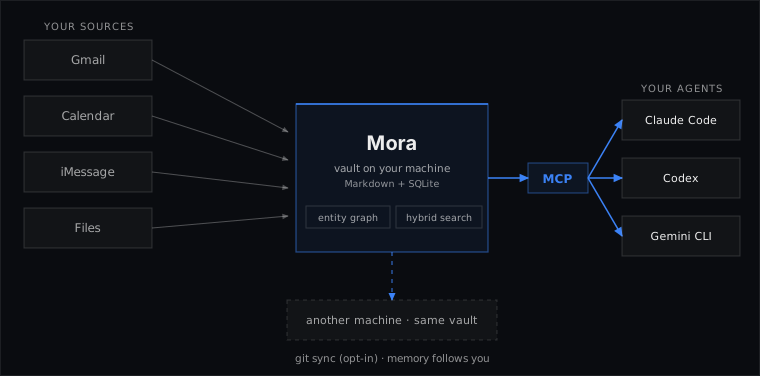
Mora indexes your Gmail (one or several accounts), Google Calendar, iMessage, Apple Calendar, and local files into a vault of Markdown files and a SQLite index on your machine, then serves it over MCP (the Model Context Protocol) to Claude Code, Codex, or any other MCP client. Point several agents at the same vault and they all answer from your history, with citations.
It runs entirely on your machine: no server, no signup, no telemetry. iMessage and Apple Calendar need macOS; Gmail, Calendar, and files also run on Linux.
What it looks like
$ mora think "what did we decide with Sam about pricing?"

Evidence (3):
  [mem_20260610_204655_f3049131] Pricing call with Sam: agreed to $29 one-time
  for the pilot; revisit a subscription tier once we cross 10 seats. He wants the
  invoice before Friday.
  ...

Gaps: none detected.
think returns cited evidence plus the gaps it found: stale results, thin coverage, a name the vault has never seen. There's no API key and no model to host; your agent does the reasoning and calls search_memory, think, and brief over MCP.
Install
curl -fsSL https://raw.githubusercontent.com/pyranthus-hq/mora/main/install.sh | sh
The script installs the release binary for your platform, clears the macOS Gatekeeper quarantine (binaries are ad-hoc signed, not notarized), and runs mora init (your vault lives at ~/vault/mora). It does not verify checksums; they are on each release if you want to check by hand. Update in place later with mora upgrade (source builds report dev and cannot self-update). Prefer to build it yourself? go install github.com/pyranthus-hq/mora/cmd/mora@latest (Go 1.25+, pure Go, no CGO).
Uninstall
curl -fsSL https://raw.githubusercontent.com/pyranthus-hq/mora/main/uninstall.sh | sh
Removes the mora binary and de-registers the MCP server from Claude Code / Codex. Your vault is preserved by default; re-run with --purge (or MORA_PURGE=1) to also delete ~/vault/mora.
Then connect your sources:
mora connect google                    # OAuth login, then backfill Gmail + Calendar (read-only; ~90 days, --since-days to widen)
mora connect google --account work     # add a second mailbox (gmail-work / calendar-work sources)
mora connect imessage                  # macOS; walks you through Full Disk Access
mora schedule install ingest-hourly    # background sync (launchd; prints a cron line on Linux)
Wire Mora into your agents (registers the local MCP server):
claude mcp add mora -s user -- mora mcp serve    # Claude Code
codex  mcp add mora -- mora mcp serve            # Codex
Any other MCP client (Gemini CLI, Cursor, custom hosts) takes the same stdio server as JSON:
{
  "mcpServers": {
    "mora": { "command": "mora", "args": ["mcp", "serve"] }
  }
}
Drop that into the client's MCP config (examples/mcp.json has a copy). Per-connector setup and options are in the guide.
No MCP? Use the shell
Every MCP tool is also a CLI command, so any agent that already has shell access can use Mora without registering the server. Paste this into the agent's instructions file (AGENTS.md, CLAUDE.md, Cursor rules):
## Memory: mora (local, read-only)

You have `mora`, a local memory CLI over my Gmail, calendars, iMessage, and files.
Before answering anything about people, past decisions, projects, or commitments,
query it first and answer from what it returns:

  mora think "<question>" --json    # cited evidence + an explicit gap check
  mora search "<query>" --json      # search the vault
  mora graph "<person>"             # one person across email, texts, and calendar
  mora brief                        # what changed and what matters lately

Cite every claim with its [stable_id]. If the evidence is insufficient, say so
plainly rather than guessing, and surface any gaps mora reports. Never invent a
memory it did not return.
The CLI siblings of every tool (mora search, mora write, mora think, ...) are in the guide.
Agent skills (optional)
A small plugin of agent-side recipes that pair with the MCP server; they teach an agent to resolve people, shared history, and calendar context from the vault before reaching for the web:
/plugin marketplace add pyranthus-hq/mora
/plugin install mora@mora
First skill: /mora:dining-concierge, for outing recommendations grounded in who's coming and where you've actually been. Skills are plain Markdown (plugins/mora); other agents can copy them into their own skills directory.
Why a local corpus
Mora keeps a persistent local corpus, so you can ask "what did I commit to, and to whom" across months and have the same context whichever assistant you use. It indexes iMessage (which has no cloud API) and handles several mail accounts at once, then serves all of it to whatever agent you use. Cloud connectors fetch from Google's APIs per query and keep nothing between calls.
| Mora | Cloud connectors | MCP Gmail servers | |
|---|---|---|---|
| Data lives | Your disk (Markdown + SQLite) | Vendor cloud | Nowhere (live fetch) |
| iMessage | Yes (local chat.db, read-only) |
No | No |
| Multiple mailboxes in one view | Yes | No | Per server |
| One person across email + texts + calendar | Yes | No | No |
| Shared by every agent (Claude, Codex, etc.) | Yes | Tied to the vendor | Per client |
| Works offline / greppable | Yes | No | No |
| Cost | $0, no Mora account | Subscription | Free |
What you get
- Plain files you own. Every email thread, text conversation, and calendar event is one Markdown file. Open them in Obsidian,
grepthem, or back them up like any folder. The SQLite index is disposable: delete it andmora index rebuildrebuilds it from the files. - Documents and PDFs. Point Mora at a folder and it indexes your notes, text files, Word documents, and text-based PDFs, including a PDF someone texts you. Add a files source.
- One view of each person.
mora graph "Sam"pulls someone together across email, texts, and calendar (including mail from different accounts) into shared threads, meetings, and the people they appear with, every line cited. Identity matching is deterministic: it merges the same mailbox written different ways (Gmail dot and +tag variants) and links different addresses only by a shared trusted name with a corroborating address. How the graph works. - Keyword and semantic search. Keyword search (BM25) is built in. Run
mora config embedder ollamato add local semantic search through Ollama. How retrieval works. - A daily brief.
mora briefshows new and updated threads, upcoming events, and stale open tasks, ranked by a per-person salience score. Filter it to one person withmora brief --entity "Riya", or build a cited prep pack for your next meeting withmora prep. - Off-device backup.
mora sync gitpushes the vault to any private git remote you control: GitHub, GitLab, self-hosted, or a bare repo on a USB stick. It pushes vault files only; your tokens and the index stay on your machine. Restore withgit cloneandmora index rebuild. Details. - Shared across agents, or used from your shell. 12 MCP tools let any MCP client search memory, read the brief, prep for a meeting (
meeting_prep), and write facts back (write_memory).mora mcp serveruns as a local stdio process, so several agents share the same vault, and every search result reports how fresh each source is. Every tool is also a plain CLI command (mora search,mora write,mora think), so the vault is just as usable from a terminal. Wiring guide.
Privacy
- Read-only at the source. Google scopes are
gmail.readonlyandcalendar.readonly; iMessage and Apple Calendar are opened read-only. Mora never sends, changes, or deletes anything in your accounts. Itswrite_memoryanddelete_memorytools only touch the local vault. - Everything on your disk. The vault, index, and OAuth tokens (
~/.config/mora/tokens/, mode 0600) live on your machine. There is no analytics endpoint. The only log is a local usage log (tool name, timing, result counts, scope, and your query text) that you can turn off withmora usage offorDO_NOT_TRACK=1. - Zero egress by default. No server, no hosting. Mora reaches the network only to sync your sources, fetch updates during
mora upgrade, and push your opt-in git backup; the optional Ollama embedder is loopback-only.mora doctorwarns if the vault is a git repo, and git-remote-gcrypt gives you an encrypted remote.
Docs
The guide covers connectors, MCP wiring, daily use, retrieval, and the cloud comparison. docs/architecture/ is the contributor spec: 13 subsystem docs with diagrams and file:line citations.
Reviews (0)
Sign in to leave a review.
Leave a reviewNo results found