qbit-vault
Health Warn
- License — License: MIT
- Description — Repository has a description
- Active repo — Last push 0 days ago
- Low visibility — Only 5 GitHub stars
Code Fail
- rm -rf — Recursive force deletion command in assets/demo/make.sh
Permissions Pass
- Permissions — No dangerous permissions requested
No AI report is available for this listing yet.
Secrets broker for coding agents: they use your secrets, they never see them. Encrypted local vault, MCP, native approval dialogs, redaction, zero-knowledge sync, TUI. By qbitdev.
QBit Vault
Agents use your secrets. They never see them.
QBit Vault by qbitdev



QBit Vault (qbit-vault) is a local secrets broker for coding agents. Claude Code, Codex and Pi / Gentle Shell can run commands that need a GITHUB_TOKEN, a DATABASE_URL or any API key, and the value never enters the model's context, the chat transcript, the session file or the provider's servers.
Why
- The value never reaches the model. The agent asks for a secret by name. The value lives in an encrypted vault and, for one command, in the environment of that one child process: not in the chat, not in the transcript, not on the provider's servers.
- You approve out of band. A native dialog, outside the chat, asks you to allow each use (once, or always in this project). Only you can grant access: there is no
granttool for the agent. - Output comes back redacted. Wherever the value appears in stdout or stderr, in any common encoding, the agent sees
[REDACTED:GITHUB_TOKEN]. - Local first. The vault is one encrypted file on your machine, with its key in your OS keychain. Syncing several machines through a server you host yourself is optional and zero-knowledge.
Install
# Linux, macOS, WSL
curl -fsSL https://github.com/qbitdevz/qbit-vault/releases/latest/download/install.sh | sh
# Windows (PowerShell)
irm https://github.com/qbitdevz/qbit-vault/releases/latest/download/install.ps1 | iex
The scripts are assets of every release (releases/latest/download/…); the copies in scripts/ are the same files. The script downloads the release for your system, checks its SHA-256 and installs qbit-vault (Linux and macOS: ~/.local/bin; Windows: added to your PATH, open a new terminal). Running it again upgrades in place. With Go 1.26+ you can use go install github.com/qbitdevz/qbit-vault/cmd/qbit-vault@latest instead. Every release also carries a build-provenance attestation you can verify with gh attestation verify, and from v1.4.0 a Minisign signature of checksums.txt (minisign -V -P <key> -m checksums.txt -x checksums.txt.minisig, key in defaults/release-key.pub); the installers verify it when minisign is installed and otherwise print the command, and qbit-vault update refuses a release without a valid signature. Options and details: docs/INSTALL.md.
First 5 minutes
- Install with the command above.
- Run
qbit-vault init(or justqbit-vault, which opens a guided setup in a terminal). It creates an empty vault in~/.qbit-vault/and connects the agents it finds. It never reads your.envfiles or environment variables. - Restart your agent so it loads QBit Vault.
- Ask for something that needs a credential ("create a GitHub release for v1.2"). A window like this opens, outside the chat; approve it:
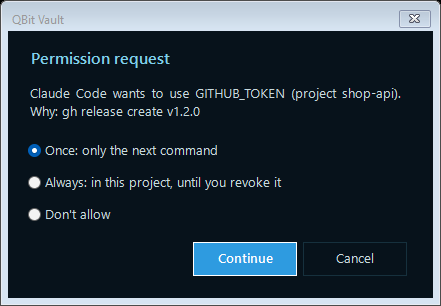
Pick Once (the default) and it asks again next time; pick Always: in this project and it stops asking in that repository until you revoke it (qbit-vault revoke). The agent never sees the value either way. A secret that does not exist yet is typed right in that dialog.
You can also store secrets yourself, with a hidden prompt (nothing is echoed or kept in your shell history):
qbit-vault set GITHUB_TOKEN --global       # usable in every folder
cd my-project
qbit-vault set DATABASE_URL --project      # only for this repository
What init does, step by step, where the master key lives (OS keychain, or a passphrase where there is none, such as WSL or a Linux server: qbit-vault unlock opens it) and how to uninstall: docs/INSTALL.md.
A terminal app too
Run qbit-vault in a terminal for the interactive app: a first-run setup, then three panes for your secrets, grants, agent hosts, the audit log, sync status and the doctor report. It shows names and metadata only; values and passphrases are typed in the hidden prompt, never in the app, and it can revoke grants but never create one.
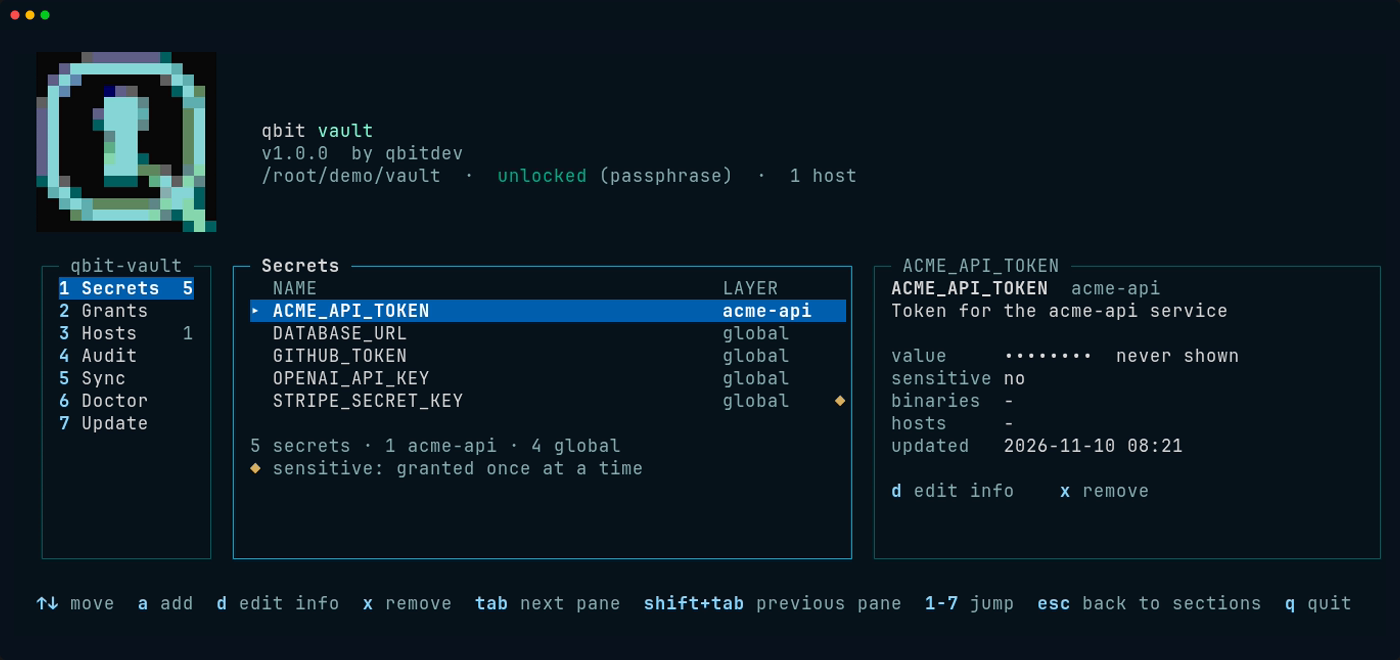
Watch a short tour of the TUI (GIF)
Reference and keys: docs/CLI.md § TUI.
How it works
sequenceDiagram
    autonumber
    actor Human
    participant Agent as Agent (model)
    participant MCP as qbit-vault mcp
    participant Dialog as Native dialog
    participant Child as Child process

    Agent->>MCP: secret_request(GITHUB_TOKEN, reason)
    MCP->>Dialog: ask for the value and a grant
    Dialog->>Human: masked input, scope choice
    Human-->>Dialog: value + approve
    Dialog-->>MCP: stored encrypted (value stays here)
    MCP-->>Agent: ok, secret://GITHUB_TOKEN
    Agent->>MCP: secret_exec(gh release create ..., GITHUB_TOKEN)
    MCP->>Child: start one process with the value in its environment
    Child-->>MCP: stdout / stderr
    MCP->>MCP: redact every active value and its encodings
    MCP-->>Agent: redacted output and exit code
The model sees tool names, secret names and redacted results. The value exists only in the dialog, the encrypted vault and the environment of that one child process.
| Tool | What the model gets back |
|---|---|
secret_list() |
Names, layers, descriptions, scopes and the rules the agent must follow. Never values. |
secret_request(name, reason) |
ok and a secret://NAME reference, after you approved or typed the value in the dialog. Never the value. |
secret_exec(command, secrets) |
Redacted stdout and stderr plus the exit code. |
secret_check(names) |
Why a service might reject a credential, without a value: per name, its length, whether it is empty, padded, multi-line or a placeholder (change-me), what its shape looks like (email, url, jwt, pem, uuid, hex, base64, number or text) and which other names in the call hold the same value. Needs a usable grant; never a value. |
secret_manage(action, name, ...) |
Proposes remove, edit, move or replace. You confirm outside the chat; the agent gets ok. |
secret_exec_start(command, secrets), secret_exec_status(job, wait_ms), secret_exec_stop(job) |
For a command that takes longer than the host allows one tool call (often 60 s): start it in the background, read its redacted output and exit code in steps, stop it. It lives in the MCP server's memory and ends with it. |
The wire contract: contracts/secrets-broker/v1/CONTRACT.md. Components and data flows: docs/ARCHITECTURE.md.
Global and project secrets
Each secret lives in one of two layers: global (every folder: a personal GITHUB_TOKEN) or project (one git repository: its DATABASE_URL, a client's deploy token). Inside a repository the project's secret wins; if the project has none, the global one is used. From repository A the agent can never see or use the secrets of repository B, and the permissions you approve are tied to the layer too. qbit-vault list shows what this folder sees; qbit-vault list --layer all shows everything. Both layers live in the same encrypted vault under ~/.qbit-vault/, never in the repository.
Everyday commands
| You want to | Command |
|---|---|
| See which secrets exist (names only, never values) | qbit-vault list |
| See what was used and who approved it | qbit-vault audit |
| Check that everything is set up | qbit-vault doctor |
| Take back every permission you gave | qbit-vault revoke --all |
| Move a secret between global and this project | qbit-vault mv NAME --to global (or --to project) |
| Open a passphrase-protected vault | qbit-vault unlock |
| Upgrade | qbit-vault update, or u in the TUI Update section when the header says update available (or run the install command again) |
| Uninstall | qbit-vault uninstall (keeps the vault) or qbit-vault uninstall --purge (deletes it) |
Every command, flag and exit code: docs/CLI.md. Most commands take --json.
Supported agents
Every agent gets the MCP server and the qbit-vault skill; Claude Code and Codex also get hooks (the output and write guard), and only Claude Code gets deny rules; Pi gets the same guard from its extension. The skill is kept current by qbit-vault sync, which the install scripts run after every upgrade.
| Agent | MCP tools | Skill | Hooks | Deny rules | Notes |
|---|---|---|---|---|---|
| Claude Code | yes | ~/.claude/skills |
pre-bash, post-bash, post-read, pre-write, user-prompt |
Read / Edit of the vault directory |
post-* redact tool output (Bash, PowerShell, Read, Grep, Glob); pre-write denies a write or edit that carries a stored value; user-prompt blocks a prompt that carries a secret; pre-bash keeps user-only commands out of the agent's shell |
| Codex | yes | ~/.agents/skills |
post-bash, pre-write (~/.codex/hooks.json) |
no | secret_exec output is already redacted; the hooks redact Bash output and deny an apply_patch that writes a stored value; Codex runs them only after you trust them in /hooks |
| Pi / Gentle Shell | yes | ~/.agents/skills (shared with Codex) |
extension | no | via mcp.json; the qbit-vault-pi extension (/vault commands, footer status, paste interception, output and write guard; docs) installs from a git tag, not npm: gentle-shell -- install git:github.com/qbitdevz/[email protected] (Pi: pi install git:github.com/qbitdevz/[email protected]); init prints that line for you to run |
Choose agents yourself with qbit-vault init --agents claude-code,codex,pi (or --agents none). OpenCode is not supported. Every config file an install touches is backed up first, and qbit-vault uninstall reverts it. Per-agent files and the hook protocol: docs/AGENT_INTEGRATIONS.md.
Sync across machines (optional)
Using QBit Vault on one machine needs no account and no server. To keep one vault on several machines, run qbit-vault-server, a small service you host yourself. The server stores ciphertext, public keys and counters only; it has nothing that decrypts them, and the client verifies every object it downloads. A vault that never runs qbit-vault remote register makes no network call.
The server image is published with every release (ghcr.io/qbitdevz/qbit-vault-server, linux/amd64 and linux/arm64). Copy deploy/compose.image.yaml to your host, then:
export QBV_SERVER_PUBLIC_URL=https://vault.example.com
docker compose -f compose.image.yaml up -d
docker compose -f compose.image.yaml exec server /qbit-vault-server invite --ttl 24h
qbit-vault remote register --server https://vault.example.com   # on the first machine
Registering shows a recovery key once; keep it offline. Other machines join with qbit-vault remote join and a pairing code you confirm on both, and a lost device can be revoked (which rotates the keys). Grants and the audit log stay on each machine. Step by step: docs/INSTALL.md; protocol, keys and failure modes: docs/REMOTE_SYNC.md.
Two commands share the word "sync".
qbit-vault syncre-applies your coding-agent registrations (after an upgrade or when an agent rewrote its config).qbit-vault remote syncsyncs your secrets between devices.
Backup without a server. qbit-vault export FILE writes one encrypted, portable copy (it asks for an export passphrase of at least 12 characters); on a new machine, qbit-vault init then qbit-vault import --from-export FILE brings every secret back with its metadata. Keep the file and its passphrase in different places, because together they are a full copy. See docs/INSTALL.md.
Security model
These are the invariants the code is tested against (AGENTS.md); the full analysis is in docs/THREAT_MODEL.md.
- The model never gets a value. No tool result, MCP response, hook output, log line, error or panic carries a secret value. Errors name the secret only.
- Nothing sensitive touches disk in the clear. Not temp files, not shell history, not the audit log.
- Setup never asks for a secret.
initcreates an empty vault and does not read your environment. - Injection is per child process. The value goes into one command's environment, not the agent's, not your shell's.
- Output is redacted. Raw values and their common encodings are removed from stdout, stderr and file content read while a grant is active.
- You approve every capture and every grant. No auto-approval; "remember" only if you choose it in the dialog.
- Config edits are reversible. Every change to an agent's config is backed up first and written atomically.
- No surprise network. No postinstall scripts, no network calls except the release download during install and the sync server you configured. Nothing that decrypts the vault ever leaves your device.
- The sync server is untrusted. Everything downloaded from it is verified before use, and recovery keys and pairing codes are shown only through the dialog, never on stdout or in logs.
Also in place: a tamper-evident audit log (qbit-vault audit --verify), grants bound to one record with a scope and a TTL, a guard that refuses env / printenv-style dump commands while secrets are injected, and per-secret allowlists of binaries and hosts.
Do not report a vulnerability in a public issue: use private vulnerability reporting, as described in SECURITY.md.
Documentation
| Document | What it is |
|---|---|
| docs/INSTALL.md | Install, upgrade, what init does step by step, several machines, uninstall |
| docs/CLI.md | Every command, flag and exit code, and the TUI |
| docs/AGENT_INTEGRATIONS.md | MCP server, skill, hooks and capture path per agent |
| docs/THREAT_MODEL.md | Assets, attackers, leak paths, controls, residual risk |
| docs/ARCHITECTURE.md | Components, data flows, process model, decisions |
| docs/STORAGE.md | Vault file format, crypto, keychain, grants, audit log |
| docs/REMOTE_SYNC.md | Multi-device sync protocol and server |
| deploy/README.md | Running the sync server image |
| docs/PRD.md | Requirements with stable IDs, scope, non-goals, implementation status |
| docs/TESTING.md | Test tiers, leak battery, Docker batteries |
| docs/ROADMAP.md | What is built and what is not (npm launcher, Homebrew, publishing the Pi extension) |
| docs/GENTLE_SHELL_EXTENSION.md | The Pi / Gentle Shell extension: what v1 ships and what is deferred |
| docs/PROPOSAL.md | The original proposal (historical) |
| contracts/secrets-broker/v1/CONTRACT.md | The wire contract and typed refusals |
| CHANGELOG.md | What changed in each release |
| design/system.md | Visual identity and design tokens |
| AGENTS.md | Instructions for the coding agent building this repo |
| odd/README.md | What odd/tasks/ is: the development logs, not user documentation |
Contributing
Contributions are welcome; the rules are in CONTRIBUTING.md. Read AGENTS.md first: the security invariants there are tested, and a change that breaks one is rejected. Found a bug? Open an issue with the output of qbit-vault doctor (it never contains a secret value). Questions and ideas go to Discussions. How contributions are reviewed: CONTRIBUTING.md § How contributions are reviewed.
License
Released under the MIT license.
QBit Vault is a personal tool by qbitdev. It is not part of Gentle AI and is not affiliated with or endorsed by the authors of Claude Code, Codex, Pi, Gentle AI or Gentle Shell; those names belong to their respective owners. It integrates with them through their public extension points.
Reviews (0)
Sign in to leave a review.
Leave a reviewNo results found