agent-html
Health Uyari
- No license — Repository has no license file
- Description — Repository has a description
- Active repo — Last push 0 days ago
- Community trust — 15 GitHub stars
Code Basarisiz
- execSync — Synchronous shell command execution in bin/cli.mjs
- process.env — Environment variable access in bin/cli.mjs
Permissions Gecti
- Permissions — No dangerous permissions requested
Bu listing icin henuz AI raporu yok.
Zero-dependency, single-file HTML design system & agent skill inspired by shadcn/ui. 100% offline, zero npm, 6 layout archetypes & atomic arsenal for LLMs.

agent-html
Zero-dependency, single-file HTML design system & agent skill for LLMs.
Inspired by shadcn/ui. 100% offline. 0 npm packages. 0 external CDNs.
Optimized for Claude Code, Pi, Codex, and Cursor.






Installation · The Problem · What You Get · The 6 Archetypes · Atomic Arsenal · Prompt Triggers · Star History
Installation & Quick Start
1-Line Install via skills (Recommended)
Install directly into your coding agent (Claude Code, Cursor, Pi, Codex, Copilot, etc.) with zero manual cloning:
# Install to current project workspace
npx skills add QingYunA/agent-html

# Or install globally across all 70+ agents on your machine
npx skills add QingYunA/agent-html -g
Try it Instantly (CLI)
No build step or Node.js server required. Explore the component gallery or scaffold a template immediately:
# Open the interactive component gallery in your browser
npx agent-html open

# Extract any raw archetype directly to a file
npx agent-html template dashboard > my-dashboard.html
npx agent-html template kanban > my-kanban.html
git clone https://github.com/QingYunA/agent-html.git ~/Code/agent-html

# Link into universal agents directory
ln -sf ~/Code/agent-html/skills/agent-html ~/.agents/skills/agent-html

# If using Claude Code or Pi:
ln -sf ../../.agents/skills/agent-html ~/.claude/skills/agent-html
ln -sf ../../../.agents/skills/agent-html ~/.pi/agent/skills/agent-html
The Problem
When asking LLMs (Claude Code, Pi, Codex, ChatGPT) to generate an HTML dashboard or report, the output usually falls into one of two traps:
- The CDN trap: The model injects
<script src="https://cdn.tailwindcss.com"></script>and external Google Fonts. It looks acceptable at first glance, but breaks completely in air-gapped corporate intranets, takes 2 seconds to parse, causes flash-of-unstyled-content (FOUC), and rots over time when CDN endpoints change. - The visual slop trap: If you forbid CDNs, the model hallucinates raw inline CSS with garish colors, harsh pure-black borders, random 30px paddings, broken alignment, and zero dark mode support.
agent-html fixes this by packaging a tight ~75-line native CSS token sheet and 6 battle-tested layout archetypes. Double-click any generated file in Finder, and it renders instantly with enterprise-grade polish.
What You Get
- Zero dependencies: No
node_modules, no npm build step, no CDN links. Every file runs offline and standalone. - Zinc-neutral design tokens: A pure CSS variable port of shadcn/ui. 1px borders, subtle radii, clean typography, and high information density.
- 6 structural layout archetypes: Scaffolds for Reports, Dashboards, Workbenches, Side-by-Side Comparisons, Timelines, and Kanban Boards ready to copy.
- Native light & dark modes: Seamless switching with CSS variables and a 5-line vanilla JS toggle.
- Closed-loop feedback: Built-in "Copy as Markdown" and "Copy Review Decisions" affordances so static HTML files never become dead ends.
- Deterministic verification linter: Includes
scripts/validate.mjsso agents self-test tag symmetry, zero-CDN compliance, and viewport setup before presenting files to humans. - 24 curated vector SVGs: Lucide-style inline vector icons with
stroke="currentColor"that adapt to font colors without font files. - Zero-CDN Pure SVG charts: Area trend curves, column distributions, multi-segment donut ratio charts, and horizontal ranking bars.
The 6 Archetypes
Rather than rigid business screens, agent-html provides 6 fundamental layout scaffolds with clear <!-- [Slot: ...] --> injection points:
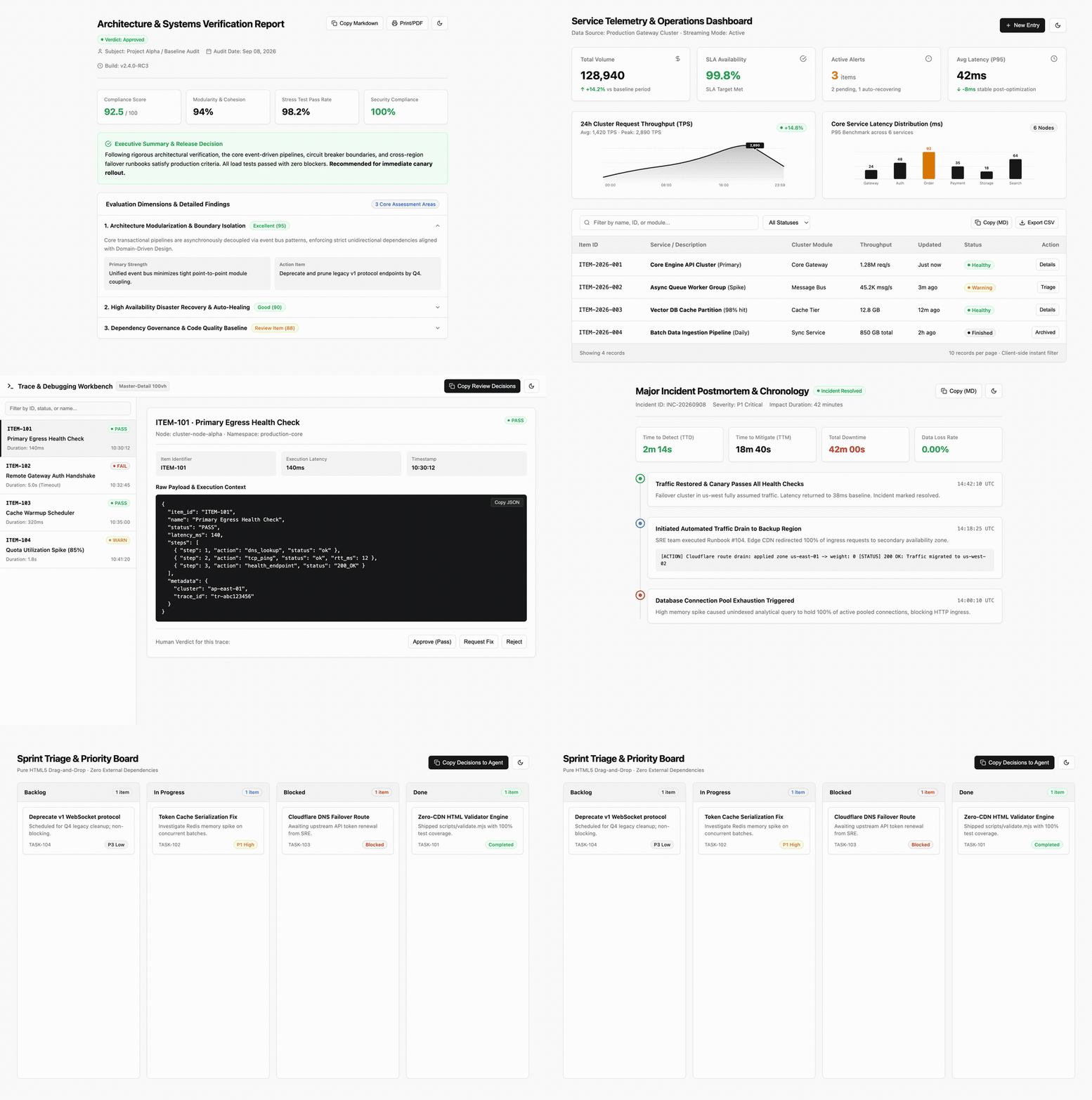
| Archetype | Template Path | Best For | Key Capabilities |
|---|---|---|---|
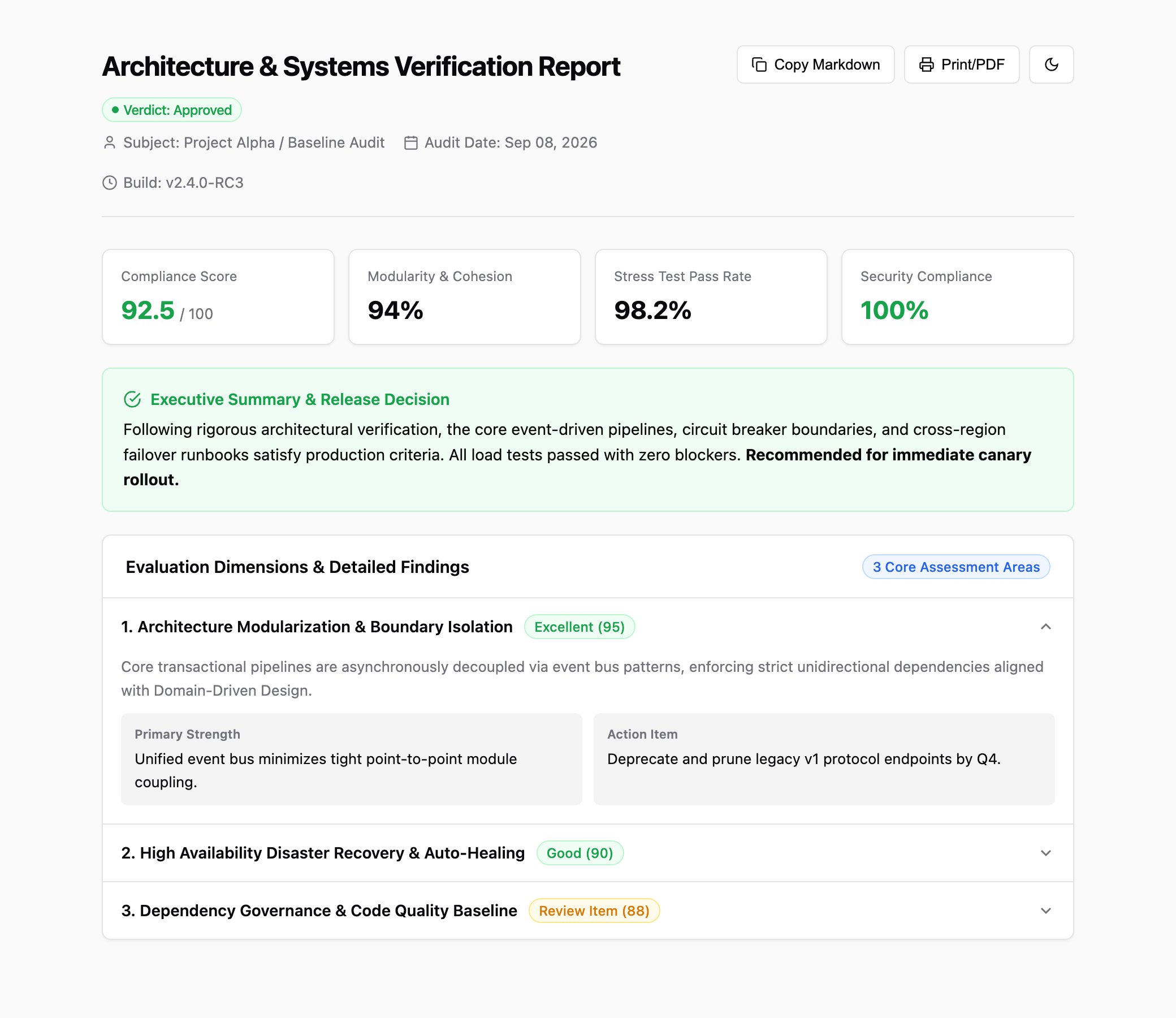
| 01. Document & Report | templates/en/report.html |
Technical reviews, RFCs, audits | TOC ScrollSpy, KPI score overview, details accordion, print CSS |
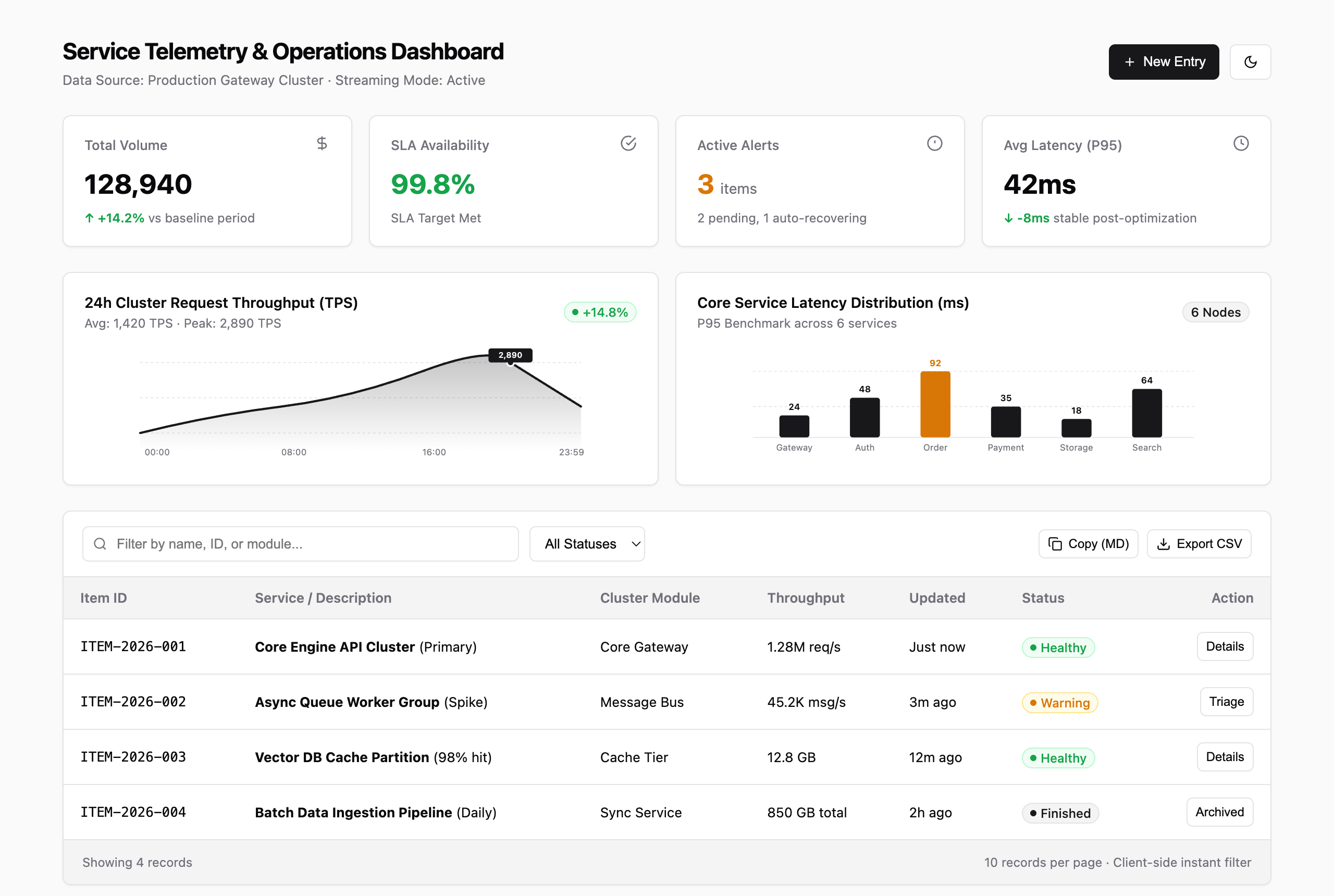
| 02. Analytics Dashboard | templates/en/dashboard.html |
Metrics monitoring, billing | 4 KPI cards, native SVG area & bar charts, filterable table |
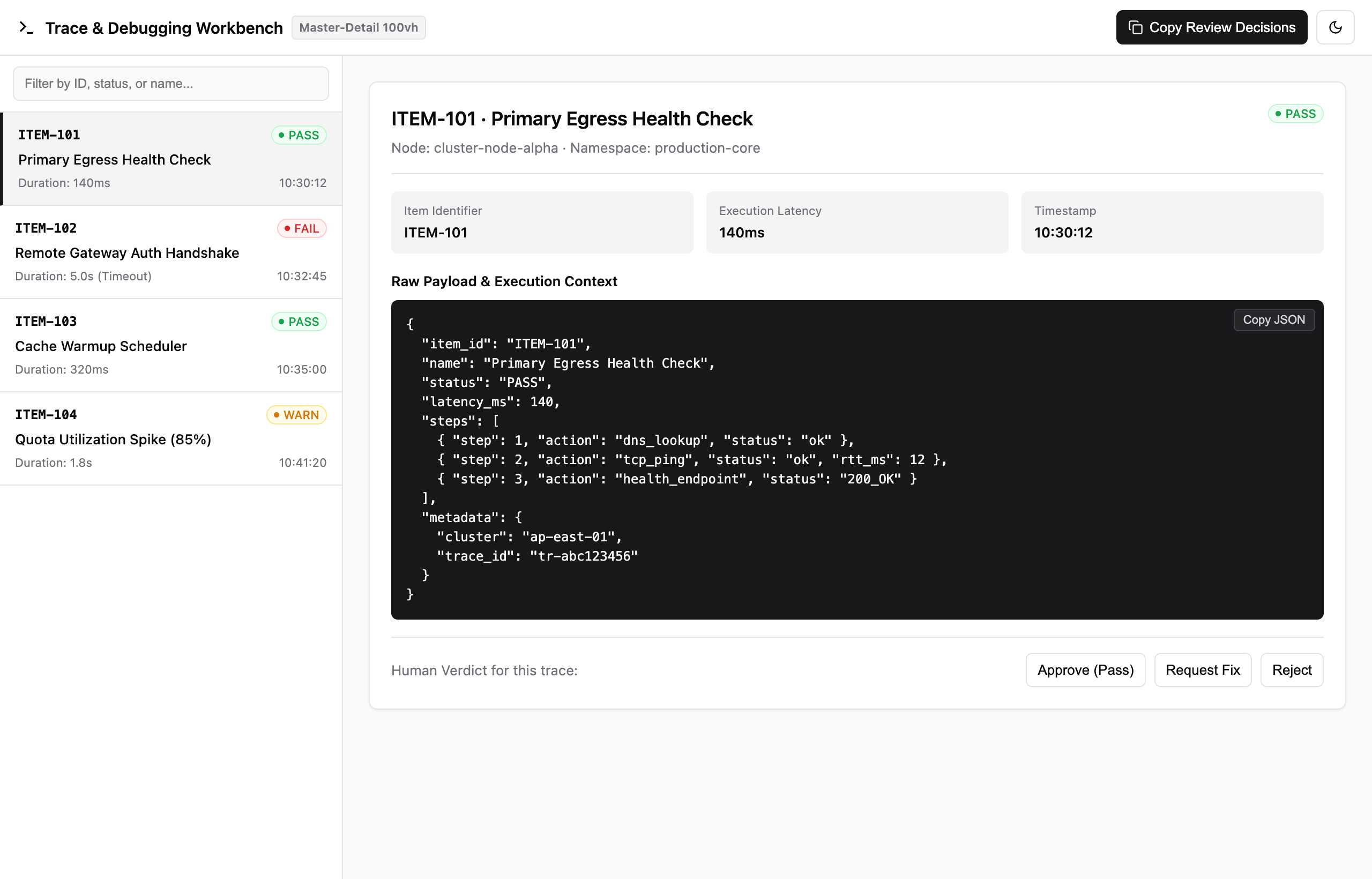
| 03. Master-Detail Workbench | templates/en/inspector.html |
Trace inspection, prompt debugging | 100vh split screen, item filtering, JSON payload viewer, review actions |
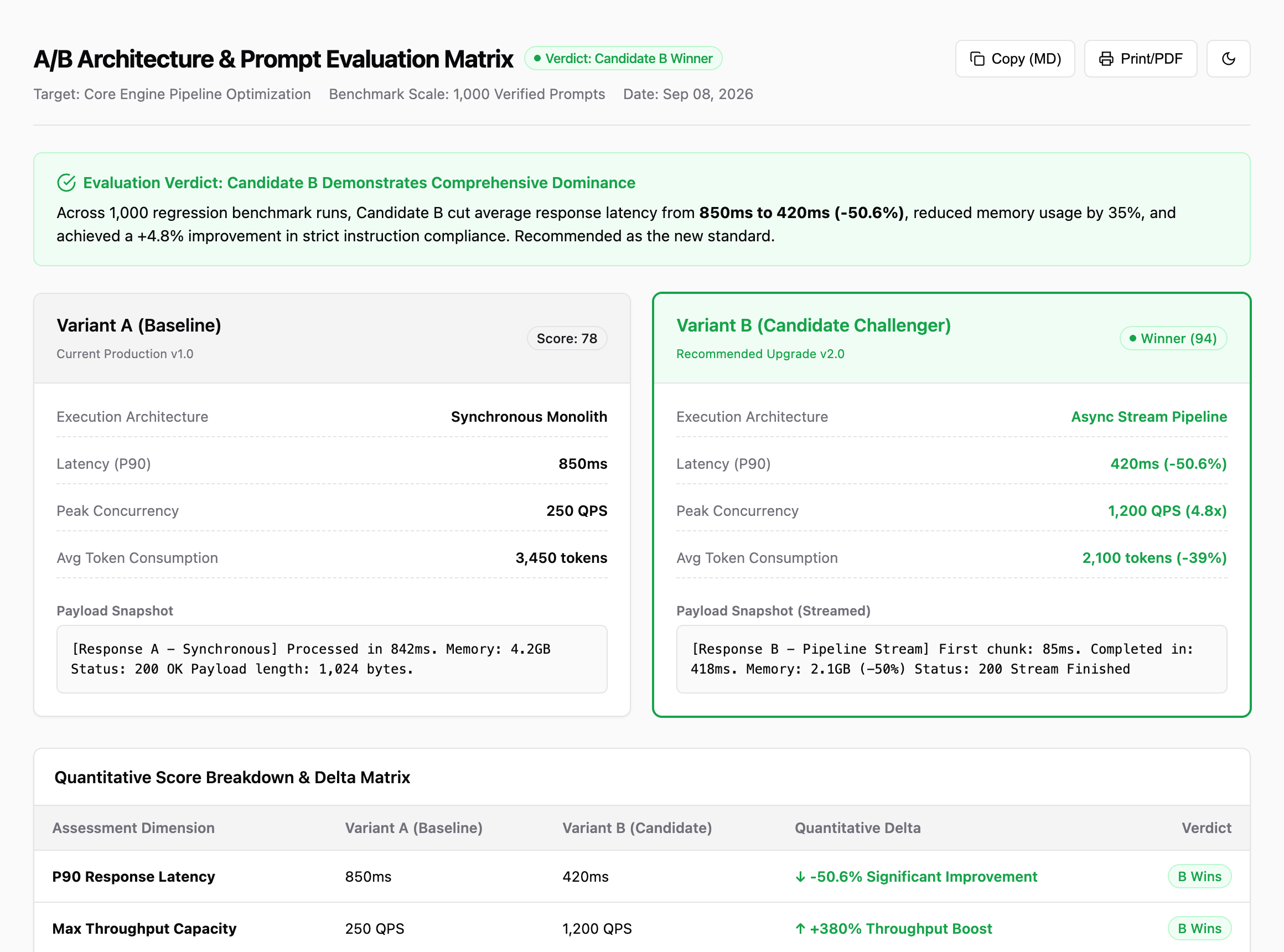
| 04. Side-by-Side Comparison | templates/en/compare.html |
Model A/B testing, prompt diffs | Dual baseline vs challenger cards, delta comparison matrix |
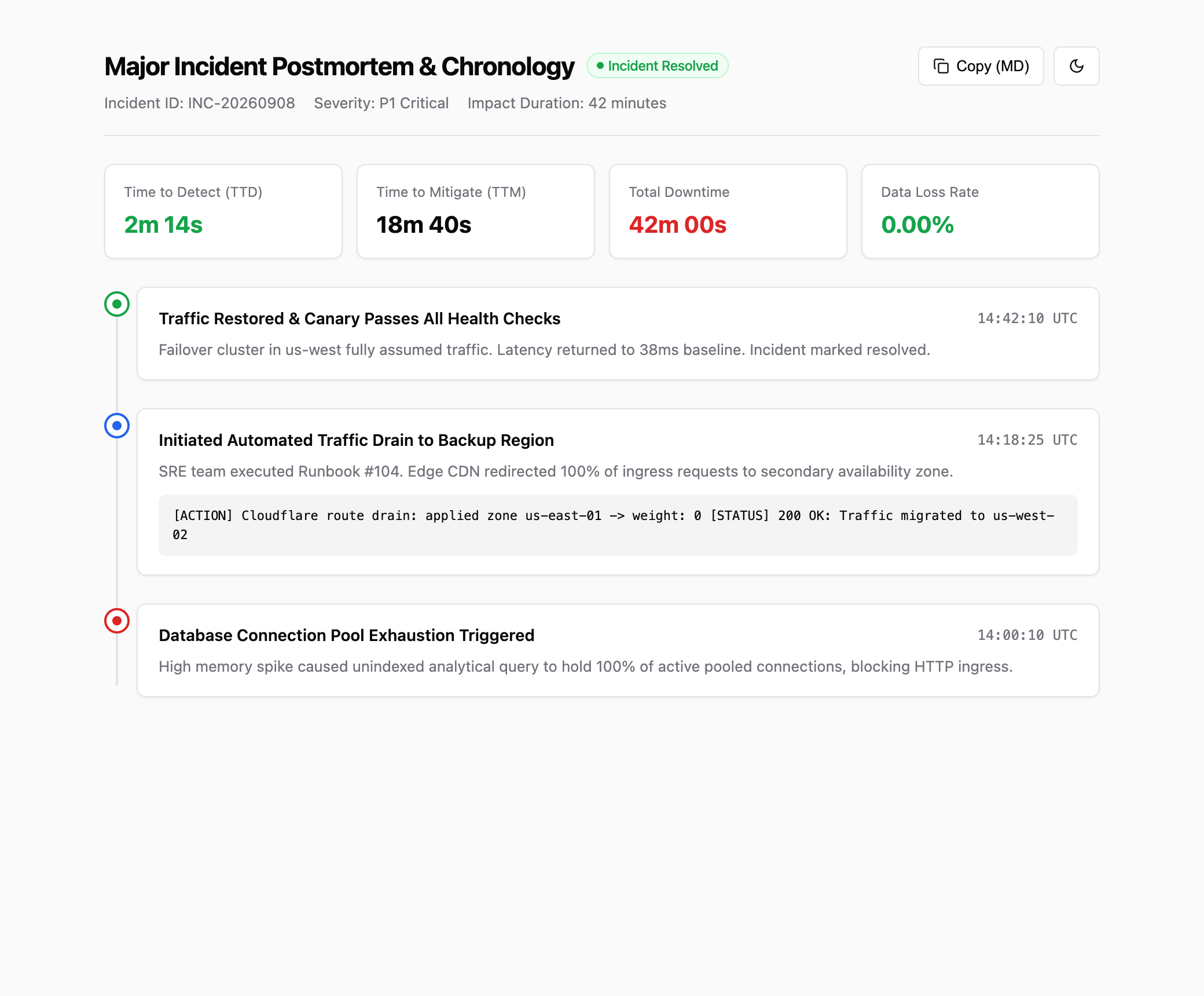
| 05. Event Timeline | templates/en/timeline.html |
Incident postmortems, changelogs | Single-track vertical timeline, status dots, diagnostic logs |
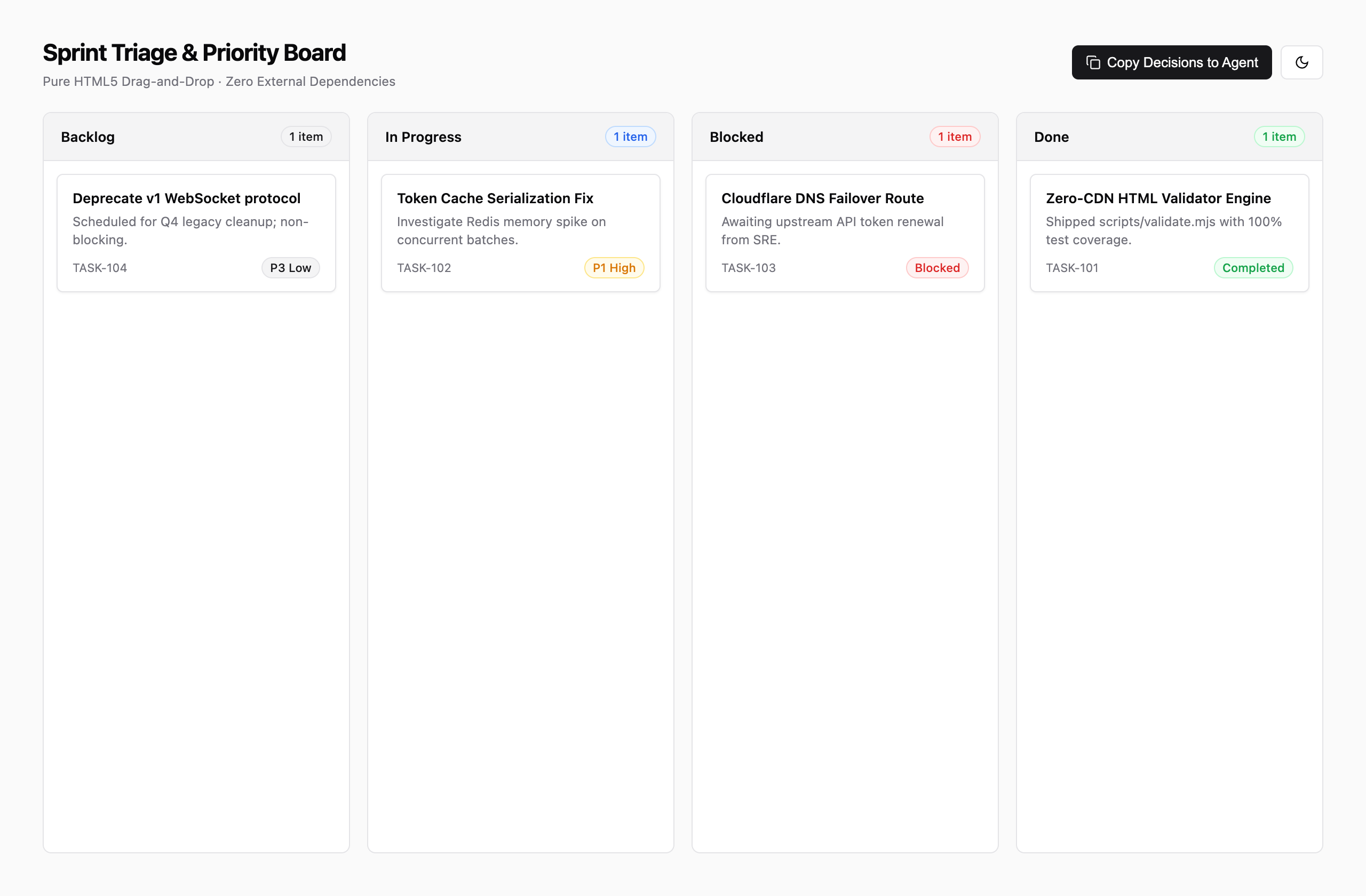
| 06. Triage Kanban | templates/en/kanban.html |
Bug triage, backlog grooming | 4-column drag & drop, status badges, agent feedback loop |
01. Document & Executive Report
02. Analytics Dashboard & Data Grid
03. Master-Detail Workbench & Inspector
04. Side-by-Side Comparison Matrix
05. Event Timeline & Incident Postmortem
06. Triage & Agile Kanban Board
Atomic Capabilities & Component Arsenal
Beyond full-page archetypes, agent-html packages production-grade atomic primitives and zero-CDN pure SVG charts. 100% offline, zero npm, zero external CDN, and instant dark mode support:
1. Button System (Buttons Matrix)

Semantic variants aligned with shadcn/ui standards, complete with :hover, :active, and :disabled micro-interactions:
| Variant | Class | Semantic Role | Common Use Case |
|---|---|---|---|
| Primary | .btn.btn-primary |
Solid high-contrast block | Submit, approve, primary CTAs |
| Secondary | .btn.btn-secondary |
Neutral subtle background | Cancel, back to list, secondary filters |
| Outline | .btn.btn-outline |
1px border stroke | Export report, copy Markdown, view details |
| Ghost | .btn.btn-ghost |
Transparent, hover-only fill | Table row actions, breadcrumbs, link buttons |
| Destructive | .btn.btn-destructive |
Semantic warning red | Block release, drop database, abort workflow |
| With Icon | .btn with inline <svg> |
Icon + text pair | Download PDF, refresh status, search |
| Icon Button | .btn.btn-icon |
32x32px square | Theme toggle, settings, collapse trigger |
<!-- Ready-to-copy button snippets -->
<button class="btn btn-primary">Approve Release</button>
<button class="btn btn-secondary">Previous Step</button>
<button class="btn btn-outline btn-sm">
  <svg width="13" height="13" viewBox="0 0 24 24" fill="none" stroke="currentColor" stroke-width="2"><path d="M21 15v4a2 2 0 0 1-2 2H5a2 2 0 0 1-2-2v-4"/><polyline points="7 10 12 15 17 10"/><line x1="12" y1="15" x2="12" y2="3"/></svg>
  <span>Export PDF</span>
</button>
<button class="btn btn-destructive btn-sm">Block Deployment</button>
2. Zero-CDN Pure SVG Charts

Zero external JS chart libraries required. Uses standard inline SVG for crisp, Retina-sharp rendering that never breaks:
| Chart Type | Native Mechanism | Key Advantage | Typical Use Cases |
|---|---|---|---|
| 📈 Area Trend | Bezier curves with linearGradient |
Zero load time, smooth gradient | 24h throughput (TPS), latency trends |
| 📊 Column Histogram | Rounded rect with data value labels |
High contrast, intuitive comparison | P95/P99 latency distribution, error codes |
| 🍩 Multi-Segment Donut | circle with stroke-dasharray offsets |
Pure CSS variable math, zero JS | Node health ratio, resource allocations |
| 📉 Dual-Line Ingress/Egress | Solid line vs dashed comparator line | Dual-metric temporal correlation | Inbound vs outbound traffic, baseline vs test |
| 📑 Horizontal Ranking Bar | Pill progress bars with semantic colors | Maximum space efficiency | Slow query ranking, TTFT by model |
| ⏱️ Semi-Circle Gauge | Semi-circle stroke arc with gradient | Immediate threshold alert | Memory watermark, API rate-limit quota |
A. Gradient Area Trend Curve
<svg viewBox="0 0 400 95" style="width: 100%; height: 85px; overflow: visible;">
  <defs>
    <linearGradient id="areaGrad" x1="0%" y1="0%" x2="0%" y2="100%">
      <stop offset="0%" stop-color="var(--chart-indigo)" stop-opacity="0.25"/>
      <stop offset="100%" stop-color="var(--chart-indigo)" stop-opacity="0.0"/>
    </linearGradient>
  </defs>
  <path d="M 0 70 Q 55 30, 110 52 T 210 36 T 310 18 T 400 28 L 400 95 L 0 95 Z" fill="url(#areaGrad)"/>
  <path d="M 0 70 Q 55 30, 110 52 T 210 36 T 310 18 T 400 28" fill="none" stroke="var(--chart-indigo)" stroke-width="2.5" stroke-linecap="round"/>
  <circle cx="210" cy="36" r="3" fill="var(--card)" stroke="var(--chart-indigo)" stroke-width="2"/>
  <circle cx="310" cy="18" r="3.5" fill="var(--chart-indigo)" stroke="var(--card)" stroke-width="2"/>
</svg>
B. Multi-Segment Donut Chart
<svg viewBox="0 0 160 160" style="width: 120px; height: 120px;">
  <circle cx="80" cy="80" r="54" fill="none" stroke="var(--secondary)" stroke-width="18"/>
  <circle cx="80" cy="80" r="54" fill="none" stroke="var(--chart-emerald)" stroke-width="18" stroke-dasharray="220.5 339.3" stroke-dashoffset="0" transform="rotate(-90 80 80)"/>
  <circle cx="80" cy="80" r="54" fill="none" stroke="var(--chart-amber)" stroke-width="18" stroke-dasharray="84.8 339.3" stroke-dashoffset="-220.5" transform="rotate(-90 80 80)"/>
  <circle cx="80" cy="80" r="54" fill="none" stroke="var(--chart-rose)" stroke-width="18" stroke-dasharray="33.9 339.3" stroke-dashoffset="-305.3" transform="rotate(-90 80 80)"/>
  <text x="80" y="77" text-anchor="middle" font-size="16" font-weight="700" fill="var(--card-fg)">1,280</text>
  <text x="80" y="93" text-anchor="middle" font-size="9" fill="var(--muted-fg)">Nodes</text>
</svg>
3. 24 Curated Engineering Vector Icons

Designed with stroke="currentColor" to automatically inherit font size and color in light and dark modes:
| Category | Curated Icons | Engineering Context |
|---|---|---|
| System & Shell | Search · Terminal · Settings · Activity |
Global search, CLI output, settings, healthcheck |
| DevOps & Git | Branch · Commit · PR · Bug |
Code reviews, trace audits, changelog releases |
| Status & Verdicts | Check · Alert · Shield · Lock |
Pass badges, critical blockers, security audits |
| Actions & Data | Copy · Download · Calendar · Filter · Refresh |
Copy back to Agent, PDF export, date ranges |
| Infrastructure | Server · Database · CPU · External |
Host metrics, slow queries, cluster CPU, RFC docs |
<!-- Automatic theme & color inheritance -->
<span style="display: inline-flex; align-items: center; gap: 6px; color: var(--ok);">
  <svg width="14" height="14" viewBox="0 0 24 24" fill="none" stroke="currentColor" stroke-width="2"><polyline points="20 6 9 17 4 12"/></svg>
  <span>All test suites passing</span>
</span>
Prompt Triggers
Once installed, prompts like:
- "Generate a standalone HTML dashboard for our cluster metrics with a trend chart"
- "Create an executive evaluation report for candidate John Doe as a single file"
- "Build a side-by-side prompt comparison matrix in HTML"
- "Don't write a wall of markdown, give me a clean single-file visual report for this PR review"
will automatically trigger the agent-html skill and produce clean, zero-dependency, self-contained files.
Atomic Components & Design Reference
All atomic HTML slots (buttons, badges, callouts, KPI stat cards), 24 currentColor vector SVGs, zero-CDN pure SVG charts, and vanilla interaction scripts are documented in skills/agent-html/references/components.md and live-previewed in index.html.
Star History
Community
Join the discussion and share your feedback on LINUX DO.
License
MIT © 2026 QingYunA
Yorumlar (0)
Yorum birakmak icin giris yap.
Yorum birakSonuc bulunamadi