sp-context
Health Uyari
- License — License: MIT
- Description — Repository has a description
- Active repo — Last push 0 days ago
- Low visibility — Only 9 GitHub stars
Code Uyari
- process.env — Environment variable access in scripts/fix-filenames.ts
- process.env — Environment variable access in scripts/fix-links.ts
Permissions Gecti
- Permissions — No dangerous permissions requested
This tool is a CLI and MCP server that provides AI coding agents with persistent memory. It uses a local Git repository and BM25 search to let agents access team knowledge, architecture decisions, and playbooks without requiring a vector database.
Security Assessment
Overall risk: Low. The tool does not request dangerous permissions or make external network requests. It operates entirely local-first, storing and retrieving files directly from your own Git repository. There is no evidence of hardcoded secrets. The automated scan did flag two warnings for environment variable access inside script files (`scripts/fix-filenames.ts` and `scripts/fix-links.ts`). While this is standard practice for utilities handling file paths, you should briefly verify how those variables are used before running them. The setup also requires adding a bash hook to your AI client's settings, which executes shell commands on session start. This is completely normal for injecting context, but users should always inspect custom shell scripts before adding them to their system startup routines.
Quality Assessment
The project is very new and currently has low community visibility, reflected by its 9 GitHub stars. However, it is under active development, with the most recent code pushed just today. The repository is properly documented with a clear, comprehensive README and is protected by a standard MIT license, which is excellent for open-source adoption.
Verdict
Use with caution — the tool is well-structured, local-first, and safe, but its low community adoption means it has not yet been widely battle-tested.
Give every AI agent persistent memory of your team's knowledge. No vector DB, no RAG — just Git + BM25 + 114 tokens per session.
sp-context
Your AI agent starts every session knowing nothing about your team. This fixes that.
sp-context is a CLI that gives any AI coding agent (Claude Code, Codex, Cursor, etc.) persistent access to your team's knowledge — decisions, architecture, playbooks, lessons learned — through a simple Git repo.
No vector database. No embeddings. No RAG pipeline. Just Git + BM25 + about 100 tokens per session for the catalog overview.
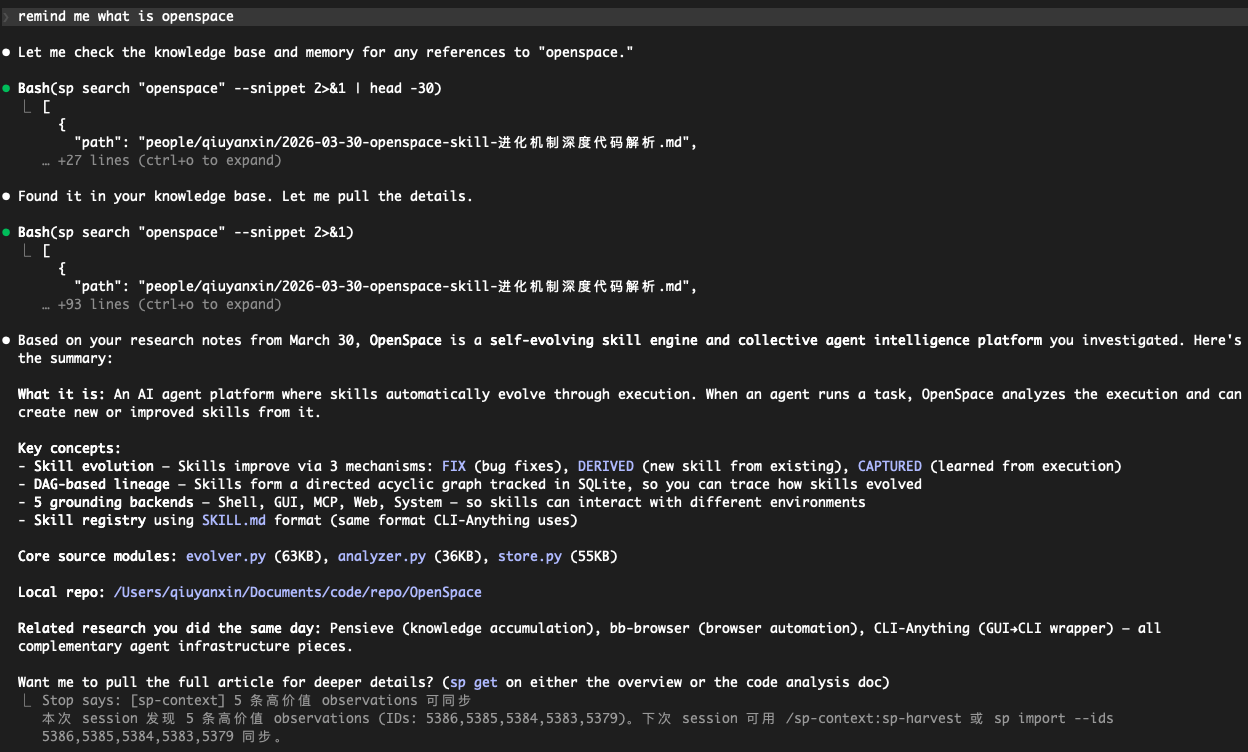
Ask your agent anything → it searches your knowledge base → returns the answer with sources.
Why not RAG / vector DB / MCP?
| Approach | sp-context |
|---|---|
| Vector DB + embeddings | Git repo + BM25 search |
| MCP server (schema overhead) | CLI (zero schema, any agent) |
| Hosted service (vendor lock-in) | Local-first, your own Git repo |
| Complex infra to maintain | bun install and done |
| Costs money at scale | Free forever |
Progressive loading: On session start, a hook injects a short directory overview (on the order of ~100 tokens). Your agent knows what knowledge exists without loading it all. It pulls full docs on demand via sp get.
Quick Start
# 1. Install
git clone https://github.com/qiuyanxin/sp-context.git ~/sp-context-plugin
cd ~/sp-context-plugin && bun install

# 2. Initialize your knowledge repo
sp init ~/my-team-context
# Creates a Git repo with starter templates: company mission, tech stack, glossary

# 3. Put `sp` on your PATH (pick one)
cd ~/sp-context-plugin && bun link          # recommended: global `sp` command
# or: echo 'alias sp="bun run ~/sp-context-plugin/src/cli.ts"' >> ~/.zshrc && source ~/.zshrc

# 4. Verify
sp --version
sp search "architecture"
Wire it to Claude Code (optional)
Add to ~/.claude/settings.json:
{
  "hooks": {
    "SessionStart": [{
      "matcher": "",
      "hooks": [{
        "type": "command",
        "command": "$HOME/sp-context-plugin/hooks/session-start.sh",
        "timeout": 5000
      }]
    }]
  }
}
Now every Claude Code session starts with your team's context automatically loaded.
Commands
# ── Read ──
sp search <query>                        # BM25 + CJK search
sp search <query> --type <t> --tags a,b  # Filter by type / tags
sp search <query> --limit 20 --mode or   # Max hits; OR = any term matches
sp search <query> --snippet              # Keyword context snippets
sp get <path>                            # Read full document
sp list <category> [--project <name>]      # Browse: context, decisions, …, clients, people

# ── Write ──
sp push --title <t> --type <type> --content <text>   # Add knowledge (auto-dedup)
sp push --title <t> --type <type> --file <path>      # Body from file (or stdin)
sp push --title <t> --type status --ttl 30d          # TTL → expiry in frontmatter
sp push --title <t> --type personal --category notes # people/ sub-folder (research, drafts, notes)

# ── Claude-mem ──
sp import --query "auth" --limit 20                  # Search observations → import
sp import --ids 101,102                                # Import by observation IDs

# ── Governance ──
sp doctor                                # Quality check (duplicates, stale, broken links)
sp schema                                # Introspect types, tags, stats
sp gc [--yes|-y]                         # Archive expired docs

# ── File ops ──
sp add <file|dir> [--to <path>] [--yes]  # Add local files to knowledge repo
sp delete <path>                         # Delete document (alias: sp rm)
sp move <path> --to <dir>                # Move document (alias: sp mv)

# ── Sync ──
sp sync                                  # Pull + rebuild index
sp config list|add|switch                # Manage multiple repos
How It Works
Progressive Loading (saves tokens)
Session start  → Tier 0: hook injects directory overview (~100 tokens)
On-demand      → Tier 1: sp search returns summaries (~95 tokens/hit)
Deep read      → Tier 2: sp get loads full document
Search Engine
- BM25 ranking with field weights: title(5x) > tags(3x) > keywords(2.5x) > summary(1.5x)
- CJK bigram — Chinese/Japanese/Korean search without a dictionary
- Prefix + fuzzy matching — typos are forgiven
- Full-text fallback — if index misses, scans raw markdown
- Content dedup — MD5 check on push, no duplicates
Document Types
| Type | Directory | What goes here |
|---|---|---|
reference |
context/ |
Company info, product specs, competitors |
decision |
decisions/ |
Architecture, product, business decisions |
learning |
experience/ |
Lessons learned, best practices |
meeting |
meetings/ |
Meeting notes |
status |
plans/ |
Plans, progress, weekly updates |
playbook |
playbook/ |
SOPs, workflows |
personal |
people/ |
Personal workspace (optional --category for sub-folders) |
sp list uses the same top-level folders plus clients (clients/) for account- or client-scoped docs (files still use normal frontmatter type).
Document Links
links:
  - type: based-on
    target: context/company.md
    evidence: "Product positioning based on company strategy"
  - type: leads-to
    target: plans/sprint-plan.md
  - type: related
    target: context/competitors/wix.md
Data Governance
- sp doctor — 8 checks: duplicates, tag casing, stale docs, missing fields, empty dirs, broken links, unused docs, missing link evidence
- sp schema — Agent introspection: available types, existing tags with frequency, usage rankings
- sp gc — Scan
expiresfield, batch-archive expired docs - Usage tracking —
sp get/sp searchauto-record read counts and search hits
Unix Philosophy
Everything composes through pipes:
# Search → extract path → read full doc
sp search "Stripe" | jq -r '.[0].path' | xargs sp get

# List all decision titles
sp list decisions | jq -r '.[].title'

# Count docs by type
sp schema | jq '.stats.by_type'
TTY → human-readable output. Pipe → auto JSON. --json → force JSON.
Claude Code Skills
If installed as a Claude Code plugin, four skills are available (slash commands use the plugin namespace):
/sp-context:sp-setup— Check dependencies and guide installation/sp-context:sp-quick— Low-friction one-line knowledge capture (AI auto-infers type/tags)/sp-context:sp-harvest— Batch sync high-value knowledge from claude-mem/sp-context:sp-health— Knowledge quality check + auto-fix
Self-Hosting Sync Server
For team sync beyond Git push/pull:
cd ~/sp-context-plugin   # or your clone path
export SP_CONTEXT_REPO=~/my-team-context
export SP_API_KEY="your-secret"           # optional; see below
export SP_WEBHOOK_SECRET="github-secret"  # optional; verify GitHub X-Hub-Signature-256 on /webhook
export PORT=3100
bun run src/http.ts
Endpoints: GET /health — liveness; POST /webhook — GitHub push (optional HMAC via SP_WEBHOOK_SECRET); POST /sync — trigger pull + index rebuild. A 5-minute timer and startup also call the same sync logic.
Environment: SP_API_KEY vs SP_WEBHOOK_SECRET
| Variable | Who sets it | What it protects |
|---|---|---|
SP_API_KEY |
You (any strong random string; the project does not generate it). Example: openssl rand -hex 32 |
Only POST /sync. If set, clients must send Authorization: Bearer <same value>. If unset, /sync accepts requests without that header (fine for local dev; do not expose that to the internet). |
SP_WEBHOOK_SECRET |
Same idea — you copy GitHub’s webhook “Secret” into this env var | Only POST /webhook signature verification (X-Hub-Signature-256). Unrelated to SP_API_KEY. |
Example (with SP_API_KEY set):
curl -s -X POST http://localhost:3100/sync \
  -H "Authorization: Bearer your-secret" \
  -H "Content-Type: application/json" \
  -d '{}'
The sp CLI does not read SP_API_KEY; it is only for the optional HTTP sync server.
Requirements
License
MIT
Yorumlar (0)
Yorum birakmak icin giris yap.
Yorum birakSonuc bulunamadi