ely-tea-party
Health Pass
- License — License: MIT
- Description — Repository has a description
- Active repo — Last push 0 days ago
- Community trust — 11 GitHub stars
Code Fail
- process.env — Environment variable access in assets/hooks/opencode.js
- process.env — Environment variable access in assets/hooks/pi.ts
- rm -rf — Recursive force deletion command in scripts/linux-tar.sh
- rm -rf — Recursive force deletion command in scripts/linux.sh
Permissions Pass
- Permissions — No dangerous permissions requested
No AI report is available for this listing yet.
A terminal where your coding agents come to tea: each session's agent is an animated chibi girl showing what it's doing. Claude Code, Codex, Gemini, Kimi, Grok, OpenCode and more. Rust + GPUI, fork of ELYTerminal.
Ely Tea Party
A terminal where your coding agents come to tea.
Each session's agent shows as an animated chibi girl who does what it does:
types while it works, reads while it searches, raises her hand when it waits for you, and naps when it's done.





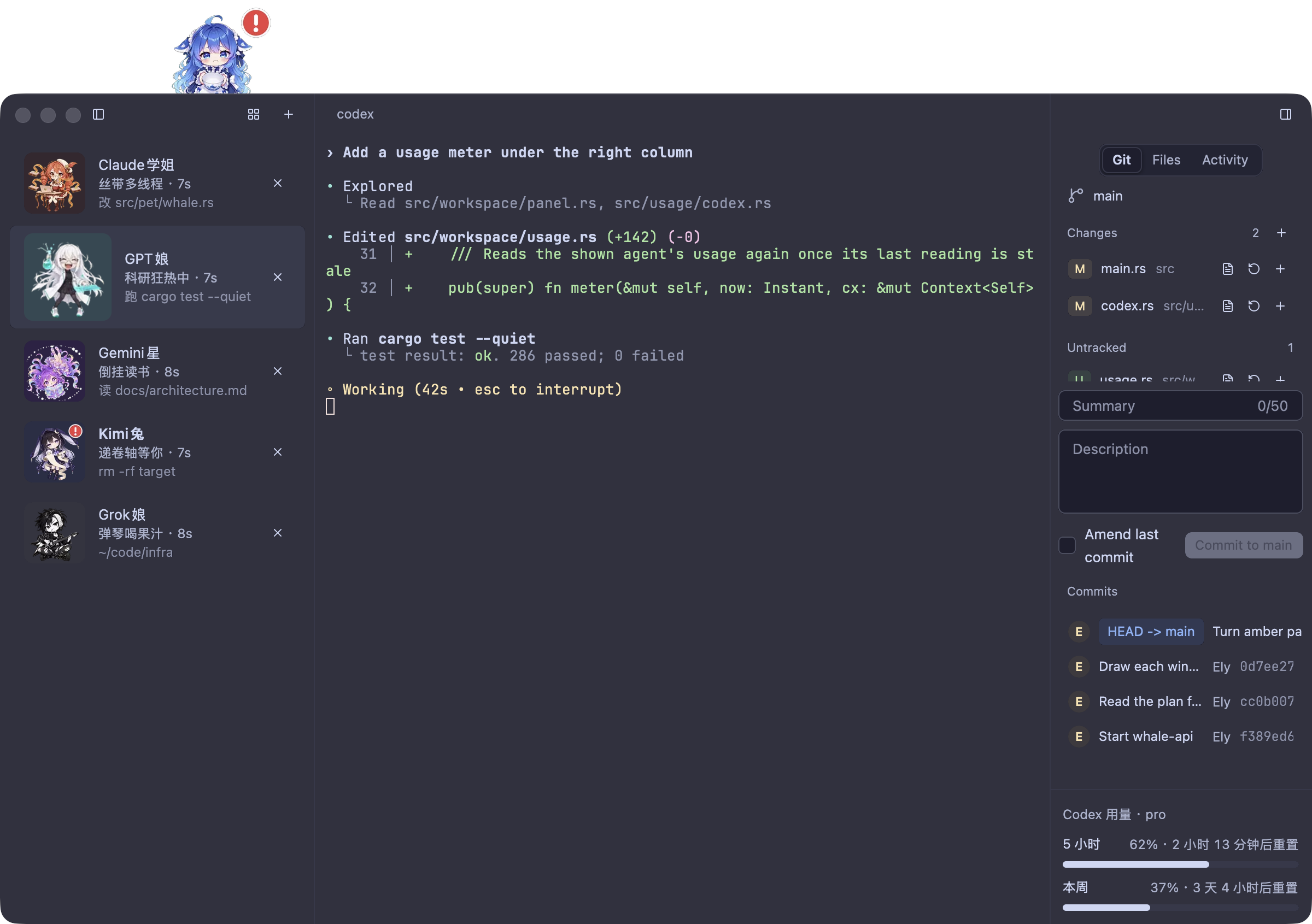
Ely Tea Party is a fork of ELYTerminal by Zachary Zhang, made with their permission. The terminal, its engine and its design are theirs; this fork adds one opinion on top: a terminal for running coding agents, where a glance at the left column tells you who is working, who is thinking and who is waiting for you.
Meet the party
 Claude学姐 claude |
 GPT娘 codex |
 鲸鱼娘 dscode deepseek |
 Grok娘 grok |
 Kimi兔 kimi |
 Gemini星 gemini agy |
 Pi酱 pi omp |
 OpenCode娘 opencode |
Each girl has eight animations: working, researching, her special move, slacking off, thinking, waiting for you (with a red "!"), idle and asleep.
Highlights
- 🫖 Characters that know what their agent does. With zero setup a character appears for any agent in a session's foreground. One command installs hooks for every agent you have, and then her row says exactly what it's doing:
改 src/pet/whale.rs,跑 cargo test,递卷轴等你. At the moments that matter she says a line of her own. - 🐋 The whale girl peeks over your window. She follows your sessions: busy at her laptop while an agent works, a hand up while one waits for you, a water spout when it finishes. Leave the app alone and she sneaks a snack, slacks off with chips, and after five minutes falls asleep.
- 📊 Your plan's usage, right there. The right column's foot shows how much of the shown agent's subscription is left: Claude Code's 5-hour and weekly windows, Codex's windows and credits, and when each resets.
- 🍰 The tea party. Cmd+Shift+O shows every session as a card at one table, so you see who needs you at a glance.
- 🗄️ A drawer under every session. Cmd+J opens your own shell under the agent's, in the same folder, for the odd command.
- ♻️ Sessions come back. Quit and reopen: every session returns to its folder, and each agent resumes its conversation.
- 📜 An activity timeline. The right column's Activity tab lists the shown agent's steps: each prompt, each tool and how long it took, each question.
- 🖥️ A real terminal underneath, on
alacritty_terminal: truecolor, the kitty keyboard protocol, input methods, OSC 8 links, prompt marks and jumps, system notifications, Git and Files panels, blur and 14 themes, on macOS, Windows and Linux.
Install
Grab the latest build from Releases.
From 0.3.4 on, the app checks Releases itself, unless Settings › Terminal › Check for updates automatically is off: when a newer version is out, a button in the title bar says so. On macOS one press downloads it, checks its signature and puts it in place, and a second press restarts into it; on Windows and Linux the button opens the release's page.
| Platform | Build | |
|---|---|---|
| macOS 11+, Apple silicon | ely-tea-party-VERSION.dmg |
Signed with Developer ID and notarized: open it and drag Ely Tea Party into Applications. |
| Windows 10+, x86_64 | ely-tea-party-VERSION-windows-x86_64.zip |
Unsigned: unzip and run ely-tea-party.exe; if SmartScreen stops it, press More info, then Run anyway. |
| Linux x86_64, glibc 2.35+ | ely-tea-party-VERSION-linux-x86_64.tar.gz |
Needs libxkbcommon, libxkbcommon-x11 and libxcb; see below. |
tar -xzf ely-tea-party-VERSION-linux-x86_64.tar.gz
cd ely-tea-party-VERSION-linux-x86_64
install -Dm755 ely-tea-party -t ~/.local/bin
install -Dm644 net.toddzheng.ely-tea-party.desktop -t ~/.local/share/applications
install -Dm644 net.toddzheng.ely-tea-party.svg -t ~/.local/share/icons/hicolor/scalable/apps
The desktop entry runs ely-tea-party, so ~/.local/bin must be on PATH. Characters show on macOS and Linux; Windows does not detect agents yet.
Hook up your agents
Characters work out of the box: once a second each session's foreground job is read (node …/codex and npx @openai/codex included), and an agent there gets its character, guessed busy while it draws and idle when quiet. For the exact state, install the hooks:
ely-tea-party hooks install              # every agent found on PATH
ely-tea-party hooks install codex kimi   # or just these
It covers Claude Code, Codex, Gemini, Antigravity, Grok, Kimi Code and dscode, plus plugins for OpenCode, Pi and oh-my-pi. Each file it changes is backed up first as NAME.ely-tea-party.bak, and running it again changes nothing. The hooks do nothing in any other terminal. On macOS, the app's command line is inside the bundle: /Applications/Ely\ Tea\ Party.app/Contents/MacOS/ely-tea-party.
The whale girl

At rest she just stands there. After a minute with nothing happening she sneaks a snack and slacks off by turns, and after five she falls asleep. Typing in a terminal, a click in the window or any change in your sessions wakes her; click her for her special move, or drag her along the edge to move her. Settings › Terminal › Mascot hides her, and Who peeks brings back upstream's Ely in her place.
Keys
Settings › Terminal lists them all, as your platform binds them.
| macOS | Windows and Linux | |
|---|---|---|
| New session | Cmd+T | Ctrl+Shift+T |
| Close session | Cmd+W | Ctrl+Shift+W |
| Session 1 to 8, last | Cmd+1…8, 9 | Alt+1…8, 9 |
| Next, previous session | Ctrl+Tab, Ctrl+Shift+Tab | the same |
| Jump to an agent waiting for you | Cmd+Shift+U | Ctrl+Shift+U |
| Tea party | Cmd+Shift+O | Ctrl+Shift+O |
| Drawer | Cmd+J | Ctrl+Shift+J |
| Sessions column, right column | Cmd+B, Cmd+Alt+B | Ctrl+Shift+B, Ctrl+Shift+Alt+B |
| Previous, next prompt | Cmd+↑, Cmd+↓ | Ctrl+Shift+↑, Ctrl+Shift+↓ |
| Copy, paste | Cmd+C, Cmd+V | Ctrl+Shift+C, Ctrl+Shift+V; on Windows Ctrl+V too |
| Select all, find | Cmd+A, Cmd+F | Ctrl+Shift+A, Ctrl+Shift+F |
| Bigger, smaller, reset size | Cmd+=, Cmd+-, Cmd+0 | Ctrl+=, Ctrl+-, Ctrl+0 |
| Open a link | Cmd+click | Ctrl+click |
| Settings | Cmd+, | Ctrl+, |
| Quit | Cmd+Q | Ctrl+Shift+Q |
Settings
Every setting has a control in the settings window, which saves each change at once to settings.json:
- macOS:
~/Library/Application Support/ely-tea-party/settings.json - Linux:
$XDG_CONFIG_HOME/ely-tea-party/settings.json, else~/.config/ely-tea-party/settings.json - Windows:
%APPDATA%\ely-tea-party\settings.json
A file that does not parse, or holds a value out of range, stops the start with an error naming the file and the field; the app never overwrites it. Ely Tea Party keeps its own settings and app id (net.toddzheng.ely-tea-party), so it runs beside ELYTerminal.
Build from source
Rust 1.95.0, which rust-toolchain.toml pins; rustup installs it on the first build.
cargo run --release
On Linux, install the libraries gpui links first. On Debian and Ubuntu:
sudo apt-get install pkg-config libwayland-dev libxkbcommon-dev libxkbcommon-x11-dev \
  libxcb1-dev libx11-xcb-dev libfontconfig-dev libfreetype-dev
Each platform's script builds its release in target/release: scripts/mac-app.sh builds Ely Tea Party.app and a disk image (DEV=1 builds Ely Tea Party (dev).app to sit beside a release), scripts/windows-zip.ps1 zips ely-tea-party.exe, and scripts/linux-tar.sh builds in Docker and packs the binary with its desktop entry and icon. scripts/check.sh runs fmt, clippy, the tests and the 500-line rule; AGENTS.md lists the layout, the decisions and the tools.
The app logs to stderr: RUST_LOG=ely_tea_party=debug writes more, trace logs each paint. A Windows release build opens no console: ely-tea-party.exe 2> log.txt keeps its log.
Dispatch the Release workflow on GitHub, which drafts vVERSION and puts the Linux and Windows builds on it. Then, on a Mac whose keychain holds a Developer ID Application identity, with an App Store Connect API key:
SIGN_IDENTITY="Developer ID Application: NAME (TEAMID)" \
NOTARY_KEY=~/.appstoreconnect/AuthKey_KEYID.p8 NOTARY_KEY_ID=KEYID NOTARY_ISSUER=ISSUER-UUID \
  scripts/mac-app.sh
scripts/release-asset.sh target/release/ely-tea-party-VERSION.dmg
- Terminal.
alacritty_terminal: 256 colors and truecolor, bold, dim, italic, five underline styles, wide characters and combining marks. Box drawing, block elements and powerline shapes are drawn as geometry, so lines join across cells. Keys follow xterm and the kitty keyboard protocol, and on Windows win32-input-mode, so herdr's shortcuts work; input methods compose at the cursor; programs can track the mouse; pastes are bracketed when a program asks; OSC 8 and plain links open with the link press; find searches the scrollback. A scrollbar along the right edge scrolls the history, even while a program takes the wheel. A click on the line the shell reads moves its cursor there. Files dropped on the terminal type their paths, quoted for the session's shell. Fallback fonts cover characters the font lacks. - Shell integration for zsh, bash, fish and PowerShell: each prompt reports its folder and title, and OSC 133 marks each prompt, each command and its exit status.
- Sessions. A double click on a row renames the session; an empty name gives it back its title. A bell marks a hidden session's row. A session without an agent shows a mark of what its programs report through OSC 7501, OSC 9;4 or herdr: waiting on you, an error, work with its progress, done or idle. Rows drag up and down to reorder; long folders shorten fish-style, with the whole path on hover.
- Notifications. While the window is in the background or the session hidden, a session that starts waiting, finishes or fails, and a program's OSC 9, 777 or 99, post a system notification; a press shows the session. On macOS only the app bundle posts them.
- Plan usage. Codex's comes from the endpoint Codex's own usage display asks, every 2 minutes, with the ChatGPT login Codex keeps, sent the same way; while that cannot be asked, from Codex's session logs, marked with how old they are. Claude Code's comes from the endpoint its
/usageasks, every 5 minutes, with the login Claude Code keeps, sent throughcurlso the token never appears in a process list; the app never refreshes that login. - Panels. Files shows the session's folder as a tree with Git's marks. Git shows the branch, stages, unstages, discards, commits, lists recent commits and opens diffs, all through the
gitcommand line. Both side columns resize by dragging their border, and the window opens at the size it was left at. - Looks. Ely Dark and Light, Catppuccin (all four), Tokyo Night, Dracula, Nord, Gruvbox Dark, Rosé Pine, Solarized Light, One Light and Kanagawa Wave, with a second theme while the system is dark; on Omarchy 4 an Omarchy theme follows the system's. Background opacity and blur through NSVisualEffectView on macOS, acrylic on Windows,
ext_background_effect_v1ororg_kde_kwin_bluron Wayland, and_KDE_NET_WM_BLUR_BEHIND_REGIONon X11.
Credits
- ELYTerminal by Zachary Zhang, the terminal this forks, and its Ely components on GPUI.
- The characters come from cmux-todd-ui, which draws the same girls for cmux;
scripts/agents.pyandscripts/mascot.pyturn its art into the animations built into the app.
License
MIT, in LICENSE, as upstream ELYTerminal; the fork keeps its copyright notice. Box drawing and key encoding follow Ghostty's code, MIT, in LICENSE-GHOSTTY. The theme files come from iTerm2-Color-Schemes, MIT, with its license in assets/themes. JetBrains Mono and its Nerd Font build are under the SIL Open Font License, in assets/fonts.
Reviews (0)
Sign in to leave a review.
Leave a reviewNo results found