better-harness
Health Pass
- License — License: MIT
- Description — Repository has a description
- Active repo — Last push 0 days ago
- Community trust — 234 GitHub stars
Code Pass
- Code scan — Scanned 12 files during light audit, no dangerous patterns found
Permissions Pass
- Permissions — No dangerous permissions requested
No AI report is available for this listing yet.
Make your coding agents better at getting better.
Better Harness
See how your AI coding workflow works—and make it better, one step at a time.
Better Harness reviews how coding agents understand tasks, make changes, verify results, deliver safely, and learn—then shows what to improve next, with every finding tied to visible evidence.


Quick Start · Demo · Why · What's open · Installation · Host support · Roadmap · Contribute
See it in action
Ask /better-harness to review the current task and its surrounding project
Harness, then generate a durable report:
/better-harness review this project's AI coding workflow and generate a report
The report keeps missing evidence explicit and turns supported gaps into
prioritized findings with an impact, expected output, scoped repair, and
acceptance checks.
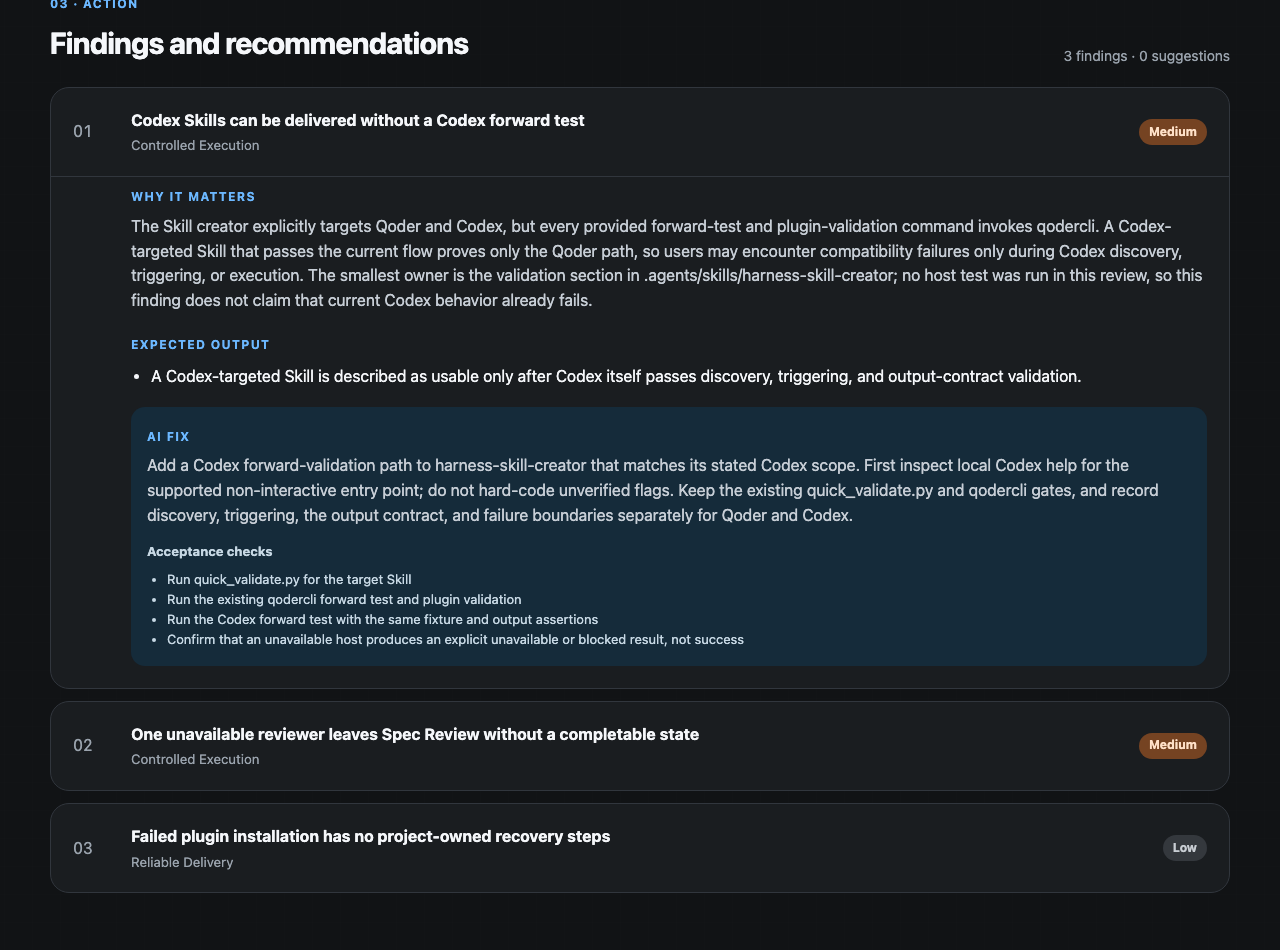
Open the complete self-contained English HTML report.
After you have comparable reports over time, the history view shows how the five
Agent Work Loop dimensions move:

The animation replays historical Harness reports. It shows recorded trends, not
causal proof of improvement. See how the demo was recorded.
Why Better Harness?
AI coding agents change code fast, but the workflow around them is often the
weak point:
- 🎯 Fuzzy goals — the agent confidently solves the wrong problem.
- 🧭 Improvised steps — work happens on paths nobody can reproduce.
- ✅ "It works" without proof — validation is incomplete or missing.
- 🚢 Speed over safeguards — review and delivery checks get bypassed.
- 🧠 Lessons lost — the same friction comes back on the next task.
Reviewing only the final diff misses these system-level problems. Better Harness
reviews the workflow itself: it gathers project evidence (and session evidence
where supported), evaluates five connected dimensions, and turns concrete gaps
into prioritized findings — each tied to its evidence, expected outcome, repair
boundary, and validation route, so a team can improve one issue at a time.
How Better Harness works
Better Harness uses a
feedforward-and-feedback
loop that combines guidance available before work starts with signals available
after the agent acts:
- Feedforward guides —
AGENTS.md, specs, Skills, and acceptance criteria
steer the agent before it acts. - Feedback sensors — linters, tests, Hooks, and review agents observe results
and help the agent self-correct.
Across that loop, it evaluates five parts of delivery — the Agent Work Loop:
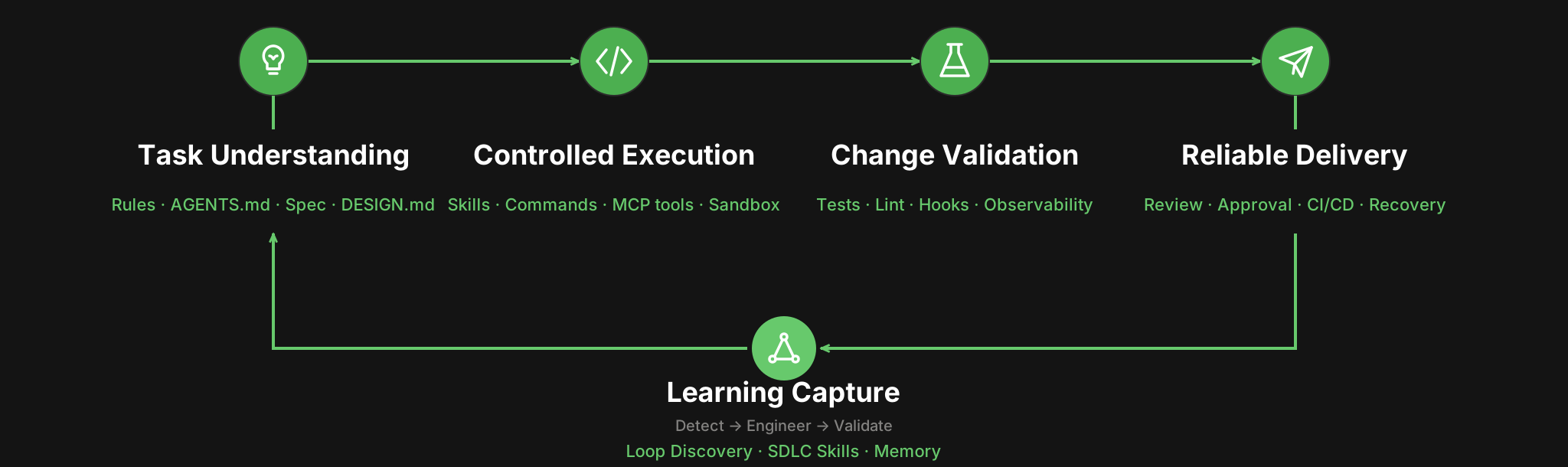
| Dimension | The question it answers | Backed by |
|---|---|---|
| Task Understanding | Does the agent know the goal and what "done" means? | Rules, AGENTS.md, specs, DESIGN.md |
| Controlled Execution | Is the work on supported, repeatable paths? | Skills, commands, MCP tools, sandbox boundaries |
| Change Validation | Is there evidence the change actually works? | Tests, lint, Hooks, observable diagnostics |
| Reliable Delivery | Does AI speed bypass quality checks or acceptance? | Human review, approvals, CI/CD, recovery paths |
| Learning Capture | Does the next task benefit from this one? | Loop Discovery, reusable SDLC Skills, Memory |
Running /better-harness establishes a task-bounded baseline and, depending on
the host, produces a visual report, a Markdown report, or both. The report
combines the five-part overview, prioritized findings, detected agent assets,
and an evidence brief. Each finding includes a repair action that drafts a
scoped fix plan for review.
Better Harness is deliberately honest: unobserved behavior stays explicit instead
of becoming an unsupported score or claim. Passing a current check proves that
the intervention was exercised; only a comparable later result can prove that
the loop improved.
What is open
Better Harness opens three connected layers, not only a slash-command prompt:
- Engineering practices — evidence and judgment guidance across
Session Evidence, Project Harness, Agent Customize, and Loop Engineering. - Evaluation model — the task-centered
Agent Work Loop, including evidence states,
findings, scoring boundaries, and longitudinal validation. - Runnable implementation — the canonical
/better-harnessworkflow, evidence
collectors, analyzers, renderers, and thin
host adapters.
The three layers share the same boundary: configured assets can establish that
a mechanism exists, but only linked task evidence can establish that it was used
or improved an outcome.
Architecture
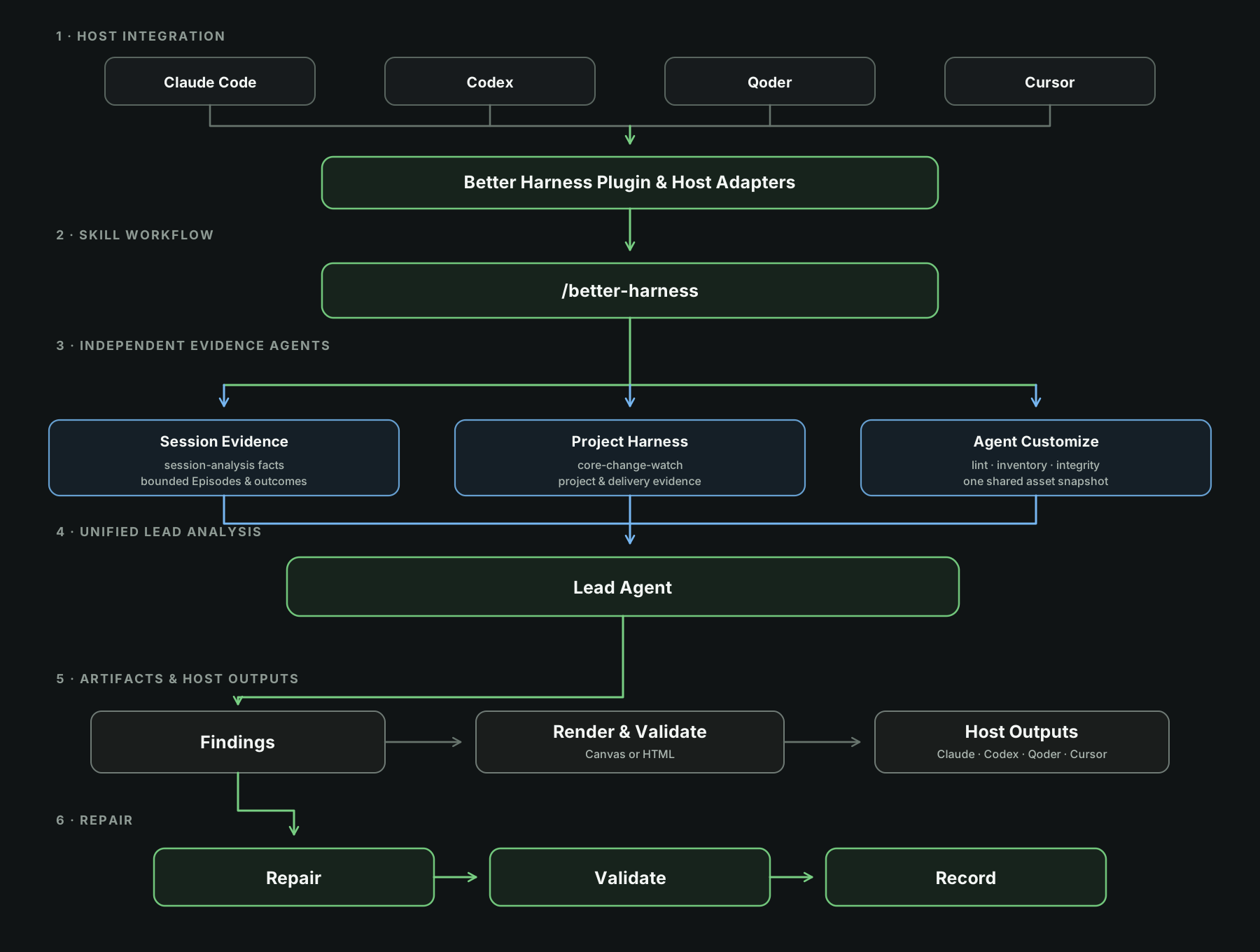
The architecture keeps the three evidence domains independent until unified
analysis by the lead agent. Every result retains a visible evidence source,
owner, and validation route.
Quick start
Pick your coding agent — you can be looking at your first report in minutes:
| Coding agent | Setup |
|---|---|
| Claude Code | Add the repository marketplace, install better-harness@better-harness, start a new session, then use the report prompt below. |
| Codex Desktop | Add the repository under Settings > Plugins > + Add > From Marketplace, install Better Harness, start a new task, then use the report prompt below. |
| Codex CLI | Add the Git marketplace, then run codex plugin add better-harness@better-harness. |
| Qoder Desktop / CLI | Nothing to install when Qoder Desktop is installed — Better Harness is built in and available to both. Open your repository and use the report prompt below. |
| Cursor | Load the plugin from source — see Installation. |
Once installed, ask Better Harness to generate the host's durable report:
/better-harness review this project's AI coding workflow and generate a report
Better Harness scopes behavior claims to relevant Task Episodes and the
surrounding project mechanisms. Qoder produces a Canvas report; Claude Code,
Codex, and Cursor produce self-contained HTML with paired Markdown. Missing or
partial evidence remains explicit. See the
Host Adapter Matrix for current coverage and output
differences.
Installation
Installation differs by coding agent. Install Better Harness separately for
each host, except that Qoder CLI can use the version bundled with Qoder Desktop.
After installing or updating a plugin, start a new session or task so the host
reloads its plugin inventory.
Claude Code
Register this repository as a Claude Code marketplace:
/plugin marketplace add QoderAI/better-harness
Then install Better Harness:
/plugin install better-harness@better-harness
Verify discovery from the shell:
claude plugin details better-harness@better-harness
The details should include Skills (1) better-harness. Then start a new Claude
session in the repository you want to review and run the report prompt:
/better-harness review this project's AI coding workflow and generate a report
Claude Code defaults to a self-contained report.html with paired report.md
and findings.json under the repository's .claude/better-harness report root.
Ask for inline or no-files output to keep the result in chat only. Workspace-
matching local Claude sessions are included when available; missing evidence
stays explicit rather than being inferred.
Codex
Codex Desktop
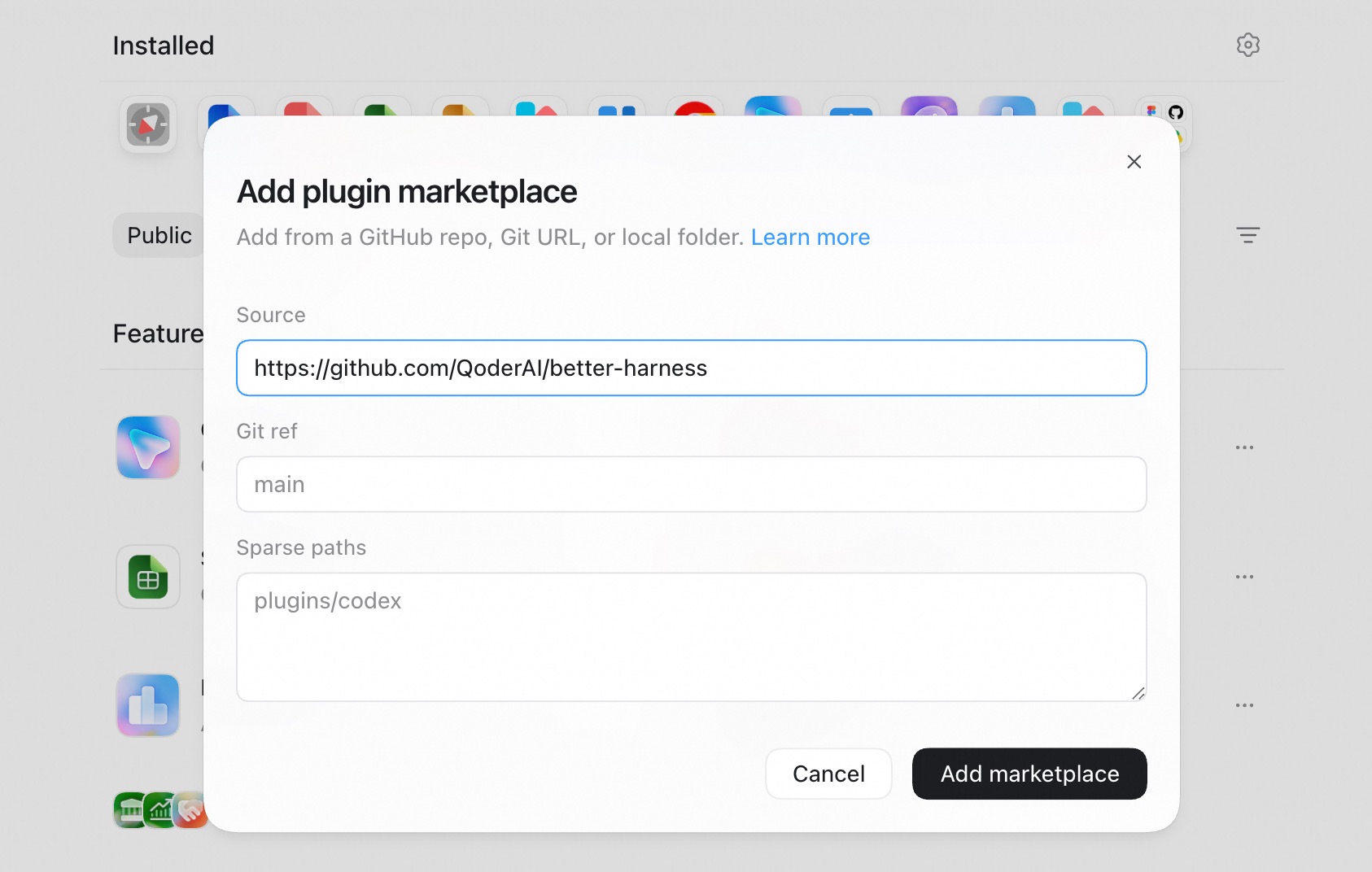
- Open Settings > Plugins.
- Select + Add > From Marketplace.
- Enter the Git repository URL, set its Git ref, and leave Sparse paths
empty for this single-plugin repository. - Select Add marketplace, then install Better Harness from the new
marketplace. - Start a new task in the repository you want to review and use the report
prompt from Quick start.
Use https://github.com/QoderAI/better-harness.git with Git ref main.
Codex CLI
Add the repository source:
codex plugin marketplace add \
  'https://github.com/QoderAI/better-harness.git' \
  --ref main
Then inspect and install Better Harness:
codex plugin list --marketplace better-harness
codex plugin add better-harness@better-harness
Start a new Codex task in the repository you want to review and run the report
prompt:
/better-harness review this project's AI coding workflow and generate a report
Use the repository URL with marketplace add, not a raw marketplace.json
URL. Current Codex builds use plugin add and --marketplace; examples that
use plugin install or --source target a different CLI contract.
Qoder
Better Harness is built into the Qoder desktop app, so no
Marketplace or local plugin installation is required there. Choose either
entry point:
From a session: Open the repository you want to review, start a new
session, and run the report prompt:/better-harness review this project's AI coding workflow and generate a reportFrom Quest (Qoder 1.18.0+): Open Quest, then select
Better Harness (Beta) from the left sidebar.
Qoder CLI
If Qoder Desktop is installed, Better Harness is already available in Qoder
CLI. No marketplace or plugin installation is required. Start a new Qoder CLI
session in the repository you want to review and run the report prompt:
/better-harness review this project's AI coding workflow and generate a report
Only when using Qoder CLI without Qoder Desktop, add this repository as a
marketplace and install Better Harness manually:
qodercli plugin marketplace add \
  'https://github.com/QoderAI/better-harness.git'
qodercli plugin install better-harness@better-harness
Verify the manual installation:
qodercli plugin list
Then start a new Qoder CLI session before using /better-harness.
Cursor
The Cursor plugin is not published to the marketplace yet. Load the
source-local plugin for one Cursor Agent session:
git clone https://github.com/QoderAI/better-harness.git
cursor-agent --plugin-dir /path/to/better-harness
Cursor session evidence is supported through workspace-matched transcripts,
metadata, and audit logs. Partial or unavailable coverage remains explicit.
Develop and package from source
Development requires Node.js >=22.20.0 <25.0.0 and npm>=10.9.3 <12.0.0 on Windows, macOS, or Linux.
npm ci
npm test
npm run pack:verify
Build the source-local Codex plugin artifact with:
node scripts/packaging/build-host-plugin.mjs
The validated artifact is written to dist/plugins/better-harness.
From the same source checkout, inspect repository evidence without reading local
sessions:
node scripts/better-harness.mjs report --no-sessions
From a source checkout, npm run preview -- --open serves a bundled fixture.
Canvas preview requires an installed Qoder runtime, or an explicit--sdk-media/--sdk-root path. It listens on 127.0.0.1 by default and is a
local inspection tool, not an authenticated sharing service.
Contribute
You do not need to understand the whole runtime to contribute. Start with the
smallest surface that matches the improvement you want to make:
| What you can contribute | Start here | Example contribution |
|---|---|---|
| Workflow guidance and engineering practices | skills/ or references/ |
Add sourced guidance for a language, framework, review pattern, or recurring agent workflow. |
| Review models and executable analysis | models/ or scripts/ |
Add an evidence-backed review lens, detector, or agent-friendly analysis command with fixtures and tests. |
| Delivery controls and host support | hooks/ or the host adapter matrix |
Add a narrow lifecycle check or document and validate evidence support for another coding-agent host. |
| Reports and visual language | templates/reporting/ or templates/style/ |
Add a report mode, reusable reporting contract, or directive-only visual style with validation evidence. |
| Examples and operating models | case-studies/ |
Share a redacted, evidence-bounded example of how a team applies agent review and delivery practices. |
To get started:
- Read the community extension map to choose the canonical
owner and understand its contract. - Follow the contribution guide to set up the project and
scope the change. - Add tests, fixtures, or preview evidence when the contribution changes
runtime behavior or rendered output. - Open a focused pull request that explains what changed, why, and how it was
validated.
Not sure where an idea belongs? Open an issue
before building a new top-level surface or changing a public report, schema,
packaging, or compatibility contract.
License
Better Harness is licensed under the MIT License.
If Better Harness helps you improve your agent workflow, consider giving it a ⭐ — it helps others find the project.
Reviews (0)
Sign in to leave a review.
Leave a reviewNo results found