platform
Health Pass
- License — License: MIT
- Description — Repository has a description
- Active repo — Last push 0 days ago
- Community trust — 34 GitHub stars
Code Pass
- Code scan — Scanned 12 files during light audit, no dangerous patterns found
Permissions Pass
- Permissions — No dangerous permissions requested
No AI report is available for this listing yet.
Build UI apps with your AI assistant — together, live. An agent-native, cross-platform declarative-UI runtime in Go: describe UI as JSON, let your AI scaffold/edit/verify it over MCP, package for web/iOS/Android/desktop/mini-program.
English · 中文
QORM
Query · Observe · Render · Mutate
Build apps with your AI assistant — together, live. QORM
(Query · Observe · Render · Mutate) is an agent-native, cross-platform app platform:
describe an app as standardized, language-neutral JSON, and your AI (Claude, Cursor, …) can scaffold, edit, run, and verify it
while you collaborate on the same live runtime in real time — user actions are sensed live; AI modifications render instantly.
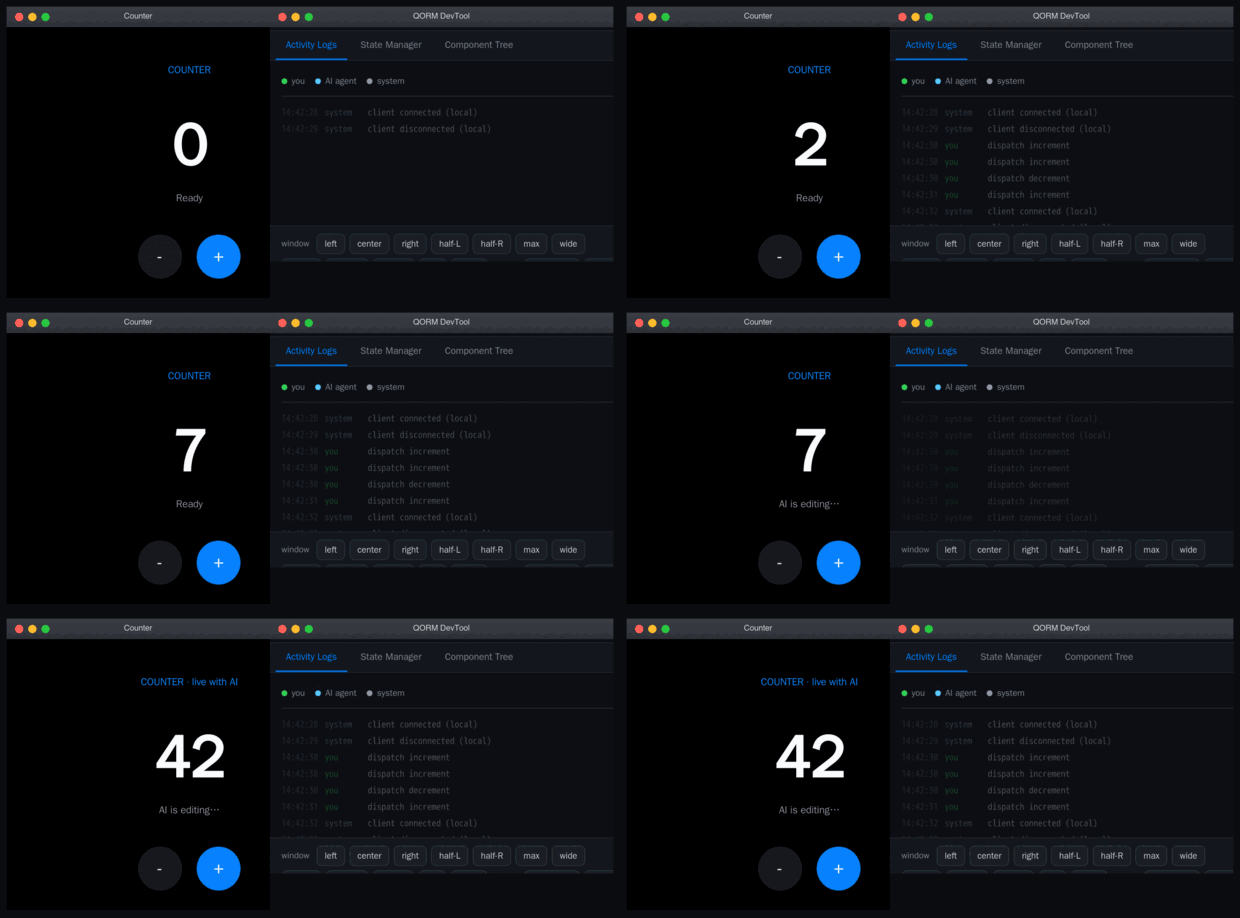
The GIF was recorded by QORM itself — the AI drove the edits over MCP and qorm shot captured each frame via WebKit. No browser automation; seescripts/record-demo.sh.
Live demo — Play retro games (Tetris, Mario, etc.) as an offline PWA (Go → WASM), rendered via our pure-Go Canvas engine entirely in your browser.
The same app, packaged for iOS
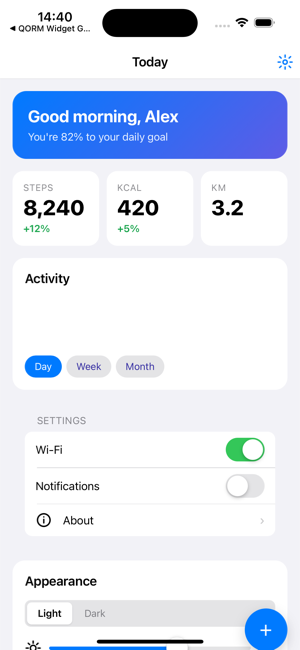
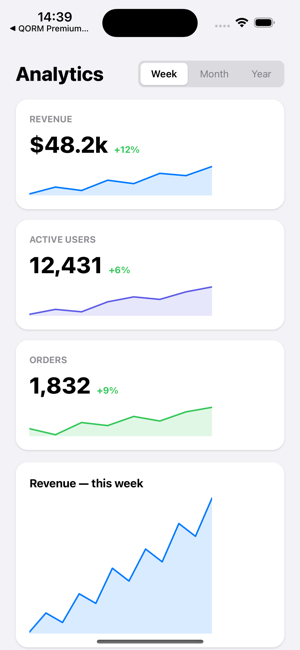
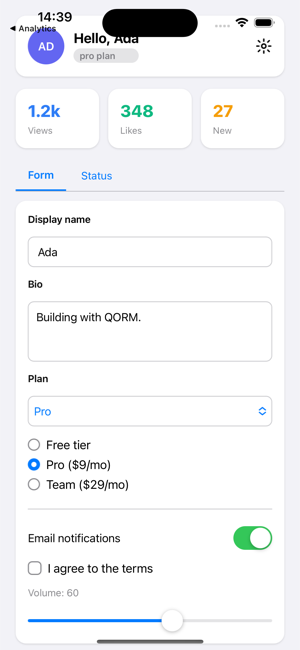
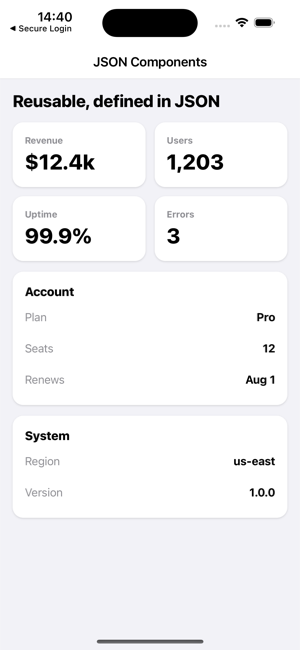
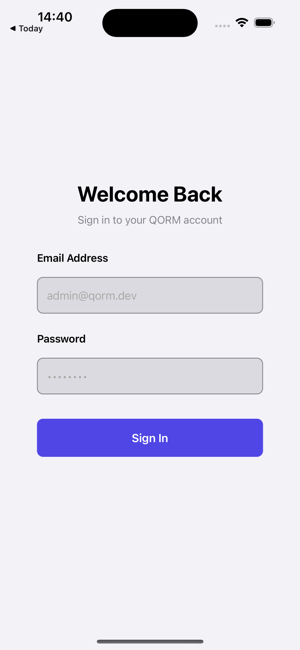
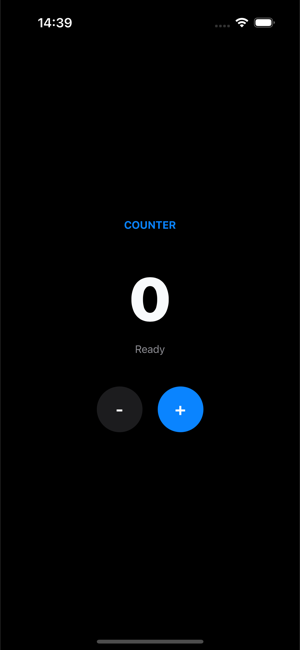
Real iOS builds (qorm package -p ios), captured in the iOS Simulator. The
same JSON app also runs on web / Android / desktop / mini-program.
Under the hood the default build is pure Go — it runs the app live in the browser, renders
a static HTML snapshot, ed25519-signs it into a distributable bundle, serves it
over-the-air with rollback, exposes it to agents over MCP, and packages it for
web / iOS / Android / desktop / mini-program — cross-compiled from any machine.
Developed in collaboration with Kimi (Moonshot AI), ChatGPT (OpenAI), Claude (Anthropic), and Gemini (Google) — human-AI
collaboration is QORM's whole premise.
Give your Agent 1 prompt to launch the QORM architecture
QORM is built for AI agents: give your AI assistant a single sentence, and it automatically loads QORM's MCP tools and Skill library, sets up the environment, and launches a native application window for real-time collaboration.
Copy & paste these 2 sequential prompts to your AI assistant (ChatGPT / Claude Code / Cursor / Windsurf / Antigravity / DeepSeek / Kimi):
- "Load QORM framework MCP configuration and Skill library (https://github.com/qorm/platform), set up environment, keep DevTool active."
- "Use QORM to create a new app in
./myapp, launch the native window, then build the app for: <your app idea, e.g. a habit tracker with streak days>."
User interactions are streamed live to the agent (qorm_activity); agent modifications to UI and logic synchronize instantly across all clients. Full guide: Build with your AI · Human-AI collaboration.
Platform support
| Target | Package | Render | Live app | Agent / MCP |
|---|---|---|---|---|
| Web | ok | ok | ok | ok |
| iOS | ok | ok | ok | ok |
| Android | ok | ok | ok | ok |
| macOS | ok | ok | ok | ok |
| Linux | beta | ok | ok | ok |
| Windows | beta | ok | ok | ok |
| Mini-program | ok | beta | — | — |
ok supported + tested · beta foundation / partial · — n/a. The full feature
list (distribution, rendering, runtime, agent — each per target) is the
platform support matrix; each platform's
hardware interfaces are in capabilities.md. Both
are generated from the code and kept in sync by tests.
How QORM compares
| QORM | Flutter | React Native | Tauri | Electron | .NET MAUI | Kotlin MP | Compose MP | |
|---|---|---|---|---|---|---|---|---|
| Language | JSON + QScript + Go | Dart | JavaScript | Rust + JS | JavaScript | C# / XAML | Kotlin | Kotlin |
| UI paradigm | Declarative JSON | Declarative widget | Declarative JSX | Web (HTML/CSS) | Web (HTML/CSS) | Declarative XAML | Shared logic, native UI | Declarative Compose |
| Rendering | HTML/CSS (WebView) + native canvas | Skia / Impeller | Native components | System WebView | Chromium | Native controls | Native controls | Skia |
| Platforms | Web, iOS, Android, macOS, Linux, Windows, Mini-program | Web, iOS, Android, macOS, Linux, Windows | iOS, Android, Web (beta) | macOS, Linux, Windows, iOS, Android (beta) | macOS, Linux, Windows | iOS, Android, macOS, Windows | iOS, Android, Desktop, Web | iOS, Android, Desktop, Web |
| Binary size | ~7 MB static | ~15-25 MB | ~7-15 MB | ~3-10 MB | ~150+ MB | ~10-20 MB | ~5-15 MB | ~10-20 MB |
| Hot reload | Yes (SSE live push) | Yes (stateful) | Yes (Fast Refresh) | Yes (Vite HMR) | Yes (HMR) | Yes (XAML) | Partial | Yes |
| AI-agent native (MCP) | Yes — 20+ tools, first-class | No | No | No | No | No | No | No |
| Human-AI live session | Yes — shared runtime | No | No | No | No | No | No | No |
| Signed bundles | Yes — ed25519 | No | No | No | No | No | No | No |
| Built-in OTA | Yes — with rollback | No | CodePush (3rd-party) | No | No | No | No | No |
| Design verification | Yes — geometry-level | No | No | No | No | No | No | No |
| State management | Built-in (JSON state) | External (Provider/Bloc) | External (Redux etc.) | External | External | Built-in (MVVM) | External | Built-in (State) |
| Learning curve | Low (JSON) | Medium (Dart) | Medium (React) | Medium (Rust) | Low (Web) | Medium (C#) | Medium (Kotlin) | Medium (Compose) |
| Cross-compile | Yes (single binary) | Yes | Partial | Yes | Yes | Yes | Yes | Yes |
| License | MIT | BSD-3 | MIT | MIT / Apache-2 | MIT | MIT | Apache-2 | Apache-2 |
QORM-exclusive features — no other framework offers these today:
- Agent-native MCP: 20+ tools to read, edit (review-gated), run and self-verify a
live app. Seamlessly integrates with Claude, Cursor, Windsurf, or any MCP-compatible agent. - Human-AI live session: A human and an AI operate the same running app at the same time —
the foundational premise of QORM's architecture. - Signed bundles + OTA: ed25519-signed, content-addressed artifacts with
verify-before-activate delivery and one-command rollback. - Design verification: The agent proves its edits by measuring real rendered geometry with
qorm measure/qorm check, verifying layout geometry quantitatively.
Run
go run ./cmd/qorm run examples/counter      # opens the app (browser or native canvas)
go run ./cmd/qorm run examples/tetris       # canvas game + chiptune
go run ./cmd/qorm run examples/canvas-fx    # visual + motion showcase
go run ./cmd/qorm run examples/canvas-ultimate -tags canvaswebview # RichText, Video, Webview, Morphing showcase
go run ./cmd/qorm render examples/todo -o todo.html   # static snapshot
Press + / - in the counter, or add/toggle tasks in the todo app — button
presses POST to /event, the server updates state, re-runs the action, and
swaps in the re-rendered UI. Games on the macOS default window (and
qorm.com/games) use the pure-Go canvas engine.
Signed bundles (verify-the-bundle, don't-trust-the-server)
Compile an app into a single content-addressed artifact and sign it with
ed25519. The runtime verifies integrity (tamper detection) and, with a trusted
public key, authenticity — before running a line of it. This is the trust
primitive for safe over-the-air UI delivery.
qorm keygen                                        # -> qorm_key, qorm_key.pub
qorm build examples/counter -o counter.qorm.bundle --key qorm_key
qorm verify counter.qorm.bundle --trust qorm_key.pub
qorm run    counter.qorm.bundle --trust qorm_key.pub   # refuses tampered/unsigned bundles
A tampered bundle fails the hash check; a bundle signed by an untrusted key
fails the signature check; both are refused at run time. All pure Go
(crypto/ed25519), so it cross-compiles like everything else.
Cross-compile every platform
./scripts/build-all.sh # -> dist/qorm-{darwin,linux,windows}-{amd64,arm64}
Each target is a single static ~7 MB binary with no runtime dependencies. In
this default (pure-Go) build, qorm run --app opens the app in a chromeless
browser window.
When is Go required?
Go is a build-time dependency, not a runtime one. A downloaded/pre-builtqorm binary runs apps with no Go on the machine: run, render, mcp,shot, measure, check, test, verify and bundle execution are fully
self-contained. Where the binary shells out at runtime it calls OS-native
tools, never Go — and always per-OS with availability guards
(osascript/screencapture/pbcopy on macOS, pactl/brightnessctl/wl-paste/notify-send on Linux, powershell on Windows); a missing tool
degrades just that one capability.
The Go toolchain IS needed for:
qorm package …— builds the app binary viago build(the web package
compiles the WASM client; iOS/Android/mac additionally want xcodebuild /
gradle / codesign).- An app with a Go middle layer (
native/desktop.go) —qorm runcompiles it
once (content-hashed cache); without a toolchain it warns and runs without
the middle layer. qorm update— triesgo install …@latestwhen Go is present, otherwise
falls back to the signed-binary download automatically.
Native desktop window (opt-in)
For a true native window, build with -tags desktop. This drives the
platform-native WebView (WKWebView / WebView2 / WebKitGTK) via cgo — using a
vendored WebView binding (internal/webview) — so it is built
per-platform, not cross-compiled from one machine:
./scripts/build-desktop.sh                     # native binary for this OS
qorm-desktop-... run examples/counter --app    # opens a native window
The two paths coexist deliberately: default = cross-compile everywhere (browser
window); -tags desktop = native window (per-platform build). Both render
HTML/CSS in a web engine, so both keep the full agent-collaboration stack
(shared live session over SSE + MCP). The QORM architecture (loader → runtime →
render → server) is identical in both.
| build | render | draws widgets |
|---|---|---|
| default | HTML/CSS → browser | web engine |
-tags desktop |
HTML/CSS → native WebView | web engine |
Agent access over MCP
Expose the app to an agent (Claude, Cursor, …) over the Model Context Protocol
(stdio JSON-RPC):
qorm mcp examples/counter
The agent can design, run, test and operate the app — the loop for real
human-AI collaboration:
| capability | tools |
|---|---|
| understand | qorm_inspect, qorm_render_html, qorm_get_node, qorm_list_actions |
| operate | qorm_dispatch (run an action), qorm_set_state |
| test | qorm_assert (stateEquals / htmlContains / nodeExists) |
| design | qorm_preview_patch → qorm_apply_patch |
| reason | qorm_simulate_action (side-effect-free) |
Safety model: simulate and preview_patch never touch the live app;apply_patch must carry the previewToken returned by a prior preview_patch
of the same ops — so a committed design change is always bound to a review.
Shared live session (human + AI, one app)
qorm run also exposes the agent over HTTP at /mcp, sharing the same
runtime the browser renders. An AI's edits appear in every connected browser
instantly — the page subscribes to Server-Sent Events at /events (with a/poll fallback) — and the human's clicks are visible to the AI's nextqorm_inspect. True real-time human-AI collaboration on one running app.
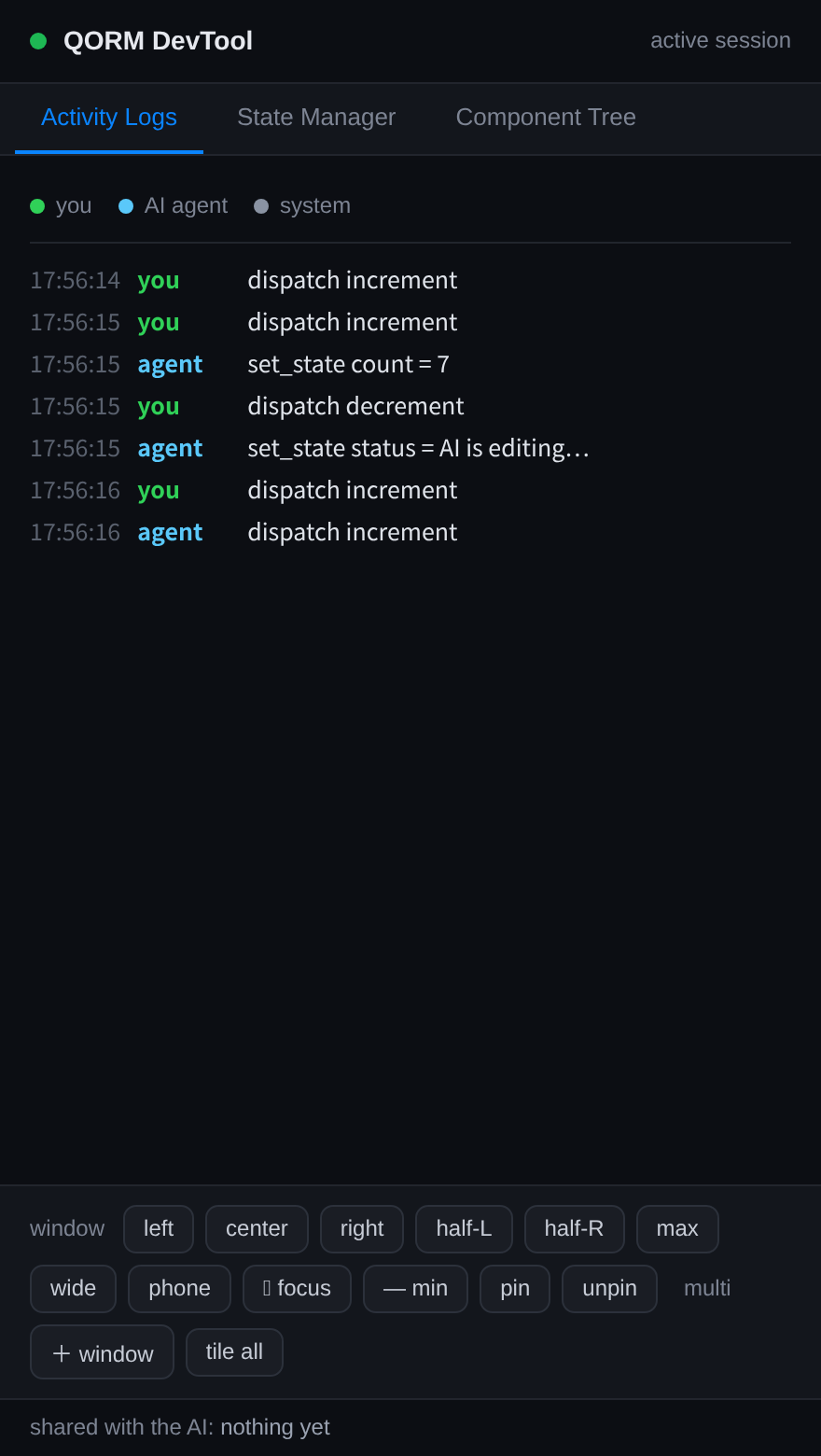
The activity panel — a separate window the desktop app opens next to your
app — shows every human tap (green) and agent MCP call (blue) on the same running
app, colour-coded and live. This is the human's window into the collaboration.
qorm run examples/counter          # browser UI + agent endpoint at /mcp
# agent: POST http://127.0.0.1:PORT/mcp  (JSON-RPC 2.0)
Architecture
app JSON (manifest + scenes + actions)
  → loader   parse into model.App (Node tree / Action / GlobalState)
  → runtime  state store + {{expr}} evaluation + action dispatch
  → render   Node → HTML + CSS flexbox (browser does layout)
  → server   HTTP + /event live update loop
| package | role |
|---|---|
internal/model |
App / Node / Action data model |
internal/loader |
load a dir (skips type:test), parse manifest/scene/action |
internal/expr |
expression evaluator (count + 1, state.x, ternary, ...) |
internal/qscript |
deterministic JS-lite scripting for app logic (script actions, actions/*.qs + shared lib.qs) |
internal/runtime |
state, binding interpolation, action steps (state.set/append/appendObject/toggle) |
internal/render |
full widget set → HTML/CSS, incl. list repeat with {{item.*}} scope |
internal/render/canvas |
native software canvas renderer — the widget engine behind the games and the native window |
internal/server |
live HTTP server + event dispatch |
internal/bundle |
compile + sha256 content hash + ed25519 sign/verify |
internal/keys |
ed25519 keypair generation and storage |
internal/ota |
fetch (http/file) + verify-before-activate, rollback by inaction |
internal/mcp |
MCP stdio JSON-RPC server (agent tools) |
cmd/qorm |
new / run / render / shot / measure / check / build / keygen / sign / verify / mcp / preview / package / docs / audit / updates / update / version CLI |
Widget coverage
Top-tier widget vocabulary, all mapped to semantic HTML/CSS:
- Layout: row, column, stack/absolute,
scroll,grid(N columns),card,spacer,divider, wrap. - Text: text,
link,icon,badge— with fontFamily, lineHeight,
letterSpacing, textDecoration,lineClamp/ellipsis, transform. - Input: input (two-way state binding),
textarea,select, checkbox,
switch,radio, slider — withonChangeevents. - Media/feedback: image,
avatar(image or initials),progress,spinner,video. - Structure:
tabs(client-side switching),list(data-bound repeat with{{item.*}}scope). - Animation: an
animationprop on any node (or component) plays an entrance
effect on mount (fadeup,pop,bounce, …);animatedcontainer/animatedopacitydo value-driven transitions; buttons get iOS press feedback.
See animation andexamples/animations/examples/payment. On canvas: gamefx/timeline(path, yoyo,
onComplete, stagger), stylerotate/scale/flipX,tint, andimageRendering: pixelated.
Plus cross-cutting features on every node: conditional rendering
("if": "{{state.x}}"), accessibility (role, ariaLabel, title), and rich
style (shadow, gradient, position + top/left/right/bottom, aspectRatio,
min/max width/height, opacity, transition / spring, filter/mask/clip,
scroll-snap, FLIP layoutMotion, animation). The canvas effects engine showcase is examples/canvas-fx; the ultimate capabilities showcase (RichText, Video, Webview, Morphing) is examples/canvas-ultimate; games in examples/tetris / mario / raiden /g2048. Full keys in props and styles.
Over-the-air updates
A running app (started from a bundle) accepts hot updates: POST /update {"source": "<url-or-path>"} fetches, verifies (hash + signature vs the trusted
key) and hot-swaps the app; POST /rollback reverts. A rejected update leaves
the live app untouched — a bad update can never take it down.
Documentation
QORM is dual-consumer — the same artifacts serve human developers and AI agents.
- Humans start at
docs/: the getting-started
tutorial, the widget
catalog and capabilities
(both auto-generated from the code), platform guides, and the user
middle-layer — add your own native ops
in onenative/desktop.gothat compiles into the desktop binary and the
mobile/web WASM. - AI agents start at
llms.txt(orAGENTS.md): a
curated, machine-readable map of everything above. Add QORM to your agent withintegrations/, drive a live app over MCP,
and self-verify your edits against real rendered geometry withqorm measure/qorm check(see verification).
License
The source is MIT — free to use, modify, and distribute. One branding
term applies (ops/TERMS.md): apps ship with the QORM logo by default;
personal / educational / open-source use may re-icon freely, and commercial
white-labeling (a custom icon, or removing the "Made with QORM" metadata note) asks
a Patreon membership — Indie $1/mo (individual) or Studio $7/mo (company). A Supporter tier ($3/mo) backs the project with priority feature requests; personal/edu/OSS use is the free Community tier. The qorm CLI asks you
to confirm (honour-system) when you package a commercial feature. Supporters are recognized on the QORM Patreon page.
Startup or can't subscribe? If you're an early-stage startup, or a
subscription is impractical for you (payment rails, company policy — whatever
the reason), just email [email protected] with a short note about your
situation and we'll authorize you by reply — free for one year (just email
again to renew).
To: [email protected]
Subject: White-label authorization request — Acme HabitsHi QORM team,
We're Acme, a 3-person startup building a habit-tracking app. We'd like to
ship it white-labeled (custom icon, no "Made with QORM" note), but a Patreon
subscription isn't practical for us right now — we're pre-revenue and our
region makes the payment awkward.Could you authorize us? Happy to credit QORM on our about page instead.
Thanks,
Jane Doe · founder · acme.example
Roadmap
HTTPS OTA (qorm run --tls), key-revocation lists (--revoked), and the
agent apply_patch tool have all landed; the docs portal and the in-browser
Playground are live. Remaining direction — the ecosystem registry and the
Phase 8/10 SDK / advanced-runtime items — is tracked in planning/.
Acknowledgments
The optional native-desktop window vendors the webview
C/C++ library and its Go binding (MIT,
(c) Serge Zaitsev) — thank you. The opt-in native-window approach was inspired by
Wails.
Reviews (0)
Sign in to leave a review.
Leave a reviewNo results found