Pulse
Health Uyari
- License — License: Apache-2.0
- Description — Repository has a description
- Active repo — Last push 0 days ago
- Low visibility — Only 8 GitHub stars
Code Basarisiz
- rm -rf — Recursive force deletion command in Scripts/bundle.sh
- rm -rf — Recursive force deletion command in Scripts/dmg.sh
Permissions Gecti
- Permissions — No dangerous permissions requested
Bu listing icin henuz AI raporu yok.
A floating macOS monitor for how much Claude Code, Codex, Antigravity, OpenCode Go and Kimi Code you have left

Pulse
Know how much Claude Code, Codex, Antigravity, Cursor, OpenCode Go,
Kimi Code or Ollama Cloud you have left, without leaving what you're doing.
macOS 14 Sonoma or newer · Apple Silicon and Intel · 简体中文

Pulse is a small floating monitor that lives against the edge of your screen.
A glance at the ring tells you where you stand; it collapses to a sliver when
you're not near it, and comes back when you are. No dashboard to tab over to,
and no finding out you're rate limited halfway through a task.
Install
Download the latest Pulse-x.y.z.dmg from
Releases, open it, and drag
Pulse into Applications.
Pulse isn't signed with an Apple Developer ID yet, so macOS blocks the first
launch — and on macOS 15 and later the old right-click → Open trick is gone.
Once:
- Open Pulse. macOS refuses — dismiss the dialog.
- System Settings → Privacy & Security, scroll to Security, and click
Open Anyway. - Open it again and confirm.
After that it launches normally, and later versions install themselves.
What it does
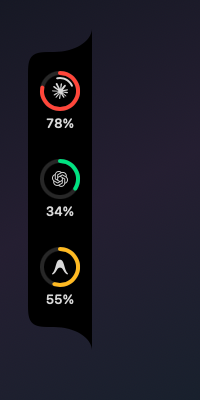
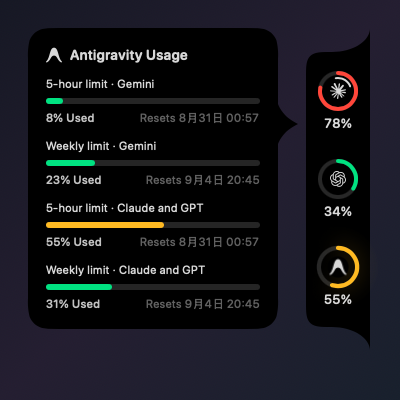
Seven agents, one rail. Claude Code, Codex, Antigravity, Cursor, OpenCode
Go, Kimi Code and Ollama Cloud, each a ring. Colour (green, amber, red) shows
how close you are before you read the number. Click a ring to refresh just that
one. A first run shows the agents you actually have installed.
Straight from each provider's own account. Pulse never derives a percentage
from local token counts, and it says so when a provider won't answer. Most are
read with a login your own CLI or app already stored; the two with none to
borrow take an API key you paste into Settings, and Ollama Cloud one that Pulse
reads out of your browser.
More than one account. Sign in to a second Claude Code or Codex
subscription from that provider's pane and watch both at once, each with its
own name and its own ring. Pulse runs its own sign-in rather than copying what
the CLI stored: a borrowed token goes stale within hours on whichever account
you aren't using, and renewing it could sign you out of your own CLI. The
consent page names the CLI because Pulse can't register an OAuth client of its
own with either provider; this isn't an official integration, and Settings says
so.
It knows when you're working. While a CLI is mid-turn, a mark turns inside
its ring. That comes from the transcript's actual turn boundaries, not from
"wrote to a file recently", so a slow tool call doesn't look like a finished
turn. Claude Code and Codex only; the rest keep no transcript on disk.
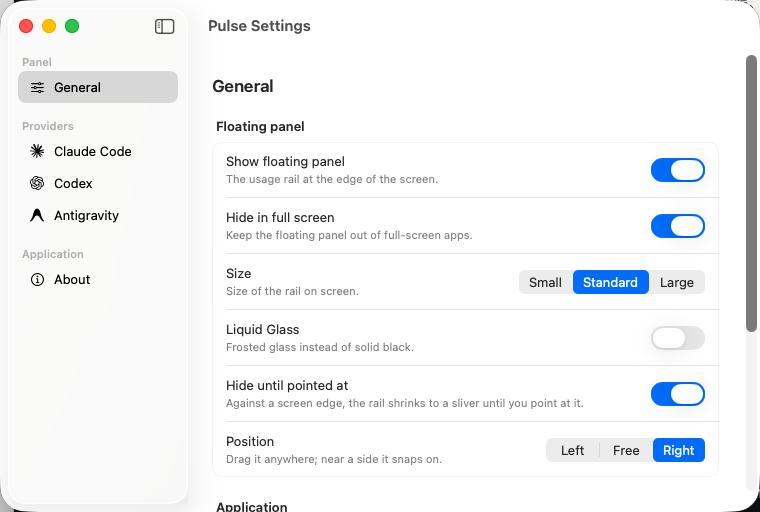
Out of the way. Docks to either side of the screen, along the top above the
menu bar, or floats anywhere on the desktop. Hides to a 6pt sliver when you're
not near it, and stays out of other apps' full-screen Spaces. The sliver still
turns red once a limit is nearly gone.
What it costs. Settings reconstructs a spending history from Claude Code's
and Codex's own session logs, priced at each provider's published API rates,
plus a clearly labelled estimate of what a rate-limit window is worth. No
provider reports one, and the other providers keep no local log to build this
from.
Adaptive refresh. Between 2 and 30 minutes, backing off when nothing is
moving instead of polling on a fixed schedule. The rail opens with the last
reading, marked with when it was taken, rather than sitting blank until the
slowest provider answers.
Yours to arrange. Put the rings in your own order, set the gap between them,
switch the percentages off on either rail, and give an account a fixed colour
if you'd rather. The default stays the usage colours: a fixed hue is a reading
you've chosen to give up. A limit the provider says is spent stays red
whatever you picked.
English and Simplified Chinese, switchable without a relaunch. Three sizes. An
optional Liquid Glass surface on macOS 26.
Where the numbers come from
Each agent is read by whatever route it actually offers, and no two are alike:
| Route | Caveat | |
|---|---|---|
| Claude Code | The account's usage endpoint, using the login Claude Code already stored — falling back to the status line, which Pulse can register for itself | The saved token expires in hours and nothing here renews it, hence the fallback |
| Codex | The same endpoint Codex's own client uses, falling back to codex app-server |
Not public API; it can change without notice |
| Antigravity | The language server the editor runs on the loopback interface | Reports only while Antigravity is open — the figures live in that process |
| Cursor | The account's usage summary, authenticated with a cookie built from the login the editor already stored | Not public API. Reported as the two pools Cursor's own account page shows, not one combined figure |
| OpenCode Go | An API key you paste into Settings — or the login OpenCode's own CLI already stored, if you're signed in there | Not public API; it can change without notice |
| Kimi Code | An API key you paste into Settings | The one documented endpoint of the seven — still no promise it won't change |
| Ollama Cloud | The signed-in settings page, with a session Pulse reads out of your browser | There is no quota API at all, so a page is the only source. See Docs/ollama-cloud.md |
An added account signs in through Pulse itself, using the same public client
its CLI uses, and keeps its own refresh token — nothing the CLI owns is
touched.
A reading that fails falls back to the last good one, shown with the time it
was taken. A window whose reset has passed is dropped rather than aged — it
hasn't gone stale, it has reset.
Privacy
Pulse has no backend and no account of its own. Most providers are read with a
login your own CLI or app already stored on this Mac. The exceptions are
OpenCode Go and Kimi Code, which need an API key you paste in yourself, and
Ollama Cloud, whose session Pulse reads out of your browser — that read is
scoped to ollama.com and to the cookie names that authenticate, and nothing
else in the store is looked at. All three are kept encrypted in Pulse's own
folder, owner-only, with the key derived from this Mac; nothing goes intoUserDefaults, which is a plist any process running as you can read.
An added account's own login is kept the same way. Spending history is worked
out entirely on-device from log files already on disk. Nothing is uploaded
anywhere.
Build from source
swift run Pulse              # build and run
swift build                  # type-check everything, previews included
./Scripts/bundle.sh          # → build.noindex/Pulse.app
./Scripts/dmg.sh             # → build.noindex/Pulse-<version>.dmg
xcode-select has to point at Xcode rather than CommandLineTools — the#Preview macro is expanded by a plugin that ships with Xcode. If a build
fails with PreviewsMacros plugin not found:
sudo xcode-select -s /Applications/Xcode.app/Contents/Developer
Swift tools 6.0; the package opens directly in Xcode through Package.swift.
There is no test target and no linter.
Layout
All source is in Sources/Pulse, one SwiftUI view per file, with the provider
marks under Sources/Pulse/Resources. CLAUDE.md is the deeper
walkthrough — the AppKit panel and SwiftUI split, why the window owns dragging,
what each provider's route actually costs. One provider has a page of its own:
Docs/ollama-cloud.md, because reading a session out of
a browser deserves to be written down in full.
Design
Thank you, Vinz (@hivinz_).
Pulse exists because of a concept he posted on X in August 2026 — a Figma
design for people tired of checking their Claude and Codex limits by hand. It
stopped me the moment I saw it: a rail of rings held against the edge of the
screen, everything worth knowing in one glance and nothing else. That idea is
his, and most of the work here has been trying not to spoil it.
This is an independent implementation. He didn't build it and isn't
responsible for it.
License
Apache 2.0. Bundled third-party assets keep their own licenses; see
THIRD_PARTY_NOTICES.md.
Yorumlar (0)
Yorum birakmak icin giris yap.
Yorum birakSonuc bulunamadi