paper2anything
Health Pass
- License — License: Apache-2.0
- Description — Repository has a description
- Active repo — Last push 0 days ago
- Community trust — 85 GitHub stars
Code Pass
- Code scan — Scanned 12 files during light audit, no dangerous patterns found
Permissions Pass
- Permissions — No dangerous permissions requested
No AI report is available for this listing yet.
An agent skills pack that turns an academic paper PDF into slides, a poster, a webpage, a Xiaohongshu post, or a WeChat article (paper2slides/poster/html/xhs/wechat)

paper2anything



English | 简体中文
Showcase · Installation · Usage · Output locations · Directory structure · Contributors · Acknowledgements

A skills pack that turns an academic paper PDF into any of several promotional artifacts, covering the main forms of paper dissemination:
| Skill | Turns the paper into | Output | Trigger phrases (examples) |
|---|---|---|---|
| paper2slides | a presentation deck | .pptx |
"make slides from this paper", "generate a deck from this PDF", "deck this paper" |
| paper2poster | a conference poster | poster.html + poster.png |
"make a poster from this paper", "turn this paper into a poster" |
| paper2html | a single-page project homepage | index.html |
"turn this paper into a webpage", "generate a project page / landing page" |
| paper2xhs | a Xiaohongshu (RED) post | xhs_post.json/md + cover |
"post this paper to Xiaohongshu", "turn this paper into a RED post" |
| paper2wechat | a WeChat Official Account article | wechat_article.md/html + cover |
"write this paper as a WeChat article", "turn this paper into a WeChat post" |
Each subdirectory is an independent, auto-triggerable skill (each has its own SKILL.md).
Showcase
paper2slides
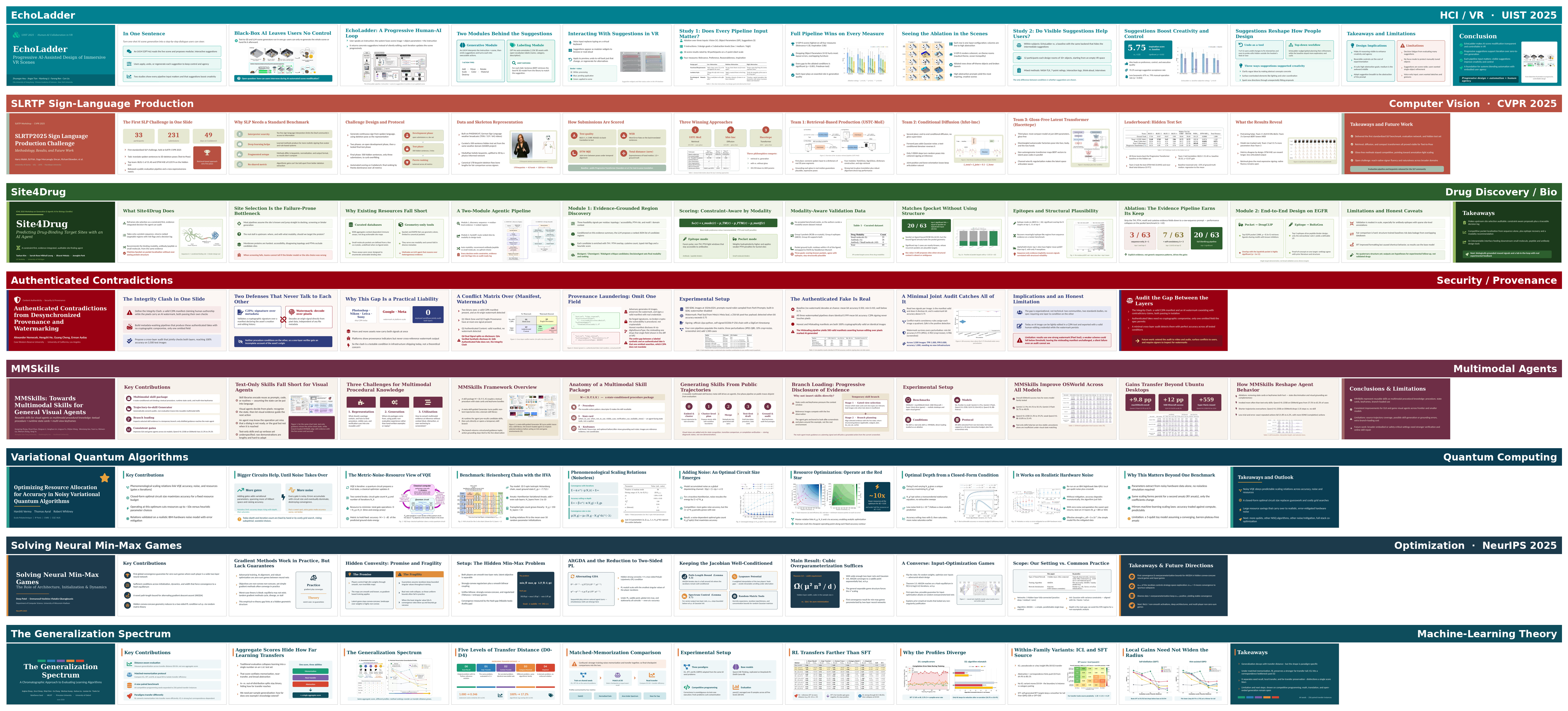
A sample of paper2slides output — eight decks across diverse research fields (HCI / VR, computer vision, drug discovery, security & provenance, multimodal agents, quantum computing, optimization, and ML theory):
paper2poster
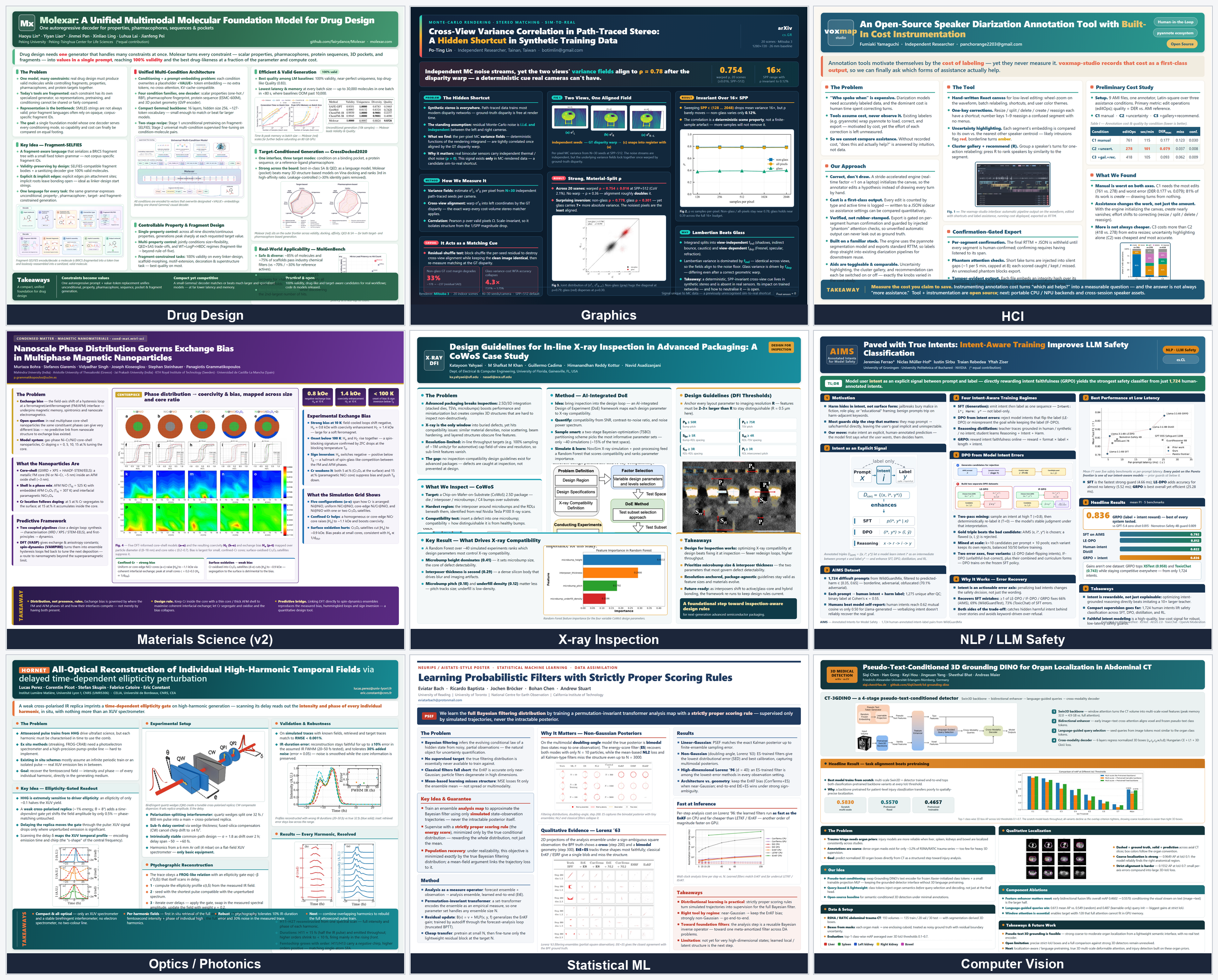
A sample of paper2poster output — nine posters, spanning nine research fields (drug design, graphics, HCI, materials science, X-ray inspection, NLP / LLM safety, optics & photonics, statistical ML, and computer vision):
Installation
One-command install with Claude Code (recommended):
bash tools/install-linux.sh --create-env --shell-init     # Linux
bash tools/install-macos.sh --create-env --shell-init     # macOS
The install script will: ① symlink the 5 skills into ~/.claude/skills/; ② bootstrap a .env from .env.example if you don't have one; ③ check the conda environment, system dependencies, and MINERU_API_TOKEN (used for paper extraction). What the two flags do (omit them if you don't need them):
--create-env:conda env create(updates perenvironment.ymlif it already exists) + installs playwright chromium + runs a pip self-check;--shell-init: (optional) writes the.envauto-export into your shell startup file, so a new shell loads the credentials automatically.
After it runs, follow the script's prompts for two more steps:
- Fill in
MINERU_API_TOKENin.env(required); - Install the missing system-level dependencies it points out (the script detects each one and gives the install command).
If you need to install manually (e.g. you only use one specific skill), here is the equivalent breakdown.
Manual installRegister a skill
Symlink the skills you want into ~/.claude/skills/ so Claude Code can discover and auto-trigger them:
# From the paper2anything package root; copy the line for whichever skill you want
mkdir -p ~/.claude/skills
ln -sfn "$(pwd)/paper2slides"  ~/.claude/skills/paper2slides
ln -sfn "$(pwd)/paper2poster"  ~/.claude/skills/paper2poster
ln -sfn "$(pwd)/paper2html"    ~/.claude/skills/paper2html
ln -sfn "$(pwd)/paper2xhs"     ~/.claude/skills/paper2xhs
ln -sfn "$(pwd)/paper2wechat"  ~/.claude/skills/paper2wechat
conda environment
All 5 skills share one conda environment, paper2anything.
# From the paper2anything package root
conda env create -f environment.yml
conda activate paper2anything
System-level dependencies
| Tool | Purpose | Which skill | Install command |
|---|---|---|---|
poppler-utils (pdftoppm) |
PDF rendering | paper2slides | sudo apt install poppler-utils (Linux) / brew install poppler (macOS) |
libreoffice (soffice) |
visual QA | paper2slides | sudo apt install libreoffice (Linux) / brew install --cask libreoffice (macOS) |
| Node.js | JS runtime | paper2slides | on Linux use NodeSource (the apt default is too old, see the note below) / brew install node (macOS) |
| pptxgenjs + react-icons/react/react-dom/sharp | PPT rendering | paper2slides | npm install -g pptxgenjs react-icons react react-dom sharp (prefix sudo on Linux) |
Node.js (Linux): sharp requires Node ≥20.9.0; install it via NodeSource:
curl -fsSL https://deb.nodesource.com/setup_22.x | sudo -E bash - && sudo apt install -y nodejs
Credentials
All skills' credentials live in a single .env at the package root (copy from .env.example and fill it in). After copying, just fill in your keys:
cp .env.example .env # first time: copy, then fill in your keys
Optional: write the .env export into your shell startup file. Pass --shell-init during install to do this automatically (see Installation), or add this line manually:
set -a; source <paper2anything package root>/.env; set +a
Usage
Just state your intent and the matching skill auto-triggers, e.g.:
- "make
path/to/paper.pdfinto slides" → paper2slides - "make a conference poster from this paper" → paper2poster
- "turn this PDF into a project homepage" → paper2html
- "post this paper to Xiaohongshu for me" → paper2xhs
- "write this paper as a WeChat article" → paper2wechat
Or call them explicitly with a slash command, followed by the PDF path:
/paper2slides path/to/paper.pdf
/paper2poster path/to/paper.pdf
/paper2html   path/to/paper.pdf
/paper2xhs    path/to/paper.pdf
/paper2wechat path/to/paper.pdf
Output locations
Each skill's final deliverable lands in the same directory as the paper; all intermediate artifacts are kept under .paper2anything/<skill>/<paper-name>/ in that same directory:
| Skill | Final deliverable | Intermediate artifacts |
|---|---|---|
| paper2slides | <paper-name>_slides/ (<paper-name>.pptx) |
.paper2anything/slides/<paper-name>/ |
| paper2poster | <paper-name>_poster/ (poster.png + poster.html + images/) |
.paper2anything/poster/<paper-name>/ |
| paper2html | <paper-name>_html/ (index.html + images/) |
.paper2anything/html/<paper-name>/ |
| paper2xhs | <paper-name>_xhs/ (xhs_post.md + .json + cover.png) |
.paper2anything/xhs/<paper-name>/ |
| paper2wechat | <paper-name>_wechat/ (wechat_article.md + .json + cover.jpg + figures/) |
.paper2anything/wechat/<paper-name>/ |
Directory structure
paper2anything/
├── environment.yml          # python environment
├── .env.example             # credentials template (copy to .env and fill in)
├── .gitignore               # ignores .env / __pycache__ etc.
├── LICENSE                  # Apache-2.0
├── README.md                # this file (English, default)
├── README.zh-CN.md          # Chinese version
├── tools/                   # install scripts
├── assets/                  # static files
│   └── showcase/            # per-skill output samples (assets/showcase/<skill>/)
├── paper2slides/            # paper → slides
│   ├── SKILL.md
│   ├── references/          # design style, outline heuristics, pipeline, schema, pptxgenjs
│   └── scripts/             # parse_pdf / render_pptx / page_screenshot / workdir + lib/
├── paper2poster/            # paper → poster HTML/PNG
│   ├── SKILL.md
│   ├── references/          # poster examples, color palettes, layout guide
│   └── scripts/             # parse_pdf / auto_outline / geom_check / collect_figures / screenshot / check_env
├── paper2html/              # paper → single-page project homepage
│   ├── SKILL.md
│   ├── references/          # design languages, HTML authoring spec, QA checklist
│   └── scripts/             # parse_pdf / validate / render_check etc. + lib/ (parse/extract/QA, no renderer)
├── paper2xhs/               # paper → Xiaohongshu
│   ├── SKILL.md
│   ├── references/          # publish guide
│   └── scripts/             # parse_pdf / cover / publish / xhs_login + utils
└── paper2wechat/            # paper → WeChat
    ├── SKILL.md
    └── scripts/             # parse_pdf / cover / publish + utils
Contributors
Skill design leads at the AI4GC Lab:
 Honghui Sheng paper2poster |
 Tao Xiong paper2html |
 Xinchen Xu paper2xhs & paper2wechat |
Acknowledgements
paper2anything is developed by the AI4GC Lab at Zhejiang University.
- Paper PDF parsing is powered by MinerU.
- Xiaohongshu publishing is powered by xiaohongshu-mcp.
- WeChat publishing and formatting are powered by md2wechat.
Reviews (0)
Sign in to leave a review.
Leave a reviewNo results found