Qube
Health Uyari
- License — License: Apache-2.0
- Description — Repository has a description
- Active repo — Last push 0 days ago
- Low visibility — Only 6 GitHub stars
Code Uyari
- fs module — File system access in .github/workflows/build.yml
- network request — Outbound network request in app/api/browser/frame-check/route.ts
Permissions Gecti
- Permissions — No dangerous permissions requested
Bu listing icin henuz AI raporu yok.
An AI agent for anyone
Qube
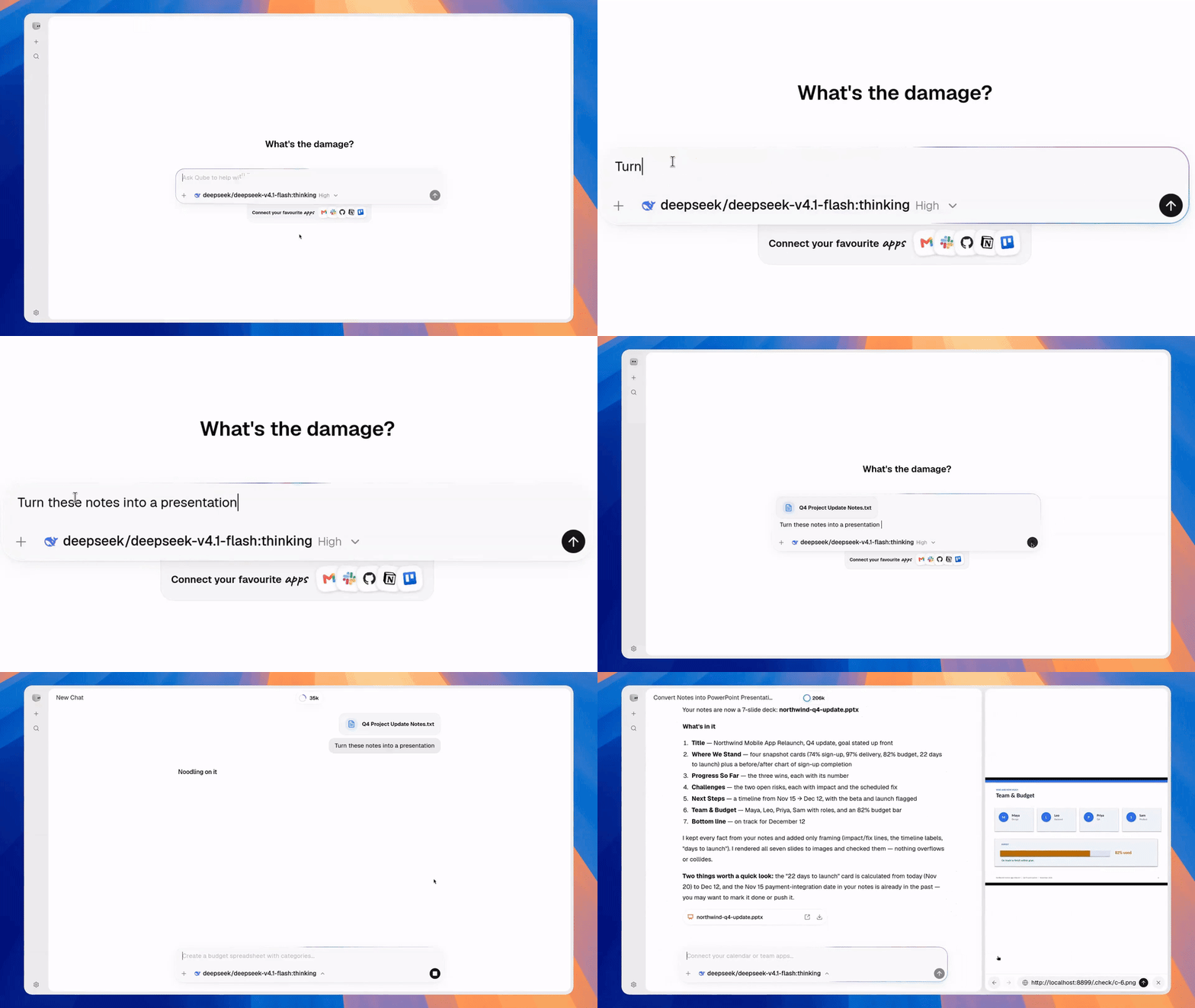
An AI agent for anyone.
A free, open-source, local-first desktop assistant that does the work instead of just suggesting it — no terminal, no server to manage, no Qube subscription.
What is Qube?
Qube is a personal assistant that lives on your computer. You tell it what you
want in plain language and it gets the job done: researching online, writing
documents and spreadsheets, organizing files, driving a browser, and working
inside the apps you already use.
It is an autonomous agent, not a chatbot: it plans the steps, uses tools,
checks its own work, and keeps going until the task is finished. Before
sensitive actions it double-checks them against your request and asks for
your approval when in doubt; destructive actions such as deleting files are
off unless you turn them on. Qube itself runs on your machine, and your
files, chats and settings stay there — what you ask is sent to the AI
provider you choose.
You bring the AI. Qube doesn't ship with a model — sign in with a ChatGPT
subscription, paste an API key for one of 40+ built-in provider presets
(OpenAI, Anthropic, Google, OpenRouter and many more) or any OpenAI-compatible
endpoint, or point it at a local model through Ollama or LM Studio. You only
ever pay your AI provider.
What you can do with it
- Finish real work, not just talk about it. Ask for a tailored CV and
cover letter, an insurance comparison with the math shown, or a folder of
invoices totaled into a spreadsheet — and get actual files back. - Get real Office documents. Properly formatted
.docx,.pptxand.xlsxfiles (with live spreadsheet formulas), plus Markdown, CSV, PDFs
and images, all organized in a tidy local workspace and shown as file cards. - Research without a dozen tabs. Qube searches, reads pages, and returns
short sourced answers with citations — and opens a watchable browser for
forms, bookings and tracking, handing you control for logins and two-factor
prompts. - Work inside your apps. Connect Gmail, Google Calendar and Drive, Slack,
GitHub, Notion, Linear, Jira, Trello, Asana, Airtable, HubSpot, Dropbox and
Canva with a normal sign-in window. Sends and creates are double-checked
and wait for your approval when in doubt; read-only lookups don't. - Let it remember and repeat. It remembers your preferences and projects
across chats, learns reusable playbooks, and can run scheduled tasks and a
periodic check-in while the app is open. - Control your whole computer when you ask. An optional driver lets it
click and type in other desktop applications, with every mutating action
reviewed and confirmed with you when in doubt.
Quickstart
Download the installer for your platform from the
Releases page — Windows
(.exe/.msi), macOS (.dmg/.zip), or Linux (.deb/.rpm) — and
install it like any desktop app. No Node.js or terminal needed.Open Qube and follow onboarding: accept the terms, connect your AI
(ChatGPT sign-in or a provider key), and optionally connect apps.Say what you want. For example:
“Research good first bikes for a 6-year-old under €150 and give me a short sourced comparison with three options.”
Qube searches and reads pages on its own, shows its progress, and comes
back with a cited answer — no setup beyond choosing an AI. Once you connect
apps in Settings, you can also ask it to triage Gmail, post to Slack, file
GitHub issues and more.
A couple of prerequisites worth knowing: browser automation needs a
Chromium-based browser installed (Chrome/Chromium, or Edge on Windows);
generating real Office files works best with Python 3 + pip on the machine.
Full details in Getting started.
Documentation
Read the documentation website at
qwerty-2117.github.io/Qube, or
browse the same pages directly in docs/ on GitHub.
Start here
- Getting started — install, onboarding, first task
- Choose your AI — ChatGPT sign-in, API keys, local models
- Having conversations — goals, questions, attachments, history
Guides
- Files and the workspace · Web research · Browser automation · Computer use
- Connected apps · Memory and skills · Automations
- Permissions and privacy · Desktop app details · Troubleshooting
Power users and contributors
- Custom MCP servers · Qube as an ACP agent · Environment variables · Development and architecture
- Architecture · Documentation website · Maintainability audit
- Terms of Service · Privacy Policy
Run from source
You don't need this to use Qube — it's for developers and contributors.
git clone https://github.com/QwErTy-2117/Qube.git
cd Qube
npm install
cp .env.example .env.local   # optional; most settings are configured in-app
npm run dev                  # http://localhost:3010
Building the desktop app additionally needs Rust and the
Tauri prerequisites:
node scripts/build-sidecar.js
npm run tauri:build
See Development and architecture for the full setup,
test suite, and codebase map.
Safety and responsibility
Qube acts on your instructions and your approvals, which means you are
responsible for what it does on your behalf — including actions in connected
apps that you didn't foresee step by step. It can make mistakes like any AI,
so review important work and keep backups. Reads and in-workspace work happen
freely; sends, outside-workspace access and computer control are checked
against your request and confirmed with you when in doubt; deletes and other
destructive actions are blocked unless you enable them. Actions inside the
built-in browser and tools from MCP servers you add are not approval-gated, so
be specific. Your data stays local and is sent to your chosen AI provider
(and, for connected apps, through Composio) to fulfill your requests. See
Permissions and privacy, the
Terms and Privacy Policy.
License
Apache 2.0 — see LICENSE.
Support Qube
Qube is free and open-source. If it saves you time, you can support its
development:
- BTC:
bc1qkn3slg3ql0z7xfuzqzwkcx3jv6my7t6xq6ekek - SOL:
EF8MNkBgeifY3KUtPHzQvQg4o2qw3MCQE1WkVrvFsEjM - ETH:
0x57C7de26041eab3cafbF7e024E1CC0817E2daf6F
Yorumlar (0)
Yorum birakmak icin giris yap.
Yorum birakSonuc bulunamadi