codex-cli-telegram-plugin
Health Uyari
- License — License: Apache-2.0
- Description — Repository has a description
- Active repo — Last push 0 days ago
- Low visibility — Only 6 GitHub stars
Code Basarisiz
- process.env — Environment variable access in codex-brain/bin/brain.ts
- exec() — Shell command execution in codex-brain/src/contract.ts
- exec() — Shell command execution in codex-brain/src/digest/archive.ts
Permissions Gecti
- Permissions — No dangerous permissions requested
Bu listing icin henuz AI raporu yok.
OpenAI Codex CLI as your personal agent in Telegram – a ready setup: autonomous work, parallel sessions, live status card, widgets, self-check. Built on the Codex app-server.
Codex CLI Telegram Plugin
Read in your language: English (this page) · Русская версия →
По-русски: личный агент OpenAI Codex в приватном чате Telegram, на вашем сервере и с вашим входом ChatGPT.


Releases: GitHub releases · current v0.6.0 · release notes · v0.1.0 notes · CHANGELOG.md
Your own Codex agent in a private Telegram chat.
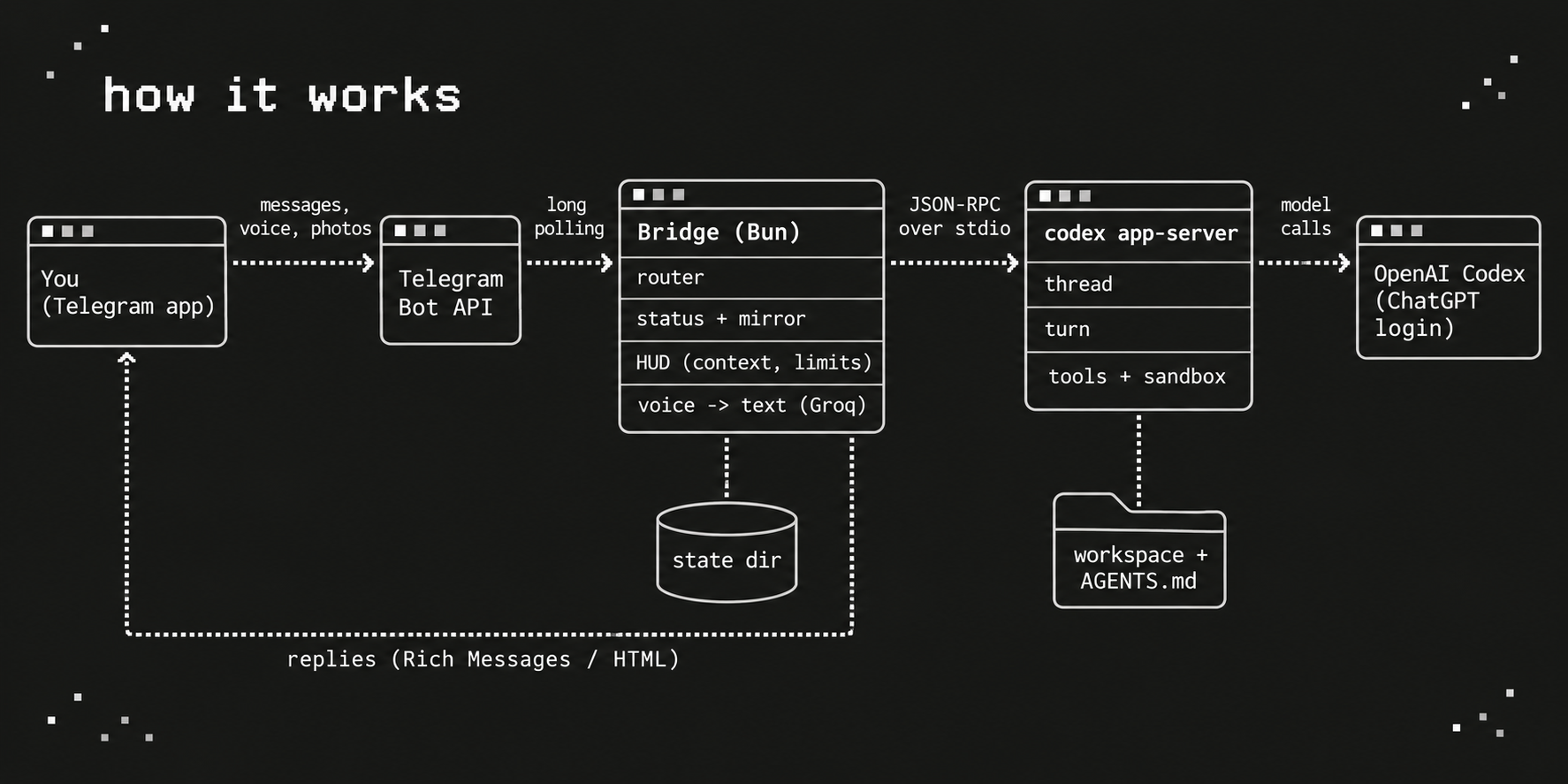
A small Bun/TypeScript bridge between a Telegram bot and OpenAI Codex CLI. It starts codex app-server (the JSON-RPC interface of Codex CLI) as a child process, forwards your messages to a Codex conversation and sends the answers back to the chat. One bot serves one owner, in a private chat, on your own server, with your own ChatGPT login.
- Plain chat. Text, voice, photos, documents and albums go to Codex; answers come back formatted.
- Long tasks.
/goalkeeps Codex working towards a stated result; you see a live status line and milestones while it runs. - Control. Approval cards for actions outside the sandbox, or a fully autonomous mode for a dedicated OS user.
- Context at a glance. An optional pinned card (HUD) with context use, plan and Codex rate limits.
- No lost messages. Messages, the Codex thread and delivery progress are saved on disk and survive a restart.
Quick start
The installer targets Linux with systemd. Run every step as the ordinary (non-root) user that will own the bot.
Install with an agent. Give Codex the repository link and ask it to follow AGENT_INSTALL.md: it checks the prerequisites, clones, runs ./install.sh, runs bun test and /doctor tests, and reports back. Russian: отправьте агенту ссылку на репозиторий и попросите выполнить AGENT_INSTALL.md.
1. Prepare the tools. Install git, curl, jq, then Bun and Codex CLI. Check bun --version and codex --version.
2. Sign in to Codex with your ChatGPT account (device code flow, works on a server without a browser):
codex login --device-auth
codex login status
3. Create a bot. In Telegram open @BotFather, send /newbot and keep the token. Open the private chat of the new bot and press Start. See Telegram bot features.
4. Install and start:
git clone https://github.com/qwwiwi/codex-cli-telegram-plugin && cd codex-cli-telegram-plugin
./install.sh --start
The installer asks for the token (hidden input), prints a one-time code and asks you to send it to the bot; this proves which Telegram account is the owner. It writes a private plugin/.env, creates the workspace (default ~/krotov-workspace) with a starter AGENTS.md, the state directory (default ~/.local/state/krotov-plugin), runs bun run doctor and enables the user service krotov-telegram.service.
5. First message. Send /help to the bot, then any question. The bot shows that it is working on the message; now and then the agent itself reacts to a message with an emoji that fits the dialogue (KROT_ACK_REACTION=off, which the installer writes and which also applies to an upgraded install without the variable; KROT_ACK_REACTION=eyes puts 👀 on every message, as older versions did).
install.sh flag |
Meaning |
|---|---|
--start |
enable and start the user service after a green doctor |
--agent-name NAME |
agent name in status and greetings (default: the bot's name) |
--workspace PATH |
Codex working folder (absolute path) |
--state-dir PATH |
bridge state folder, must be outside the workspace |
--approval-mode never|standard|risky |
approval cards: never (default for a new install, autonomous, no cards), standard or risky (see Security) |
--non-interactive --token-file PATH |
no prompts; token from a private file |
--owner-id ID / --pair-code CODE |
owner by numeric ID, or by a pre-sent krotov-<uuid> code |
--hooks / --no-hooks |
install (default) or skip the Codex hooks pack |
--no-memories |
skip the native Codex memory default on a fresh install |
--dry-run |
print the plan and exit |
Manual setup on Ubuntu or Debian: plugin/docs/quickstart.md. Setup by an AI agent: INSTALL-WITH-AGENT.md. On macOS there is no installer and no systemd unit; set plugin/.env by hand and run bun run start in plugin/.
Requirements
- Linux with systemd user services for
install.shandupdate.sh;loginctl enable-lingerso the bot keeps running after you log out. bun,codex,git,flock,curl,jqinPATH(checked by the installer).- A ChatGPT account with Codex access. The bridge checks at start that Codex is signed in through ChatGPT.
- A Telegram bot token from BotFather with no webhook set.
- Optional: a Groq API key for voice messages.
Features
- One owner, one private chat; everything else is ignored.
- Text, voice (transcribed), photos, documents, albums, forwards and replies with quoted context.
- A live status message while Codex works, moved below new messages so it stays visible.
- What the agent is thinking: the status message streams the latest line of Codex's reasoning summary instead of a static
reasoning...(on for a new install;TELEGRAM_STATUS_THOUGHTS=0turns it off). /mirror onshows one line per recent command and collapses to a summary when the turn ends.- Approval cards for commands, file changes and MCP tool calls; question cards when Codex asks you to choose.
/goalfor long tasks with a completion criterion; unfinished tasks continue in the next turn.- Optional pinned HUD: context window use, model, plan, autonomy mandate, Codex limits; moves to the bottom after each turn.
- Optional parallel answers: a new question while a long task runs gets its own side conversation.
- Widget answers: Codex can show numbers, charts, steps, plans and comparisons as a Telegram widget built from html-components, with a plain-text fallback (details).
- Saved conversations:
/cc resume, export to a file, model choice. - Codex Brain is on by default. Manage facts, tasks, suggestions, and handoffs from
/memoryin the owner’s private chat. Memory guide
Voice messages
Set GROQ_API_KEY in plugin/.env. A voice message is downloaded and sent to the Groq transcription endpoint (whisper-large-v3-turbo, language ru by default, files up to 25 MB). Codex receives the text. Without a key, or when transcription fails, Codex receives a note that the transcript is unavailable plus the path to the downloaded file.
How replies are formatted
Codex writes Markdown. The bridge first tries a Rich Message: Telegram's sendRichMessage, which renders Markdown on Telegram's side, one message up to 32768 bytes. It is used when the reply has no files, fits the limit, has no expandable quote and carries Markdown only Telegram renders (a table, math, a task list, <details> or a footnote). Any other reply goes as HTML: in a Rich Message Telegram shows paragraphs without the empty line between them. If Telegram rejects rich messages, the bridge switches them off for the rest of the process and uses the HTML fallback: Markdown converted to Telegram HTML and split into 4096-character parts; on an HTML parse error the part is resent as plain text. Turn rich messages off with TELEGRAM_RICH_MESSAGES=0.
Commands
| Command | What it does |
|---|---|
/help |
list of commands |
/status |
session state, current step, model, context use, prompt-cache share of input (Кеш: 93% входа, this thread and the last 24 hours), queue, mirror and approval state |
/stop |
interrupt the current turn (and parallel side turns) |
/new |
start a new Codex conversation; stops a running task first |
/reset force |
start a new conversation when nothing runs (/reset alone asks for force) |
/compact |
compress the Codex conversation context |
/keys |
inline buttons: status, stop, compact, help |
/mirror on|off|status |
live feed of Codex commands |
/lease <task>[; ttl=48h], /lease revoke <ID>, /lease consume <ID> |
give, list or revoke an autonomy mandate |
/cc |
compact, context, status, model [name], resume [number or ID], export, cost, clear |
/goal <result> |
set a long goal; /goal, /goal status, /goal pause, /goal resume, /goal cancel |
/memory |
manage Brain facts, tasks, suggestions and handoffs. Use off to disable Brain |
/pin, /unpin |
pin or unpin the message you reply to |
/react <emoji> |
put a reaction on the message you reply to |
/edit <text> |
replace the text of a bot message you reply to |
/get |
hand an attachment from the quoted message to Codex |
/usage [1|7|30] |
Token usage and UTC daily trends from local Codex logs. Defaults to seven days. See usage analytics. |
/doctor |
self-check: runs doctor, fetches the GitHub repository (KROT_UPDATE_REMOTE, default public if present else origin; KROT_UPDATE_BRANCH, default main) and reports commits behind/ahead, local edits (file names only), bun.lock vs node_modules drift, the Codex CLI version, the error journal (errors of the last 24 hours and 7 days, the last 5) and the prompt-cache share (a problem when under 70% of at least 200k input tokens of the last 24 hours came from the cache); /doctor fix hands the report to Codex to fix what is safe, without restarting the bridge mid-turn; /doctor tests runs a short smoke set (settings parse, Telegram getMe for the expected bot, Codex App Server handshake, hooks pack, writable state directory) and prints pass or fail per check |
/help, /status, /stop, /reset and /new can be switched off in config.json (commands block). Unknown /cc <name> commands are read from KROT_CODEX_COMMANDS_DIR when it is set.
Security model
- Single owner. The bridge refuses to start unless exactly one user ID and the same private chat ID are allowed. Messages from anyone else, from groups and from bots are dropped.
- Never root. The bridge exits when started as root, and the installer refuses to run as root. Run it under a dedicated unprivileged OS user that has no access to your other data.
- Secrets stay out of Codex. Codex gets only an allowlist of environment variables (
PATH,HOME, locale,CODEX_HOME,GH_CONFIG_DIRand a few system ones). The bot token and the Groq key are not passed and are redacted from logs and messages. - State outside the workspace. The state directory must be outside the Codex workspace, so Codex cannot edit the bridge's own files.
- Thoughts are redacted. The reasoning lines in the status message pass the same redaction as tool lines: configured secrets, tokens, keys and similar values are masked, and a word still being streamed is held back until it is complete, so half a secret never shows. They live only in that transient message, which is deleted when the turn ends.
Approval modes:
| Setting | Codex behaviour | When to use |
|---|---|---|
KROT_CODEX_APPROVALS=1 + KROT_CODEX_APPROVAL_MODE=never (set by the installer), or KROT_CODEX_APPROVALS unset |
sandbox workspace-write until managed hooks qualify for full access, policy never: no approval cards of any kind (commands, files, MCP and GitHub connector calls); the agent never waits for you, actions that need approval fail |
default: an autonomous agent working inside the workspace |
KROT_CODEX_APPROVALS=1 + KROT_CODEX_APPROVAL_MODE=standard (--approval-mode standard) |
sandbox workspace-write, approval policy on-request: Codex asks before actions outside the sandbox; you get a card with the exact command or diff |
when you want to confirm actions outside the workspace |
KROT_CODEX_APPROVALS=1 + KROT_CODEX_APPROVAL_MODE=risky |
as standard, but routine requests are decided by the bridge's policy and only risky or unclear ones reach you |
when cards come too often |
KROT_CODEX_SANDBOX=danger-full-access, with verified managed hooks in approval mode never |
Codex can use the network and write anywhere the OS user can | only for a dedicated unprivileged OS user |
danger-full-access cannot be combined with KROT_CODEX_PROXY.
Full access and managed hooks
On Linux, full access lets the agent write wherever its dedicated system user can write. Run ./install.sh --hooks as that user. Have an administrator review and run the single sudo install … line printed by the installer, then rerun ./install.sh --hooks and check /doctor in Telegram or run bun run doctor from plugin/. In approval mode never, the bridge enables full access after it verifies the root-owned hooks. If verification fails, it uses the workspace sandbox.
The hooks protect AGENTS.md and AGENTS.override.md in Codex home. For host-wide setup and protecting those files with the Linux immutable flag, see the hooks guide.
Brain memory
Brain is on by default. It keeps facts and open tasks from your private chat so a new or shortened conversation can pick up where you left off. Forwarded and foreign text stays separate from your owner memory. Send /memory to see what is stored or /memory off to switch Brain off.
On a new installation with Brain off at startup, the local backend defaults to native Codex memory when you have left the setting unset. See the Brain guide and native memory settings.
Parallel answers
Off by default. With KROT_CODEX_PARALLEL=1, a new message that arrives while the main task runs is routed like this:
- A reply to a message of a side conversation continues that side conversation.
- Any other reply goes into the running main task as a correction.
- A message that starts with a correction word goes into the main task. Default words:
уточнение,поправка,к задаче,стоп; override withKROT_CODEX_CORRECTION_WORDS(comma-separated). - Anything else starts a side conversation in the same app-server, if fewer than
KROT_CODEX_MAX_PARALLELconversations run (main included, default 2, max 8). Otherwise the message waits in the queue and the bot tells you what is running.
Side conversations do not touch the main conversation, the HUD or the status message. /stop stops them too.
Configuration
Settings live in plugin/.env (environment) and an optional config.json in the state directory; the environment wins. The installer writes the required ones: TELEGRAM_BOT_TOKEN, TELEGRAM_EXPECTED_BOT_ID, TELEGRAM_ALLOWED_USER_IDS, TELEGRAM_ALLOWED_CHAT_IDS, TELEGRAM_STATE_DIR, TELEGRAM_WORKSPACE_ROOT, KROT_CODEX_AGENT_NAME, KROT_CODEX_APPROVALS, KROT_CODEX_APPROVAL_MODE, TELEGRAM_STATUS_THOUGHTS, KROT_ACK_REACTION=off. doctor prints the active approval mode, whether thoughts are shown and the reaction settings. KROT_REACTION_PALETTE sets the emoji the agent may react with (up to 10, default 👍,❤,🔥,🎉,😁,🤔,👏,🙏,💯,🤝). Commonly added: TELEGRAM_HUD_ENABLED=1, GROQ_API_KEY, KROT_CODEX_MODEL, KROT_CODEX_SANDBOX, KROT_CODEX_PARALLEL=1. Every owner turn carries a short Telegram format reminder (paragraphs of 1-3 sentences, headings and list items on their own lines); KROT_FORMAT_REMINDER=off turns it off. A final answer that still arrives as one long block without blank lines is split into paragraphs at sentence ends before sending, and short lines separated by single line breaks are grouped into paragraphs of 1-3 sentences (a bold first line becomes a heading); code blocks, lists and links stay as written. KROT_ERROR_LOG_DAYS sets how long the error journal is kept. Every variable is listed in docs/ARCHITECTURE.md. Restart the service after a change.
Update and uninstall
Update (fast-forward from the tracked branch, tests and doctor run on a staged copy first):
./update.sh            # then restart when the bot is idle
./update.sh --restart  # restart right away
Uninstall:
systemctl --user disable --now krotov-telegram.service
rm ~/.config/systemd/user/krotov-telegram.service
systemctl --user daemon-reload
Then delete the clone, the state directory and, if you no longer need it, the workspace.
Troubleshooting
| Symptom | Cause and fix |
|---|---|
| Installer says Telegram did not confirm the token, though the token is right | The command ran without network access, for example inside a Codex sandbox. Run ./install.sh from a normal shell. |
Installer or doctor reports an active webhook |
The bridge uses long polling (getUpdates); Telegram does not deliver updates by polling while a webhook is set. Use a new bot or remove the webhook from the other integration. |
Bot stops answering, log shows 409 Conflict |
Another process polls the same token. Stop it; only one poller per token works. |
| A restart killed a running task | A restart stops the Codex process and its current turn; nothing resumes mid-turn. On start the bridge looks up the final answer of the interrupted task and delivers it, or tells you the result could not be restored. Queued messages continue. Restart only when the bot is idle (update.sh without --restart, then restart yourself). |
/help works, ordinary messages get no answer |
Check codex login status as the service user and journalctl --user -u krotov-telegram.service -n 50. |
Run bun run doctor in plugin/ to check the environment at any time.
Error journal
Every warning and error the bridge logs is also written, one JSON line each, to a daily file in the state directory: <state dir>/errors-YYYY-MM-DD.jsonl (UTC date; default state directory ~/.local/state/krotov-plugin). A line holds the time, level, area, message, the error's name, code and description, and the turn, thread and chat message IDs, redacted; never message text, request payloads or environment values. Files are kept for KROT_ERROR_LOG_DAYS days (default 14, at least 7) under a 50 MB total cap (the oldest day goes first, never today). /doctor reports a problem only for an error in the last 24 hours or a warning from the same area repeating 5 or more times in 24 hours, and then shows the last 5 such entries; /doctor fix hands only those to the agent, quoted as journal data, not instructions. Otherwise /doctor shows the counts for 24 hours and 7 days as an info line. The agent can read the journal itself, for example:
tail -n 20 ~/.local/state/krotov-plugin/errors-$(date -u +%F).jsonl
grep -h '"level":"error"' ~/.local/state/krotov-plugin/errors-*.jsonl | tail -n 20
Documentation
- docs/ARCHITECTURE.md: code map, message flow, state files, cards, HUD, all environment variables
- docs/codex-known-problems.md: known Codex CLI problems and which of them this bridge solves, partly solves or leaves open
- plugin/docs/quickstart.md: manual installation on a VPS (Russian)
- plugin/docs/install.md: deployment guide and Telegram commands
- plugin/docs/root-backend.md: separate Codex App Server through a local relay
- Codex Brain and legacy memory migration
- CHANGES.md: implementation history
Developer tests: bun test in plugin/.
License and credits
Based on Krotov-plugin by Pavel Krotov (github.com/PashaKrot), Apache-2.0. This fork adds, on top of upstream commit bb1d1ce:
- Codex limits line in the HUD
GH_CONFIG_DIRpassthrough to Codex- HUD moves to the bottom of the chat after each turn
- autonomous sandbox mode without approval cards (
KROT_CODEX_SANDBOX) - deletion of the bot's own pin service messages
- parallel answers while a task runs (
KROT_CODEX_PARALLEL)
Details and dates: CHANGES.md. License: Apache-2.0, notices: NOTICE. Modifications by Dashi Eshiev (qwwiwi) and contributors. Issues and PRs welcome.
Contributors
Yorumlar (0)
Yorum birakmak icin giris yap.
Yorum birakSonuc bulunamadi