lattice
Health Warn
- License — License: MIT
- Description — Repository has a description
- Active repo — Last push 0 days ago
- Low visibility — Only 9 GitHub stars
Code Fail
- rm -rf — Recursive force deletion command in packages/cli/package.json
- process.env — Environment variable access in packages/cli/scripts/postinstall.mjs
Permissions Pass
- Permissions — No dangerous permissions requested
No AI report is available for this listing yet.
Cross-project, cross-session context for developers & AI agents: layered specs, tasks, RAG search, knowledge graph, sync. CLI · VS Code extension · Web. 跨项目、跨会话的 AI 上下文脚手架。

Lattice
Cross-project, cross-session context for developers and AI agents
Specs, tasks and reusable experience — maintained once in ~/.lattice, reused across every repo.







English | 简体中文
Lattice is a local-first AI context scaffold. It keeps the knowledge that usually gets lost between repos and sessions — layered specs, task state with PRD / design / progress, project relations, and reusable domain experience — in one place, and serves it back to you (and to your AI agents) through a CLI, an in-editor extension and a web workbench.
Why Lattice
- Entering an unfamiliar repo? Get its conventions and context before writing a line of code.
- Juggling several projects? Track task state and relations across all of them.
- Solved something similar before? Search past specs, decisions and reusable experience instead of starting from scratch.
- Using AI agents? Inject the project's rules and context up front instead of starting every session from zero.
Screenshots
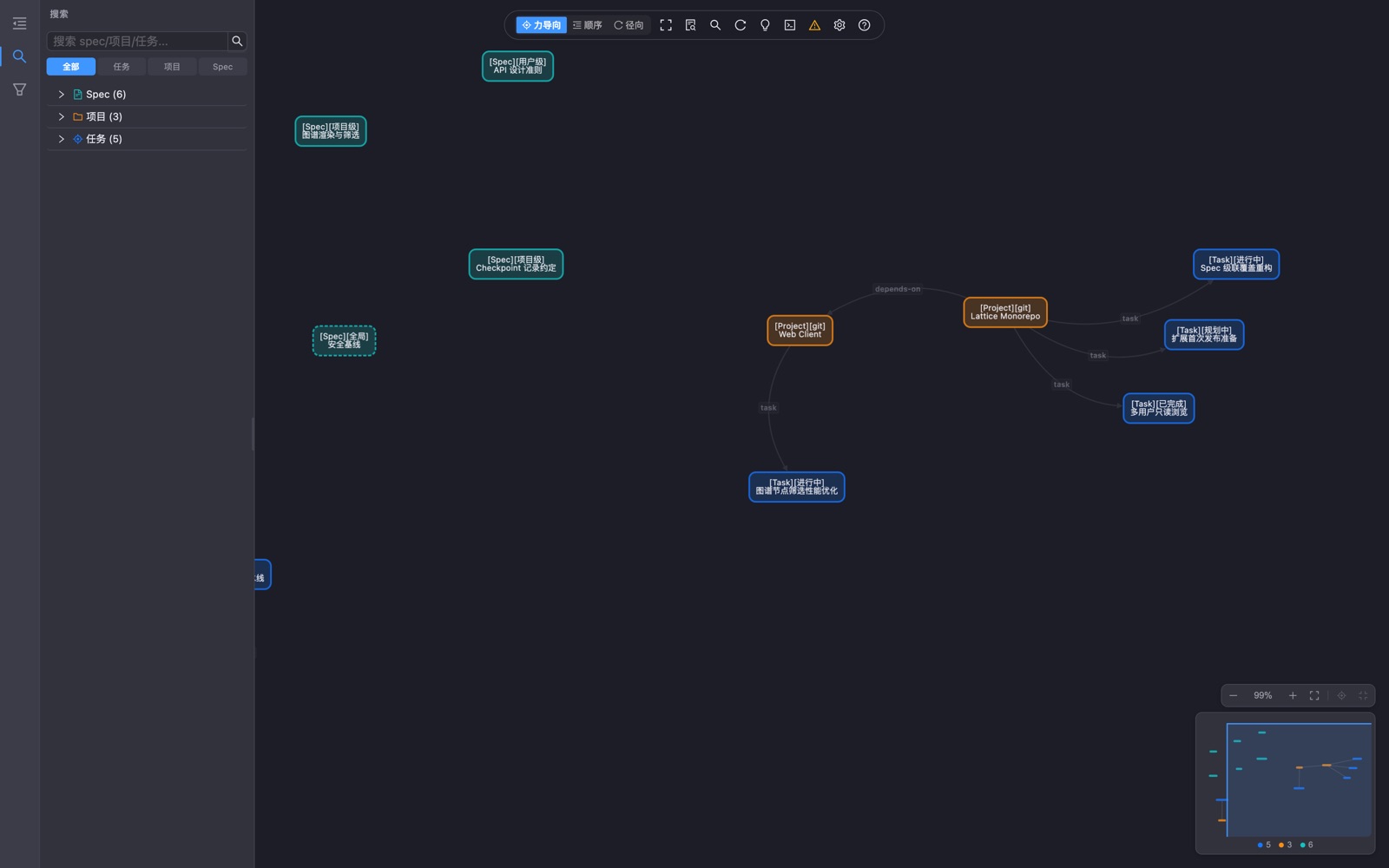
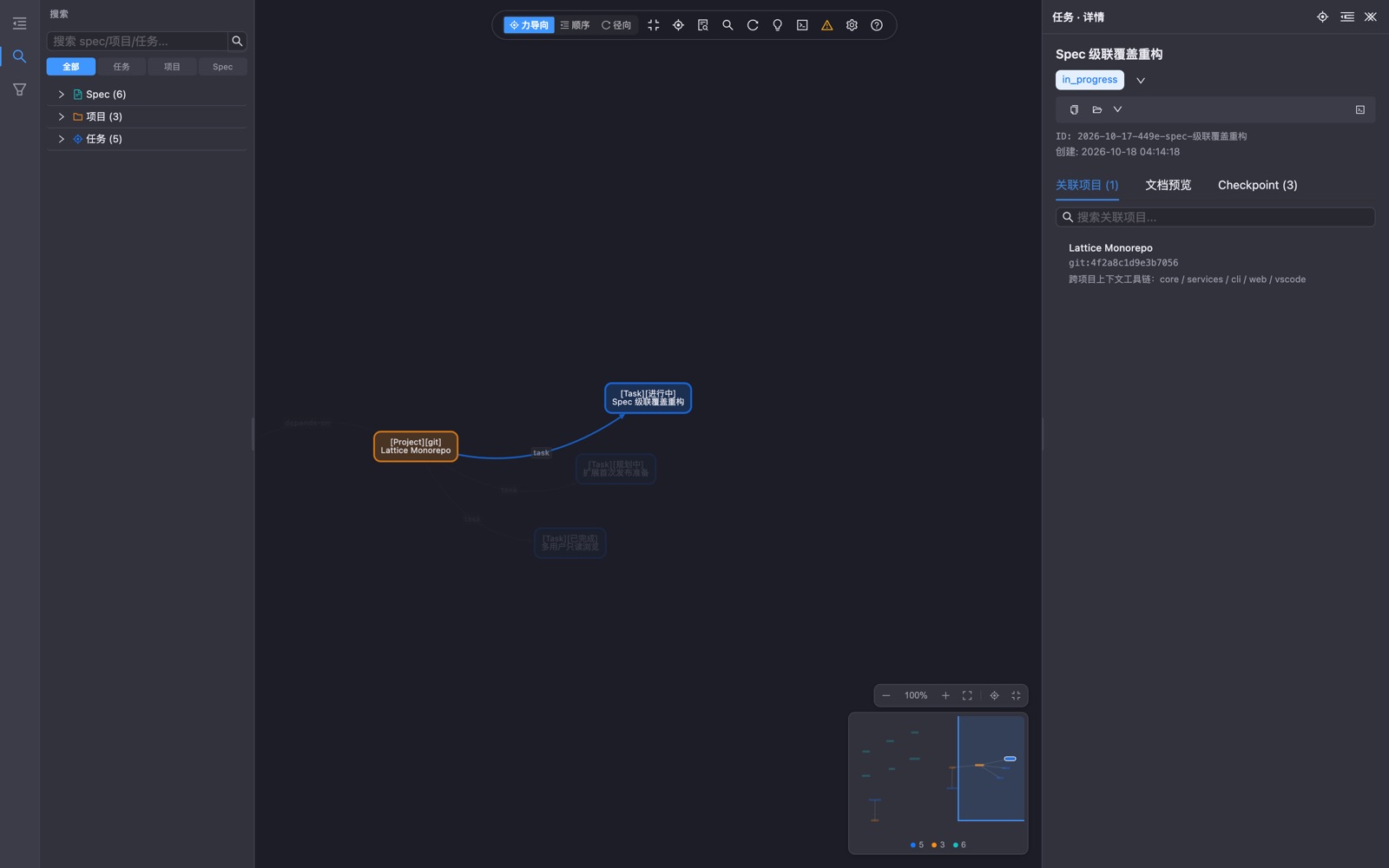
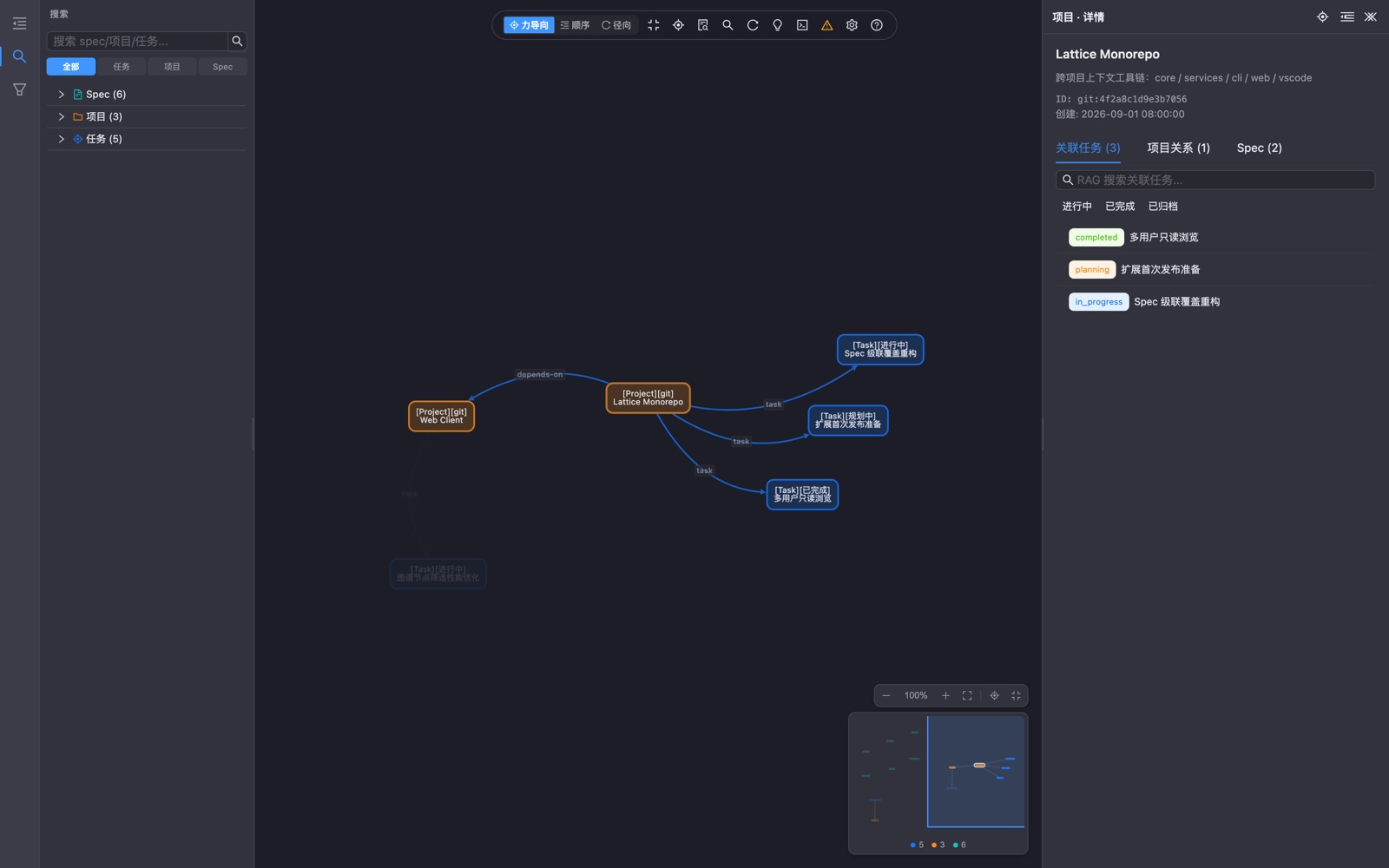
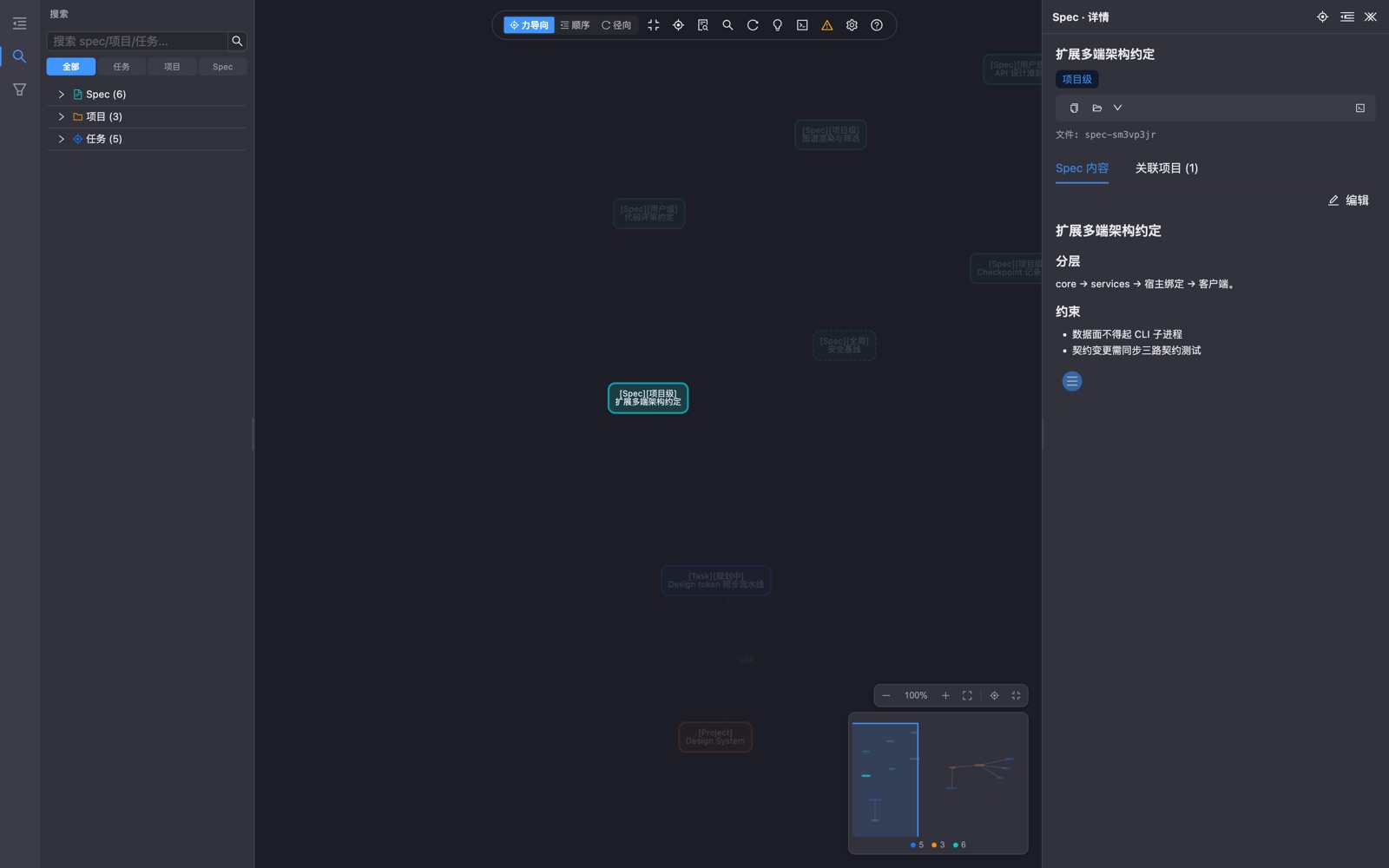
| Web workbench | Task detail |
|---|---|
 |
 |
 |
 |
The web workbench — also embedded inside the VS Code extension ("Lattice: Open Web Workbench").
Core capabilities
| Capability | Description |
|---|---|
| Layered specs | Global / user / project specs with automatic cascade override (ancestors included) |
| Tasks & checkpoints | Full lifecycle (planning → in progress → done → archived) with typed checkpoints (11 types) recording context, decisions, pivots, milestones |
| Project registry | Fingerprint-based project identity, monorepo nesting, cross-repo relations, alias-aware virtual merge |
| RAG search | Local embeddings + full-text index across specs, tasks, checkpoints and docs |
| Context aggregation | ltc context assembles every spec, active task and related project for the current repo in one shot |
| Dual-track sync | origin — single-repo multi-machine full sync; domains (experience packs) — multi-user collaboration over Git remotes, merged read-time |
| Spec templates | Built-in + remote template registry for project conventions |
| AI integrations | ltc init injects agent workflows into Cursor / Claude Code / Qoder / Trae, etc. |
| VS Code extension | Native sidebar views, graph workbench webview, Problems diagnostics, multi-user, checkpoint drafting — running the core in-process |
| Web workbench | ltc web (or the extension's built-in workbench) — task / project / spec explorer and Cytoscape knowledge graph |
Three ways to use it
| CLI | VS Code extension | Web workbench | |
|---|---|---|---|
| For | Automation, scripts, AI agents | Day-to-day browsing and editing | Visual exploration |
| Install | npm i -g @qcqx/lattice-cli |
Open VSX · VS Marketplace | npm i -g @qcqx/lattice-web |
| Run | ltc init · ltc scan · ltc context |
Activity bar → Lattice (first run: Quick Start — no CLI needed) | ltc web → browser, or the extension's built-in webview |
| Docs | packages/cli | packages/vscode | packages/web |
Packages
| Package | Role | Version |
|---|---|---|
@qcqx/lattice-core |
Domain core: storage, spec cascade, RAG, sync |  |
@qcqx/lattice-protocol |
Cross-host contracts (types-only DTOs & messages) |  |
@qcqx/lattice-services |
Use-case layer shared by CLI / web / extension |  |
@qcqx/lattice-cli |
Command line (lattice / ltc) |
 |
@qcqx/lattice-web |
Web server (HTTP API + static assets) |  |
@qcqx/lattice-web-ui |
Shared React UI (web client & extension webview) |  |
lattice (VS Code) |
VS Code extension (in-process core + webview) | 0.1.1 (VSIX) |
Quick start
# CLI — installs `lattice` and `ltc`
npm install -g @qcqx/lattice-cli
ltc init          # create ~/.lattice, pick a username, inject AI-client workflows
ltc scan          # register local projects (or `ltc link` inside a non-git repo)
ltc context       # every spec / active task / related project for the current repo
# Development + packaging of the VS Code extension
pnpm install
pnpm package:vscode   # → packages/vscode/dist-vsix/lattice-context-<version>.vsix
# Web workbench
npm install -g @qcqx/lattice-web
ltc web               # opens the local web UI
Data & privacy
- Everything lives in
~/.latticeon your machine — projects, specs, tasks, checkpoints, the search index. - No telemetry, no network calls from the tooling itself. Sync (origin / domains) only touches the Git remotes you configure.
- The VS Code extension reads and writes the same data root in-process (no CLI subprocess, no local HTTP server required).
Documentation
Package docs: cli · core · web · vscode
AI / agent workflow templates
- Skills overview
- Always-on rules (hard constraints)
- CLI command reference
- Task workflows · Spec workflows
- Project context · Project discovery
- Agent commands
Repository structure
packages/
├── core/       → @qcqx/lattice-core       domain core (storage, cascade, RAG, sync)
├── protocol/   → @qcqx/lattice-protocol   cross-host contracts (types-only)
├── services/   → @qcqx/lattice-services   use cases shared by all hosts
├── cli/        → @qcqx/lattice-cli        command line (lattice / ltc)
├── web/        → @qcqx/lattice-web        web server + client bundle
├── web-ui/     → @qcqx/lattice-web-ui     shared React UI components
└── vscode/     → lattice (VS Code)        extension: views, webview, diagnostics
Contributing
Issues and PRs are welcome — see CONTRIBUTING.md. Please follow the Code of Conduct;
for security reports use SECURITY.md.
License
Reviews (0)
Sign in to leave a review.
Leave a reviewNo results found