CluxMate
Health Gecti
- License — License: MIT
- Description — Repository has a description
- Active repo — Last push 0 days ago
- Community trust — 12 GitHub stars
Code Basarisiz
- exec() — Shell command execution in .github/workflows/ci.yml
Permissions Gecti
- Permissions — No dangerous permissions requested
Bu listing icin henuz AI raporu yok.
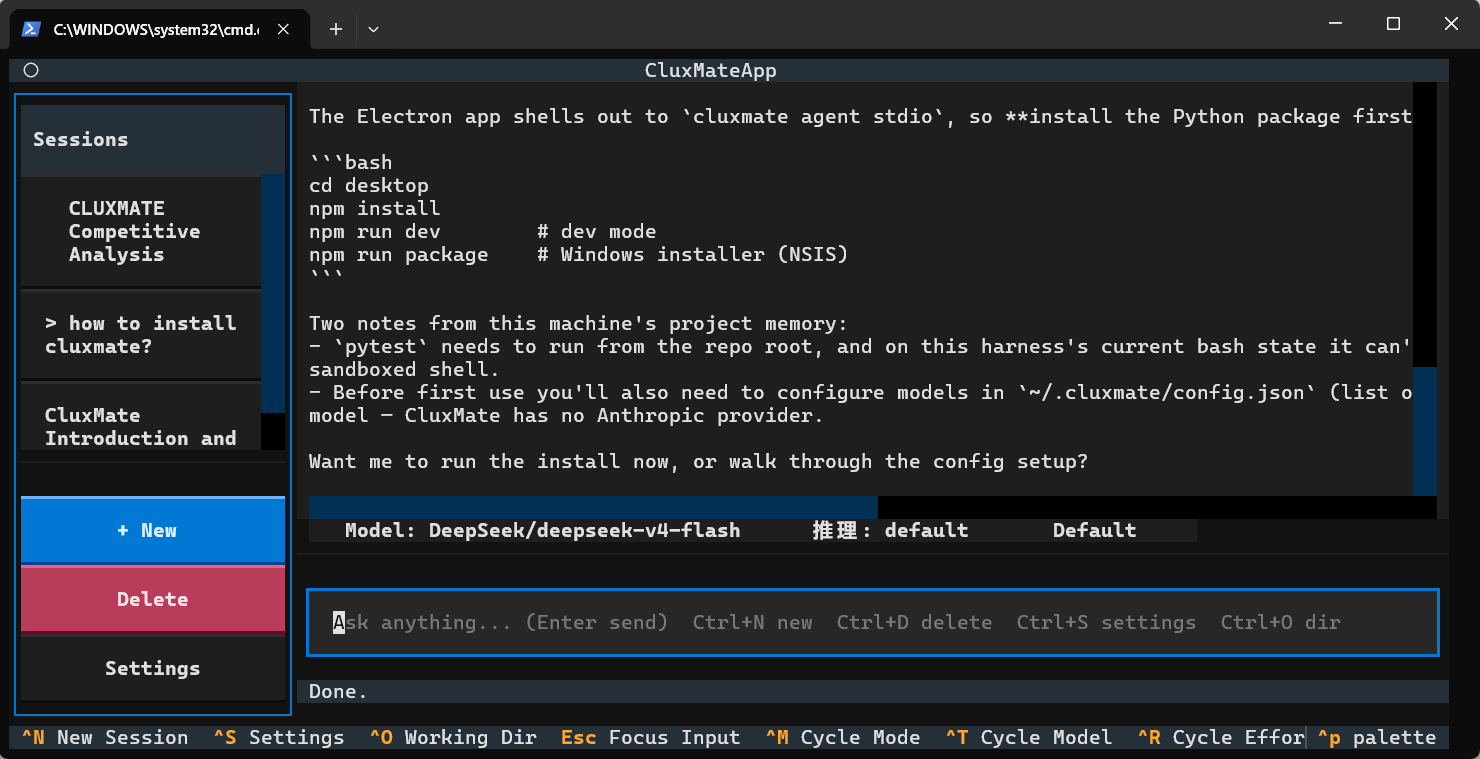
AI coding agent with one Python core and three front-ends — headless CLI, Textual TUI, and an Electron desktop. Works with any OpenAI-compatible API, with risk-tiered permissions, event-sourced replayable sessions, and a fail-closed OS-level sandbox.
CluxMate
An AI coding agent — one Python core, three front-ends.



English · 中文文档
What is CluxMate?
CluxMate is an AI coding agent that reads your codebase, plans changes, edits files, runs commands, and answers questions. A single Python core powers three interchangeable front-ends:
| Front-end | What you get |
|---|---|
| Headless CLI | One-shot prompts for scripts, CI, and automation (cluxmate -p "...") |
| Textual TUI | A full interactive terminal UI (cluxmate) |
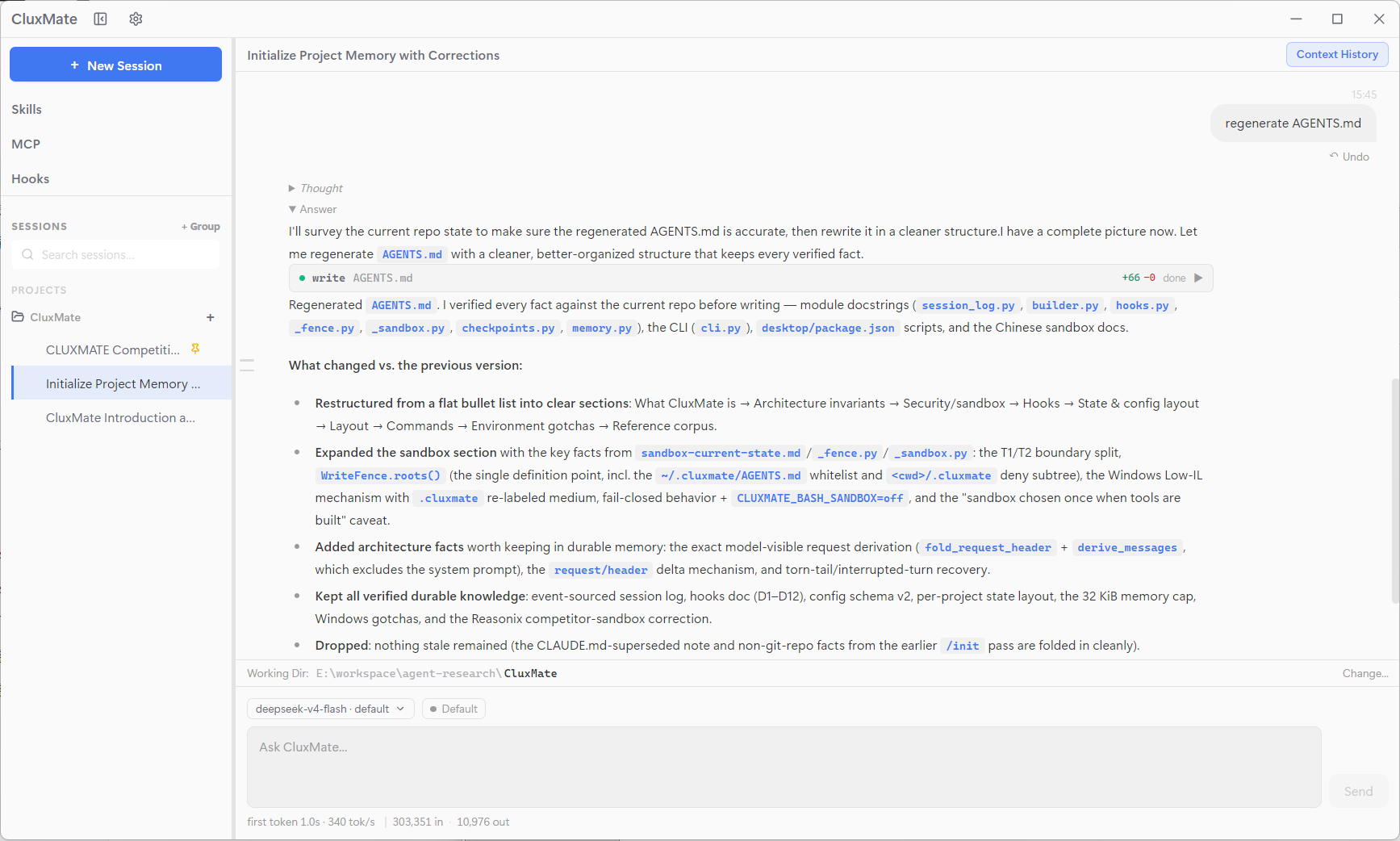
| Electron desktop | A polished GUI that drives the same core over JSON-RPC (stdio) |
It speaks the OpenAI-compatible API, so it works with DeepSeek, Qwen, GLM, OpenAI, OpenRouter, Ollama, or any self-hosted endpoint using the same protocol — just point it at a base_url. No vendor lock-in.
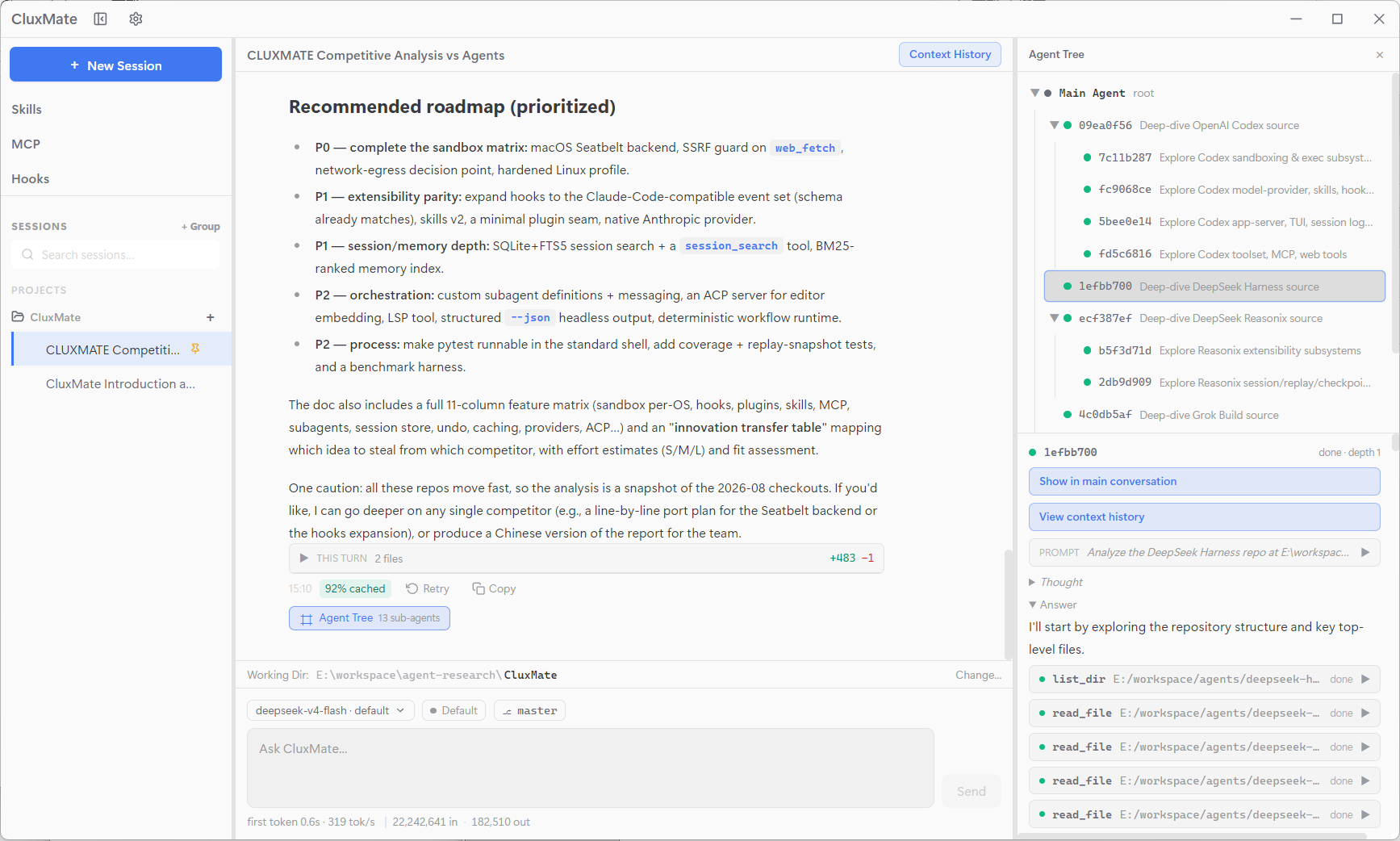
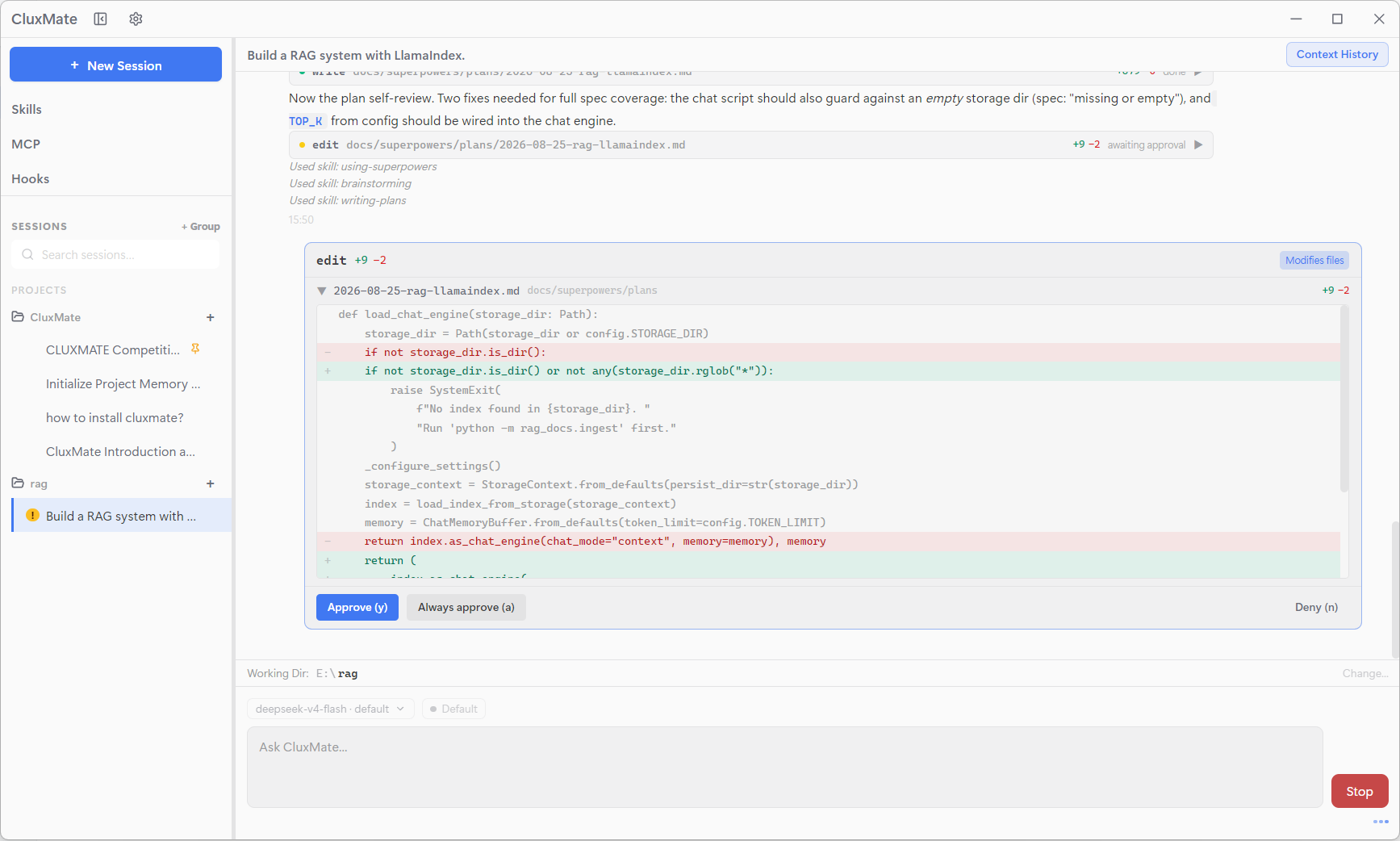
Screenshots
Highlights
- One core, three front-ends — the headless CLI, the REPL, the Textual TUI, and the Electron desktop all drive the exact same agent loop. The desktop app is a shell around that core; the Python agent remains fully usable on its own.
- No vendor lock-in — speaks any OpenAI-compatible API: DeepSeek, Qwen, GLM, OpenAI, OpenRouter, or a self-hosted endpoint. Configure multiple models and switch on the fly; provider failures never crash a turn, because timeouts, API errors, and network failures are translated into graceful, user-visible messages.
- Event-sourced sessions, fully traceable — every session is an append-only event log; the model's message history is derived from it, never stored separately. Every turn of every agent — main and subagents — is bracketed by
turn/start/turn/end, every step logsstep/start,request/header, and tool results, so the exact prompt sent at any step can be reconstructed and replayed verbatim, and context compaction rewrites a summary region without erasing the underlying events. See Sessions you can replay below. - Stable, cache-friendly context — the system prompt never changes with your session: memory, skills, and mode are injected as tagged synthetic messages, so request prefixes stay stable and prompt caches stay hot — with per-turn cache-hit and latency metrics surfaced in the UI.
- Risk-tiered permissions — every tool declares a risk level (
safe/write/dangerous); four modes (plan/default/acceptEdits/yolo) plus a persistent always-allow list control approval.planmode is read-only by construction; dangerous commands always prompt. - A two-layer sandbox — file write/delete tools are guarded by an in-process WriteFence (canonicalize-then-contain), and model-generated
bashcommands run inside an OS-level sandbox (Windows Low-integrity token, Linux bubblewrap, macOS Seatbelt). Sandboxing is fail-closed and onlyyolomode — the explicit opt-out — disarms it. See Security: sandbox. - Checkpoints & rewind — a shadow-git repository per working directory snapshots your files before and after every turn, so you can undo any turn — session-scoped, so other sessions' edits surface as conflicts, never clobbered.
- Subagent delegation — delegate independent tasks to restricted subagents (
general-purpose, read-onlyexplore) with a depth cap of 4, each with its own replayable session log. - Doom-loop guard — if the agent starts repeating identical tool calls, escalating advisories nudge it back on track;
MAX_TURNSremains the hard backstop. - Skills, memory & MCP — project-scoped skill packs, durable project memory (
AGENTS.md), and Model Context Protocol servers (stdio / HTTP) plug into the same context pipeline. - Lifecycle hooks — run your own shell commands at
UserPromptSubmit/PreToolUse/PostToolUse/Stop, receiving context as stdin JSON and deciding to block or inject context via stdout JSON. Hooks are your own trusted config, never sandboxed; crashes/timeouts degrade to a no-op. - Rich toolset, safely capped —
bash, file read/write/edit/delete,grep,list_dir,web_fetch,web_search,ask_user_question, subagents, skills, memory updates and more; every tool's output is capped and truncated to keep context bounded.
Architecture at a glance
┌──────────────────────────────────────────────┐
│                 Front-ends                   │
│  CLI ─── REPL ─── Textual TUI ─── Desktop    │
└──────────────────────────────────────────────┘
                     │
         JSON-RPC over stdio (desktop)
                     │
┌──────────────────────────────────────────────┐
│             Python agent core                │
│  AgentLoop ── SessionLog (event-sourced)     │
│  Builder ── Permissions ── Checkpoints       │
│  WriteFence ── Bash/MCP sandbox              │
│  Skills ── Memory ── MCP ── Subagents        │
│  Hooks ── Grants                              │
└──────────────────────────────────────────────┘
                     │
         OpenAI-compatible API (httpx)
                     │
┌──────────────────────────────────────────────┐
│  DeepSeek · Qwen · GLM · OpenAI · any base   │
└──────────────────────────────────────────────┘
The session log is the source of truth: an append-only sequence of events from which the model's message history is derived. This keeps request prefixes stable (prompt-cache friendly), enables exact replay, and survives crashes.
Sessions you can replay
Everything the agent does is recorded in an append-only event log — one .jsonl file per session — and the provider message history is derived from those events, never stored separately. That single source of truth buys a lot:
- Every turn, every step — each turn is bracketed by
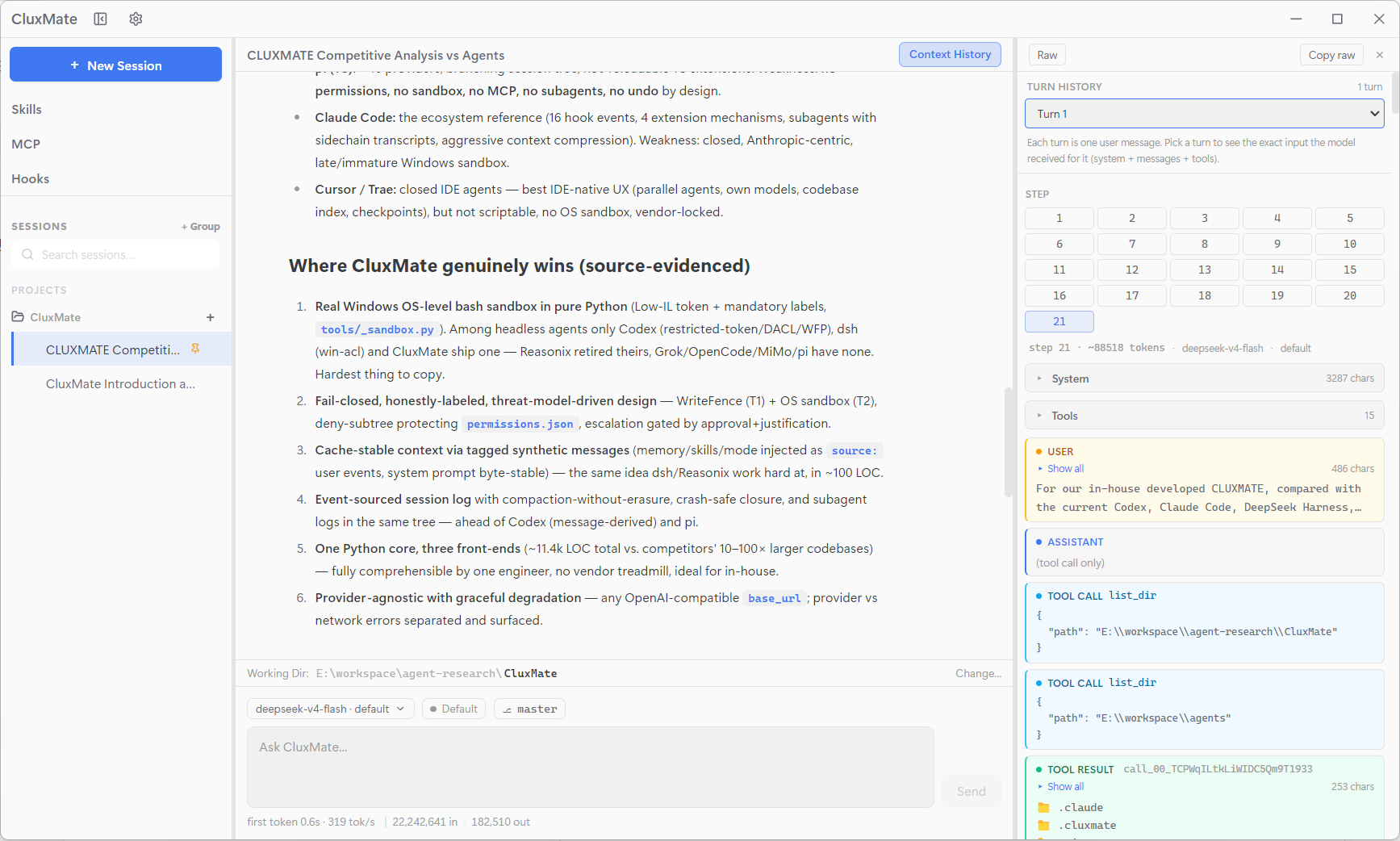
turn/start/turn/end; inside it, every model request logsstep/start+request/header(config, system prompt, tool schemas — only when they change), and every tool call logs its result. The exact prompt sent at any step can be reconstructed verbatim (session/contextshows it turn by turn). - Environment changes are logged too — memory updates, skill loads, and mode switches are recorded as tagged synthetic
user/messageevents (source: memory/skill/mode), and a mode or tool-schema change appends a freshrequest/headerwith reasonchange— so replay shows what the agent knew and could do at every point, not just what it said. - Subagents included — a subagent is just another agent loop with its own child
SessionLog, linked to its parent viasubagent/spawnpointers. Replaying a session replays the whole delegation tree, parents and children, in order. - Compaction without erasure — when a context grows too long, compaction rewrites one region of the log into a single summary message (one
ReplaceOp). The underlying events stay in the append-only log and the prompt-cache-friendly prefix stays intact — nothing is silently lost. - Crash-safe by construction — a torn tail is dropped on load, and an interrupted turn is durably closed with synthetic
tool/result+turn/end {interrupted}events, so a reloaded history is always a valid transcript. Undo rewinds to a turn boundary via a singletruncate.
Security: sandbox
Permissions decide what is allowed; two enforcement boundaries make denials stick:
① WriteFence (in-process) — guards the five file tools (write_file, search_replace, multi_edit, multi_write, delete_file). Every path is canonicalized (.. and symlinks resolved) then checked: deny-list first, containment second, before any I/O. Only the working directory, the platform temp dir, and your ~/.cluxmate/AGENTS.md are writable — and <project>/.cluxmate/ (permission config, MCP servers, skills) is always off-limits so a prompt-injected model can never edit its own permission settings.
② Bash + MCP sandbox (OS-level) — model-generated bash commands run under an OS sandbox instead of your full user, with a kernel-level backend on each platform:
- Windows: a Low-integrity token (
NO_WRITE_UP) with the workspace tree labeled low — the shell can read and reach the network, but cannot modify anything above its integrity level. - Linux: bubblewrap (
bwrap) mount namespaces — the root filesystem is read-only, only the workspace/temp dirs/granted folders are writable, and<project>/.cluxmateis re-mounted read-only. - macOS: Seatbelt (
sandbox-exec) —(allow default)with only file writes denied, the workspace/temp dirs/granted folders allowed, and<project>/.cluxmatedenied again. - Fail-closed: if sandboxing is on but no backend is available,
bashrefuses to run rather than falling back to a bare subprocess. Escape hatch:CLUXMATE_BASH_SANDBOX=off.
MCP stdio servers reuse the same sandbox (best-effort: they are your explicit config, so with no backend they fall back to running bare).
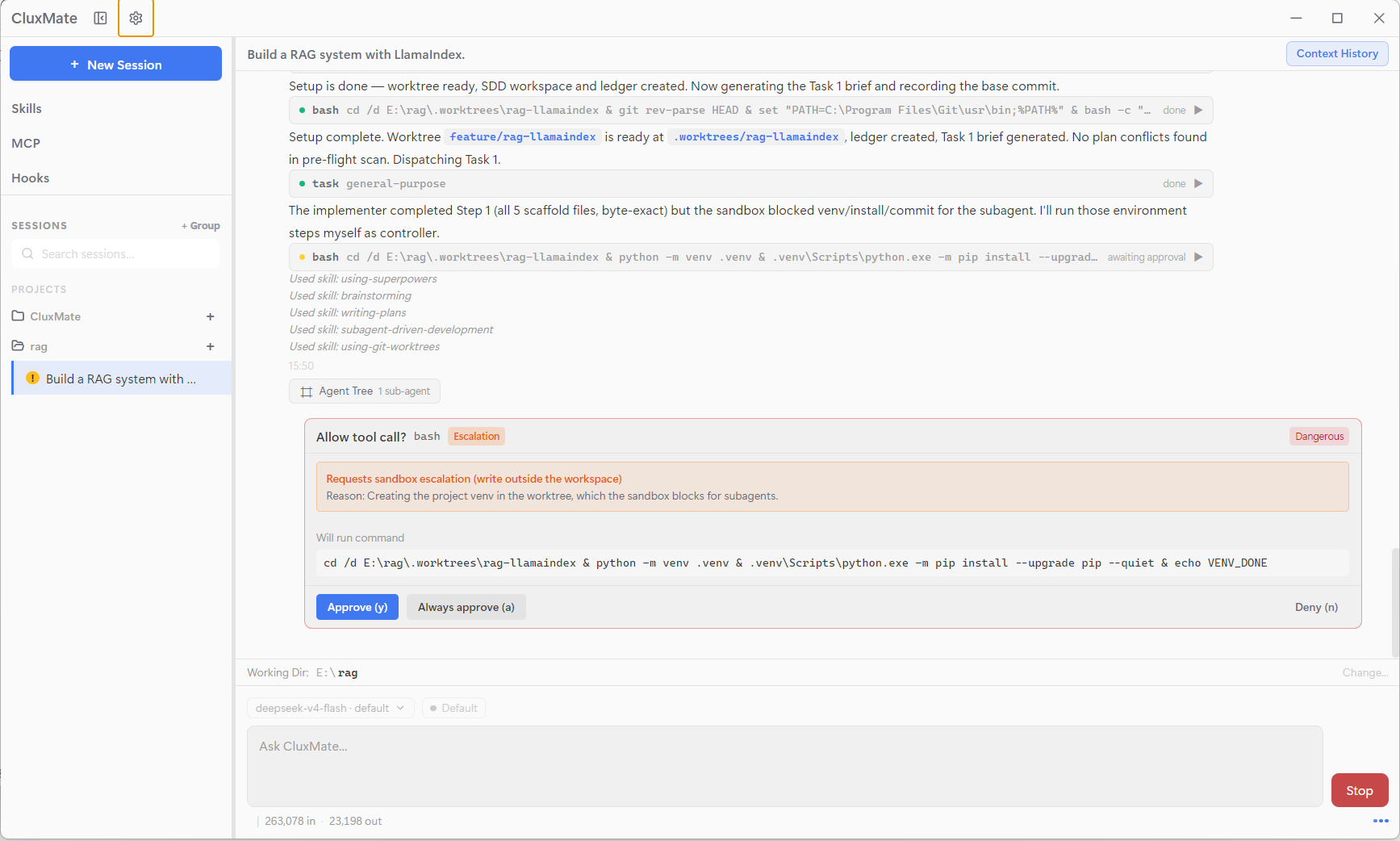
Both boundaries are enabled in every mode except yolo — the one explicit opt-out that disarms everything. Writable-folder grants (~/.cluxmate/sandbox-grants.json) let you whitelist extra directories. When the sandbox denies something, the model can request a one-off escalation (sandbox_permissions="danger-full-access" + a one-sentence reason) — this triggers a dangerous approval, and the grant applies to that single call only. The permission modes:
| Mode | Behavior | Sandbox |
|---|---|---|
plan |
Read-only toolset (writes aren't even registered) | Hard isolation |
default |
safe auto-approves; write / dangerous prompt |
On |
acceptEdits |
write auto-approves; dangerous still prompts |
On |
yolo |
Everything auto-approves, including dangerous |
Off (opt-out) |
Subagents
Delegate independent work to child agents with restricted toolsets:
general-purpose— the full read/write/bash toolset for any sub-task.explore— read-only (read_file,grep,list_dir,web_fetch,web_search) for research.
Subagents recurse up to a depth cap of 4 (the task tool is withheld at the cap), and each one is a child SessionLog linked to its parent via subagent/spawn — replay walks the whole delegation tree.
Skills, memory & MCP
- Skills — project-scoped instruction packs (
<project>/.cluxmate/skills.json) that the model can load on demand via theuse_skilltool. - Memory — a durable project memory file,
AGENTS.md, rendered as a tagged synthetic message every turn. A legacyCLAUDE.mdfile is also honored as a read-only fallback. - MCP — Model Context Protocol servers (stdio or HTTP) plug their tools straight into the agent's context; servers are loaded once per working directory, and stdio servers are OS-sandboxed like
bash.
Lifecycle hooks
Run your own shell commands at fixed points (Claude Code style): UserPromptSubmit / PreToolUse / PostToolUse / Stop. Commands receive context as stdin JSON and decide to block or inject via stdout JSON:
{
  "hooks": {
    "PreToolUse": [
      {
        "matcher": "bash",
        "hooks": [{"type": "command", "command": "python .cluxmate/hooks/audit.py", "timeout": 30}]
      }
    ]
  }
}
- Block: output
{"decision":"block","reason":"..."}or exit with code 2 → the tool/reply is blocked and the model receives the reason. - Inject: output
{"hookSpecificOutput":{"additionalContext":"..."}}→ extra context is injected for the model. - Location:
~/.cluxmate/settings.json(global) and<project>/.cluxmate/settings.json(project, runs after global) are merged. - Trust model: hooks are your own trusted config, running in a normal subprocess (not sandboxed); crashes/timeouts degrade to a no-op.
Installation
Requirements
- Python ≥ 3.12
- Node.js 18+ and npm (for the desktop app)
1. Python package
git clone https://github.com/r1c7/CluxMate.git
cd cluxmate

pip install .            # direct install
# or, for development — editable install (your changes take effect immediately):
pip install -e .
pip install pytest pytest-asyncio   # dev deps are not in pyproject.toml
After installation the cluxmate command is available on your PATH.
2. Desktop app
The desktop app drives the Python agent via cluxmate agent stdio, so install the Python package first and make sure cluxmate is on your PATH.
cd desktop
npm install
Then run it in one of two ways:
Development mode — launches the app with hot reload, for working on the desktop code:
npm run devBuild & package — compiles and produces an installer for the current platform (
dist/):npm run package # current platform npm run package:win # Windows installer npm run package:mac # macOS DMG npm run package:linux # Linux AppImage / deb
Other useful commands:
npm run build      # compile only (electron-vite build)
npm run preview    # preview the built app
npm run typecheck  # type-check main + renderer
Usage
cluxmate -p "Explain the session log design"                    # headless one-shot
cluxmate -p "Refactor this" --model-id deepseek                 # with a specific model entry
cluxmate -p "..." --reasoning-effort high                       # reasoning level (per-dialect)
cluxmate repl                                                   # interactive REPL
cluxmate                                                        # Textual TUI
cluxmate agent stdio                                            # JSON-RPC stdio server (desktop backend)
Run cluxmate once to seed a default config, then pick a model in the TUI/desktop Settings.
Configuration
Global config lives at ~/.cluxmate/config.json (schema v2) — a list of model entries plus the active model:
{
  "version": 2,
  "models": [
    {
      "id": "deepseek",
      "api_type": "openai",
      "provider": "DeepSeek",
      "base_url": "https://api.deepseek.com",
      "api_key": "",
      "model_name": "deepseek-v4-flash",
      "context_1m": false,
      "max_tokens": 80000,
      "reasoning_efforts": ["low", "high", "max"]
    }
  ],
  "active_model_id": "deepseek"
}
base_url— any OpenAI-compatible endpoint (DeepSeek, Qwen, GLM, OpenAI, OpenRouter, Ollama, self-hosted…).api_key— may be left empty; it falls back to theDEEPSEEK_API_KEY/OPENAI_API_KEYenvironment variables.context_1m— enable for providers with 1M-token contexts.max_tokens— output budget; leave empty/0for the 32768 default.reasoning_efforts— optional per-model override of the reasoning-effort levels (the system ships presets per dialect: DeepSeek / Qwen / GLM / OpenAI).
Per-project state (always-allow permissions, MCP servers, skills, sandbox grants, and lifecycle hooks) lives under <project>/.cluxmate/ — it stays with the project, not your home directory.
Desktop app
The Electron desktop is a full-featured front-end for the same Python core:
- Sessions & working directories — switch projects, resume or delete sessions, search past sessions.
- Git integration — current branch awareness, per-turn checkpoint timeline, diff viewer, and undo/checkout across branches.
- Inspectors — agent inspector, context viewer (what the model saw), subagent tree, tool-call cards, permission cards.
- Views — hooks, MCP servers, skills, settings with per-model configuration (including reasoning effort).
- Tray app — stays in the system tray with a show/quit menu.
License
Yorumlar (0)
Yorum birakmak icin giris yap.
Yorum birakSonuc bulunamadi