swarm
Health Uyari
- License — License: Apache-2.0
- Description — Repository has a description
- Active repo — Last push 0 days ago
- Low visibility — Only 5 GitHub stars
Code Uyari
- process.env — Environment variable access in api/releases.ts
- network request — Outbound network request in api/releases.ts
Permissions Gecti
- Permissions — No dangerous permissions requested
Bu listing icin henuz AI raporu yok.
Local-first control plane for AI-agent development — watch every Claude Code session live, ledger tasks/worktrees/resources, track token spend and cost, enforce rules.

Swarm
See every agent. Stop the collisions.
A local-first control plane for AI-agent development on any repository.
Website · Docs · Downloads · Changelog · Feedback



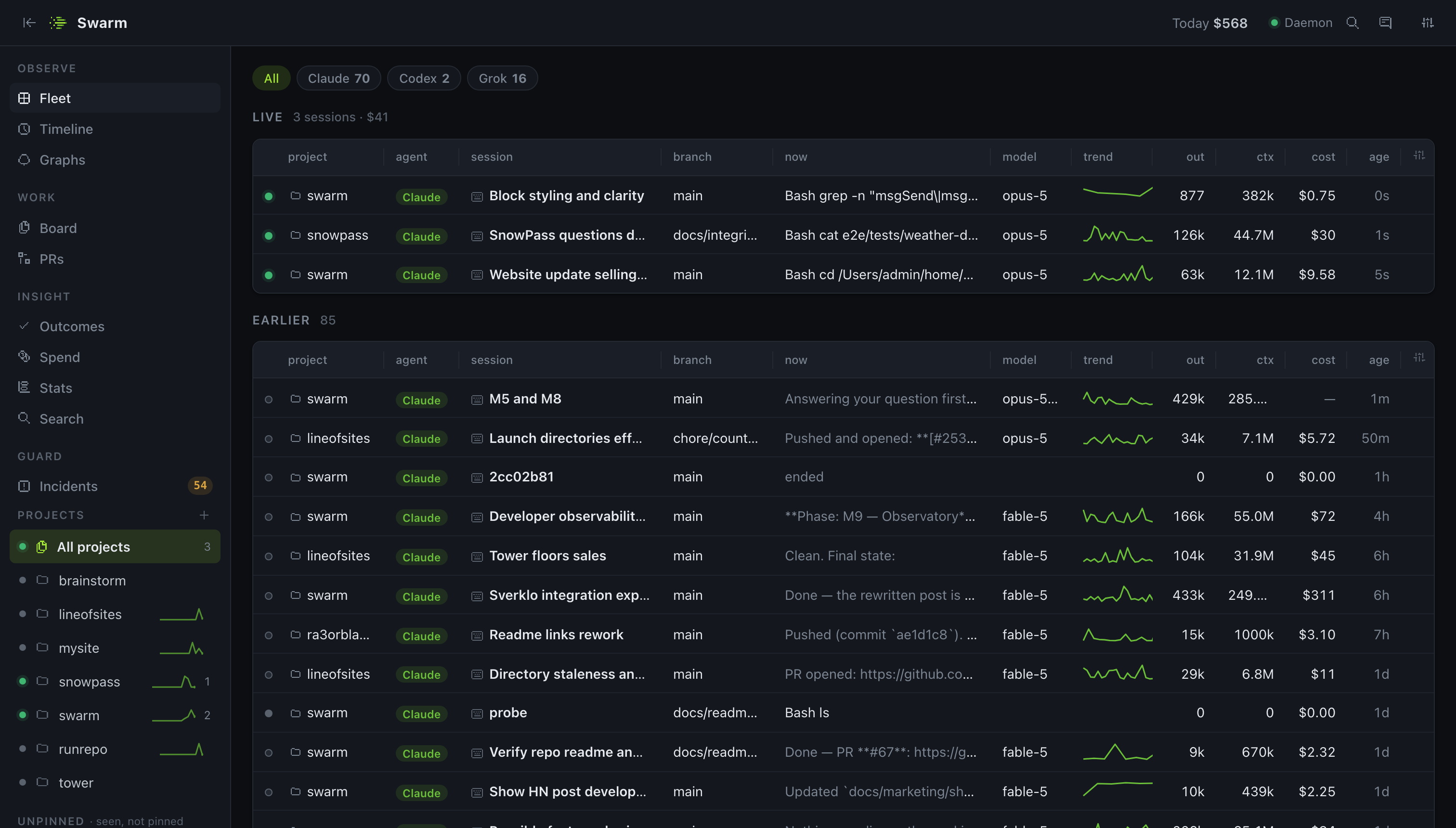
Run more than one Claude Code session at a time — or a Codex CLI, Gemini, Grok, Aider or opencode run on the side — and you lose the thread fast: which session is on which branch, what it's costing, which worktree has uncommitted work nobody owns, why that edit got blocked. Swarm is one daemon that watches every session on your machine — live tool calls, reasoning, token spend, cost — keeps a ledger of who holds which task, worktree and runtime resource, turns the "never do X" prose in CLAUDE.md into real permission decisions, and streams all of it to one dashboard.
It runs entirely on your machine. No account, no telemetry, works offline. Nothing is added to your repositories.
bunx @ra3orblade/swarm setup
Status: early, but real, and shipping fast — eleven releases so far. Observability across six agent CLIs, task claims in isolated worktrees, runtime resources, rules and incidents, a cross-forge merge queue, spawned agents (
swarm run/swarm dispatch), declarative workflows, executed verification gates (including a built-in reviewer), handoffs, agent-to-agent messaging, session replay, outcome tracking, the collision graph, search, budgets, signed org policy and a self-hosted team daemon are all built and dogfooded daily — Swarm dispatches its own tasks. What's next is on the roadmap.
What you get
Fleet — every session across every project, live: agent, title, branch, what it's doing right now, model, a trend sparkline, output tokens, context size, cost, age. Filter by agent (all six). A session that starts repeating a failing command gets a Stuck badge and a desktop notification — a heuristic, and nothing is ever interrupted.
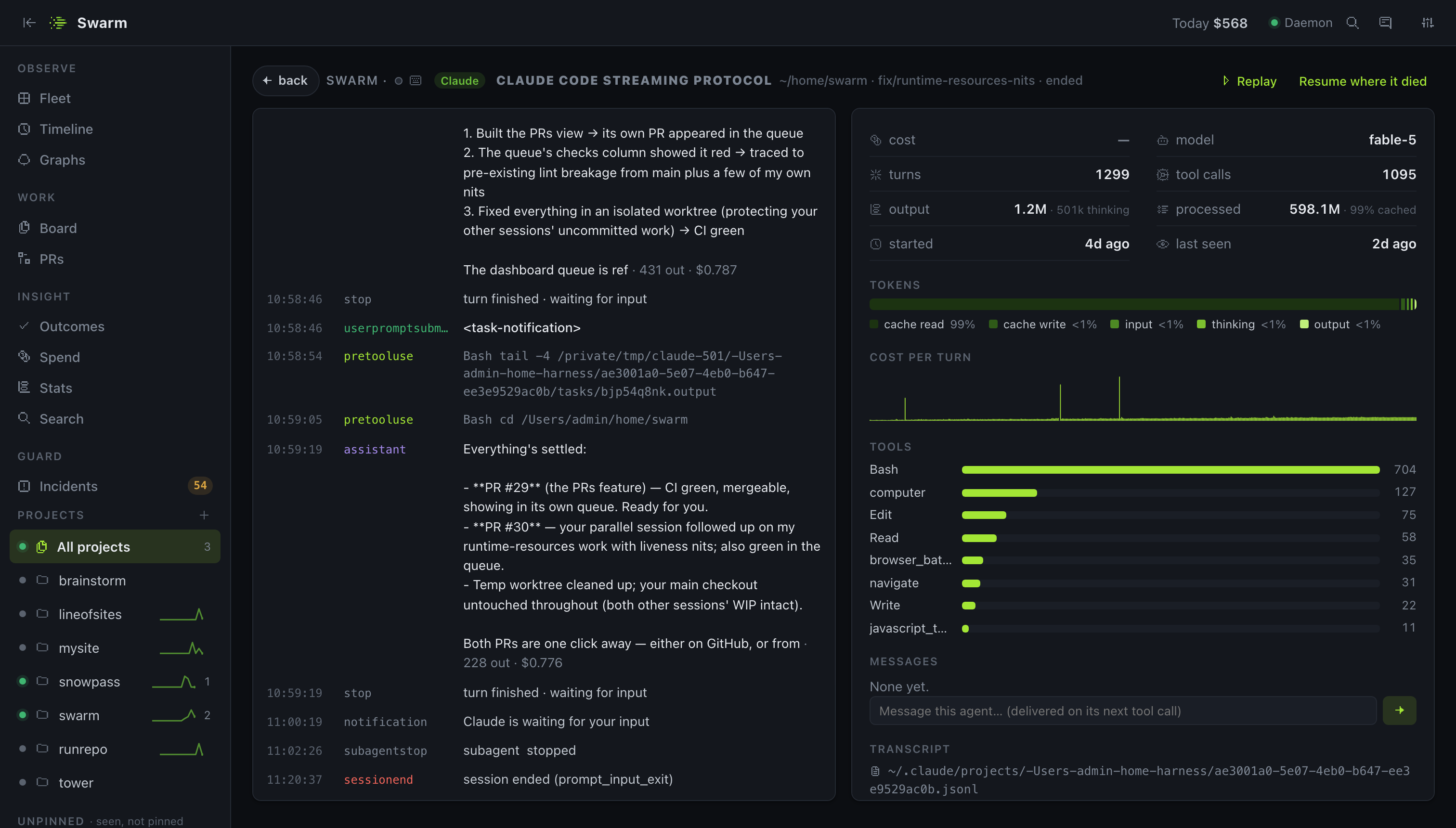
Session — an agent's reasoning and tool calls as a live stream, with cost per turn, cache hit rate, thinking share, tool histogram and the transcript path. Replay steps through its tool calls one at a time with full input and output; an ended session gets Resume where it died, which spawns a run from what it left behind; a session inside a worktree shows its Diff.
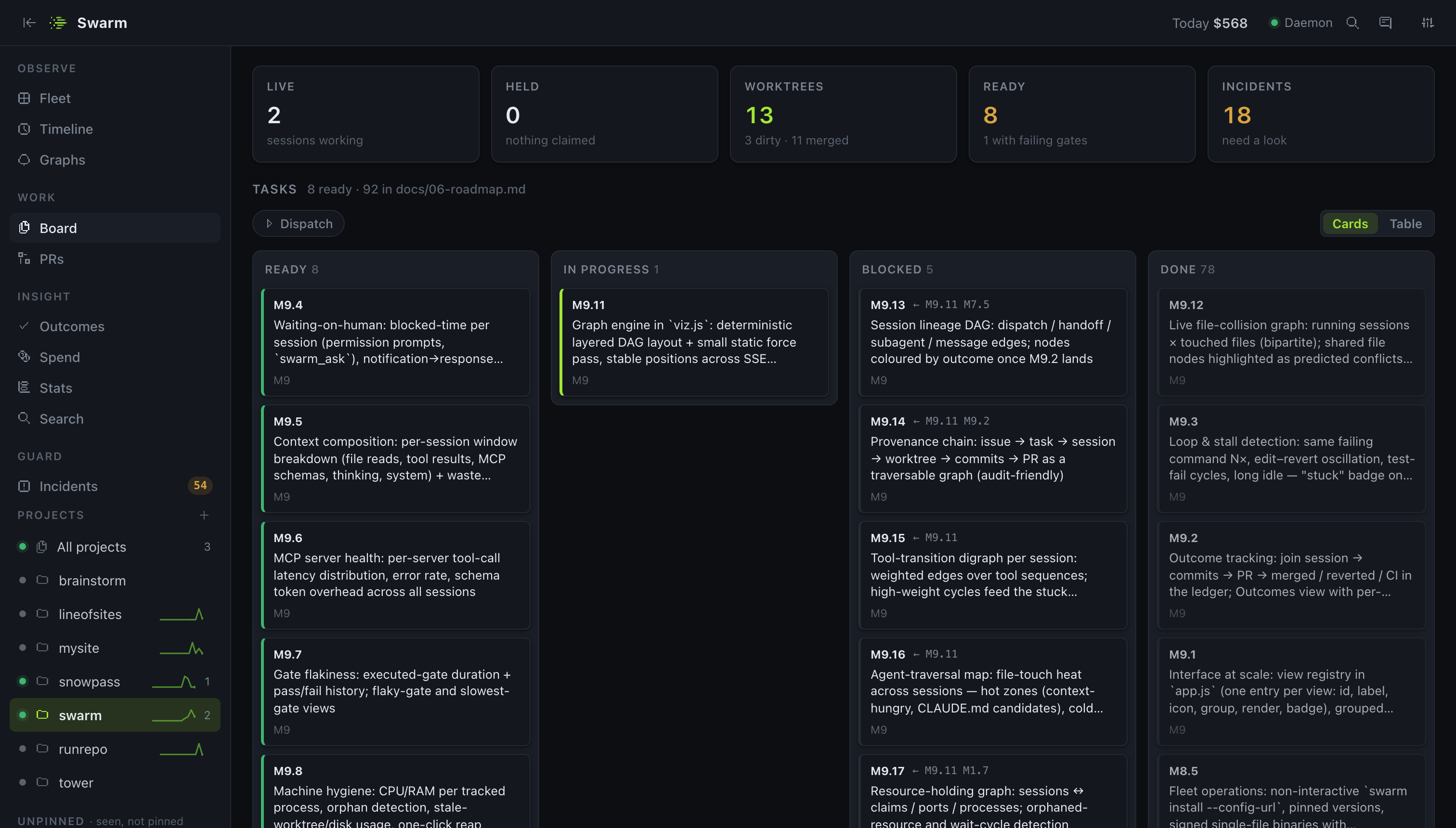
Board — the coordination ledger for a project: tasks from your backlog (a markdown file, GitHub Issues or Linear) with a ✓ / ✗ per gate and Run / Dispatch actions, task claims (each in an isolated git worktree), worktrees with branch, drift, dirty/unpushed state and which session is inside — plus Diff, PR (push + open a pull/merge request prefilled from the task and handoff), Open and Remove per row — runtime resources (ports, dev servers, databases held as named singletons), dispatch status, recent gates, and incidents — every command the rules asked about or denied, with the rule and the command, and a Codify action that turns one into a .swarm.toml rule and a CLAUDE.md lesson.
Rules — guardrails on the Bash commands a Claude Code session runs: shared_tree, destructive_git, pattern_kill, protected_ports, plus no_foreign_worktree and the opt-in claim_required_to_write on file writes; each ask | deny | off per repo in .swarm.toml. A deny is returned to Claude Code as a real permission denial. Ports held as resources are protected automatically. Guardrails against accidents, not a sandbox — see what rules are and aren't.
Run & Dispatch — start an agent from Swarm: swarm run --task X (or Run on a task row) claims the task and spawns claude -p in its worktree; steer it by stdin, stop it by pid. Its permission prompts go through the same rules as your interactive sessions — deny auto-denies, ask becomes an Allow / Deny card on the session, nothing else blocks. swarm dispatch --ready hands every claimable task to its own run, N at a time; when a run ends Swarm re-runs the gates and looks for the PR, and reports done / gates-failed / no-pr / crashed. Run profiles (full | no-edits | read-only) narrow what a spawned agent may do.
Gates & handoffs — .swarm.toml declares the gates every task must pass; a gate with a cmd is executed in the task's worktree (exit 0 passes, the output tail is the evidence) — on demand, from the agent, or automatically when a session in a held worktree ends. The latest run decides, failed runs are never deleted. Every session that pauses leaves an auto-handoff (files edited, last verification command, last request); the next session in that worktree gets it, the lease left, gate status and held resources injected at start.
Ask the human — an agent that hits a decision only you can make calls swarm_ask; the question shows on the session page with the options as buttons, Fleet shows an Asking badge, a desktop notification fires, and the answer reaches the agent on its own.
Workflows — [[workflows]] name = "ship" steps = ["implement", "gate:tests", "gate:review", "pr"] in .swarm.toml, and the daemon advances it: run steps spawn an agent in the task's worktree, gate steps must pass to continue, pr pushes the branch and opens the pull request. A failed step stops with an incident that says which one.
Messaging — swarm_send(to, text) reaches another session by id, whoever holds a task, or "lead" (your interactive session in the project). It arrives as injected context on the recipient's next tool call, over stdin to a spawned run, or via swarm_inbox — exactly once.
PRs — one merge queue across GitHub and GitLab, read through your already-authenticated gh / glab. Merge from the dashboard when checks and review are clear. No tokens stored.
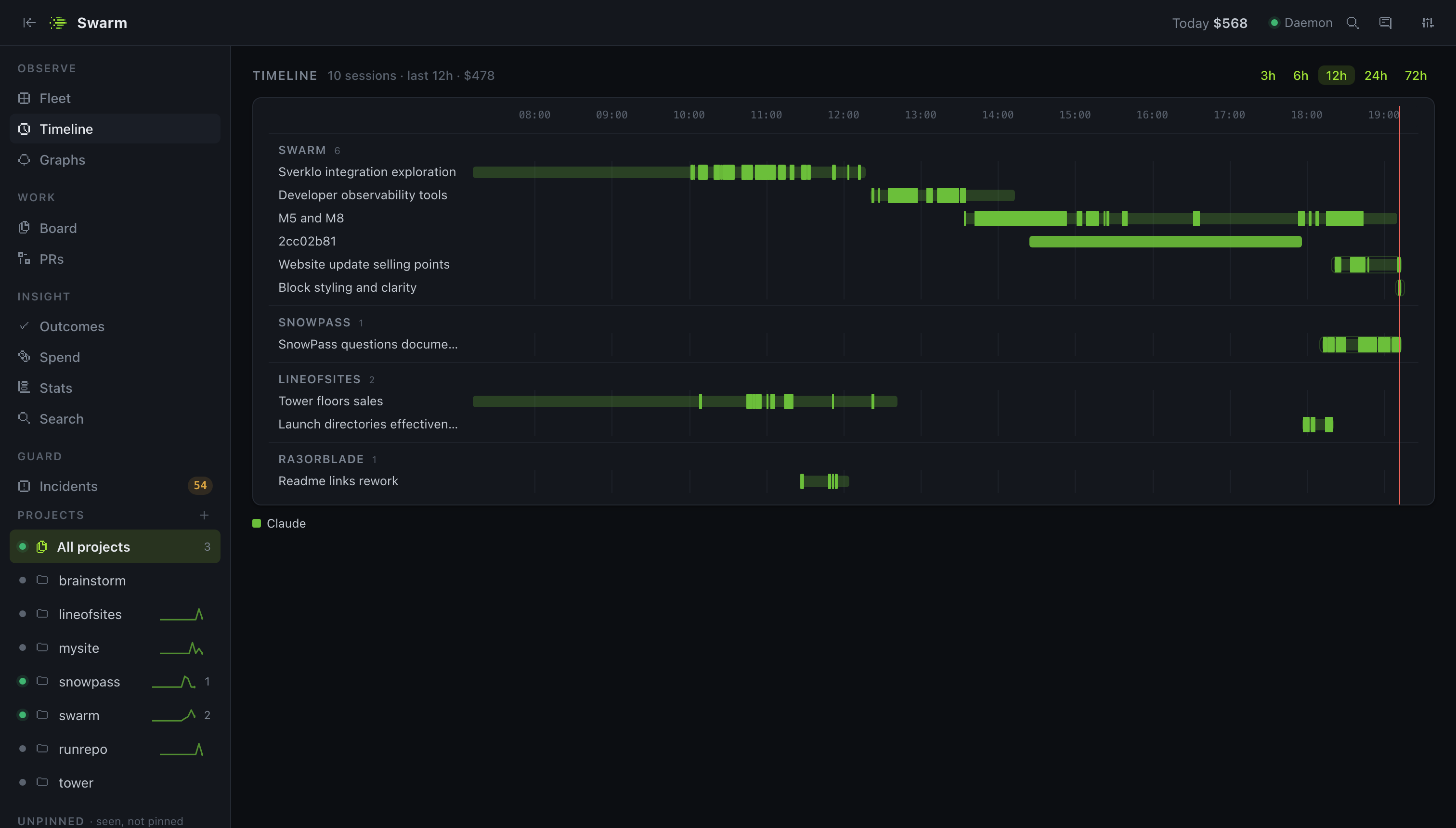
Timeline — session lanes per project, coloured by agent, 3–72 h.
Spend & Stats — cost by project, model, agent and task, today and all-time, with a context-budget table that ranks sessions by how much context they re-read; per-repo budgets (daily / weekly ceilings that warn, ask or stop); plus the fun numbers: tokens, turns, streaks, activity calendar, words written, what it adds up to in novels and coffee.
Search — full-text memory over everything Swarm remembers: handoffs, incidents, gate runs and what sessions said. Dry-run rules replays a project's history under rule modes you pick before switching anything on.
Outcomes — did the work survive? Sessions join to a branch, the branch to its PR, the PR to merged or reverted, scored per model and per agent: merge rate, median time from session start to merge, dollars per merge.
Graphs — a live bipartite graph of running sessions against the files they touch. A file two sessions hold with at least one writer turns red: a merge conflict you can still prevent.
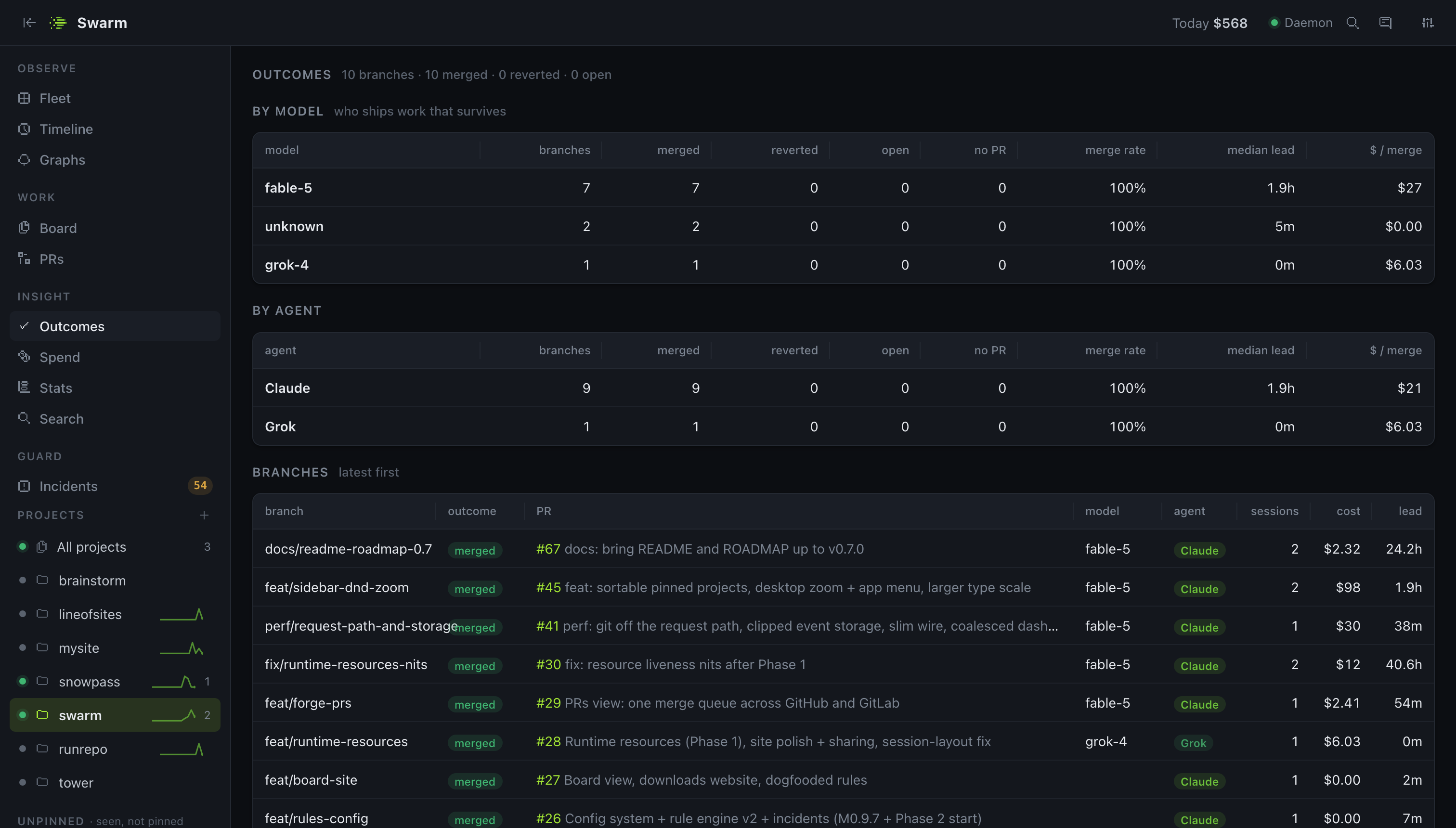
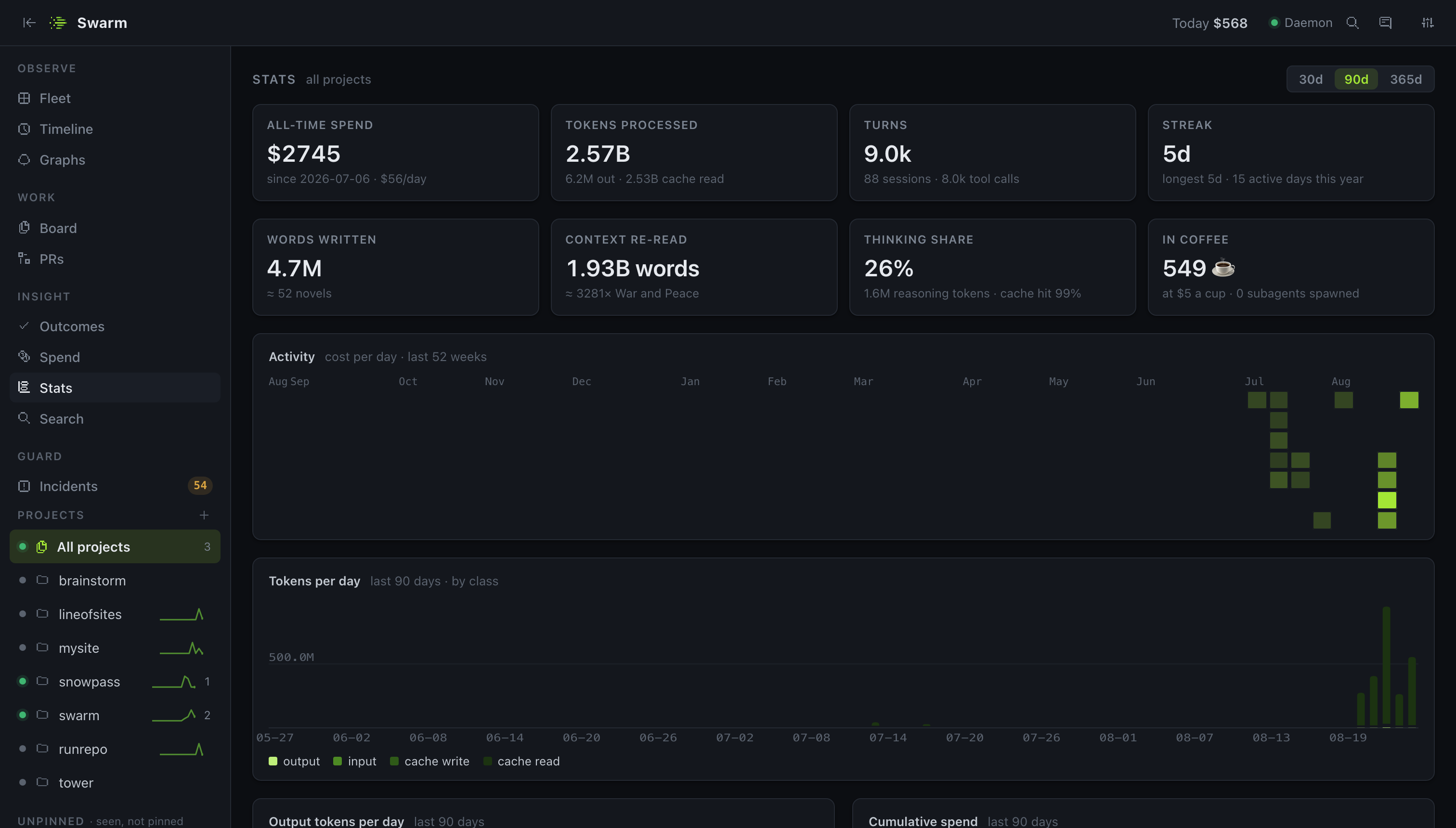
Multi-agent — six brands, one ledger: Claude Code via its hooks and transcripts (the full picture — rules, MCP, spawned runs), and Codex CLI (~/.codex), Gemini CLI (~/.gemini), Grok (ACP updates.jsonl), Aider (.aider.chat.history.md) and opencode (its SQLite database, read-only) by reading the session logs they already write. Every session is tagged with its agent; Spend, Timeline and Outcomes break down per agent.
Zero instrumentation — it reads the hooks and transcripts the agents already write. Every table is a real data grid: sort, resize, reorder, filter, persisted layouts. Light and dark themes.
Install
Requires Bun ≥ 1.3, git, and at least one agent: Claude Code (claude on your PATH — hooks, rules and MCP need it), plus Codex CLI, Gemini CLI, Grok, Aider and opencode (observed by reading their logs; no hooks, so no rules). Optional: gh and/or glab (authenticated) for the PRs view.
bunx @ra3orblade/swarm setup # daemon + hooks + MCP, opens the dashboard
Or install the CLI globally (bun add -g @ra3orblade/swarm, then swarm setup). Start claude in any folder and it appears at http://127.0.0.1:7777. The daemon runs in the background and auto-starts when needed; swarm doctor checks everything and prints the fix for each gap.
Prefer a native window with auto-updates? Get the desktop app from the downloads page — macOS (signed + notarized), Windows, Linux (.deb / .rpm). It bundles the daemon; run bunx @ra3orblade/swarm install once to add the Claude Code hooks. Building it yourself needs the Rust toolchain: bun run desktop:dev / bun run desktop:build.
Full guide: getswarm.vercel.app/docs — Getting started · The dashboard · Rules and configuration · Claims and worktrees · Runtime resources · Pull requests · CLI · MCP · Desktop app · Privacy & FAQ
Rules in 30 seconds
Drop a .swarm.toml in a repo (commit it — it's how the repo declares its rules). Global defaults live in ~/.swarm/config.toml. Bad config never takes the daemon down.
[rules]                      # "ask" | "deny" | "off"
shared_tree     = "deny"     # broad `git add -A` / `commit -a` while another live session shares the checkout
destructive_git = "ask"      # reset --hard, checkout ., clean -f …
pattern_kill    = "ask"      # pkill -f and friends
protected_ports = "ask"      # freeing a port listed below (or held as a resource)
no_foreign_worktree     = "ask"  # file writes into a worktree another claim holds
claim_required_to_write = "off"  # opt-in: writes to the shared checkout need a claim

[rules.protected]
ports = [5432]

[gates]                      # what every task must pass; a gate with a cmd is executed, not vouched for
required = ["tests", "review"]
[gates.tests]
cmd = "bun test"

[worktree]                   # start every new worktree warm
copy  = [".env.local"]
setup = "bun install"

[tasks]                      # the backlog the Board, `swarm tasks` and dispatch read
source = "docs/plan.md"      # or "github" / "linear"

[budget]                     # USD ceilings; on_exceed = "warn" | "ask" | "stop"
daily = 25

[dispatch]
max_parallel = 2
Every ask and deny is recorded as an incident on the Board. Reference: Rules and configuration · full docs/13-config.md.
CLI
swarm setup                    # first-run: daemon + hooks + dashboard
swarm start | stop | restart   # manage the background daemon
swarm status                   # live sessions in the terminal
swarm doctor                   # check setup, print the fix for each gap
swarm add <path> · ls · ui     # pin a project · list projects · open the dashboard
swarm tail                     # follow the live event stream

swarm tasks [--ready]          # the repo's task source; --ready = claimable now
swarm claim <task> [--owner n] # claim a task in a fresh isolated worktree (fail-closed)
swarm renew | release <task>   # extend the lease · release + remove the worktree
swarm claims · reap            # list claims · release abandoned ones (keeps those holding work)
swarm handoff <task> --done "…" --remaining "…"   # leave notes for the next holder · resume <task> reads them
swarm gate run <task> [gate…]  # execute the repo's [gates.<name>] cmd gates in the worktree and record them
swarm gate record <task> <gate> pass|fail --rubric "…"   # record a verification run by hand · gate ls
swarm wt [ls|create|open|diff|rm|gc]   # first-class worktrees: task-less ones, drift, diff, collect stale
swarm pr open <task>           # push the branch and open a PR/MR prefilled from task, handoff, gates, files

swarm run --task <id> --prompt "…" [--profile no-edits|read-only]   # spawn claude -p in the task's worktree
swarm run ls | send <task> "…" | stop <task>   # steer (stdin) or stop a spawned run — by pid, never pattern
swarm run resume <session-id>  # pick up where a dead session stopped (its handoff + tail)
swarm dispatch --ready | <task…> · status · clear   # claim + spawn a run per task, max_parallel at a time
swarm questions · answer <id> <text>   # what agents are waiting on a human for

swarm res ls | acquire <name> [--pid n] [--port n] | release <name> [--force]
swarm serve start [--name web] -- <cmd>   # dev server: port allocated, PORT set, pid tracked, port protected
swarm proc start [--name n] -- <cmd>      # same, for workers without a port · serve/proc ls | stop
swarm stats [--json]           # all-time totals, streak, records
swarm search <query>           # memory over handoffs, incidents, gates, what sessions said
swarm rules dryrun [--set rule=mode,…]    # replay history under rule modes; shows what would fire

swarm install | uninstall      # add/remove Swarm hooks in ~/.claude/settings.json + the MCP server
For agents (MCP)
swarm setup registers an MCP server with Claude Code (and with Codex CLI and Gemini CLI when installed), so an agent can coordinate itself instead of you running the CLI:
swarm_status/swarm_context— what's claimed, who's live, what's held; what Swarm told this session at start, current as of nowswarm_next_task/swarm_claim/swarm_renew/swarm_release/swarm_reap— the backlog and task claims in isolated worktrees (fail-closed)swarm_handoff/swarm_resume— leave notes for the next holder, read the last onesswarm_gates/swarm_gate_run/swarm_gate_record— see, execute or record verification gatesswarm_pr_open— push the branch and open a PR/MR prefilled from the task and handoffswarm_dispatch— a lead agent hands ready tasks to autonomous runs in their own worktreesswarm_ask/swarm_inbox— ask the human a question (with options); the answer arrives on its ownswarm_acquire_resource/swarm_release_resource/swarm_resources— hold a port, dev server or database as a named singleton; held ports are protected from other agents automaticallyswarm_search— memory over handoffs, incidents, gates and what sessions said
How it works
Claude Code · Codex · Gemini · Grok · Aider · opencode
              │   hooks · transcripts · session logs
              ▼
           swarmd ──▶ SQLite (~/.swarm) — the only place state lives
              │
              ├──▶ rules engine ──▶ ask · deny · incident
              ├──▶ ledger ──▶ claims · worktrees · gates · handoffs · ports · budgets
              ├──▶ SSE ──▶ dashboard · CLI · MCP · desktop app
              └──▶ swarm run / dispatch ──▶ an agent in a claimed worktree
- Identity is the git common dir, so every worktree of a repo maps to one project.
- State lives in
~/.swarm/— never in your repositories. Uninstalling leaves your repos untouched. - Hooks are installed once at the Claude Code user level, so every session on the machine reports in. The hook fails open: if the daemon is down, nothing blocks your work.
- Spawned runs are stopped by pid from the process registry, never by command pattern; a run that ends short of done keeps its claim and opens an incident rather than cleaning up behind your back.
Design docs (architecture, data model, protocol, interface, roadmap) are rendered at getswarm.vercel.app/docs/design and live in docs/.
Teams
One machine is free and always will be. When it outgrows one laptop, swarm-teamd is a second, self-hosted service your machines forward to — audit events, spend rollups and claims, never transcript text unless a machine opts in, and always after your redaction rules. You get one view of the fleet (machines, cluster-wide claims, spend by person, project, machine and day), a claim taken on one laptop is refused on another with the holder's name, org policy.toml is ed25519-signed and verified against a key pinned at swarm login, team budgets enforce warn / ask / stop, and monthly chargeback exports come out by user, machine, model or ticket id. Every laptop stays local-first and keeps working offline. Teams guide.
Licensing: packages/team is the single source-available package (FSL-1.1-ALv2, Apache-2.0 after two years). Everything else is and stays Apache-2.0.
Privacy
Everything is local. Swarm reads the hook payloads and session logs (all six agents) that already exist on your disk, stores derived state in ~/.swarm/swarm.db, and serves a dashboard on 127.0.0.1. Optional outbound paths, all under your control: fetching model prices from the public LiteLLM list (SWARM_OFFLINE=1 skips it); the PRs view shelling out to your already-authenticated gh / glab (Swarm stores no forge tokens); and the desktop app asking GitHub Releases for updates when you click Check for Updates…. No data about your sessions leaves your machine.
Configuration
| Env | Default | Meaning |
|---|---|---|
SWARM_PORT |
7777 |
daemon port (SWARM_PORT > [daemon].port in config > 7777) |
SWARM_HOME |
~/.swarm |
state directory |
SWARM_URL |
derived | override the daemon URL clients use |
SWARM_OFFLINE |
– | 1 disables the pricing fetch |
SWARM_STRICT_PORT |
– | 1 fails instead of falling back to a free port |
Model prices can be overridden in ~/.swarm/pricing.json. Full reference: docs/13-config.md.
Contributing
Issues and PRs welcome — see CONTRIBUTING.md, the roadmap and the changelog. Found something confusing? Use the Feedback button in the dashboard or open an issue. By participating you agree to the Code of Conduct.
git clone https://github.com/ra3orblade/swarm.git && cd swarm && bun install
bun run dev      # daemon with hot reload
bun run test     # the suite CI runs
Apache-2.0 — everything that runs on one machine: daemon, dashboard, CLI, MCP server, hooks, all
agent adapters. No telemetry, no account, and that never changes.
The one exception is packages/team — the self-hosted team daemon (multi-machine,
paid tier), which is source-available under
FSL-1.1-ALv2: free for internal use, education, research and
professional services, converting to Apache-2.0 two years after each release. The boundary is
simple (OQ-15): one machine free, a second person is the product.
Yorumlar (0)
Yorum birakmak icin giris yap.
Yorum birakSonuc bulunamadi