paperless-genie
Health Warn
- License — License: AGPL-3.0
- Description — Repository has a description
- Active repo — Last push 0 days ago
- Low visibility — Only 5 GitHub stars
Code Pass
- Code scan — Scanned 12 files during light audit, no dangerous patterns found
Permissions Pass
- Permissions — No dangerous permissions requested
No AI report is available for this listing yet.
🧞 AI-powered Telegram bot for Paperless-ngx — chat with your document archive, upload and process documents, set metadata, and search — all from Telegram.
Paperless Genie 🧞
An AI-powered Telegram bot for Paperless-ngx using the Google Antigravity SDK (google-antigravity).


paperless-genie acts as an intelligent, conversational interface to your Paperless-ngx document archive. It runs completely conversational and doesn't require mounting local files on the server. It supports multiple users, routing actions to Paperless-ngx dynamically using the corresponding user's API token.
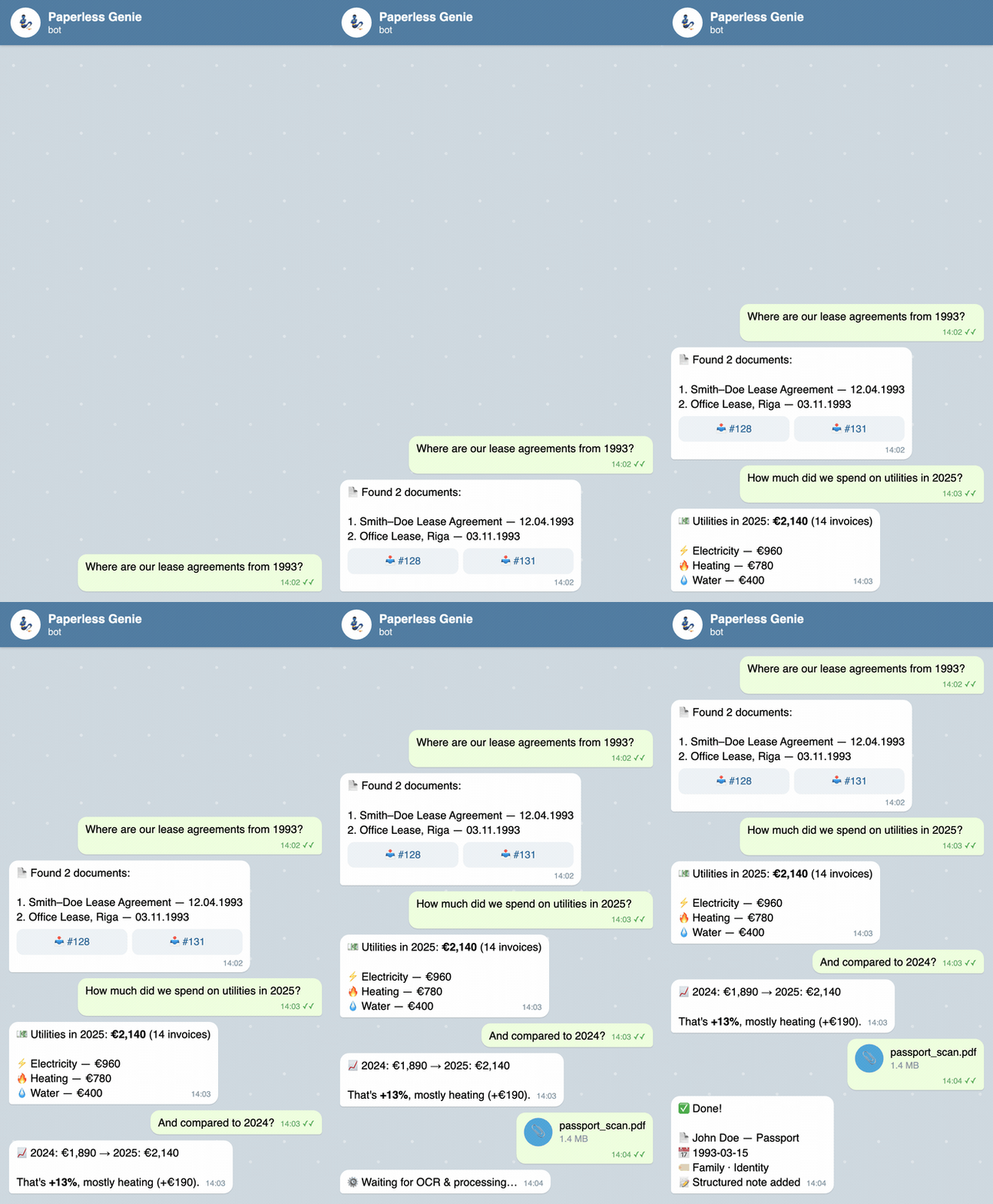
Illustrative demo — a mock-up chat with sample data, not a recording of a live instance.
🚀 Key Features
- Conversational Search & Query: Ask questions about your archive in natural language (e.g., "Find John Doe's passport" or "What contracts do we have from 1993?"). The bot routes the query to an autonomous agent which uses Paperless-ngx MCP tools to find the answers.
- Totals, Comparisons & Follow-Ups: Because an AI agent processes each query, it can reason over a set of documents — "How much did we spend on utilities in 2025?" — and per-user conversation memory lets you refine the answer with follow-ups like "And compared to 2024?". See the Example Queries page for the full range (and its honest note on accuracy).
- Intelligent Document Archiving: Upload a document (PDF, JPG, PNG and more) directly in Telegram. The bot downloads it into memory and runs the Antigravity agent to analyze its contents. The agent suggests metadata (Title, Date, Correspondent, Type, Tags), uploads the document via the
post_documentMCP tool, waits for OCR, sets the metadata, and writes a detailed note in Paperless. All responses are automatically delivered in the language you write in. - Multi-User Security & Permissions: Mappings between Telegram User IDs and Paperless API Tokens ensure that each user can only search, see, and edit documents they have permissions to view in Paperless-ngx.
- Modern Developer Tooling: Orchestrated using
uv,mise,rufffor formatting/linting,mypyfor static typing, andpytestfor tests.
🛠️ Configuration & Setup
1. Environment Variables
Copy the example file and fill in your own values:
cp .env.example .env
.env.example documents every variable:
TELEGRAM_BOT_TOKEN="your_telegram_bot_token"
PAPERLESS_URL="https://your-paperless-instance.com"
GEMINI_API_KEY="your_google_ai_studio_gemini_api_key"

# JSON mapping between Telegram User IDs and their Paperless API Tokens
PAPERLESS_USER_TOKENS='{"52966251": "token_for_user_1", "12345678": "token_for_user_2"}'

# Optional — leave commented to use the default (gemini-3.1-flash-lite)
#GEMINI_MODEL="gemini-3.1-flash-lite"
2. Local Environment Setup
Make sure you have mise installed on your machine.
# Install Python 3.14 and uv
mise install

# Install project dependencies (dev + docs dependency groups included)
uv sync --all-groups

# Setup pre-commit hooks
uv run pre-commit install
The bot talks to Paperless-ngx through the @baruchiro/paperless-mcp
MCP server. Install Node.js 24+ and pre-install the exact pinned version globally so the
bot can find it on PATH (the Docker image does this automatically):
npm install -g @baruchiro/[email protected]
This version must match the PAPERLESS_MCP_VERSION build argument in the Dockerfile —
when bumping one, bump the other.
3. Available Tasks (via mise)
- Run the bot:
mise run run - Format code:
mise run format - Lint code:
mise run lint - Type check:
mise run mypy - Run tests:
mise run test
🐳 Docker Deployment (Recommended)
You can run the bot in the background using Docker and Docker Compose. This packages Node.js automatically so the bot can execute Node-based MCP servers.
1. Build and Start Container
Make sure you have created your .env file, then run:
docker compose up -d --build
2. View Logs
docker compose logs -f
📋 Production Deployment (systemd)
To run the bot in the background on your Linux server, create a systemd service file: /etc/systemd/system/paperless-genie.service
[Unit]
Description=Paperless Genie Telegram Bot
After=network.target

[Service]
Type=simple
User=your-linux-username
WorkingDirectory=/home/your-linux-username/Repositories/paperless-genie
ExecStart=/home/your-linux-username/Repositories/paperless-genie/.venv/bin/python -m paperless_genie
Restart=always
RestartSec=10
EnvironmentFile=/home/your-linux-username/Repositories/paperless-genie/.env

[Install]
WantedBy=multi-user.target
Enable and start the service:
sudo systemctl daemon-reload
sudo systemctl start paperless-genie
sudo systemctl enable paperless-genie
🔒 Privacy & Data Flow
This bot handles authentication tokens and the contents of a personal document
archive, so it's worth being explicit about where data goes.
- Documents are sent to Google's Gemini API for analysis. When you archive
or search, the relevant document text and your query are sent to Gemini
(via the Google Antigravity SDK) so the agent can extract metadata, write
notes, and answer questions. This is not a fully local/offline setup —
Google's API data-handling terms apply, and they differ by API tier. Keep
this in mind for highly sensitive documents. The model is configurable viaGEMINI_MODEL. - Secrets live only in
.env(gitignored) and are never logged. The bot
token, the Gemini key, and every user's Paperless token stay in the
process environment. - Per-user isolation. Each Telegram user is mapped to their own
Paperless-ngx API token, so a user can only search and edit documents that
token is allowed to access. - Least-privilege subprocess. The Paperless MCP server runs as a
subprocess that receives only the Paperless URL and the requesting user's
token — never the Telegram bot token, the Gemini key, or other users'
tokens. - No storage of its own. The bot keeps no database. Conversation history
lives only in memory for the lifetime of the process (and/clearresets
it). Uploaded files are handled in memory and passed straight to
Paperless-ngx; the agent's scratch space is a temporary directory that is
deleted when processing finishes. In Docker it runs as an unprivileged user.
Vulnerabilities: please use private reporting, never public issues — see
SECURITY.md.
🤝 Contributing
Contributions are welcome! Please read CONTRIBUTING.md for the
development setup, check suite, and workflow. First-time contributors sign the
Contributor License Agreement as part of their first pull request. We follow
the Contributor Covenant Code of Conduct; security issues go
through private vulnerability reporting, never public issues.
📝 License
This project is licensed under the GNU Affero General Public License v3.0 (AGPL-3.0).
See the LICENSE file for details.
This means that if you deploy a modified version of this bot as a network service,
you must make your modified source code publicly available under the same license.
Reviews (0)
Sign in to leave a review.
Leave a reviewNo results found