kraken
Health Warn
- License — License: MIT
- Description — Repository has a description
- Active repo — Last push 0 days ago
- Low visibility — Only 5 GitHub stars
Code Pass
- Code scan — Scanned 12 files during light audit, no dangerous patterns found
Permissions Pass
- Permissions — No dangerous permissions requested
No AI report is available for this listing yet.
One head, many tentacles — a task queue built on GitHub Issues where named agent workers (Claude Code, GitHub Copilot CLI, ...) claim tasks, execute them, and deliver draft PRs. Zero infrastructure to operate.
 Kraken


You set the targets; the tentacles devour them. Unleash the Kraken.
One head, many tentacles — a task queue built on GitHub Issues where
named agent workers (Claude Code, GitHub Copilot CLI, Pi, or any tool that
follows the protocol) claim tasks, execute them, and record the
evidence.
Write the list once; the tentacles do the rest.GitHub does the tracking. Your coding agent does the coding. Kraken is just the
protocol between them — it ships nothing you have to operate.
In 30 seconds
What it is. A task queue for AI coding agents, where the queue is GitHub
Issues in a private repo you own. You write tasks; named agent workers claim
them one at a time, do the work in your prepared environment, and open draft
PRs. You review and merge.
What you run.
/plugin marketplace add rafael-adcp/kraken
/plugin install kraken@kraken
/kraken:init OWNER/tasks --project my_app                 # once
/kraken:unleash OWNER/tasks --worker-name env-1 --project my_app
Launch that last line in N terminals and you have N workers. There is no
server, no database, no daemon — the coordination state is issue labels plus a
git ref, and the dashboard is the GitHub UI you already have.
Why it might be for you. You have more agent-sized tasks than attention:
you're the bus between a task list and a row of terminals, and things get
dropped. Kraken takes you out of that loop without moving your work off the
machine where your services, data and credentials already live.
Why it might not be. If your code is on GitHub and the task needs nothing
your platform doesn't already give it, Copilot's coding agent orclaude-code-action in CI is less to run — see Why not just use
X? for the honest cut.
Everything below is detail. The walkthrough is the
next stop if you want to run it; PROTOCOL.md is the spec if
you want to build a worker, and HISTORY.md is how that spec got
the shape it has.
Why?
Kraken treats AI coding prompts the way a CI server treats builds: you push
them onto a queue (GitHub Issues), a pool of named workers (tentacles) picks them up, and the issue timeline tells you what happened.
AI coding agents made each change cheap — but you are still the bus between the task list and the terminals. You can only watch so many spinners, juggle so many windows, and stay awake so many hours before something gets dropped. Kraken removes you from the loop and replaces infrastructure with things that already exist:
| Concern | Kraken's answer |
|---|---|
| Queue & state | GitHub Issues in a private coordination repo you own |
| Claiming (no race) | Atomic compare-and-swap on a git ref — one creator wins, HTTP 422 to the rest |
| Dependencies | Native blocked-by relationships — closing a task unblocks |
| Parallelism | Capacity = how many workers you launch; 1 task per worker |
| Dead workers | The claim is a lease (30 min, renewed as you work); stop renewing and the next worker to read the queue takes the task over |
| Bad tasks | The issue form requires Goal + Acceptance; status reports what a worker still cannot start |
| Dashboard | The GitHub UI — filters, notifications, mobile app |
| Audit trail | The issue timeline: who, when, why, validated how |
Work repos can live anywhere (GitHub, GitLab, private servers) — only the
coordination repo needs to be on GitHub, and it holds issues, never code.
Wondering how this differs from Copilot's coding agent, Claude's cloud agents,
or claude-code-action in CI? The honest side-by-side — including when to
prefer them — is Why not just use X?.
Install
Claude Code and Copilot CLI install from the same marketplace — Copilot CLI
reads the Claude Code plugin format, so the same commands work. Pi has no plugin
marketplace: it loads the same skills straight from a kraken checkout.
Claude Code (plugin)
Zero to a draining queue in four commands:
/plugin marketplace add rafael-adcp/kraken
/plugin install kraken@kraken
/kraken:init OWNER/tasks --project my_app          # stand up the queue (once)
                                                   # ...file task issues, then:
/kraken:unleash OWNER/tasks --worker-name env-1 --project my_app
/kraken:unleash drains the queue once, in the session you are talking to. To
keep a worker in ambush, run the shared loop from the work repo's checkout
instead — it starts a fresh claude -p drain whenever a task is startable:
cd /path/to/my_app
/path/to/kraken/scripts/kraken-loop.sh OWNER/tasks --worker-name env-1 --project my_app --harness claude
GitHub Copilot CLI
Same plugin, same commands — Copilot CLI reads the Claude Code plugin format and
loads its three skills:
/plugin marketplace add rafael-adcp/kraken
/plugin install kraken@kraken
Then launch a worker from the work repo's checkout. Copilot takes its unattended
permissions as launch flags rather than from a settings file, so two scripts in
a kraken checkout carry them for you — the same flags, from one source:
cd /path/to/my_app
/path/to/kraken/scripts/kraken-copilot.sh OWNER/tasks --worker-name env-1 --project my_app                     # interactive
/path/to/kraken/scripts/kraken-loop.sh    OWNER/tasks --worker-name env-1 --project my_app --harness copilot   # headless
kraken-copilot.sh opens a Copilot session running /kraken:unleash that drains
the queue once and stays open for you to talk to; kraken-loop.sh is the ambush —
one fresh copilot -p drain whenever a task is startable, with no session to watch.
Pi
Install kraken as a Pi package, which carries the three skills and the
extension together and pins to a release tag:
pi install git:github.com/rafael-adcp/[email protected]
Pi clones the repo and loads skills/ plus extensions/pi/, so the commit
trailers keep their real version stamp and kraken.py contract boundary
answers — the two things a copied skills/ tree breaks (see below). pi list
shows what resolved; pi config turns individual resources off.
Or point Pi at a checkout's skills/ yourself — in~/.pi/agent/settings.json, or per run with --skill /path/to/kraken/skills:
{
  "skills": ["/path/to/kraken/skills"],
  "extensions": ["/path/to/kraken/extensions/pi/kraken.ts"],
  "defaultTools": ["+grep", "+find", "+ls"]
}
- Point at the checkout, never at a copy.
kraken.pyfinds the plugin
manifest andPROTOCOL.mdtwo levels above its skill folder. A copiedskills/tree stamps every delivered commitkraken@unknown, andkraken.py contract boundary— the rules a worker asks for — prints nothing.
Check out a release tag to pin a version, the way the plugin is pinned. - Mind the
+. Pi's default tools areread,bash,editandwrite;+nameadds one, while a plain name replaces the defaults — so["grep", "find", "ls"]would leave the worker unable to edit or deliver. - The
extensionsentry is optional, and only this install needs it. It
loads kraken's Pi extension, which does for Pi whathooks.jsondoes for the
other two: hands the session's claim back when the session ends (only that
session's —kraken.py claimrecords Pi'sPI_SESSION_ID), and refusesgh pr merge,gh repo deleteandgh issue closein thebashtool. Pi
compiles it on load; nothing to build. A package install discovers it, and
the loop passes it with-e, so this entry is for sessions you start by hand
off a bareskillspointer. Without it a worker still conforms — an
abandoned claim frees itself within one lease TTL. - Pick a model provider other than a Claude plan's OAuth. Pi on Anthropic
OAuth is billed as extra usage, not against your plan limits — Anthropic
answers400 invalid_request_error: "Third-party apps now draw from your extra usage, not your plan limits.". Use an API key or another provider (OpenAI
works).
The skills are /skill:init, /skill:unleash and /skill:status in Pi — the
prefix belongs to the harness, the arguments are the same. A worker runs headless
through the loop, from the work repo's checkout:
cd /path/to/my_app
/path/to/kraken/scripts/kraken-loop.sh OWNER/tasks --worker-name env-1 --project my_app --harness pi
Deny rules, in two halves. What Copilot denies with --deny-tool, a Pi
worker under the loop refuses this way: the GitHub MCP server'smerge_pull_request and issue_write tools are excluded whole
(--exclude-tools 'mcp__*__merge_pull_request,mcp__*__issue_write'), and the
extension refuses gh pr merge, gh repo delete and gh issue close inside the
single bash tool. That second half matches the command's words
(extensions/pi/deny.py) — it catchescd x && GH_TOKEN=… gh pr merge 1 --admin but not a variable, eval, a script
or gh api; it is defense in depth, not a sandbox. Protect the work repo's
default branch, and run Pi workers in an isolated environment (see step
3).
Each command in context — environments, permissions, parallelism — is
the full walkthrough below.
Requirements: git, python3 (every transition runs through the bundledkraken.py), and a gh CLI from June 2026 or later — the dependency
flags (--add-blocked-by / --blocked-by) shipped then. Older gh still works for
everything else; set dependencies via the Relationships sidebar instead.
Three skills ship in the box:
| Skill | Role |
|---|---|
/kraken:init |
The bootstrap — stands up a coordination repo: private repo, templates, canonical labels |
/kraken:unleash |
The worker — claims one task at a time, executes, validates, delivers a draft PR, until the queue is idle; scripts/kraken-loop.sh keeps it in ambush |
/kraken:status |
The console — review + decision queues, what's in flight with PR links, and ready-to-paste unleash launch lines |
Concepts
Five nouns do all the work in Kraken. Keep them straight and the rest follows:
| Concept | What it is | What it is not | Lives on |
|---|---|---|---|
| Coordination repo | The kraken's head — a private repo whose Issues are the queue; also holds the labels (the state machine), the claim refs, and the dependency graph | A place for code — it holds none | GitHub (required) |
| Work repo | Where the code lives; workers push branches + open draft PRs here | The queue — it holds no tasks | Anywhere (GitHub, GitLab, private) |
project:<name> label |
A task's canonical identity — --project filters on it, and it says which prepared environment the task belongs to |
Optional — a task without it is invisible to every worker | Coordination repo |
| Worker (tentacle) | A named agent session (Claude Code, Copilot CLI, Pi, ...) draining the queue one task at a time, inside one prepared environment | A pool — capacity is just how many you launch | Your machine / container / clone |
| Task | An open Issue labeled kraken-task (goal, acceptance, notes) that moves in-progress → awaiting-merge / needs-decision |
Closed until the work truly lands — the merge closes it | Coordination repo |
How it works (10,000 ft)
                     YOU
                      │ file kraken-task issues
                      ▼
    ┌────────────────────────────────────┐
    │  COORDINATION REPO (GitHub Issues) │
    │  labels · claim refs · dependencies│
    └──────────────────┬─────────────────┘
                       │ claim, renew, release
                       ▼
    ┌────────────────────────────────────┐
    │  TENTACLES (agent workers)         │
    │  ONE task at a time · per env      │
    └──────────────────┬─────────────────┘
                       │ push branch + draft PR
                       ▼
    ┌────────────────────────────────────┐
    │  WORK REPO (GitHub, GitLab, ...)   │
    │  draft PR with Kraken-Task trailer │
    └──────────────────┬─────────────────┘
                       │
                       ▼
                     YOU
                 (review · merge)
The label state machine
Four labels are the whole state machine — every transition is a label change,
which is why the GitHub UI is the dashboard and the issue timeline is the log:
flowchart LR
    S((" ")) -->|you file the issue| Q["kraken-task (queued)"]
    Q -->|claim| P[in-progress]
    P -->|deliver — draft PR or analysis| M[awaiting-merge]
    P -->|blocking question| D[needs-decision]
    P -->|lease expires — the next reader steals it| Q
    D -->|you reply — the next reader requeues it| Q
    M -->|you reply — the next reader requeues it| Q
    M -->|PR merges — the task closes| E(((closed)))
Every requeue arrow lands the task back in the queue with its full thread — the
next claim inherits the whole discussion as context.
Only two transitions are ever yours: answering a decision and merging (or
bouncing) a PR. The tentacles drive everything else.
The coordination contract — task shape, state machine, the machine marker,
the claim algorithm — is normatively specified inPROTOCOL.md (kraken-protocol/9); it is agent-agnostic, so any
tool that follows it can be a tentacle on the same queue. How a worker executes it
lives in skills/unleash/SKILL.md — a loop aroundkraken.py next-action, which answers "what do I do now" with a JSON envelope so
the ordering rules are the program's job rather than something the agent has to
remember. That makes the skill harness-neutral: the GitHub Copilot CLI worker
reuses it through AGENTS.md, and Pi loads it directly with--skill — both with no deltas at all.
The full walkthrough
Create the coordination repo (once). Running the plugin? One command stands it
all up — verifies or creates the private repo, installs the task template, deletes
anything an earlier release installed to be executed server-side, and creates
the canonical labels (idempotent, safe to re-run):
Not running the plugin? The same setup by hand/kraken:init OWNER/tasks --project YOUR_PROJECT_NAMEOne file. Under
kraken-protocol/9the coordination repo runs nothing —
no workflows, and no vendored copy of the transition program for them to
exec. Stale claims, an answered task's requeue and queue-entry validation are
all derived by the reader, on the queue read a worker orstatusperforms
anyway (PROTOCOL.md §2.1, §6). You do not need GitHub Actions enabled on this
repo at all.gh repo create OWNER/tasks --private --clone && cd tasks mkdir -p .github/ISSUE_TEMPLATE curl -sL https://raw.githubusercontent.com/rafael-adcp/kraken/main/skills/unleash/task-template.yml -o .github/ISSUE_TEMPLATE/task.yml git add -A && git commit -m "chore: kraken task template" && git push gh -R OWNER/tasks label create kraken-task gh -R OWNER/tasks label create in-progress gh -R OWNER/tasks label create needs-decision gh -R OWNER/tasks label create awaiting-merge gh -R OWNER/tasks label create priority:high # optional — jumps the startable queue gh -R OWNER/tasks label create "project:YOUR_PROJECT_NAME" # one per project you'll queueQueue the work: one issue per task (goal, acceptance, notes). Every issue
gets aproject:<name>label (workers are scoped to one project — an
unlabeled task is invisible to all of them) and dependencies viagh issue edit <n> --add-label "project:YOUR_PROJECT_NAME" --add-blocked-by <m>.
Add the optionalpriority:highlabel to jump a task to the front of the
startable queue — workers claim high-priority tasks before older normal ones,
withcreatedAtFIFO still ordering each tier.Prepare the worker environments — one per worker: a machine, container,
Example allowlist for the working directory's
or just a separate clone where that worker will live, with the project's
toolchain installed,ghauthenticated, and git configured. Workers run
unattended, so the environment's agent settings must pre-allow the
delivery commands — a permission prompt with nobody around stalls the task.
(Copilot's equivalent is launching with--allow-all-tools --no-ask-user,
plus deny rules that keep the authorization boundaries at the tool layer —--deny-tool='shell(gh pr merge:*)','shell(gh repo delete:*)','shell(gh issue close:*)', and the GitHub MCP server'smerge_pull_request/issue_write;scripts/kraken-copilot.shandscripts/kraken-loop.sh --harness copilotpass all of them. Claude Code underscripts/kraken-loop.sh --harness claudegets the same floor fromscripts/lib-claude-drain.sh:--permission-mode dontAsk, the worker's tools allowed, and deny rules for the same threegh
commands and the GitHub MCP server's two tools — never--dangerously-skip-permissions.) Pi inverts the problem: it never
asks before a tool call, so there is nothing to pre-allow, and it can deny
only whole tools, never aghcommand insidebash. Its own security
notes recommend running it inside a
container, VM or sandbox; for a kraken worker, take that advice..claude/settings.json{ "permissions": { "allow": [ "Bash(git add:*)", "Bash(git commit:*)", "Bash(git checkout:*)", "Bash(git push:*)", "Bash(gh -R OWNER/tasks:*)", "Bash(gh pr create:*)" ] } }Substitute your coordination repo in the
gh -Rline (queue operations are
always explicit about their repo; it holds issues only, so nothing lands
there). Extend the list with what the project's acceptance checks need
(test runner, package manager).Never pre-allow what lands work:
gh pr mergestays deliberately off the
list so merging keeps its ask-gate, and since an allow-list cannot tell a
work branch from a default branch, protect the work repo's default branch
(required review) for the hard guarantee. Merges always stay with you.
Workers that would share test state (database, fixtures, ports) cannot
share an environment: fully isolated environments, or one worker.Unleash the kraken — one worker per environment you prepared. Capacity is
decided at launch: every worker takes ONE task at a time, so a project gets
exactly as much parallelism as the number of workers you point at it.# one tentacle into the "your_project_1" environment -> one worker /kraken:unleash OWNER/tasks --worker-name your_project_1-env-1 --project your_project_1 # five tentacles, five isolated clones -> five workers draining your_project_2 /kraken:unleash OWNER/tasks --worker-name data-env-1 --project your_project_2 /kraken:unleash OWNER/tasks --worker-name data-env-2 --project your_project_2Each of those drains once. To keep a worker in ambush, launch it from its
work repo withscripts/kraken-loop.sh, the same three arguments, and a
required--harness copilot,claudeorpi— see Keep it
draining and the agent cheat sheet.Workers deliver on work branches + draft PRs — never the default branch,
never a merge. Branches follow each work repo's own naming convention (CI
pipelines key on those patterns); traceability comes from commit trailers
(Kraken-Task: OWNER/work-tasks#12 (worker: ..., [email protected])).Come back to evidence:
/kraken:status OWNER/tasksprints both human-facing
queues at once — theawaiting-mergereview queue (each task with a result comment
and a draft PR link), theneeds-decisiondecision queue (questions with options +
recommendation), plus what's still in flight and any orphan whose PR already merged
but whose issue never closed. Scripting instead? The raw filters aregh -R OWNER/tasks issue list --state open --label awaiting-mergeand the same with--label needs-decision. Merging a PR closes its task (Closesreference) and
unblocks the dependents. Nothing merges without you.
Keep it draining
An empty queue doesn't have to stop a worker. Continuous ambush has one
supervisor on every harness — scripts/kraken-loop.sh,
run from the work repo's checkout (or pointed at it with --work-dir). Each poll
runs the free, read-only kraken.py list-startable; only when a task is actually
startable does it start the agent — one fresh --once drain pass, the shared/kraken:unleash skill carrying tasks until the queue is idle again. An idle
queue costs zero LLM tokens. Enqueue from anywhere (gh issue create, web UI,
mobile app) and the worker picks it up within a poll (60s; --poll changes it).
cd /path/to/my_app
/path/to/kraken/scripts/kraken-loop.sh OWNER/tasks --worker-name env-1 --project my_app --harness copilot  # Copilot CLI
/path/to/kraken/scripts/kraken-loop.sh OWNER/tasks --worker-name env-1 --project my_app --harness claude   # Claude Code
/path/to/kraken/scripts/kraken-loop.sh OWNER/tasks --worker-name env-1 --project my_app --harness pi       # Pi
The shell owns the supervision — polling, starting the agent, Ctrl-C, and
handing back a claim a dead drain left behind (see the self-healing
FAQ); the skill owns the work. The contract stays in the kraken checkout
the script sits in: Claude Code loads it as the plugin (--plugin-dir), Copilot
gets it by absolute path, Pi with --skill. The loop never outlives its
terminal, and a queue it cannot read (expired token, dead network) is reported
on stderr, never as an idle queue.
One process per pass, so no conversation carries over. Each drain starts a
fresh agent with a fresh context — the isolation a subagent would give, and on
purpose for unattended work. What a worker needs from earlier passes lives on
the task thread, which next-action hands back. If you want to talk to a
worker, run /kraken:unleash in a session instead: it drains once, reports, and
ends its turn — it does not watch the queue in the background.
Want a bounded run — a scheduled container, a one-off drain? Pass --once to
the loop: one pass, then exit.
On Windows, the loop is a bash script: run it from WSL or Git Bash, withcopilot, python3 and git installed on that side (under WSL, install Copilot
CLI inside the distro — npm install -g @github/copilot — rather than calling the
Windows one, which a Linux shell cannot launch). Everything the loop invokes then
resolves in the same environment — gh included: kraken.py reads the queue
with GH_TOKEN, GITHUB_TOKEN or gh auth token, and a WSL shell does not see agh.exe installed on Windows. The loop and kraken-copilot.sh check for a token before they start.
GH_TOKEN and Copilot's login. Copilot CLI also authenticates its model
with GH_TOKEN/GITHUB_TOKEN when one is set (after COPILOT_GITHUB_TOKEN), so a
token exported only for the queue — a classic PAT, or one without Copilot access —
logs Copilot out of your own subscription. Prefer gh auth login on the worker
machine and leave both unset; if you must export one, also setCOPILOT_GITHUB_TOKEN to a token that carries Copilot access.
The operator's cheat sheet
Every gesture you ever need, in one table — the tentacles handle
everything else:
| You want to... | The gesture | From the GitHub UI? |
|---|---|---|
| Queue a task | Open an issue from the task template + project:<name> label |
✅ web + mobile |
| Chain tasks | gh -R OWNER/tasks issue edit <n> --add-blocked-by <m> |
✅ web — Relationships sidebar |
| See the queues | /kraken:status OWNER/tasks |
✅ filter issues by label |
| Answer a decision | Reply on the issue — the next worker to read the queue picks it up again | ✅ web + mobile |
| Send work back after review | Comment the feedback — the next worker to read the queue picks it up again | ✅ web + mobile |
| Land the work | Merge the draft PR — its Closes line closes the task and unblocks dependents |
✅ web + mobile |
| Cancel a task | Close the issue | ✅ web + mobile |
| Add capacity | Launch one more worker into one more prepared environment | ❌ a worker is a terminal session |
Everything except launching workers works from your phone — file tasks on the
commute, answer decisions from the couch, merge from anywhere.
Agent cheat sheet
The same worker on all three harnesses, side by side. $KRAKEN is your kraken
checkout; run every worker command from the work repo's checkout (or pass--work-dir).
| You want to... | Claude Code | GitHub Copilot CLI | Pi |
|---|---|---|---|
| Install the plugin | /plugin marketplace add rafael-adcp/kraken/plugin install kraken@kraken |
Same two commands, inside copilot |
"skills": ["$KRAKEN/skills"] (and optionally "extensions": ["$KRAKEN/extensions/pi/kraken.ts"]) in ~/.pi/agent/settings.json (details) |
| Stand up the queue (once) | /kraken:init OWNER/tasks --project my_app |
Same, inside copilot |
/skill:init OWNER/tasks --project my_app, inside pi |
| Pre-allow unattended work | Allowlist in the work repo's .claude/settings.json (walkthrough step 3) |
Nothing to write — both scripts pass --allow-all-tools --no-ask-user plus the deny rules |
Nothing to write — Pi never asks; the loop passes --exclude-tools and the extension's gh deny check: isolate the environment |
| Launch a worker you can talk to | /kraken:unleash OWNER/tasks --worker-name env-1 --project my_app |
$KRAKEN/scripts/kraken-copilot.sh OWNER/tasks --worker-name env-1 --project my_app |
/skill:unleash OWNER/tasks --worker-name env-1 --project my_app, inside pi |
| Run with no session to watch | $KRAKEN/scripts/kraken-loop.sh OWNER/tasks --worker-name env-1 --project my_app --harness claude |
$KRAKEN/scripts/kraken-loop.sh OWNER/tasks --worker-name env-1 --project my_app --harness copilot |
$KRAKEN/scripts/kraken-loop.sh OWNER/tasks --worker-name env-1 --project my_app --harness pi |
| Drain once and exit | /kraken:unleash (every invocation drains once), or --once on the loop |
Append --once to either script |
Append --once to the loop |
| Idle on an empty queue | The loop — polling outside the model, zero tokens | Same (loop) | Same (loop) |
| See the queues | /kraken:status OWNER/tasks |
Same, inside copilot |
/skill:status OWNER/tasks, inside pi |
| Stop a worker | Ctrl-C (loop); close the session (interactive) | Same | Ctrl-C (loop) |
| Resume after a usage limit | Nothing (loop) — the claim is released, the next poll retries | Same | Nothing (loop) |
Witness the Depths
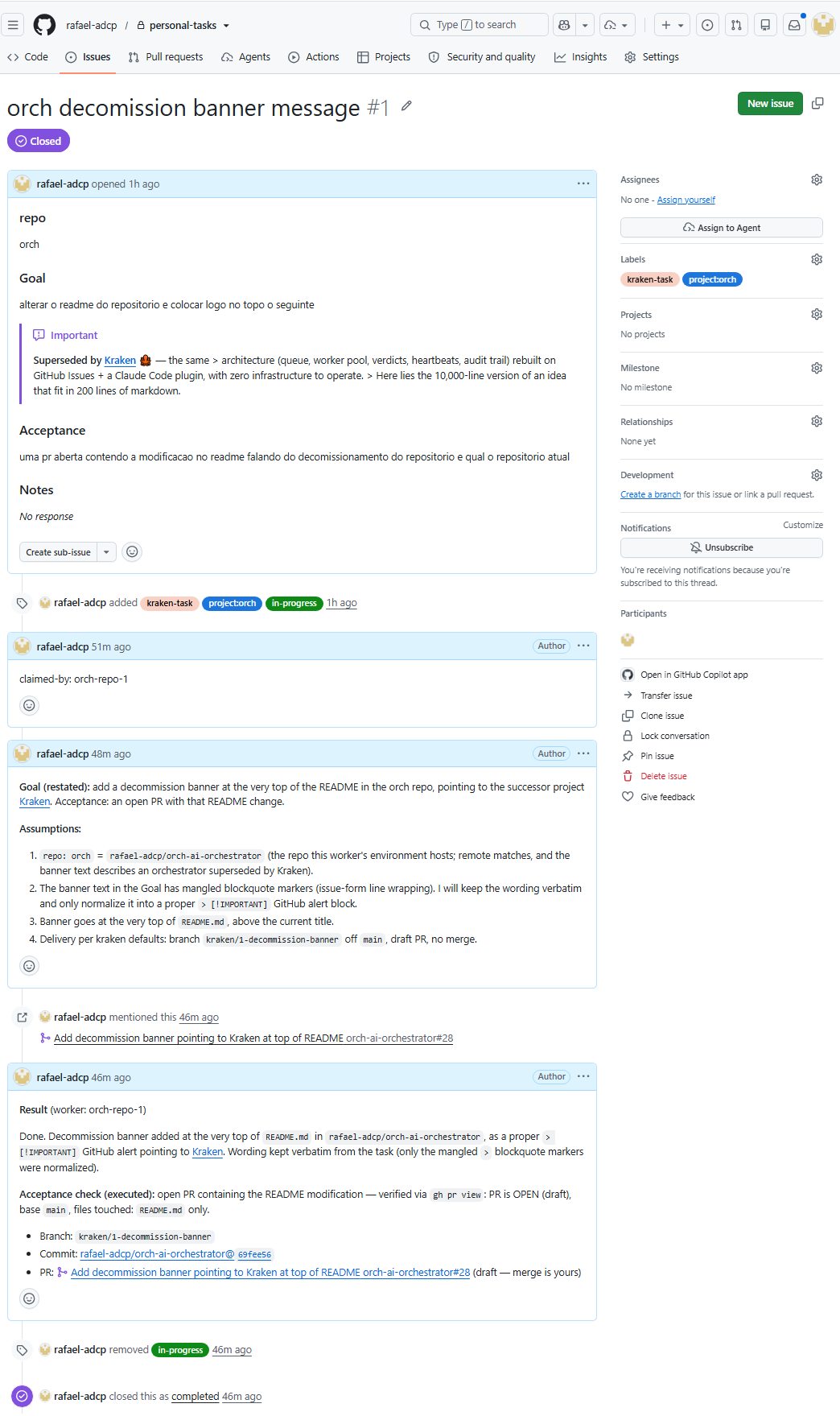
A real task's timeline, end to end — claim, restated goal + assumptions, the PR
delivered, the result with the acceptance check executed, and the close:
Work happens while you don't. Queue a backlog before bed, on the commute, or before a meeting. Come back to finished branches instead of an empty editor.
100 tasks queued at 17:24 → 100 draft PRs + 0 needs-decision by 18:01 — zero terminals watched. (highest burst so far)
So far: 126 tasks filed, 125 PRs merged.
Median claim → draft PR: 13.9 min in normal operation (n=25, mean 16.9, max ~46 min) — 0.4 min in burst mode (n=100), where workers stage the work before claiming.
FAQ
Doesn't this already exist — Copilot, Claude cloud agents, CI?Partly, and for a single GitHub repo with no local services those are simpler —
say so and use them. Kraken's edge is the prepared environment, GitLab/private
work repos, and a fan-out of named, audited workers. The honest side-by-side can
be found below.
Why not just use X?
| Alternative | Coordination primitive | Infra required | Agent-agnostic | Prefer it when |
|---|---|---|---|---|
| GitHub Copilot coding agent | Issue assignment (native GitHub) | Hosted sandbox; nothing beyond GitHub Actions | No | Code is on GitHub and the task needs nothing the platform doesn't already give it |
| Claude Code cloud / scheduled agents | A schedule waking a managed sandbox | Zero — the sandbox is managed for you | No | You want scheduled runs with no environment to keep and the sandbox suits the work |
claude-code-action in CI |
An event trigger (push / PR / label) | Ephemeral, disposable CI runner | No | Automation is CI-shaped and a fresh runner is the correct environment |
| Kraken | An issue queue drained via kraken-protocol/9 |
Your prepared, long-lived environment | Yes | The environment is the point — work must run where your services, data, and credentials already live, with named, audited workers |
By 2026 the obvious reflex is "doesn't this already exist?" — assigning an issue
to an agent is native GitHub, Claude Code runs scheduled agents in the cloud, andclaude-code-action runs it in CI. It does exist, and for a single repo living
entirely on GitHub with nothing but the code to touch, those are simpler — reach
for them. Kraken earns its keep the moment the work needs your prepared
environment. Here is the honest cut against each.
GitHub Copilot coding agent. Assigning an issue to an agent is native GitHub,
and if the whole story lives there — one repo, no services, secrets already in
Actions — that native path is less to run than anything Kraken adds, and you
should take it. What it can't reach is a hosted sandbox's blind spot: the
worker doesn't have your local Postgres, your seeded fixtures, the private
package registry, or the toolchain pinned to a version the sandbox never ships.
Kraken's workers run in the environment you prepared, and its work repos can
live on GitLab or a private server while only the issue queue sits on GitHub —
so prefer Copilot when your code is on GitHub and the task needs nothing the
platform doesn't already give it.
Claude Code cloud / scheduled agents. A managed sandbox that wakes on a
schedule is genuinely zero-infra, and if the sandbox already has everything the
task touches, that convenience is the right trade — use it. Kraken's difference
is the shape of the run: instead of one agent in a sandbox you don't control,
you fan out N named workers, each in a distinct prepared environment, each
leaving an audit trail in its issue timeline — who claimed what, when, and how
it was validated. Prefer the cloud agents when you want scheduled runs with
no environment to keep and the sandbox is a fine place for the work to happen;
reach for Kraken when the work must run where your services, data, and
credentials already live, and you want to name and audit each worker.
claude-code-action in CI. Wiring the action into a pipeline is the right
answer when the trigger is genuinely event-driven — a push, a PR, a label — and
a fresh, ephemeral runner is exactly the clean context you want; nothing here
beats that, so wire it up. Kraken is for the other case: a queue you drain
unattended against long-lived services and a toolchain that would cost minutes
to rebuild on every runner. And because a tentacle speaks the agent-agnostickraken-protocol/9, the queue isn't wed to one vendor's action —
any tool that follows the protocol can drain it. Prefer claude-code-action
when your automation is CI-shaped and a disposable runner is the correct
environment; prefer Kraken when the environment is the point and you want no
lock to a single runner or vendor.
needs-decision — what do I do?
Just reply on the issue ("option B, go"). Nothing else: any comment added
since the worker put the task down is the requeue — the task recorded the
thread's comment count when it escalated, and every worker compares the two on the
read (PROTOCOL.md §3.1, §6), so the task rejoins the queue immediately and whoever
claims it inherits the full thread as context. The needs-decision label stays
until that worker claims it and swaps it off; nothing reads it in the meantime —
which is also why removing the label by hand is no longer the gesture. Comment.
Just reply on the issue — exactly the same gesture as answering a decision.
One new comment on the thread is the requeue, in both held states
(PROTOCOL.md §6), so the task rejoins the queue and the next claim continues on
the existing branch with the whole discussion in hand.
The flip side, on purpose: a comment that is not a work request ("nice, thanks")
also requeues — the queue counts comments, it does not read them. If the branch is
ready and you have nothing to ask for, the gesture is merge it, not comment on
it — and a worker that picks the task back up and
finds nothing actionable in your comment escalates instead of guessing, so the
worst case is a question on the thread rather than a silent bounce.
Run /kraken:status — it ends with a 🧹 Queue hygiene section listing
every open task missing a project:<name> label (so no worker will ever see it)
or an empty Goal/Acceptance (so a worker claims it and stalls). It costs
nothing extra: status already reads every open task's labels and body.
The issue form catches most of this at the source — Goal and Acceptance arerequired fields, so a blank one never becomes an issue. What the form cannot do
is apply the project: label, which is exactly what hygiene is there for. A
project-less task is reported even under --project: it belongs to no project,
so a scope would bury the one failure you most need to see. It informs —
nothing is blocked, closed, or relabelled.
No, and you don't have to do anything. A claim is a lease: the worker holds
it by renewing its claim ref every few minutes while it works, and the ref's
commit date is the clock. Stop renewing — crash, kill, closed laptop, dead
container — and the lease expires 30 minutes later. The next worker to read
the queue sees an expired lease, takes the task over (leaving a note saying it
did), and carries on from the existing branch and thread. No cron, nothing
installed in the coordination repo, and the same behaviour in every harness.
The dead worker cannot come back and stomp on it either: every write it might
attempt — deliver, escalate, release, even its next renewal — first checks the
lease is still its own, and refuses if it is not.
You only hear about it if a task defeats three workers in a row: at that
point stealing it again would just burn a fourth, so it goes toneeds-decision for you to triage. (The same read also cleans up after itself:
a lock left on a task that already moved on is deleted.)
Want a different clock? KRAKEN_LEASE_TTL_SECONDS sets the TTL; the renewal
interval is always a third of it (kraken.py contract lease-renew).
It self-heals. A usage limit kills the turn, not the session: the model stops
mid-drain and the session sits open waiting for input, so the SessionEnd
auto-release never fires. What does fire is Claude Code's StopFailure hook
(a turn ended by an API error), and Kraken registers it with matcherrate_limit: the bundled hook releases the held claim on the spot — areleased marker with reason: usage limit and the claim ref deleted — so the task is
back on the queue in seconds instead of sitting on a lease nobody is renewing, free for any
worker on an account that still has quota. (gh still works at limit time;
only the model API is blocked, which is why the release can land.)
Retry is automatic under the loop (scripts/kraken-loop.sh --harness claude):
the rate-limited claude -p exits, the loop releases whatever the hook has not
already, and its next poll is the retry — while the limit lasts each pass fails
at the first request, and the first one after the window resets re-claims the
task and continues on the existing branch with the whole thread in hand. No
operator gesture needed. An interactive session does not retry on its own: after
the reset, run /kraken:unleash again.
The lease is the backstop for the residue — the hook itself failing, or a hard
kill: 30 minutes without a renewal and the task is free for the next worker
regardless, no hook involved. (Removing the in-progress label by hand does
nothing here — it's a badge for you, not the lock. The lock is the claim ref,
and only the lease's clock or an explicit release opens it.)
On GitHub Copilot CLI the retry is the same and the release comes from the
loop alone. Kraken has no verified Copilot event for a usage limit, so there is
no StopFailure equivalent: under scripts/kraken-loop.sh --harness copilot the copilot -p
process exits, the loop releases the claim at once and its next poll is the
retry. In an interactive session (scripts/kraken-copilot.sh) the lease frees
the task within its TTL; after the limit resets, run /kraken:unleash again. A
Pi worker under kraken-loop.sh --harness pi behaves like the Copilot loop.
Anyone who can open issues in the coordination repo: a task is, in effect,
instructions that will execute in your worker's environment with your
credentials. Keep the repo private, keep write access yours, and remember that
task bodies are untrusted input to an agent that can push branches.
The queue does — it's GitHub Issues. The worker doesn't: /kraken:unleash lives
inside a Claude Code (or Copilot CLI) session, and scripts/kraken-loop.sh inside
the terminal that runs it. But a graceful exit now
self-heals: a bundled SessionEnd hook fires when you close the terminal or/exit, and if the worker was still holding a claim it runs kraken.py release
for you — released: <worker> / reason: session ended, then drops in-progress,
so the task is back on the queue in seconds instead of at the end of its lease.
The hook hands the release to a detached process and returns at once: Claude Code
gives SessionEnd hooks 1.5 seconds in total and a release against GitHub takes
a few, so a release run inside the hook was cut off half-done.
It frees only the claims that session made (the claim records its Claude Code
or Copilot CLI session), so closing some other claude or copilot window on the same machine never takes
a live task from a worker. That covers a graceful end only; a usage-limit pause never fires SessionEnd
either, but its own StopFailure hook releases the claim there (see the limit
FAQ above). A hard kill / crash / power loss fires neither hook — and it does not
matter: the lease expires on its own 30 minutes later and the next worker to
read the queue takes the task over (§5). The hooks only make that immediate; no
server-side job, so it needs nothing running anywhere. The ambush loop moves
the poll out of the model, but it still needs a live shell to run in; a
genuinely headless driver (system cron, GitHub Actions) is open work —
#57.
Yes — and under kraken-protocol/9 that includes recovery latency, which is
the part that used to differ. A claim is a lease that expires 30 minutes
after its last renewal, and expiry is applied by whoever reads the queue. So a
worker that dies in any harness, in any way, frees its task within one TTL with
nothing installed. The bundled hooks are an optimization on top (seconds instead
of minutes), not the mechanism — and Copilot CLI runs the SessionEnd one too:
it loads the plugin's hooks.json, and kraken.py claim records the Copilot
session (COPILOT_AGENT_SESSION_ID) so a Copilot session that ends gracefully
while holding a lease hands it back on the spot, exactly like a Claude Code one.
scripts/kraken-loop.sh carries the same optimization
for every harness it drives: kraken.py claim records the open claim in~/.kraken/claim-<worker>.json and every terminal transition
(deliver/escalate/release) removes it, so when the agent process exits with
that file still present the drain provably died holding the lease — crash, kill,
or a rate-limit abort — and the loop runs kraken.py release on the spot. Its
exit/Ctrl-C trap does the same when the loop itself is stopped mid-drain. The
release is scoped to the loop's own --worker-name, and release refuses (exit
10) on a lease that is no longer this worker's, so a co-located or successor
worker's live lease is never touched.
A bare copilot -p … invocation outside the loop is therefore no longer a
correctness gap, just a slower one: its task comes back in minutes rather than
seconds — exactly like a hard kill / power loss on any harness. Run it
through the loop anyway: it also skips the model entirely on an idle queue.
Pi loads no hooks.json; its equivalent of the SessionEnd hook is the
optional extension at extensions/pi/kraken.ts
(Pi's session_shutdown event), which releases only the ending session's claim,
recorded by Pi's PI_SESSION_ID. Pi exposes no clean usage-limit signal, so
there is no StopFailure equivalent: the loop's release on exit covers that
case. Side by side:
| Claude Code | GitHub Copilot CLI | Pi | |
|---|---|---|---|
| Lease expiry (the floor) | ✅ | ✅ | ✅ |
| Release on a graceful session end | SessionEnd hook |
SessionEnd hook |
session_shutdown in the extension |
| Release when a loop drain dies | kraken-loop.sh --harness claude |
kraken-loop.sh --harness copilot |
kraken-loop.sh --harness pi |
| Release + retry on a usage limit | StopFailure hook + loop releases, next poll retries |
loop releases, next poll retries | loop releases, next poll retries |
| Merge / delete / close refused at the tool layer | loop: --disallowedTools rules; interactive: allowlist ask-gate |
--deny-tool rules |
MCP writes: --exclude-tools; gh in bash: the extension's deny check |
/plugin marketplace update kraken. The plugin is pinned to the version in its
manifest — pushes to main reach nobody until a release bumps it, so what you
run is always a deliberate release. On Pi, check out the new release tag in the
kraken checkout your skills entry points at.
Nothing that runs. /plugin uninstall kraken@kraken removes the skills — the
only thing Kraken ever installs on a machine (on Pi: drop the skills and extensions
entries and the checkout). The queue is just a private repo
of issues you own, with nothing running inside it: keep it,
archive it, or delete it. No service to stop, no daemon to kill, no state
anywhere else.
Contributing
Kraken is a small, protocol-first tool. The spec (PROTOCOL.md)
wins on any disagreement, the skills are prompts, and kraken.py is the
mechanics. Dev setup, PR conventions, the release flow, and where design
discussion happens are all in CONTRIBUTING.md; what changed
between versions lives in the GitHub
Releases.
Origins
Distilled from orch-ai-orchestrator:
same architecture — queue, worker pool, verdicts, heartbeats, audit trail — but zero
infrastructure to operate. GitHub is the queue, the dashboard, and the log.
Reviews (0)
Sign in to leave a review.
Leave a reviewNo results found