AutoCodeAI
Health Uyari
- License — License: MIT
- Description — Repository has a description
- Active repo — Last push 0 days ago
- Low visibility — Only 9 GitHub stars
Code Basarisiz
- network request — Outbound network request in api/routes.py
- network request — Outbound network request in client.js
- rm -rf — Recursive force deletion command in core/tools/tool_executor.py
Permissions Gecti
- Permissions — No dangerous permissions requested
Bu listing icin henuz AI raporu yok.
Multi-agent LLM system for autonomous code generation, testing, and debugging with Docker sandboxing
AutoCodeAI — Multi-Agent Autonomous Coding System v2.0
A production-grade, multi-agent AI coding framework with parallel execution, tool integration, flexible LLM support, sandboxed execution, semantic memory, real-time streaming, and git-native output.
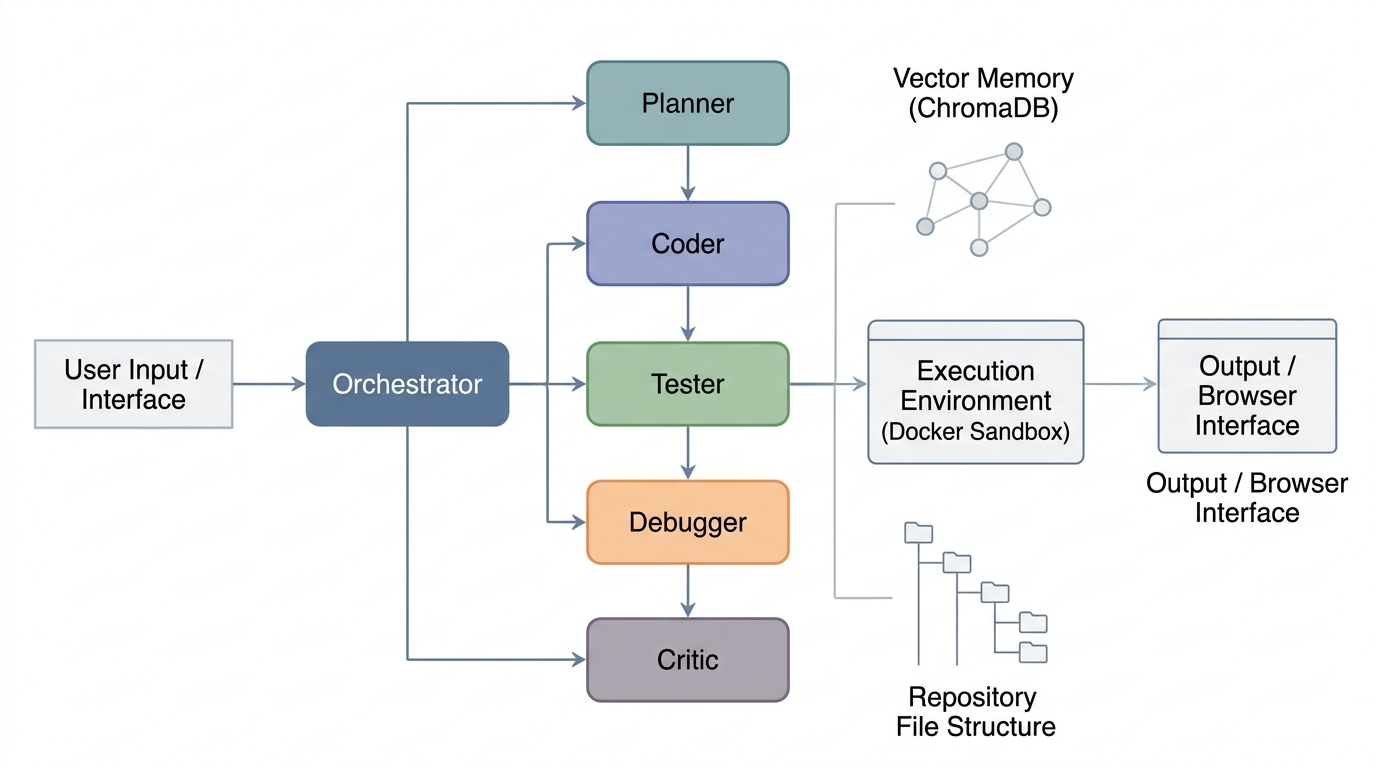
Figure 1: Overview of the multi-agent AI coding framework pipeline.
🆕 What's New in v2.0
Major enhancements:
- 🔧 Tool Integration — Execute git commands, pip installs, and shell operations directly from agent plans
- ⚡ Parallel Execution — Run independent coding tasks concurrently for 3-5x faster completion
- 🌐 Flexible LLM Support — Switch between LiteLLM (100+ providers), OpenAI, DeepSeek, or local models (Ollama)
- 🖥️ Web UI — Beautiful, modern web interface for task submission and real-time output streaming
- 📊 Enhanced Planning — Planner can now create parallel execution groups and tool execution steps
Table of Contents
- Overview
- Architecture
- Agents
- Project Structure
- Installation
- Configuration
- Usage
- API Reference
- How It Works
- Running Tests
- Contributing
- License
Overview
AutoCodeAI is an autonomous software engineering system that breaks down a natural language task into a structured plan, executes it across a team of specialized AI agents, validates the output in an isolated Docker sandbox, and streams every token back to the client in real time.
Key capabilities:
- Multi-agent orchestration — Planner, Coder, Tester, Debugger, and Critic agents collaborate on every task
- Parallel execution — Independent tasks run concurrently with automatic dependency management
- Tool integration — Git operations, package installation, shell commands executed safely
- Flexible LLM backends — LiteLLM, OpenAI, DeepSeek, or local models (Ollama)
- Sandboxed execution — All generated code runs inside a resource-limited, network-disabled Docker container
- Semantic memory — Past tasks and repo context stored in ChromaDB, retrieved by vector similarity
- Live streaming — Token-by-token output via Server-Sent Events (SSE) and WebSocket
- Web UI — Modern, responsive interface for interactive task management
- Diff-based editing — Existing files edited via minimal unified diffs, not full rewrites
- Repo awareness — Watchdog monitors the repo and keeps the vector index live in real time
Architecture
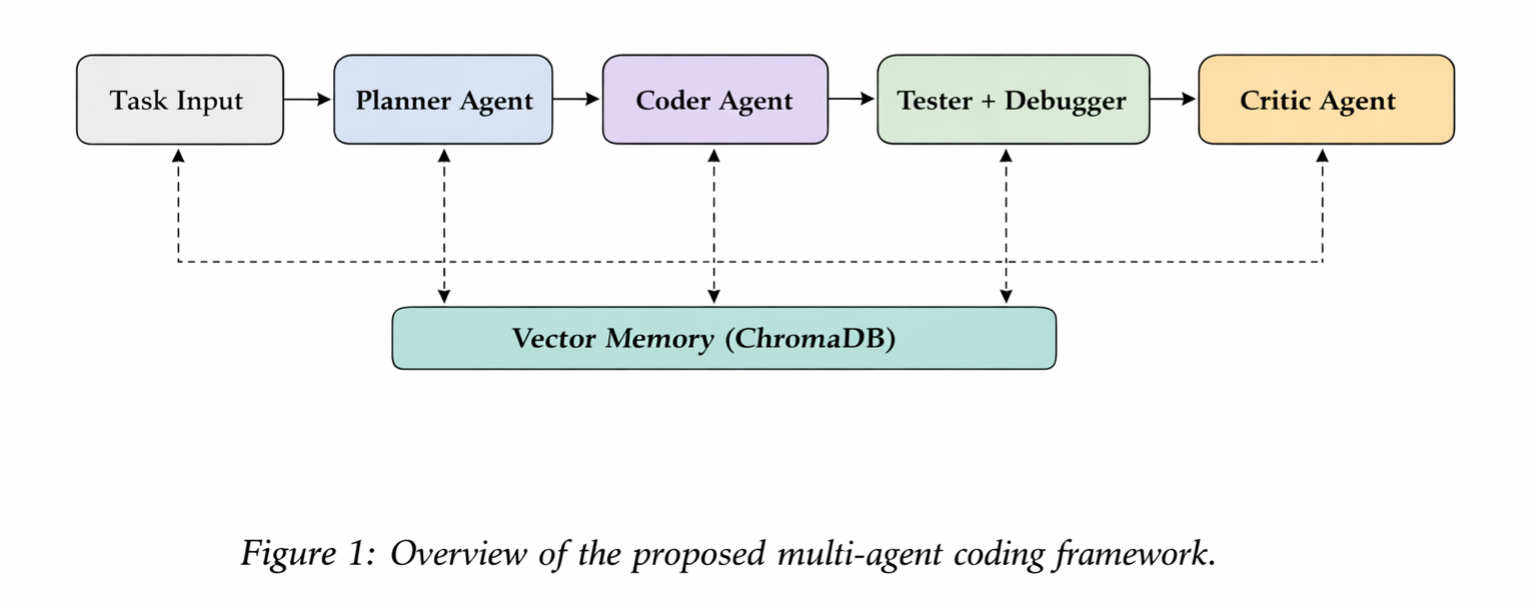
Figure 2: Agent interaction sequence — from task input to validated code output.
| Layer | Components | Description |
|---|---|---|
| API | FastAPI, SSE, WebSocket | Receives tasks, streams output to clients |
| Orchestration | Orchestrator |
Coordinates agents, manages memory, drives the pipeline |
| Agents | Planner · Coder · Tester · Debugger · Critic | Each agent owns one responsibility |
| Memory | ChromaDB, RepoIndexer, MemoryAgent |
Vector store for past results and live repo context |
| Execution | DockerSandbox |
Isolated container with resource caps and no network |
Agents
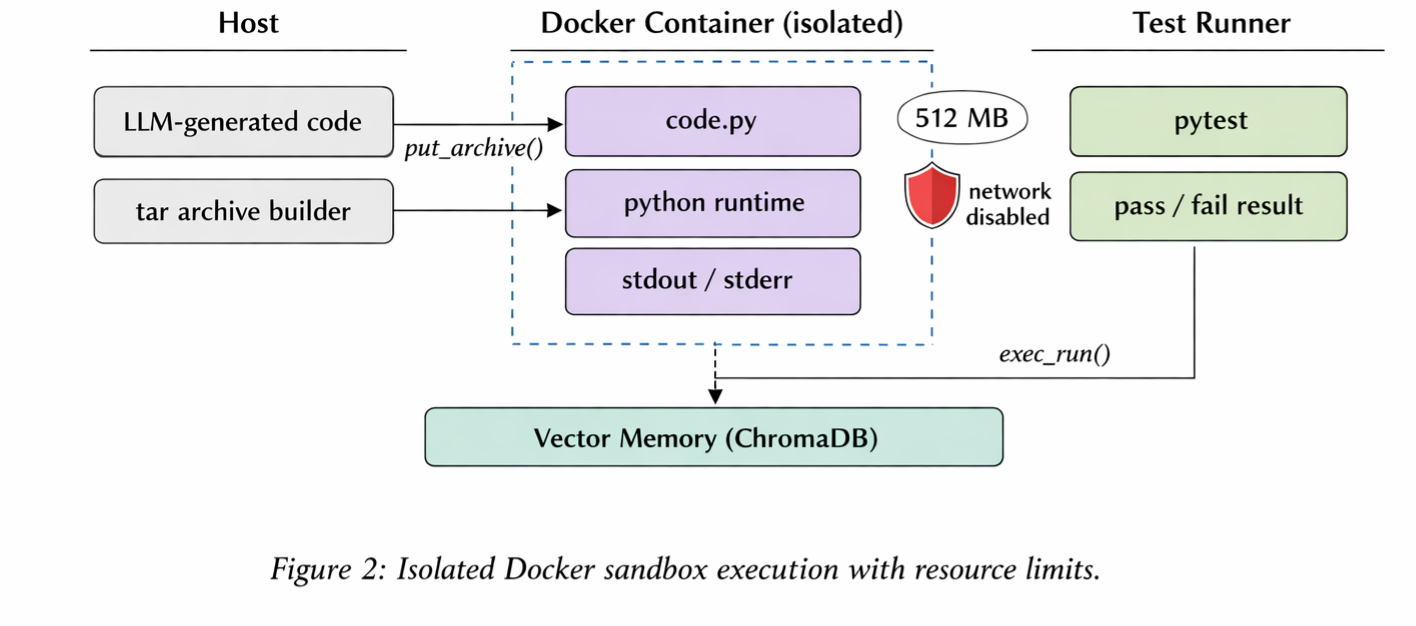
Figure 3: Roles and data flow between the specialized agents.
| Agent | File | Responsibility |
|---|---|---|
| Planner | core/agents/agents.py |
Converts a task into a structured JSON step plan with parallel groups and tool steps |
| Coder | core/agents/agents.py |
Generates new code or produces a minimal unified diff |
| Tester | core/agents/agents.py |
Writes pytest cases including edge cases and exceptions |
| Debugger | core/agents/agents.py |
Fixes code given sandbox error output |
| Critic | core/agents/agents.py |
Reviews all results, returns PASS or FAIL |
| Memory | core/agents/agents.py |
Stores and retrieves past successful tasks |
| Tool Executor | core/tools/tool_executor.py |
Executes whitelisted shell commands, git operations, pip installs |
Project Structure
autocodeai/
├── main.py                        # FastAPI app entry point
├── requirements.txt               # Python dependencies
├── Dockerfile                     # Backend container
├── docker-compose.yml             # Full stack: backend + ChromaDB
├── .env.example                   # Environment variable template
├── .gitignore
├── client.js                      # Browser SSE + WebSocket helpers
│
├── static/                        # 🆕 Web UI
│   └── index.html                 # Modern web interface
│
├── api/
│   ├── __init__.py
│   └── routes.py                  # REST, SSE, WebSocket, and parallel endpoints
│
├── services/
│   ├── __init__.py
│   └── orchestrator.py            # Central pipeline coordinator with parallel support
│
├── core/
│   ├── __init__.py
│   ├── agents/
│   │   ├── __init__.py
│   │   └── agents.py              # All agents with enhanced planner
│   ├── tools/
│   │   ├── __init__.py
│   │   ├── sandbox.py             # Docker sandbox with tar file injection
│   │   └── tool_executor.py      # 🆕 Safe shell/git/pip command execution
│   └── utils/
│       ├── __init__.py
│       └── llm.py                 # 🆕 Multi-mode LLM client (LiteLLM/OpenAI/DeepSeek/Local)
│
├── memory/
│   ├── __init__.py
│   ├── repo_indexer.py            # Watchdog-based live repo indexer
│   └── vector/
│       ├── __init__.py
│       └── embeddings.py          # ChromaDB store + OpenAI embedding calls
│
├── tests/
│   ├── __init__.py
│   ├── test_sandbox.py
│   ├── test_agents.py
│   ├── test_orchestrator.py
│   └── test_embeddings.py
│
├── assets/
│   ├── Figure1.png                # System architecture diagram
│   ├── Figure2.png                # Agent interaction sequence
│   ├── Figure3.png                # Multi-agent pipeline
│   └── Figure4.png                # Sandbox + memory diagram
│
└── .github/
    └── workflows/
        └── ci.yml                 # GitHub Actions CI pipeline
Installation
Prerequisites: Docker, Docker Compose, Python 3.11+, an OpenAI API key.
# 1. Clone the repo
git clone https://github.com/your-username/ai-coder.git
cd ai-coder

# 2. Copy environment config
cp .env.example .env
# Edit .env and set your OPENAI_API_KEY

# 3. Start the full stack
docker compose up --build
The backend will be available at http://localhost:8000.
ChromaDB runs at http://localhost:8001.
Local development (without Docker):
pip install -r requirements.txt
uvicorn main:app --reload --port 8000
Configuration
LLM Mode Configuration (v2.0)
| Variable | Default | Description |
|---|---|---|
LLM_MODE |
litellm |
LLM provider mode: litellm | openai | deepseek | local |
OPENAI_API_KEY |
— | Required for openai mode. Your OpenAI API key |
DEEPSEEK_API_KEY |
— | Required for deepseek mode. Your DeepSeek API key |
LOCAL_LLM_URL |
http://localhost:11434/v1 |
Endpoint for local models (Ollama) |
LOCAL_MODEL |
deepseek-coder |
Model name for local inference |
LLM_MODEL |
— | Global model override (applies to all agents) |
Per-Agent Model Configuration
| Variable | Default | Description |
|---|---|---|
PLANNER_MODEL |
gpt-4o |
Model for plan creation |
CODER_MODEL |
deepseek/deepseek-chat |
Model for code generation |
TESTER_MODEL |
groq/llama-3.3-70b-versatile |
Model for test writing |
DEBUGGER_MODEL |
anthropic/claude-sonnet-4-5 |
Model for debugging |
CRITIC_MODEL |
anthropic/claude-sonnet-4-5 |
Model for code review |
DEFAULT_MODEL |
gpt-4o |
Fallback model |
Tool & Execution Configuration
| Variable | Default | Description |
|---|---|---|
TOOL_EXECUTOR_TIMEOUT |
30 |
Timeout for shell commands (seconds) |
ENABLE_TOOL_USE |
true |
Enable git, pip, shell commands |
ENABLE_PARALLEL_EXECUTION |
true |
Allow concurrent agent execution |
MAX_PARALLEL_WORKERS |
3 |
Maximum parallel tasks |
Sandbox Configuration
| Variable | Default | Description |
|---|---|---|
SANDBOX_IMAGE |
python:3.10-slim |
Docker image for sandboxed execution |
SANDBOX_TIMEOUT |
30 |
Max seconds a sandbox container may run |
Memory Configuration
| Variable | Default | Description |
|---|---|---|
CHROMA_HOST |
localhost |
ChromaDB host |
CHROMA_PORT |
8001 |
ChromaDB port |
REPO_INDEX_PATH |
./.ai_coding_index |
Local path for the vector index |
Usage
🖥️ Web UI (NEW)
The easiest way to use AutoCodeAI is through the web interface:
# Start the server
uvicorn main:app --reload

# Open your browser
open http://localhost:8000
The web UI provides:
- Beautiful, responsive interface
- Real-time streaming output
- Task history and status
- File context management
REST — one-shot task
curl -X POST http://localhost:8000/api/agent/run \
  -H "Content-Type: application/json" \
  -d '{
    "task": "Write a binary search function with full pytest coverage",
    "context_files": []
  }'
Parallel Execution (NEW)
Run multiple independent tasks concurrently:
curl -X POST http://localhost:8000/api/agent/run_parallel \
  -H "Content-Type: application/json" \
  -d '{
    "steps": [
      {"agent": "coder", "description": "Create user model"},
      {"agent": "coder", "description": "Create API routes"},
      {"agent": "tool", "tool_name": "pip_install", "tool_params": {"package": "fastapi"}}
    ],
    "context_files": ["main.py"]
  }'
SSE — streaming output (JavaScript)
import { streamTask } from './client.js';

await streamTask(
  "Refactor the auth module to use JWT",
  ["src/auth.py"],
  chunk => process.stdout.write(chunk),
  ()    => console.log("\n✅ Done"),
);
WebSocket — interactive mode
import { AgentSocket } from './client.js';

const socket = new AgentSocket(
  msg => console.log(msg),
  ()  => console.log("Done"),
  err => console.error(err),
);
socket.send("Add pagination to the users endpoint", ["api/users.py"]);
Python — direct orchestrator
import asyncio
from services.orchestrator import Orchestrator

async def main():
    orch = Orchestrator(repo_path="./my_project")
    results = await orch.run(
        task="Add input validation to the login endpoint",
        context_files=["app/routes/auth.py"],
        callback=lambda msg: print(msg, end="", flush=True),
    )
    print("\nFinal results:", results)

asyncio.run(main())
LLM Mode Examples
# Use OpenAI directly
export LLM_MODE=openai
export OPENAI_API_KEY=sk-...

# Use DeepSeek
export LLM_MODE=deepseek
export DEEPSEEK_API_KEY=sk-...

# Use local Ollama
export LLM_MODE=local
export LOCAL_LLM_URL=http://localhost:11434/v1
export LOCAL_MODEL=deepseek-coder
API Reference
POST /api/agent/run
Run a task synchronously. Waits for full pipeline completion.
Request body
{
  "task": "string",
  "context_files": ["optional/path/to/file.py"]
}
Response
{
  "results": [
    { "step": "Write the function", "output": "def foo(): ...", "type": "code" },
    { "step": "Run tests",          "output": "1 passed in 0.3s", "type": "test" },
    { "step": "Critic review",      "output": "PASS",              "type": "review" }
  ]
}
POST /api/agent/run_parallel (NEW)
Execute multiple independent steps concurrently.
Request body
{
  "steps": [
    {"agent": "coder", "description": "Create user model"},
    {"agent": "coder", "description": "Create API routes"},
    {"agent": "tool", "tool_name": "git_clone", "tool_params": {"url": "...", "dest": "lib"}}
  ],
  "context_files": ["main.py"]
}
Response
{
  "results": [
    "def User(Base): ...",
    "@router.get('/users'): ...",
    {"stdout": "Cloning into 'lib'...", "returncode": 0}
  ]
}
POST /api/agent/stream
Same pipeline, but streams output as Server-Sent Events. Each data: event is a text chunk from the active agent.
data: Planning step 1...↵
data: def binary_search(arr, target):↵
data:     ...↵
data: ✅ Done.↵
WS /api/ws
WebSocket endpoint. Send JSON: {"task": "...", "context_files": [...]}.
Receive streamed text chunks. Connection ends with __DONE__ sentinel.
GET /health
{ "status": "ok", "version": "2.0.0" }
GET /
Redirects to the web UI at /static/index.html.
How It Works
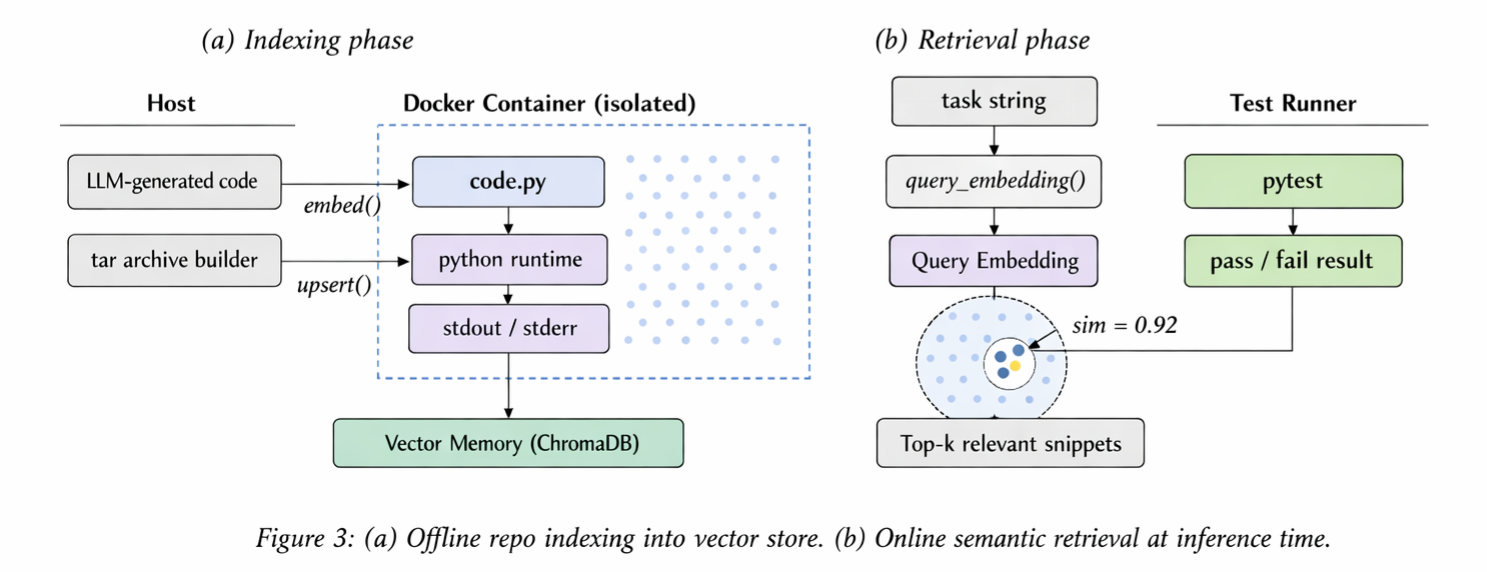
Figure 4: Sandboxed code execution pipeline and vector memory retrieval.
Step-by-step pipeline
User Task
   │
   ▼
Orchestrator ──► Retrieve ChromaDB memory + repo snippets
   │
   ▼
Planner ──────► JSON plan: [{agent, description, file?}, ...]
   │
   ▼ (for each step)
┌─────────────────────────────────┐
│  Coder ──► stream tokens        │
│  Tester ──► generate pytest     │  ◄── loop with auto-debug
│  Debugger ──► fix on failure    │
│  Critic ──► PASS / FAIL         │
└─────────────────────────────────┘
   │
   ▼
Docker Sandbox ──► run_code(code, test_code)
   │                 • 512 MB RAM limit
   │                 • 0.5 CPU quota
   │                 • network disabled
   │                 • tmpfs /workspace
   ▼
Memory store ──► ChromaDB (on PASS)
   │
   ▼
Stream final output to client
Diff-based editing
When a file is specified in a plan step, the Coder receives the existing file content and produces a unified diff. The diff is applied with the unidiff library — only the changed lines are written, leaving the rest of the file intact.
Repo indexing
RepoIndexer uses Watchdog to observe the repo directory. On every file create, modify, or delete event for .py, .js, .ts, .go, .rs, or .java files, the embedding is updated in ChromaDB. All indexing runs in a background thread so it never blocks the request pipeline.
Running Tests
# Run full test suite
pytest tests/ -v

# Run a specific module
pytest tests/test_sandbox.py -v

# With coverage
pytest tests/ --cov=core --cov=services --cov=memory --cov-report=term-missing
Contributing
- Fork the repo and create a feature branch
git checkout -b feature/your-improvement
- Make changes and add tests
pytest tests/ -v
- Open a pull request — describe what changed and why
Please follow existing code style: async-first, type-annotated, no bare except clauses.
License
MIT License — see LICENSE for details.
Citation
If you use this project, please cite:
@misc{kumar2026AgentForge,
  title={AgentForge: Execution-Grounded Multi-Agent LLM Framework for Autonomous Software Engineering},
  author={Rajesh Kumar, Waqar Ali, Junaid Ahmed, Najma Imtiaz Ali, Shaban Usman},
  year={2026},
  note={https://arxiv.org/abs/2604.13120}
}
Yorumlar (0)
Yorum birakmak icin giris yap.
Yorum birakSonuc bulunamadi