zulivio
Health Uyari
- License — License: AGPL-3.0
- Description — Repository has a description
- Active repo — Last push 0 days ago
- Low visibility — Only 6 GitHub stars
Code Basarisiz
- Hardcoded secret — Potential hardcoded credential in .github/workflows/build-windows-msix-store.yml
- Hardcoded secret — Potential hardcoded credential in .github/workflows/build-windows-msix.yml
- process.env — Environment variable access in apps/backend/prisma/backfill-phone-numbers.ts
Permissions Gecti
- Permissions — No dangerous permissions requested
Bu listing icin henuz AI raporu yok.
Self-hosted sales CRM and workforce operations: leads, call logs, follow-ups, scoring, employee records, attendance and assignments.

Zulivio
Open-source, self-hostable CRM and humane workforce-operations platform
Developed by NodeDR Infotech Private Limited
Try Zulivio · Case study · Maintainer: Raktim Ranjit





Role-based employee management, work assignments, an explicit attendance
state machine, a PDF knowledge base with daily team tips, a live master
dashboard, and CSV/Google Sheets import-export. Built to run on your own
hardware — no subscription, no data leaving your server — and to be
CasaOS/ZimaOS installable.
The sales CRM adds leads, call logs, follow-ups, lead scoring and assignment
rules alongside these workforce workflows. Read Scope and limitations
for deployment requirements and the capabilities outside the current release.
Get Zulivio
Two ways to install, both built from the same code and pointed at the samehttp://<server>:3100 — pick whichever fits your setup.

| Platform | Status | Install | What it needs |
|---|---|---|---|
| 🐳 Docker Compose (any OS) | ✅ Docker deployment | git clone + ./install.sh (see Quick start) |
Docker |
| 🏠 CasaOS / ZimaOS | ✅ Ready to install now, official app store submission pending | Install from a compose URL — see casaos/docker-compose.yml |
Nothing — CasaOS/ZimaOS pulls pre-built images, no build step |
| 🪟 Windows (Microsoft Store, MSIX) | 🧪 Built and CI-tested on real Windows, Partner Center submission pending |  |
Nothing — a self-contained desktop app with its own embedded database, no Docker |
Both pull the same multi-arch (amd64/arm64) images published by.github/workflows/docker-publish.yml
and share the same database schema — nothing about your data changes if you
switch install methods later.
Contents
- Get Zulivio
- Screenshots
- Stack
- Quick start
- Roles and access
- Core features
- Google Sheets integration
- MCP server
- User manual
- Environment variables
- Common operations
- Local development
- Tests
- CasaOS / ZimaOS
- Architecture notes
- Scope and limitations
- Roadmap
- License
Screenshots
All captured from a real running instance (Docker Compose, seeded with
sample data) — not mockups.
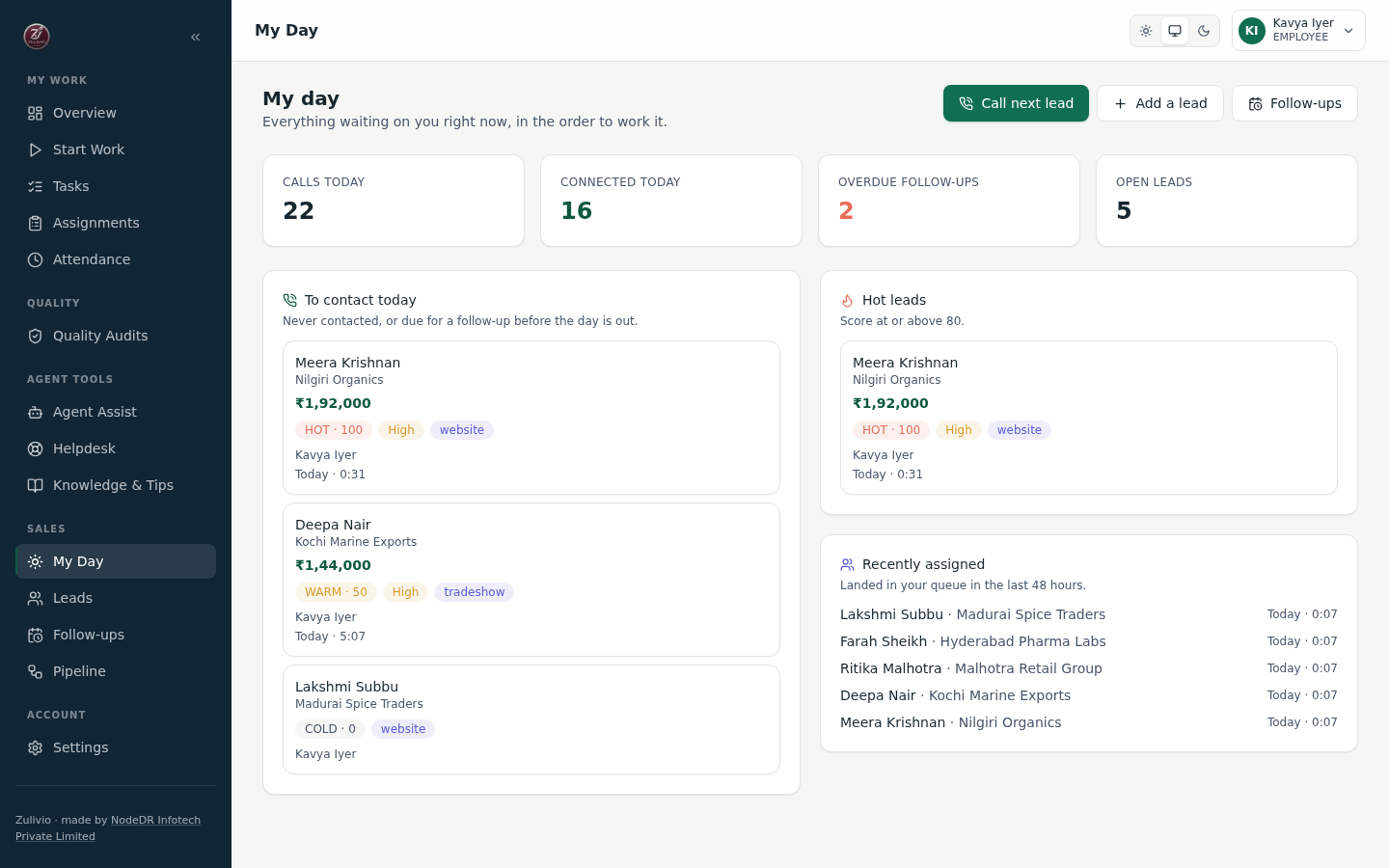
My Day — Telecaller's Dashboard What to call, what's due, what's hot
|
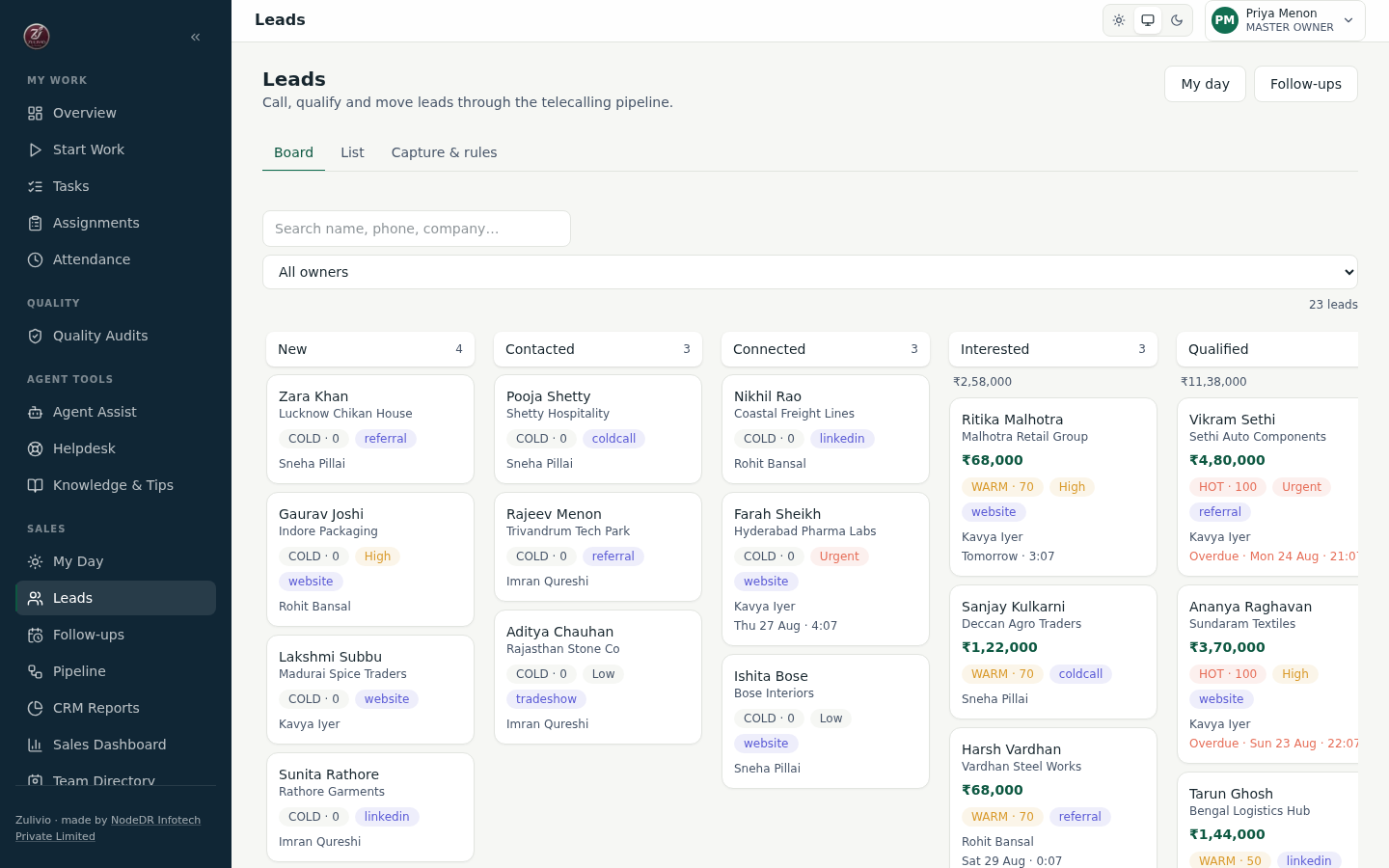
Lead Board — Drag & Drop Pipeline Visual pipeline management across telecalling stages
|
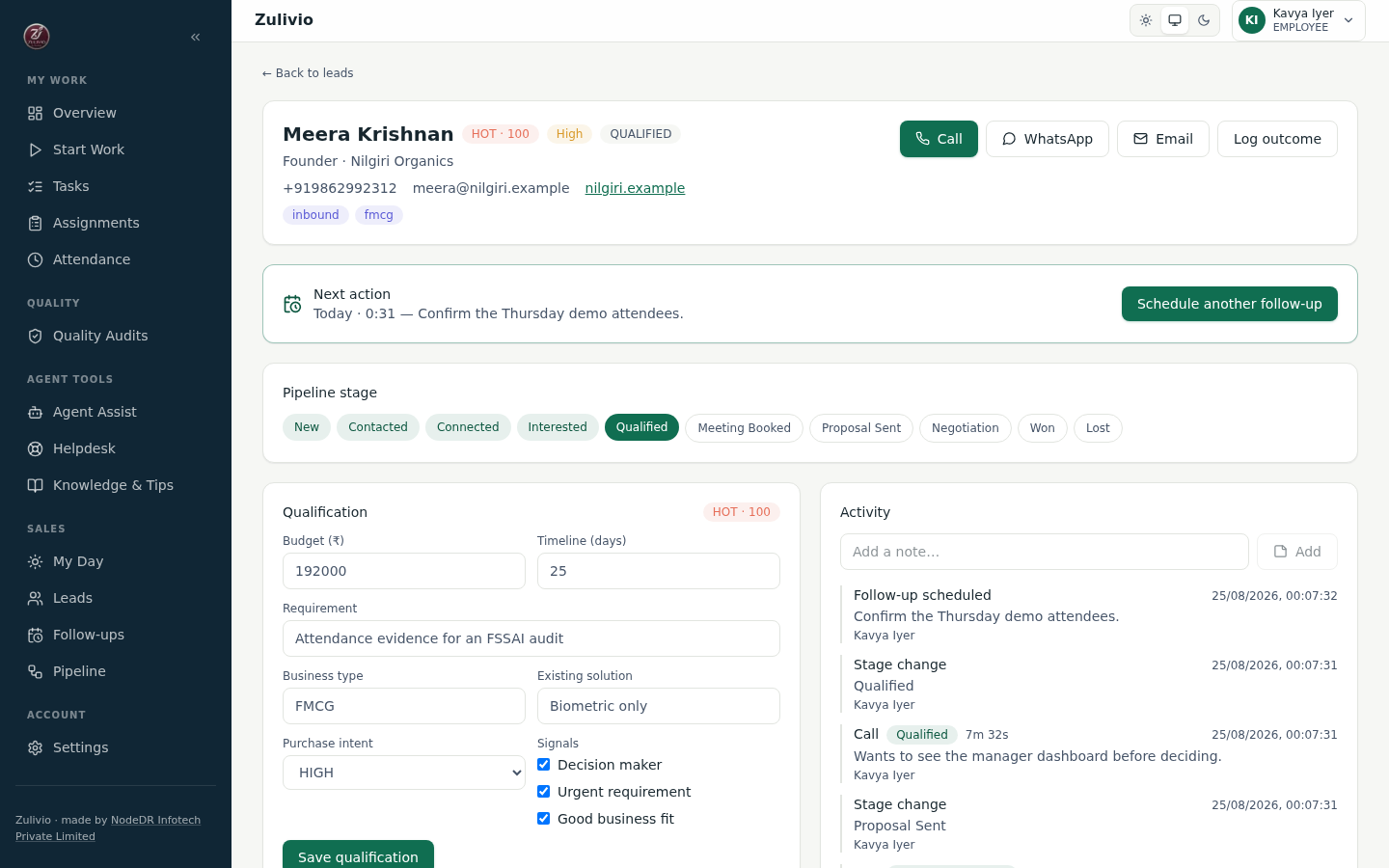
Lead Workspace — Single Screen CRM Call, qualify, log outcome, schedule follow-up
|
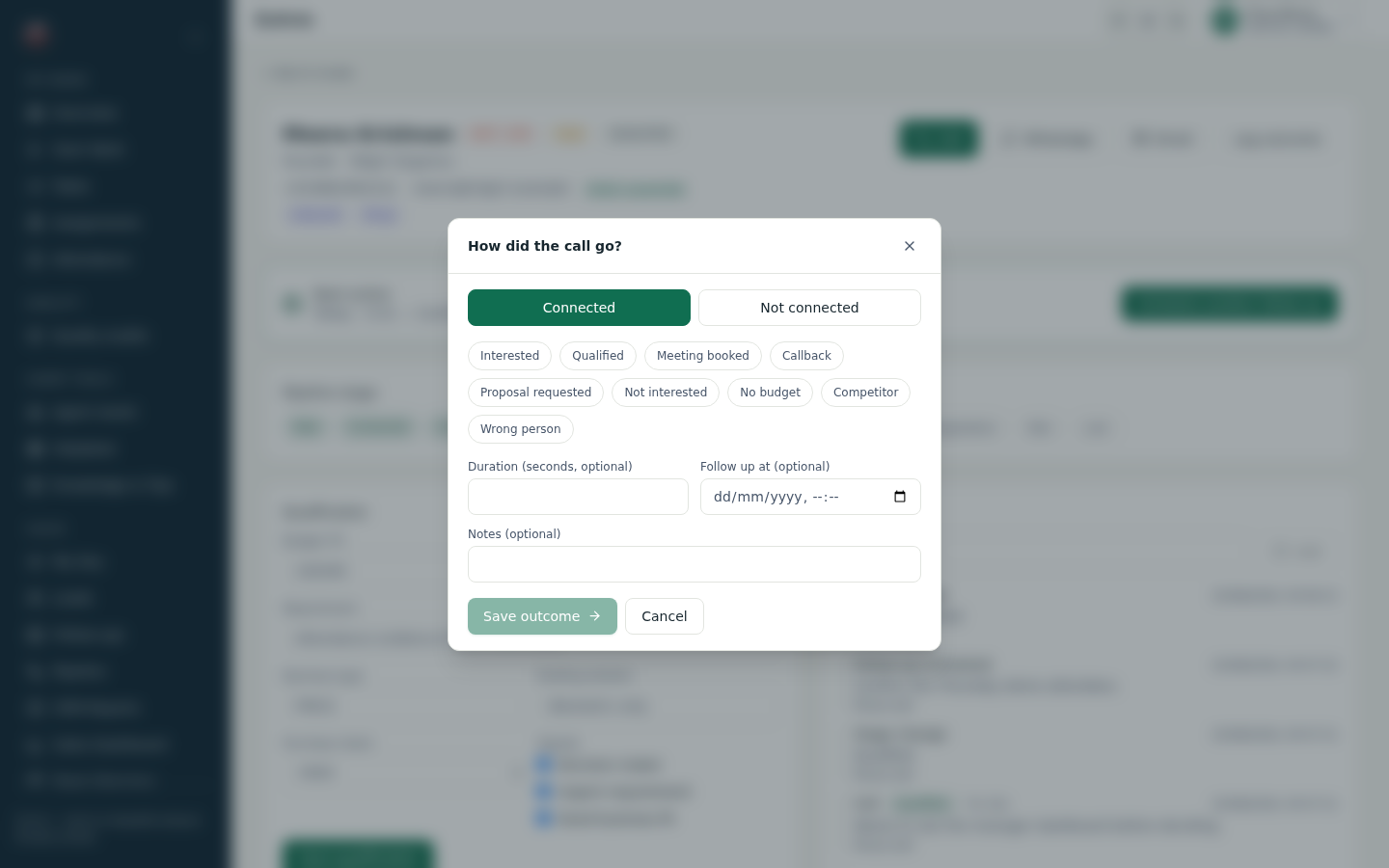
Call Disposition — Quick Outcome Logging Single-tap outcome, no long forms
|
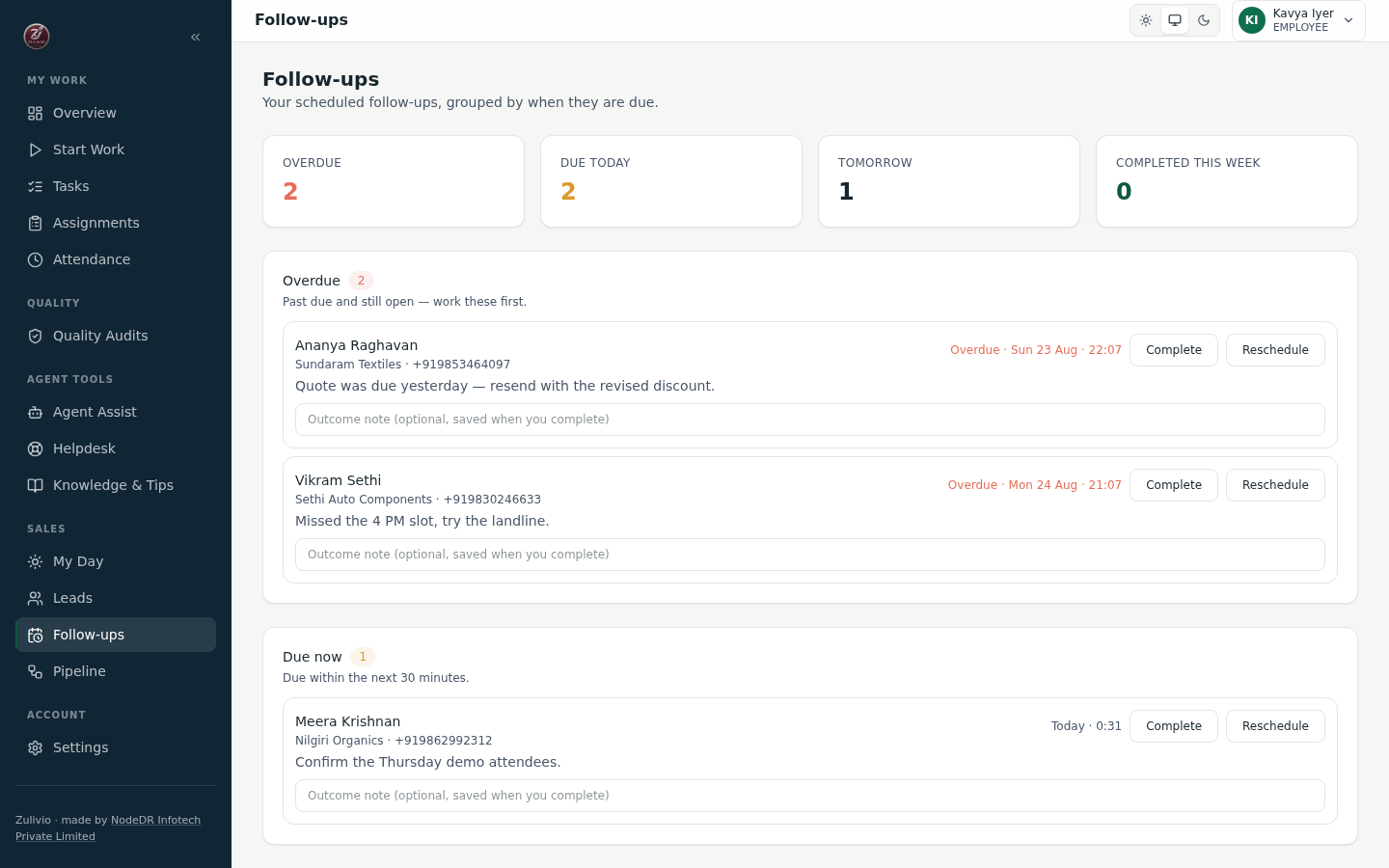
Follow-ups — Smart Task Buckets Overdue / Due now / Today / Tomorrow / Upcoming
|
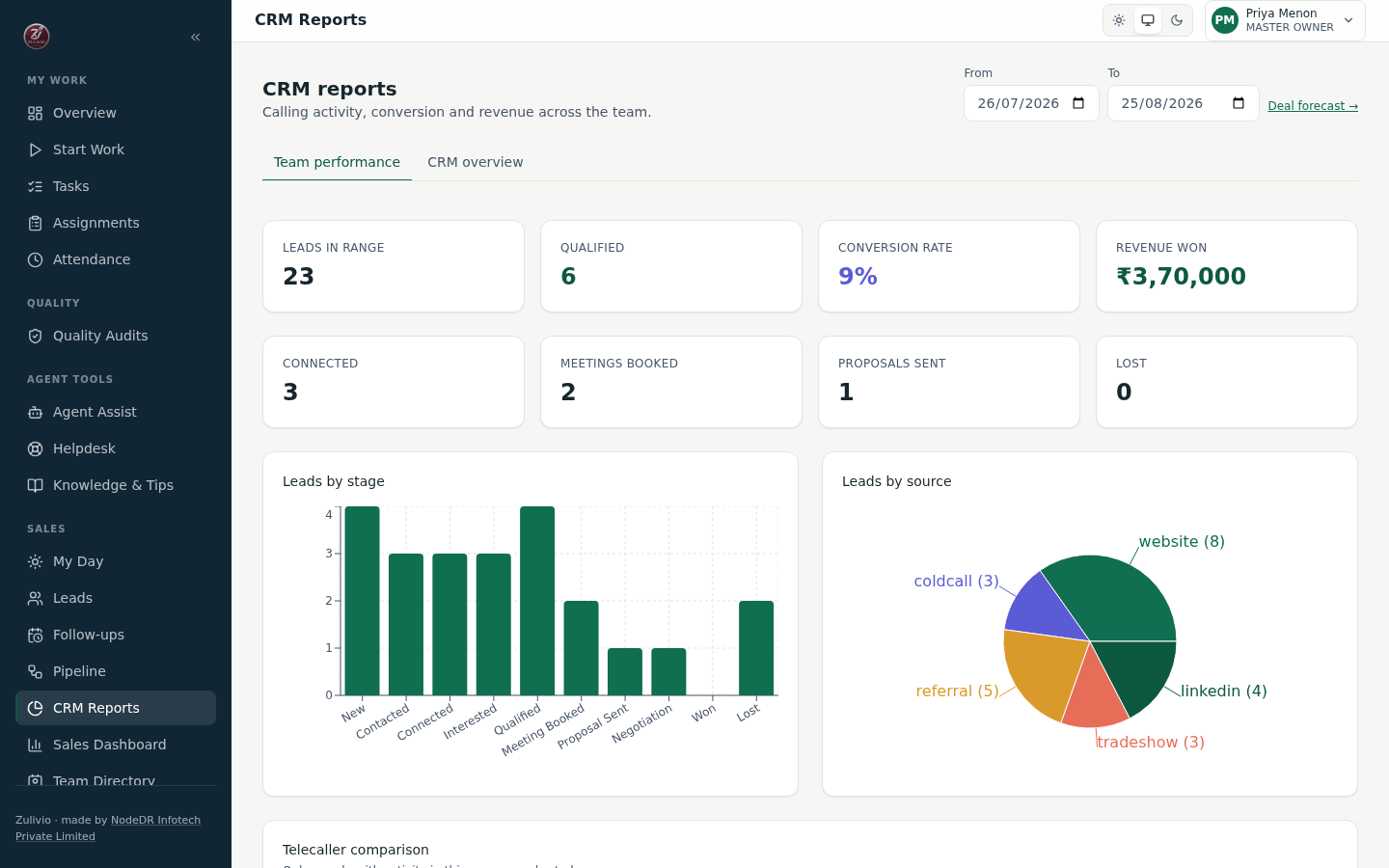
CRM Reports — Sales Analytics Leads by stage, source, conversion, revenue
|
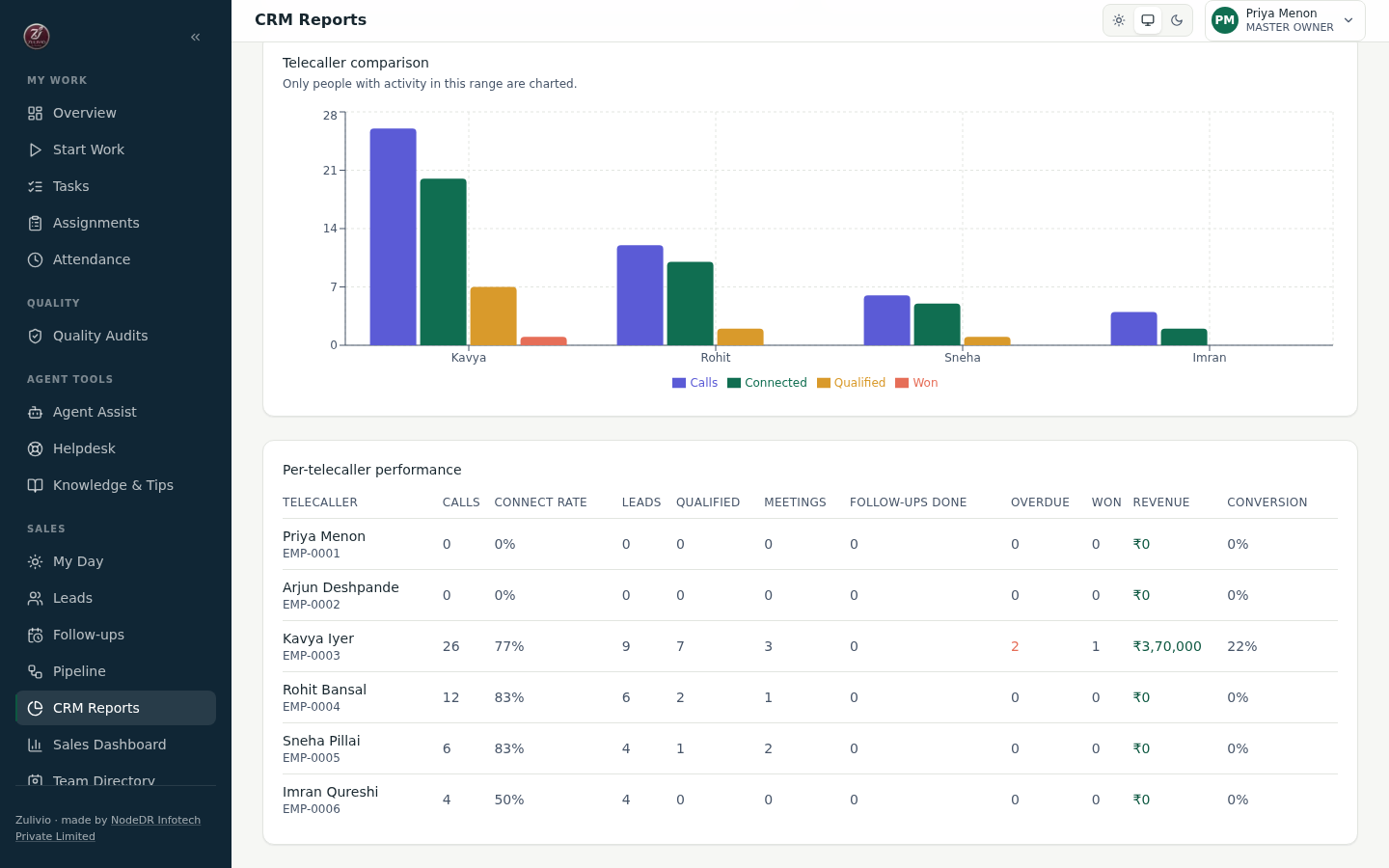
Telecaller Performance — Team KPIs Calls, connect rate, meetings, revenue per rep
|
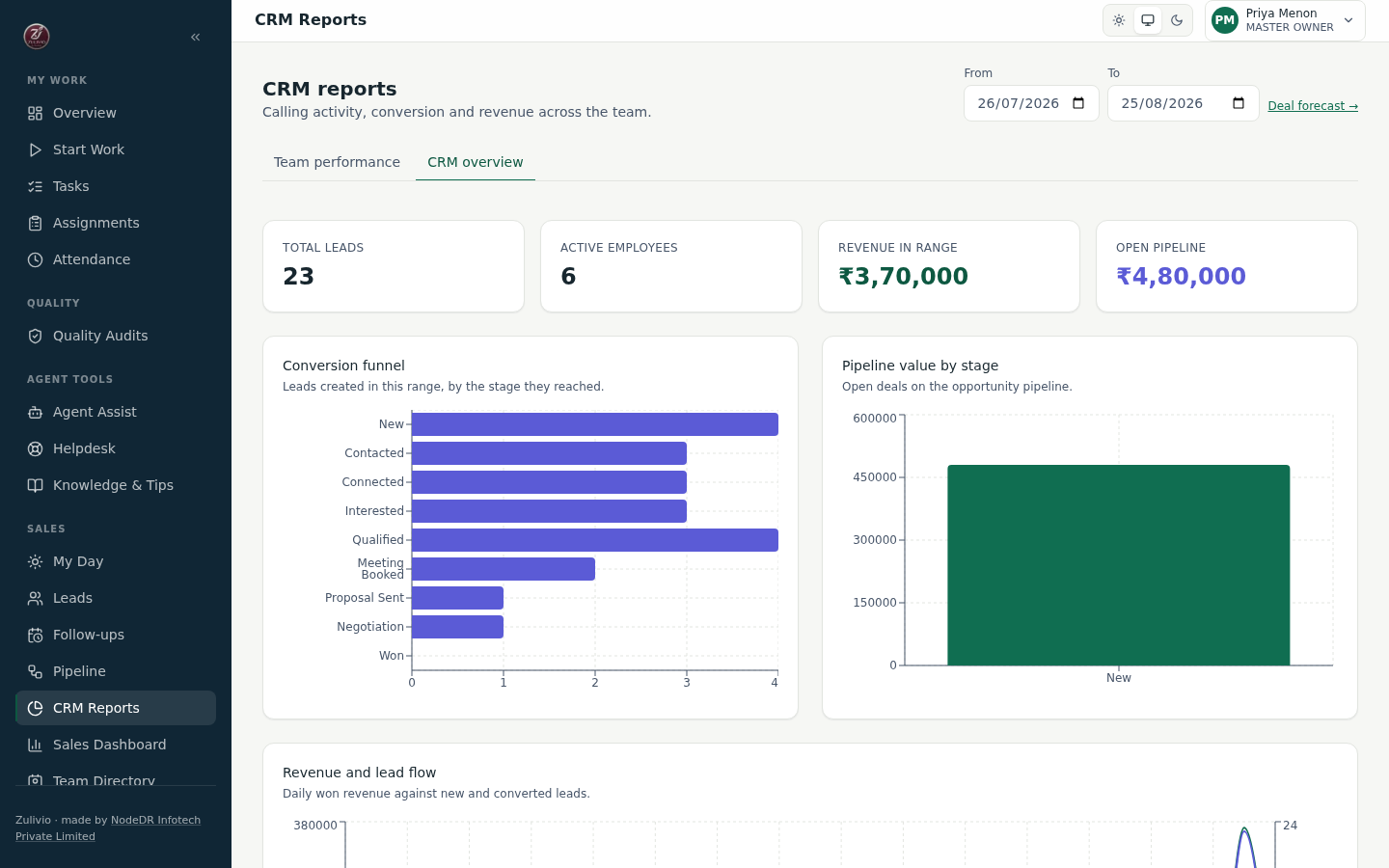
CRM Overview — Organization Dashboard Org-wide funnel, pipeline value, follow-up health
|
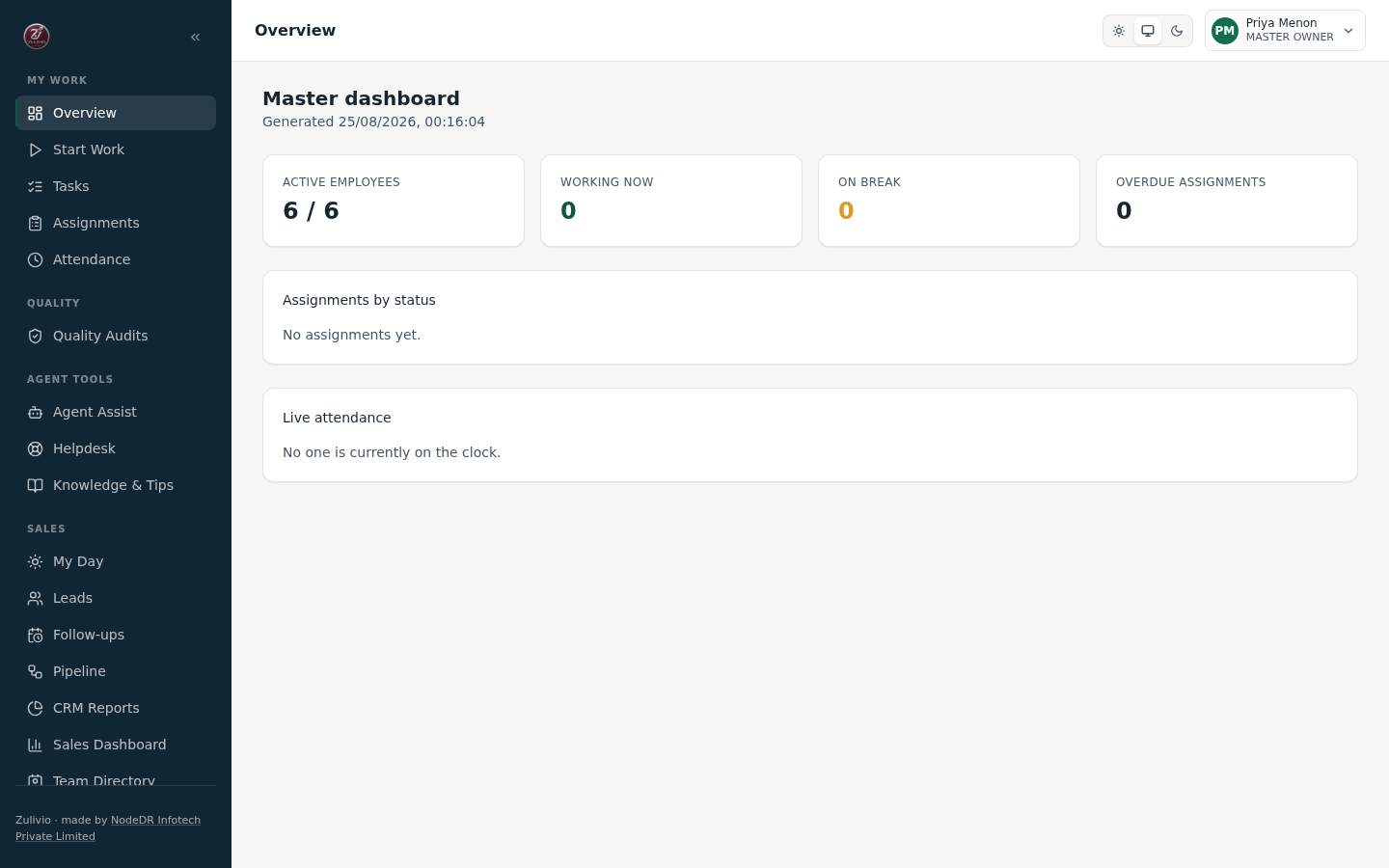
Master Dashboard — Live Operations Headcount, assignment mix, who's on the clock
|
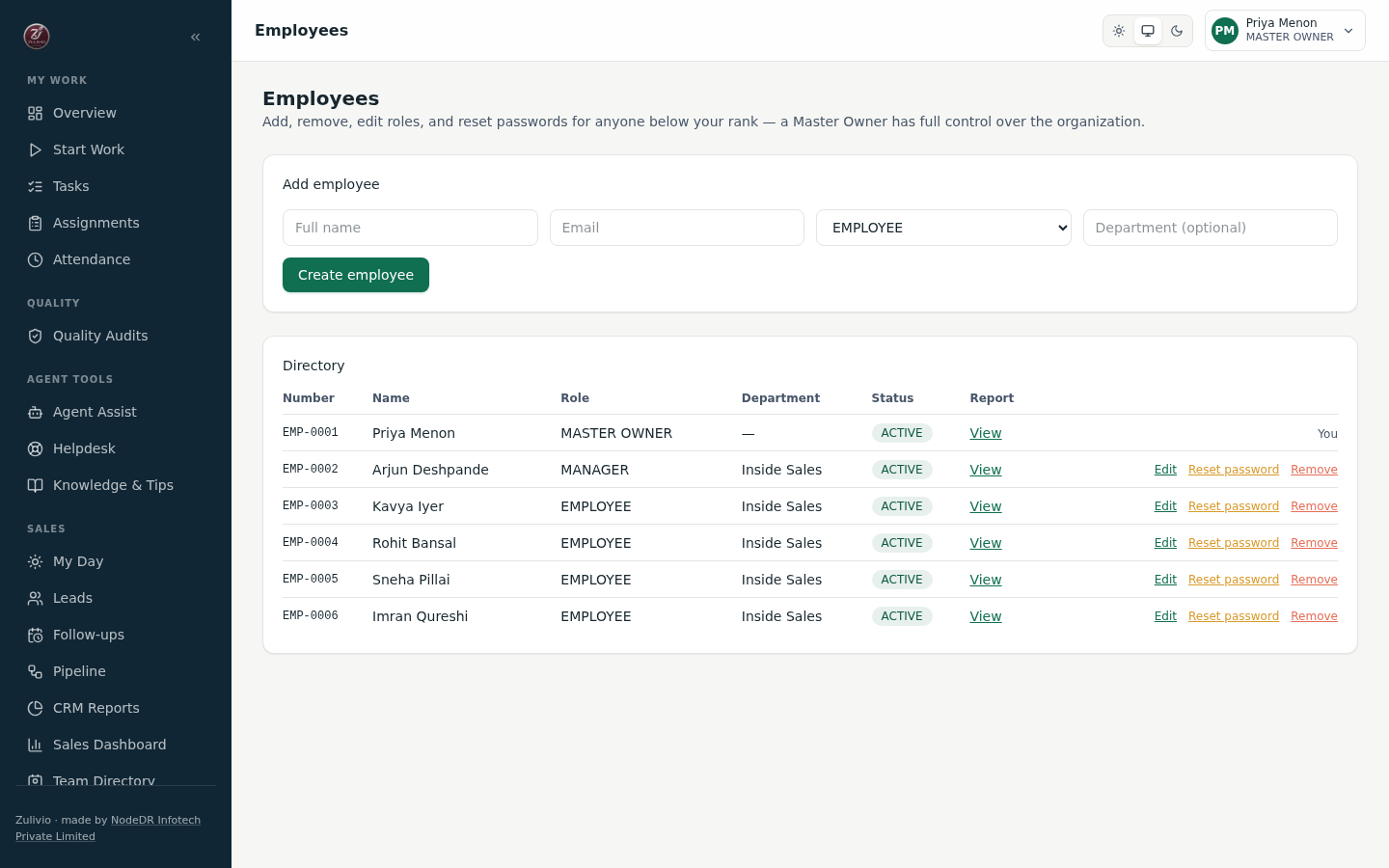
Employee Directory — Role Management Add, edit, reset password, remove — all rank-guarded
|
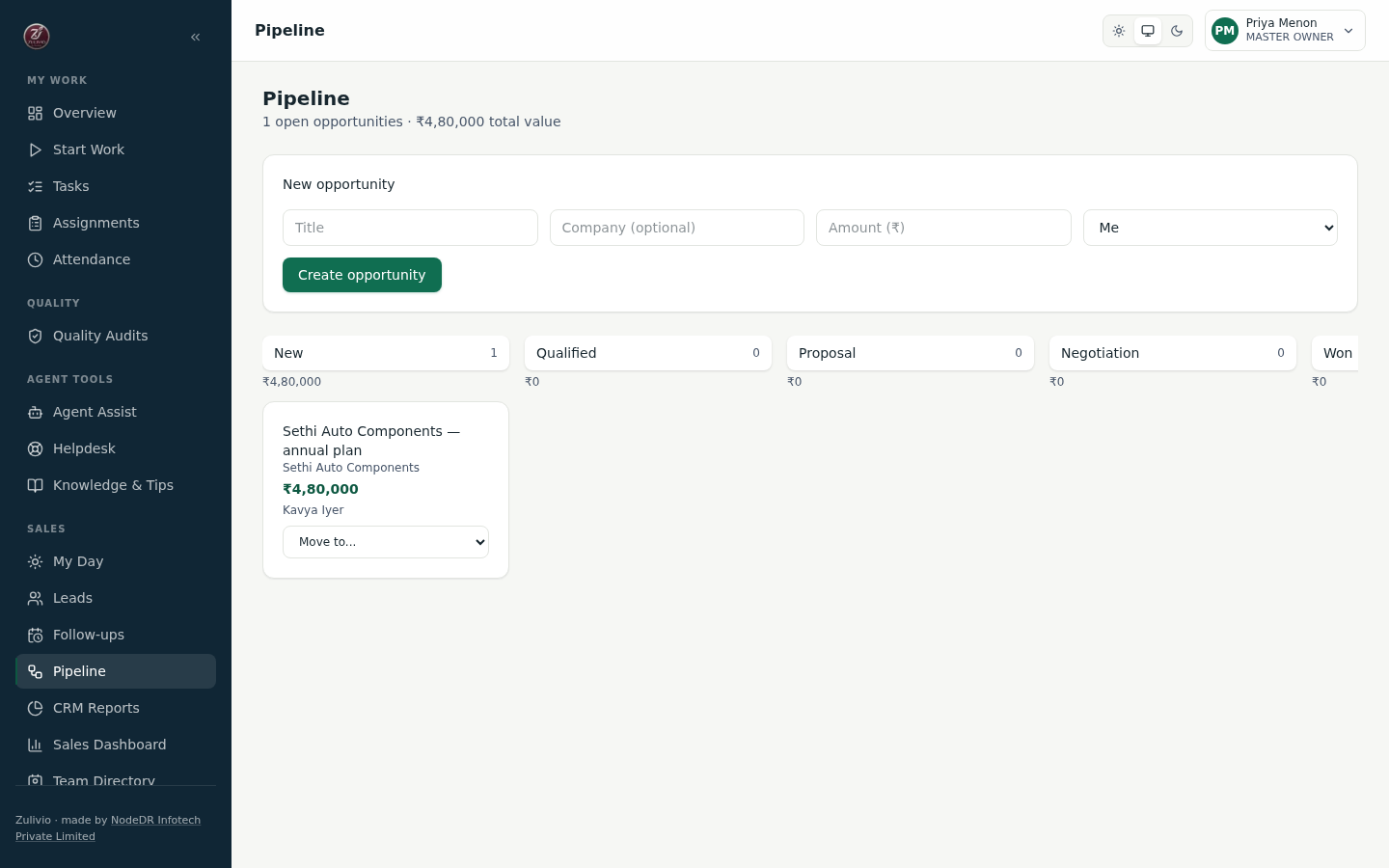
Deal Pipeline — Opportunity Management Kanban board across the opportunity pipeline
|
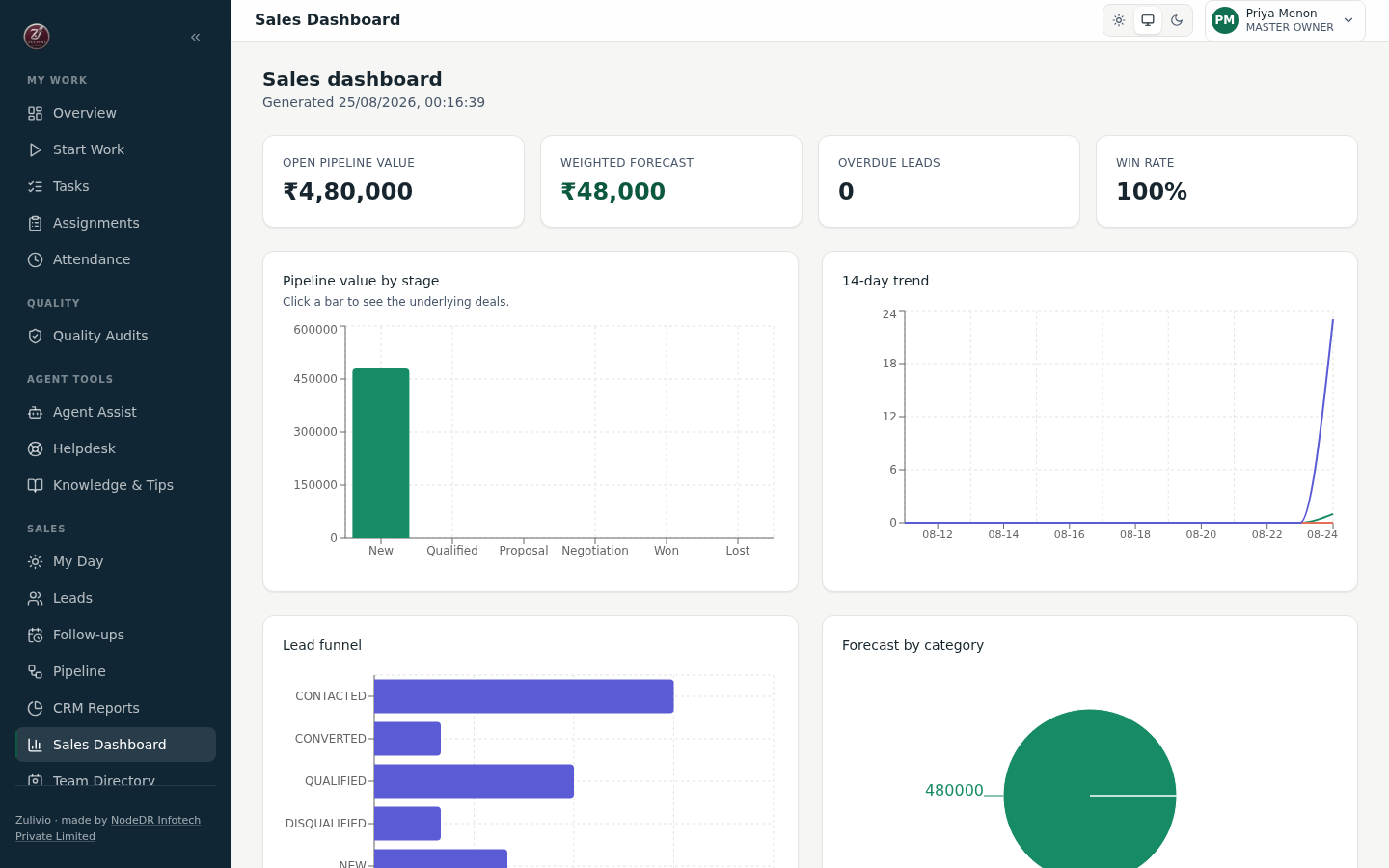
Sales Dashboard — Revenue Analytics Pipeline value, lead funnel, forecast by rep
|
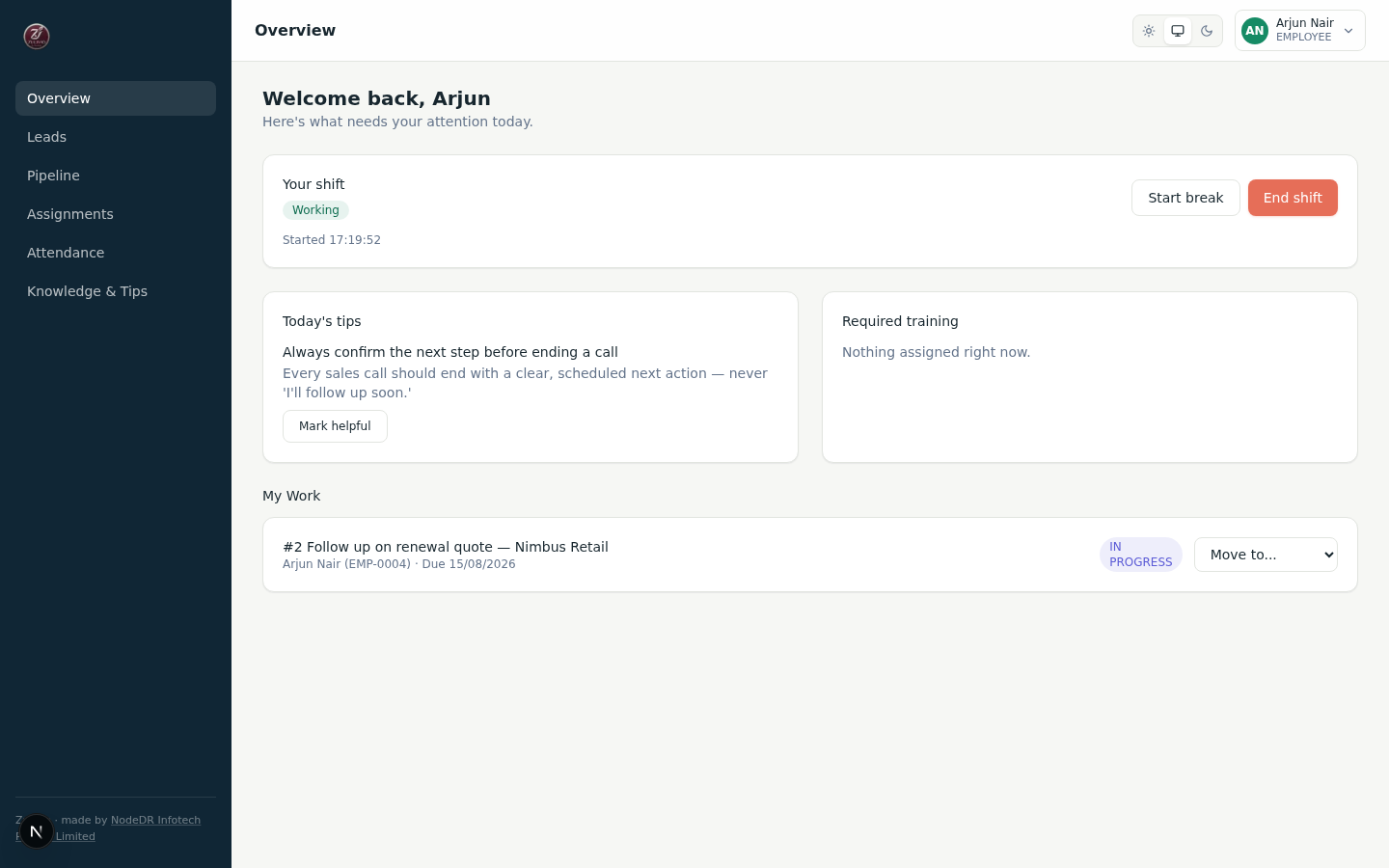
Employee Front Page — My Work Today's tips, shift controls, active work
|
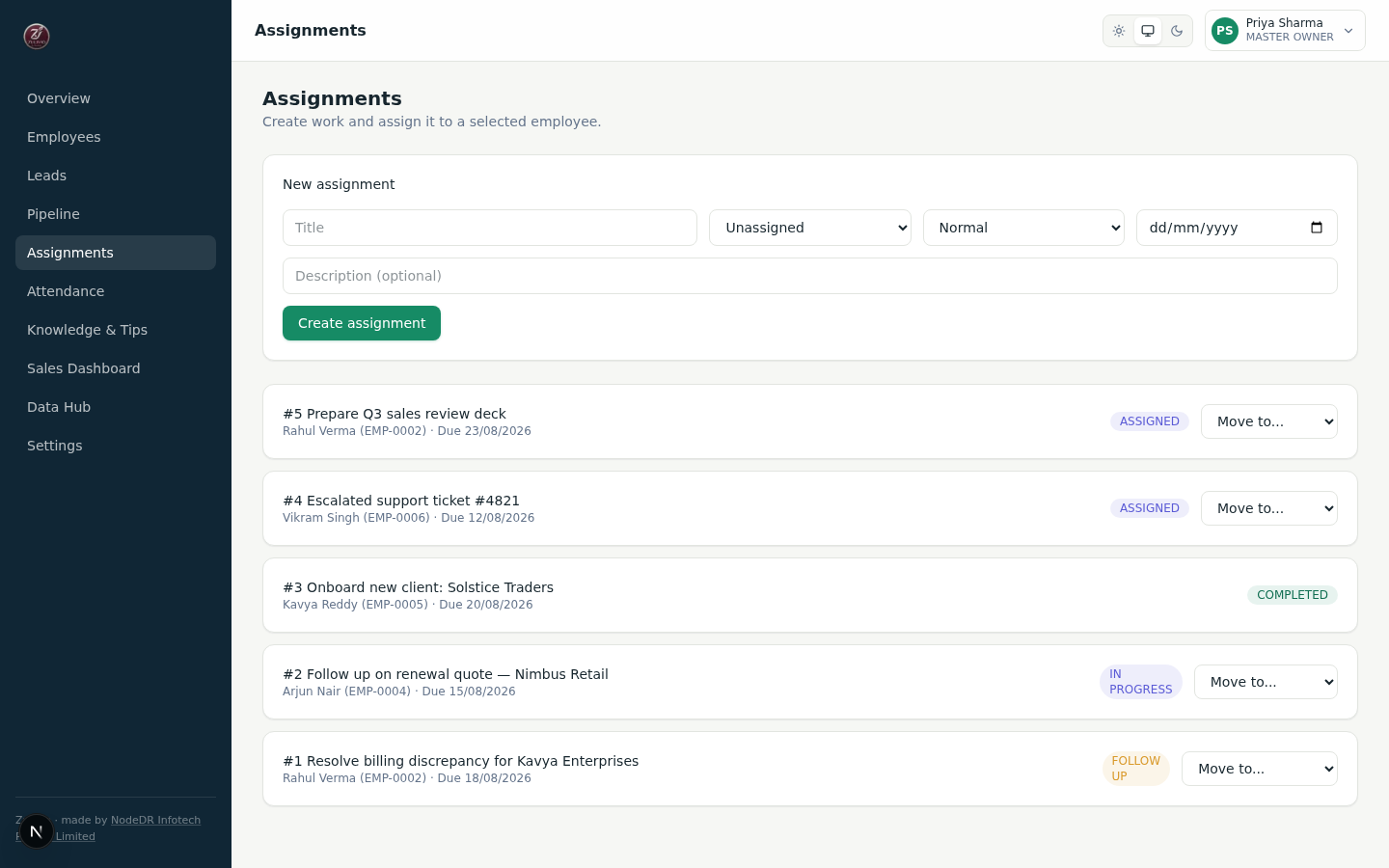
Assignments — Status Pipeline Guarded transitions with audit trail
|
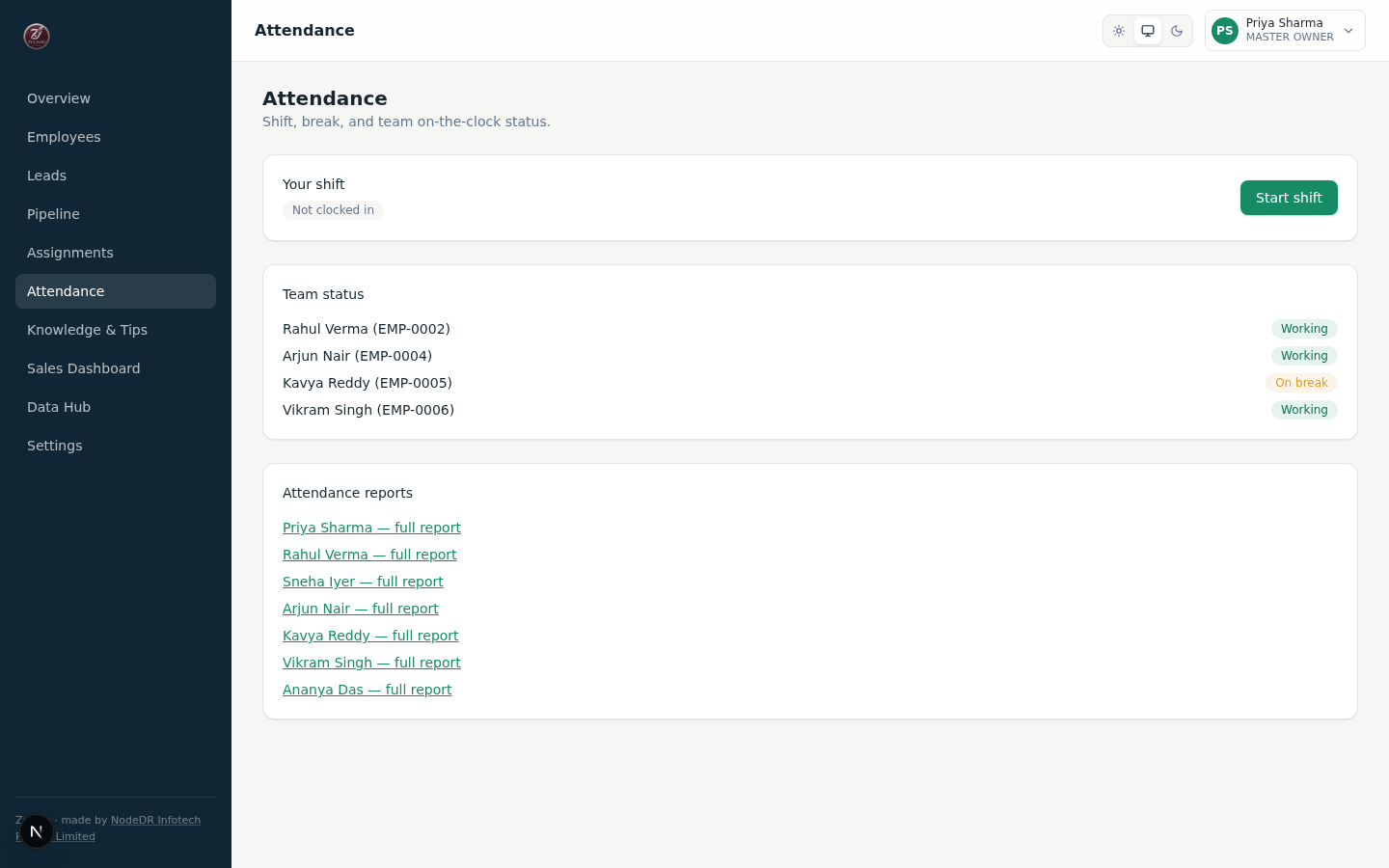
Attendance — Shift State Machine Explicit state transitions with server timestamps
|
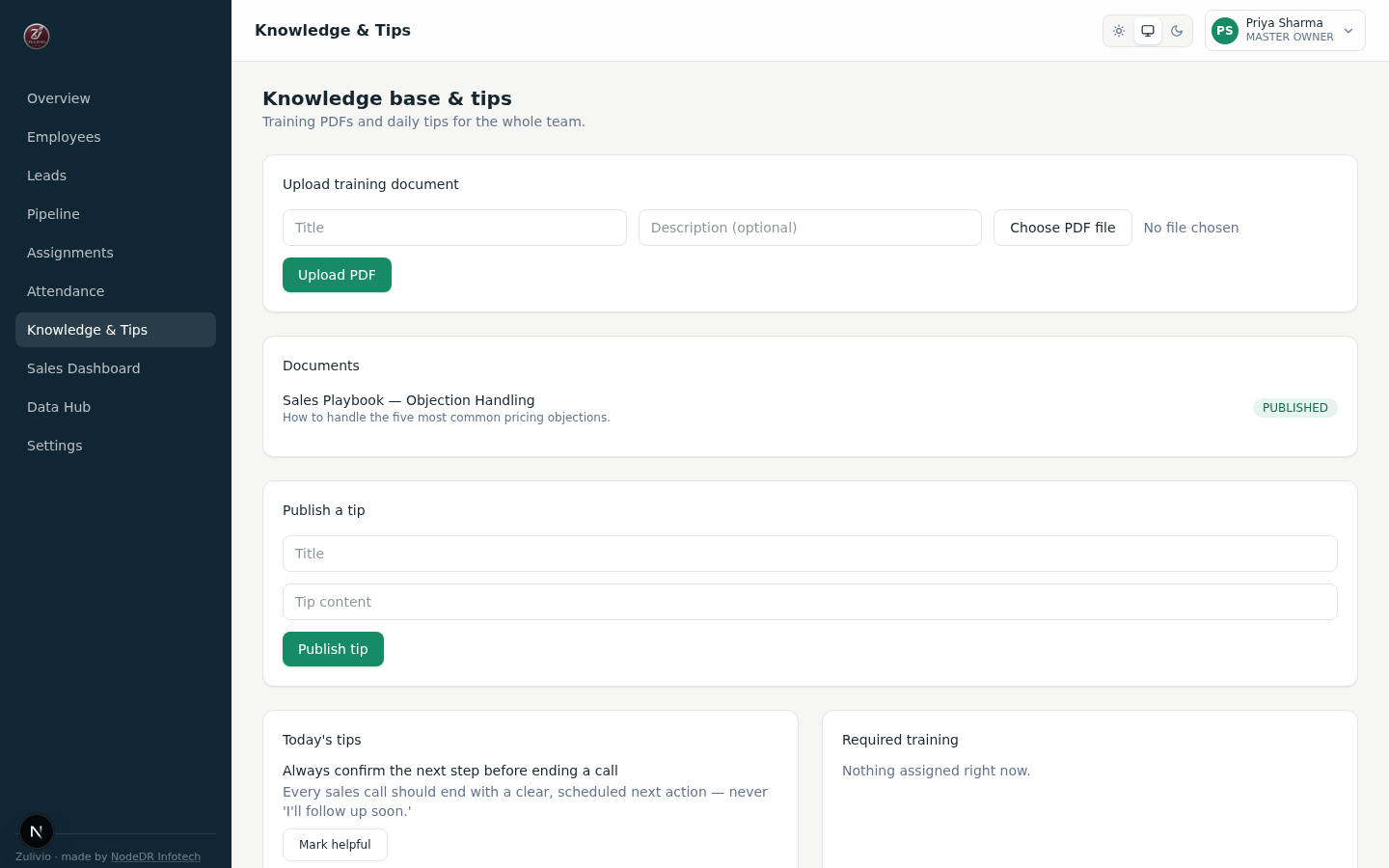
Knowledge Base — Training Hub PDF uploads, daily tips, role-targeted training
|
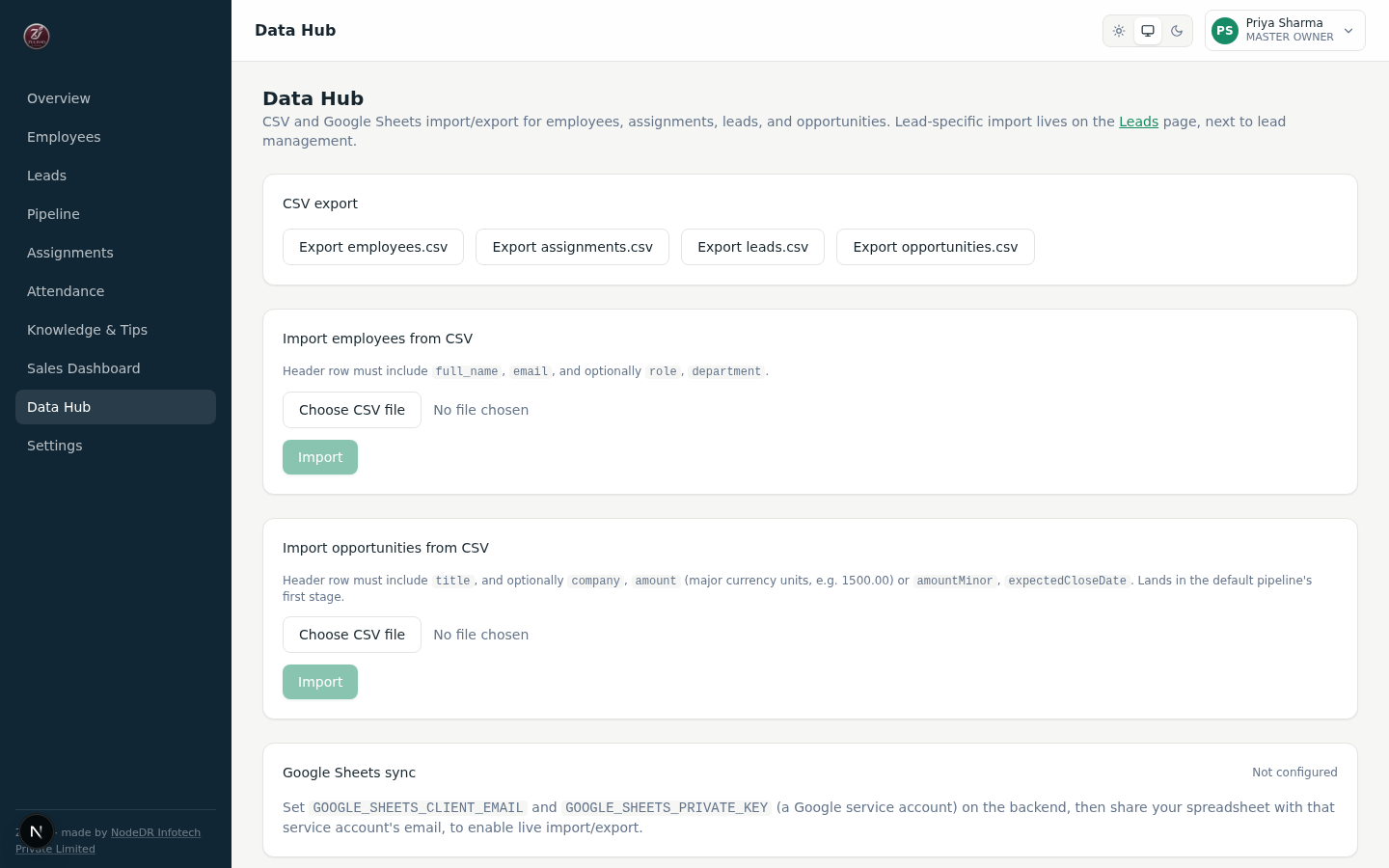
Data Hub — Import/Export Center CSV export, Google Sheets integration, bulk import
|
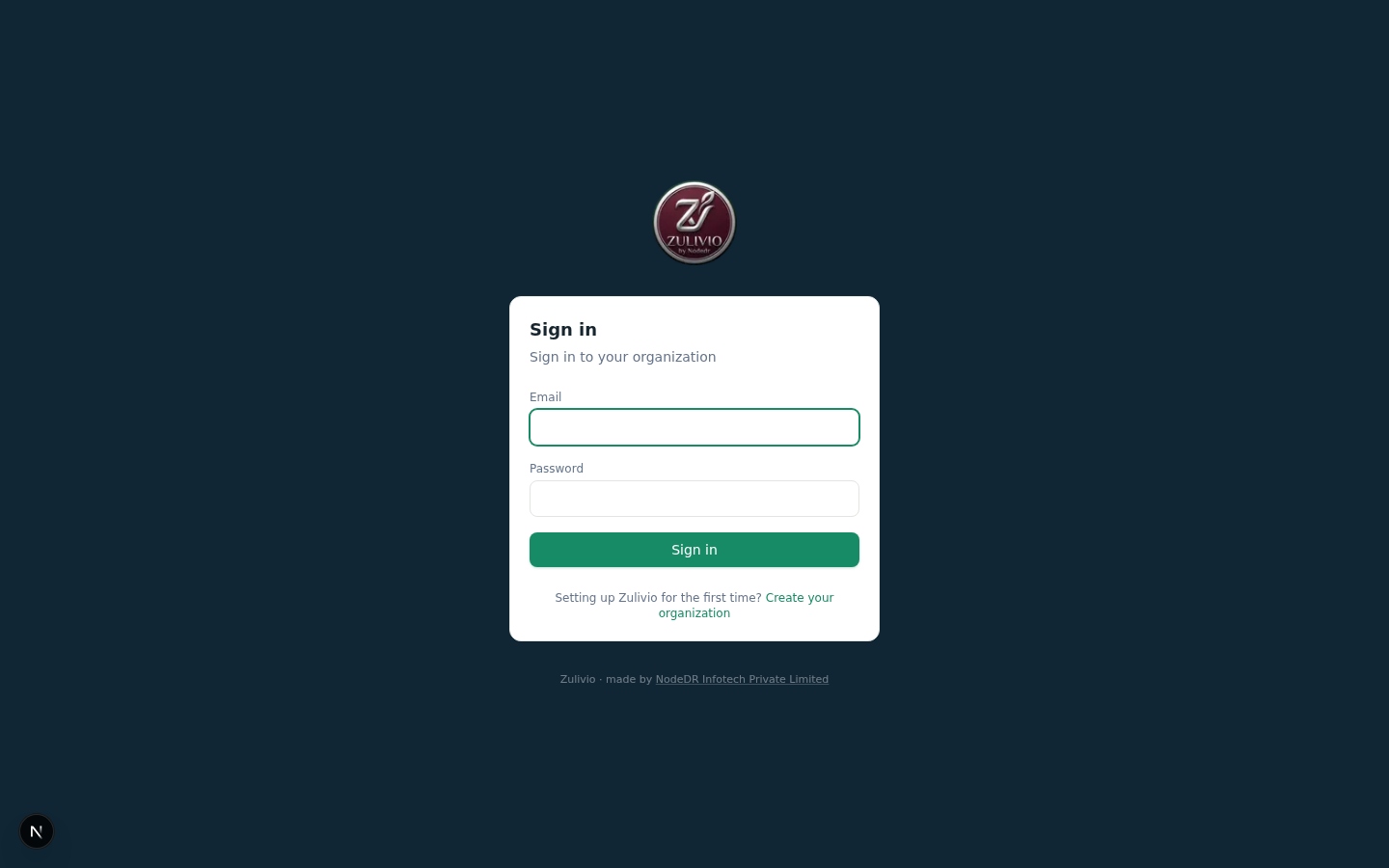
Sign In — Secure Authentication Argon2id hashing, session-based auth
|
Stack
Versioning policy: identify the latest stable major version of each
language/framework/tool at the start of a project (or before a dependency
bump), and default to it — don't build against an outdated version out of
habit. "Latest" still means judgment, not automatic: a version released
days ago with no ecosystem adoption (e.g. a from-scratch compiler rewrite)
is a deliberate, separately-tested upgrade, not a default. As of this
writing, Next.js 16 and Prisma 7 are both newer majors than what's below —
tracked as a deliberate future upgrade (Prisma 7 in particular changes
driver adapters and config, not a drop-in bump), not done yet.
- Backend: NestJS 11 + Prisma 6 + PostgreSQL 16, session-based auth
(Argon2id password hashing), REST API under/api/v1. - Frontend: Next.js 15 (App Router) + React 19 + TanStack Query +
Tailwind CSS v4. Talks to the backend only through a same-origin
server-side proxy (/api/*rewrites), so the session cookie stays
first-party. - Monorepo: pnpm workspaces + Turborepo, Node.js 24.
- Shared types:
packages/types— TypeScript interfaces shared between
frontend and backend API contracts.
Quick start

Requires Docker and Docker Compose
(bundled with current Docker Desktop/Engine).
One-click install
git clone https://github.com/Raktim94/zulivio.git && cd zulivio && ./install.sh
install.sh checks that Docker is installed, generates a.env with a random Postgres password (only if one doesn't already exist —
safe to re-run), builds the images, starts the stack, waits for the backend
to report healthy, then prints the URL to open. Re-run it any time (e.g.
after git pull) to rebuild and restart — it never touches existing data.
Manual install
If you'd rather run each step yourself (or install.sh doesn't fit your
setup), here's exactly what it does, one command at a time:
# 1. Get the code
git clone https://github.com/Raktim94/zulivio.git
cd zulivio

# 2. Set a real Postgres password — compose refuses to start without one.
cp .env.example .env
# Edit .env: set POSTGRES_PASSWORD (generate one with: openssl rand -base64 32)

# 3. Build the images (multi-stage, node:24-alpine) and start the stack.
#    The `migrate` service applies database migrations before `backend`
#    starts. First run takes a few minutes; later runs are cached and fast.
docker compose up --build -d

# 4. (optional) Watch the logs until the backend reports healthy.
docker compose logs -f

# 5. (later) Stop the stack without deleting your data:
docker compose down
Then open http://localhost:3100/setup and create your organization —
this creates your company and its first Master Owner account. There is
no baked-in demo password; you choose the master owner's password during
setup.
All data (the Postgres database and uploaded knowledge-base PDFs) lives in
named Docker volumes, not inside the containers, so it survivesdocker compose down, container recreation, and image rebuilds. See
Common operations for backup/restore commands.
To close self-service organization creation once you're done setting up
(recommended for a single-tenant deployment), set BOOTSTRAP_DISABLED=true
in .env and restart the backend service.
Roles and access
Roles form a strict hierarchy — each role can manage everything below it,
never above or beside it:
| Role | Typical use | Can do |
|---|---|---|
| Master Owner | Company owner | Everything, including creating Company Admins |
| Company Admin | Operations lead | Everything except creating other admins/owners |
| Sales Head | Head of sales | Manage managers/employees, assignments, reports |
| Manager | Team lead | Add/remove employees below them, assign work, view team reports |
| Employee | Front-line staff | Own attendance, own assignments, knowledge base, tips |
Enforced server-side on every request — a manager cannot create a peer
or higher role (privilege escalation is blocked and tested), and an
employee cannot view another employee's report. Seeapps/backend/test/app.e2e-spec.ts for the authorization test suite.
Adding an employee generates a unique employee number (EMP-0001, ...) and
a random temporary password, shown exactly once in the UI at creation
time — it is never stored in plaintext or retrievable again. Removing an
employee marks them SEPARATED, immediately revokes all their sessions,
and preserves their history for reporting/audit (no hard delete, no reused
employee numbers).
The Master Owner (and anyone with a high-enough rank over the target) has
full operational control over the organization from the Employees page:
- Edit any subordinate's role, department, or employment status
(including reactivating someoneSUSPENDED/ON_LEAVE) —PATCH /api/v1/employees/:id. Guarded the same way as creation: you can never
promote someone to your own rank or above. - Reset password — force-generates a new temporary password for a
subordinate and immediately revokes all their active sessions, so a
reset takes effect right away rather than on their next natural login —POST /api/v1/employees/:id/reset-password. - Remove — separates an employee and revokes their sessions —
DELETE /api/v1/employees/:id. - Full visibility into every assignment, attendance record, and report in
the organization (Manager rank and above is unrestricted by scope;
Employee/Manager-of-a-team see only their own or their direct reports').
CRM records (leads, assignments, opportunities, reports) are scoped by the
org chart, not by rank: an Employee sees their own, a Manager their
direct reports', a Sales Head their whole reporting subtree, and Company
Admin/Master Owner the whole organization. A lead nobody owns yet stays
visible to Manager and above, so the people who route leads can still see
them. This is narrower than the general employee directory, which stays
rank-based for HR-style actions like reset-password — see the doc comment
on EmployeeScopeService for why the two differ.
All of the above are enforced server-side, tested inapps/backend/test/ (142/142 passing, including a dedicated cross-tenant
isolation suite — seeSECURITY_AUDIT_REPORT.md), and never gated
only by hiding a button in the UI.
Core features
Employees — add/remove with auto-generated credentials, role
assignment, manager hierarchy, department tagging.Assignments — create work, assign it to a selected employee by
number, track throughASSIGNED → IN_PROGRESS → FOLLOW_UP / BLOCKED → COMPLETED / CANCELEDwith a full transition audit trail and outcome
notes. Invalid transitions (e.g. skipping straight toCOMPLETED) are
rejected server-side.Attendance — explicit shift/break state machine
(logged_out → working → on_break → working → logged_out), server
timestamps, one open session per employee enforced, auto-closes a
dangling break on shift end.Employee report — login/logout times, total worked minutes, total
break minutes, per-session breakdown, assignment counts by outcome
(completed/follow-up/blocked/in-progress), training acknowledged.Master dashboard — headcount, assignments by status, overdue count,
live "who's working / on break right now" board, knowledge base stats.Knowledge base & tips — PDF upload (managers+), draft/publish
lifecycle, role/person-targeted training assignments with per-version
acknowledgement tracking, and a "today's tips" feed on the employee
front page.Data Hub — CSV export (employees, assignments, leads, opportunities)
with spreadsheet formula-injection protection; CSV import with row-level
error reporting; a real Google Sheets adapter (see below).Sales CRM — leads with a configurable qualification pipeline
(NEW → CONTACTED → QUALIFIED → DISQUALIFIED), lead-to-opportunity
conversion that preserves history, a Kanban pipeline board (default
6-stage pipeline: New/Qualified/Proposal/Negotiation/Won/Lost) with an
auditable stage-transition trail, manager-only forecast-category
overrides with a full adjustment audit, and a sales dashboard (pipeline
value by stage, lead funnel, forecast-by-category, value/forecast-by-rep,
and win/loss charts). CSV import/export for both leads and opportunities.- Assignment rules — three routing modes per rule: round robin,
territory (a lead's free-text territory maps to a specific rep, falling
back to round robin on no match), and capacity (routes to whichever
member holds the fewest open leads, skipping anyone at their configured
cap). Each rule carries a response SLA and feeds the overdue queue.
- Assignment rules — three routing modes per rule: round robin,
Telecalling CRM — the phone-first loop on top of the Sales CRM
above: a drag-and-drop lead board on a configurable 10-stage telecalling
pipeline (New → Contacted → Connected → Interested → Qualified → Meeting
Booked → Proposal Sent → Negotiation → Won, plus Lost with granular loss
reasons), and a single-screen lead workspace — contact header with
Call/WhatsApp/Email, stage strip, qualification fields, activity
timeline, and a prominent next action.- Call dispositions — single-tap outcome (connected / not connected)
and disposition, with duration and notes. The pair is validated
server-side, so a not-connected call can't be marked "meeting booked"
and skew connect-rate reporting. A swappableCallProviderseam is in
place for a future dialer; today's provider hands the device atel:
URI. No telephony vendor, no call recording. - Follow-ups — real due-dated records (not a status flag), bucketed
into overdue / due now / today / tomorrow / upcoming, completed and
rescheduled inline from the queue. - Lead scoring — a transparent weighted rubric (budget, decision
maker, urgency, requirement clarity, timeline, business fit) banded
HOT/WARM/COLD. Weights and thresholds are stored per organization and
editable from the Leads screen — changing one does not need a redeploy. - Call Next Lead — picks the single highest-priority lead for a
telecaller: overdue follow-up → callback due soon → hot lead → new
lead → oldest untouched. - Dashboards — My Day for the telecaller, team KPIs with
per-telecaller performance for managers, and an org-wide CRM overview
(funnel, sources, revenue trend, follow-up health, assignment
distribution) for admins. - Search, filters and bulk actions — server-side search and
filtering over name/phone/email/company/ID, stage, status, owner,
source, score, priority and date ranges; multi-select assign, stage
change and tagging for managers. There is deliberately no bulk delete —
leads are disqualified with a reason.
Design notes, what was reused versus newly built, and the explicit
out-of-scope backlog are indocs/decisions/0001-telecalling-crm.md.- Forecasting — rep-level (per-owner pipeline value, weighted
forecast, and forecast-by-category on the sales dashboard),
manager-level (forecast-category overrides with a full audit trail viaforecast_adjustments), and company-level (org-wide pipeline value and
weighted forecast rollup) views.
- Call dispositions — single-tap outcome (connected / not connected)
Employee workspace — Home (today's assignment summary + attendance
state + active-work list), Start Work (attendance widget + today's
queue), Tasks (Pending/Completed/All/Workflow-Runs tabs), Quality
Audits (published reviewer feedback, self-acknowledged, with a
Manager+ scoring/authoring panel), Agent Assist (phone/lead/campaign
lookup returning the record's real current status, valid next
transitions, and matching Knowledge/Tips — no AI, no generated text,
by design), and Helpdesk (published step-by-step runbooks employees
run themselves, with a Manager+ author panel). Settings is split into
Profile/Team/Password tabs available to every employee, plus
Master-Owner-only Backups & Activity and Integrations tabs.Sales Head workspace — a Sales Head's authorized visibility is
their full reporting subtree (recursive through the org chart), versus
a line Manager's direct reports only — enforced by a sharedEmployeeScopeServiceon both the Sales dashboard's owner-filtered
data and every endpoint below, not just a UI-level filter. Sales
dashboard gained a 14-day won/lost/new-leads trend chart and
click-to-drill-down (a pipeline-stage bar or a rep row opens the
actual underlying deals, not just the aggregate number). Team
Directory lists everyone in scope with live open/overdue-work and
pipeline-value counts; clicking through to an employee's detail page
shows their tasks, sales activity, quality history, and recent audit
events, with an Assign Task action.Automated S3 backups (Settings, Master Owner only) — a full
instance backup (Postgres viapg_dump --format=custom, plus the
uploads volume) to any S3-compatible bucket, on a rolling schedule
(default every 3 days): back up, download-and-verify the upload, then
delete the oldest backup past the retention count (default 2) — so a
verified backup always exists in the bucket, never a window with zero.
One-click restore (pg_restore --clean --if-existsplus replacing the
uploads volume) is gated behind a typedRESTOREconfirmation, since it
overwrites the entire database. Connect it entirely from Settings —
endpoint, bucket, and access key are entered there, tested live before
saving, and stored in the app itself (no CasaOS/env-var editing
required).S3_BACKUP_*env vars are also still supported as a
fallback for headless/CasaOS-config-driven deployments — Settings takes
priority when both are present. See Environment variables below.
Google Sheets integration
The Google Sheets adapter is real, not a mock — but it only activates when
you provide credentials, per the "no fake integrations" rule this project
follows. Connect it two ways, same pattern as backups below:
- From Settings → Integrations (recommended, Master Owner only) —
create a Google Cloud service account, enable the Sheets API, share your
target spreadsheet with the service account's email, then paste the
email and private key into the connect form there. The key is verified
live (a real token mint against Google) before saving, and stored in the
app itself — no env-var editing or container restart required. - Via
GOOGLE_SHEETS_CLIENT_EMAIL/GOOGLE_SHEETS_PRIVATE_KEYenv
vars — still supported as a fallback for headless/CasaOS-config-driven
deployments (the private key needs its newlines escaped as\nin.env). Settings takes priority when both are present. Requires a
restart of thebackendservice after changing.
Either way, the Data Hub page shows "Connected" once configured and exposes
live import/export. Without credentials configured,GET /api/v1/integrations/google-sheets/status returns{ configured: false } and the UI clearly says so — it never pretends the
integration works.
MCP server
Zulivio ships with a built-in Model Context Protocol
(MCP) server, enabling AI assistants like Claude, ChatGPT, and any MCP-capable client to
directly interact with your Zulivio instance. Ask your AI to check tasks, review the sales
dashboard, clock in, or create a lead — all through natural language.
What is MCP?
The Model Context Protocol is an open standard that lets AI assistants connect to external
data sources and tools in a secure, standardized way. Think of it as a universal adapter
between your AI and your business tools. Zulivio implements the MCP Streamable HTTP
transport, making it compatible with all major AI platforms.
Design philosophy
The MCP integration follows Zulivio's core security principles:
- Zero-trust by default — every MCP call goes through the same RBAC/scope checks as the REST API
- Curated tool surface — only safe, read-heavy operations are exposed; no destructive actions
- Personal API keys — each key resolves to the employee who created it, carrying their exact permissions
- No synthetic permissions — the AI can only do what the employee could already do in the app
Architecture
AI Assistant (Claude/ChatGPT/etc.)
        │
        ▼
  MCP Client (Streamable HTTP)
        │
        ▼
  Zulivio MCP Endpoint (/api/v1/mcp)
        │
        ├── AuthGuard (API key → employee lookup)
        ├── RBAC Guard (role hierarchy enforcement)
        ├── Scope Guard (org-scoped data access)
        │
        ▼
  NestJS Service Layer (same as REST API)
        │
        ▼
  Prisma → PostgreSQL
Getting started
1. Generate an API key — Settings → API Keys → Create key. Copy the token immediately;
it's shown exactly once.
2. Test the connection (replace both placeholders):
curl -X POST https://<your-zulivio-domain>/api/v1/mcp \
  -H "Authorization: Bearer <your-api-key>" \
  -H "Content-Type: application/json" \
  -H "Accept: application/json, text/event-stream" \
  -d '{"jsonrpc":"2.0","id":1,"method":"tools/list","params":{}}'
A working connection returns a JSON-RPC response listing the available tools.
3. Connect your AI client:
| Platform | Setup |
|---|---|
| Claude.ai | Add connector → paste endpoint URL → set Authorization: Bearer <key> in custom headers |
| ChatGPT | Add connector → paste endpoint URL → set Authorization: Bearer <key> in custom headers |
| Claude Desktop | Use mcp-remote proxy (see config below) |
| Other MCP clients | Endpoint: https://<your-domain>/api/v1/mcp with Bearer auth |
{
  "mcpServers": {
    "zulivio": {
      "command": "npx",
      "args": [
        "-y", "mcp-remote",
        "https://<your-zulivio-domain>/api/v1/mcp",
        "--header", "Authorization:Bearer ${ZULIVIO_API_KEY}"
      ],
      "env": { "ZULIVIO_API_KEY": "<your-api-key>" }
    }
  }
}
Available tools
| Tool | Type | Description |
|---|---|---|
list_employees |
Read | List employees scoped by your role (same as Employees page) |
my_attendance_status |
Read | Check current attendance state: logged_out / working / on_break |
start_attendance |
Write | Clock in (start a work session) |
end_attendance |
Write | Clock out (end current work session) |
list_my_tasks |
Read | View assignments assigned to you |
update_task_status |
Write | Update task status (guarded by state machine) |
list_leads |
Read | View leads (own leads, or all if Manager+) |
create_lead |
Write | Create a new lead with optional auto-assignment |
sales_dashboard |
Read | View sales metrics (Manager+ only, scoped to reporting subtree) |
Security
- API keys are personal — they resolve to the employee who created them
- All RBAC, scope, and state machine checks apply identically to MCP calls
- No destructive operations (delete, role changes, backup restore) are exposed
- Keys can be revoked instantly from Settings → API Keys
- See
SECURITY_AUDIT_REPORT.mdfor full audit details
Revoke a key any time from Settings → API Keys — it stops working
immediately, no restart needed.
User manual
A full step-by-step guide to every major action in the app — creating
employees, running quality audits, connecting the MCP server, and more —
with real screenshots, is published as docs/zulivio-user-manual.pdf in
this repo and linked from the in-app /docs page.
Environment variables
See .env.example for the full list with descriptions. The important ones:
| Variable | Required | Purpose |
|---|---|---|
POSTGRES_PASSWORD |
Yes | Shared by postgres/migrate/backend |
FRONTEND_ORIGIN |
No | CORS allow-origin (default http://localhost:3100) |
HOST_PORT |
No | Host port for the web app (default 3100) |
BOOTSTRAP_DISABLED |
No | Set true to close self-service org creation |
GOOGLE_SHEETS_CLIENT_EMAIL / GOOGLE_SHEETS_PRIVATE_KEY |
No | Enables live Sheets sync |
S3_BACKUP_ENDPOINT / S3_BACKUP_BUCKET / S3_BACKUP_ACCESS_KEY_ID / S3_BACKUP_SECRET_ACCESS_KEY |
No | Enables automatic backups (all four required together) |
S3_BACKUP_INTERVAL_DAYS / S3_BACKUP_RETAIN_COUNT |
No | Backup cadence (default 3) and how many verified backups to keep (default 2) |
SEED_MASTER_OWNER_PASSWORD |
Only for pnpm db:seed |
Never baked into the image |
Exposing this behind a custom domain, reverse proxy, or tunnel
FRONTEND_ORIGIN (mapped to CORS_ORIGIN on the backend container) must
be the full public URL including the scheme — e.g.https://app.example.com, not app.example.com. The backend matches this
value exactly against the browser's Origin header, which always includeshttp:// or https://; a bare hostname never matches, and the browser
fails every API request with a "Cross-Origin Request Blocked" error
(most visibly on /setup and /login), even though curl against the
site looks fine. The backend now logs a [CORS] warning at startup ifCORS_ORIGIN is missing a scheme — check docker compose logs backend (ordocker logs <container> on CasaOS) if this happens. After fixing the
value, the container must be recreated, not just restarted — the env
var is only read at process start (docker compose up -d --force-recreate backend, or the equivalent recreate on CasaOS).
Common operations
# Migrations (also run automatically by the `migrate` one-shot service on startup)
docker compose exec backend npx prisma migrate deploy

# Seed a demo organization (fails loudly if SEED_MASTER_OWNER_PASSWORD isn't set)
SEED_MASTER_OWNER_PASSWORD='...' docker compose exec -e SEED_MASTER_OWNER_PASSWORD backend npx prisma db seed

# Backup the database
docker compose exec postgres pg_dump -U nodedr zulivio | gzip > backup-$(date +%F).sql.gz

# Restore
gunzip -c backup-2026-08-12.sql.gz | docker compose exec -T postgres psql -U nodedr zulivio

# Tail logs
docker compose logs -f backend web

# Stop (data persists in named volumes)
docker compose down

# Stop AND delete all data (destructive)
docker compose down -v
Local development (without Docker)
pnpm install

# Start a local Postgres however you like, then:
cd apps/backend
DATABASE_URL="postgresql://user:pass@localhost:5432/zulivio" npx prisma migrate dev
DATABASE_URL="postgresql://user:pass@localhost:5432/zulivio" pnpm dev   # backend on :4100

cd ../web
BACKEND_URL="http://localhost:4100" pnpm dev   # frontend on :3100
Tests
cd apps/backend
pnpm typecheck   # tsc --noEmit
pnpm build       # nest build

# e2e/integration suite against a real Postgres (not mocked) — covers RBAC
# negative paths (privilege escalation, cross-employee report access),
# the attendance state machine, and the assignment status-transition guard
docker run --rm -d --name zulivio-test-pg -e POSTGRES_PASSWORD=test \
  -e POSTGRES_DB=zulivio_test -p 55432:5432 postgres:16-alpine
DATABASE_URL="postgresql://postgres:test@localhost:55432/zulivio_test" \
  npx prisma migrate deploy
DATABASE_URL="postgresql://postgres:test@localhost:55432/zulivio_test" \
  NODE_ENV=test npx jest --config ./test/jest-e2e.json --runInBand
docker rm -f zulivio-test-pg
At last run: 142/142 tests passing — bootstrap/login/logout, privilege
escalation blocked (on both create and edit), cross-employee report access
blocked, owner edit/reset-password/remove on subordinates, a dedicated
cross-tenant isolation suite (two independent organizations, ID-guessing
across the boundary blocked on every employee/assignment/lead/
opportunity/attendance/audit-log route), the full attendance state machine
(including rejecting a second concurrent session/break), and the full
assignment lifecycle (including rejecting invalid transitions and
mutations on a terminal state).
test/telecalling-crm.e2e-spec.ts adds the CRM loop — temporary-password
and forced-change flow, stage/qualification/scoring rules, call
dispositions, follow-up buckets, Call Next Lead priority, search, bulk
actions, RBAC scoping, and the manager/admin dashboards. Itsbackward compatibility of the pre-existing lead API block is a standing
regression guard for external integrations: it asserts every original
field is still on the POST /api/v1/leads response, thatGET /api/v1/leads is still a bare array rather than a paginated
envelope, and that validation was not loosened.
Full findings from the latest security pass:SECURITY_AUDIT_REPORT.md.
cd apps/web
pnpm typecheck
pnpm build   # production build, verified clean
CasaOS / ZimaOS
casaos/docker-compose.yml is the CasaOS App Store manifest (x-casaos
metadata, bind-mounted /DATA/AppData/$AppID/... volumes per CasaOS
convention). Differences from the plain compose.yaml:
- Migrations run inline in the backend's startup command
(prisma migrate deploy && node dist/src/main.js) instead of a separate
one-shot service, since CasaOS doesn't cleanly support init containers —
this is safe becausemigrate deployis idempotent. - Images are referenced by tag (
ghcr.io/raktim94/zulivio-*:1.0.0) and
built and published to GHCR by.github/workflows/docker-publish.yml
(multi-arch amd64/arm64) rather than built locally.
casaos/icon.png, casaos/thumbnail.png, and casaos/screenshot-{1,2,3}.png
are all real — the icon/thumbnail come from the actual Zulivio brand
assets, and the screenshots are genuine captures from a running instance
(same source as Screenshots above), not placeholders.
Not yet done: official submission to the CasaOS/ZimaOS App Store
(IceWhaleTech/CasaOS-AppStore) — the manifest is ready and validated
locally, but hasn't been merged into the official store index yet, so
CasaOS's own "Custom Install"/compose-URL flow is the way to install it
today (see Get Zulivio).
Architecture notes
Languages and frameworks, by layer
| Layer | Language / framework | Why |
|---|---|---|
| Backend API | TypeScript on Node.js 24, NestJS 11 | Structured DI + guards/decorators map cleanly onto the role-hierarchy authorization model below; NestJS is the current stable major (see the versioning policy above). |
| Database access | Prisma 6 ORM, PostgreSQL 16 | Typed queries end-to-end from schema to API response; Postgres for real relational integrity (foreign keys, transactions) across employees/assignments/leads/opportunities. |
| Frontend | TypeScript, Next.js 15 (App Router), React 19 | Server + client components in one framework; App Router's route groups ((app)) gave a clean split between the authenticated shell and /login//setup. |
| Data fetching / cache | TanStack Query | Server state (employees, assignments, leads...) is genuinely server-owned; Query's cache invalidation model fits that better than hand-rolled useState/useEffect fetching. |
| Styling | Tailwind CSS v4 | Utility-first, no separate CSS-in-JS runtime, small production bundle. |
| Monorepo tooling | pnpm workspaces + Turborepo | packages/types is imported by both apps/backend and apps/web with real type-checking across the boundary, not duplicated interfaces. |
| Auth | Argon2id (password hashing), custom session tokens (not JWT) | Argon2id is the current OWASP-recommended password hash; sessions are opaque server-side tokens specifically so a reset/removal can actually revoke them — a JWT can't be un-issued before it expires. |
Request flow — how data actually moves
Browser
  │  HTTP request to the Next.js server (same origin: e.g. http://host:3100)
  ▼
Next.js (apps/web) — server-side
  │  /api/* is a Next.js rewrite (next.config.ts), not a browser-visible
  │  redirect: the browser only ever talks to this Next.js origin, so the
  │  session cookie stays first-party (no CORS, no third-party-cookie risk)
  ▼
NestJS backend (apps/backend), :4100 internally
  │  AuthGuard reads the session cookie -> looks up the hashed token in
  │  `sessions` -> attaches the authenticated employee to the request
  │  RolesGuard checks @Roles(...) against the role hierarchy
  │  Service layer re-scopes the query by organizationId + rank (never
  │  trusts the guard alone — see Authorization below)
  ▼
Prisma Client -> PostgreSQL
  │  Typed query, response shaped by the service, never the raw row
  ▼
... response flows back up the same path to the browser
Nothing in this path lets the browser reach the backend directly — there's
no separate CORS-enabled API origin in production, which is whyCORS_ORIGIN/COOKIE_SECURE mostly matter for edge cases (see Environment
variables) rather than everyday requests.
Core architectural decisions
- Multi-tenancy: every business record carries an immutable
organizationId; every repository query filters by the organization
taken from the authenticated session, never from client input. - Authorization: a strict role hierarchy
(EMPLOYEE < MANAGER < SALES_HEAD < COMPANY_ADMIN < MASTER_OWNER)
enforced by a NestJS guard plus per-service checks (e.g. "an employee can
only see their own attendance report", "an employee directory listing
only ever includes strictly-lower-ranked accounts — the same rank
comparison used to gate edit/reset-password/remove, so an account is
never visible to someone who couldn't also act on it"). Manager-only and
Master-Owner-only pages (Employees, Sales Dashboard, Data Hub, Settings)
are also guarded client-side (redirect on direct URL access, not just a
hidden nav link) as defense in depth on top of the server-side checks
that are the actual security boundary. - Sessions: random 256-bit tokens, only the SHA-256 hash stored,
httpOnly + SameSite=lax cookies, 12h TTL, revoked on logout/password
change/employee removal. - Audit trail:
audit_eventstable records who did what to what, when
— deliberately excludes plaintext temporary passwords and password
hashes from metadata. Viewable in-app under Settings > Activity log
(Master Owner only). - File storage: local disk under
UPLOADS_DIR(a named Docker volume
in production), not database blobs.
Scope and limitations
Zulivio provides sales CRM and workforce operations. The current release has
the following specific limitations:
- No contacts/accounts objects or multiple pipelines per organization —
leads/opportunities exist on a single default pipeline per org; a
contact/account layer and custom pipelines are not built yet. - No product/skill-based assignment routing — round robin, territory, and
capacity-based routing are implemented; those two are on the roadmap. - No background job queue / Redis / worker service — CSV import and PDF
upload run synchronously in the request. Fine at small-team scale; a
large CSV import or PDF library will need this added. - Live file storage is local disk under
UPLOADS_DIR, not an
S3-compatible object store — fine for a single-server deployment, not
horizontally scalable as-is. (Automatic backups of that disk, plus
Postgres, to an S3-compatible bucket are supported — see Core features
above — but day-to-day serving is still local disk.) - No automation/workflow-rule engine, no AI features.
- No MFA/SSO/OIDC — session + password only.
- No WhatsApp/telephony/email/calendar adapters.
- No row-level security (RLS) in Postgres — tenant isolation is enforced
entirely in the application layer today. - Assignment/employee sequence numbers are computed via
count() + 1
inside a transaction; the database's unique constraint prevents a
collision from corrupting data, but under heavy concurrent writes a
request could fail and need a retry rather than silently succeeding.
Fine at normal team-scale write volume.
None of the above are silently faked — where a feature isn't built, there
is no button or endpoint pretending it works.
Roadmap
What's in this repository today is the workforce-operations foundation
of a much larger product: a shared identity/permission/relationship core
with purpose-built departmental workspaces (Sales, Marketing, Service,
Success, Delivery, Field Service, People, Partner/Vendor) layered on top
over time, integrations-first rather than rebuilding accounting/payroll/
telephony/ad platforms in-house, and governed AI added only after the data
foundation is solid.
The full 15–18 month, phase-by-phase implementation and rollout plan —
department workspace designs, feature catalogue, migration/rollout
playbook, go/no-go checklists, and adoption safeguards — lives in
ROADMAP.md. It's also mirrored on the
project wiki alongside architecture and getting-started pages.
License
AGPL-3.0-only. See LICENSE for the standard license text and
NOTICE.md for the project copyright notice.
Built by NodeDR Infotech Private Limited
Case study
Read the Zulivio case study for the product background and design decisions.
Maintainer: Raktim Ranjit
Commercial licence
Licensed under the AGPL-3.0. A commercial licence is available on request for use without the AGPL obligations. The Zulivio name and logo are not covered by the AGPL.
Yorumlar (0)
Yorum birakmak icin giris yap.
Yorum birakSonuc bulunamadi