Janus
Health Gecti
- License — License: MIT
- Description — Repository has a description
- Active repo — Last push 0 days ago
- Community trust — 36 GitHub stars
Code Basarisiz
- rm -rf — Recursive force deletion command in build.sh
- rm -rf — Recursive force deletion command in scripts/package.sh
Permissions Gecti
- Permissions — No dangerous permissions requested
Bu listing icin henuz AI raporu yok.
Switch between Claude Code accounts and clear developer caches, from the macOS menu bar.
Janus
A small macOS app for people who keep more than one Claude Code account, and who
have noticed how much disk the tools they use every day quietly hold onto.


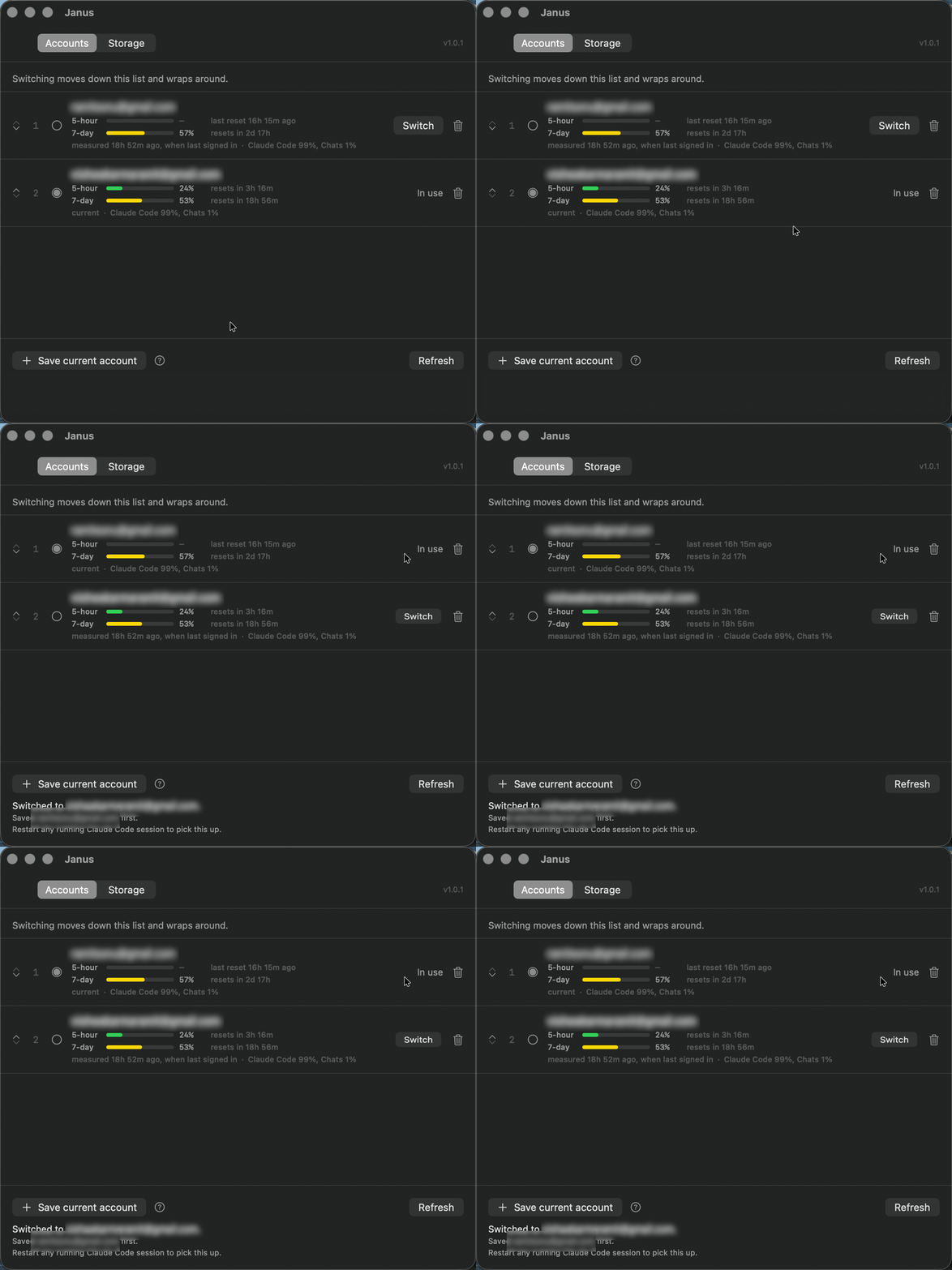
One click moves the live session, and the account it displaces is saved first.
It does two things:
- Switches Claude Code accounts. Signing in as another account normally means
signing out first and typing the whole thing again. Janus saves each
account's session and puts it back on demand, so the second account is one click
away instead of one login away. - Clears developer caches. A list of directories that are safe to delete,
measured and shown with what each one costs to lose. Everything goes to the
Trash rather than being deleted, so any decision can be taken back.
Install
With Homebrew:
brew install --cask --no-quarantine ramitvishwakarma/tap/janus
Or download the latest .dmg from
Releases, open it,
and drag Janus to Applications. The build is universal, covering Apple silicon
and Intel.
The app is signed ad-hoc rather than with a paid Apple Developer certificate, so
macOS quarantines it on first launch and says the developer cannot be verified.--no-quarantine tells Homebrew to skip that flag. After a download by hand,
clear it once:
xattr -dr com.apple.quarantine /Applications/Janus.app
open /Applications/Janus.app
To have it start with the Mac, add it under System Settings → General → Login
Items, or:
osascript -e 'tell application "System Events" to make login item \
  at end with properties {path:"/Applications/Janus.app", hidden:true}'
Build it yourself
Needs the Xcode Command Line Tools (xcode-select --install). Xcode itself is
not required.
git clone https://github.com/RamitVishwakarma/Janus.git
cd Janus
./build.sh
open Janus.app
Using it
Janus cannot sign in for you, so the first account has to be signed in
already. Press Save current account and it is captured.
For the second: sign out of Claude Code, sign in as the other account, come back,
and press Save current account again. From then on both are in the list and
switching between them is one click, or ⌘S from the menu bar.
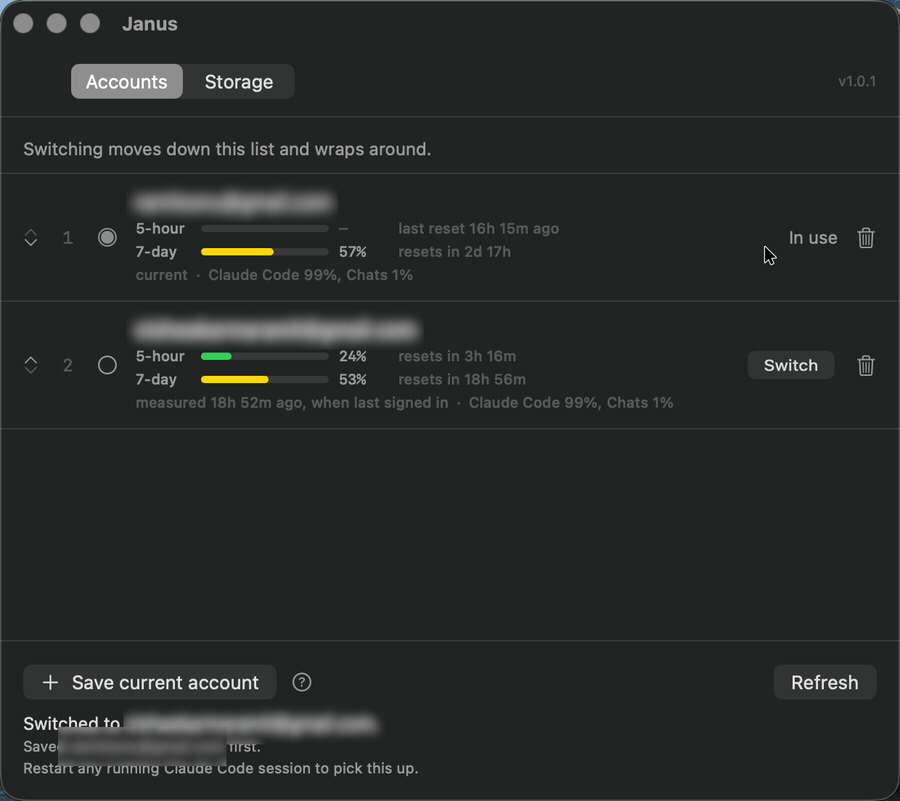
The menu bar item shows which account is live. The window shows both accounts
with how much of their five-hour and weekly limits each has spent. That is the
number to look at when the decision you are making is which account has room
left.
Where the usage figures come from
Claude Code asks Anthropic for your limits while a session is running and writes
the answer into its own settings file. Janus reads that file for nothing, which
is what every row shows to begin with. For the account that is signed in, those
figures are as current as your last session. For an account that is not, they
are whatever it had spent at the moment you switched away — frozen, and
increasingly wrong the longer it sits there.
Refresh goes and asks. It calls Anthropic's usage endpoint once per account,
with the tokens that account already has saved, and shows what comes back. That
is the only network request Janus makes, it goes nowhere but api.anthropic.com
and platform.claude.com, and nothing is sent that is not the account's own
credentials. The line under each pair of bars says which of the two you are
looking at, so a fetched figure and a three-day-old one are never confusable.
Two things happen on their own, without the button:
- The window keeps its own time. Countdowns tick down and a limit that
passes its reset empties itself while you are looking at it, rather than
waiting for the next time something forces a redraw. - A window turning over is fetched. That is the one moment the old figure
becomes actively misleading — it is the spend of a window that has ended — so
it is the one moment Janus spends a request without being asked.
A limit past its reset shows a dash until it has been fetched. Guessing at the
replacement would be worse than admitting there isn't one yet.
Saved accounts are renewed as needed: an access token that has expired is
refreshed before the usage request, and the tokens that come back are written
into the vault before anything else is attempted with them. The signed-in
account's token is never renewed by Janus, because a running Claude Code session
is holding it, and rotating it underneath that session is how a sign-in that was
working stops working. Claude Code keeps that one fresh itself.
How switching works
A signed-in Claude Code session is two things on disk:
| Part | Where it lives |
|---|---|
| OAuth tokens | Keychain entry Claude Code-credentials |
| Everything else | ~/.claude.json |
Switching is just moving that pair. Janus copies the live pair into storage
under the account it belongs to, then writes the other account's saved pair into
place. Saved tokens go into the login keychain under the service Janus;
saved settings go to ~/Library/Application Support/Janus/, readable only
by you.
Three things follow from that, and are worth knowing before you trust it:
- Nothing leaves the Mac except a usage request you asked for. There is no
server and no telemetry. The one thing that goes out is Refresh asking
Anthropic for your own figures with your own tokens, described above. - The settings file is written back whole. It belongs to another program and
gains keys between releases, so Janus parses what it needs and preserves
everything else byte for byte. - Switching does not affect a running session. Claude Code reads credentials
at startup, so restart it to pick up the new account.
If something goes wrong halfway
Every switch fetches the replacement session before it touches anything live, and
saves the session it is about to displace before overwriting it. If a step fails,
say a declined keychain prompt or a missing saved session, the Mac is left signed
into the account it was already signed into.
Signing in outside the app is handled too. If the live account is not one
Janus knows about, it is saved as a new account rather than overwritten,
because those credentials exist nowhere else.
Clearing caches
The Storage tab measures a fixed list of cache directories: package managers,
build caches, browser and editor caches. Two rules keep it boring:
- Nothing is deleted.
FileManager.trashItemmoves things to the Trash. - Only caches inside your home directory can be touched. Anything outside it
is refused, as are the directories everything else lives inside, among them~/Desktop,~/Library,~/.sshand~/.claude. This is enforced in code,
not by being careful when editing the list, and there is a test asserting every
entry in the catalogue passes it.
Caches belonging to a running app are shown greyed out with a Quit it link
rather than cleared underneath it. Clearing an editor's cache while the editor
holds files open in it is a good way to confuse the editor.
Some paths, ~/Downloads and ~/.Trash among them, are behind macOS privacy
controls. Grant Full Disk Access in System Settings → Privacy & Security if you
want them covered.
Adding a cache to the list
Add an entry to CacheEntry.developerTools or CacheEntry.applications inSources/JanusCore/CacheCatalog.swift:
CacheEntry(id: "cargo", name: "Cargo registry",
           note: "Downloaded crate sources, refetched on the next build.",
           path: ".cargo/registry")
Paths are relative to the home directory. Entries that do not exist on a given
Mac are filtered out when scanning, so listing something niche costs nothing.
Known limitations
- Ad-hoc signed. Every build produces a different signature, so macOS treats
each new version as a new app and may ask for keychain permission again after
an update. Signing with a self-signed certificate from Keychain Access gives a
stable identity if that becomes annoying. - Not sandboxed. The App Sandbox would cut the app off from the keychain entry
and settings file it exists to move, which also means it cannot ship on the App
Store. - macOS only. Both halves of a session are stored in macOS-specific places.
Development
swift build          # build
swift test           # run the tests (needs Xcode for XCTest)
./build.sh           # assemble Janus.app
The code is split so the interesting half can be tested without a window on
screen:
| Target | What is in it |
|---|---|
JanusCore |
Sessions, storage, the switch itself, the cache catalogue and its safety rules. No SwiftUI. |
Janus |
The SwiftUI window, the menu bar item, and the models behind them. |
JanusCoreTests |
Everything in JanusCore, against a temporary home directory and an in-memory keychain. |
swift build needs only the Command Line Tools; swift test needs XCTest, which
ships with Xcode. CI runs the tests on every push and pull request.
Contributing
Issues and pull requests are welcome. See CONTRIBUTING.md.
Security reports have their own route in SECURITY.md.
License
MIT.
Janus is not affiliated with, endorsed by, or supported by Anthropic. It
reads and writes files and keychain entries belonging to Claude Code, which is a
product of Anthropic.
Yorumlar (0)
Yorum birakmak icin giris yap.
Yorum birakSonuc bulunamadi