openclaw-memorybox
Health Uyari
- License — License: MIT
- Description — Repository has a description
- Active repo — Last push 0 days ago
- Low visibility — Only 9 GitHub stars
Code Gecti
- Code scan — Scanned 11 files during light audit, no dangerous patterns found
Permissions Gecti
- Permissions — No dangerous permissions requested
This is a lightweight shell-based CLI designed to monitor and clean up memory files for AI agents like Claude Code and OpenClaw. It provides diagnostic commands to split, archive, and optimize markdown-based memory folders, keeping them lean over time.
Security Assessment
Overall risk: Medium. The primary security concern is the recommended installation method, which relies on the classic "curl pipe to bash" pattern (`curl -fsSL ... | bash`). This practice automatically executes remote code on your machine, meaning you must implicitly trust the repository maintainer not to inject malicious scripts. The automated code scan of 11 files found no dangerous patterns, hardcoded secrets, or dangerous permission requests. As a shell script, it inherently executes local shell commands to manage your files, but there are no obvious signs of data exfiltration.
Quality Assessment
The project appears to be well-structured and maintained, with its last push occurring today. It features a clear MIT license, basic CI/CD and linting badges, and declares zero external dependencies. However, the repository currently suffers from extremely low community visibility, having only 9 GitHub stars. Consequently, the codebase has undergone minimal public scrutiny from the broader open-source community.
Verdict
Use with caution — while the scanned code appears clean and licensed, the low community visibility and reliance on piping remote shell scripts warrant reviewing the install script manually before running it.
🧠 Install once, forget about memory management. Zero-dependency maintenance CLI for OpenClaw agents. Works alongside Mem0, Supermemory, QMD.
🧠 MemoryBox
Memory health CLI for Claude Code, OpenClaw, and any markdown-based AI agent.
Install once. Your agent's memory stays lean forever. Zero dependencies.






If this fixed your agent's memory bloat, a ⭐ helps others find it.
Quick Install
curl -fsSL https://raw.githubusercontent.com/Ramsbaby/openclaw-memorybox/main/install.sh | bash
⚡ Quick Start • 📊 Without vs With • 🤖 Claude Code • 💻 CLI • 📈 Results • 🔧 How It Works • 🔄 Daemon • ❓ FAQ
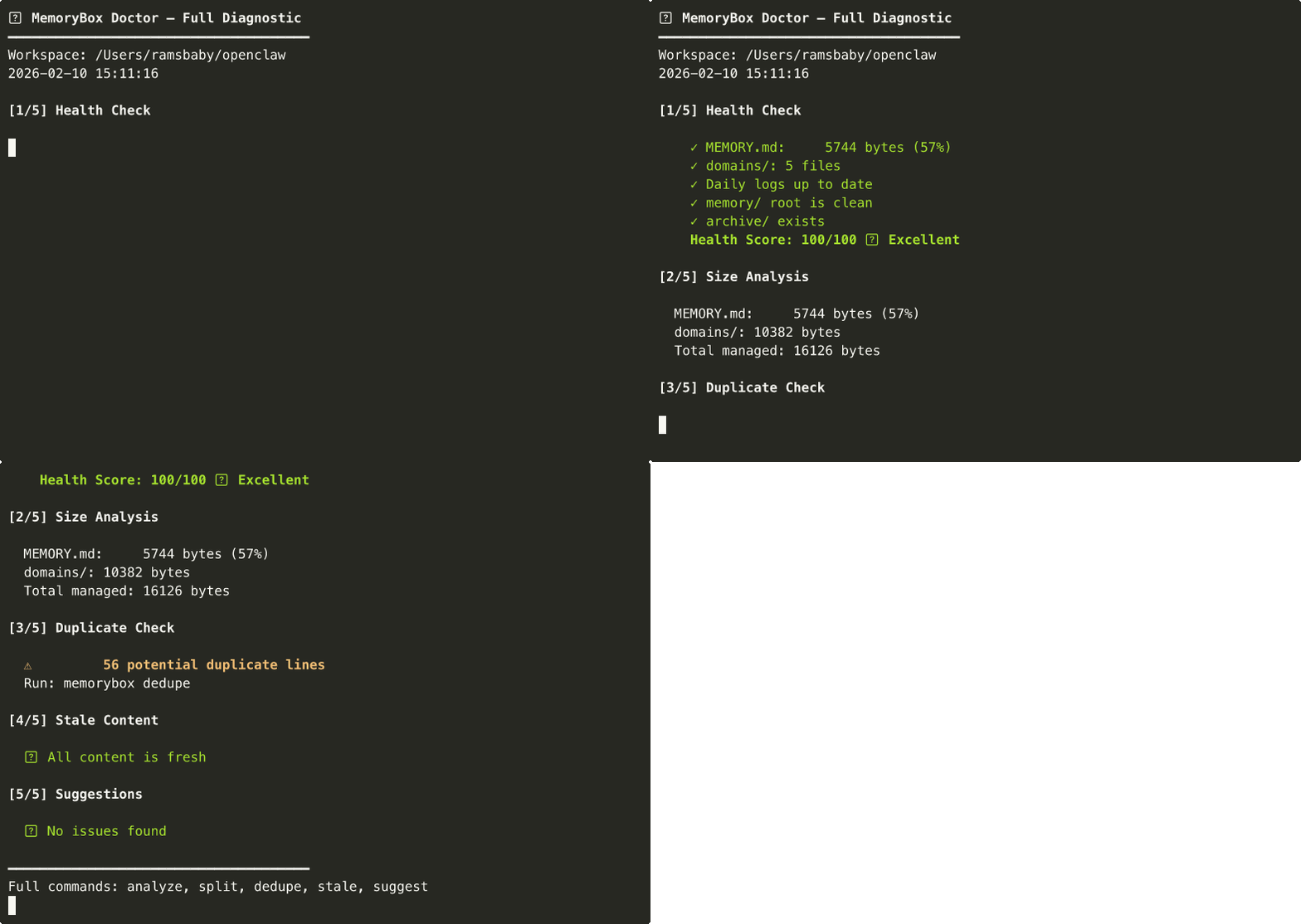
Full diagnostic in one command: health check → size analysis → duplicates → stale content → suggestions
⚡ Quick Start
3 commands. 30 seconds.
# 1. Install (one-liner)
curl -fsSL https://raw.githubusercontent.com/Ramsbaby/openclaw-memorybox/main/install.sh | bash

# 2. Diagnose
memorybox doctor ~/openclaw         # OpenClaw
memorybox doctor ~/.claude          # Claude Code

# 3. Fix (if needed)
memorybox split ~/openclaw          # interactive: move large sections to domain files
memorybox archive ~/openclaw        # move old logs to archive/
Verify install:
memorybox --version # memorybox v2.3.0
git clone https://github.com/Ramsbaby/openclaw-memorybox.git
cd openclaw-memorybox && chmod +x bin/memorybox
sudo ln -sf "$(pwd)/bin/memorybox" /usr/local/bin/memorybox
📊 Without vs With MemoryBox
| Without MemoryBox | With MemoryBox | |
|---|---|---|
| MEMORY.md size | Grows unbounded (20KB+) | Capped at ~3.5KB |
| Every session loads | Everything (all 20KB) | Core facts only (3.5KB) |
| Context pressure | 98% → compaction failures | 7% → comfortable headroom |
| Agent crashes | 2–3/week from context overflow | 0 |
| Setup time | — | 5 minutes, one-time |
| Maintenance | Manual or never | Automated via cron/daemon |
| Old logs | Accumulate in root | Auto-archived after 14 days |
The crash chain MemoryBox prevents:
Memory bloat → Context overflow → Compaction failure → Gateway crash
🌟 The Problem
Your AI agent's MEMORY.md grows every day. Whether you're running Claude Code, OpenClaw, or any 24/7 agent — at some point it hits 20KB+, gets loaded into every session, eats tokens, and eventually causes context overflow or crashes.
MemoryBox prevents this in 5 minutes:
memorybox doctor ~/openclaw   # diagnose
memorybox split ~/openclaw    # fix interactively
Your MEMORY.md stays lean. Your agent stays fast. Move on to things that matter.
2026 context: Personal AI agents running 24/7 locally are surging — subscription fatigue is real, and "own your AI" is the new default. Memory management is now the #1 silent bottleneck. MemoryBox solves it before it crashes you.
🔧 How It Works
MemoryBox applies a simple 3-tier pattern (inspired by Letta/MemGPT):
workspace/
├── MEMORY.md              ← Tier 1: Core facts only (≤10KB, loaded everywhere)
└── memory/
    ├── YYYY-MM-DD.md      ← Tier 1.5: Daily logs (today+yesterday, auto-loaded)
    ├── domains/           ← Tier 2: Detailed reference (searched on-demand)
    │   ├── persona.md
    │   ├── decisions.md
    │   └── ...
    ├── projects/          ← Tier 2: Per-project context
    └── archive/           ← Tier 3: Old daily logs (14+ days)
| Tier | Loaded when | Token cost |
|---|---|---|
| Tier 1 | Every session, automatically | ~3.5KB (lean!) |
| Tier 2 | On-demand via memory_search |
Only when needed |
| Tier 3 | Manual reference only | ~0 |
Key insight: OpenClaw's memory_search indexes memory/**/*.md recursively. Tier 2 files are automatically searchable — zero config changes needed.
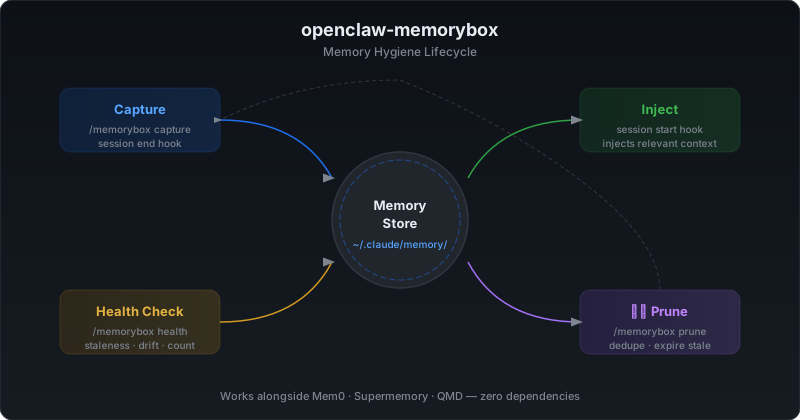
🤖 Claude Code Compatibility
MemoryBox works directly with Claude Code's CLAUDE.md / AGENTS.md workflow.
Point it at your Claude workspace:
memorybox doctor ~/.claude
Or set the workspace once:
export OPENCLAW_WORKSPACE=~/.claude
memorybox doctor    # uses ~/.claude automatically
Add to your CLAUDE.md or AGENTS.md
## Memory Health Protocol

- Check health: `memorybox health ~/.claude`
- If score < 80: run `memorybox doctor ~/.claude` and follow the suggestions
- NEVER delete files in memory/ directly — use `memorybox archive` instead
- After restructuring: memory/ is RAG-indexed on the next rag-index run
- Large MEMORY.md (≥10KB): run `memorybox split` interactively
- Search memory: `memorybox search "<query>" ~/.claude`
Claude Code + Daemon (fully automated)
# Start the health watcher before beginning a long Claude Code session
MEMORYBOX_WORKSPACE=~/.claude \
MEMORYBOX_NTFY_TOPIC=your-ntfy-topic \
bash /path/to/memorybox-watch.sh --daemon

# It runs in the background while you work.
# If memory health degrades mid-session, you get a push notification.
Auto-capture at session end (Claude Code hook)
{
  "hooks": {
    "Stop": [{"command": "bash ~/.local/share/memorybox/session-end-hook.sh"}]
  }
}
Install the hook:
mkdir -p ~/.local/share/memorybox
curl -fsSL https://raw.githubusercontent.com/Ramsbaby/openclaw-memorybox/main/scripts/session-end-hook.sh \
  -o ~/.local/share/memorybox/session-end-hook.sh
chmod +x ~/.local/share/memorybox/session-end-hook.sh
📈 Real Results
Tested on a production instance (7 Discord channels, 48 crons, running 24/7):
| Metric | Before | After | Improvement |
|---|---|---|---|
| MEMORY.md size | 20,542 bytes | 3,460 bytes | -83% |
| Context pressure | 98% (critical) | 7% (healthy) | -91% |
| Compaction frequency | Multiple per session | Rare (~weekly) | 10x fewer |
| Gateway crashes | 2-3/week | 0 | 100% stable |
memory_search |
Works | Still works | No change |
| Setup time | — | 5 minutes | One-time |
Real Terminal Output
Before:
$ memorybox health ~/openclaw
━━━━━━━━━━━━━━━━━━━━━━━━━━━━━━━━━━━━━━
🏥 Health Score: 28/100 🚨 CRITICAL

  ✗ MEMORY.md over limit: 20,542 bytes (205%) 🚨
  △ 8 daily logs need archiving (>14 days)
  △ 12 potential duplicate lines

ACTION REQUIRED: Run 'memorybox doctor' for full diagnostic
━━━━━━━━━━━━━━━━━━━━━━━━━━━━━━━━━━━━━━
After (5 minutes of interactive splitting + archiving):
$ memorybox health ~/openclaw
━━━━━━━━━━━━━━━━━━━━━━━━━━━━━━━━━━━━━━
🏥 Health Score: 92/100 ✅ EXCELLENT

  ✓ MEMORY.md: 3,460 bytes (35%)
  ✓ domains/: 3 files
  ✓ Daily logs up to date
  ✓ memory/ root is clean
  ✓ archive/ exists

All systems green. No action needed.
━━━━━━━━━━━━━━━━━━━━━━━━━━━━━━━━━━━━━━
Honest note: The 83% reduction applies to MEMORY.md load — roughly 5-15% of total per-session tokens depending on conversation length. But in a 24/7 agent with 48 crons, those savings compound over thousands of sessions. More importantly, it prevents the context overflow that crashes your agent — and that's worth far more than the token savings alone.
💻 CLI Commands
memorybox doctor [path]           # Full diagnostic — start here
memorybox analyze [path]          # Section-by-section size breakdown with bar charts
memorybox split [path]            # Interactive: move large sections to domain files
memorybox health [path]           # Quick health score (0-100)
memorybox search "<query>" [path] # Search memory files for matching content
memorybox archive [path]          # Move old daily logs (14+ days) to archive/
memorybox dedupe [path]           # Find duplicate content across files
memorybox stale [path]            # Detect outdated content
memorybox suggest [path]          # Improvement recommendations
memorybox report [path]           # Before/after token savings
memorybox init [path]             # Set up 3-tier directory structure
Daemon mode (v2.2):
bash scripts/memorybox-watch.sh --daemon   # start background health watcher
bash scripts/memorybox-watch.sh --status   # check watcher status
bash scripts/memorybox-watch.sh --stop     # stop watcher
Most users only need two commands:
memorybox doctor— see what's wrongmemorybox split— fix it interactively
Options
memorybox -w ~/my-workspace doctor   # custom workspace path
memorybox -d 7 archive               # archive logs older than 7 days (default: 14)
memorybox -m 8000 health             # custom max target (default: 10KB)
🏥 Example: Doctor Output
🩺 MemoryBox Doctor — Full Diagnostic
━━━━━━━━━━━━━━━━━━━━━━━━━━━━━━━━━━━━━━
Workspace: /Users/you/openclaw
2026-02-11 17:00:00

[1/5] Health Check

    ✗ MEMORY.md over limit: 20,542 bytes (205%) 🚨
    ✓ domains/: 3 files
    △ 8 daily logs need archiving (>14 days)
    ✓ memory/ root is clean
    ✓ archive/ exists

    Health Score: 40/100 🚨 Critical

[2/5] Size Analysis

  MEMORY.md: 20,542 bytes (205%)
  domains/: 3,200 bytes
  Total managed: 23,742 bytes

[3/5] Duplicate Check

  ⚠️  2 potential duplicate lines

[4/5] Stale Content

  ⏰ 1 domain file(s) unchanged for 60+ days

[5/5] Suggestions

  📌 3 section(s) could be split to domains/
  🗄️  8 daily logs ready for archiving

━━━━━━━━━━━━━━━━━━━━━━━━━━━━━━━━━━━━━━
🔄 Daemon Mode — memorybox watch (New in v2.2)
Run MemoryBox in the background. Get alerts when your memory health drops below a threshold — before it crashes your agent.
# Start background daemon (checks every 60s, alerts when score < 80)
bash scripts/memorybox-watch.sh --daemon

# With push notifications + custom interval
MEMORYBOX_INTERVAL=120 \
MEMORYBOX_THRESHOLD=85 \
MEMORYBOX_NTFY_TOPIC=your-ntfy-topic \
bash scripts/memorybox-watch.sh --daemon

# With Discord webhook
MEMORYBOX_DISCORD_URL="https://discord.com/api/webhooks/..." \
bash scripts/memorybox-watch.sh --daemon

# Check status
bash scripts/memorybox-watch.sh --status

# Stop
bash scripts/memorybox-watch.sh --stop
What it does
- Runs
memorybox healthevery N seconds (default: 60) - Score drops below threshold → sends alert (ntfy / Discord webhook)
- Score recovers above threshold → sends recovery notification
- Logs all checks to
~/.openclaw/logs/memorybox-watch.log - State persisted to
/tmp/memorybox-watch-state.json
Configuration
| Env var | Default | Description |
|---|---|---|
MEMORYBOX_WORKSPACE |
~/openclaw |
Workspace path to monitor |
MEMORYBOX_INTERVAL |
60 |
Check interval in seconds |
MEMORYBOX_THRESHOLD |
80 |
Alert when score drops below this |
MEMORYBOX_NTFY_TOPIC |
— | ntfy.sh push topic |
MEMORYBOX_DISCORD_URL |
— | Discord webhook URL |
MEMORYBOX_LOG_DIR |
~/.openclaw/logs |
Log directory |
Cron alternative (simpler)
If you just want daily checks without a running daemon:
{
  "name": "Memory Health Watch",
  "schedule": "0 9 * * *",
  "prompt": "Run: memorybox health ~/openclaw. If score < 80, run memorybox doctor and report findings."
}
📦 Installation
Option A: One-line install (recommended)
curl -fsSL https://raw.githubusercontent.com/Ramsbaby/openclaw-memorybox/main/install.sh | bash
This installs the CLI to ~/.local/bin/memorybox and the Claude Code skill to ~/.claude/skills/memorybox.md.
Option B: CLI only (legacy)
curl -sSL https://raw.githubusercontent.com/Ramsbaby/openclaw-memorybox/main/bin/memorybox -o /usr/local/bin/memorybox && chmod +x /usr/local/bin/memorybox
Option C: Manual
git clone https://github.com/Ramsbaby/openclaw-memorybox.git
cd openclaw-memorybox && chmod +x bin/memorybox
sudo ln -sf "$(pwd)/bin/memorybox" /usr/local/bin/memorybox
Verify
memorybox --version   # memorybox v2.3.0
memorybox doctor ~/openclaw
🔄 What This Is (and Isn't)
MemoryBox is a maintenance tool, like df for your agent's memory.
It doesn't replace your memory system — it keeps it healthy.
| Tool | What it does | Category |
|---|---|---|
| Mem0 | Decides what to remember | 🧠 Memory engine |
| Supermemory | Cloud-based persistent recall | 🧠 Memory engine |
| QMD | Local search backend | 🔍 Search engine |
| MemoryBox | Keeps files organized & lean | 🧹 Maintenance tool |
You can use MemoryBox with all of the above, or with none of them. It only touches file structure — never configs, never plugins, never internals.
📖 Origin Story
I run an OpenClaw agent 24/7 — 7 Discord channels, 48 cron jobs. As it learned, MEMORY.md ballooned to 20KB+. Every session loaded all of it.
One day, context hit 100%. Compaction corrupted state. I tried to fix the config — and crashed the gateway.
That crash led to openclaw-self-healing (auto-recovery in ~30s). But the root cause was memory bloat. So I built MemoryBox to prevent it from happening again.
Memory bloat → Context overflow → Gateway crash
  → Built self-healing (recover from crashes)
  → Built MemoryBox (prevent the bloat)
  → Problem solved at both ends.
🤖 Teach Your Agent the 3-Tier Pattern
Add to your AGENTS.md:
## Memory Protocol
- **MEMORY.md** (≤10KB): Core facts only. Loaded everywhere — keep it lean.
- **memory/domains/*.md**: Detailed reference. Use `memory_search` to find.
- **memory/archive/**: Old logs. Rarely needed.

When MEMORY.md grows past 8KB, split large sections to domains/.
Set It and Forget It (Optional Cron)
{
  "name": "Memory Maintenance",
  "schedule": { "kind": "cron", "expr": "0 23 * * 0", "tz": "Asia/Seoul" },
  "sessionTarget": "isolated",
  "payload": {
    "kind": "agentTurn",
    "message": "Run: memorybox archive && memorybox health. Report if score < 80."
  }
}
✅ Compatibility
Works with everything:
| Plugin / Backend | Compatible | Notes |
|---|---|---|
| memory-core (default) | ✅ | No changes needed |
| Mem0 | ✅ | Different layer — no conflict |
| Supermemory | ✅ | Different layer — no conflict |
| QMD | ✅ | Indexes same files |
memory_search |
✅ | Indexes memory/**/*.md recursively |
memory_get |
✅ | Reads any memory/ file |
| Claude Code | ✅ | CLAUDE.md / AGENTS.md friendly |
Does NOT touch:
openclaw.json— no config changes- Plugin behavior — no overrides
- OpenClaw internals — files only
🌐 OpenClaw Ecosystem
| Project | Role |
|---|---|
| openclaw-memorybox ← you are here | Zero-dep memory hygiene CLI |
| openclaw-self-healing | 4-tier autonomous crash recovery — gateway back in ~30s |
| openclaw-self-evolving | AI agent that proposes its own improvements |
| jarvis | 24/7 AI ops system using Claude Max — self-healing, RAG, cron |
All MIT licensed, all battle-tested on the same 24/7 production instance.
❓ FAQ
Q: My MEMORY.md is only 5KB. Do I need this?
A: Not yet. Bookmark it for when it grows. Or run memorybox health to confirm you're fine.
Q: Will this break my existing setup?
A: No. It only creates directories and moves content you approve. Backup is automatic.
Q: Does memory_search find files in subdirectories?
A: Yes. OpenClaw indexes memory/**/*.md recursively.
Q: I'm using Mem0/Supermemory. Should I also use this?
A: Yes — they solve different problems. Mem0 decides what to remember. MemoryBox keeps your file structure clean so sessions load fast.
Q: Will OpenClaw updates break this?
A: Unlikely. This uses standard markdown files in the standard memory directory. OpenClaw's philosophy is "files are source of truth" — that won't change.
Q: I use Claude Code, not OpenClaw. Does this work?
A: Yes. Point MEMORYBOX_WORKSPACE at ~/.claude or your project dir. See Claude Code Compatibility.
Q: How does memorybox search work?
A: It searches MEMORY.md and all memory/**/*.md files for your query (case-insensitive), showing 2 context lines around each match. Example: memorybox search "API key" ~/.claude
🤝 Contributing
PRs welcome! Areas for improvement:
- Migration script for different workspace layouts
- Automated MEMORY.md size monitoring via cron (see cron template)
- Domain file templates for common use cases
- Integration tests with memory_search
-
memorybox watch— daemon mode for continuous monitoring (added in v2.2) -
memorybox search— full-text search across memory files (added in v2.3) - Qdrant/local vector search integration for Tier 2 semantic retrieval
📜 License
MIT — Do whatever you want.
📊 Star History
Made with 🦞 by @ramsbaby
Battle-tested on a production OpenClaw instance running 24/7 with 48 crons and 7 channels.
Yorumlar (0)
Yorum birakmak icin giris yap.
Yorum birakSonuc bulunamadi