agent-usage
Health Warn
- License — License: MIT
- Description — Repository has a description
- Active repo — Last push 0 days ago
- Low visibility — Only 6 GitHub stars
Code Warn
- process.env — Environment variable access in tests/smoke.mjs
- network request — Outbound network request in tests/smoke.mjs
Permissions Pass
- Permissions — No dangerous permissions requested
No AI report is available for this listing yet.
A local desktop widget for Codex and Claude Code usage, subscription limits, and resets. Linux and Windows.
A local desktop widget for coding agents on Linux and Windows. It reads each
agent's native session history, shows account limits and when they reset, and
lets you inspect activity by day. On GNOME, limits live in the top bar. No API
key or external collector is needed.
Supported agents
| Agent | ID | History | Limits | Sign-in |
|---|---|---|---|---|
| Claude Code | claude |
~/.claude/projects (CLAUDE_CONFIG_DIR) |
Usage control request ¹ | Terminal |
| Codex | codex |
~/.codex/sessions, archived_sessions (CODEX_HOME) |
App server account interface | Browser |
Each agent is found on PATH, in its native installation directory, or inside its
official VS Code, VS Code Insiders or Cursor extension. Agents handle their own
credentials; Agent Usage never reads or stores tokens, and no sign-in starts on
its own. API-key accounts do not report subscription limits. Windows and WSL are
separate environments.
¹ Claude Code's get_usage control request is the experimental interface used
by its VS Code extension, verified with version 2.1.301; it may change. Queries send
control requests only, with tools, hooks and session persistence disabled.
New agents are added as modules; see Adding an agent.
Get started
Portable app: download the archive for your system from
Releases, extract the whole
folder, and open agent-usage on Linux or agent-usage.exe on Windows. Python
and Qt are included. Keep the _internal directory beside the executable.
On Windows, the first launch adds Agent Usage to the Start menu.
From source: install uv
and Git, then run:
git clone https://github.com/RanulfoMNeto/agent-usage.git
cd agent-usage
uv run --locked --no-dev agent-usage
Python 3.12–3.14 is supported; uv can supply it. A desktop session is required.
After moving an installation, launch it once to refresh its shortcut.
To try it without any agent installed:
uv run --locked --no-dev agent-usage --demo
The demo creates six months of fictional sessions for every supported agent in a
temporary profile, makes no account queries, and removes the profile on exit.
Use the widget
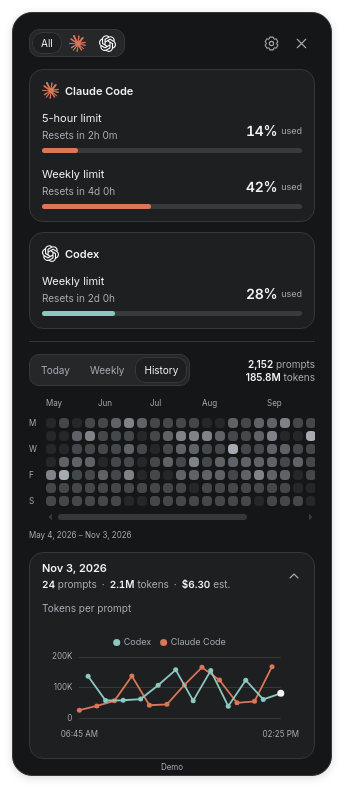
- Header: drag it to move the widget. Agent icons filter the activity; the
gear opens Settings; × quits. - Limits: one card per agent, with each reported window and its reset. When
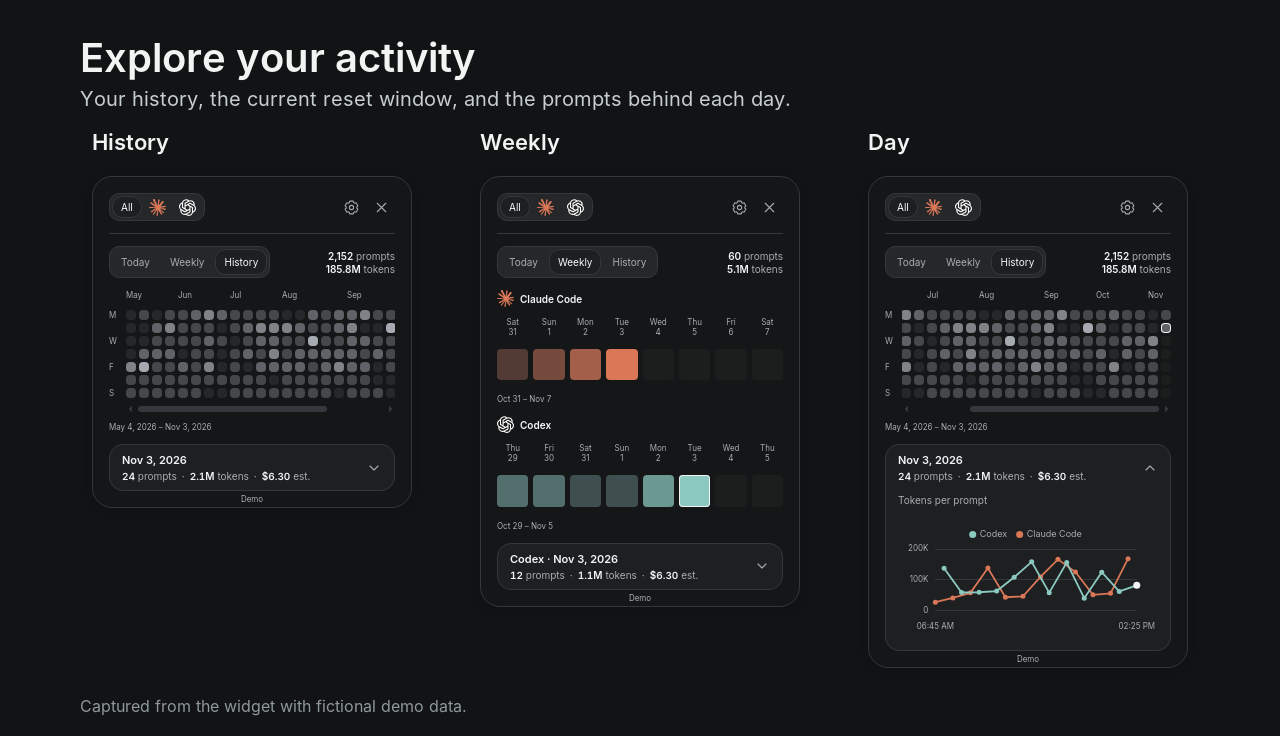
the GNOME top bar shows limits, the widget leaves them out. - Today, Weekly and History choose the period. Click a day to see its
totals; click the summary below to open its chart and prompts. - Settings: visible limits, bars or rings, a usage warning, theme, style,
keep on top, agent connections and history folders, and export or import.
The ? button explains how the numbers are measured.
The widget's height follows its content. Preferences persist locally and never
affect collection.
GNOME top bar
uv run --locked --no-dev agent-usage --install-gnome
Sign out and back in. Agent Usage then starts at login, its widget stays behind
normal windows on every workspace, and its icon appears in the top bar. Portable
builds accept the same flag. GNOME user extensions must be enabled.
The top bar menu lists every limit. Check the limits to show in the bar; the menu
stays open while you choose. Show reset time adds each limit's countdown.
Values turn yellow at the usage warning and red at 100%. The menu also hides or
shows the widget and quits. A hidden widget stays hidden at the next login and
returns if the extension is disabled. The demo does not publish to the top bar.
After updating, run the command again and sign out and back in. Remove it withagent-usage --uninstall-gnome from the same installation; history is kept.
Understand the data
- Limits come from each agent's account and cover all of its usage. Local
tokens cannot reconstruct subscription percentages. - Weekly follows each agent's current reset window. Today and History
group prompts by their local start date. - Tokens are recorded input and output, including cached input. A prompt can
involve several model calls. Missing measurements stay unknown. - Duration is shown only when the session records a confirmed duration.
- Estimated cost uses standard API prices, not subscription billing.
Native recorded costs are used when present; otherwise a model needs an entry
under[prices]in defaults.toml or your configuration.
Agent Usage reads existing files; it cannot recover sessions deleted before
collection. Native log formats can change between agent versions.
Connections, data and privacy
Settings → Agents connects each agent or pauses its monitoring. Limits are
queried through the installed agent every 60 seconds by default, without model
requests. Disconnect pauses collection and queries; sign-ins and history are
kept, and reconnecting collects what was recorded meanwhile. History folder
overrides an agent's session directory.
The archive keeps usage metadata, short prompt titles and file bookkeeping in
SQLite, never conversation text. There is no analytics service or listening port.
Limit queries contact each provider through its own installed client.
| System | History and preferences |
|---|---|
| Linux | $XDG_STATE_HOME/agent-usage, normally ~/.local/state/agent-usage |
| Windows | %LOCALAPPDATA%\AgentUsage |
Export / Import transfers the archive as JSON; imports merge without
duplicates, up to 64 MiB, and accept exports from earlier versions. Exports
contain prompt titles; review them before sharing. To erase collected data, quit
Agent Usage and delete its state directory. Agent files are never modified.
Configuration
Defaults are in usage/defaults.toml. Overrides live at~/.config/agent-usage/config.toml on Linux (XDG_CONFIG_HOME is respected) or%LOCALAPPDATA%\AgentUsage\config.toml on Windows; --config PATH selects another
file. Agent settings use the IDs from Supported agents:
[agents.codex]
command = ["/absolute/path/to/codex"]   # instead of discovery
history = "/absolute/path/to/history"   # instead of the default directory

[limits]
refresh_seconds = 60

[integrations]
windows_shortcut = false                # stop updating the Start menu shortcut
Sections from earlier versions ([subscriptions], [transcripts]) are ignored
with a warning. To update, replace the portable app or pull the source; state stays
outside the installation. To uninstall, remove the GNOME integration if enabled,
then delete the application folder and its shortcut.
Compatibility
| Environment | Behavior |
|---|---|
| Linux desktop | Persistent window; positioning and pinning depend on the compositor |
| GNOME 50 | Optional top bar and desktop placement across workspaces |
| Windows x64 | Persistent window with Keep on top |
| macOS, other GNOME versions | Not currently supported |
CI runs the tests on Linux and Windows at both ends of the supported Python range.
Release builds extract the archive and exercise its executable in an isolated demo.
Adding an agent
Every agent is a module in usage/agents that subclasses Agent
from base.py; nothing else in the app names a specific agent.
- Set the attributes:
id,name,namespace(hashed into record identities;
never change it),colorsfor light and dark themes,monochromefor a
single dark icon,executable, an editorextensionprefix if one bundles it,
andlogin("terminal"or"browser"withlogin_hosts). - Implement
default_history,parse(one native event into prompt and call
records from records.py),read_limits(normalized windows
from the native client),demo_session, and, when needed,history_files,install_directoriesandextension_binary. - Register an instance in usage/agents/__init__.py.
- Add
usage/static/assets/agents/<id>.svg. It is also the top bar icon, which
GNOME recolors, so solid single-color shapes work best. - Add parser and limit tests, and a row to Supported agents.
Development and support
The Python package is usage; the command is agent-usage. Qt WebChannel connects
the bundled UI to the collector, and the same code serves the live widget, the demo
and packaged builds.
uv sync --locked
uv run ruff check .
uv run ruff format --check .
uv run python -m unittest discover -s tests -v
node --test tests/gnome.test.mjs
uv build
To build a portable app, run uv run --group build python scripts/package.py, thennode tests/smoke.mjs dist/agent-usage/agent-usage (agent-usage.exe on Windows).
Build on the target operating system; Node 22+ is needed for the UI tests. Tags
matching the package version, such as v0.1.0, trigger checks, native builds,
checksums and a GitHub release.
Report reproducible bugs through Issues
with versions and redacted screenshots, never transcripts or credentials. Keep pull
requests focused and add regression tests for behavioral changes. Report
vulnerabilities privately through Security → Report a vulnerability.
MIT. Third-party assets retain their licenses; portable builds include
the Qt/PySide notices. Maintained by RanulfoMNeto.
Independent of the agents' vendors; their names and logos only identify supported agents.
Reviews (0)
Sign in to leave a review.
Leave a reviewNo results found