claude-rpc
Health Warn
- License — License: MIT
- Description — Repository has a description
- Active repo — Last push 0 days ago
- Low visibility — Only 6 GitHub stars
Code Fail
- spawnSync — Synchronous process spawning in dashboard/main.js
- os.homedir — User home directory access in dashboard/main.js
- process.env — Environment variable access in dashboard/main.js
- fs module — File system access in dashboard/main.js
Permissions Pass
- Permissions — No dangerous permissions requested
No AI report is available for this listing yet.
Discord Rich Presence (RPC) for Claude Code — live model, project, tokens, and lifetime stats in your Discord profile. Driven by Claude Code hooks.




claude-rpc
Discord Rich Presence (RPC) for Claude Code.
Your live model, project, current tool, tokens, and lifetime stats — in your Discord profile. Driven by the hooks Claude Code already fires. Zero polling between sessions.
→ claude-rpc.vercel.app — what it looks like, in one page.


live — on by default for fresh installs, opt out any time. see community totals






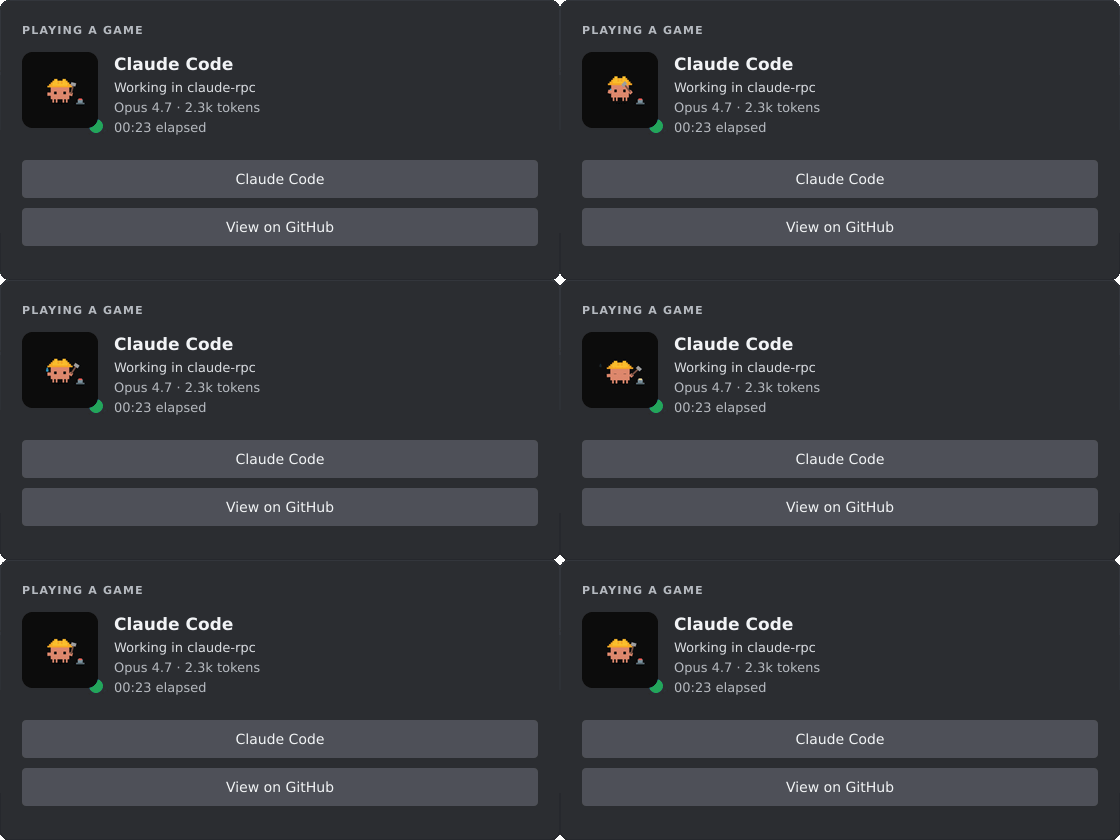
A small Node daemon that takes the lifecycle events Claude Code already fires and pipes them into the Discord rich-presence card on your profile. Your friends see what you're building; your future self gets lifetime stats. Built solo, on weekends.
install
macOS / Linux / any Node 18+ — one command:
npx claude-rpc@latest setup
(The @latest matters — bare npx claude-rpc will happily reuse a stale cached copy.)
That installs claude-rpc globally, wires the hooks into Claude Code, and starts the daemon — no separate start step. Open Claude Code in any project and the card appears within a second. Something looks wrong? claude-rpc doctor (or claude-rpc doctor --fix to auto-repair).
Prefer a one-liner that figures it out for you?
curl -fsSL https://claude-rpc.vercel.app/install | sh
Detects Node (installs the npm package) or falls back to the prebuilt Apple-Silicon binary, then runs setup for you.
Homebrew (macOS / Linux):
brew install rar-file/claude-rpc/claude-rpc && claude-rpc setup
Windows (no Node required) — grab the portable exe from the latest release, then:
claude-rpc setup
That's the whole pitch.
setupregisters a Windows startup entry and wires hooks into Claude Code'ssettings.json, and the daemon reports anonymous totals by default. All of it is reversible (claude-rpc uninstall,community off) and fully documented inSECURITY.md— read it first if you want to know exactly what runs.
The Discord desktop app must be running. The browser client doesn't expose the local IPC bridge that Rich Presence uses.
other platforms / from sourcegit clone https://github.com/rar-file/claude-rpc.git
cd claude-rpc
npm install
node ./src/cli.js setup # wires hooks + starts the daemon
Or npm install -g claude-rpc && claude-rpc setup for the global bin. setup starts the daemon for you; manage it afterward with claude-rpc start | stop | status. Every mode survives npm update without losing your clientId — user config lives under the per-OS config dir, not inside node_modules.
A working public Discord application is bundled into the default config — you don't need to register your own to get started. If you want a different app name on the card, create one in the Discord Developer Portal, copy the Application ID, and drop it into your config:
# Linux
echo '{ "clientId": "YOUR_ID" }' > ~/.config/claude-rpc/config.json
# macOS
echo '{ "clientId": "YOUR_ID" }' > ~/Library/Application\ Support/claude-rpc/config.json
# Windows (PowerShell)
'{ "clientId": "YOUR_ID" }' | Set-Content $env:APPDATA\claude-rpc\config.json
claude-rpc upgrade-config if you're carrying forward a v0.3-era file.
what claude-rpc does
on discord
A card that updates as you work. The large image swaps between five states (working / thinking / idle / stale / notification — those gifs at the top of this README). The two lines of text rotate through frames you template — current file, today's hours, lifetime totals, top hotspot, code churn, cost — and the daemon skips frames whose required template variables are empty. The SessionEnd hook clears the card instantly when you close Claude Code; no "is it still running?" timeout.
A View on GitHub → button appears automatically when your cwd is a git repo with a github origin. The daemon checks .git/config directly — no shell-out, no surprise GH API call.
on your machine
Three local surfaces, all reading the same ~/.claude-rpc/aggregate.json:
web dashboardclaude-rpc serve · port 47474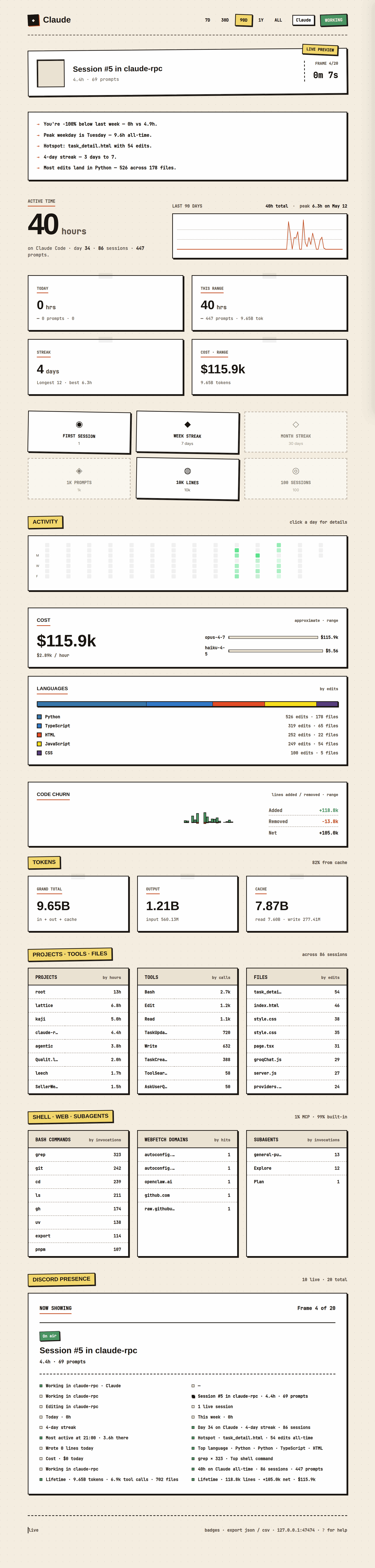 |
settings guinpm run dashboard · Electron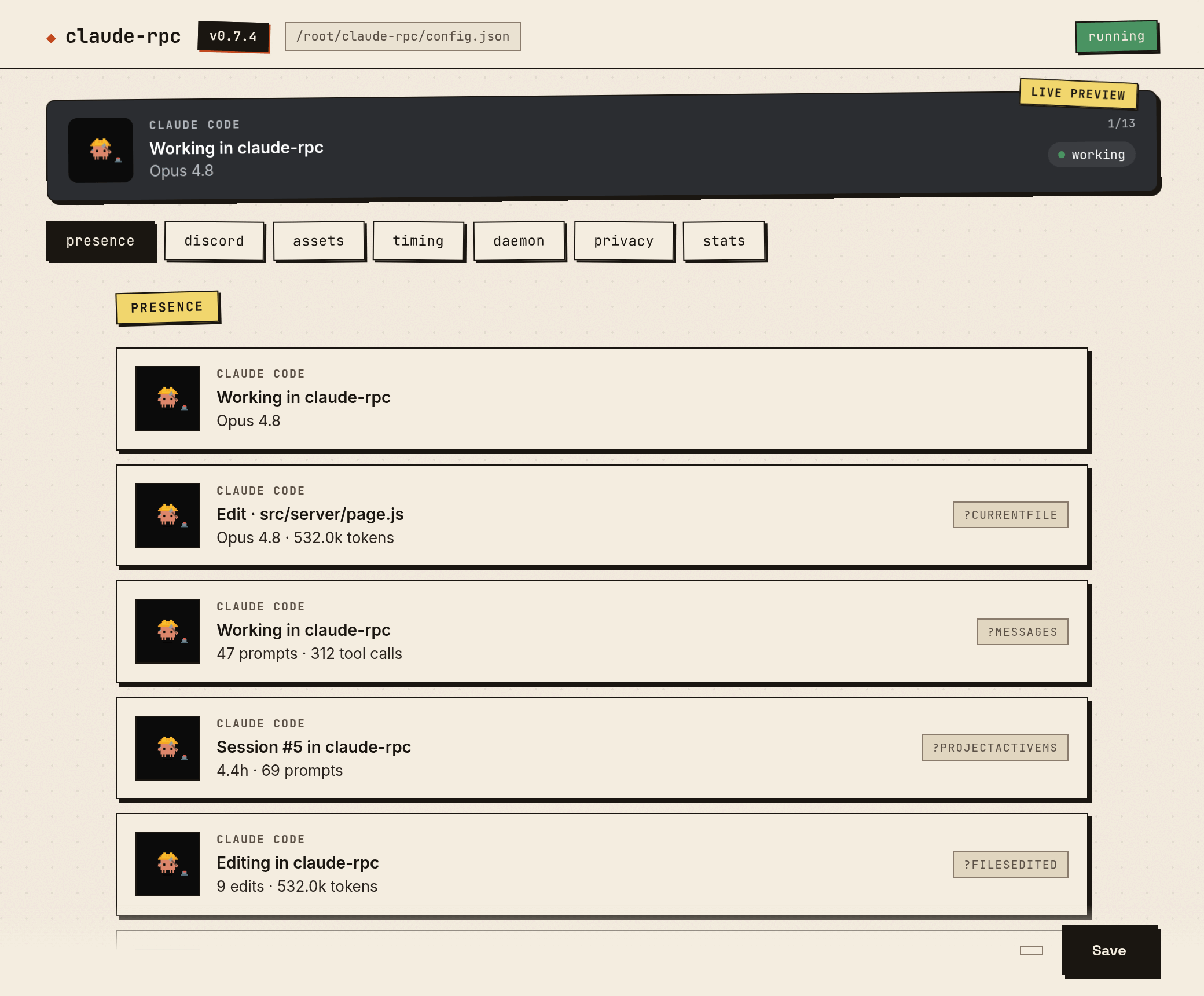 |
claude-rpc status                 (TUI — heatmap, hour histogram, leaderboards)
claude-rpc today                  (today's stats, focused)
claude-rpc week                   (weekday breakdown)
claude-rpc preview                (every rotation frame rendered with real data)
claude-rpc insights               (3–5 auto-generated lines: trend, peak, hotspot)
The web dashboard pushes updates via SSE; the TUI refreshes on a 3-second tick.
beyond your machine
Shields-style badges and a poster-style summary card you can paste into a README or a Discord message:
claude-rpc badge --metric hours  --range 7d   --out claude-hours.svg
claude-rpc badge --metric streak              --out claude-streak.svg
claude-rpc badge --metric hours  --gist                                     # publish to a gist (live README badge)
claude-rpc card  --range year                 --out year-on-claude.svg
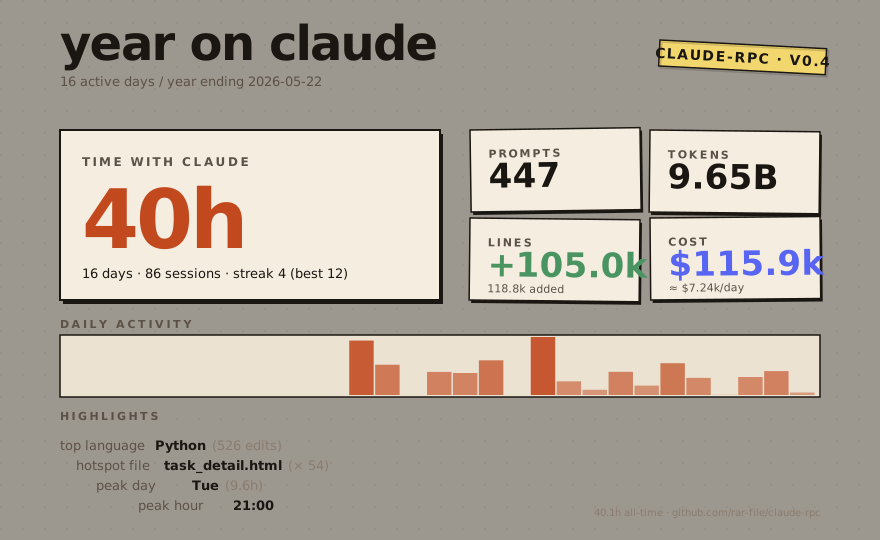
badge --gist writes the SVG to your own GitHub gist (creates one on first run, updates it after — id remembered in config.json). The URL printed back is README-ready and updates every time you re-run the command. Uses gh if available, else GH_TOKEN with gist scope.
Live equivalents when the daemon is up:
http://127.0.0.1:47474/api/badge.svg?metric=hours&range=7dhttp://127.0.0.1:47474/api/card.svg?range=year
Cost numbers come from src/pricing.js, seeded with approximate public list prices. Your actual Claude Code subscription bill is unrelated.
community totals
The badges at the top of this README are live, served by a small Cloudflare Worker (worker/) that holds running totals of sessions and tokens across every install that's reporting. As of v0.7 fresh installs are on by default — setup mints an anonymous UUID v4 and the daemon starts flushing deltas every 30 minutes. Existing users upgrading from a pre-v0.7 config stay off until they explicitly run community on (the consent flow prints the exact payload first).
claude-rpc community              # show state + instanceId (last 8 chars)
claude-rpc community off          # opt out; instanceId retained for re-enable continuity
claude-rpc community on           # explicit consent flow (upgraders / re-enable)
claude-rpc community report       # one-shot manual flush (testing)
Each report sends only: a sessionsDelta, a tokensDelta, the claude-rpc version, OS family (linux/darwin/win32), and the anonymous UUID v4. No prompts, paths, models, repos, costs, usernames, or hostnames — the Worker's validateReport is the schema of record. The full Worker source is in this repo so the privacy claim is auditable.
For a complete account of the sensitive things claude-rpc does — startup persistence, hook injection, every outbound request, and the exact telemetry payload — see SECURITY.md. It's also the reference for supply-chain scanner findings (Socket.dev et al.): the flagged persistence and hook-injection behaviors are inherent to the tool and documented there.
three pieces, glued by json files
   Claude Code                                          Discord desktop
        │                                                     ▲
        │ lifecycle event (stdin JSON)                        │ IPC frame
        ▼                                                     │
   ┌──────────┐    state.json    ┌──────────┐                 │
   │ hook.js  │ ───────────────▶ │ daemon.js│ ────────────────┘
   └──────────┘                  └──────────┘
                                       ▲
                                       │ aggregate.json
                                       │
                                ┌────────────┐
                                │ scanner.js │ ◀── ~/.claude/projects/*.jsonl
                                └────────────┘
No database, no message bus, no background polling when Claude Code isn't running. State on disk you can cat and jq. Zero runtime dependencies — even the Discord Rich Presence IPC client is hand-rolled (src/discord-ipc.js).
- hook (
src/hook.js) — Claude Code spawns it on every lifecycle event. Parses the JSON from stdin and mutates the shared state file. Runs in ~20ms. - daemon (
src/daemon.js) — long-running. Connects to Discord's local IPC, watches the state file, pushes presence frames every few seconds. Exponential backoff with jitter on reconnect;daemon.logrotates at 5 MB. - scanner (
src/scanner.js) — walks~/.claude/projects/**/*.jsonlfor all-time aggregates (active time, prompts, tools, tokens, streaks, hotspots, lines, languages, cost, bash, web, subagents). Incremental — re-parses only changed files.
Persistent state, all human-readable JSON:
| Path | What |
|---|---|
$TMPDIR/claude-rpc/state.json |
Current session, volatile |
~/.claude-rpc/aggregate.json |
All-time aggregates |
~/.claude-rpc/scan-cache.json |
Per-transcript scan cache |
~/.claude-rpc/private-list.json |
Runtime privacy toggles |
~/.claude/settings.json |
Hook registrations (managed by setup) |
User config lives at %APPDATA%\claude-rpc\config.json (Windows), ~/Library/Application Support/claude-rpc/config.json (macOS), or $XDG_CONFIG_HOME/claude-rpc/config.json (Linux). It only needs to hold overrides — every key has a baked default. { "clientId": "..." } is a complete config file. Defaults live in src/default-config.js; the loader deep-merges over them.
privacy
Per-project, runtime, or auto-detected — whichever fits how you work.
// drop at your project root: <project>/.claude-rpc.json
{ "private": true }                                  // shortcut for visibility: "hidden"
{ "visibility": "name-only" }                        // project name only, no file/tool detail
{ "projectName": "redacted" }                        // show this name on Discord instead
Or from the command line, in any project:
claude-rpc private        # add cwd to ~/.claude-rpc/private-list.json
claude-rpc public         # remove cwd
claude-rpc privacy        # show the resolved visibility for the current dir
Or globally, in config.json:
{ "privacy": { "patterns": ["client-*", "secret-stuff"], "mode": "hidden" } }
If gh is installed and authenticated, GitHub-private repos auto-hide (privacy.githubPrivateMode, default hidden — opt out with privacy.autoDetectGithubPrivate: false). 5-minute cache, 1.5s timeout, silent skip when gh isn't there.
Aggregates and local dashboards are never affected. Privacy is a one-way valve between local state and Discord.
customizing the card
claude-rpc preview        # render every rotation frame with your real data
claude-rpc vars           # dump the full template-variable list as JSON
Frames have a requires field; the daemon skips a frame when any of its required vars resolve empty / zero. Write seven frames knowing only the relevant ones render.
"idle": {
  "details": "Idle in {project}",
  "state":   "{modelPretty} · {todayHours} today",
  "rotation": [
    { "details": "This week · {weekHours}",      "state": "{weekPromptsLabel} · {weekTokensFmt} tokens",
      "requires": ["weekActiveMs"] },
    { "details": "Code churn · {linesAddedFmt} added",
      "state":   "{linesNetFmt} net · {topLanguage}",
      "requires": ["topLanguage"] }
  ]
}
The full default config is in src/default-config.js — that's the canonical list of every key. ~140 template variables are available; claude-rpc vars is the source of truth.
commands
| Command | What it does |
|---|---|
setup |
Install Claude Code hooks (test-fires one synthetic SessionStart to prove the pipe works) |
uninstall |
Remove Claude Code hooks |
upgrade-config |
Re-run idempotent migrations on config.json |
start / stop / restart |
Lifecycle for the detached daemon |
status |
Interactive TUI — heatmap, hour histogram, leaderboards (--dump for plain output) |
today / week |
Focused views (today's stats, weekday breakdown) |
serve |
Open the local web dashboard (port 47474) |
preview |
Render every rotation frame against real state |
scan / rescan |
Incremental / forced re-parse of ~/.claude/projects |
backfill <dir> |
Import transcripts from any folder (backup, other machine) |
insights |
Print 3–5 auto-generated lines about your week |
badge |
Shields-style SVG (--metric --range --out --gist) |
card |
Poster-style SVG (--range year|month|week|all) |
github-stat |
Embeddable profile stat card (--handle --out --gist) |
calendar |
Year activity heatmap SVG (--out --gist) |
session-card |
Recap card for the current session (--out) |
statusline |
One-line status for tmux/shell prompts (--template) |
mcp install |
Wire the stats MCP server into Claude Code (one command) |
mcp |
Run the MCP server (stdio) for Claude Code |
wrapped |
Open your animated year-in-review (Claude Wrapped) |
private / public / privacy |
Per-cwd visibility toggles + status |
community |
Opt-in community totals — on | off | status | report |
doctor |
Diagnostic checklist with one-line fix hints |
tail / logs |
Tail the daemon log |
daemon |
Run the daemon in the foreground (debugging) |
vars |
Dump the full template-var list as JSON |
Exit codes: 0 ok · 1 user error · 2 system error · 3 wrong state. --version and --help work as expected.
troubleshooting
First step is always claude-rpc doctor. It checks Node version, hook registration, daemon liveness, Discord IPC connection, aggregate freshness, and privacy resolution — with a one-line fix hint per failure.
- Discord doesn't show anything. Discord desktop must be running. The browser client doesn't expose the local IPC bridge.
claude-rpc tailshows what the daemon is actually doing. - Hooks don't fire.
claude-rpc setupre-registers them and now test-fires a syntheticSessionStartend-to-end, so a broken hook command surfaces immediately. Restart Claude Code afterwards so it re-reads its hook config. - Config error. Bad JSON in
config.jsonno longer crashes anything — the daemon logs one line and falls back to baked defaults.claude-rpc tailshows the parse error verbatim. - Old binary path baked into hooks. Common after manual exe replacement.
claude-rpc setuprewrites hook entries to point at the canonical install location.
development
npm test                  # 270+ tests, ~2s
npm run lint              # eslint over src + test
npm run start             # run daemon in foreground
npm run serve             # web dashboard against your real data
npm run dashboard         # Electron settings GUI (dev mode)
npm run build:exe         # SEA single-file binary for the current OS
Tests are node --test with zero deps. The CI pipeline (release.yml) runs the suite (plus the Cloudflare Worker's own tests) across Node 18/20/22 and gates the matrix build and the npm publish behind it. Every pure/logic module in src/*.js is unit-tested, including the MCP transport and the SVG renderers; the long-running daemon, the TUI, and the CLI dispatcher are covered by integration and manual smoke testing rather than unit tests.
Where the project is headed (and what it will deliberately never do) lives in ROADMAP.md.
license
MIT © Archer Simmons
Reviews (0)
Sign in to leave a review.
Leave a reviewNo results found